

Dopo aver ricevuto un messaggio da un utente, puoi inviare una risposta per continuare la conversazione. Puoi inviare messaggi a un utente fino a 30 giorni dopo l'ultimo messaggio dell'utente.
Gli agenti comunicano con gli utenti inviando e ricevendo messaggi. Per inviare messaggi agli utenti, l'agente invia richieste di messaggi a Business Messages.
Per inviare un messaggio, invia una richiesta HTTP POST all'API Business Messages che include
- un ID messaggio univoco
- l'ID conversazione
- il contenuto del messaggio
Quando l'API Business Messages invia il tuo messaggio all'utente, restituisce un
200 OK. Se nel messaggio mancano valori obbligatori, l'API
restituisce un errore 400. Se il messaggio utilizza credenziali non valide, l'API restituisce
un errore 401.
Utilizza la pagina dei log della Developer Console di Business Communications per eseguire il debug dei problemi di pubblicazione dei messaggi.
Strategia di riserva
Se il dispositivo di un utente non supporta un messaggio che tenti di inviare, ad esempio se un
utente non supporta le risposte suggerite, l'API restituisce un errore 400 (FAILED
PRECONDITION). Tuttavia, puoi aggirare i tipi di messaggi non supportati
specificando il testo fallback per ogni messaggio che invii. Se specifichi il testo fallback, l'API restituisce una risposta 200 OK, anche se il dispositivo dell'utente non supporta il tipo di messaggio.
Se un utente riceve un messaggio non supportato dal suo dispositivo, ma che include
il testo fallback, il dispositivo visualizza il testo fallback. Questo
comportamento ti consente di continuare la conversazione in modo proattivo senza
interrompere il flusso della conversazione o impiegare più tempo per elaborare un errore 400
(FAILED PRECONDITION) e identificare un messaggio alternativo.
Il testo fallback di un messaggio deve riflettere la funzione del messaggio.
Ad esempio,
- Per i messaggi con risposte o azioni suggerite, includi il testo del messaggio nel
testo
fallbacke includi indicazioni sulle opzioni a disposizione degli utenti per continuare la conversazione. - Per le schede avanzate o i caroselli, includi il titolo e la descrizione nel testo
fallbacke includi i link a immagini o siti web.
Per inserire interruzioni di riga nel testo fallback, utilizza \n o \r\n.
Testo di riserva di prova
Prima di lanciare un agente, puoi testare l'aspetto del testo di riserva in una conversazione inviando un messaggio con il parametro URL forceFallback impostato su true. Quando forzi il testo di riserva, la conversazione ignora i contenuti principali
del messaggio (testo e un suggerimento Apri URL nell'esempio seguente) e
visualizza invece il testo di riserva.
cURL
# Copyright 2021 Google LLC # # Licensed under the Apache License, Version 2.0 (the "License"); # you may not use this file except in compliance with the License. # You may obtain a copy of the License at # https://www.apache.org/licenses/LICENSE-2.0 # Unless required by applicable law or agreed to in writing, software # distributed under the License is distributed on an "AS IS" BASIS, # WITHOUT WARRANTIES OR CONDITIONS OF ANY KIND, either express or implied. # See the License for the specific language governing permissions and # limitations under the License. # This code sends a text message to the user with a fallback text. # Read more: https://developers.google.com/business-communications/business-messages/guides/how-to/message/send?hl=en#fallback_strategy # Replace the __CONVERSATION_ID__ with a conversation id that you can send messages to # Make sure a service account key file exists at ./service_account_key.json curl -X POST \ "https://businessmessages.googleapis.com/v1/conversations/__CONVERSATION_ID__/messages?forceFallback=true" \ -H "Content-Type: application/json" \ -H "User-Agent: curl/business-messages" \ -H "$(oauth2l header --json ./service_account_key.json businessmessages)" \ -d "{ 'messageId': '$(uuidgen)', 'text': 'Hello world!', 'fallback': 'Hello, world!\n\nSay \"Hello\" at https://www.growingtreebank.com', 'suggestions': [ { 'action': { 'text': 'Hello', 'postbackData': 'hello-formal', 'openUrlAction': { 'url': 'https://www.growingtreebank.com', } }, }, ], 'representative': { 'avatarImage': 'https://developers.google.com/identity/images/g-logo.png', 'displayName': 'Chatbot', 'representativeType': 'BOT' } }"
Node.js
/** * This code sends a text message to the user with a fallback text. * Read more: https://developers.google.com/business-communications/business-messages/guides/how-to/message/send?hl=en#fallback_strategy * * This code is based on the https://github.com/google-business-communications/nodejs-businessmessages Node.js * Business Messages client library. */ /** * Edit the values below: */ const PATH_TO_SERVICE_ACCOUNT_KEY = './service_account_key.json'; const CONVERSATION_ID = 'EDIT_HERE'; const businessmessages = require('businessmessages'); const uuidv4 = require('uuid').v4; const {google} = require('googleapis'); // Initialize the Business Messages API const bmApi = new businessmessages.businessmessages_v1.Businessmessages({}); // Set the scope that we need for the Business Messages API const scopes = [ 'https://www.googleapis.com/auth/businessmessages', ]; // Set the private key to the service account file const privatekey = require(PATH_TO_SERVICE_ACCOUNT_KEY); /** * Posts a message to the Business Messages API defaulting to the fallback text. * * @param {string} conversationId The unique id for this user and agent. * @param {string} message The message text to send the user. * @param {string} representativeType A value of BOT or HUMAN. */ async function sendMessage(conversationId, message, representativeType) { const authClient = await initCredentials(); // Create the payload for sending a message const apiParams = { auth: authClient, parent: 'conversations/' + conversationId, forceFallback: true, // Force usage of the fallback text resource: { messageId: uuidv4(), representative: { representativeType: representativeType, }, text: message, fallback: 'This is the fallback text' }, }; // Call the message create function using the // Business Messages client library bmApi.conversations.messages.create(apiParams, {auth: authClient}, (err, response) => { console.log(err); console.log(response); }); } /** * Initializes the Google credentials for calling the * Business Messages API. */ async function initCredentials() { // configure a JWT auth client const authClient = new google.auth.JWT( privatekey.client_email, null, privatekey.private_key, scopes, ); return new Promise(function(resolve, reject) { // authenticate request authClient.authorize(function(err, tokens) { if (err) { reject(false); } else { resolve(authClient); } }); }); } sendMessage(CONVERSATION_ID, 'BOT');
Java
import com.google.api.client.googleapis.services.AbstractGoogleClientRequest; import com.google.api.client.http.HttpBackOffUnsuccessfulResponseHandler; import com.google.api.client.http.HttpRequest; import com.google.api.client.googleapis.auth.oauth2.GoogleCredential; import com.google.api.client.googleapis.javanet.GoogleNetHttpTransport; import com.google.api.client.http.HttpTransport; import com.google.api.client.json.jackson2.JacksonFactory; import com.google.api.client.util.ExponentialBackOff; import com.google.api.services.businessmessages.v1.Businessmessages; import com.google.api.services.businessmessages.v1.model.*; import java.io.FileInputStream; import java.util.Arrays; import java.util.UUID; class TestFallbackTestSnippet { /** * Initializes credentials used by the Business Messages API. */ private static Businessmessages.Builder getBusinessMessagesBuilder() { Businessmessages.Builder builder = null; try { GoogleCredential credential = GoogleCredential .fromStream(new FileInputStream("PATH_TO_SERVICE_ACCOUNT_KEY")); credential = credential.createScoped(Arrays.asList( "https://www.googleapis.com/auth/businessmessages")); credential.refreshToken(); HttpTransport httpTransport = GoogleNetHttpTransport.newTrustedTransport(); JacksonFactory jsonFactory = JacksonFactory.getDefaultInstance(); // Create instance of the Business Messages API builder = new Businessmessages .Builder(httpTransport, jsonFactory, null) .setApplicationName("Sample Application"); // Set the API credentials and endpoint builder.setHttpRequestInitializer(credential); } catch (Exception e) { e.printStackTrace(); } return builder; } public static void main(String args[]) { try { String conversationId = "CONVERSATION_ID"; // Create client library reference Businessmessages.Builder builder = getBusinessMessagesBuilder(); // Create a basic text message with fallback text BusinessMessagesMessage message = new BusinessMessagesMessage() .setMessageId(UUID.randomUUID().toString()) .setFallback("This is the fallback text") .setText("MESSAGE_TEXT") .setRepresentative(new BusinessMessagesRepresentative() .setRepresentativeType("TYPE")); // Create message request Businessmessages.Conversations.Messages.Create messageRequest = builder.build().conversations().messages() .create("conversations/" + conversationId, message); // Force usage of the fallback text messageRequest.setForceFallback(true); // Setup retries with exponential backoff HttpRequest httpRequest = ((AbstractGoogleClientRequest) messageRequest).buildHttpRequest(); httpRequest.setUnsuccessfulResponseHandler(new HttpBackOffUnsuccessfulResponseHandler( new ExponentialBackOff())); // Execute request httpRequest.execute(); } catch (Exception e) { e.printStackTrace(); } } }
Python
"""This code sends a text message to the user with a fallback text. Read more: https://developers.google.com/business-communications/business-messages/guides/how-to/message/send?hl=en#fallback_strategy This code is based on the https://github.com/google-business-communications/python-businessmessages Python Business Messages client library. """ import uuid from businessmessages import businessmessages_v1_client as bm_client from businessmessages.businessmessages_v1_messages import BusinessmessagesConversationsMessagesCreateRequest from businessmessages.businessmessages_v1_messages import BusinessMessagesMessage from businessmessages.businessmessages_v1_messages import BusinessMessagesRepresentative from oauth2client.service_account import ServiceAccountCredentials # Edit the values below: path_to_service_account_key = './service_account_key.json' conversation_id = 'EDIT_HERE' credentials = ServiceAccountCredentials.from_json_keyfile_name( path_to_service_account_key, scopes=['https://www.googleapis.com/auth/businessmessages']) client = bm_client.BusinessmessagesV1(credentials=credentials) representative_type_as_string = 'BOT' if representative_type_as_string == 'BOT': representative_type = BusinessMessagesRepresentative.RepresentativeTypeValueValuesEnum.BOT else: representative_type = BusinessMessagesRepresentative.RepresentativeTypeValueValuesEnum.HUMAN # Create message with fallback text message = BusinessMessagesMessage( messageId=str(uuid.uuid4().int), fallback='This is the fallback text', representative=BusinessMessagesRepresentative( representativeType=representative_type ), text='This is a sample text') # Create the message request, force usage of the fallback text create_request = BusinessmessagesConversationsMessagesCreateRequest( businessMessagesMessage=message, forceFallback=True, parent='conversations/' + conversation_id) # Send the message bm_client.BusinessmessagesV1.ConversationsMessagesService( client=client).Create(request=create_request)
Per maggiori dettagli, vedi
Message.
Rappresentanti
Quando l'agente invia un messaggio, devi specificare un rappresentante: la persona o
l'automazione che ha composto il messaggio. Business Messages supporta i rappresentanti HUMAN e
BOT.
Specifica un rappresentante di BOT quando un qualsiasi tipo di automazione compone un messaggio,
che si tratti di una risposta automatica che comunica agli utenti la loro posizione in una
coda, di un agente complesso di comprensione del linguaggio naturale che ha accesso dinamico ai
dettagli dell'utente o di qualsiasi altra cosa. I messaggi con i rappresentanti di BOT vengono visualizzati con una piccola icona  che aiuta a definire le aspettative degli utenti sui tipi di interazioni in cui potrebbero essere coinvolti.
Specifica un rappresentante di HUMAN solo quando un agente in tempo reale compone un messaggio.
Prima di inviare messaggi da un rappresentante di HUMAN, invia un
REPRESENTATIVE_JOINED
evento per comunicare
agli utenti che possono inviare messaggi più complessi o in formato libero. Dopo aver inviato l'ultimo messaggio da un rappresentante di HUMAN, invia un evento REPRESENTATIVE_LEFT per definire nuovamente le aspettative degli utenti.
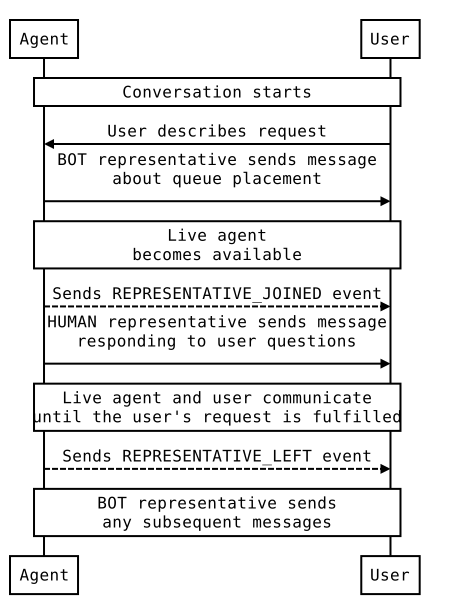
Ad esempio, se un utente avvia una conversazione con il tuo agente e tu
invii un messaggio automatico in cui gli comunichi che dovrebbe aspettarsi un agente live entro due
minuti, il messaggio deve essere inviato da un rappresentante di BOT. Prima che l'agente
live si unisca, invia un evento REPRESENTATIVE_JOINED. Tutti i messaggi dell'operatore
live devono essere etichettati come provenienti da un rappresentante di HUMAN. Quando l'agente
live esce dalla conversazione, invia un evento REPRESENTATIVE_LEFT. Tutti
i messaggi successivi devono provenire da un rappresentante di BOT, a meno che un altro operatore
non si unisca alla conversazione.
Consulta Trasferimento dal bot all'agente
live
per un esempio di conversazione e codice per la transizione tra rappresentanti BOT e HUMAN.
Indipendentemente dal fatto che un rappresentante sia BOT o HUMAN, puoi specificare un nome visualizzato e un avatar per il rappresentante. Sia i nomi visualizzati che gli avatar sono visibili agli utenti.
Le immagini dell'avatar devono essere 1024 x 1024 px e non devono superare i 50 KB e devono essere specificate
come URL disponibili pubblicamente. Se non fornisci un'immagine dell'avatar, viene utilizzato il logo
dell'agente per l'avatar del rappresentante.
Testo
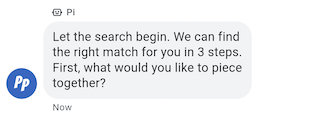
I messaggi più semplici sono composti da testo. I messaggi sono più adatti per comunicare informazioni senza la necessità di immagini, interazioni complesse o risposte.
Esempio
Il seguente codice invia un semplice messaggio. Per informazioni di riferimento, vedi
conversations.messages.create.
cURL
# Copyright 2021 Google LLC # # Licensed under the Apache License, Version 2.0 (the "License"); # you may not use this file except in compliance with the License. # You may obtain a copy of the License at # https://www.apache.org/licenses/LICENSE-2.0 # Unless required by applicable law or agreed to in writing, software # distributed under the License is distributed on an "AS IS" BASIS, # WITHOUT WARRANTIES OR CONDITIONS OF ANY KIND, either express or implied. # See the License for the specific language governing permissions and # limitations under the License. # This code sends a text message to the user. # Read more: https://developers.google.com/business-communications/business-messages/guides/how-to/message/send?hl=en#text # Replace the __CONVERSATION_ID__ with a conversation id that you can send messages to # Make sure a service account key file exists at ./service_account_key.json curl -X POST "https://businessmessages.googleapis.com/v1/conversations/__CONVERSATION_ID__/messages" \ -H "Content-Type: application/json" \ -H "User-Agent: curl/business-messages" \ -H "$(oauth2l header --json ./service_account_key.json businessmessages)" \ -d "{ 'messageId': '$(uuidgen)', 'text': 'Hello world!', 'representative': { 'avatarImage': 'https://developers.google.com/identity/images/g-logo.png', 'displayName': 'Chatbot', 'representativeType': 'BOT' } }"
Node.js
/** * This code sends a text message to the user. * Read more: https://developers.google.com/business-communications/business-messages/guides/how-to/message/send?hl=en#text * * This code is based on the https://github.com/google-business-communications/nodejs-businessmessages Node.js * Business Messages client library. */ /** * Edit the values below: */ const PATH_TO_SERVICE_ACCOUNT_KEY = './service_account_key.json'; const CONVERSATION_ID = 'EDIT_HERE'; const businessmessages = require('businessmessages'); const uuidv4 = require('uuid').v4; const {google} = require('googleapis'); // Initialize the Business Messages API const bmApi = new businessmessages.businessmessages_v1.Businessmessages({}); // Set the scope that we need for the Business Messages API const scopes = [ 'https://www.googleapis.com/auth/businessmessages', ]; // Set the private key to the service account file const privatekey = require(PATH_TO_SERVICE_ACCOUNT_KEY); /** * Posts a text message to the Business Messages API. * * @param {string} conversationId The unique id for this user and agent. * @param {string} message The message text to send the user. * @param {string} representativeType A value of BOT or HUMAN. */ async function sendMessage(conversationId, message, representativeType) { const authClient = await initCredentials(); // Create the payload for sending a message const apiParams = { auth: authClient, parent: 'conversations/' + conversationId, resource: { messageId: uuidv4(), representative: { representativeType: representativeType, }, text: message, }, }; // Call the message create function using the // Business Messages client library bmApi.conversations.messages.create(apiParams, {auth: authClient}, (err, response) => { console.log(err); console.log(response); }); } /** * Initializes the Google credentials for calling the * Business Messages API. */ async function initCredentials() { // configure a JWT auth client const authClient = new google.auth.JWT( privatekey.client_email, null, privatekey.private_key, scopes, ); return new Promise(function(resolve, reject) { // authenticate request authClient.authorize(function(err, tokens) { if (err) { reject(false); } else { resolve(authClient); } }); }); } sendMessage(CONVERSATION_ID, 'This is a test message', 'BOT');
Java
import com.google.api.client.googleapis.services.AbstractGoogleClientRequest; import com.google.api.client.http.HttpBackOffUnsuccessfulResponseHandler; import com.google.api.client.http.HttpRequest; import com.google.api.client.googleapis.auth.oauth2.GoogleCredential; import com.google.api.client.googleapis.javanet.GoogleNetHttpTransport; import com.google.api.client.http.HttpTransport; import com.google.api.client.json.jackson2.JacksonFactory; import com.google.api.client.util.ExponentialBackOff; import com.google.api.services.businessmessages.v1.Businessmessages; import com.google.api.services.businessmessages.v1.model.*; import java.io.FileInputStream; import java.util.Arrays; import java.util.UUID; class SendTextMessageSnippet { /** * Initializes credentials used by the Business Messages API. */ private static Businessmessages.Builder getBusinessMessagesBuilder() { Businessmessages.Builder builder = null; try { GoogleCredential credential = GoogleCredential .fromStream(new FileInputStream("PATH_TO_SERVICE_ACCOUNT_KEY")); credential = credential.createScoped(Arrays.asList( "https://www.googleapis.com/auth/businessmessages")); credential.refreshToken(); HttpTransport httpTransport = GoogleNetHttpTransport.newTrustedTransport(); JacksonFactory jsonFactory = JacksonFactory.getDefaultInstance(); // Create instance of the Business Messages API builder = new Businessmessages .Builder(httpTransport, jsonFactory, null) .setApplicationName("Sample Application"); // Set the API credentials and endpoint builder.setHttpRequestInitializer(credential); } catch (Exception e) { e.printStackTrace(); } return builder; } public static void main(String args[]) { try { String conversationId = "CONVERSATION_ID"; // Create client library reference Businessmessages.Builder builder = getBusinessMessagesBuilder(); // Create a basic text message BusinessMessagesMessage message = new BusinessMessagesMessage() .setMessageId(UUID.randomUUID().toString()) .setText("MESSAGE_TEXT") .setRepresentative(new BusinessMessagesRepresentative() .setRepresentativeType("TYPE")); // Create message request Businessmessages.Conversations.Messages.Create messageRequest = builder.build().conversations().messages() .create("conversations/" + conversationId, message); // Setup retries with exponential backoff HttpRequest httpRequest = ((AbstractGoogleClientRequest) messageRequest).buildHttpRequest(); httpRequest.setUnsuccessfulResponseHandler(new HttpBackOffUnsuccessfulResponseHandler( new ExponentialBackOff())); // Execute request httpRequest.execute(); } catch (Exception e) { e.printStackTrace(); } } }
Python
"""This code sends a text message to the user. Read more: https://developers.google.com/business-communications/business-messages/guides/how-to/message/send?hl=en#text This code is based on the https://github.com/google-business-communications/python-businessmessages Python Business Messages client library. """ import uuid from businessmessages import businessmessages_v1_client as bm_client from businessmessages.businessmessages_v1_messages import BusinessmessagesConversationsMessagesCreateRequest from businessmessages.businessmessages_v1_messages import BusinessMessagesMessage from businessmessages.businessmessages_v1_messages import BusinessMessagesRepresentative from oauth2client.service_account import ServiceAccountCredentials # Edit the values below: path_to_service_account_key = './service_account_key.json' conversation_id = 'EDIT_HERE' credentials = ServiceAccountCredentials.from_json_keyfile_name( path_to_service_account_key, scopes=['https://www.googleapis.com/auth/businessmessages']) client = bm_client.BusinessmessagesV1(credentials=credentials) representative_type_as_string = 'BOT' if representative_type_as_string == 'BOT': representative_type = BusinessMessagesRepresentative.RepresentativeTypeValueValuesEnum.BOT else: representative_type = BusinessMessagesRepresentative.RepresentativeTypeValueValuesEnum.HUMAN # Create a text message message = BusinessMessagesMessage( messageId=str(uuid.uuid4().int), representative=BusinessMessagesRepresentative( representativeType=representative_type ), text='This is a sample text') # Create the message request create_request = BusinessmessagesConversationsMessagesCreateRequest( businessMessagesMessage=message, parent='conversations/' + conversation_id) # Send the message bm_client.BusinessmessagesV1.ConversationsMessagesService( client=client).Create(request=create_request)
RTF
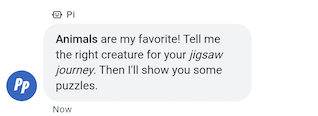
I messaggi con containsRichText impostato su true potrebbero includere
la formattazione Markdown di base. Puoi includere link ipertestuali o formattare il testo in grassetto o
in corsivo. La tabella mostra alcuni esempi validi:
| Formattazione | Caratteri | Testo normale | Testo visualizzato |
|---|---|---|---|
| Grassetto | ** |
**Some text** |
Some text |
| Corsivo | * |
*Some text* |
Some text |
| Link ipertestuale | []() |
[Click here](https://www.example.com) |
Fai clic qui |
| Interruzione di riga | \n
|
Line one\nLine two
|
Riga 1 Riga 2 |
La formattazione deve rispettare alcune regole aggiuntive:
- Tutti i link devono iniziare con
https://ohttp:// - Diversi tipi di formattazione possono essere nidificati, ma non possono sovrapporsi.
- I ritorni a capo con
\nsono consentiti ovunque nel messaggio, ma i ritorni a capo alla fine del messaggio non vengono visualizzati. - Per visualizzare normalmente uno dei caratteri riservati (
*,\,[o]), devi anteporre una barra rovesciata (\).
I messaggi con formattazione non valida non vengono inviati e viene visualizzato un messaggio di errore relativo a Markdown non valido. La tabella mostra altri esempi validi e non validi in base alle regole riportate sopra:
| Testo normale | Validità | Testo visualizzato |
|---|---|---|
[Click here](www.example.com) |
Non valido. Il link non inizia con http:// o https:// |
Non viene visualizzato. |
[**Click here**](https://www.example.com) |
Valida. È consentita la nidificazione. | Fai clic qui |
**This is [not** valid](https://www.example.com) |
Non valido. La formattazione sovrapposta non è consentita. | Non viene visualizzato. |
** Some bold text ** |
Non valido. Non sono ammessi spazi vuoti finali all'interno di **. |
Non viene visualizzato. |
Citation below\* |
Valida. Il carattere * viene sottoposto a escape. |
Citazione di seguito* |
Esempio
Il seguente codice invia un messaggio in formato RTF. Per informazioni di riferimento, vedi
conversations.messages.create.
cURL
# Copyright 2021 Google LLC # # Licensed under the Apache License, Version 2.0 (the "License"); # you may not use this file except in compliance with the License. # You may obtain a copy of the License at # https://www.apache.org/licenses/LICENSE-2.0 # Unless required by applicable law or agreed to in writing, software # distributed under the License is distributed on an "AS IS" BASIS, # WITHOUT WARRANTIES OR CONDITIONS OF ANY KIND, either express or implied. # See the License for the specific language governing permissions and # limitations under the License. # This code sends a rich text to the user with a fallback text. # Read more: https://developers.google.com/business-communications/business-messages/guides/how-to/message/send?hl=en#rich_text # Replace the __CONVERSATION_ID__ with a conversation id that you can send messages to # Make sure a service account key file exists at ./service_account_key.json curl -X POST "https://businessmessages.googleapis.com/v1/conversations/__CONVERSATION_ID__/messages" \ -H "Content-Type: application/json" \ -H "User-Agent: curl/business-messages" \ -H "$(oauth2l header --json ./service_account_key.json businessmessages)" \ -d "{ 'messageId': '$(uuidgen)', 'fallback': 'Hello, check out this link https://www.google.com.', 'text': 'Hello, here is some **bold text**, *italicized text*, and a [link](https://www.google.com).', 'containsRichText': 'true', 'representative': { 'avatarImage': 'https://developers.google.com/identity/images/g-logo.png', 'displayName': 'Chatbot', 'representativeType': 'BOT' } }"
Node.js
/** * This code sends a rich text to the user with a fallback text. * Read more: https://developers.google.com/business-communications/business-messages/guides/how-to/message/send?hl=en#rich_text * * This code is based on the https://github.com/google-business-communications/nodejs-businessmessages Node.js * Business Messages client library. */ /** * Edit the values below: */ const PATH_TO_SERVICE_ACCOUNT_KEY = './service_account_key.json'; const CONVERSATION_ID = 'EDIT_HERE'; const businessmessages = require('businessmessages'); const uuidv4 = require('uuid').v4; const {google} = require('googleapis'); // Initialize the Business Messages API const bmApi = new businessmessages.businessmessages_v1.Businessmessages({}); // Set the scope that we need for the Business Messages API const scopes = [ 'https://www.googleapis.com/auth/businessmessages', ]; // Set the private key to the service account file const privatekey = require(PATH_TO_SERVICE_ACCOUNT_KEY); /** * Posts a rich text message using markdown to the Business Messages API. * * @param {string} conversationId The unique id for this user and agent. * @param {string} representativeType A value of BOT or HUMAN. */ async function sendMessage(conversationId, message, representativeType) { const authClient = await initCredentials(); // Create the payload for sending a rich text message const apiParams = { auth: authClient, parent: 'conversations/' + conversationId, resource: { messageId: uuidv4(), representative: { representativeType: representativeType, }, containsRichText: true, // Force this message to be processed as rich text text: 'Hello, here is some **bold text**, *italicized text*, and a [link](https://www.google.com).', fallback: 'Hello, check out this link https://www.google.com.' }, }; // Call the message create function using the // Business Messages client library bmApi.conversations.messages.create(apiParams, {auth: authClient}, (err, response) => { console.log(err); console.log(response); }); } /** * Initializes the Google credentials for calling the * Business Messages API. */ async function initCredentials() { // configure a JWT auth client const authClient = new google.auth.JWT( privatekey.client_email, null, privatekey.private_key, scopes, ); return new Promise(function(resolve, reject) { // authenticate request authClient.authorize(function(err, tokens) { if (err) { reject(false); } else { resolve(authClient); } }); }); } sendMessage(CONVERSATION_ID, 'BOT');
Java
import com.google.api.client.googleapis.services.AbstractGoogleClientRequest; import com.google.api.client.http.HttpBackOffUnsuccessfulResponseHandler; import com.google.api.client.http.HttpRequest; import com.google.api.client.googleapis.auth.oauth2.GoogleCredential; import com.google.api.client.googleapis.javanet.GoogleNetHttpTransport; import com.google.api.client.http.HttpTransport; import com.google.api.client.json.jackson2.JacksonFactory; import com.google.api.client.util.ExponentialBackOff; import com.google.api.services.businessmessages.v1.Businessmessages; import com.google.api.services.businessmessages.v1.model.*; import java.io.FileInputStream; import java.util.Arrays; import java.util.UUID; class SendRichTextMessageSnippet { /** * Initializes credentials used by the Business Messages API. */ private static Businessmessages.Builder getBusinessMessagesBuilder() { Businessmessages.Builder builder = null; try { GoogleCredential credential = GoogleCredential .fromStream(new FileInputStream("PATH_TO_SERVICE_ACCOUNT_KEY")); credential = credential.createScoped(Arrays.asList( "https://www.googleapis.com/auth/businessmessages")); credential.refreshToken(); HttpTransport httpTransport = GoogleNetHttpTransport.newTrustedTransport(); JacksonFactory jsonFactory = JacksonFactory.getDefaultInstance(); // Create instance of the Business Messages API builder = new Businessmessages .Builder(httpTransport, jsonFactory, null) .setApplicationName("Sample Application"); // Set the API credentials and endpoint builder.setHttpRequestInitializer(credential); } catch (Exception e) { e.printStackTrace(); } return builder; } public static void main(String args[]) { try { String conversationId = "CONVERSATION_ID"; // Create client library reference Businessmessages.Builder builder = getBusinessMessagesBuilder(); // Create a rich text message BusinessMessagesMessage message = new BusinessMessagesMessage() .setMessageId(UUID.randomUUID().toString()) .setContainsRichText(true) // Force this message to be processed as rich text .setText("Hello, here is some **bold text**, *italicized text*, and a [link](https://www.google.com).") .setFallback("Hello, check out this link https://www.google.com.") .setRepresentative(new BusinessMessagesRepresentative() .setRepresentativeType("TYPE")); // Create message request Businessmessages.Conversations.Messages.Create messageRequest = builder.build().conversations().messages() .create("conversations/" + conversationId, message); // Setup retries with exponential backoff HttpRequest httpRequest = ((AbstractGoogleClientRequest) messageRequest).buildHttpRequest(); httpRequest.setUnsuccessfulResponseHandler(new HttpBackOffUnsuccessfulResponseHandler( new ExponentialBackOff())); // Execute request httpRequest.execute(); } catch (Exception e) { e.printStackTrace(); } } }
Python
"""This code sends a rich text to the user with a fallback text. Read more: https://developers.google.com/business-communications/business-messages/guides/how-to/message/send?hl=en#rich_text This code is based on the https://github.com/google-business-communications/python-businessmessages Python Business Messages client library. """ import uuid from businessmessages import businessmessages_v1_client as bm_client from businessmessages.businessmessages_v1_messages import BusinessmessagesConversationsMessagesCreateRequest from businessmessages.businessmessages_v1_messages import BusinessMessagesMessage from businessmessages.businessmessages_v1_messages import BusinessMessagesRepresentative from oauth2client.service_account import ServiceAccountCredentials # Edit the values below: path_to_service_account_key = './service_account_key.json' conversation_id = 'EDIT_HERE' credentials = ServiceAccountCredentials.from_json_keyfile_name( path_to_service_account_key, scopes=['https://www.googleapis.com/auth/businessmessages']) client = bm_client.BusinessmessagesV1(credentials=credentials) representative_type_as_string = 'BOT' if representative_type_as_string == 'BOT': representative_type = BusinessMessagesRepresentative.RepresentativeTypeValueValuesEnum.BOT else: representative_type = BusinessMessagesRepresentative.RepresentativeTypeValueValuesEnum.HUMAN # Create a rich text message with fallback text message = BusinessMessagesMessage( messageId=str(uuid.uuid4().int), fallback='Hello, check out this link https://www.google.com.', containsRichText=True, # Force this message to be processed as rich text representative=BusinessMessagesRepresentative( representativeType=representative_type ), text='Hello, here is some **bold text**, *italicized text*, and a [link](https://www.google.com).') # Create the message request create_request = BusinessmessagesConversationsMessagesCreateRequest( businessMessagesMessage=message, parent='conversations/' + conversation_id) # Send the message bm_client.BusinessmessagesV1.ConversationsMessagesService( client=client).Create(request=create_request)
Immagini
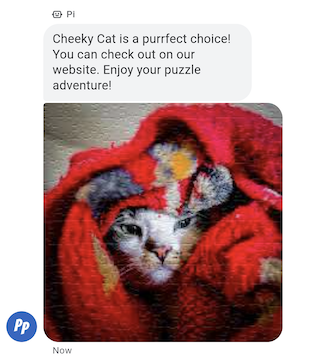
Invia un'immagine a un utente in un messaggio.
Puoi inviare un messaggio immagine con gli URL dell'immagine e della miniatura.
Esempio
Il seguente codice invia un'immagine. Per le opzioni di formattazione e
valore, vedi
conversations.messages.create
e
Image.
cURL
# Copyright 2021 Google LLC # # Licensed under the Apache License, Version 2.0 (the "License"); # you may not use this file except in compliance with the License. # You may obtain a copy of the License at # https://www.apache.org/licenses/LICENSE-2.0 # Unless required by applicable law or agreed to in writing, software # distributed under the License is distributed on an "AS IS" BASIS, # WITHOUT WARRANTIES OR CONDITIONS OF ANY KIND, either express or implied. # See the License for the specific language governing permissions and # limitations under the License. # This code sends an image to the user with a fallback text. # Read more: https://developers.google.com/business-communications/business-messages/guides/how-to/message/send?hl=en#images # Replace the __CONVERSATION_ID__ with a conversation id that you can send messages to # Make sure a service account key file exists at ./service_account_key.json curl -X POST "https://businessmessages.googleapis.com/v1/conversations/__CONVERSATION_ID__/messages" \ -H "Content-Type: application/json" \ -H "User-Agent: curl/business-messages" \ -H "$(oauth2l header --json ./service_account_key.json businessmessages)" \ -d "{ 'messageId': '$(uuidgen)', 'representative': { 'avatarImage': 'https://developers.google.com/identity/images/g-logo.png', 'displayName': 'Chatbot', 'representativeType': 'BOT' }, 'fallback': 'Hello, world!\nAn image has been sent with Business Messages.', 'image': { 'contentInfo':{ 'altText': 'Image alternative text', 'fileUrl': 'https://storage.googleapis.com/kitchen-sink-sample-images/cute-dog.jpg', 'forceRefresh': 'false' } }, }"
Node.js
/** * This code sends an image to the user with a fallback text. * Read more: https://developers.google.com/business-communications/business-messages/guides/how-to/message/send?hl=en#images * * This code is based on the https://github.com/google-business-communications/nodejs-businessmessages Node.js * Business Messages client library. */ /** * Edit the values below: */ const PATH_TO_SERVICE_ACCOUNT_KEY = './service_account_key.json'; const CONVERSATION_ID = 'EDIT_HERE'; const businessmessages = require('businessmessages'); const uuidv4 = require('uuid').v4; const {google} = require('googleapis'); // Initialize the Business Messages API const bmApi = new businessmessages.businessmessages_v1.Businessmessages({}); // Set the scope that we need for the Business Messages API const scopes = [ 'https://www.googleapis.com/auth/businessmessages', ]; // Set the private key to the service account file const privatekey = require(PATH_TO_SERVICE_ACCOUNT_KEY); /** * Posts an image message to the Business Messages API. * * @param {string} conversationId The unique id for this user and agent. * @param {string} representativeType A value of BOT or HUMAN. */ async function sendMessage(conversationId, representativeType) { const authClient = await initCredentials(); if (authClient) { // Create the payload for sending an image message const apiParams = { auth: authClient, parent: 'conversations/' + conversationId, resource: { messageId: uuidv4(), representative: { representativeType: representativeType, }, fallback: 'Hello, world!\n An image has been sent with Business Messages.', image: { contentInfo: { altText: 'Some alternative text', fileUrl: 'https://www.google.com/images/branding/googlelogo/2x/googlelogo_color_272x92dp.png', forceRefresh: true, }, }, }, }; // Call the message create function using the // Business Messages client library bmApi.conversations.messages.create(apiParams, {auth: authClient}, (err, response) => { console.log(err); console.log(response); }); } else { console.log('Authentication failure.'); } } /** * Initializes the Google credentials for calling the * Business Messages API. */ async function initCredentials() { // configure a JWT auth client const authClient = new google.auth.JWT( privatekey.client_email, null, privatekey.private_key, scopes, ); return new Promise(function(resolve, reject) { // authenticate request authClient.authorize(function(err, tokens) { if (err) { reject(false); } else { resolve(authClient); } }); }); } sendMessage(CONVERSATION_ID, 'BOT');
Java
import com.google.api.client.googleapis.services.AbstractGoogleClientRequest; import com.google.api.client.http.HttpBackOffUnsuccessfulResponseHandler; import com.google.api.client.http.HttpRequest; import com.google.api.client.googleapis.auth.oauth2.GoogleCredential; import com.google.api.client.googleapis.javanet.GoogleNetHttpTransport; import com.google.api.client.http.HttpTransport; import com.google.api.client.json.jackson2.JacksonFactory; import com.google.api.client.util.ExponentialBackOff; import com.google.api.services.businessmessages.v1.Businessmessages; import com.google.api.services.businessmessages.v1.model.*; import com.google.communications.businessmessages.v1.MediaHeight; import java.io.FileInputStream; import java.util.Arrays; import java.util.UUID; class SendImageMessageSnippet { /** * Initializes credentials used by the Business Messages API. */ private static Businessmessages.Builder getBusinessMessagesBuilder() { Businessmessages.Builder builder = null; try { GoogleCredential credential = GoogleCredential .fromStream(new FileInputStream("PATH_TO_SERVICE_ACCOUNT_KEY")); credential = credential.createScoped(Arrays.asList( "https://www.googleapis.com/auth/businessmessages")); credential.refreshToken(); HttpTransport httpTransport = GoogleNetHttpTransport.newTrustedTransport(); JacksonFactory jsonFactory = JacksonFactory.getDefaultInstance(); // Create instance of the Business Messages API builder = new Businessmessages .Builder(httpTransport, jsonFactory, null) .setApplicationName("Sample Application"); // Set the API credentials and endpoint builder.setHttpRequestInitializer(credential); } catch (Exception e) { e.printStackTrace(); } return builder; } public static void main(String args[]) { try { String conversationId = "CONVERSATION_ID"; // Create client library reference Businessmessages.Builder builder = getBusinessMessagesBuilder(); // Create an Image BusinessMessagesMessage message = new BusinessMessagesMessage() .setMessageId(UUID.randomUUID().toString()) .setRepresentative(representative) .setImage(new BusinessMessagesImage() .setContentInfo( new BusinessMessagesContentInfo() .setFileUrl("FILE_URL") .setAltText("ALT_TEXT") .setForceRefresh("FORCE_REFRESH") )); // Create message request Businessmessages.Conversations.Messages.Create messageRequest = builder.build().conversations().messages() .create("conversations/" + conversationId, message); // Setup retries with exponential backoff HttpRequest httpRequest = ((AbstractGoogleClientRequest) messageRequest).buildHttpRequest(); httpRequest.setUnsuccessfulResponseHandler(new HttpBackOffUnsuccessfulResponseHandler( new ExponentialBackOff())); // Execute request httpRequest.execute(); } catch (Exception e) { e.printStackTrace(); } } }
Python
"""This code sends an image to the user with a fallback text. Read more: https://developers.google.com/business-communications/business-messages/guides/how-to/message/send?hl=en#images This code is based on the https://github.com/google-business-communications/python-businessmessages Python Business Messages client library. """ import uuid from businessmessages import businessmessages_v1_client as bm_client from businessmessages.businessmessages_v1_messages import BusinessMessagesContentInfo from businessmessages.businessmessages_v1_messages import BusinessmessagesConversationsMessagesCreateRequest from businessmessages.businessmessages_v1_messages import BusinessMessagesImage from businessmessages.businessmessages_v1_messages import BusinessMessagesMessage from businessmessages.businessmessages_v1_messages import BusinessMessagesRepresentative from oauth2client.service_account import ServiceAccountCredentials # Edit the values below: path_to_service_account_key = './service_account_key.json' conversation_id = 'EDIT_HERE' image_file_url = 'EDIT_HERE' credentials = ServiceAccountCredentials.from_json_keyfile_name( path_to_service_account_key, scopes=['https://www.googleapis.com/auth/businessmessages']) client = bm_client.BusinessmessagesV1(credentials=credentials) representative_type_as_string = 'BOT' if representative_type_as_string == 'BOT': representative_type = BusinessMessagesRepresentative.RepresentativeTypeValueValuesEnum.BOT else: representative_type = BusinessMessagesRepresentative.RepresentativeTypeValueValuesEnum.HUMAN # Create an image message with fallback text message = BusinessMessagesMessage( messageId=str(uuid.uuid4().int), representative=BusinessMessagesRepresentative( representativeType=representative_type ), fallback='Hello, world!\nAn image has been sent with Business Messages.', image=BusinessMessagesImage( contentInfo=BusinessMessagesContentInfo( altText='Alternative text', fileUrl=image_file_url, forceRefresh=True ) )) # Create the message request create_request = BusinessmessagesConversationsMessagesCreateRequest( businessMessagesMessage=message, parent='conversations/' + conversation_id) # Send the message bm_client.BusinessmessagesV1.ConversationsMessagesService( client=client).Create(request=create_request)
Risposte suggerite
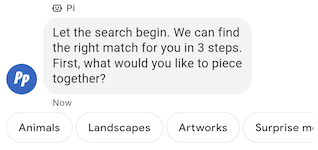
Le risposte suggerite guidano gli utenti nelle conversazioni fornendo risposte a cui il tuo agente sa come reagire.
Quando un utente tocca una risposta suggerita, il tuo agente riceve un messaggio contenente il testo della risposta e i dati di postback.
Le risposte suggerite possono contenere al massimo 25 caratteri e un messaggio può contenere al massimo 13 suggerimenti.
Esempio
Il seguente codice invia un testo con due risposte suggerite. Per le opzioni di formattazione e
valore, vedi
conversations.messages.create
e
SuggestedReply.
cURL
# Copyright 2021 Google LLC # # Licensed under the Apache License, Version 2.0 (the "License"); # you may not use this file except in compliance with the License. # You may obtain a copy of the License at # https://www.apache.org/licenses/LICENSE-2.0 # Unless required by applicable law or agreed to in writing, software # distributed under the License is distributed on an "AS IS" BASIS, # WITHOUT WARRANTIES OR CONDITIONS OF ANY KIND, either express or implied. # See the License for the specific language governing permissions and # limitations under the License. # This code sends a text mesage to the user with suggested replies. # Read more: https://developers.google.com/business-communications/business-messages/guides/how-to/message/send?hl=en#suggested_replies # Replace the __CONVERSATION_ID__ with a conversation id that you can send messages to # Make sure a service account key file exists at ./service_account_key.json curl -X POST "https://businessmessages.googleapis.com/v1/conversations/__CONVERSATION_ID__/messages" \ -H "Content-Type: application/json" \ -H "User-Agent: curl/business-messages" \ -H "$(oauth2l header --json ./service_account_key.json businessmessages)" \ -d "{ 'messageId': '$(uuidgen)', 'text': 'Hello, world!', 'fallback': 'Hello, world!\n\nReply with \"Hello\" or \"Hi!\"', 'suggestions': [ { 'reply': { 'text': 'Hello', 'postbackData': 'hello-formal', }, }, { 'reply': { 'text': 'Hi!', 'postbackData': 'hello-informal', }, }, ], 'representative': { 'avatarImage': 'https://developers.google.com/identity/images/g-logo.png', 'displayName': 'Chatbot', 'representativeType': 'BOT' }, }"
Node.js
/** * This code sends a text mesage to the user with suggested replies. * Read more: https://developers.google.com/business-communications/business-messages/guides/how-to/message/send?hl=en#suggested_replies * * This code is based on the https://github.com/google-business-communications/nodejs-businessmessages Node.js * Business Messages client library. */ /** * Edit the values below: */ const PATH_TO_SERVICE_ACCOUNT_KEY = './service_account_key.json'; const CONVERSATION_ID = 'EDIT_HERE'; const businessmessages = require('businessmessages'); const uuidv4 = require('uuid').v4; const {google} = require('googleapis'); // Initialize the Business Messages API const bmApi = new businessmessages.businessmessages_v1.Businessmessages({}); // Set the scope that we need for the Business Messages API const scopes = [ 'https://www.googleapis.com/auth/businessmessages', ]; // Set the private key to the service account file const privatekey = require(PATH_TO_SERVICE_ACCOUNT_KEY); /** * Posts a message of "Hello, world!" to the Business Messages API along with two suggested replies. * * @param {string} conversationId The unique id for this user and agent. * @param {string} representativeType A value of BOT or HUMAN. */ async function sendMessage(conversationId, representativeType) { const authClient = await initCredentials(); // Create a text message with two suggested replies const apiParams = { auth: authClient, parent: 'conversations/' + conversationId, resource: { messageId: uuidv4(), representative: { representativeType: representativeType, }, fallback: 'Hello, world!\n\nReply with "Hello" or "Hi!"', text: 'Hello, world!', suggestions: [ { reply: { text: 'Hello', postbackData: 'hello-formal', }, }, { reply: { text: 'Hello', postbackData: 'hello-informal', }, }, ], }, }; // Call the message create function using the // Business Messages client library bmApi.conversations.messages.create(apiParams, {auth: authClient}, (err, response) => { console.log(err); console.log(response); }); } /** * Initializes the Google credentials for calling the * Business Messages API. */ async function initCredentials() { // configure a JWT auth client const authClient = new google.auth.JWT( privatekey.client_email, null, privatekey.private_key, scopes, ); return new Promise(function(resolve, reject) { // authenticate request authClient.authorize(function(err, tokens) { if (err) { reject(false); } else { resolve(authClient); } }); }); } sendMessage(CONVERSATION_ID, 'BOT');
Java
import com.google.api.client.googleapis.services.AbstractGoogleClientRequest; import com.google.api.client.http.HttpBackOffUnsuccessfulResponseHandler; import com.google.api.client.http.HttpRequest; import com.google.api.client.googleapis.auth.oauth2.GoogleCredential; import com.google.api.client.googleapis.javanet.GoogleNetHttpTransport; import com.google.api.client.http.HttpTransport; import com.google.api.client.json.jackson2.JacksonFactory; import com.google.api.client.util.ExponentialBackOff; import com.google.api.services.businessmessages.v1.Businessmessages; import com.google.api.services.businessmessages.v1.model.*; import java.io.FileInputStream; import java.util.Arrays; import java.util.UUID; class SendSuggestedReplySnippet { /** * Initializes credentials used by the Business Messages API. */ private static Businessmessages.Builder getBusinessMessagesBuilder() { Businessmessages.Builder builder = null; try { GoogleCredential credential = GoogleCredential .fromStream(new FileInputStream("PATH_TO_SERVICE_ACCOUNT_KEY")); credential = credential.createScoped(Arrays.asList( "https://www.googleapis.com/auth/businessmessages")); credential.refreshToken(); HttpTransport httpTransport = GoogleNetHttpTransport.newTrustedTransport(); JacksonFactory jsonFactory = JacksonFactory.getDefaultInstance(); // Create instance of the Business Messages API builder = new Businessmessages .Builder(httpTransport, jsonFactory, null) .setApplicationName("Sample Application"); // Set the API credentials and endpoint builder.setHttpRequestInitializer(credential); } catch (Exception e) { e.printStackTrace(); } return builder; } public static void main(String args[]) { try { String conversationId = "CONVERSATION_ID"; // Create client library reference Businessmessages.Builder builder = getBusinessMessagesBuilder(); // Create a text message with two suggested replies BusinessMessagesMessage message = new BusinessMessagesMessage() .setMessageId(UUID.randomUUID().toString()) .setText("Hello, world!") .setFallback("Hello, world!\n\nReply with \"Hello\" or \"Hi!\"") .setSuggestions(Arrays.asList( new BusinessMessagesSuggestion() .setReply(new BusinessMessagesSuggestedReply() .setText("Hello").setPostbackData("hello-formal") ), new BusinessMessagesSuggestion() .setReply(new BusinessMessagesSuggestedReply() .setText("Hi!").setPostbackData("hello-informal") )) ) .setRepresentative(new BusinessMessagesRepresentative() .setRepresentativeType("TYPE")); // Create message request Businessmessages.Conversations.Messages.Create messageRequest = builder.build().conversations().messages() .create("conversations/" + conversationId, message); // Setup retries with exponential backoff HttpRequest httpRequest = ((AbstractGoogleClientRequest) messageRequest).buildHttpRequest(); httpRequest.setUnsuccessfulResponseHandler(new HttpBackOffUnsuccessfulResponseHandler( new ExponentialBackOff())); // Execute request httpRequest.execute(); } catch (Exception e) { e.printStackTrace(); } } }
Python
"""This code sends a text mesage to the user with suggested replies. Read more: https://developers.google.com/business-communications/business-messages/guides/how-to/message/send?hl=en#suggested_replies This code is based on the https://github.com/google-business-communications/python-businessmessages Python Business Messages client library. """ import uuid from businessmessages import businessmessages_v1_client as bm_client from businessmessages.businessmessages_v1_messages import BusinessmessagesConversationsMessagesCreateRequest from businessmessages.businessmessages_v1_messages import BusinessMessagesMessage from businessmessages.businessmessages_v1_messages import BusinessMessagesRepresentative from businessmessages.businessmessages_v1_messages import BusinessMessagesSuggestedReply from businessmessages.businessmessages_v1_messages import BusinessMessagesSuggestion from oauth2client.service_account import ServiceAccountCredentials # Edit the values below: path_to_service_account_key = './service_account_key.json' conversation_id = 'EDIT_HERE' credentials = ServiceAccountCredentials.from_json_keyfile_name( path_to_service_account_key, scopes=['https://www.googleapis.com/auth/businessmessages']) client = bm_client.BusinessmessagesV1(credentials=credentials) representative_type_as_string = 'BOT' if representative_type_as_string == 'BOT': representative_type = BusinessMessagesRepresentative.RepresentativeTypeValueValuesEnum.BOT else: representative_type = BusinessMessagesRepresentative.RepresentativeTypeValueValuesEnum.HUMAN # Create a text message with two suggested replies and fallback text message = BusinessMessagesMessage( messageId=str(uuid.uuid4().int), representative=BusinessMessagesRepresentative( representativeType=representative_type ), text='Hello, world!', fallback='Hello, world!\n\nReply with \"Hello\" or \"Hi!\"', suggestions=[ BusinessMessagesSuggestion( reply=BusinessMessagesSuggestedReply( text='Hello', postbackData='hello-formal') ), BusinessMessagesSuggestion( reply=BusinessMessagesSuggestedReply( text='Hi!', postbackData='hello-informal') ) ]) # Create the message request create_request = BusinessmessagesConversationsMessagesCreateRequest( businessMessagesMessage=message, parent='conversations/' + conversation_id) # Send the message bm_client.BusinessmessagesV1.ConversationsMessagesService( client=client).Create(request=create_request)
Azioni suggerite
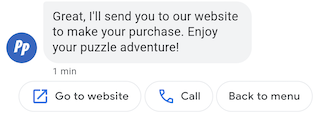
Le azioni suggerite guidano gli utenti nelle conversazioni sfruttando la funzionalità nativa dei loro dispositivi. Quando un utente tocca un'azione suggerita, il tuo agente riceve un messaggio contenente il testo dell'azione e i dati di postback.
Le azioni suggerite hanno un massimo di 25 caratteri e un messaggio ha un massimo di 13 suggerimenti.
Per le opzioni di formattazione e valore, vedi
conversations.messages.create
e
SuggestedAction.
Apri azione URL
Con l'azione Apri URL, l'agente suggerisce un URL da aprire per l'utente. Se un'app è registrata come gestore predefinito per l'URL, si apre l'app e l'icona dell'azione è l'icona dell'app. Le azioni Apri URL supportano solo URL con protocolli HTTP e HTTPS. Altri protocolli (come mailto) non sono supportati.
Il seguente codice invia un testo con un'azione Apri URL. Per le opzioni di formattazione e valore, vedi
OpenUrlAction.
cURL
# Copyright 2021 Google LLC # # Licensed under the Apache License, Version 2.0 (the "License"); # you may not use this file except in compliance with the License. # You may obtain a copy of the License at # https://www.apache.org/licenses/LICENSE-2.0 # Unless required by applicable law or agreed to in writing, software # distributed under the License is distributed on an "AS IS" BASIS, # WITHOUT WARRANTIES OR CONDITIONS OF ANY KIND, either express or implied. # See the License for the specific language governing permissions and # limitations under the License. # This code sends a text mesage to the user with a suggestion action toopen a URL # and a fallback text. # Read more: https://developers.google.com/business-communications/business-messages/guides/how-to/message/send?hl=en#open_url_action # Replace the __CONVERSATION_ID__ with a conversation id that you can send messages to # Make sure a service account key file exists at ./service_account_key.json curl -X POST "https://businessmessages.googleapis.com/v1/conversations/__CONVERSATION_ID__/messages" \ -H "Content-Type: application/json" \ -H "User-Agent: curl/business-messages" \ -H "$(oauth2l header --json ./service_account_key.json businessmessages)" \ -d "{ 'messageId': '$(uuidgen)', 'text': 'Hello world!', 'fallback': 'Hello, world!\n\nSay \"Hello\" at https://www.growingtreebank.com', 'suggestions': [ { 'action': { 'text': 'Hello', 'postbackData': 'hello-formal', 'openUrlAction': { 'url': 'https://www.growingtreebank.com', } }, }, ], 'representative': { 'avatarImage': 'https://developers.google.com/identity/images/g-logo.png', 'displayName': 'Chatbot', 'representativeType': 'BOT' }, }"
Node.js
/** * This code sends a text mesage to the user with a suggestion action toopen a URL * and a fallback text. * Read more: https://developers.google.com/business-communications/business-messages/guides/how-to/message/send?hl=en#open_url_action * * This code is based on the https://github.com/google-business-communications/nodejs-businessmessages Node.js * Business Messages client library. */ /** * Edit the values below: */ const PATH_TO_SERVICE_ACCOUNT_KEY = './service_account_key.json'; const CONVERSATION_ID = 'EDIT_HERE'; const businessmessages = require('businessmessages'); const uuidv4 = require('uuid').v4; const {google} = require('googleapis'); // Initialize the Business Messages API const bmApi = new businessmessages.businessmessages_v1.Businessmessages({}); // Set the scope that we need for the Business Messages API const scopes = [ 'https://www.googleapis.com/auth/businessmessages', ]; // Set the private key to the service account file const privatekey = require(PATH_TO_SERVICE_ACCOUNT_KEY); /** * Posts a message with an open URL action to the Business Messages API. * * @param {string} conversationId The unique id for this user and agent. * @param {string} representativeType A value of BOT or HUMAN. */ async function sendMessage(conversationId, representativeType) { const authClient = await initCredentials(); if (authClient) { // Create the payload for sending a message along with an open url action const apiParams = { auth: authClient, parent: 'conversations/' + conversationId, resource: { messageId: uuidv4(), representative: { representativeType: representativeType, }, fallback: 'Hello, world!\n\nSay \"Hello\" at https://www.growingtreebank.com', text: 'Hello world!', suggestions: [ { action: { text: 'Hello', postbackData: 'hello-formal', openUrlAction: { url: 'https://www.growingtreebank.com', }, }, }, ], }, }; // Call the message create function using the // Business Messages client library bmApi.conversations.messages.create(apiParams, {auth: authClient}, (err, response) => { console.log(err); console.log(response); }); } else { console.log('Authentication failure.'); } } /** * Initializes the Google credentials for calling the * Business Messages API. */ async function initCredentials() { // configure a JWT auth client const authClient = new google.auth.JWT( privatekey.client_email, null, privatekey.private_key, scopes, ); return new Promise(function(resolve, reject) { // authenticate request authClient.authorize(function(err, tokens) { if (err) { reject(false); } else { resolve(authClient); } }); }); } sendMessage(CONVERSATION_ID, 'BOT');
Java
import com.google.api.client.googleapis.services.AbstractGoogleClientRequest; import com.google.api.client.http.HttpBackOffUnsuccessfulResponseHandler; import com.google.api.client.http.HttpRequest; import com.google.api.client.googleapis.auth.oauth2.GoogleCredential; import com.google.api.client.googleapis.javanet.GoogleNetHttpTransport; import com.google.api.client.http.HttpTransport; import com.google.api.client.json.jackson2.JacksonFactory; import com.google.api.client.util.ExponentialBackOff; import com.google.api.services.businessmessages.v1.Businessmessages; import com.google.api.services.businessmessages.v1.model.*; import java.io.FileInputStream; import java.util.Arrays; import java.util.UUID; class SendSuggestedActionSnippet { /** * Initializes credentials used by the Business Messages API. */ private static Businessmessages.Builder getBusinessMessagesBuilder() { Businessmessages.Builder builder = null; try { GoogleCredential credential = GoogleCredential .fromStream(new FileInputStream("PATH_TO_SERVICE_ACCOUNT_KEY")); credential = credential.createScoped(Arrays.asList( "https://www.googleapis.com/auth/businessmessages")); credential.refreshToken(); HttpTransport httpTransport = GoogleNetHttpTransport.newTrustedTransport(); JacksonFactory jsonFactory = JacksonFactory.getDefaultInstance(); // Create instance of the Business Messages API builder = new Businessmessages .Builder(httpTransport, jsonFactory, null) .setApplicationName("Sample Application"); // Set the API credentials and endpoint builder.setHttpRequestInitializer(credential); } catch (Exception e) { e.printStackTrace(); } return builder; } public static void main(String args[]) { try { String conversationId = "CONVERSATION_ID"; // Create client library reference Businessmessages.Builder builder = getBusinessMessagesBuilder(); // Create a text message with an open url action BusinessMessagesMessage message = new BusinessMessagesMessage() .setMessageId(UUID.randomUUID().toString()) .setText("Hello world!") .setFallback("Hello, world!\n\nSay \"Hello\" at https://www.growingtreebank.com") .setSuggestions(Arrays.asList(new BusinessMessagesSuggestion() .setAction(new BusinessMessagesSuggestedAction() .setText("Hello").setPostbackData("hello-formal") .setOpenUrlAction( new BusinessMessagesOpenUrlAction().setUrl("https://www.growingtreebank.com")) )) ) .setRepresentative(new BusinessMessagesRepresentative() .setRepresentativeType("TYPE")); // Create message request Businessmessages.Conversations.Messages.Create messageRequest = builder.build().conversations().messages() .create("conversations/" + conversationId, message); // Setup retries with exponential backoff HttpRequest httpRequest = ((AbstractGoogleClientRequest) messageRequest).buildHttpRequest(); httpRequest.setUnsuccessfulResponseHandler(new HttpBackOffUnsuccessfulResponseHandler( new ExponentialBackOff())); // Execute request httpRequest.execute(); } catch (Exception e) { e.printStackTrace(); } } }
Python
"""This code sends a text mesage to the user with a suggestion action to open a URL. Read more: https://developers.google.com/business-communications/business-messages/guides/how-to/message/send?hl=en#open_url_action This code is based on the https://github.com/google-business-communications/python-businessmessages Python Business Messages client library. """ import uuid from businessmessages import businessmessages_v1_client as bm_client from businessmessages.businessmessages_v1_messages import BusinessmessagesConversationsMessagesCreateRequest from businessmessages.businessmessages_v1_messages import BusinessMessagesMessage from businessmessages.businessmessages_v1_messages import BusinessMessagesOpenUrlAction from businessmessages.businessmessages_v1_messages import BusinessMessagesRepresentative from businessmessages.businessmessages_v1_messages import BusinessMessagesSuggestedAction from businessmessages.businessmessages_v1_messages import BusinessMessagesSuggestion from oauth2client.service_account import ServiceAccountCredentials # Edit the values below: path_to_service_account_key = './service_account_key.json' conversation_id = 'EDIT_HERE' credentials = ServiceAccountCredentials.from_json_keyfile_name( path_to_service_account_key, scopes=['https://www.googleapis.com/auth/businessmessages']) client = bm_client.BusinessmessagesV1(credentials=credentials) representative_type_as_string = 'BOT' if representative_type_as_string == 'BOT': representative_type = BusinessMessagesRepresentative.RepresentativeTypeValueValuesEnum.BOT else: representative_type = BusinessMessagesRepresentative.RepresentativeTypeValueValuesEnum.HUMAN # Create a text message with an open url action and fallback text message = BusinessMessagesMessage( messageId=str(uuid.uuid4().int), representative=BusinessMessagesRepresentative( representativeType=representative_type ), text='Hello, world!', fallback='Hello, world!\n\nReply with \"Hello\" or \"Hi!\"', suggestions=[ BusinessMessagesSuggestion( action=BusinessMessagesSuggestedAction( text='Hello', postbackData='hello-formal', openUrlAction=BusinessMessagesOpenUrlAction( url='https://www.growingtreebank.com')) ), ]) # Create the message request create_request = BusinessmessagesConversationsMessagesCreateRequest( businessMessagesMessage=message, parent='conversations/' + conversation_id) # Send the message bm_client.BusinessmessagesV1.ConversationsMessagesService( client=client).Create(request=create_request)
Azione di composizione
L'azione Chiama suggerisce un numero di telefono da chiamare all'utente. Quando un utente tocca un chip di suggerimento Azione chiamata, si apre l'app Telefono predefinita dell'utente con il numero di telefono specificato precompilato.
Il seguente codice invia un testo con un'azione di chiamata. Per le opzioni di formattazione e valore, vedi
DialAction.
cURL
# Copyright 2021 Google LLC # # Licensed under the Apache License, Version 2.0 (the "License"); # you may not use this file except in compliance with the License. # You may obtain a copy of the License at # https://www.apache.org/licenses/LICENSE-2.0 # Unless required by applicable law or agreed to in writing, software # distributed under the License is distributed on an "AS IS" BASIS, # WITHOUT WARRANTIES OR CONDITIONS OF ANY KIND, either express or implied. # See the License for the specific language governing permissions and # limitations under the License. # This code sends a text mesage to the user with a suggestion action to dial # a phone number and a fallback text. # Read more: https://developers.google.com/business-communications/business-messages/guides/how-to/message/send?hl=en#dial_action # Replace the __CONVERSATION_ID__ with a conversation id that you can send messages to # Make sure a service account key file exists at ./service_account_key.json curl -X POST "https://businessmessages.googleapis.com/v1/conversations/__CONVERSATION_ID__/messages" \ -H "Content-Type: application/json" \ -H "User-Agent: curl/business-messages" \ -H "$(oauth2l header --json ./service_account_key.json businessmessages)" \ -d "{ 'messageId': '$(uuidgen)', 'text': 'Contact support for help with this issue.', 'fallback': 'Give us a call at +12223334444.', 'suggestions': [ { 'action': { 'text': 'Call support', 'postbackData': 'call-support', 'dialAction': { 'phoneNumber': '+12223334444', } }, }, ], 'representative': { 'avatarImage': 'https://developers.google.com/identity/images/g-logo.png', 'displayName': 'Chatbot', 'representativeType': 'BOT' }, }"
Node.js
/** * This code sends a text mesage to the user with a suggestion action to dial * a phone number and a fallback text. * Read more: https://developers.google.com/business-communications/business-messages/guides/how-to/message/send?hl=en#dial_action * * This code is based on the https://github.com/google-business-communications/nodejs-businessmessages Node.js * Business Messages client library. */ /** * Edit the values below: */ const PATH_TO_SERVICE_ACCOUNT_KEY = './service_account_key.json'; const CONVERSATION_ID = 'EDIT_HERE'; const businessmessages = require('businessmessages'); const uuidv4 = require('uuid').v4; const {google} = require('googleapis'); // Initialize the Business Messages API const bmApi = new businessmessages.businessmessages_v1.Businessmessages({}); // Set the scope that we need for the Business Messages API const scopes = [ 'https://www.googleapis.com/auth/businessmessages', ]; // Set the private key to the service account file const privatekey = require(PATH_TO_SERVICE_ACCOUNT_KEY); /** * Posts a message with a dial suggested action to the Business Messages API. * * @param {string} conversationId The unique id for this user and agent. * @param {string} representativeType A value of BOT or HUMAN. */ async function sendMessage(conversationId, representativeType) { const authClient = await initCredentials(); if (authClient) { // Create the payload for sending a message along with a dial action const apiParams = { auth: authClient, parent: 'conversations/' + conversationId, resource: { messageId: uuidv4(), representative: { representativeType: representativeType, }, fallback: 'Give us a call at +12223334444.', text: 'Contact support for help with this issue.', suggestions: [ { action: { text: 'Call support', postbackData: 'call-support', dialAction: { phoneNumber: '+12223334444', }, }, }, ], }, }; // Call the message create function using the // Business Messages client library bmApi.conversations.messages.create(apiParams, {auth: authClient}, (err, response) => { console.log(err); console.log(response); }); } else { console.log('Authentication failure.'); } } /** * Initializes the Google credentials for calling the * Business Messages API. */ async function initCredentials() { // configure a JWT auth client const authClient = new google.auth.JWT( privatekey.client_email, null, privatekey.private_key, scopes, ); return new Promise(function(resolve, reject) { // authenticate request authClient.authorize(function(err, tokens) { if (err) { reject(false); } else { resolve(authClient); } }); }); } sendMessage(CONVERSATION_ID, 'BOT');
Java
import com.google.api.client.googleapis.services.AbstractGoogleClientRequest; import com.google.api.client.http.HttpBackOffUnsuccessfulResponseHandler; import com.google.api.client.http.HttpRequest; import com.google.api.client.googleapis.auth.oauth2.GoogleCredential; import com.google.api.client.googleapis.javanet.GoogleNetHttpTransport; import com.google.api.client.http.HttpTransport; import com.google.api.client.json.jackson2.JacksonFactory; import com.google.api.client.util.ExponentialBackOff; import com.google.api.services.businessmessages.v1.Businessmessages; import com.google.api.services.businessmessages.v1.model.*; import java.io.FileInputStream; import java.util.Arrays; import java.util.UUID; class SendDialActionSnippet { /** * Initializes credentials used by the Business Messages API. */ private static Businessmessages.Builder getBusinessMessagesBuilder() { Businessmessages.Builder builder = null; try { GoogleCredential credential = GoogleCredential .fromStream(new FileInputStream("PATH_TO_SERVICE_ACCOUNT_KEY")); credential = credential.createScoped(Arrays.asList( "https://www.googleapis.com/auth/businessmessages")); credential.refreshToken(); HttpTransport httpTransport = GoogleNetHttpTransport.newTrustedTransport(); JacksonFactory jsonFactory = JacksonFactory.getDefaultInstance(); // Create instance of the Business Messages API builder = new Businessmessages .Builder(httpTransport, jsonFactory, null) .setApplicationName("Sample Application"); // Set the API credentials and endpoint builder.setHttpRequestInitializer(credential); } catch (Exception e) { e.printStackTrace(); } return builder; } public static void main(String args[]) { try { String conversationId = "CONVERSATION_ID"; // Create client library reference Businessmessages.Builder builder = getBusinessMessagesBuilder(); // Create a text message with a dial action BusinessMessagesMessage message = new BusinessMessagesMessage() .setMessageId(UUID.randomUUID().toString()) .setText("Contact support for help with this issue.") .setFallback("Give us a call at +12223334444.") .setSuggestions(Arrays.asList(new BusinessMessagesSuggestion() .setAction(new BusinessMessagesSuggestedAction() .setText("Call support").setPostbackData("call-support") .setDialAction( new BusinessMessagesDialAction().setPhoneNumber("+12223334444")) ))) .setRepresentative(new BusinessMessagesRepresentative() .setRepresentativeType("TYPE")); // Create message request Businessmessages.Conversations.Messages.Create messageRequest = builder.build().conversations().messages() .create("conversations/" + conversationId, message); // Setup retries with exponential backoff HttpRequest httpRequest = ((AbstractGoogleClientRequest) messageRequest).buildHttpRequest(); httpRequest.setUnsuccessfulResponseHandler(new HttpBackOffUnsuccessfulResponseHandler( new ExponentialBackOff())); // Execute request httpRequest.execute(); } catch (Exception e) { e.printStackTrace(); } } }
Python
"""Sends a text mesage to the user with a suggestion action to dial a phone number. Read more: https://developers.google.com/business-communications/business-messages/guides/how-to/message/send?hl=en#dial_action This code is based on the https://github.com/google-business-communications/python-businessmessages Python Business Messages client library. """ import uuid from businessmessages import businessmessages_v1_client as bm_client from businessmessages.businessmessages_v1_messages import BusinessmessagesConversationsMessagesCreateRequest from businessmessages.businessmessages_v1_messages import BusinessMessagesDialAction from businessmessages.businessmessages_v1_messages import BusinessMessagesMessage from businessmessages.businessmessages_v1_messages import BusinessMessagesRepresentative from businessmessages.businessmessages_v1_messages import BusinessMessagesSuggestedAction from businessmessages.businessmessages_v1_messages import BusinessMessagesSuggestion from oauth2client.service_account import ServiceAccountCredentials # Edit the values below: path_to_service_account_key = './service_account_key.json' conversation_id = 'EDIT_HERE' credentials = ServiceAccountCredentials.from_json_keyfile_name( path_to_service_account_key, scopes=['https://www.googleapis.com/auth/businessmessages']) client = bm_client.BusinessmessagesV1(credentials=credentials) representative_type_as_string = 'BOT' if representative_type_as_string == 'BOT': representative_type = BusinessMessagesRepresentative.RepresentativeTypeValueValuesEnum.BOT else: representative_type = BusinessMessagesRepresentative.RepresentativeTypeValueValuesEnum.HUMAN # Create a text message with a dial action and fallback text message = BusinessMessagesMessage( messageId=str(uuid.uuid4().int), representative=BusinessMessagesRepresentative( representativeType=representative_type ), text='Contact support for help with this issue.', fallback='Give us a call at +12223334444.', suggestions=[ BusinessMessagesSuggestion( action=BusinessMessagesSuggestedAction( text='Call support', postbackData='call-support', dialAction=BusinessMessagesDialAction( phoneNumber='+12223334444')) ), ]) # Create the message request create_request = BusinessmessagesConversationsMessagesCreateRequest( businessMessagesMessage=message, parent='conversations/' + conversation_id) # Send the message bm_client.BusinessmessagesV1.ConversationsMessagesService( client=client).Create(request=create_request)
Suggerimento per la richiesta di autenticazione
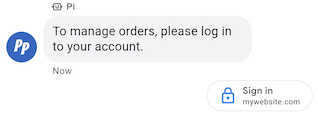
Il suggerimento Richiesta di autenticazione chiede agli utenti di accedere a un'applicazione compatibile con OAuth 2.0, passando i codici di autenticazione per confermare i dati dell'account e consentendo esperienze utente personalizzate e flussi di conversazione dettagliati. Consulta Eseguire l'autenticazione con OAuth.
Esempio
Il seguente codice invia un testo con un suggerimento di richiesta di autenticazione. Per le opzioni di
formattazione e valore, vedi
conversations.messages.create
e
Suggestion.
cURL
# Copyright 2021 Google LLC # # Licensed under the Apache License, Version 2.0 (the "License"); # you may not use this file except in compliance with the License. # You may obtain a copy of the License at # https://www.apache.org/licenses/LICENSE-2.0 # Unless required by applicable law or agreed to in writing, software # distributed under the License is distributed on an "AS IS" BASIS, # WITHOUT WARRANTIES OR CONDITIONS OF ANY KIND, either express or implied. # See the License for the specific language governing permissions and # limitations under the License. # This code sends a text message to the user with an authentication request suggestion # that allows the user to authenticate with OAuth. It also has a fallback text. # Read more: https://developers.google.com/business-communications/business-messages/guides/how-to/message/send?hl=en#authentication-request-suggestion # Replace the __CONVERSATION_ID__ with a conversation id that you can send messages to # Make sure a service account key file exists at ./service_account_key.json # Replace the __CLIENT_ID__ # Replace the __CODE_CHALLENGE__ # Replace the __SCOPE__ curl -X POST "https://businessmessages.googleapis.com/v1/conversations/__CONVERSATION_ID__/messages" \ -H "Content-Type: application/json" \ -H "User-Agent: curl/business-messages" \ -H "$(oauth2l header --json ./service_account_key.json businessmessages)" \ -d "{ 'messageId': '$(uuidgen)', 'text': 'Sign in to continue the conversation.', 'fallback': 'Visit support.growingtreebank.com to continue.', 'suggestions': [ { 'authenticationRequest': { 'oauth': { 'clientId': '__CLIENT_ID__', 'codeChallenge': '__CODE_CHALLENGE__', 'scopes': [ '__SCOPE__', ], }, }, }, ], 'representative': { 'avatarImage': 'https://developers.google.com/identity/images/g-logo.png', 'displayName': 'Chatbot', 'representativeType': 'BOT' } }"
Node.js
/** * This code sends a text message to the user with an authentication request suggestion * that allows the user to authenticate with OAuth. It also has a fallback text. * Read more: https://developers.google.com/business-communications/business-messages/guides/how-to/message/send?hl=en#authentication-request-suggestion * * This code is based on the https://github.com/google-business-communications/nodejs-businessmessages Node.js * Business Messages client library. */ /** * Before continuing, learn more about the prerequisites for authenticating * with OAuth at: https://developers.google.com/business-communications/business-messages/guides/how-to/integrate/oauth?hl=en * * Edit the values below: */ const PATH_TO_SERVICE_ACCOUNT_KEY = './service_account_key.json'; const CONVERSATION_ID = 'EDIT_HERE'; const OAUTH_CLIENT_ID = 'EDIT_HERE'; const OAUTH_CODE_CHALLENGE = 'EDIT_HERE'; const OAUTH_SCOPE = 'EDIT_HERE'; const businessmessages = require('businessmessages'); const uuidv4 = require('uuid').v4; const {google} = require('googleapis'); // Initialize the Business Messages API const bmApi = new businessmessages.businessmessages_v1.Businessmessages({}); // Set the scope that we need for the Business Messages API const scopes = [ 'https://www.googleapis.com/auth/businessmessages', ]; // Set the private key to the service account file const privatekey = require(PATH_TO_SERVICE_ACCOUNT_KEY); /** * Posts a message to the Business Messages API along with an authentication request. * * @param {string} conversationId The unique id for this user and agent. * @param {string} representativeType A value of BOT or HUMAN. */ async function sendMessage(conversationId, representativeType) { const authClient = await initCredentials(); if (authClient) { // Create the payload for sending a message along with an authentication request const apiParams = { auth: authClient, parent: 'conversations/' + conversationId, resource: { messageId: uuidv4(), representative: { representativeType: representativeType, }, fallback: 'Visit support.growingtreebank.com to continue.', text: 'Sign in to continue the conversation.', suggestions: [ { authenticationRequest: { oauth: { clientId: OAUTH_CLIENT_ID, codeChallenge: OAUTH_CODE_CHALLENGE, scopes: [OAUTH_SCOPE] } } }, ], }, }; // Call the message create function using the // Business Messages client library bmApi.conversations.messages.create(apiParams, {auth: authClient}, (err, response) => { console.log(err); console.log(response); }); } else { console.log('Authentication failure.'); } } /** * Initializes the Google credentials for calling the * Business Messages API. */ async function initCredentials() { // configure a JWT auth client const authClient = new google.auth.JWT( privatekey.client_email, null, privatekey.private_key, scopes, ); return new Promise(function(resolve, reject) { // authenticate request authClient.authorize(function(err, tokens) { if (err) { reject(false); } else { resolve(authClient); } }); }); } sendMessage(CONVERSATION_ID, 'BOT');
Java
import com.google.api.client.googleapis.services.AbstractGoogleClientRequest; import com.google.api.client.http.HttpBackOffUnsuccessfulResponseHandler; import com.google.api.client.http.HttpRequest; import com.google.api.client.googleapis.auth.oauth2.GoogleCredential; import com.google.api.client.googleapis.javanet.GoogleNetHttpTransport; import com.google.api.client.http.HttpTransport; import com.google.api.client.json.jackson2.JacksonFactory; import com.google.api.client.util.ExponentialBackOff; import com.google.api.services.businessmessages.v1.Businessmessages; import com.google.api.services.businessmessages.v1.model.*; import java.io.FileInputStream; import java.util.Arrays; import java.util.UUID; class SendAuthenticationRequestSuggestionSnippet { /** * Initializes credentials used by the Business Messages API. */ private static Businessmessages.Builder getBusinessMessagesBuilder() { Businessmessages.Builder builder = null; try { GoogleCredential credential = GoogleCredential .fromStream(new FileInputStream("PATH_TO_SERVICE_ACCOUNT_KEY")); credential = credential.createScoped(Arrays.asList( "https://www.googleapis.com/auth/businessmessages")); credential.refreshToken(); HttpTransport httpTransport = GoogleNetHttpTransport.newTrustedTransport(); JacksonFactory jsonFactory = JacksonFactory.getDefaultInstance(); // Create instance of the Business Messages API builder = new Businessmessages .Builder(httpTransport, jsonFactory, null) .setApplicationName("Sample Application"); // Set the API credentials and endpoint builder.setHttpRequestInitializer(credential); } catch (Exception e) { e.printStackTrace(); } return builder; } public static void main(String args[]) { try { String conversationId = "CONVERSATION_ID"; // Create client library reference Businessmessages.Builder builder = getBusinessMessagesBuilder(); // Create a text message with an authentication request BusinessMessagesMessage message = new BusinessMessagesMessage() .setMessageId(UUID.randomUUID().toString()) .setText("Would you like to chat with a live agent?") .setFallback("Would you like to chat with a live agent?") .setSuggestions(Arrays.asList(new BusinessMessagesSuggestion() .setAuthenticationRequest(new BusinessMessagesAuthenticationRequest() .setOauth(new BusinessMessagesAuthenticationRequestOauth() .setClientId("CLIENT_ID") .setCodeChallenge("CODE_CHALLENGE") .setScopes(Arrays.asList("SCOPE")) ))) ) .setRepresentative(new BusinessMessagesRepresentative() .setRepresentativeType("TYPE")); // Create message request Businessmessages.Conversations.Messages.Create messageRequest = builder.build().conversations().messages() .create("conversations/" + conversationId, message); // Setup retries with exponential backoff HttpRequest httpRequest = ((AbstractGoogleClientRequest) messageRequest).buildHttpRequest(); httpRequest.setUnsuccessfulResponseHandler(new HttpBackOffUnsuccessfulResponseHandler( new ExponentialBackOff())); // Execute request httpRequest.execute(); } catch (Exception e) { e.printStackTrace(); } } }
Python
"""Sends a text message to the user with an authentication request suggestion. It allows the user to authenticate with OAuth and has a fallback text. Read more: https://developers.google.com/business-communications/business-messages/guides/how-to/message/send?hl=en#authentication-request-suggestion This code is based on the https://github.com/google-business-communications/python-businessmessages Python Business Messages client library. """ import uuid from businessmessages import businessmessages_v1_client as bm_client from businessmessages.businessmessages_v1_messages import BusinessMessagesAuthenticationRequest from businessmessages.businessmessages_v1_messages import BusinessMessagesAuthenticationRequestOauth from businessmessages.businessmessages_v1_messages import BusinessmessagesConversationsMessagesCreateRequest from businessmessages.businessmessages_v1_messages import BusinessMessagesMessage from businessmessages.businessmessages_v1_messages import BusinessMessagesRepresentative from businessmessages.businessmessages_v1_messages import BusinessMessagesSuggestion from oauth2client.service_account import ServiceAccountCredentials # Before continuing, learn more about the prerequisites for authenticating # with OAuth at: https://developers.google.com/business-communications/business-messages/guides/how-to/integrate/oauth?hl=en # Edit the values below: path_to_service_account_key = './service_account_key.json' conversation_id = 'EDIT_HERE' oauth_client_id = 'EDIT_HERE' oauth_code_challenge = 'EDIT_HERE' oauth_scope = 'EDIT_HERE' credentials = ServiceAccountCredentials.from_json_keyfile_name( path_to_service_account_key, scopes=['https://www.googleapis.com/auth/businessmessages']) client = bm_client.BusinessmessagesV1(credentials=credentials) representative_type_as_string = 'BOT' if representative_type_as_string == 'BOT': representative_type = BusinessMessagesRepresentative.RepresentativeTypeValueValuesEnum.BOT else: representative_type = BusinessMessagesRepresentative.RepresentativeTypeValueValuesEnum.HUMAN # Create a text message with an authentication request message = BusinessMessagesMessage( messageId=str(uuid.uuid4().int), representative=BusinessMessagesRepresentative( representativeType=representative_type ), text='Sign in to continue the conversation.', fallback='Visit support.growingtreebank.com to continue.', suggestions=[ BusinessMessagesSuggestion( authenticationRequest=BusinessMessagesAuthenticationRequest( oauth=BusinessMessagesAuthenticationRequestOauth( clientId=oauth_client_id, codeChallenge=oauth_code_challenge, scopes=[oauth_scope]) ) ), ] ) # Create the message request create_request = BusinessmessagesConversationsMessagesCreateRequest( businessMessagesMessage=message, parent='conversations/' + conversation_id) # Send the message bm_client.BusinessmessagesV1.ConversationsMessagesService( client=client).Create(request=create_request)
Suggerimento di richiesta di operatore

Il suggerimento di richiesta di agente live ti consente di guidare gli utenti a interagire con rappresentanti umani durante interazioni complesse o quando l'automazione non è in grado di gestire una richiesta utente.
Gli utenti possono richiedere un operatore in qualsiasi momento di una conversazione dal menu overflow. Questo suggerimento offre agli agenti un modo per suggerire in modo programmatico le interazioni con i rappresentanti umani in base al contesto della conversazione. L'agente deve sempre essere pronto a rispondere a un evento richiesto da un operatore in carne e ossa, anche se non ha inviato un suggerimento di richiesta di operatore in carne e ossa.
Quando gli utenti toccano un suggerimento di richiesta di operatore, viene attivato un evento operatore richiesto.
Esempio
Il seguente codice invia un testo con un suggerimento di richiesta di operatore. Per le opzioni di
formattazione e valore, vedi
conversations.messages.create
e
Suggestion.
cURL
# Copyright 2021 Google LLC # # Licensed under the Apache License, Version 2.0 (the "License"); # you may not use this file except in compliance with the License. # You may obtain a copy of the License at # https://www.apache.org/licenses/LICENSE-2.0 # Unless required by applicable law or agreed to in writing, software # distributed under the License is distributed on an "AS IS" BASIS, # WITHOUT WARRANTIES OR CONDITIONS OF ANY KIND, either express or implied. # See the License for the specific language governing permissions and # limitations under the License. # This code sends a text message to the user with a Live agent request suggestion # that allows the user to connect with a Live agent. # Read more: https://developers.google.com/business-communications/business-messages/guides/how-to/message/send?hl=en#live_agent_request_suggestion # Replace the __CONVERSATION_ID__ with a conversation id that you can send messages to # Make sure a service account key file exists at ./service_account_key.json curl -X POST "https://businessmessages.googleapis.com/v1/conversations/__CONVERSATION_ID__/messages" \ -H "Content-Type: application/json" \ -H "User-Agent: curl/business-messages" \ -H "$(oauth2l header --json ./service_account_key.json businessmessages)" \ -d "{ 'messageId': '$(uuidgen)', 'text': 'Would you like to chat with a live agent?', 'fallback': 'Would you like to chat with a live agent?', 'suggestions': [ { 'liveAgentRequest': {}, }, ], 'representative': { 'avatarImage': 'https://developers.google.com/identity/images/g-logo.png', 'displayName': 'Chatbot', 'representativeType': 'BOT' }, }"
Node.js
/** * This code sends a text message to the user with a Live agent request suggestion * that allows the user to connect with a Live agent. * Read more: https://developers.google.com/business-communications/business-messages/guides/how-to/message/send?hl=en#live_agent_request_suggestion * * This code is based on the https://github.com/google-business-communications/nodejs-businessmessages Node.js * Business Messages client library. */ /** * Edit the values below: */ const PATH_TO_SERVICE_ACCOUNT_KEY = './service_account_key.json'; const CONVERSATION_ID = 'EDIT_HERE'; const businessmessages = require('businessmessages'); const uuidv4 = require('uuid').v4; const {google} = require('googleapis'); // Initialize the Business Messages API const bmApi = new businessmessages.businessmessages_v1.Businessmessages({}); // Set the scope that we need for the Business Messages API const scopes = [ 'https://www.googleapis.com/auth/businessmessages', ]; // Set the private key to the service account file const privatekey = require(PATH_TO_SERVICE_ACCOUNT_KEY); /** * Posts a message with a live agent request action to the Business Messages API. * * @param {string} conversationId The unique id for this user and agent. */ async function sendMessage(conversationId) { const authClient = await initCredentials(); if (authClient) { // Create the payload for sending a message along with a request for live agent action const apiParams = { auth: authClient, parent: 'conversations/' + conversationId, resource: { messageId: uuidv4(), representative: { representativeType: 'BOT', // Must be sent from a BOT representative }, fallback: 'Would you like to chat with a live agent?', text: 'Would you like to chat with a live agent?', suggestions: [ { liveAgentRequest: {} }, ], }, }; // Call the message create function using the // Business Messages client library bmApi.conversations.messages.create(apiParams, {auth: authClient}, (err, response) => { console.log(err); console.log(response); }); } else { console.log('Authentication failure.'); } } /** * Initializes the Google credentials for calling the * Business Messages API. */ async function initCredentials() { // configure a JWT auth client const authClient = new google.auth.JWT( privatekey.client_email, null, privatekey.private_key, scopes, ); return new Promise(function(resolve, reject) { // authenticate request authClient.authorize(function(err, tokens) { if (err) { reject(false); } else { resolve(authClient); } }); }); } sendMessage(CONVERSATION_ID);
Java
import com.google.api.client.googleapis.services.AbstractGoogleClientRequest; import com.google.api.client.http.HttpBackOffUnsuccessfulResponseHandler; import com.google.api.client.http.HttpRequest; import com.google.api.client.googleapis.auth.oauth2.GoogleCredential; import com.google.api.client.googleapis.javanet.GoogleNetHttpTransport; import com.google.api.client.http.HttpTransport; import com.google.api.client.json.jackson2.JacksonFactory; import com.google.api.client.util.ExponentialBackOff; import com.google.api.services.businessmessages.v1.Businessmessages; import com.google.api.services.businessmessages.v1.model.*; import java.io.FileInputStream; import java.util.Arrays; import java.util.UUID; class SendLiveAgentRequestSuggestionSnippet { /** * Initializes credentials used by the Business Messages API. */ private static Businessmessages.Builder getBusinessMessagesBuilder() { Businessmessages.Builder builder = null; try { GoogleCredential credential = GoogleCredential .fromStream(new FileInputStream("PATH_TO_SERVICE_ACCOUNT_KEY")); credential = credential.createScoped(Arrays.asList( "https://www.googleapis.com/auth/businessmessages")); credential.refreshToken(); HttpTransport httpTransport = GoogleNetHttpTransport.newTrustedTransport(); JacksonFactory jsonFactory = JacksonFactory.getDefaultInstance(); // Create instance of the Business Messages API builder = new Businessmessages .Builder(httpTransport, jsonFactory, null) .setApplicationName("Sample Application"); // Set the API credentials and endpoint builder.setHttpRequestInitializer(credential); } catch (Exception e) { e.printStackTrace(); } return builder; } public static void main(String args[]) { try { String conversationId = "CONVERSATION_ID"; // Create client library reference Businessmessages.Builder builder = getBusinessMessagesBuilder(); // Create a text message with a live request action BusinessMessagesMessage message = new BusinessMessagesMessage() .setMessageId(UUID.randomUUID().toString()) .setText("Would you like to chat with a live agent?") .setFallback("Would you like to chat with a live agent?") .setSuggestions(Arrays.asList(new BusinessMessagesSuggestion() .setLiveAgentRequest(new BusinessMessagesLiveAgentRequest())) ) .setRepresentative(new BusinessMessagesRepresentative() .setRepresentativeType("BOT")); // Must be sent from a BOT representative // Create message request Businessmessages.Conversations.Messages.Create messageRequest = builder.build().conversations().messages() .create("conversations/" + conversationId, message); // Setup retries with exponential backoff HttpRequest httpRequest = ((AbstractGoogleClientRequest) messageRequest).buildHttpRequest(); httpRequest.setUnsuccessfulResponseHandler(new HttpBackOffUnsuccessfulResponseHandler( new ExponentialBackOff())); // Execute request httpRequest.execute(); } catch (Exception e) { e.printStackTrace(); } } }
Python
"""Sends a text message to the user with a Live agent request suggestion. It allows the user to connect with a Live agent. Read more: https://developers.google.com/business-communications/business-messages/guides/how-to/message/send?hl=en#live_agent_request_suggestion This code is based on the https://github.com/google-business-communications/python-businessmessages Python Business Messages client library. """ import uuid from businessmessages import businessmessages_v1_client as bm_client from businessmessages.businessmessages_v1_messages import BusinessmessagesConversationsMessagesCreateRequest from businessmessages.businessmessages_v1_messages import BusinessMessagesLiveAgentRequest from businessmessages.businessmessages_v1_messages import BusinessMessagesMessage from businessmessages.businessmessages_v1_messages import BusinessMessagesRepresentative from businessmessages.businessmessages_v1_messages import BusinessMessagesSuggestion from oauth2client.service_account import ServiceAccountCredentials # Edit the values below: path_to_service_account_key = './service_account_key.json' conversation_id = 'EDIT_HERE' credentials = ServiceAccountCredentials.from_json_keyfile_name( path_to_service_account_key, scopes=['https://www.googleapis.com/auth/businessmessages']) client = bm_client.BusinessmessagesV1(credentials=credentials) # Create a text message with a live agent request action and fallback text # Follow instructions at https://developers.google.com/business-communications/business-messages/guides/how-to/message/send?hl=en#live_agent_request_suggestion message = BusinessMessagesMessage( messageId=str(uuid.uuid4().int), representative=BusinessMessagesRepresentative( # Must be sent from a BOT representative representativeType=BusinessMessagesRepresentative.RepresentativeTypeValueValuesEnum.BOT ), text='Would you like to chat with a live agent?', fallback='Would you like to chat with a live agent?', suggestions=[ BusinessMessagesSuggestion( liveAgentRequest=BusinessMessagesLiveAgentRequest() ) ]) # Create the message request create_request = BusinessmessagesConversationsMessagesCreateRequest( businessMessagesMessage=message, parent='conversations/' + conversation_id) # Send the message bm_client.BusinessmessagesV1.ConversationsMessagesService( client=client).Create(request=create_request)
Schede interattive
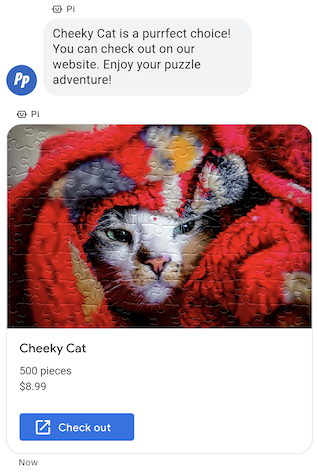
Quando devi inviare un blocco di informazioni, contenuti multimediali o suggerimenti correlati, devi inviare una scheda informativa. Le schede avanzate consentono all'agente di inviare più unità di informazioni in un unico messaggio.
Le schede avanzate possono contenere i seguenti elementi:
- File multimediali (JPG, JPEG o PNG, massimo 5 MB)
- Miniatura del media (JPG, JPEG o PNG, massimo 25 KB)
- Titolo (massimo 200 caratteri)
- Descrizione (massimo 2000 caratteri)
- Un elenco di risposte suggerite e azioni suggerite (massimo 4)
Una scheda avanzata può contenere uno o tutti gli elementi elencati, ma deve contenere almeno contenuti multimediali o un titolo per essere valida. Una scheda avanzata può contenere un massimo di quattro azioni suggerite e risposte suggerite.
L'agente può inviare più schede informative insieme in un carosello di schede informative.
Esempio
Il seguente codice invia una scheda avanzata con un'immagine e risposte suggerite. Per le opzioni di
formattazione e valore, vedi
conversations.messages.create
e
RichCard.
cURL
# Copyright 2021 Google LLC # # Licensed under the Apache License, Version 2.0 (the "License"); # you may not use this file except in compliance with the License. # You may obtain a copy of the License at # https://www.apache.org/licenses/LICENSE-2.0 # Unless required by applicable law or agreed to in writing, software # distributed under the License is distributed on an "AS IS" BASIS, # WITHOUT WARRANTIES OR CONDITIONS OF ANY KIND, either express or implied. # See the License for the specific language governing permissions and # limitations under the License. # This code sends a rich card to the user with a fallback text. # Read more: https://developers.google.com/business-communications/business-messages/guides/how-to/message/send?hl=en#rich-cards # Replace the __CONVERSATION_ID__ with a conversation id that you can send messages to # Make sure a service account key file exists at ./service_account_key.json curl -X POST "https://businessmessages.googleapis.com/v1/conversations/__CONVERSATION_ID__/messages" \ -H "Content-Type: application/json" \ -H "User-Agent: curl/business-messages" \ -H "$(oauth2l header --json ./service_account_key.json businessmessages)" \ -d "{ 'messageId': '$(uuidgen)', 'representative': { 'avatarImage': 'https://developers.google.com/identity/images/g-logo.png', 'displayName': 'Chatbot', 'representativeType': 'BOT' }, 'fallback': 'Hello, world!\nSent with Business Messages\n\nReply with \"Suggestion #1\" or \"Suggestion #2\"', 'richCard': { 'standaloneCard': { 'cardContent': { 'title': 'Hello, world!', 'description': 'Sent with Business Messages.', 'media': { 'height': 'TALL', 'contentInfo':{ 'altText': 'Google logo', 'fileUrl': 'https://www.google.com/images/branding/googlelogo/2x/googlelogo_color_272x92dp.png', 'forceRefresh': 'false' } }, 'suggestions': [ { 'reply': { 'text': 'Suggestion #1', 'postbackData': 'suggestion_1' } }, { 'reply': { 'text': 'Suggestion #2', 'postbackData': 'suggestion_2' } } ] } } } }"
Node.js
/** * This code sends a rich card to the user with a fallback text. * Read more: https://developers.google.com/business-communications/business-messages/guides/how-to/message/send?hl=en#rich-cards * * This code is based on the https://github.com/google-business-communications/nodejs-businessmessages Node.js * Business Messages client library. */ /** * Edit the values below: */ const PATH_TO_SERVICE_ACCOUNT_KEY = './service_account_key.json'; const CONVERSATION_ID = 'EDIT_HERE'; const businessmessages = require('businessmessages'); const uuidv4 = require('uuid').v4; const {google} = require('googleapis'); // Initialize the Business Messages API const bmApi = new businessmessages.businessmessages_v1.Businessmessages({}); // Set the scope that we need for the Business Messages API const scopes = [ 'https://www.googleapis.com/auth/businessmessages', ]; // Set the private key to the service account file const privatekey = require(PATH_TO_SERVICE_ACCOUNT_KEY); /** * Posts a rich card message to the Business Messages API. * * @param {string} conversationId The unique id for this user and agent. * @param {string} representativeType A value of BOT or HUMAN. */ async function sendMessage(conversationId, representativeType) { const authClient = await initCredentials(); if (authClient) { // Create the payload for sending a rich card message with two suggested replies const apiParams = { auth: authClient, parent: 'conversations/' + conversationId, resource: { messageId: uuidv4(), representative: { representativeType: representativeType, }, fallback: 'Hello, world!\nSent with Business Messages\n\nReply with \"Suggestion #1\" or \"Suggestion #2\"', richCard: { standaloneCard: { cardContent: { title: 'Hello, world!', description: 'Sent with Business Messages.', media: { height: 'TALL', contentInfo: { altText: 'Google logo', fileUrl: 'https://www.google.com/images/branding/googlelogo/2x/googlelogo_color_272x92dp.png', forceRefresh: false, }, }, suggestions: [ { reply: { text: 'Suggestion #1', postbackData: 'suggestion_1', }, }, { reply: { text: 'Suggestion #2', postbackData: 'suggestion_2', }, }, ], }, }, }, }, }; // Call the message create function using the // Business Messages client library bmApi.conversations.messages.create(apiParams, {auth: authClient}, (err, response) => { console.log(err); console.log(response); }); } else { console.log('Authentication failure.'); } } /** * Initializes the Google credentials for calling the * Business Messages API. */ async function initCredentials() { // configure a JWT auth client const authClient = new google.auth.JWT( privatekey.client_email, null, privatekey.private_key, scopes, ); return new Promise(function(resolve, reject) { // authenticate request authClient.authorize(function(err, tokens) { if (err) { reject(false); } else { resolve(authClient); } }); }); } sendMessage(CONVERSATION_ID, 'BOT');
Java
import com.google.api.client.googleapis.services.AbstractGoogleClientRequest; import com.google.api.client.http.HttpBackOffUnsuccessfulResponseHandler; import com.google.api.client.http.HttpRequest; import com.google.api.client.googleapis.auth.oauth2.GoogleCredential; import com.google.api.client.googleapis.javanet.GoogleNetHttpTransport; import com.google.api.client.http.HttpTransport; import com.google.api.client.json.jackson2.JacksonFactory; import com.google.api.client.util.ExponentialBackOff; import com.google.api.services.businessmessages.v1.Businessmessages; import com.google.api.services.businessmessages.v1.model.*; import com.google.communications.businessmessages.v1.MediaHeight; import java.io.FileInputStream; import java.util.Arrays; import java.util.UUID; class SendRichCardMessageSnippet { /** * Initializes credentials used by the Business Messages API. */ private static Businessmessages.Builder getBusinessMessagesBuilder() { Businessmessages.Builder builder = null; try { GoogleCredential credential = GoogleCredential .fromStream(new FileInputStream("PATH_TO_SERVICE_ACCOUNT_KEY")); credential = credential.createScoped(Arrays.asList( "https://www.googleapis.com/auth/businessmessages")); credential.refreshToken(); HttpTransport httpTransport = GoogleNetHttpTransport.newTrustedTransport(); JacksonFactory jsonFactory = JacksonFactory.getDefaultInstance(); // Create instance of the Business Messages API builder = new Businessmessages .Builder(httpTransport, jsonFactory, null) .setApplicationName("Sample Application"); // Set the API credentials and endpoint builder.setHttpRequestInitializer(credential); } catch (Exception e) { e.printStackTrace(); } return builder; } public static void main(String args[]) { try { String conversationId = "CONVERSATION_ID"; // Create client library reference Businessmessages.Builder builder = getBusinessMessagesBuilder(); // Create a rich card with two suggested replies BusinessMessagesMessage message = new BusinessMessagesMessage() .setMessageId(UUID.randomUUID().toString()) .setFallback("Hello, world!\nSent with Business Messages\n\nReply with \"Suggestion #1\" or \"Suggestion #2\"") .setRichCard(new BusinessMessagesRichCard() .setStandaloneCard(new BusinessMessagesStandaloneCard() .setCardContent( new BusinessMessagesCardContent() .setTitle("Hello, world!") .setDescription("Sent with Business Messages.") .setSuggestions(Arrays.asList( new BusinessMessagesSuggestion() .setReply(new BusinessMessagesSuggestedReply() .setText("Suggestion #1").setPostbackData("suggestion_1") ), new BusinessMessagesSuggestion() .setReply(new BusinessMessagesSuggestedReply() .setText("Suggestion #2").setPostbackData("suggestion_2") )) ) .setMedia(new BusinessMessagesMedia() .setHeight(MediaHeight.MEDIUM.toString()) .setContentInfo( new BusinessMessagesContentInfo() .setAltText("Google logo") .setFileUrl("https://www.google.com/images/branding/googlelogo/2x/googlelogo_color_272x92dp.png") .setForceRefresh(false) )) ))) .setRepresentative(new BusinessMessagesRepresentative() .setRepresentativeType("TYPE")); // Create message request Businessmessages.Conversations.Messages.Create messageRequest = builder.build().conversations().messages() .create("conversations/" + conversationId, message); // Setup retries with exponential backoff HttpRequest httpRequest = ((AbstractGoogleClientRequest) messageRequest).buildHttpRequest(); httpRequest.setUnsuccessfulResponseHandler(new HttpBackOffUnsuccessfulResponseHandler( new ExponentialBackOff())); // Execute request httpRequest.execute(); } catch (Exception e) { e.printStackTrace(); } } }
Python
"""This code sends a rich card to the user with a fallback text. Read more: https://developers.google.com/business-communications/business-messages/guides/how-to/message/send?hl=en#rich-cards This code is based on the https://github.com/google-business-communications/python-businessmessages Python Business Messages client library. """ import uuid from businessmessages import businessmessages_v1_client as bm_client from businessmessages.businessmessages_v1_messages import BusinessMessagesCardContent from businessmessages.businessmessages_v1_messages import BusinessMessagesContentInfo from businessmessages.businessmessages_v1_messages import BusinessmessagesConversationsMessagesCreateRequest from businessmessages.businessmessages_v1_messages import BusinessMessagesMedia from businessmessages.businessmessages_v1_messages import BusinessMessagesMessage from businessmessages.businessmessages_v1_messages import BusinessMessagesRepresentative from businessmessages.businessmessages_v1_messages import BusinessMessagesRichCard from businessmessages.businessmessages_v1_messages import BusinessMessagesStandaloneCard from businessmessages.businessmessages_v1_messages import BusinessMessagesSuggestedReply from businessmessages.businessmessages_v1_messages import BusinessMessagesSuggestion from oauth2client.service_account import ServiceAccountCredentials # Edit the values below: path_to_service_account_key = './service_account_key.json' conversation_id = 'EDIT_HERE' credentials = ServiceAccountCredentials.from_json_keyfile_name( path_to_service_account_key, scopes=['https://www.googleapis.com/auth/businessmessages']) client = bm_client.BusinessmessagesV1(credentials=credentials) representative_type_as_string = 'BOT' if representative_type_as_string == 'BOT': representative_type = BusinessMessagesRepresentative.RepresentativeTypeValueValuesEnum.BOT else: representative_type = BusinessMessagesRepresentative.RepresentativeTypeValueValuesEnum.HUMAN # Create a rich card message with two suggested replies and fallback text message = BusinessMessagesMessage( messageId=str(uuid.uuid4().int), representative=BusinessMessagesRepresentative( representativeType=representative_type ), fallback='Hello, world!\nSent with Business Messages\n\nReply with \"Suggestion #1\" or \"Suggestion #2\"', richCard=BusinessMessagesRichCard( standaloneCard=BusinessMessagesStandaloneCard( cardContent=BusinessMessagesCardContent( title='Hello, world!', description='Sent with Business Messages.', suggestions=[ BusinessMessagesSuggestion( reply=BusinessMessagesSuggestedReply( text='Suggestion #1', postbackData='suggestion_1') ), BusinessMessagesSuggestion( reply=BusinessMessagesSuggestedReply( text='Suggestion #2', postbackData='suggestion_2') ) ], media=BusinessMessagesMedia( height=BusinessMessagesMedia.HeightValueValuesEnum.TALL, contentInfo=BusinessMessagesContentInfo( altText='Google logo', fileUrl='https://www.google.com/images/branding/googlelogo/2x/googlelogo_color_272x92dp.png', forceRefresh=False )) )))) # Create the message request create_request = BusinessmessagesConversationsMessagesCreateRequest( businessMessagesMessage=message, parent='conversations/' + conversation_id) # Send the message bm_client.BusinessmessagesV1.ConversationsMessagesService( client=client).Create(request=create_request)
Caroselli di schede interattive
Quando devi presentare a un utente più opzioni tra cui scegliere, utilizza un carosello di schede avanzate. I caroselli raggruppano più schede avanzate, consentendo agli utenti di confrontare gli elementi e reagire a ciascuno singolarmente.
I caroselli possono contenere un minimo di due e un massimo di dieci schede avanzate. Le schede avanzate all'interno dei caroselli devono rispettare i requisiti generali delle schede avanzate per contenuti e altezza.
Esempio
Il seguente codice invia un carosello di schede interattive. Per le opzioni di formattazione e
valore, vedi
conversations.messages.create
e
RichCard.
cURL
# Copyright 2021 Google LLC # # Licensed under the Apache License, Version 2.0 (the "License"); # you may not use this file except in compliance with the License. # You may obtain a copy of the License at # https://www.apache.org/licenses/LICENSE-2.0 # Unless required by applicable law or agreed to in writing, software # distributed under the License is distributed on an "AS IS" BASIS, # WITHOUT WARRANTIES OR CONDITIONS OF ANY KIND, either express or implied. # See the License for the specific language governing permissions and # limitations under the License. # This code sends to the user a carousel with rich cards and a fallback text. # Read more: https://developers.google.com/business-communications/business-messages/guides/how-to/message/send?hl=en#rich-card-carousels # Replace the __CONVERSATION_ID__ with a conversation id that you can send messages to # Make sure a service account key file exists at ./service_account_key.json curl -X POST "https://businessmessages.googleapis.com/v1/conversations/__CONVERSATION_ID__/messages" \ -H "Content-Type: application/json" \ -H "User-Agent: curl/business-messages" \ -H "$(oauth2l header --json ./service_account_key.json businessmessages)" \ -d "{ 'messageId': '$(uuidgen)', 'representative': { 'avatarImage': 'https://developers.google.com/identity/images/g-logo.png', 'displayName': 'Chatbot', 'representativeType': 'BOT' }, 'fallback': 'Card #1\nThe description for card #1\n\nCard #2\nThe description for card #2\n\nReply with \"Card #1\" or \"Card #2\"', 'richCard': { 'carouselCard': { 'cardWidth': 'MEDIUM', 'cardContents': [ { 'title': 'Card #1', 'description': 'The description for card #1', 'suggestions': [ { 'reply': { 'text': 'Card #1', 'postbackData': 'card_1' } } ], 'media': { 'height': 'MEDIUM', 'contentInfo': { 'fileUrl': 'https://storage.googleapis.com/kitchen-sink-sample-images/cute-dog.jpg', 'forceRefresh': 'false', } } }, { 'title': 'Card #2', 'description': 'The description for card #2', 'suggestions': [ { 'reply': { 'text': 'Card #2', 'postbackData': 'card_2' } } ], 'media': { 'height': 'MEDIUM', 'contentInfo': { 'fileUrl': 'https://storage.googleapis.com/kitchen-sink-sample-images/elephant.jpg', 'forceRefresh': 'false', } } } ] } } }"
Node.js
/** * This code sends to the user a carousel with rich cards and a fallback text. * Read more: https://developers.google.com/business-communications/business-messages/guides/how-to/message/send?hl=en#rich-card-carousels * * This code is based on the https://github.com/google-business-communications/nodejs-businessmessages Node.js * Business Messages client library. */ /** * Edit the values below: */ const PATH_TO_SERVICE_ACCOUNT_KEY = './service_account_key.json'; const CONVERSATION_ID = 'EDIT_HERE'; const businessmessages = require('businessmessages'); const uuidv4 = require('uuid').v4; const {google} = require('googleapis'); // Initialize the Business Messages API const bmApi = new businessmessages.businessmessages_v1.Businessmessages({}); // Set the scope that we need for the Business Messages API const scopes = [ 'https://www.googleapis.com/auth/businessmessages', ]; // Set the private key to the service account file const privatekey = require(PATH_TO_SERVICE_ACCOUNT_KEY); /** * Posts a carousel card message to the Business Messages API. * * @param {string} conversationId The unique id for this user and agent. * @param {string} representativeType A value of BOT or HUMAN. */ async function sendMessage(conversationId, representativeType) { const authClient = await initCredentials(); if (authClient) { // Create the payload for sending carousel message // with two cards and a suggested reply for each card const apiParams = { auth: authClient, parent: 'conversations/' + conversationId, resource: { messageId: uuidv4(), representative: { representativeType: representativeType, }, fallback: 'Card #1\nThe description for card #1\n\nCard #2\nThe description for card #2\n\nReply with \"Card #1\" or \"Card #2\"', richCard: { carouselCard: { cardWidth: 'MEDIUM', cardContents: [ { title: 'Card #1', description: 'The description for card #1', suggestions: [ { reply: { text: 'Card #1', postbackData: 'card_1' } } ], media: { height: 'MEDIUM', contentInfo: { fileUrl: 'https://storage.googleapis.com/kitchen-sink-sample-images/cute-dog.jpg', forceRefresh: 'false', } } }, { title: 'Card #2', description: 'The description for card #2', suggestions: [ { reply: { text: 'Card #2', postbackData: 'card_2' } } ], media: { height: 'MEDIUM', contentInfo: { fileUrl: 'https://storage.googleapis.com/kitchen-sink-sample-images/elephant.jpg', forceRefresh: 'false', } } } ] } } }, }; // Call the message create function using the // Business Messages client library bmApi.conversations.messages.create(apiParams, {auth: authClient}, (err, response) => { console.log(err); console.log(response); }); } else { console.log('Authentication failure.'); } } /** * Initializes the Google credentials for calling the * Business Messages API. */ async function initCredentials() { // configure a JWT auth client const authClient = new google.auth.JWT( privatekey.client_email, null, privatekey.private_key, scopes, ); return new Promise(function(resolve, reject) { // authenticate request authClient.authorize(function(err, tokens) { if (err) { reject(false); } else { resolve(authClient); } }); }); } sendMessage(CONVERSATION_ID, 'BOT');
Java
import com.google.api.client.googleapis.services.AbstractGoogleClientRequest; import com.google.api.client.http.HttpBackOffUnsuccessfulResponseHandler; import com.google.api.client.http.HttpRequest; import com.google.api.client.googleapis.auth.oauth2.GoogleCredential; import com.google.api.client.googleapis.javanet.GoogleNetHttpTransport; import com.google.api.client.http.HttpTransport; import com.google.api.client.json.jackson2.JacksonFactory; import com.google.api.client.util.ExponentialBackOff; import com.google.api.services.businessmessages.v1.Businessmessages; import com.google.api.services.businessmessages.v1.model.*; import com.google.communications.businessmessages.v1.MediaHeight; import java.io.FileInputStream; import java.util.Arrays; import java.util.UUID; class SendRichCardCarouselMessage { /** * Initializes credentials used by the Business Messages API. */ private static Businessmessages.Builder getBusinessMessagesBuilder() { Businessmessages.Builder builder = null; try { GoogleCredential credential = GoogleCredential .fromStream(new FileInputStream("PATH_TO_SERVICE_ACCOUNT_KEY")); credential = credential.createScoped(Arrays.asList( "https://www.googleapis.com/auth/businessmessages")); credential.refreshToken(); HttpTransport httpTransport = GoogleNetHttpTransport.newTrustedTransport(); JacksonFactory jsonFactory = JacksonFactory.getDefaultInstance(); // Create instance of the Business Messages API builder = new Businessmessages .Builder(httpTransport, jsonFactory, null) .setApplicationName("Sample Application"); // Set the API credentials and endpoint builder.setHttpRequestInitializer(credential); } catch (Exception e) { e.printStackTrace(); } return builder; } public static void main(String args[]) { try { String conversationId = "CONVERSATION_ID"; // Create client library reference Businessmessages.Builder builder = getBusinessMessagesBuilder(); // Create a rich card with two suggested replies BusinessMessagesMessage message = new BusinessMessagesMessage() .setMessageId(UUID.randomUUID().toString()) .setFallback("Hello, world!\nSent with Business Messages\n\nReply with \"Suggestion #1\" or \"Suggestion #2\"") .setRichCard(new BusinessMessagesRichCard() .setCarouselCard(new BusinessMessagesCarouselCard().setCardWidth("MEDIUM") .setCardContents(Arrays.asList( new BusinessMessagesCardContent() .setTitle("Card #1") .setDescription("The description for card #1") .setSuggestions(Arrays.asList(new BusinessMessagesSuggestion() .setReply(new BusinessMessagesSuggestedReply() .setText("Card #1").setPostbackData("card_1") ))) .setMedia(new BusinessMessagesMedia() .setHeight(MediaHeight.MEDIUM.toString()) .setContentInfo(new BusinessMessagesContentInfo() .setFileUrl("https://storage.googleapis.com/kitchen-sink-sample-images/cute-dog.jpg"))), new BusinessMessagesCardContent() .setTitle("Card #2") .setDescription("The description for card #2") .setSuggestions(Arrays.asList(new BusinessMessagesSuggestion() .setReply(new BusinessMessagesSuggestedReply() .setText("Card #2").setPostbackData("card_2") ))) .setMedia(new BusinessMessagesMedia() .setHeight(MediaHeight.MEDIUM.toString()) .setContentInfo(new BusinessMessagesContentInfo() .setFileUrl("https://storage.googleapis.com/kitchen-sink-sample-images/elephant.jpg"))) ) ))) .setRepresentative(new BusinessMessagesRepresentative() .setRepresentativeType("TYPE")); // Create message request Businessmessages.Conversations.Messages.Create messageRequest = builder.build().conversations().messages() .create("conversations/" + conversationId, message); // Setup retries with exponential backoff HttpRequest httpRequest = ((AbstractGoogleClientRequest) messageRequest).buildHttpRequest(); httpRequest.setUnsuccessfulResponseHandler(new HttpBackOffUnsuccessfulResponseHandler( new ExponentialBackOff())); // Execute request httpRequest.execute(); } catch (Exception e) { e.printStackTrace(); } } }
Python
"""This code sends to the user a carousel with rich cards and a fallback text. Read more: https://developers.google.com/business-communications/business-messages/guides/how-to/message/send?hl=en#rich-card-carousels This code is based on the https://github.com/google-business-communications/python-businessmessages Python Business Messages client library. """ import uuid from businessmessages import businessmessages_v1_client as bm_client from businessmessages.businessmessages_v1_messages import BusinessMessagesCardContent from businessmessages.businessmessages_v1_messages import BusinessMessagesCarouselCard from businessmessages.businessmessages_v1_messages import BusinessMessagesContentInfo from businessmessages.businessmessages_v1_messages import BusinessmessagesConversationsMessagesCreateRequest from businessmessages.businessmessages_v1_messages import BusinessMessagesMedia from businessmessages.businessmessages_v1_messages import BusinessMessagesMessage from businessmessages.businessmessages_v1_messages import BusinessMessagesRepresentative from businessmessages.businessmessages_v1_messages import BusinessMessagesRichCard from businessmessages.businessmessages_v1_messages import BusinessMessagesSuggestedReply from businessmessages.businessmessages_v1_messages import BusinessMessagesSuggestion from oauth2client.service_account import ServiceAccountCredentials # Edit the values below: path_to_service_account_key = './service_account_key.json' conversation_id = 'EDIT_HERE' credentials = ServiceAccountCredentials.from_json_keyfile_name( path_to_service_account_key, scopes=['https://www.googleapis.com/auth/businessmessages']) client = bm_client.BusinessmessagesV1(credentials=credentials) representative_type_as_string = 'BOT' if representative_type_as_string == 'BOT': representative_type = BusinessMessagesRepresentative.RepresentativeTypeValueValuesEnum.BOT else: representative_type = BusinessMessagesRepresentative.RepresentativeTypeValueValuesEnum.HUMAN # Create a carousel message with two cards and a suggested reply for each card # and fallback text message = BusinessMessagesMessage( messageId=str(uuid.uuid4().int), representative=BusinessMessagesRepresentative( representativeType=representative_type ), fallback='Card #1\nThe description for card #1\n\nCard #2\nThe description for card #2\n\nReply with \"Card #1\" or \"Card #2\"', richCard=BusinessMessagesRichCard( carouselCard=BusinessMessagesCarouselCard( cardWidth=BusinessMessagesCarouselCard.CardWidthValueValuesEnum.MEDIUM, cardContents=[ BusinessMessagesCardContent( title='Card #1', description='The description for card #1', suggestions=[ BusinessMessagesSuggestion( reply=BusinessMessagesSuggestedReply( text='Card #1', postbackData='card_1') ) ], media=BusinessMessagesMedia( height=BusinessMessagesMedia.HeightValueValuesEnum.MEDIUM, contentInfo=BusinessMessagesContentInfo( fileUrl='https://storage.googleapis.com/kitchen-sink-sample-images/cute-dog.jpg', forceRefresh=False))), BusinessMessagesCardContent( title='Card #2', description='The description for card #2', suggestions=[ BusinessMessagesSuggestion( reply=BusinessMessagesSuggestedReply( text='Card #2', postbackData='card_2') ) ], media=BusinessMessagesMedia( height=BusinessMessagesMedia.HeightValueValuesEnum.MEDIUM, contentInfo=BusinessMessagesContentInfo( fileUrl='https://storage.googleapis.com/kitchen-sink-sample-images/elephant.jpg', forceRefresh=False))) ]))) # Create the message request create_request = BusinessmessagesConversationsMessagesCreateRequest( businessMessagesMessage=message, parent='conversations/' + conversation_id) # Send the message bm_client.BusinessmessagesV1.ConversationsMessagesService( client=client).Create(request=create_request)