

نوع پیوند OAuth از دو جریان استاندارد صنعتی OAuth 2.0 پشتیبانی می کند، جریان کد ضمنی و مجوز .
در جریان کد ضمنی، Google نقطه پایانی مجوز شما را در مرورگر کاربر باز میکند. پس از ورود موفقیت آمیز به سیستم، یک توکن دسترسی طولانی مدت به Google برمی گردانید. این نشانه دسترسی اکنون در هر درخواست ارسال شده از دستیار به Action شما گنجانده شده است.
در جریان کد مجوز، به دو نقطه پایانی نیاز دارید:
- نقطه پایانی مجوز ، که مسئول ارائه رابط کاربری ورود به سیستم به کاربرانی است که قبلاً وارد سیستم نشدهاند و رضایت دسترسی درخواستی را در قالب یک کد مجوز کوتاه مدت ثبت میکند.
- نقطه پایانی تبادل توکن ، که مسئول دو نوع مبادله است:
- یک کد مجوز را برای یک نشانه رفرش طولانی مدت و یک رمز دسترسی کوتاه مدت مبادله می کند. این تبادل زمانی اتفاق میافتد که کاربر از جریان پیوند حساب عبور کند.
- یک نشانه رفرش طولانی مدت را با یک توکن دسترسی کوتاه مدت مبادله می کند. این مبادله زمانی اتفاق میافتد که گوگل به یک توکن دسترسی جدید نیاز دارد، زیرا رمز دسترسی منقضی شده است.
اگرچه اجرای جریان کد ضمنی سادهتر است، اما گوگل توصیه میکند که توکنهای دسترسی صادر شده با استفاده از جریان ضمنی هرگز منقضی نمیشوند، زیرا استفاده از انقضای رمز با جریان ضمنی کاربر را مجبور میکند تا حساب خود را دوباره پیوند دهد. اگر به دلایل امنیتی نیاز به انقضای توکن دارید، باید قویاً از جریان کد تأیید استفاده کنید.
پیوند حساب OAuth را پیاده سازی کنید
پروژه را پیکربندی کنید
برای پیکربندی پروژه خود برای استفاده از پیوند حساب OAuth، این مراحل را دنبال کنید:
- Actions Console را باز کنید و پروژه ای را که می خواهید استفاده کنید انتخاب کنید.
- روی تب Develop کلیک کنید و Account linking را انتخاب کنید.
- سوئیچ کنار Account linking را فعال کنید.
- در بخش ایجاد حساب ، خیر را انتخاب کنید، من فقط میخواهم اجازه ایجاد حساب در وبسایت خود را بدهم .
در نوع پیوند ، OAuth و Implicit را انتخاب کنید.
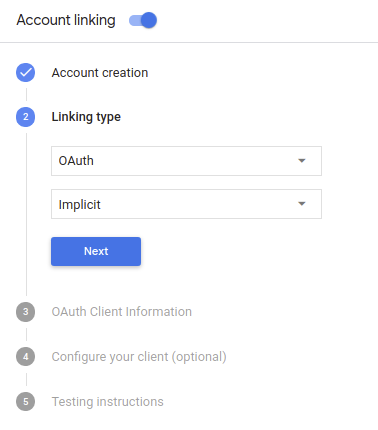
در اطلاعات مشتری :
- یک مقدار به Client ID صادر شده توسط Actions شما به Google اختصاص دهید تا درخواستهای ارسالی از Google را شناسایی کنید.
- آدرسهای اینترنتی را برای نقاط پایانی مجوز و مبادله رمز خود وارد کنید.
- روی ذخیره کلیک کنید.
سرور OAuth خود را پیاده سازی کنید
برای پشتیبانی از جریان ضمنی OAuth 2.0، سرویس شما یک نقطه پایانی مجوز را توسط HTTPS در دسترس قرار می دهد. این نقطه پایانی مسئول احراز هویت و کسب رضایت از کاربران برای دسترسی به داده است. نقطه پایانی مجوز یک رابط کاربری برای ورود به سیستم به کاربرانی که قبلاً وارد سیستم نشدهاند ارائه میکند و رضایت را برای دسترسی درخواستی ثبت میکند.
وقتی Action شما نیاز به تماس با یکی از APIهای مجاز سرویس شما دارد، Google از این نقطه پایانی استفاده میکند تا از کاربران شما اجازه بگیرد تا از طرف آنها با این APIها تماس بگیرد.
یک جلسه جریان ضمنی OAuth 2.0 که توسط Google آغاز شده است دارای جریان زیر است:
- Google نقطه پایانی مجوز شما را در مرورگر کاربر باز می کند. اگر کاربر قبلاً وارد سیستم نشده باشد، به سیستم وارد میشود و اگر قبلاً مجوز نداده باشد، به Google اجازه میدهد با API شما به دادههای خود دسترسی داشته باشد.
- سرویس شما یک نشانه دسترسی ایجاد میکند و با هدایت مرورگر کاربر به Google با علامت دسترسی پیوست شده به درخواست، آن را به Google برمیگرداند.
- Google APIهای سرویس شما را فراخوانی میکند و رمز دسترسی را با هر درخواست پیوست میکند. سرویس شما تأیید میکند که نشانه دسترسی به Google مجوز دسترسی به API را میدهد و سپس تماس API را تکمیل میکند.
رسیدگی به درخواست های مجوز
زمانی که Action شما باید پیوند حساب را از طریق جریان ضمنی OAuth2 انجام دهد، Google کاربر را با درخواستی که شامل پارامترهای زیر است به نقطه پایانی مجوز شما میفرستد:
| پارامترهای نقطه پایانی مجوز | |
|---|---|
client_id | شناسه مشتری که به Google اختصاص داده اید. |
redirect_uri | آدرس اینترنتی که پاسخ این درخواست را به آن ارسال می کنید. |
state | یک مقدار حسابداری که بدون تغییر در URI تغییر مسیر به Google بازگردانده می شود. |
response_type | نوع مقداری که باید در پاسخ برگردانده شود. برای جریان ضمنی OAuth 2.0، نوع پاسخ همیشه token است. |
برای مثال، اگر نقطه پایانی مجوز شما در https://myservice.example.com/auth موجود باشد، ممکن است یک درخواست به این صورت باشد:
GET https://myservice.example.com/auth?client_id=GOOGLE_CLIENT_ID&redirect_uri=REDIRECT_URI&state=STATE_STRING&response_type=token
برای اینکه نقطه پایانی مجوز شما به درخواستهای ورود به سیستم رسیدگی کند، مراحل زیر را انجام دهید:
برای جلوگیری از اعطای دسترسی به برنامه های مشتری ناخواسته یا پیکربندی نادرست، مقادیر
client_idوredirect_uriرا تأیید کنید:- تأیید کنید که
client_idبا شناسه مشتری که به Google اختصاص داده اید مطابقت دارد. - تأیید کنید که URL مشخص شده توسط پارامتر
redirect_uriشکل زیر را دارد:https://oauth-redirect.googleusercontent.com/r/YOUR_PROJECT_ID
- تأیید کنید که
بررسی کنید که آیا کاربر به سرویس شما وارد شده است یا خیر. اگر کاربر وارد سیستم نشده است، جریان ورود به سیستم یا ثبت نام سرویس خود را تکمیل کنید.
یک نشانه دسترسی ایجاد کنید که Google از آن برای دسترسی به API شما استفاده می کند. نشانه دسترسی میتواند هر مقدار رشتهای باشد، اما باید بهطور منحصربهفرد نشاندهنده کاربر و کلاینتی باشد که نشانه برای آن است و نباید قابل حدس زدن باشد.
یک پاسخ HTTP ارسال کنید که مرورگر کاربر را به URL مشخص شده توسط پارامتر
redirect_uriهدایت می کند. تمام پارامترهای زیر را در قطعه URL وارد کنید:-
access_token: نشانه دسترسی که ایجاد کردید -
token_type:bearerرشته -
state: مقدار حالت تغییر نیافته از درخواست اصلی مثال زیر نمونه ای از URL به دست آمده است:https://oauth-redirect.googleusercontent.com/r/YOUR_PROJECT_ID#access_token=ACCESS_TOKEN&token_type=bearer&state=STATE_STRING
-
کنترلکننده تغییر مسیر OAuth 2.0 Google نشانه دسترسی را دریافت میکند و تأیید میکند که مقدار state تغییر نکرده است. پس از اینکه Google یک رمز دسترسی برای سرویس شما به دست آورد، Google این رمز را به تماسهای بعدی به Action شما به عنوان بخشی از AppRequest متصل میکند.
جریان احراز هویت را شروع کنید
از هدف کمکی ورود به حساب کاربری برای شروع جریان احراز هویت استفاده کنید. قطعه کد زیر نحوه ارسال پاسخ در Dialogflow و Actions SDK را برای استفاده از این کمک کننده توضیح می دهد.
جریان گفتگو:
const {dialogflow, SignIn} = require('actions-on-google');
const app = dialogflow({
  // REPLACE THE PLACEHOLDER WITH THE CLIENT_ID OF YOUR ACTIONS PROJECT
  clientId: CLIENT_ID,
});
// Intent that starts the account linking flow.
app.intent('Start Signin', (conv) => {
  conv.ask(new SignIn('To get your account details'));
});
@ForIntent("Start Signin")
public ActionResponse text(ActionRequest request) {
  ResponseBuilder rb = getResponseBuilder(request);
  return rb.add(new SignIn().setContext("To get your account details")).build();
}
{
  "payload": {
    "google": {
      "expectUserResponse": true,
      "richResponse": {
        "items": [
          {
            "simpleResponse": {
              "textToSpeech": "PLACEHOLDER"
            }
          }
        ]
      },
      "userStorage": "{\"data\":{}}",
      "systemIntent": {
        "intent": "actions.intent.SIGN_IN",
        "data": {
          "@type": "type.googleapis.com/google.actions.v2.SignInValueSpec",
          "optContext": "To get your account details"
        }
      }
    }
  },
  "outputContexts": [
    {
      "name": "/contexts/_actions_on_google",
      "lifespanCount": 99,
      "parameters": {
        "data": "{}"
      }
    }
  ]
}
Actions SDK:
const {actionssdk, SignIn} = require('actions-on-google');
const app = actionssdk({
  // REPLACE THE PLACEHOLDER WITH THE CLIENT_ID OF YOUR ACTIONS PROJECT
  clientId: CLIENT_ID,
});
// Intent that starts the account linking flow.
app.intent('actions.intent.TEXT', (conv) => {
  conv.ask(new SignIn('To get your account details'));
});
@ForIntent("actions.intent.TEXT")
public ActionResponse text(ActionRequest request) {
  ResponseBuilder rb = getResponseBuilder(request);
  return rb.add(new SignIn().setContext("To get your account details")).build();
}
{
  "expectUserResponse": true,
  "expectedInputs": [
    {
      "inputPrompt": {
        "richInitialPrompt": {
          "items": [
            {
              "simpleResponse": {
                "textToSpeech": "PLACEHOLDER"
              }
            }
          ]
        }
      },
      "possibleIntents": [
        {
          "intent": "actions.intent.SIGN_IN",
          "inputValueData": {
            "@type": "type.googleapis.com/google.actions.v2.SignInValueSpec",
            "optContext": "To get your account details"
          }
        }
      ]
    }
  ],
  "conversationToken": "{\"data\":{}}",
  "userStorage": "{\"data\":{}}"
}
رسیدگی به درخواست های دسترسی به داده ها
اگر درخواست دستیار حاوی یک نشانه دسترسی است ، ابتدا بررسی کنید که نشانه دسترسی معتبر است (و منقضی نشده است) و سپس حساب کاربری مرتبط را از پایگاه داده خود بازیابی کنید.