Many Google apps, one platform in the cloud
Increase the power of your favorite Google apps — like Calendar, Docs, Drive, Gmail, Sheets, and Slides.
Apps Script lets you do more with Google. All on a JavaScript platform in the cloud.
Try a 5-minute quickstart
Add-on for Google Docs
Create a Docs add-on that transforms selected text into other languages with Google Translate.Macros, menus, and custom functions
Tailor spreadsheet functions to your needs and build reports with a custom menu in Google Sheets.Managing responses for Google Forms
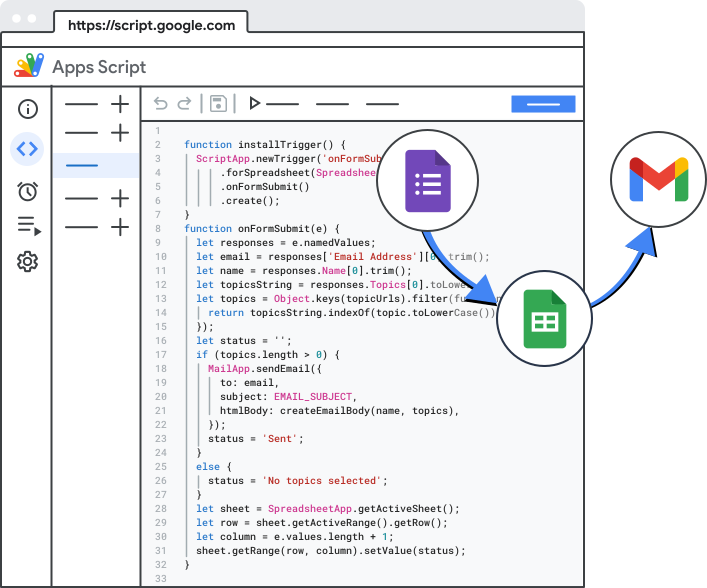
Email Calendar invites and a personalized Google Doc to every user who responds to a form.Build add-ons to extend Google Sheets, Docs, Slides, and Forms
Desktop add-ons for Docs, Sheets, Slides, and Forms
Apps Script makes it easy to create and publish add-ons in an online
store for Google Sheets, Docs, Slides, and Forms. There’s no better way to
distribute scripts to large numbers of users, whether you want to ship
your code to the whole world or keep it private to the users in your
G Suite domain.
A living, breathing platform (well, metaphorically)
August 20, 2018
- The Utilities service has been extended with the following methods and classes:
August 17, 2018
-
Apps Script add-on documentation has been moved to a new location:
G Suite Developer > Add-ons.
The Add-on documentation has been moved in an effort to make add-ons
more discoverable and improve site navigation.
In the coming months we will continue to expand and revise the Add-ons documentation to create a better developer learning experience.
June 19, 2018
- The
quota limits
for
UrlFetchGETresponse size andPOSTsize have been increased to 50MB / call. The quota on total data received byUrlFetchper day per user has been removed. - The Forms service now has the following method:
- The Utilities service
now has the following methods:
Utilities.computeDigest(algorithm, value), wherevalueis aBytearrayUtilities.computeHmacSha256Signature(value, key), wherevalueandkeyareBytearraysUtilities.computeHmacSignature(algorithm, value, key), wherevalueandkeyareBytearrays
April 23, 2018
- The Spreadsheet service has been extended with the new Group class and the GroupControlTogglePosition enum. Groups are an association between an interval of contiguous rows or columns that can be expanded or collapsed as a unit.
- The
Spreadsheet service
has been extended with the following new methods to support
Groups:
Range.collapseGroups()Range.expandGroups()Range.shiftColumnGroupDepth(delta)Range.shiftRowGroupDepth(delta)Sheet.collapseAllColumnGroups()Sheet.collapseAllRowGroups()Sheet.expandAllColumnGroups()Sheet.expandAllRowGroups()Sheet.expandColumnGroupsUpToDepth(groupDepth)Sheet.expandRowGroupsUpToDepth(groupDepth)Sheet.getColumnGroup(columnIndex, groupDepth)Sheet.getColumnGroupControlPosition()Sheet.getColumnGroupDepth(columnIndex)Sheet.getRowGroup(rowIndex, groupDepth)Sheet.getRowGroupControlPosition()Sheet.getRowGroupDepth(rowIndex)Sheet.setColumnGroupControlPosition(position)Sheet.setRowGroupControlPosition(position)
April 11, 2018
- Macros for Google Sheets are now becoming available for users, and will finish rolling out over then next few weeks. This feature lets you record macros in the Google Sheets UI and use Apps Script to create or edit them.
-
The Sheets service
has been extended with a large number of new classes and methods.
The addition of these methods make it possible to reproduce in code
nearly any action a Sheets user can take at a keyboard. The new
classes and methods include:
BandingThemeBandingBooleanConditionBooleanCriteriaConditionalFormatRuleBuilderConditionalFormatRuleDimensionDirectionFilterCriteriaBuilderFilterCriteriaFilterGradientConditionInterpolationTypePivotFilterPivotGroupPivotTableSummarizeFunctionPivotTablePivotTableDisplayTypePivotValueRangeListRelativeDateSelectionTextDirectionTextRotationTextToColumnsDelimiterWrapStrategyEmbeddedChartBuilder.setHiddenDimensionStrategy(strategy)(also in each of the type-specific chart builder classes)EmbeddedChartBuilder.setNumHeaders(headers)(also in each of the type-specific chart builder classes)EmbeddedChartBuilder.setTransposeRowsAndColumns(transpose)(also in each of the type-specific chart builder classes)Range.activateAsCurrentCell()Range.applyColumnBanding()Range.applyColumnBanding(bandingTheme)Range.applyColumnBanding(bandingTheme, showHeader, showFooter)Range.applyRowBanding()Range.applyRowBanding(bandingTheme)Range.applyRowBanding(bandingTheme, showHeader, showFooter)Range.createFilter()Range.createPivotTable(sourceData)Range.deleteCells(shiftDimension)Range.getBandings()Range.getNextDataCell(direction)Range.getTextDirection()Range.getTextDirections()Range.getTextRotation()Range.getTextRotations()Range.getWrapStrategies()Range.getWrapStrategy()Range.insertCells(shiftDimension)Range.setShowHyperlink(showHyperlink)Range.setTextDirection(direction)Range.setTextDirections(directions)Range.setTextRotation(degrees)Range.setTextRotation(rotation)Range.setTextRotations(rotations)Range.setVerticalText(isVertical)Range.setWrapStrategies(strategies)Range.setWrapStrategy(strategy)Range.setTextToColumns()Range.setTextToColumns(delimiter)Range.setTextToColumns(delimiter)Sheet.autoResizeColumns(startColumns, numColumns)Sheet.autoResizeRows(startRows, numRows)Sheet.clearConditionalFormatRules()Sheet.getActiveRangeList()Sheet.getBandings()Sheet.getConditionalFormatRules()Sheet.getCurrentCell()Sheet.getFilter()Sheet.getPivotTables()Sheet.getRangeList(a1Notations)Sheet.getSelection()Sheet.hasHiddenGridlines()Sheet.isRightToLeft()Sheet.setActiveRangeList(rangeList)Sheet.setColumnWidths(startColumn numColumns, width)Sheet.setConditionalFormatRules(rules)Sheet.setCurrentCell(cell)Sheet.setHiddenGridlines(hideGridlines)Sheet.setRightToLeft(rightToLeft)Sheet.setRowHeights(startRow, numRows, height)Spreadsheet.getActiveRangeList()Spreadsheet.getBandings()Spreadsheet.getCurrentCell()Spreadsheet.getRangeList(a1Notations)Spreadsheet.getSelection()Spreadsheet.setActiveRangeList(rangeList)Spreadsheet.setCurrentCell(cell)
-
The Charts service
has been extended to support EmbeddedCharts
in Google Sheets with the enums ChartHiddenDimensionStrategy
and
ChartMergeStrategy.
In addition, the following ChartTypes
have been added:
TIMELINEBUBBLECANDLESTICKGAUGEGEORADARORGSPARKLINESTEPPED_AREATREEMAPWATERFALL