Thêm điều khoản dành riêng cho người bán
Sử dụng bộ sưu tập để sắp xếp ngăn nắp các trang
Lưu và phân loại nội dung dựa trên lựa chọn ưu tiên của bạn.
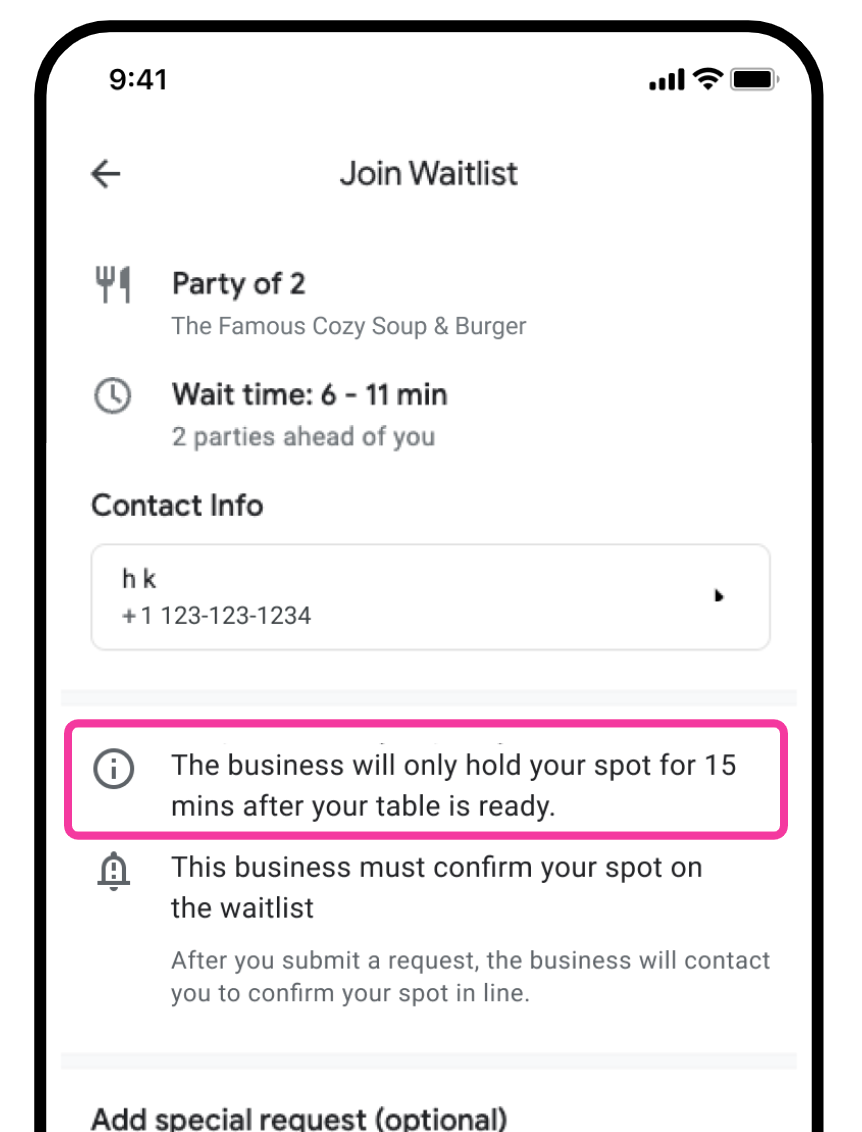
Mỗi người bán trong danh sách chờ có thể chọn chỉ định bất kỳ điều khoản hoặc điều kiện riêng biệt nào trên cửa sổ phương thức "Tham gia danh sách chờ".
[[["Dễ hiểu","easyToUnderstand","thumb-up"],["Giúp tôi giải quyết được vấn đề","solvedMyProblem","thumb-up"],["Khác","otherUp","thumb-up"]],[["Thiếu thông tin tôi cần","missingTheInformationINeed","thumb-down"],["Quá phức tạp/quá nhiều bước","tooComplicatedTooManySteps","thumb-down"],["Đã lỗi thời","outOfDate","thumb-down"],["Vấn đề về bản dịch","translationIssue","thumb-down"],["Vấn đề về mẫu/mã","samplesCodeIssue","thumb-down"],["Khác","otherDown","thumb-down"]],["Cập nhật lần gần đây nhất: 2026-09-11 UTC."],[],["Merchants can add unique terms to the \"Join Waitlist\" modal using the `merchant.waitlist_advisement` field. This is done by specifying text within the field. The content of the text is then shown as part of the terms and conditions. For example, a merchant might input a text value stating, \"We can only hold your table for 15 minutes once it is ready,\" to inform customers of their specific waitlist policy.\n"]]