Sử dụng bộ sưu tập để sắp xếp ngăn nắp các trang
Lưu và phân loại nội dung dựa trên lựa chọn ưu tiên của bạn.
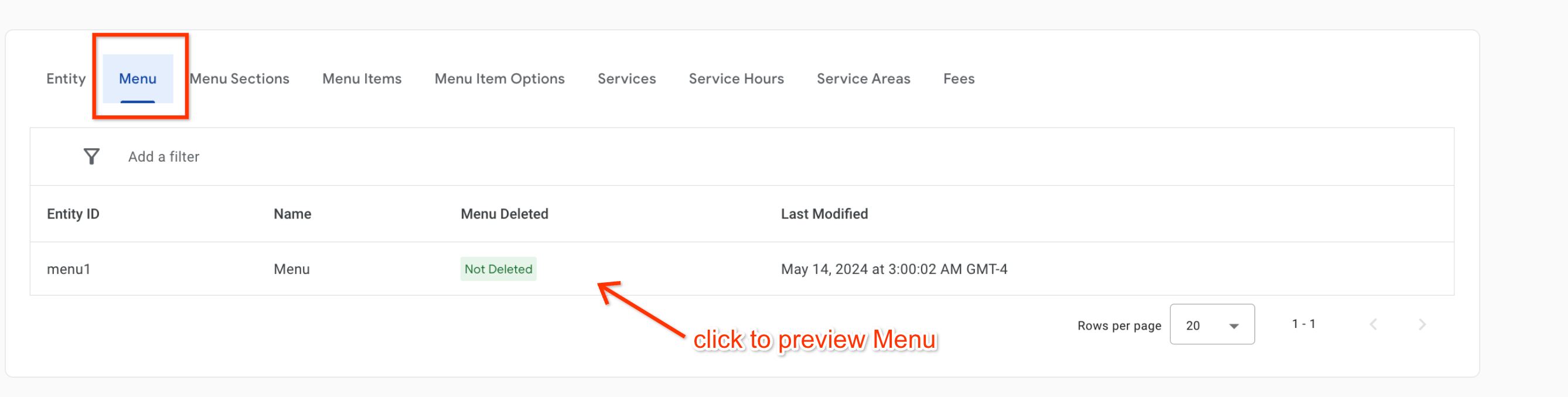
Trình trực quan hoá trình đơn cho phép các đối tác trực quan hoá nguồn cấp dữ liệu trình đơn trong môi trường thử nghiệm/môi trường thực tế trong Trung tâm hành động.
Lưu ý: Trình xem thực đơn không phản ánh cách dữ liệu sẽ xuất hiện trên bất kỳ nền tảng nào của người dùng. Trình xem này dùng để kiểm thử dữ liệu có cấu trúc của thực đơn, chẳng hạn như giá, hình ảnh và bố cục thực đơn.
[[["Dễ hiểu","easyToUnderstand","thumb-up"],["Giúp tôi giải quyết được vấn đề","solvedMyProblem","thumb-up"],["Khác","otherUp","thumb-up"]],[["Thiếu thông tin tôi cần","missingTheInformationINeed","thumb-down"],["Quá phức tạp/quá nhiều bước","tooComplicatedTooManySteps","thumb-down"],["Đã lỗi thời","outOfDate","thumb-down"],["Vấn đề về bản dịch","translationIssue","thumb-down"],["Vấn đề về mẫu/mã","samplesCodeIssue","thumb-down"],["Khác","otherDown","thumb-down"]],["Cập nhật lần gần đây nhất: 2025-07-26 UTC."],[[["\u003cp\u003eThe Menu Visualizer in Actions Center lets partners preview their menu feeds in a sandbox or production environment to check data accuracy.\u003c/p\u003e\n"],["\u003cp\u003eIt focuses on the structure and content of menu data like pricing, images, and layout, not the consumer-facing appearance.\u003c/p\u003e\n"],["\u003cp\u003eMenus become visible in the visualizer within approximately 2 hours of successful ingestion and appearance in Inventory View.\u003c/p\u003e\n"],["\u003cp\u003eAccess the Menu Visualizer by navigating to Inventory > Food Ordering Entities in Actions Center and selecting the Menu tab.\u003c/p\u003e\n"],["\u003cp\u003eClick on any menu entity within the Menu tab to see a visual representation on the subsequent page.\u003c/p\u003e\n"]]],["The Menu Visualizer tool in the Actions Center allows partners to view their menu feeds in sandbox or production environments. It is used to test structured menu data, including prices, images, and layout, but does not represent consumer-facing displays. Menus appear in the visualizer within two hours of successful ingestion, which can be confirmed in the Inventory View. Access the Menu Visualizer by navigating to Inventory \u003e Food Ordering Entities and then selecting the Menu tab.\n"],null,[]]