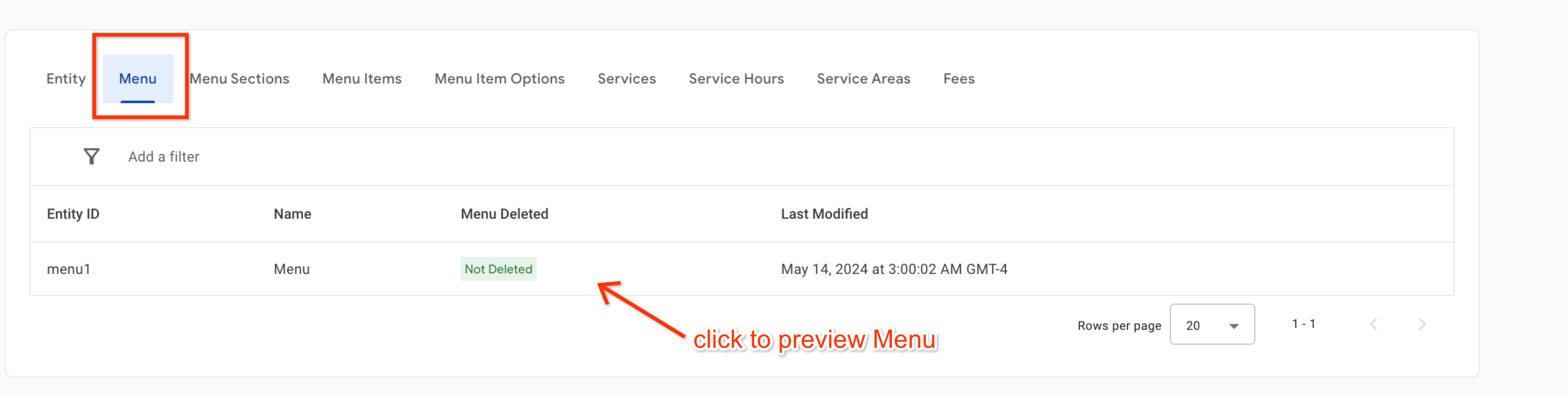
[[["เข้าใจง่าย","easyToUnderstand","thumb-up"],["แก้ปัญหาของฉันได้","solvedMyProblem","thumb-up"],["อื่นๆ","otherUp","thumb-up"]],[["ไม่มีข้อมูลที่ฉันต้องการ","missingTheInformationINeed","thumb-down"],["ซับซ้อนเกินไป/มีหลายขั้นตอนมากเกินไป","tooComplicatedTooManySteps","thumb-down"],["ล้าสมัย","outOfDate","thumb-down"],["ปัญหาเกี่ยวกับการแปล","translationIssue","thumb-down"],["ตัวอย่าง/ปัญหาเกี่ยวกับโค้ด","samplesCodeIssue","thumb-down"],["อื่นๆ","otherDown","thumb-down"]],["อัปเดตล่าสุด 2025-07-26 UTC"],[[["\u003cp\u003eThe Menu Visualizer in Actions Center lets partners preview their menu feeds in a sandbox or production environment to check data accuracy.\u003c/p\u003e\n"],["\u003cp\u003eIt focuses on the structure and content of menu data like pricing, images, and layout, not the consumer-facing appearance.\u003c/p\u003e\n"],["\u003cp\u003eMenus become visible in the visualizer within approximately 2 hours of successful ingestion and appearance in Inventory View.\u003c/p\u003e\n"],["\u003cp\u003eAccess the Menu Visualizer by navigating to Inventory > Food Ordering Entities in Actions Center and selecting the Menu tab.\u003c/p\u003e\n"],["\u003cp\u003eClick on any menu entity within the Menu tab to see a visual representation on the subsequent page.\u003c/p\u003e\n"]]],["The Menu Visualizer tool in the Actions Center allows partners to view their menu feeds in sandbox or production environments. It is used to test structured menu data, including prices, images, and layout, but does not represent consumer-facing displays. Menus appear in the visualizer within two hours of successful ingestion, which can be confirmed in the Inventory View. Access the Menu Visualizer by navigating to Inventory \u003e Food Ordering Entities and then selecting the Menu tab.\n"],null,[]]