
পিভট টেবিল, পিভট টেবিল

এই নির্দেশিকাটি বর্ণনা করে যে কীভাবে এবং কেন আপনার স্প্রেডশিটে পিভট টেবিল তৈরি করতে Google Sheets API ব্যবহার করবেন।

পিভট টেবিল কী?

পিভট টেবিলগুলি আপনার স্প্রেডশিটে ডেটা সারসংক্ষেপ করার একটি উপায় প্রদান করে, স্বয়ংক্রিয়ভাবে ডেটা একত্রিত করে, বাছাই করে, গণনা করে বা গড় করে, একই সাথে একটি নতুন টেবিলে সংক্ষিপ্ত ফলাফল প্রদর্শন করে। একটি পিভট টেবিল একটি উৎস ডেটাসেটের বিরুদ্ধে এক ধরণের কোয়েরি হিসাবে কাজ করে। এই উৎস ডেটা স্প্রেডশিটের অন্য কোনও স্থানে বিদ্যমান থাকে এবং পিভট টেবিলটি ডেটার একটি প্রক্রিয়াজাত দৃশ্য উপস্থাপন করে।

উদাহরণস্বরূপ, নিম্নলিখিত বিক্রয় ডেটাসেটটি বিবেচনা করুন:

আইটেম বিভাগ মডেল নম্বর খরচ পরিমাণ অঞ্চল বিক্রয়কর্মী পাঠানোর তারিখ
চাকা W-24 সম্পর্কে $২০.৫০ পশ্চিম বেথ ৩/১/২০১৬
দরজা ডি-০১এক্স $১৫.০০ দক্ষিণ আমির ৩/১৫/২০১৬
ইঞ্জিন ENG-0134 সম্পর্কে $১০০.০০ উত্তর কারমেন ৩/২০/২০১৬
ফ্রেম এফআর-০বি১ $৩৪.০০ পূর্ব হান্না ৩/১২/২০১৬
প্যানেল পি-০৩৪ $৬.০০ উত্তর ডেভিন ৪/২/২০১৬
প্যানেল পি-০৫২ $১১.৫০ পূর্ব এরিক ৫/১৬/২০১৬
চাকা W-24 সম্পর্কে $২০.৫০ ১১ দক্ষিণ শেলডন ৪/৩০/২০১৬
ইঞ্জিন ENG-0161 সম্পর্কে $৩৩০.০০ উত্তর জেসি ৭/২/২০১৬
১০ দরজা ডি-০১ওয়াই $২৯.০০ পশ্চিম আরমান্ডো ৩/১৩/২০১৬
১১ ফ্রেম এফআর-০বি১ $৩৪.০০ দক্ষিণ ইউলিয়ানা ২/২৭/২০১৬
১২ প্যানেল পি-১০২ $৩.০০ ১৫ পশ্চিম কারমেন ৪/১৮/২০১৬
১৩ প্যানেল পি-১০৫ $৮.২৫ ১৩ পশ্চিম জেসি ২০/৬/২০১৬
১৪ ইঞ্জিন ENG-0211 সম্পর্কে $২৮৩.০০ উত্তর আমির ২১/৬/২০১৬
১৫ দরজা ডি-০১এক্স $১৫.০০ পশ্চিম আরমান্ডো ৭/৩/২০১৬
১৬ ফ্রেম এফআর-০বি১ $৩৪.০০ দক্ষিণ কারমেন ৭/১৫/২০১৬
১৭ চাকা W-25 সম্পর্কে $২০.০০ দক্ষিণ হান্না ৫/২/২০১৬
১৮ চাকা ডাব্লু-১১ $২৯.০০ ১৩ পূর্ব এরিক ৫/১৯/২০১৬
১৯ দরজা ডি-০৫ $১৭.৭০ পশ্চিম বেথ ৬/২৮/২০১৬
২০ ফ্রেম এফআর-০বি১ $৩৪.০০ উত্তর শেলডন ৩০/৩/২০১৬

প্রতিটি অঞ্চলে কতগুলি মডেল নম্বর বিক্রি হয়েছে তা দেখানোর জন্য আপনি একটি পিভট টেবিল ব্যবহার করতে পারেন:
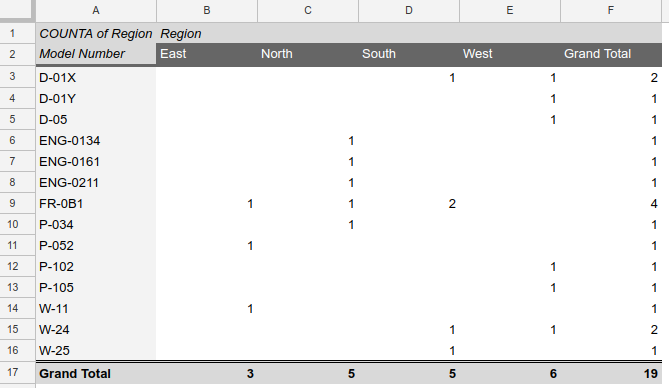
অঞ্চল অনুসারে মডেল নম্বরের গণনা দেখানো একটি পিভট টেবিলের স্ক্রিনশট

এই পিভট টেবিলটি তৈরি করতে ব্যবহৃত সোর্স কোডের জন্য, নীচের উদাহরণ বিভাগটি দেখুন।

একবার একটি পিভট টেবিল স্প্রেডশিটে স্থাপন করা হলে, ব্যবহারকারীরা Sheets UI ব্যবহার করে ইন্টারেক্টিভভাবে সারাংশের কাঠামো এবং বিবরণ পরিবর্তন করতে পারবেন।

পিভট টেবিল নিয়ে কাজ করা

একটি পিভট টেবিলের সংজ্ঞা একটি শীটের একটি একক ঘরের সাথে সম্পর্কিত। যদিও এর রেন্ডার করা চেহারা উচ্চতা এবং প্রস্থ উভয় ক্ষেত্রেই অনেক কোষ, প্রোগ্রাম্যাটিকভাবে এটি একটি একক কোষ স্থানাঙ্কে অবস্থিত। এই ঘরটি রেন্ডার করা পিভট টেবিলের উপরের-বাম কোণে পরিণত হয়, যার অনুভূমিক এবং উল্লম্ব ব্যাপ্তি এর সংজ্ঞা দ্বারা নির্ধারিত হয়।

একটি পিভট টেবিল যোগ করা হচ্ছে

একটি পিভট টেবিল যোগ করতে, batchUpdate পদ্ধতি ব্যবহার করুন, যা একটি updateCells অনুরোধ সরবরাহ করে। আপনি নীচে দেখানো হিসাবে একটি ঘরের বিষয়বস্তু হিসাবে একটি PivotTable সংজ্ঞা সরবরাহ করতে এই অনুরোধটি ব্যবহার করেন:

{
  "updateCells": {
    "rows": {
      "values": [
        {
          "pivotTable": "MyPivotTable"
        }
      ],
      "start": {
        "sheetId": "sheetId",
        "rowIndex": 0,
        "columnIndex": 0
      },
      "fields": "pivotTable"
    }
  }
}

এটি MyPivotTable দ্বারা বর্ণিত পিভট টেবিলটি নির্দিষ্ট শীটে স্থাপন করে, উপরের বাম কোণে A1 কক্ষে। (পিভট টেবিলের উচ্চতা এবং প্রস্থ গতিশীল; আপনি কেবল উৎপত্তিস্থল উল্লেখ করেন।)

PivotTable টাইপ আপনাকে নির্দিষ্ট করতে দেয়:

  • উৎস ডেটা পরিসর
  • এক বা একাধিক ক্ষেত্র যার ডেটা পিভট টেবিলের সারি তৈরি করবে
  • এক বা একাধিক ক্ষেত্র যার ডেটা পিভট টেবিলের কলাম গঠন করবে
  • ফিল্টারিং এবং একত্রিতকরণের মানদণ্ড
  • পিভট টেবিল লেআউট

পিভট টেবিলগুলি পরিবর্তন এবং মুছে ফেলা হচ্ছে

পিভট টেবিল পরিবর্তন বা মুছে ফেলার জন্য কোনও স্পষ্ট অনুরোধ নেই। পরিবর্তে, বিভিন্ন কক্ষের বিষয়বস্তু সহ একটি updateCells অনুরোধ ব্যবহার করুন:

  • একটি পিভট টেবিল পরিবর্তন করতে, একটি পরিবর্তিত পিভটটেবল সংজ্ঞা তৈরি করুন এবং এটি ব্যবহার করে সেলটি আপডেট করুন, যেমন একটি নতুন পিভট টেবিল যোগ করা হয়েছে।
  • একটি পিভট টেবিল মুছে ফেলার জন্য, খালি মান সহ ঘরটি আপডেট করুন। উদাহরণস্বরূপ, একটি পিভট টেবিল মুছে ফেলুন নমুনা দেখুন।

ব্যবহারের ক্ষেত্রে

পরিসংখ্যানগত বিশ্লেষণ, ERP অ্যাপ্লিকেশন, আর্থিক প্রতিবেদন এবং অন্যান্য বিস্তৃত ক্ষেত্রগুলিতে পিভট টেবিলের অনেকগুলি ভিন্ন ভিন্ন ব্যবহার রয়েছে। ক্লাসিক পিভট টেবিল ব্যবহারের ক্ষেত্রে নিম্নলিখিত বিষয়গুলি অন্তর্ভুক্ত রয়েছে:

  • অঞ্চল এবং ত্রৈমাসিক অনুসারে মোট বিক্রয়
  • পদবী এবং অবস্থান অনুসারে গড় বেতন
  • পণ্য এবং দিনের সময় অনুসারে ঘটনার সংখ্যা

পিভট টেবিলের সম্ভাব্য প্রয়োগের সংখ্যা বিশাল, এবং প্রোগ্রাম্যাটিকভাবে সেগুলি তৈরি করার ক্ষমতা শক্তিশালী। আপনি এমন পিভট টেবিল তৈরি করতে পারেন যা ইন্টারেক্টিভ অন্বেষণকে সমর্থন করে তবে নির্দিষ্ট পরিস্থিতিতে তৈরি করা হয়, উদাহরণস্বরূপ:

  • সাম্প্রতিক ২৪ ঘন্টার ঘটনার তথ্য অন্বেষণ করুন
  • নির্বাচিত অ্যাকাউন্টের সাথে সম্পর্কিত সমষ্টিগত ডেটা দেখুন বা বিশ্লেষণ করুন
  • বর্তমান ব্যবহারকারীর অঞ্চলগুলির বিক্রয় তথ্য পরীক্ষা করুন।

উদাহরণ

এই উদাহরণটি একটি ডেটাসেট থেকে একটি পিভট টেবিল তৈরি করে যা এই পৃষ্ঠার ভূমিকায় দেখানো "অঞ্চল অনুসারে মডেল নম্বর" রিপোর্ট তৈরি করে। অতিরিক্ত উদাহরণের জন্য, পিভট টেবিলের নমুনা পৃষ্ঠাটি দেখুন।

অ্যাপস স্ক্রিপ্ট

শিটস/এপিআই/স্প্রেডশিট_স্নিপেটস.জিএস
/**
 * Create pivot table
 * @param {string} spreadsheetId spreadsheet ID
 * @returns {*} pivot table's spreadsheet
 */
Snippets.prototype.pivotTable = (spreadsheetId) => {
  try {
    const spreadsheet = SpreadsheetApp.openById(spreadsheetId);

    // Create two sheets for our pivot table, assume we have one.
    const sheet = spreadsheet.getSheets()[0];
    sheet.copyTo(spreadsheet);

    const sourceSheetId = spreadsheet.getSheets()[0].getSheetId();
    const targetSheetId = spreadsheet.getSheets()[1].getSheetId();

    // Create pivot table
    const pivotTable = Sheets.newPivotTable();

    const gridRange = Sheets.newGridRange();
    gridRange.sheetId = sourceSheetId;
    gridRange.startRowIndex = 0;
    gridRange.startColumnIndex = 0;
    gridRange.endRowIndex = 20;
    gridRange.endColumnIndex = 7;
    pivotTable.source = gridRange;

    const pivotRows = Sheets.newPivotGroup();
    pivotRows.sourceColumnOffset = 1;
    pivotRows.showTotals = true;
    pivotRows.sortOrder = "ASCENDING";
    pivotTable.rows = pivotRows;

    const pivotColumns = Sheets.newPivotGroup();
    pivotColumns.sourceColumnOffset = 4;
    pivotColumns.sortOrder = "ASCENDING";
    pivotColumns.showTotals = true;
    pivotTable.columns = pivotColumns;

    const pivotValue = Sheets.newPivotValue();
    pivotValue.summarizeFunction = "COUNTA";
    pivotValue.sourceColumnOffset = 4;
    pivotTable.values = [pivotValue];

    // Create other metadata for the updateCellsRequest
    const cellData = Sheets.newCellData();
    cellData.pivotTable = pivotTable;

    const rows = Sheets.newRowData();
    rows.values = cellData;

    const start = Sheets.newGridCoordinate();
    start.sheetId = targetSheetId;
    start.rowIndex = 0;
    start.columnIndex = 0;

    const updateCellsRequest = Sheets.newUpdateCellsRequest();
    updateCellsRequest.rows = rows;
    updateCellsRequest.start = start;
    updateCellsRequest.fields = "pivotTable";

    // Batch update our spreadsheet
    const batchUpdate = Sheets.newBatchUpdateSpreadsheetRequest();
    const updateCellsRawRequest = Sheets.newRequest();
    updateCellsRawRequest.updateCells = updateCellsRequest;
    batchUpdate.requests = [updateCellsRawRequest];
    const response = Sheets.Spreadsheets.batchUpdate(
      batchUpdate,
      spreadsheetId,
    );

    return response;
  } catch (err) {
    // TODO (developer) - Handle exception
    console.log("Failed with error %s", err.message);
  }
};

জাভা

শীট/স্নিপেট/src/main/java/PivotTables.java
import com.google.api.client.googleapis.json.GoogleJsonError;
import com.google.api.client.googleapis.json.GoogleJsonResponseException;
import com.google.api.client.http.HttpRequestInitializer;
import com.google.api.client.http.javanet.NetHttpTransport;
import com.google.api.client.json.gson.GsonFactory;
import com.google.api.services.sheets.v4.Sheets;
import com.google.api.services.sheets.v4.SheetsScopes;
import com.google.api.services.sheets.v4.model.AddSheetRequest;
import com.google.api.services.sheets.v4.model.BatchUpdateSpreadsheetRequest;
import com.google.api.services.sheets.v4.model.BatchUpdateSpreadsheetResponse;
import com.google.api.services.sheets.v4.model.CellData;
import com.google.api.services.sheets.v4.model.GridCoordinate;
import com.google.api.services.sheets.v4.model.GridRange;
import com.google.api.services.sheets.v4.model.PivotGroup;
import com.google.api.services.sheets.v4.model.PivotTable;
import com.google.api.services.sheets.v4.model.PivotValue;
import com.google.api.services.sheets.v4.model.Request;
import com.google.api.services.sheets.v4.model.RowData;
import com.google.api.services.sheets.v4.model.UpdateCellsRequest;
import com.google.auth.http.HttpCredentialsAdapter;
import com.google.auth.oauth2.GoogleCredentials;
import com.google.common.collect.Lists;
import java.io.IOException;
import java.util.ArrayList;
import java.util.Collections;
import java.util.List;

/* Class to demonstrate the use of Spreadsheet Create Pivot Tables API */
public class PivotTables {
  /**
   * Create pivot table.
   *
   * @param spreadsheetId - Id of the spreadsheet.
   * @return pivot table's spreadsheet
   * @throws IOException - if credentials file not found.
   */
  public static BatchUpdateSpreadsheetResponse pivotTables(String spreadsheetId)
      throws IOException {
        /* Load pre-authorized user credentials from the environment.
           TODO(developer) - See https://developers.google.com/identity for
            guides on implementing OAuth2 for your application. */
    GoogleCredentials credentials = GoogleCredentials.getApplicationDefault()
        .createScoped(Collections.singleton(SheetsScopes.SPREADSHEETS));
    HttpRequestInitializer requestInitializer = new HttpCredentialsAdapter(
        credentials);

    // Create the sheets API client
    Sheets service = new Sheets.Builder(new NetHttpTransport(),
        GsonFactory.getDefaultInstance(),
        requestInitializer)
        .setApplicationName("Sheets samples")
        .build();

    // Create two sheets for our pivot table.
    List<Request> sheetsRequests = new ArrayList<>();
    BatchUpdateSpreadsheetResponse result = null;
    try {
      sheetsRequests.add(new Request().setAddSheet(new AddSheetRequest()));
      sheetsRequests.add(new Request().setAddSheet(new AddSheetRequest()));

      BatchUpdateSpreadsheetRequest createSheetsBody = new BatchUpdateSpreadsheetRequest()
          .setRequests(sheetsRequests);
      BatchUpdateSpreadsheetResponse createSheetsResponse = service.spreadsheets()
          .batchUpdate(spreadsheetId, createSheetsBody).execute();
      int sourceSheetId = createSheetsResponse.getReplies().get(0).getAddSheet().getProperties()
          .getSheetId();
      int targetSheetId = createSheetsResponse.getReplies().get(1).getAddSheet().getProperties()
          .getSheetId();

      PivotTable pivotTable = new PivotTable()
          .setSource(
              new GridRange()
                  .setSheetId(sourceSheetId)
                  .setStartRowIndex(0)
                  .setStartColumnIndex(0)
                  .setEndRowIndex(20)
                  .setEndColumnIndex(7)
          )
          .setRows(Collections.singletonList(
              new PivotGroup()
                  .setSourceColumnOffset(1)
                  .setShowTotals(true)
                  .setSortOrder("ASCENDING")
          ))
          .setColumns(Collections.singletonList(
              new PivotGroup()
                  .setSourceColumnOffset(4)
                  .setShowTotals(true)
                  .setSortOrder("ASCENDING")
          ))
          .setValues(Collections.singletonList(
              new PivotValue()
                  .setSummarizeFunction("COUNTA")
                  .setSourceColumnOffset(4)
          ));
      List<Request> requests = Lists.newArrayList();
      Request updateCellsRequest = new Request().setUpdateCells(new UpdateCellsRequest()
          .setFields("*")
          .setRows(Collections.singletonList(
              new RowData().setValues(
                  Collections.singletonList(
                      new CellData().setPivotTable(pivotTable))
              )
          ))
          .setStart(new GridCoordinate()
              .setSheetId(targetSheetId)
              .setRowIndex(0)
              .setColumnIndex(0)

          ));

      requests.add(updateCellsRequest);
      BatchUpdateSpreadsheetRequest updateCellsBody = new BatchUpdateSpreadsheetRequest()
          .setRequests(requests);
      result = service.spreadsheets().batchUpdate(spreadsheetId, updateCellsBody).execute();
    } catch (GoogleJsonResponseException e) {
      // TODO(developer) - handle error appropriately
      GoogleJsonError error = e.getDetails();
      if (error.getCode() == 404) {
        System.out.printf("Spreadsheet not found with id '%s'.\n", spreadsheetId);
      } else {
        throw e;
      }
    }
    return result;
  }
}

জাভাস্ক্রিপ্ট

শিট/স্নিপেট/শিট_পিভট_টেবিল.জেএস
function pivotTable(spreadsheetId, callback) {
  // Create two sheets for our pivot table
  const requests = [{
    addSheet: {},
  }, {
    addSheet: {},
  }];
  const batchUpdateRequest = {requests: requests};
  try {
    gapi.client.sheets.spreadsheets.batchUpdate({
      spreadsheetId: spreadsheetId,
      resource: batchUpdateRequest,
    }).then((response) => {
      const sourceSheetId = response.result.replies[0].addSheet.properties.sheetId;
      const targetSheetId = response.result.replies[1].addSheet.properties.sheetId;

      const requests = [{
        updateCells: {
          rows: {
            values: [{
              pivotTable: {
                source: {
                  sheetId: sourceSheetId,
                  startRowIndex: 0,
                  startColumnIndex: 0,
                  endRowIndex: 20,
                  endColumnIndex: 7,
                },
                rows: [{
                  sourceColumnOffset: 1,
                  showTotals: true,
                  sortOrder: 'ASCENDING',
                }],
                columns: [{
                  sourceColumnOffset: 4,
                  sortOrder: 'ASCENDING',
                  showTotals: true,
                }],
                values: [{
                  summarizeFunction: 'COUNTA',
                  sourceColumnOffset: 4,
                }],
                valueLayout: 'HORIZONTAL',
              },
            },
            ],
          },
          start: {
            sheetId: targetSheetId,
            rowIndex: 0,
            columnIndex: 0,
          },
          fields: 'pivotTable',
        },
      }];

      const body = {
        requests,
      };
      gapi.client.sheets.spreadsheets.batchUpdate({
        spreadsheetId: spreadsheetId,
        resource: body,
      }).then((response) => {
        if (callback) callback(response);
      });
    });
  } catch (err) {
    document.getElementById('content').innerText = err.message;
    return;
  }
}

নোড.জেএস

শীট/স্নিপেট/শীট_পিভট_টেবিল.জেএস
import {GoogleAuth} from 'google-auth-library';
import {google} from 'googleapis';

/**
 * Creates a pivot table in a spreadsheet.
 * @param {string} spreadsheetId The ID of the spreadsheet.
 * @return {Promise<object>} The response from the batch update.
 */
async function pivotTable(spreadsheetId) {
  // Authenticate with Google and get an authorized client.
  const auth = new GoogleAuth({
    scopes: 'https://www.googleapis.com/auth/spreadsheets',
  });

  const service = google.sheets({version: 'v4', auth});

  // Create two new sheets for the pivot table.
  // One for the source data and one for the pivot table itself.
  let requests = [
    {
      addSheet: {},
    },
    {
      addSheet: {},
    },
  ];
  let resource = {requests};
  let response = await service.spreadsheets.batchUpdate({
    spreadsheetId,
    resource,
  });

  // Get the IDs of the newly created sheets.
  const sourceSheetId = response.data.replies[0].addSheet.properties.sheetId;
  const targetSheetId = response.data.replies[1].addSheet.properties.sheetId;

  // Add a pivot table to the new sheet.
  requests = [
    {
      updateCells: {
        rows: {
          values: [
            {
              pivotTable: {
                // The source data for the pivot table.
                source: {
                  sheetId: sourceSheetId,
                  startRowIndex: 0,
                  startColumnIndex: 0,
                  endRowIndex: 20,
                  endColumnIndex: 7,
                },
                // The rows of the pivot table.
                rows: [
                  {
                    sourceColumnOffset: 1,
                    showTotals: true,
                    sortOrder: 'ASCENDING',
                  },
                ],
                // The columns of the pivot table.
                columns: [
                  {
                    sourceColumnOffset: 4,
                    sortOrder: 'ASCENDING',
                    showTotals: true,
                  },
                ],
                // The values to display in the pivot table.
                values: [
                  {
                    summarizeFunction: 'COUNTA',
                    sourceColumnOffset: 4,
                  },
                ],
                valueLayout: 'HORIZONTAL',
              },
            },
          ],
        },
        // The location to place the pivot table.
        start: {
          sheetId: targetSheetId,
          rowIndex: 0,
          columnIndex: 0,
        },
        fields: 'pivotTable',
      },
    },
  ];
  resource = {
    requests,
  };

  // Send the batch update request to create the pivot table.
  response = service.spreadsheets.batchUpdate({
    spreadsheetId,
    resource,
  });
  return response;
}

পিএইচপি

শীট/স্নিপেট/src/SpreadsheetPivotTables.php
<?php
use Google\Client;
use Google\Service\Drive;
use Google\Service\Sheets\BatchUpdateSpreadsheetRequest;


function pivotTables($spreadsheetId)
    {
        /* Load pre-authorized user credentials from the environment.
           TODO(developer) - See https://developers.google.com/identity for
            guides on implementing OAuth2 for your application. */
        $client = new Google\Client();
        $client->useApplicationDefaultCredentials();
        $client->addScope(Google\Service\Drive::DRIVE);
        $service = new Google_Service_Sheets($client);
        try{
            $requests = [
                new Google_Service_Sheets_Request([
                    'addSheet' => [
                        'properties' => [
                            'title' => 'Sheet 1'
                            ]
                ]
            ]),
            new Google_Service_Sheets_Request([
                'addSheet' => [
                    'properties' => [
                        'title' => 'Sheet 2'
                        ]
                        ]
                        ])
                    ];
                    // Create two sheets for our pivot table
                    $batchUpdateRequest = new Google_Service_Sheets_BatchUpdateSpreadsheetRequest([
                        'requests' => $requests
                    ]);
        $batchUpdateResponse = $service->spreadsheets->batchUpdate($spreadsheetId, $batchUpdateRequest);
        $sourceSheetId = $batchUpdateResponse->replies[0]->addSheet->properties->sheetId;
        $targetSheetId = $batchUpdateResponse->replies[1]->addSheet->properties->sheetId;
        $requests = [
            'updateCells' => [
                'rows' => [
                    'values' => [
                        [
                            'pivotTable' => [
                                'source' => [
                                    'sheetId' => $sourceSheetId,
                                    'startRowIndex' => 0,
                                    'startColumnIndex' => 0,
                                    'endRowIndex' => 20,
                                    'endColumnIndex' => 7
                                ],
                                'rows' => [
                                    [
                                        'sourceColumnOffset' => 1,
                                        'showTotals' => true,
                                        'sortOrder' => 'ASCENDING',
                                    ],
                                ],
                                'columns' => [
                                    [
                                        'sourceColumnOffset' => 4,
                                        'sortOrder' => 'ASCENDING',
                                        'showTotals' => true,
                                    ]
                                ],
                                'values' => [
                                    [
                                        'summarizeFunction' => 'COUNTA',
                                        'sourceColumnOffset' => 4
                                        ]
                                    ],
                                'valueLayout' => 'HORIZONTAL'
                            ]
                        ]
                        ]
                ],
                'start' => [
                    'sheetId' => $targetSheetId,
                    'rowIndex' => 0,
                    'columnIndex' => 0
                ],
                'fields' => 'pivotTable'
            ]
        ];
        return $batchUpdateResponse;
    }
        catch(Exception $e) {
            // TODO(developer) - handle error appropriately
            echo 'Message: ' .$e->getMessage();
        }
    }

পাইথন

শীট/স্নিপেট/শীট_পিভট_টেবিল.পি
import google.auth
from googleapiclient.discovery import build
from googleapiclient.errors import HttpError


def pivot_tables(spreadsheet_id):
  """
  Creates the batch_update the user has access to.
  Load pre-authorized user credentials from the environment.
  TODO(developer) - See https://developers.google.com/identity
  for guides on implementing OAuth2 for the application.
  """
  creds, _ = google.auth.default()
  # pylint: disable=maybe-no-member
  try:
    service = build("sheets", "v4", credentials=creds)
    # Create two sheets for our pivot table.
    body = {"requests": [{"addSheet": {}}, {"addSheet": {}}]}
    batch_update_response = (
        service.spreadsheets()
        .batchUpdate(spreadsheetId=spreadsheet_id, body=body)
        .execute()
    )
    source_sheet_id = (
        batch_update_response.get("replies")[0]
        .get("addSheet")
        .get("properties")
        .get("sheetId")
    )
    target_sheet_id = (
        batch_update_response.get("replies")[1]
        .get("addSheet")
        .get("properties")
        .get("sheetId")
    )
    requests = []
    requests.append(
        {
            "updateCells": {
                "rows": {
                    "values": [
                        {
                            "pivotTable": {
                                "source": {
                                    "sheetId": source_sheet_id,
                                    "startRowIndex": 0,
                                    "startColumnIndex": 0,
                                    "endRowIndex": 20,
                                    "endColumnIndex": 7,
                                },
                                "rows": [
                                    {
                                        "sourceColumnOffset": 1,
                                        "showTotals": True,
                                        "sortOrder": "ASCENDING",
                                    },
                                ],
                                "columns": [{
                                    "sourceColumnOffset": 4,
                                    "sortOrder": "ASCENDING",
                                    "showTotals": True,
                                }],
                                "values": [{
                                    "summarizeFunction": "COUNTA",
                                    "sourceColumnOffset": 4,
                                }],
                                "valueLayout": "HORIZONTAL",
                            }
                        }
                    ]
                },
                "start": {
                    "sheetId": target_sheet_id,
                    "rowIndex": 0,
                    "columnIndex": 0,
                },
                "fields": "pivotTable",
            }
        }
    )
    body = {"requests": requests}
    response = (
        service.spreadsheets()
        .batchUpdate(spreadsheetId=spreadsheet_id, body=body)
        .execute()
    )
    return response

  except HttpError as error:
    print(f"An error occurred: {error}")
    return error


if __name__ == "__main__":
  # Pass: spreadsheet_id
  pivot_tables("1CM29gwKIzeXsAppeNwrc8lbYaVMmUclprLuLYuHog4k")

রুবি

শিট/স্নিপেট/লিব/স্প্রেডশিট_স্নিপেটস.আরবি
requests = [{
  update_cells: {
    rows:   {
      values: [
        {
          pivot_table: {
            source:       {
              sheet_id:           source_sheet_id,
              start_row_index:    0,
              start_column_index: 0,
              end_row_index:      20,
              end_column_index:   7
            },
            rows:         [
              {
                source_column_offset: 1,
                show_totals:          true,
                sort_order:           'ASCENDING',
              },
            ],
            columns:      [
              {
                source_column_offset: 4,
                sort_order:           'ASCENDING',
                show_totals:          true,
              }
            ],
            values:       [
              {
                summarize_function:   'COUNTA',
                source_column_offset: 4
              }
            ],
            value_layout: 'HORIZONTAL'
          }
        }
      ]
    },
    start:  {
      sheet_id:     target_sheet_id,
      row_index:    0,
      column_index: 0
    },
    fields: 'pivotTable'
  }
}]
result = service.batch_update_spreadsheet(spreadsheet_id, body, {})