Ứng dụng sử dụng WebRTC để giao tiếp với các máy chủ Meet. Các ứng dụng tham chiếu được cung cấp (C++,
TypeScript) minh hoạ các phương pháp hay nhất và
bạn nên xây dựng trực tiếp dựa trên các ứng dụng này.
Tuy nhiên, bạn cũng có thể xây dựng các ứng dụng WebRTC hoàn toàn tuỳ chỉnh tuân thủ
các yêu cầu kỹ thuật
của Meet Media API.
Trang này trình bày các khái niệm chính về WebRTC cần thiết để phiên Meet Media API thành công.
Tín hiệu đề xuất-phản hồi
WebRTC là một khung ngang hàng (P2P), trong đó các đối tượng ngang hàng giao tiếp bằng cách gửi tín hiệu cho nhau. Để bắt đầu một phiên, đối tượng ngang hàng khởi tạo sẽ gửi đề xuất SDP
đến một đối tượng ngang hàng từ xa. Đề xuất này bao gồm các thông tin quan trọng sau:
Nội dung mô tả nội dung nghe nhìn cho âm thanh và video
Nội dung mô tả nội dung nghe nhìn cho biết nội dung được truyền đạt trong các phiên P2P. Có 3 loại nội dung mô tả: âm thanh, video và dữ liệu.
Để cho biết n luồng âm thanh, người đề xuất sẽ đưa n nội dung mô tả nội dung nghe nhìn âm thanh vào đề xuất. Điều này cũng đúng đối với video. Tuy nhiên, sẽ chỉ có tối đa một nội dung mô tả nội dung nghe nhìn dữ liệu.
Hướng đi
Mỗi nội dung mô tả âm thanh hoặc video mô tả các luồng Giao thức truyền tải bảo mật theo thời gian thực (SRTP) riêng lẻ, chịu sự điều chỉnh của RFC
3711. Đây là các luồng hai chiều, cho phép 2 đối tượng ngang hàng gửi và nhận nội dung nghe nhìn qua cùng một kết nối.
Do đó, mỗi nội dung mô tả nội dung nghe nhìn (trong cả đề xuất và phản hồi) chứa một trong 3 thuộc tính mô tả cách sử dụng luồng:
sendonly: Chỉ gửi nội dung nghe nhìn từ đối tượng ngang hàng đề xuất. Đối tượng ngang hàng từ xa sẽ không gửi nội dung nghe nhìn trên luồng này.
recvonly: Chỉ nhận nội dung nghe nhìn từ đối tượng ngang hàng từ xa. Đối tượng ngang hàng đề xuất sẽ không gửi nội dung nghe nhìn trên luồng này.
sendrecv: Cả 2 đối tượng ngang hàng đều có thể gửi và nhận trên luồng này.
Codec
Mỗi nội dung mô tả nội dung nghe nhìn cũng chỉ định các codec mà một đối tượng ngang hàng hỗ trợ. Trong trường hợp của
Meet Media API, các đề xuất của ứng dụng sẽ bị từ chối trừ phi chúng hỗ trợ
(ít nhất) các codec được chỉ định trong yêu cầu
kỹ thuật.
Bắt tay DTLS
Các luồng SRTP được bảo mật bằng một lần bắt tay ban đầu
Giao thức bảo mật tầng truyền tải gói thông tin ("DTLS", RFC
9147) giữa các đối tượng ngang hàng.
DTLS thường là một giao thức từ ứng dụng đến máy chủ; trong quá trình gửi tín hiệu, một đối tượng ngang hàng đồng ý đóng vai trò là máy chủ trong khi đối tượng còn lại đóng vai trò là đối tượng ngang hàng.
Vì mỗi luồng SRTP có thể có kết nối DTLS riêng, nên mỗi nội dung mô tả nội dung nghe nhìn chỉ định một trong 3 thuộc tính để cho biết vai trò của đối tượng ngang hàng trong quá trình bắt tay DTLS:
a=setup:actpass: Đối tượng ngang hàng đề xuất sẽ tuân theo lựa chọn của đối tượng ngang hàng từ xa.
a=setup:active: Đối tượng ngang hàng này đóng vai trò là ứng dụng.
a=setup:passive: Đối tượng ngang hàng này đóng vai trò là máy chủ.
Nội dung mô tả nội dung nghe nhìn ứng dụng
Kênh dữ liệu (RFC 8831) là
một sự trừu tượng của Giao thức truyền tải kiểm soát luồng ("SCTP", RFC
9260).
Để mở các kênh dữ liệu trong giai đoạn gửi tín hiệu ban đầu, đề xuất phải chứa nội dung mô tả nội dung nghe nhìn ứng dụng. Không giống như nội dung mô tả âm thanh và video, nội dung mô tả ứng dụng không chỉ định hướng hoặc codec.
Ứng viên ICE
Các ứng viên Thiết lập kết nối tương tác ("ICE", RFC
8445) của một đối tượng ngang hàng là danh sách các tuyến mà một đối tượng ngang hàng từ xa có thể sử dụng để thiết lập kết nối.
Tích Descartes của danh sách 2 đối tượng ngang hàng, được gọi là cặp ứng viên,
đại diện cho các tuyến tiềm năng giữa 2 đối tượng ngang hàng. Các cặp này được kiểm thử để xác định tuyến tối ưu.
importcom.google.api.core.ApiFuture;importcom.google.apps.meet.v2beta.ConnectActiveConferenceRequest;importcom.google.apps.meet.v2beta.ConnectActiveConferenceResponse;importcom.google.apps.meet.v2beta.SpaceName;importcom.google.apps.meet.v2beta.SpacesServiceClient;publicclassAsyncConnectActiveConference{publicstaticvoidmain(String[]args)throwsException{asyncConnectActiveConference();}publicstaticvoidasyncConnectActiveConference()throwsException{// This snippet has been automatically generated and should be regarded as a code template only.// It will require modifications to work:// - It may require correct/in-range values for request initialization.// - It may require specifying regional endpoints when creating the service client as shown in// https://cloud.google.com/java/docs/setup#configure_endpoints_for_the_client_librarytry(SpacesServiceClientspacesServiceClient=SpacesServiceClient.create()){ConnectActiveConferenceRequestrequest=ConnectActiveConferenceRequest.newBuilder().setName(SpaceName.of("[SPACE]").toString()).setOffer("offer105650780").build();ApiFuture<ConnectActiveConferenceResponse>future=spacesServiceClient.connectActiveConferenceCallable().futureCall(request);// Do something.ConnectActiveConferenceResponseresponse=future.get();}}}
usingGoogle.Apps.Meet.V2Beta;usingSystem.Threading.Tasks;publicsealedpartialclassGeneratedSpacesServiceClientSnippets{/// <summary>Snippet for ConnectActiveConferenceAsync</summary>/// <remarks>/// This snippet has been automatically generated and should be regarded as a code template only./// It will require modifications to work:/// - It may require correct/in-range values for request initialization./// - It may require specifying regional endpoints when creating the service client as shown in/// https://cloud.google.com/dotnet/docs/reference/help/client-configuration#endpoint./// </remarks>publicasyncTaskConnectActiveConferenceAsync(){// Create clientSpacesServiceClientspacesServiceClient=awaitSpacesServiceClient.CreateAsync();// Initialize request argument(s)stringname="spaces/[SPACE]";// Make the requestConnectActiveConferenceResponseresponse=awaitspacesServiceClient.ConnectActiveConferenceAsync(name);}}
/** * This snippet has been automatically generated and should be regarded as a code template only. * It will require modifications to work. * It may require correct/in-range values for request initialization. * TODO(developer): Uncomment these variables before running the sample. *//** * Required. Resource name of the space. * Format: spaces/{spaceId} */// const name = 'abc123'/** * Required. WebRTC SDP (Session Description Protocol) offer from the client. * The format is defined by RFC * 8866 (https://www.rfc-editor.org/rfc/rfc8866) with mandatory keys defined * by RFC 8829 (https://www.rfc-editor.org/rfc/rfc8829). This is the standard * SDP format generated by a peer connection's createOffer() and * createAnswer() methods. */// const offer = 'abc123'// Imports the Meet libraryconst{SpacesServiceClient}=require('@google-apps/meet').v2beta;// Instantiates a clientconstmeetClient=newSpacesServiceClient();asyncfunctioncallConnectActiveConference(){// Construct requestconstrequest={name,offer,};// Run requestconstresponse=awaitmeetClient.connectActiveConference(request);console.log(response);}callConnectActiveConference();
# This snippet has been automatically generated and should be regarded as a# code template only.# It will require modifications to work:# - It may require correct/in-range values for request initialization.# - It may require specifying regional endpoints when creating the service# client as shown in:# https://googleapis.dev/python/google-api-core/latest/client_options.htmlfromgoogle.appsimportmeet_v2betaasyncdefsample_connect_active_conference():# Create a clientclient=meet_v2beta.SpacesServiceAsyncClient()# Initialize request argument(s)request=meet_v2beta.ConnectActiveConferenceRequest(name="name_value",offer="offer_value",)# Make the requestresponse=awaitclient.connect_active_conference(request=request)# Handle the responseprint(response)
Ví dụ về quy trình kết nối
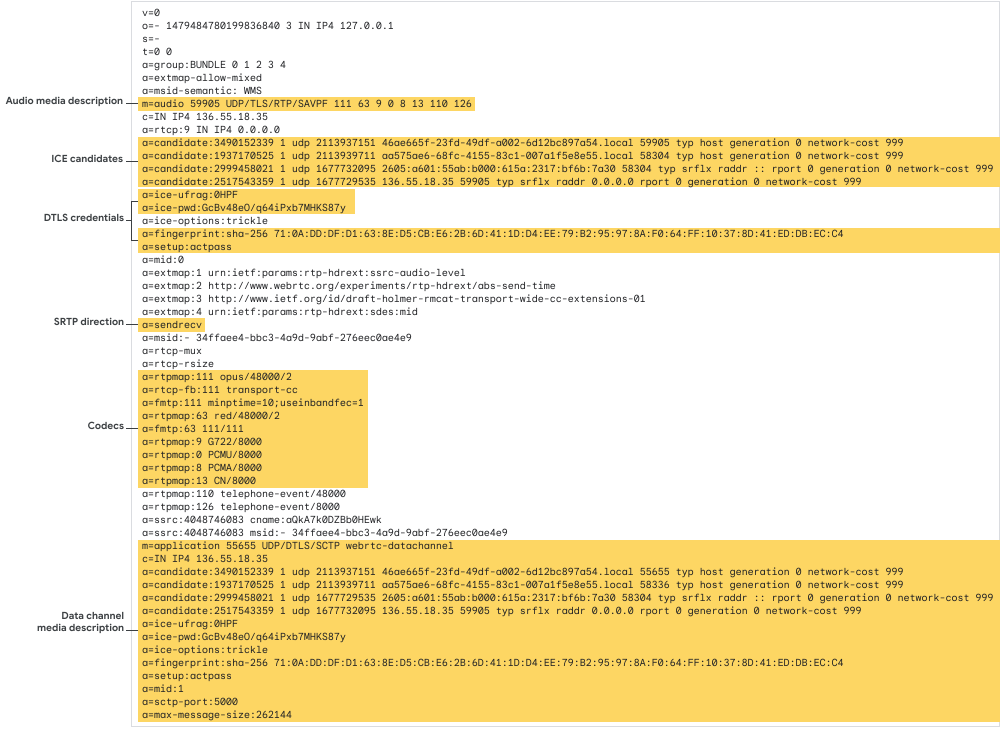
Sau đây là một đề xuất có nội dung mô tả nội dung nghe nhìn âm thanh:
Hình 1. Ví dụ về đề xuất có nội dung mô tả nội dung nghe nhìn âm thanh.
Đối tượng ngang hàng từ xa phản hồi bằng một phản hồi SDP chứa cùng số dòng mô tả nội dung nghe nhìn. Mỗi dòng cho biết nội dung nghe nhìn (nếu có) mà ứng dụng ngang hàng từ xa gửi lại cho ứng dụng đề xuất trên các luồng SRTP. Đối tượng ngang hàng từ xa cũng có thể từ chối các luồng cụ thể từ người đề xuất bằng cách đặt mục nhập nội dung mô tả nội dung nghe nhìn đó thành recvonly.
Đối với Meet Media API, ứng dụng luôn gửi đề xuất SDP để bắt đầu kết nối. Meet không bao giờ là đối tượng khởi tạo.
Hành vi này được quản lý nội bộ bởi các ứng dụng tham chiếu
(C++, TypeScript),
nhưng nhà phát triển ứng dụng tuỳ chỉnh có thể sử dụng PeerConnectionInterface của WebRTC để
tạo đề xuất.
Để kết nối với Meet Meet, đề xuất phải tuân thủ các yêu cầu cụ thể
requirements:
Ứng dụng phải luôn đóng vai trò là ứng dụng trong quá trình bắt tay DTLS, vì vậy, mọi nội dung mô tả nội dung nghe nhìn trong đề xuất phải chỉ định a=setup:actpass hoặc a=setup:active.
Mỗi dòng mô tả nội dung nghe nhìn phải hỗ trợ tất cả các codec
bắt buộc cho loại nội dung nghe nhìn
đó:
Âm thanh:Opus
Video:VP8, VP9, AV1
Để nhận âm thanh, đề xuất phải chứa đúng 3 nội dung mô tả nội dung nghe nhìn âm thanh chỉ nhận. Bạn có thể thực hiện việc này bằng cách đặt bộ thu phát trên đối tượng kết nối ngang hàng.
C++
// ...rtc::scoped_refptr<webrtc::PeerConnectionInterface>peer_connection;for(inti=0;i < 3;++i){webrtc::RtpTransceiverInitaudio_init;audio_init.direction=webrtc::RtpTransceiverDirection::kRecvOnly;audio_init.stream_ids={absl::StrCat("audio_stream_",i)};webrtc::RTCErrorOr<rtc::scoped_refptr<webrtc::RtpTransceiverInterface>>
audio_result=peer_connection->AddTransceiver(cricket::MediaType::MEDIA_TYPE_AUDIO,audio_init);if(!audio_result.ok()){returnabsl::InternalError(absl::StrCat("Failed to add audio transceiver: ",audio_result.error().message()));}}
JavaScript
pc=newRTCPeerConnection();// Configure client to receive audio from Meet servers.pc.addTransceiver('audio',{'direction':'recvonly'});pc.addTransceiver('audio',{'direction':'recvonly'});pc.addTransceiver('audio',{'direction':'recvonly'});
Để nhận video, đề xuất phải chứa 1–3 nội dung mô tả nội dung nghe nhìn video chỉ nhận. Bạn có thể thực hiện việc này bằng cách đặt bộ thu phát trên đối tượng kết nối ngang hàng.
C++
// ...rtc::scoped_refptr<webrtc::PeerConnectionInterface>peer_connection;for(uint32_ti=0;i < configurations.receiving_video_stream_count;++i){webrtc::RtpTransceiverInitvideo_init;video_init.direction=webrtc::RtpTransceiverDirection::kRecvOnly;video_init.stream_ids={absl::StrCat("video_stream_",i)};webrtc::RTCErrorOr<rtc::scoped_refptr<webrtc::RtpTransceiverInterface>>
video_result=peer_connection->AddTransceiver(cricket::MediaType::MEDIA_TYPE_VIDEO,video_init);if(!video_result.ok()){returnabsl::InternalError(absl::StrCat("Failed to add video transceiver: ",video_result.error().message()));}}
JavaScript
pc=newRTCPeerConnection();// Configure client to receive video from Meet servers.pc.addTransceiver('video',{'direction':'recvonly'});pc.addTransceiver('video',{'direction':'recvonly'});pc.addTransceiver('video',{'direction':'recvonly'});
Đề xuất phải luôn bao gồm các kênh dữ liệu. Tối thiểu, các kênh session-control và media-stats phải luôn mở. Tất cả các kênh dữ liệu phải là ordered.
C++
// ...// All data channels must be ordered.constexprwebrtc::DataChannelInitkDataChannelConfig={.ordered=true};rtc::scoped_refptr<webrtc::PeerConnectionInterface>peer_connection;// Signal session-control data channel.webrtc::RTCErrorOr<rtc::scoped_refptr<webrtc::DataChannelInterface>>
session_create_result=peer_connection->CreateDataChannelOrError("session-control",&kDataChannelConfig);if(!session_create_result.ok()){returnabsl::InternalError(absl::StrCat("Failed to create data channel ",data_channel_label,": ",session_create_result.error().message()));}// Signal media-stats data channel.webrtc::RTCErrorOr<rtc::scoped_refptr<webrtc::DataChannelInterface>>
stats_create_result=peer_connection->CreateDataChannelOrError("media-stats",&kDataChannelConfig);if(!stats_create_result.ok()){returnabsl::InternalError(absl::StrCat("Failed to create data channel ",data_channel_label,": ",stats_create_result.error().message()));}
JavaScript
// ...pc=newRTCPeerConnection();// All data channels must be ordered.constdataChannelConfig={ordered:true,};// Signal session-control data channel.sessionControlChannel=pc.createDataChannel('session-control',dataChannelConfig);sessionControlChannel.onopen=()=>console.log("data channel is now open");sessionControlChannel.onclose=()=>console.log("data channel is now closed");sessionControlChannel.onmessage=async(e)=>{console.log("data channel message",e.data);};// Signal media-stats data channel.mediaStatsChannel=pc.createDataChannel('media-stats',dataChannelConfig);mediaStatsChannel.onopen=()=>console.log("data channel is now open");mediaStatsChannel.onclose=()=>console.log("data channel is now closed");mediaStatsChannel.onmessage=async(e)=>{console.log("data channel message",e.data);};
Ví dụ về đề xuất và phản hồi SDP
Sau đây là ví dụ đầy đủ về một đề xuất SDP hợp lệ và phản hồi SDP phù hợp. Đề xuất này thương lượng một phiên Meet Media API có âm thanh và một luồng video.
Lưu ý rằng có 3 nội dung mô tả nội dung nghe nhìn âm thanh, 1 nội dung mô tả nội dung nghe nhìn video và nội dung mô tả nội dung nghe nhìn ứng dụng bắt buộc.
[[["Dễ hiểu","easyToUnderstand","thumb-up"],["Giúp tôi giải quyết được vấn đề","solvedMyProblem","thumb-up"],["Khác","otherUp","thumb-up"]],[["Thiếu thông tin tôi cần","missingTheInformationINeed","thumb-down"],["Quá phức tạp/quá nhiều bước","tooComplicatedTooManySteps","thumb-down"],["Đã lỗi thời","outOfDate","thumb-down"],["Vấn đề về bản dịch","translationIssue","thumb-down"],["Vấn đề về mẫu/mã","samplesCodeIssue","thumb-down"],["Khác","otherDown","thumb-down"]],["Cập nhật lần gần đây nhất: 2026-04-23 UTC."],[],[]]