

rubric は、教師が生徒の提出物を採点する際に使用できるテンプレートです。Classroom API を使用すると、教師に代わってこれらのルーブリックを管理したり、生徒の提出物でルーブリックの成績を読み取ったりできます。
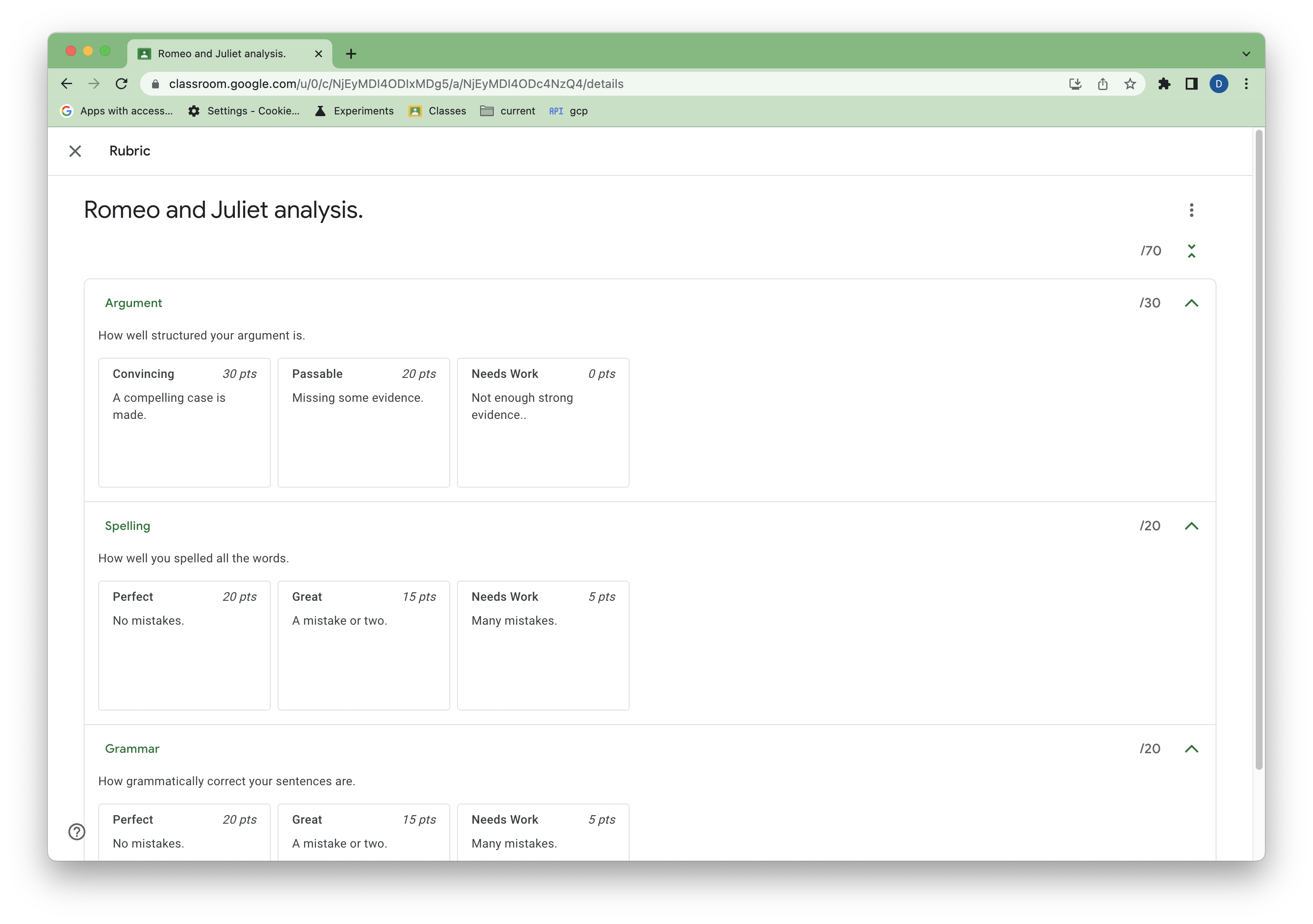 図 1. Classroom の課題のルーブリックの例。
このガイドでは、ルーブリック API の基本的なコンセプトと機能について説明します。ルーブリックの一般的な構造と、Classroom UI でルーブリックを使用して評価する方法については、ヘルプセンターの記事をご覧ください。
前提条件
このガイドは、以下のものがあることを前提としています。
- Python 3.8.6 以降
- pip パッケージ管理ツール
- Google Cloud プロジェクト。
Google Classroom が有効になっており、Google Workspace for Education Plus ライセンスが割り当てられている Google Workspace for Education 教育機関向けアカウント。デベロッパー デモ アカウントをお持ちでない場合は、アップグレードされたアカウントをリクエストできます。
テスト生徒アカウントが 1 つ以上あるテストクラス。テストに使用できる Classroom のクラスがない場合は、UI でクラスを作成して、テスト用の生徒を追加します。
デスクトップ アプリケーションの認証情報を承認する
エンドユーザーとして認証を行い、アプリ内でユーザーデータにアクセスするには、1 つ以上の OAuth 2.0 クライアント ID を作成する必要があります。クライアント ID は、Google の OAuth サーバーで個々のアプリを識別するために使用します。アプリが複数のプラットフォームで実行される場合は、プラットフォームごとに個別のクライアント ID を作成する必要があります。
- Google Cloud コンソールの Google Cloud の認証情報ページに移動します。
- [認証情報を作成] > [OAuth クライアント ID] をクリックします。
- [アプリケーションの種類] > [デスクトップ アプリ] をクリックします。
- [名前] フィールドに、認証情報の名前を入力します。この名前は Google Cloud コンソールにのみ表示されます。(例: 「Rubrics client」)。
- [作成] をクリックします。[OAuth クライアントを作成しました] 画面が表示され、新しいクライアント ID とクライアント シークレットが表示されます。
- [JSON をダウンロード]、[OK] の順にクリックします。新しく作成した認証情報が [OAuth 2.0 クライアント ID] に表示されます。
- ダウンロードした JSON ファイルを
credentials.jsonとして保存し、作業ディレクトリに移動します。 - [認証情報を作成] > [API キー] の順にクリックし、API キーをメモします。
詳細については、アクセス認証情報を作成するをご覧ください。
OAuth スコープを構成する
プロジェクトの既存の OAuth スコープによっては、追加のスコープを構成する必要があります。
- OAuth 同意画面に移動します。
- [アプリを編集] > [保存して次へ] をクリックして、[スコープ] 画面に移動します。
- [スコープを追加または削除] をクリックします。
- 次のスコープがまだない場合は追加します。
https://www.googleapis.com/auth/classroom.coursework.studentshttps://www.googleapis.com/auth/classroom.courses
- [更新] > [保存して次へ] > [保存して次へ] > [ダッシュボードに戻る] の順にクリックします。
詳細については、OAuth 同意画面を構成するをご覧ください。
classroom.coursework.students スコープでは、ルーブリックに対する読み取りと書き込みのアクセス権(CourseWork へのアクセス権も含む)が付与され、classroom.courses スコープでは、コースの読み取りと書き込みが許可されます。
特定のメソッドに必要なスコープは、そのメソッドのリファレンス ドキュメントに記載されています。例として、courses.courseWork.rubrics.create 認証スコープをご覧ください。Classroom のすべてのスコープについては、Google API の OAuth 2.0 スコープをご覧ください。
サンプルを構成する
作業ディレクトリで、Python 用 Google クライアント ライブラリをインストールします。
pip install --upgrade google-api-python-client google-auth-httplib2 google-auth-oauthlib
YOUR_API_KEY の代わりに API キーを使用して、クライアント ライブラリをビルドし、ユーザーを承認する main.py というファイルを作成します。
import json
import os.path

from google.auth.transport.requests import Request
from google.oauth2.credentials import Credentials
from google_auth_oauthlib.flow import InstalledAppFlow
from googleapiclient.discovery import build
from googleapiclient.errors import HttpError

# If modifying these scopes, delete the file token.json.
SCOPES = ['https://www.googleapis.com/auth/classroom.courses',
          'https://www.googleapis.com/auth/classroom.coursework.students']

def build_authenticated_service(api_key):
    """Builds the Classroom service."""
    creds = None
    # The file token.json stores the user's access and refresh tokens, and is
    # created automatically when the authorization flow completes for the first
    # time.
    if os.path.exists('token.json'):
        creds = Credentials.from_authorized_user_file('token.json', SCOPES)
    # If there are no (valid) credentials available, let the user log in.
    if not creds or not creds.valid:
        if creds and creds.expired and creds.refresh_token:
            creds.refresh(Request())
        else:
            flow = InstalledAppFlow.from_client_secrets_file(
                'credentials.json', SCOPES)
            creds = flow.run_local_server(port=0)
        # Save the credentials for the next run.
        with open('token.json', 'w') as token:
            token.write(creds.to_json())

    try:
        # Build the Classroom service.
        service = build(
            serviceName="classroom",
            version="v1",
            credentials=creds,
            discoveryServiceUrl=f"https://classroom.googleapis.com/$discovery/rest?labels=DEVELOPER_PREVIEW&key={api_key}")

        return service

    except HttpError as error:
        print('An error occurred: %s' % error)

if __name__ == '__main__':
    service = build_authenticated_service(YOUR_API_KEY)
python main.py を使用してスクリプトを実行します。ログインして OAuth スコープに同意するよう求めるメッセージが表示されます。
課題を作成する
ルーブリックは課題(CourseWork)に関連付けられており、その CourseWork のコンテキストでのみ意味を持ちます。ルーブリックは、親 CourseWork アイテムを作成した Google Cloud プロジェクトでのみ作成できます。このガイドでは、スクリプトを使用して新しい CourseWork 割り当てを作成します。
main.py に以下を追加します。
def get_latest_course(service):
    """Retrieves the last created course."""
    try:
        response = service.courses().list(pageSize=1).execute()
        courses = response.get("courses", [])
        if not courses:
            print("No courses found. Did you remember to create one in the UI?")
            return
        course = courses[0]
        return course

    except HttpError as error:
        print(f"An error occurred: {error}")
        return error

def create_coursework(service, course_id):
    """Creates and returns a sample coursework."""
    try:
        coursework = {
            "title": "Romeo and Juliet analysis.",
            "description": """Write a paper arguing that Romeo and Juliet were
                                time travelers from the future.""",
            "workType": "ASSIGNMENT",
            "state": "PUBLISHED",
        }
        coursework = service.courses().courseWork().create(
            courseId=course_id, body=coursework).execute()
        return coursework

    except HttpError as error:
        print(f"An error occurred: {error}")
        return error
次に、main.py を更新して、作成したテストクラスの course_id を取得し、新しい課題のサンプルを作成して、課題の coursework_id を取得します。
if __name__ == '__main__':
    service = build_authenticated_service(YOUR_API_KEY)

    course = get_latest_course(service)
    course_id = course.get("id")
    course_name = course.get("name")
    print(f"'{course_name}' course ID: {course_id}")

    coursework = create_coursework(service, course_id)
    coursework_id = coursework.get("id")
    print(f"Assignment created with ID {coursework_id}")

    #TODO(developer): Save the printed course and coursework IDs.
course_id と coursework_id を保存します。これらは、すべてのルーブリックの CRUD オペレーションに必要です。
これで、Classroom にサンプル CourseWork が作成されました。
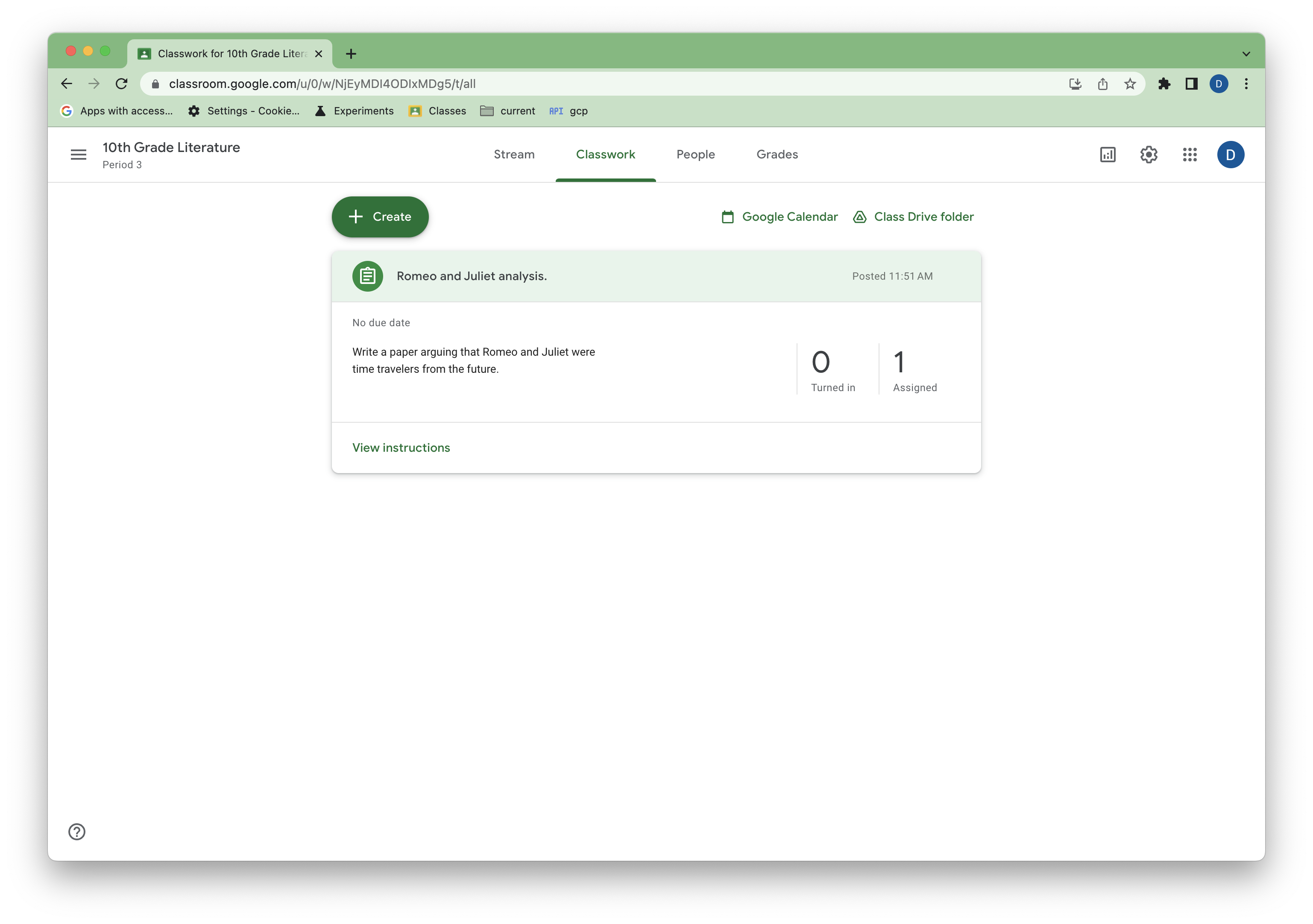 図 2. Classroom の課題の例のビュー。
お客様が対象であるか確認する
ルーブリックを作成および更新するには、リクエストを行うユーザーと対応するコースの所有者の両方に Google Workspace for Education Plus ライセンスが割り当てられている必要があります。Classroom は、デベロッパーがユーザーがアクセスできる機能を確認できるように、ユーザーの利用資格エンドポイントをサポートしています。
main.py を更新して実行し、テスト アカウントがルーブリック機能にアクセスできることを確認します。
if __name__ == '__main__':
    service = build_authenticated_service(YOUR_API_KEY)

    capability = service.userProfiles().checkUserCapability(
        userId='me',
        # Specify the preview version. checkUserCapability is
        # supported in V1_20240930_PREVIEW and later.
        previewVersion="V1_20240930_PREVIEW",
        capability="CREATE_RUBRIC").execute()

    if not capability.get('allowed'):
      print('User ineligible for rubrics creation.')
      # TODO(developer): in a production app, this signal could be used to
      # proactively hide any rubrics related features from users or encourage
      # them to upgrade to the appropriate license.
    else:
      print('User eligible for rubrics creation.')
ルーブリックの作成
これで、ルーブリックの管理を開始する準備が整いました。
ルーブリックは、完全なルーブリック オブジェクトを含む create() 呼び出しを使用して CourseWork で作成できます。この場合、条件とレベルの ID プロパティは省略されます(これらは作成時に生成されます)。
次の関数を main.py に追加します。
def create_rubric(service, course_id, coursework_id):
    """Creates an example rubric on a coursework."""
    try:
        body = {
            "criteria": [
                {
                    "title": "Argument",
                    "description": "How well structured your argument is.",
                    "levels": [
                        {"title": "Convincing",
                         "description": "A compelling case is made.", "points": 30},
                        {"title": "Passable",
                         "description": "Missing some evidence.", "points": 20},
                        {"title": "Needs Work",
                         "description": "Not enough strong evidence..", "points": 0},
                    ]
                },
                {
                    "title": "Spelling",
                    "description": "How well you spelled all the words.",
                    "levels": [
                        {"title": "Perfect",
                         "description": "No mistakes.", "points": 20},
                        {"title": "Great",
                         "description": "A mistake or two.", "points": 15},
                        {"title": "Needs Work",
                         "description": "Many mistakes.", "points": 5},
                    ]
                },
                {
                    "title": "Grammar",
                    "description": "How grammatically correct your sentences are.",
                    "levels": [
                        {"title": "Perfect",
                         "description": "No mistakes.", "points": 20},
                        {"title": "Great",
                         "description": "A mistake or two.", "points": 15},
                        {"title": "Needs Work",
                         "description": "Many mistakes.", "points": 5},
                    ]
                },
            ]
        }

        rubric = service.courses().courseWork().rubrics().create(
            courseId=course_id, courseWorkId=coursework_id, body=body
            ).execute()
        print(f"Rubric created with ID {rubric.get('id')}")
        return rubric

    except HttpError as error:
        print(f"An error occurred: {error}")
        return error
次に、main.py を更新して実行し、以前の Course ID と CourseWork ID を使用して、ルーブリックの例を作成します。
if __name__ == '__main__':
    service = build_authenticated_service(YOUR_API_KEY)

    capability = service.userProfiles().checkUserCapability(
        userId='me',
        # Specify the preview version. checkUserCapability is
        # supported in V1_20240930_PREVIEW and later.
        previewVersion="V1_20240930_PREVIEW",
        capability="CREATE_RUBRIC").execute()

    if not capability.get('allowed'):
      print('User ineligible for rubrics creation.')
      # TODO(developer): in a production app, this signal could be used to
      # proactively hide any rubrics related features from users or encourage
      # them to upgrade to the appropriate license.
    else:
      rubric = create_rubric(service, YOUR_COURSE_ID, YOUR_COURSEWORK_ID)
      print(json.dumps(rubric, indent=4))
ルーブリックの表現に関する注意事項:
- 基準とレベルの順序は Classroom の UI に反映されます。
- スコア付きレベル(
pointsプロパティを持つレベル)は、ポイントの昇順または降順で並べ替える必要があります(ランダムな順序にすることはできません)。 - 教師は UI で条件とスコア付きレベル(スコアなしレベルを除く)を並べ替えることができ、それによってデータ内の順序が変更されます。
ルーブリックの構造に関するその他の注意事項については、制限事項をご覧ください。
UI に戻ると、課題にルーブリックが表示されます。
図 3. Classroom の課題のルーブリックの例。
ルーブリックを読む
ルーブリックは、標準の list() メソッドと get() メソッドで読み取ることができます。
課題に設定できるルーブリックは 1 つだけなので、list() は直感的ではないように見えるかもしれませんが、ルーブリック ID がまだない場合は便利です。CourseWork に関連付けられたルーブリックがない場合、list() レスポンスは空になります。
次の関数を main.py に追加します。
def get_rubric(service, course_id, coursework_id):
    """
    Get the rubric on a coursework. There can only be at most one.
    Returns null if there is no rubric.
    """
    try:
        response = service.courses().courseWork().rubrics().list(
            courseId=course_id, courseWorkId=coursework_id
            ).execute()

        rubrics = response.get("rubrics", [])
        if not rubrics:
            print("No rubric found for this assignment.")
            return
        rubric = rubrics[0]
        return rubric

    except HttpError as error:
        print(f"An error occurred: {error}")
        return error
main.py を更新して実行し、追加したルーブリックを取得します。
if __name__ == '__main__':
    service = build_authenticated_service(YOUR_API_KEY)

    rubric = get_rubric(service, YOUR_COURSE_ID, YOUR_COURSEWORK_ID)
    print(json.dumps(rubric, indent=4))

    #TODO(developer): Save the printed rubric ID.
後のステップで使用するために、ルーブリックの id プロパティをメモします。
Get() は、ルーブリック ID がある場合に適しています。関数で get() を使用すると、次のようになります。
def get_rubric(service, course_id, coursework_id, rubric_id):
    """
    Get the rubric on a coursework. There can only be at most one.
    Returns a 404 if there is no rubric.
    """
    try:
        rubric = service.courses().courseWork().rubrics().get(
            courseId=course_id,
            courseWorkId=coursework_id,
            id=rubric_id
        ).execute()

        return rubric

    except HttpError as error:
        print(f"An error occurred: {error}")
        return error
この実装では、ルーブリックがない場合は 404 が返されます。
ルーブリックを更新する
ルーブリックの更新は patch() 呼び出しで行われます。ルーブリックの構造が複雑なため、更新は読み取り-修正-書き込みパターンで行う必要があります。このパターンでは、criteria プロパティ全体が置き換えられます。
更新ルールは次のとおりです。
- ID なしで追加された条件またはレベルは、追加と見なされます。
- 以前の条件またはレベルが欠落している場合は、削除と見なされます。
- 既存の ID があるがデータが変更されている条件またはレベルは、編集と見なされます。変更されていないプロパティはそのまま残ります。
- 新しい ID または不明な ID を指定して基準またはレベルを指定すると、エラーと見なされます。
- 新しい条件とレベルの順序は、新しい UI の順序と見なされます(前述の制限事項あり)。
ルーブリックを更新する関数を追加します。
def update_rubric(service, course_id, coursework_id, rubric_id, body):
    """
    Updates the rubric on a coursework.
    """
    try:
        rubric = service.courses().courseWork().rubrics().patch(
            courseId=course_id,
            courseWorkId=coursework_id,
            id=rubric_id,
            body=body,
            updateMask='criteria'
        ).execute()

        return rubric

    except HttpError as error:
        print(f"An error occurred: {error}")
        return error
この例では、criteria フィールドが updateMask で変更されるように指定されています。
次に、前述の各更新ルールの変更を行うように main.py を変更します。
if __name__ == '__main__':
    service = build_authenticated_service(YOUR_API_KEY)

    capability = service.userProfiles().checkUserCapability(
        userId='me',
        # Specify the preview version. checkUserCapability is
        # supported in V1_20240930_PREVIEW and later.
        previewVersion="V1_20240930_PREVIEW",
        capability="CREATE_RUBRIC").execute()

    if not capability.get('allowed'):
      print('User ineligible for rubrics creation.')
      # TODO(developer): in a production app, this signal could be used to
      # proactively hide any rubrics related features from users or encourage
      # them to upgrade to the appropriate license.
    else:
        # Get the latest rubric.
        rubric = get_rubric(service, YOUR_COURSE_ID, YOUR_COURSEWORK_ID)
        criteria = rubric.get("criteria")
        """
        The "criteria" property should look like this:
        [
            {
                "id": "NkEyMdMyMzM2Nxkw",
                "title": "Argument",
                "description": "How well structured your argument is.",
                "levels": [
                    {
                        "id": "NkEyMdMyMzM2Nxkx",
                        "title": "Convincing",
                        "description": "A compelling case is made.",
                        "points": 30
                    },
                    {
                        "id": "NkEyMdMyMzM2Nxky",
                        "title": "Passable",
                        "description": "Missing some evidence.",
                        "points": 20
                    },
                    {
                        "id": "NkEyMdMyMzM2Nxkz",
                        "title": "Needs Work",
                        "description": "Not enough strong evidence..",
                        "points": 0
                    }
                ]
            },
            {
                "id": "NkEyMdMyMzM2Nxk0",
                "title": "Spelling",
                "description": "How well you spelled all the words.",
                "levels": [...]
            },
            {
                "id": "NkEyMdMyMzM2Nxk4",
                "title": "Grammar",
                "description": "How grammatically correct your sentences are.",
                "levels": [...]
            }
        ]
        """

        # Make edits. This example will make one of each type of change.

        # Add a new level to the first criteria. Levels must remain sorted by
        # points.
        new_level = {
            "title": "Profound",
            "description": "Truly unique insight.",
            "points": 50
        }
        criteria[0]["levels"].insert(0, new_level)

        # Remove the last criteria.
        del criteria[-1]

        # Update the criteria titles with numeric prefixes.
        for index, criterion in enumerate(criteria):
            criterion["title"] = f"{index}: {criterion['title']}"

        # Resort the levels from descending to ascending points.
        for criterion in criteria:
            criterion["levels"].sort(key=lambda level: level["points"])

        # Update the rubric with a patch call.
        new_rubric = update_rubric(
            service, YOUR_COURSE_ID, YOUR_COURSEWORK_ID, YOUR_RUBRIC_ID, rubric)

        print(json.dumps(new_rubric, indent=4))
変更は Classroom で教師に反映されます。
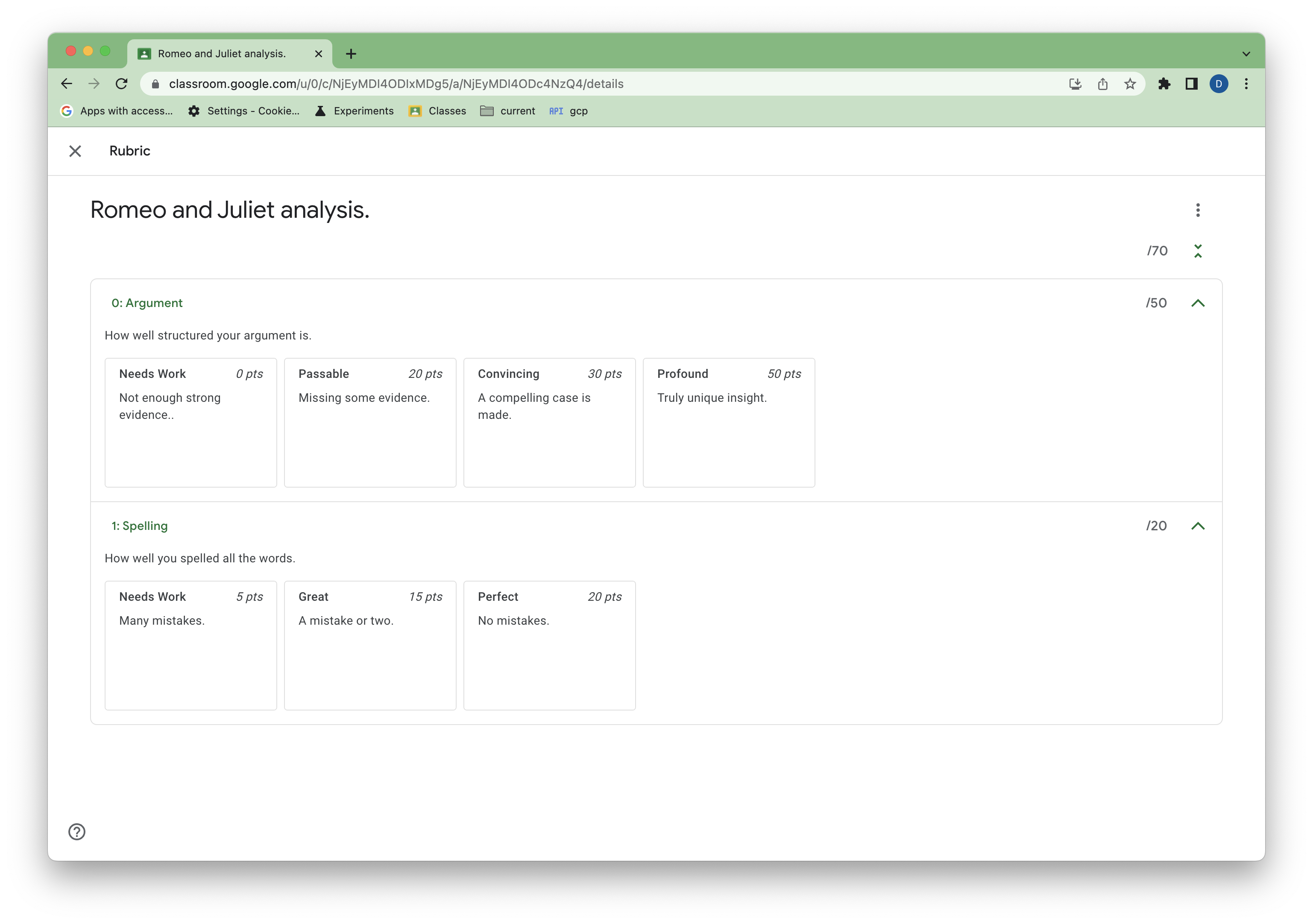 図 4. 更新されたルーブリックの表示。
ルーブリックで採点された提出物を表示する
現時点では、API でルーブリックを使用して生徒の提出物を採点することはできませんが、Classroom UI でルーブリックを使用して採点された提出物のルーブリックの成績を読み取ることができます。
Classroom UI の生徒として、サンプル課題を完了して提出します。次に、教師として、ルーブリックを使用して課題を手動で採点します。
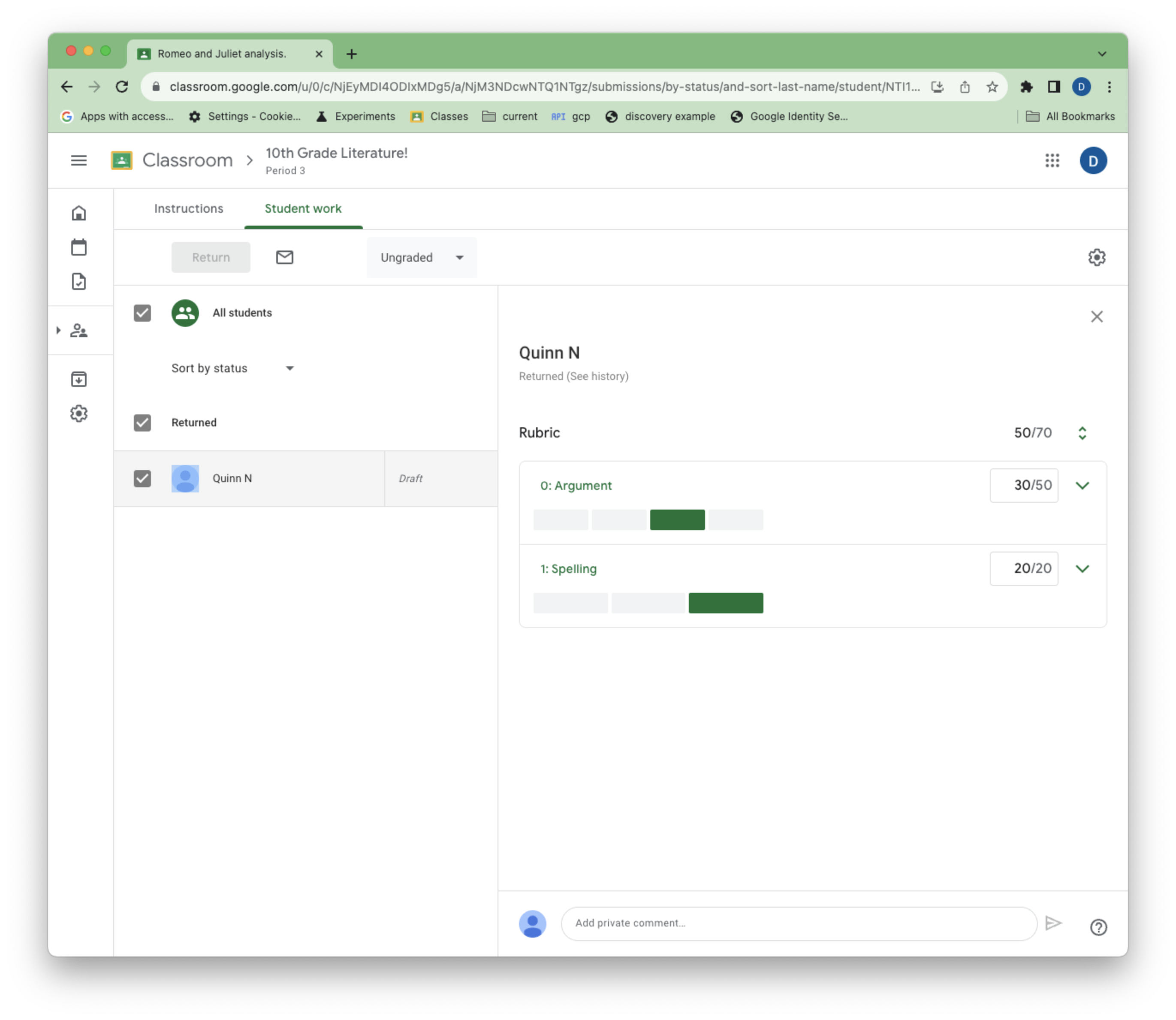 図 5. 採点中のルーブリックの教師ビュー。
ルーブリックで採点された StudentSubmissions には、2 つの新しいプロパティ draftRubricGrades と assignedRubricGrades があります。これらは、下書き状態と割り当てられた採点状態のそれぞれで教師が選択した点数とレベルを表します。
既存の studentSubmissions.get() メソッドと studentSubmissions.list() メソッドを使用して、採点済みの提出物を表示できます。
main.py に次の関数を追加して、生徒の提出物を一覧表示します。
def get_latest_submission(service, course_id, coursework_id):
    """Retrieves the last submission for an assignment."""
    try:
        response = service.courses().courseWork().studentSubmissions().list(
            courseId = course_id,
            courseWorkId = coursework_id,
            pageSize=1
        ).execute()
        submissions = response.get("studentSubmissions", [])
        if not submissions:
            print(
                """No submissions found. Did you remember to turn in and grade
                   the assignment in the UI?""")
            return
        submission = submissions[0]
        return submission

    except HttpError as error:
        print(f"An error occurred: {error}")
        return error
次に、main.py を更新して実行し、提出物の成績を表示します。
if __name__ == '__main__':
    service = build_authenticated_service(YOUR_API_KEY)

    submission = get_latest_submission(
        service, YOUR_COURSE_ID, YOUR_COURSEWORK_ID)
    print(json.dumps(submission, indent=4))
draftRubricGrades と assignedRubricGrades には以下が含まれます。
- 対応するルーブリックの条件の
criterionId。 - 各評価基準に対して教師が割り当てた
points。これは選択されたレベルから取得される可能性がありますが、教師が上書きしている可能性もあります。 - 各評価基準で選択されたレベルの
levelId。教師がレベルを選択しなかったが、条件にポイントを割り当てた場合、このフィールドは存在しません。
これらのリストには、教師がレベルを選択したか、得点を設定した基準のエントリのみが含まれます。たとえば、教師が採点時に 1 つの基準のみを使用する場合、ルーブリックに複数の基準があっても、draftRubricGrades と assignedRubricGrades には 1 つの項目しか含まれません。
ルーブリックを削除する
ルーブリックは、標準の delete() リクエストで削除できます。次のコードは、完全性のための関数例を示していますが、採点がすでに開始されているため、現在のルーブリックを削除することはできません。
def delete_rubric(service, course_id, coursework_id, rubric_id):
    """Deletes the rubric on a coursework."""
    try:
        service.courses().courseWork().rubrics().delete(
            courseId=course_id,
            courseWorkId=coursework_id,
            id=rubric_id
        ).execute()

    except HttpError as error:
        print(f"An error occurred: {error}")
        return error
ルーブリックのエクスポートとインポート
ルーブリックは、教師が再利用できるように Google スプレッドシートに手動でエクスポートできます。
コードでルーブリックの条件を指定するだけでなく、エクスポートされたこれらのシートからルーブリックを作成して更新することもできます。その場合は、ルーブリックの本文で criteria ではなく sourceSpreadsheetId を指定します。
def create_rubric_from_sheet(service, course_id, coursework_id, sheet_id):
    """Creates an example rubric on a coursework."""
    try:
        body = {
            "sourceSpreadsheetId": sheet_id
        }

        rubric = service.courses().courseWork().rubrics().create(
            courseId=course_id, courseWorkId=coursework_id, body=body
            ).execute()

        print(f"Rubric created with ID {rubric.get('id')}")
        return rubric

    except HttpError as error:
        print(f"An error occurred: {error}")
        return error