

本頁說明如何為 Google Chat 應用程式的即時訊息建立首頁。首頁在 Google Chat API 中稱為「應用程式首頁」,是可自訂的資訊卡介面,會顯示在使用者與 Chat 應用程式之間的1 對 1 即時訊息空間的「首頁」分頁中。

與其他 Google Workspace 主機應用程式不同,擴充 Chat 的外掛程式不會在右側快速存取面板中顯示首頁,也不會在資訊清單中使用 addOns.common.homepageTrigger。Chat 會在與 Chat 應用程式的個人即時訊息中,將首頁顯示為「首頁」分頁的資訊卡,並在 Google Cloud 控制台中設定。
您可以透過應用程式主頁面分享與 Chat 應用程式互動的訣竅、顯示個人化使用者資訊主頁,或讓使用者從 Chat 存取及設定外部服務或工具。
使用資訊卡建構工具設計及預覽即時通訊應用程式的訊息和使用者介面:
開啟「Card Builder」(資訊卡建立工具)必要條件
HTTP
Apps Script
接收及回應使用者互動的 Google Chat 應用程式。如要建構一個,請完成 Apps Script 快速入門導覽課程。
設定 Chat 應用程式的應用程式主畫面
如要支援應用程式主畫面,請啟用「支援應用程式主畫面」,並在 Google Cloud 控制台中設定「應用程式主畫面」 觸發條件。每當使用者在與 Chat 應用程式的個人即時訊息中開啟「首頁」分頁,Chat 應用程式就會收到「應用程式首頁」觸發事件。
如要在 Google Cloud 控制台中設定 App Home,請按照下列步驟操作:
前往 Google Cloud 控制台,依序點選「選單」 >「API 和服務」 >「已啟用的 API 和服務」 >「Google Chat API」 >「設定」。
在「互動功能」下方,確認「啟用互動功能」已開啟,然後在「功能」下方,選取「支援應用程式首頁」核取方塊。
在「連線設定」>「觸發條件」下方,根據 Chat 應用程式架構,在「應用程式主畫面」欄位中指定應用程式主畫面處理常式:
- HTTP:輸入處理應用程式主畫面要求的 HTTPS 端點網址 (或選取「為所有觸發條件使用通用的 HTTP 端點網址」,讓通用的 HTTP 端點網址接收所有事件)。
- Google Apps Script:輸入 Google Apps Script 回呼函式的名稱,該函式會建構並傳回首頁資訊卡 (預設為
onAppHome)。
按一下 [儲存]。
處理 App Home 事件物件
使用者透過 Chat 應用程式開啟個人即時訊息的「首頁」分頁時,Chat 會將事件物件傳送至應用程式首頁端點或回呼函式。
與空間或訊息互動事件不同,初始 App 主畫面事件物件不包含聯集互動酬載 (例如 messagePayload),而是包含下列欄位:
commonEventObject: 包括clientPlatform、hostApp("CHAT")、userLocale和userTimezone。chat.user:開啟「首頁」分頁的 Chat 使用者。chat.eventTime:使用者開啟「首頁」分頁的時間戳記。
建構應用程式主頁面卡片
使用者開啟「首頁」分頁時,請處理「應用程式首頁」觸發事件,方法是傳回含有 pushCard 導覽動作和 Card 的 RenderActions 物件。如要建立互動式體驗,資訊卡可以包含按鈕或文字輸入等互動式小工具。
HTTP
{
  "action": {
    "navigations": [
      {
        "pushCard": {
          "header": {
            "title": "Welcome to App Home"
          },
          "sections": [
            {
              "widgets": [
                {
                  "textParagraph": {
                    "text": "Manage your settings and view your dashboard here."
                  }
                },
                {
                  "buttonList": {
                    "buttons": [
                      {
                        "text": "Refresh",
                        "onClick": {
                          "action": {
                            "function": "https://example.com/updateAppHome"
                          }
                        }
                      }
                    ]
                  }
                }
              ]
            }
          ]
        }
      }
    ]
  }
}
Apps Script
/**
 * Builds and returns the App Home card when a user opens the Home tab.
 *
 * @param {Object} event The event object from Google Chat.
 * @return {ActionResponse} The RenderActions response pushing the homepage card.
 */
function onAppHome(event) {
  const card = CardService.newCardBuilder()
      .setHeader(
          CardService.newCardHeader().setTitle('Welcome to App Home'))
      .addSection(
          CardService.newCardSection()
              .addWidget(
                  CardService.newTextParagraph().setText(
                      'Manage your settings and view your dashboard here.'))
              .addWidget(
                  CardService.newButtonSet().addButton(
                      CardService.newTextButton()
                          .setText('Refresh')
                          .setOnClickAction(
                              CardService.newAction().setFunctionName(
                                  'updateAppHome')))))
      .build();

  return CardService.newActionResponseBuilder()
      .setNavigation(CardService.newNavigation().pushCard(card))
      .build();
}
回應應用程式主畫面互動
如果應用程式主畫面資訊卡包含互動式小工具,例如按鈕或表單輸入內容,點選按鈕會將包含 chat.buttonClickedPayload (以及 commonEventObject.parameters 和 commonEventObject.formInputs) 的事件物件傳送至按鈕的設定動作函式或端點。
如要根據使用者互動更新應用程式主畫面資訊卡,請傳回含有 updateCard
導覽動作的 RenderActions 物件。如要進一步瞭解如何從互動式小工具讀取表單輸入內容,請參閱「讀取使用者在資訊卡上輸入的表單資料」。
HTTP
{
  "action": {
    "navigations": [
      {
        "updateCard": {
          "header": {
            "title": "Welcome to App Home"
          },
          "sections": [
            {
              "widgets": [
                {
                  "textParagraph": {
                    "text": "Last updated: 2026-10-02T23:00:00Z"
                  }
                }
              ]
            }
          ]
        }
      }
    ]
  }
}
Apps Script
/**
 * Updates the App Home card when a user clicks the Refresh button.
 *
 * @param {Object} event The event object from Google Chat.
 * @return {ActionResponse} The RenderActions response updating the homepage card.
 */
function updateAppHome(event) {
  const updatedCard = CardService.newCardBuilder()
      .setHeader(
          CardService.newCardHeader().setTitle('Welcome to App Home'))
      .addSection(
          CardService.newCardSection().addWidget(
              CardService.newTextParagraph().setText(
                  'Last updated: ' + new Date().toTimeString())))
      .build();

  return CardService.newActionResponseBuilder()
      .setNavigation(CardService.newNavigation().updateCard(updatedCard))
      .build();
}
從應用程式主頁面開啟對話方塊
Chat 應用程式也可以開啟對話方塊,回應應用程式主畫面中的互動。
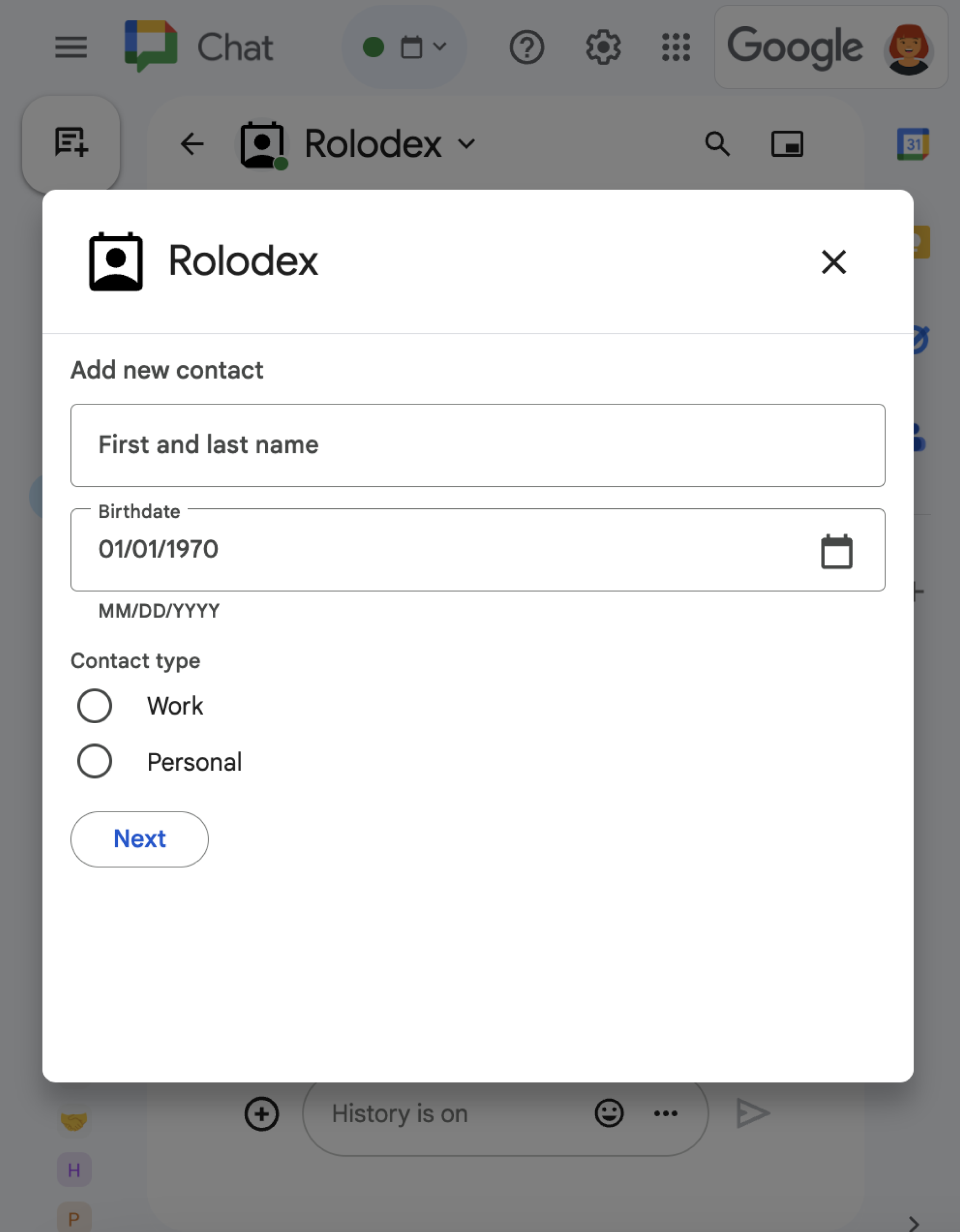
如要瞭解如何使用 RenderActions (pushCard、updateCard 和 endNavigation: "CLOSE_DIALOG") 開啟、更新及關閉對話方塊,請參閱「開啟互動式對話方塊」。
相關主題
非外掛程式的 Chat 擴充應用程式:為 Chat 擴充應用程式建立首頁
如果您維護的 Chat 應用程式不是 Google Workspace 外掛程式,當使用者開啟「首頁」分頁時,Chat 會傳送 APP_HOME 互動事件,當使用者與應用程式首頁資訊卡上的小工具互動時,則會傳送 CARD_CLICKED 或 SUBMIT_FORM 互動事件。
如要將非外掛程式的 Chat 應用程式升級至 Google Workspace 外掛程式架構,請參閱「將 Google Chat 應用程式轉換為 Google Workspace 外掛程式」。
在非外掛程式的 Chat 應用程式中建構應用程式主畫面資訊卡
在非外掛程式的 Chat 應用程式中,處理 APP_HOME 互動事件時,請傳回包含頂層 renderActions 欄位的回應,並加入 pushCard 導覽:
Node.js
Python
Java
Apps Script
這個範例會傳回資訊卡 JSON,藉此傳送資訊卡訊息。您也可以使用 Apps Script 資訊卡服務。
在非外掛程式的 Chat 擴充應用程式中,回應應用程式主畫面互動
在非外掛程式的 Chat 應用程式中,處理來自應用程式首頁資訊卡的 CARD_CLICKED 或 SUBMIT_FORM 互動事件,方法是傳回包含頂層 renderActions 欄位和 updateCard 導覽的內容:
Node.js
Python
Java
Apps Script
這個範例會傳回資訊卡 JSON,藉此傳送資訊卡訊息。您也可以使用 Apps Script 資訊卡服務。