

이 페이지에서는 Google Chat 앱과의 채팅 메시지를 위한 홈페이지를 빌드하는 방법을 설명합니다. 홈페이지는 Google Chat API에서 앱 홈이라고 하며, 사용자와 Chat 앱 간의 1:1 채팅 메시지 스페이스의 홈 탭에 표시되는 맞춤설정 가능한 카드 인터페이스입니다.

다른 Google Workspace 호스트 애플리케이션과 달리 Chat을 확장하는 부가기능은 오른쪽의 빠른 액세스 패널에 홈페이지를 표시하지 않으며 매니페스트에서 addOns.common.homepageTrigger를 사용하지 않습니다.
대신 Chat 앱과의 1:1 채팅 메시지의 홈 탭에 홈페이지가 카드로 표시되며 Google Cloud 콘솔에서 구성됩니다.
앱 홈을 사용하여 채팅 앱과 상호작용하는 팁을 공유하거나, 맞춤설정된 사용자 대시보드를 표시하거나, 사용자가 채팅에서 외부 서비스 또는 도구에 액세스하고 이를 구성하도록 할 수 있습니다.
카드 빌더를 사용하여 Chat 앱의 메시지 및 사용자 인터페이스를 디자인하고 미리 봅니다.
카드 빌더 열기기본 요건
HTTP
사용자 상호작용을 수신하고 이에 응답하는 Google Chat 앱 하나를 빌드하려면 HTTP 빠른 시작을 완료하세요.
Apps Script
사용자 상호작용을 수신하고 이에 응답하는 Google Chat 앱 하나를 빌드하려면 Apps Script 빠른 시작을 완료하세요.
Chat 앱의 앱 홈 구성
앱 홈을 지원하려면 Google Cloud 콘솔에서 앱 홈 지원을 사용 설정하고 앱 홈 트리거를 구성합니다. 사용자가 채팅 앱과의 1:1 채팅 메시지에서 홈 탭을 열 때마다 채팅 앱은 앱 홈 트리거 이벤트를 수신합니다.
Google Cloud 콘솔에서 앱 홈을 구성하려면 다음 단계를 따르세요.
Google Cloud 콘솔에서 메뉴 > API 및 서비스 > 사용 설정된 API 및 서비스 > Google Chat API > 구성으로 이동합니다.
양방향 기능에서 양방향 기능 사용 설정이 사용 설정되어 있는지 확인한 다음 기능에서 앱 홈 지원 체크박스를 선택합니다.
연결 설정 > 트리거에서 Chat 앱 아키텍처에 따라 앱 홈 필드에 앱 홈 핸들러를 지정합니다.
- HTTP: 앱 홈 요청을 처리하는 HTTPS 엔드포인트 URL을 입력합니다. 또는 모든 트리거에 공통 HTTP 엔드포인트 URL 사용을 선택하여 공통 HTTP 엔드포인트 URL이 모든 이벤트를 수신하도록 합니다.
- Google Apps Script: 홈페이지 카드를 빌드하고 반환하는 Google Apps Script 콜백 함수의 이름을 입력합니다 (기본값은
onAppHome).
저장을 클릭합니다.
App Home 이벤트 객체 처리
사용자가 Chat 앱과의 1:1 채팅 메시지에서 홈 탭을 열면 Chat에서 이벤트 객체를 앱 홈 엔드포인트 또는 콜백 함수로 전송합니다.
스페이스 또는 메시지 상호작용 이벤트와 달리 초기 앱 홈 이벤트 객체에는 유니온 상호작용 페이로드 (예: messagePayload)가 포함되지 않습니다. 여기에는 다음 필드가 포함됩니다.
commonEventObject:clientPlatform,hostApp("CHAT"),userLocale,userTimezone이 포함됩니다.chat.user: 홈 탭을 연 Chat 사용자입니다.chat.eventTime: 사용자가 홈 탭을 연 시점의 타임스탬프입니다.
앱 홈 카드 빌드
사용자가 홈 탭을 열면 pushCard 탐색 작업과 Card이 포함된 RenderActions 객체를 반환하여 앱 홈 트리거 이벤트를 처리합니다. 대화형 환경을 만들려면 카드에 버튼이나 텍스트 입력과 같은 대화형 위젯이 포함될 수 있습니다.
HTTP
{
  "action": {
    "navigations": [
      {
        "pushCard": {
          "header": {
            "title": "Welcome to App Home"
          },
          "sections": [
            {
              "widgets": [
                {
                  "textParagraph": {
                    "text": "Manage your settings and view your dashboard here."
                  }
                },
                {
                  "buttonList": {
                    "buttons": [
                      {
                        "text": "Refresh",
                        "onClick": {
                          "action": {
                            "function": "https://example.com/updateAppHome"
                          }
                        }
                      }
                    ]
                  }
                }
              ]
            }
          ]
        }
      }
    ]
  }
}
Apps Script
/**
 * Builds and returns the App Home card when a user opens the Home tab.
 *
 * @param {Object} event The event object from Google Chat.
 * @return {ActionResponse} The RenderActions response pushing the homepage card.
 */
function onAppHome(event) {
  const card = CardService.newCardBuilder()
      .setHeader(
          CardService.newCardHeader().setTitle('Welcome to App Home'))
      .addSection(
          CardService.newCardSection()
              .addWidget(
                  CardService.newTextParagraph().setText(
                      'Manage your settings and view your dashboard here.'))
              .addWidget(
                  CardService.newButtonSet().addButton(
                      CardService.newTextButton()
                          .setText('Refresh')
                          .setOnClickAction(
                              CardService.newAction().setFunctionName(
                                  'updateAppHome')))))
      .build();

  return CardService.newActionResponseBuilder()
      .setNavigation(CardService.newNavigation().pushCard(card))
      .build();
}
App Home 상호작용에 응답
앱 홈 카드에 버튼이나 양식 입력과 같은 대화형 위젯이 포함된 경우 버튼을 클릭하면 chat.buttonClickedPayload (commonEventObject.parameters 및 commonEventObject.formInputs와 함께)가 포함된 이벤트 객체가 버튼의 구성된 작업 함수 또는 엔드포인트로 전송됩니다.
사용자 상호작용에 따라 앱 홈 카드를 업데이트하려면 updateCard 탐색 작업이 포함된 RenderActions 객체를 반환합니다. 대화형 위젯에서 양식 입력을 읽는 방법을 자세히 알아보려면 카드에서 사용자가 입력한 양식 데이터 읽기를 참고하세요.
HTTP
{
  "action": {
    "navigations": [
      {
        "updateCard": {
          "header": {
            "title": "Welcome to App Home"
          },
          "sections": [
            {
              "widgets": [
                {
                  "textParagraph": {
                    "text": "Last updated: 2026-10-02T23:00:00Z"
                  }
                }
              ]
            }
          ]
        }
      }
    ]
  }
}
Apps Script
/**
 * Updates the App Home card when a user clicks the Refresh button.
 *
 * @param {Object} event The event object from Google Chat.
 * @return {ActionResponse} The RenderActions response updating the homepage card.
 */
function updateAppHome(event) {
  const updatedCard = CardService.newCardBuilder()
      .setHeader(
          CardService.newCardHeader().setTitle('Welcome to App Home'))
      .addSection(
          CardService.newCardSection().addWidget(
              CardService.newTextParagraph().setText(
                  'Last updated: ' + new Date().toTimeString())))
      .build();

  return CardService.newActionResponseBuilder()
      .setNavigation(CardService.newNavigation().updateCard(updatedCard))
      .build();
}
앱 홈에서 대화상자 열기
Chat 앱은 대화상자를 열어 앱 홈의 상호작용에 응답할 수도 있습니다.
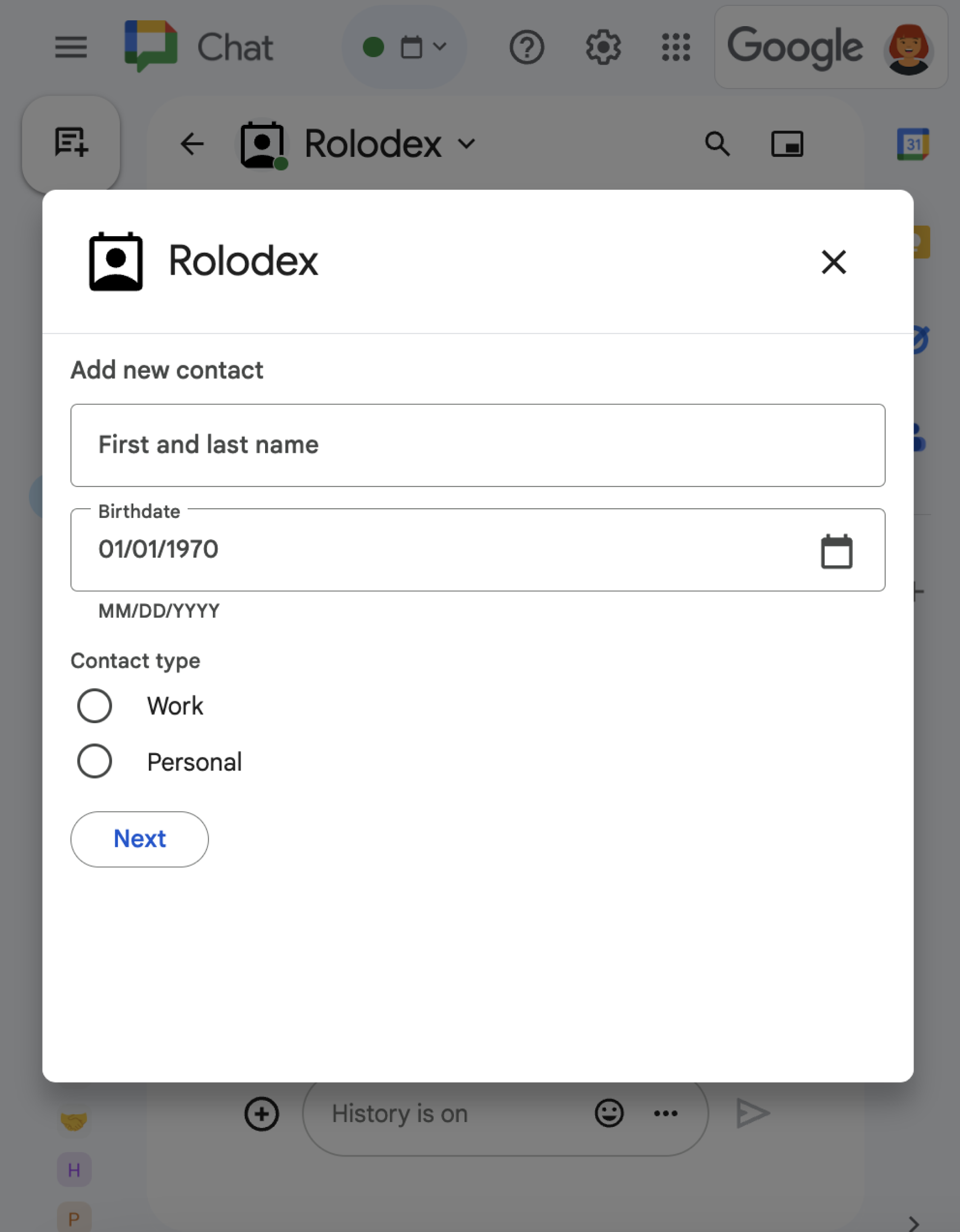
RenderActions(pushCard, updateCard, endNavigation: "CLOSE_DIALOG")를 사용하여 대화상자를 열고 업데이트하고 닫는 방법을 알아보려면 대화형 대화상자 열기를 참고하세요.
관련 주제
부가기능이 아닌 Chat 앱: Chat 앱의 홈페이지 빌드
Google Workspace 부가기능이 아닌 Chat 앱을 유지관리하는 경우 사용자가 홈 탭을 열면 Chat에서 APP_HOME 상호작용 이벤트를 전송하고 사용자가 앱 홈 카드에서 위젯과 상호작용하면 CARD_CLICKED 또는 SUBMIT_FORM 상호작용 이벤트를 전송합니다.
부가기능이 아닌 채팅 앱을 Google Workspace 부가기능 프레임워크로 업그레이드하려면 Google Chat 앱을 Google Workspace 부가기능으로 변환을 참고하세요.
부가기능이 아닌 Chat 앱에서 앱 홈 카드 빌드
부가기능이 아닌 Chat 앱에서 APP_HOME 상호작용 이벤트를 처리하려면 pushCard 탐색이 포함된 최상위 renderActions 필드가 포함된 응답을 반환하세요.
Node.js
Python
자바
Apps Script
이 예에서는 카드 JSON을 반환하여 카드 메시지를 전송합니다. Apps Script 카드 서비스를 사용할 수도 있습니다.
부가기능이 아닌 채팅 앱에서 앱 홈 상호작용에 응답
부가기능이 아닌 채팅 앱에서 updateCard 탐색이 포함된 최상위 renderActions 필드가 포함된 응답을 반환하여 앱 홈 카드에서 CARD_CLICKED 또는 SUBMIT_FORM 상호작용 이벤트를 처리합니다.
Node.js
Python
자바
Apps Script
이 예에서는 카드 JSON을 반환하여 카드 메시지를 전송합니다. Apps Script 카드 서비스를 사용할 수도 있습니다.