为 Google Chat 应用构建首页

本页介绍了如何为与 Google Chat 应用之间的私信构建首页。首页在 Google Chat API 中称为应用首页,是一种可自定义的卡片界面,显示在用户与 Chat 应用之间的一对一私信聊天室的首页标签页中。

包含两个 widget 的应用首页卡片。
图 1:在与 Chat 应用的私信中显示的首页示例。

与 Google Workspace 的其他宿主应用不同,扩展 Chat 的插件不会在右侧的快速访问面板中显示首页,也不会在清单中使用 addOns.common.homepageTrigger。 Chat 会在与 Chat 应用的 1 对 1 私信的首页标签页中以卡片形式显示您的首页,并在 Google Cloud 控制台中进行配置。

您可以使用应用首页分享有关如何与 Chat 应用互动的提示、显示个性化的用户仪表盘,或让用户从 Chat 中访问和配置外部服务或工具。


使用卡片构建器设计和预览 Chat 应用的消息和界面:

打开卡片构建器

前提条件

HTTP

一种 Google Chat 应用,可接收并响应用户互动。 如需构建一个,请完成 HTTP 快速入门。

Apps 脚本

一种 Google Chat 应用,可接收并响应用户互动。 如需构建一个,请完成 Apps 脚本快速入门。

为 Chat 应用配置应用主页

如需支持应用首页,请在 Google Cloud 控制台中启用支持应用首页并配置应用首页 触发器。每当用户在与 Chat 应用的 1 对 1 私信中打开首页标签页时,您的 Chat 应用都会收到应用首页触发事件。

如需在 Google Cloud 控制台中配置应用首页,请执行以下操作:

  1. 在 Google Cloud 控制台中,依次前往菜单 > API 和服务 > 已启用的 API 和服务 > Google Chat API > 配置。

    前往 Chat API 配置

  2. 在互动功能下,确保启用互动功能处于开启状态,然后在功能下,选中支持应用主屏幕复选框。

  3. 在连接设置 > 触发器下,根据您的 Chat 应用架构,在应用首页字段中指定您的应用首页处理程序:

    • HTTP:输入处理应用首页请求的 HTTPS 端点网址(或选择为所有触发器使用通用 HTTP 端点网址,以便您的通用 HTTP 端点网址接收所有事件)。
    • Google Apps 脚本:输入用于构建和返回首页卡片的 Google Apps 脚本回调函数的名称(默认为 onAppHome)。
  4. 点击保存。

处理应用首页事件对象

当用户打开与您的 Chat 应用之间的 1 对 1 私信的首页标签页时,Chat 会向您的应用首页端点或回调函数发送事件对象。

与聊天室或消息互动事件不同,初始应用首页事件对象不包含联合互动载荷(例如 messagePayload)。它包含以下字段:

  • commonEventObject:包括 clientPlatform、hostApp ("CHAT")、userLocale 和 userTimezone。
  • chat.user:打开首页标签页的 Chat 用户。
  • chat.eventTime:用户打开首页标签页时的时间戳。

构建应用首页卡片

当用户打开首页标签页时,通过返回包含 pushCard 导航操作和 Card 的 RenderActions 对象来处理应用首页触发事件。为了打造互动式体验,卡片可以包含按钮或文本输入等互动式微件。

HTTP

{
  "action": {
    "navigations": [
      {
        "pushCard": {
          "header": {
            "title": "Welcome to App Home"
          },
          "sections": [
            {
              "widgets": [
                {
                  "textParagraph": {
                    "text": "Manage your settings and view your dashboard here."
                  }
                },
                {
                  "buttonList": {
                    "buttons": [
                      {
                        "text": "Refresh",
                        "onClick": {
                          "action": {
                            "function": "https://example.com/updateAppHome"
                          }
                        }
                      }
                    ]
                  }
                }
              ]
            }
          ]
        }
      }
    ]
  }
}

Apps 脚本

/**
 * Builds and returns the App Home card when a user opens the Home tab.
 *
 * @param {Object} event The event object from Google Chat.
 * @return {ActionResponse} The RenderActions response pushing the homepage card.
 */
function onAppHome(event) {
  const card = CardService.newCardBuilder()
      .setHeader(
          CardService.newCardHeader().setTitle('Welcome to App Home'))
      .addSection(
          CardService.newCardSection()
              .addWidget(
                  CardService.newTextParagraph().setText(
                      'Manage your settings and view your dashboard here.'))
              .addWidget(
                  CardService.newButtonSet().addButton(
                      CardService.newTextButton()
                          .setText('Refresh')
                          .setOnClickAction(
                              CardService.newAction().setFunctionName(
                                  'updateAppHome')))))
      .build();

  return CardService.newActionResponseBuilder()
      .setNavigation(CardService.newNavigation().pushCard(card))
      .build();
}

响应应用首页互动

如果您的应用首页卡片包含互动式微件(例如按钮或表单输入),那么点击按钮会向按钮的配置操作函数或端点发送包含 chat.buttonClickedPayload(以及 commonEventObject.parameters 和 commonEventObject.formInputs)的事件对象。

如需更新应用首页卡片以响应用户互动,请返回一个包含 updateCard 导航操作的 RenderActions 对象。如需详细了解如何从交互式 widget 读取表单输入,请参阅读取用户在卡片上输入的表单数据。

HTTP

{
  "action": {
    "navigations": [
      {
        "updateCard": {
          "header": {
            "title": "Welcome to App Home"
          },
          "sections": [
            {
              "widgets": [
                {
                  "textParagraph": {
                    "text": "Last updated: 2026-10-02T23:00:00Z"
                  }
                }
              ]
            }
          ]
        }
      }
    ]
  }
}

Apps 脚本

/**
 * Updates the App Home card when a user clicks the Refresh button.
 *
 * @param {Object} event The event object from Google Chat.
 * @return {ActionResponse} The RenderActions response updating the homepage card.
 */
function updateAppHome(event) {
  const updatedCard = CardService.newCardBuilder()
      .setHeader(
          CardService.newCardHeader().setTitle('Welcome to App Home'))
      .addSection(
          CardService.newCardSection().addWidget(
              CardService.newTextParagraph().setText(
                  'Last updated: ' + new Date().toTimeString())))
      .build();

  return CardService.newActionResponseBuilder()
      .setNavigation(CardService.newNavigation().updateCard(updatedCard))
      .build();
}

从应用首页打开对话框

您的 Chat 应用还可以通过打开对话框来响应应用首页中的互动。
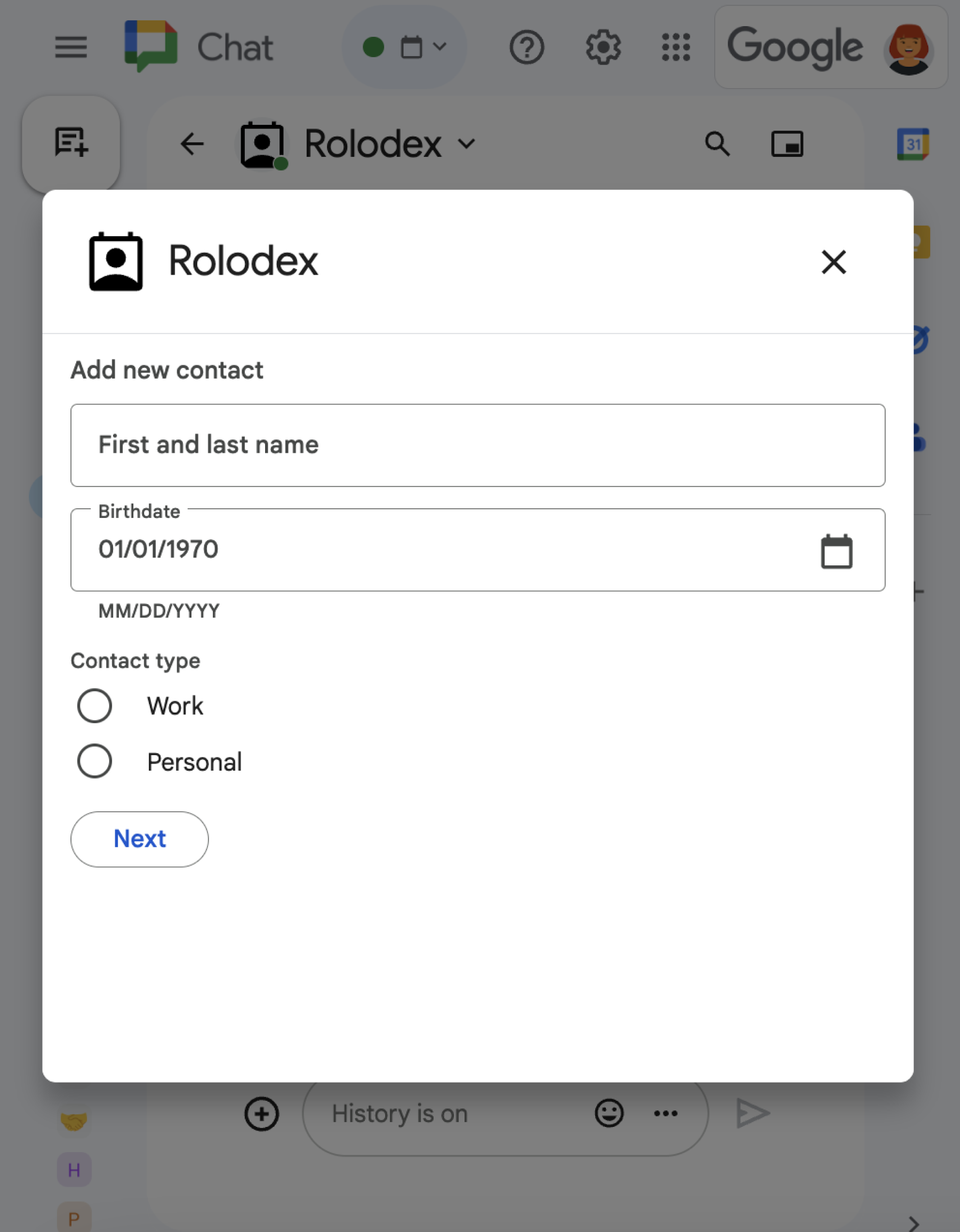
一个包含各种不同 widget 的对话框。
图 2:提示用户添加联系人的对话框。

如需了解如何使用 RenderActions(pushCard、updateCard 和 endNavigation: "CLOSE_DIALOG")打开、更新和关闭对话框,请参阅打开互动式对话框。

非插件型 Chat 应用:为 Chat 应用构建首页

如果您维护的 Chat 应用不是 Google Workspace 加载项,那么当用户打开首页标签页时,Chat 会发送 APP_HOME 互动事件;当用户与“应用首页”卡片上的 widget 互动时,Chat 会发送 CARD_CLICKED 或 SUBMIT_FORM 互动事件。

如需将非插件的 Chat 扩展应用升级到 Google Workspace 插件框架,请参阅将 Google Chat 扩展应用转换为 Google Workspace 插件。

在非插件的 Chat 应用中构建应用首页卡片

在非插件的 Chat 应用中,通过返回包含顶级 renderActions 字段(带有 pushCard 导航)的响应来处理 APP_HOME 互动事件:

Node.js

node/app-home/index.js
app.post('/', async (req, res) => {
  let event = req.body.chat;

  let body = {};
  if (event.type === 'APP_HOME') {
    // App home is requested
    body = { action: { navigations: [{
      pushCard: getHomeCard()
    }]}}
  } else if (event.type === 'SUBMIT_FORM') {
    // The update button from app home is clicked
    commonEvent = req.body.commonEventObject;
    if (commonEvent && commonEvent.invokedFunction === 'updateAppHome') {
      body = updateAppHome()
    }
  }

  return res.json(body);
});

// Create the app home card
function getHomeCard() {
  return { sections: [{ widgets: [
    { textParagraph: {
      text: "Here is the app home 🏠 It's " + new Date().toTimeString()
    }},
    { buttonList: { buttons: [{
      text: "Update app home",
      onClick: { action: {
        function: "updateAppHome"
      }}
    }]}}
  ]}]};
}

Python

python/app-home/main.py
@app.route('/', methods=['POST'])
def post() -> Mapping[str, Any]:
  """Handle requests from Google Chat

  Returns:
      Mapping[str, Any]: the response
  """
  event = request.get_json()
  match event['chat'].get('type'):

    case 'APP_HOME':
      # App home is requested
      body = { "action": { "navigations": [{
        "pushCard": get_home_card()
      }]}}

    case 'SUBMIT_FORM':
      # The update button from app home is clicked
      event_object = event.get('commonEventObject')
      if event_object is not None:
        if 'update_app_home' == event_object.get('invokedFunction'):
          body = update_app_home()

    case _:
      # Other response types are not supported
      body = {}

  return json.jsonify(body)


def get_home_card() -> Mapping[str, Any]:
  """Create the app home card

  Returns:
      Mapping[str, Any]: the card
  """
  return { "sections": [{ "widgets": [
    { "textParagraph": {
      "text": "Here is the app home 🏠 It's " +
        datetime.datetime.now().isoformat()
    }},
    { "buttonList": { "buttons": [{
      "text": "Update app home",
      "onClick": { "action": {
        "function": "update_app_home"
      }}
    }]}}
  ]}]}

Java

java/app-home/src/main/java/com/google/chat/app/home/App.java
// Process Google Chat events
@PostMapping("/")
@ResponseBody
public GenericJson onEvent(@RequestBody JsonNode event) throws Exception {
  switch (event.at("/chat/type").asText()) {
    case "APP_HOME":
      // App home is requested
      GenericJson navigation = new GenericJson();
      navigation.set("pushCard", getHomeCard());

      GenericJson action = new GenericJson();
      action.set("navigations", List.of(navigation));

      GenericJson response = new GenericJson();
      response.set("action", action);
      return response;
    case "SUBMIT_FORM":
      // The update button from app home is clicked
      if (event.at("/commonEventObject/invokedFunction").asText().equals("updateAppHome")) {
        return updateAppHome();
      }
  }

  return new GenericJson();
}

// Create the app home card
GoogleAppsCardV1Card getHomeCard() {
  return new GoogleAppsCardV1Card()
    .setSections(List.of(new GoogleAppsCardV1Section()
      .setWidgets(List.of(
        new GoogleAppsCardV1Widget()
          .setTextParagraph(new GoogleAppsCardV1TextParagraph()
            .setText("Here is the app home 🏠 It's " + new Date())),
        new GoogleAppsCardV1Widget()
          .setButtonList(new GoogleAppsCardV1ButtonList().setButtons(List.of(new GoogleAppsCardV1Button()
            .setText("Update app home")
            .setOnClick(new GoogleAppsCardV1OnClick()
              .setAction(new GoogleAppsCardV1Action()
                .setFunction("updateAppHome"))))))))));
}

Apps 脚本

此示例通过返回 card JSON 来发送卡片消息。您还可以使用 Apps 脚本卡片服务。

apps-script/app-home/app-home.gs
/**
 * Responds to a APP_HOME event in Google Chat.
 */
function onAppHome() {
  return { action: { navigations: [{
    pushCard: getHomeCard()
  }]}};
}

/**
 * Returns the app home card.
 */
function getHomeCard() {
  return { sections: [{ widgets: [
    { textParagraph: {
      text: "Here is the app home 🏠 It's " + new Date().toTimeString()
    }},
    { buttonList: { buttons: [{
      text: "Update app home",
      onClick: { action: {
        function: "updateAppHome"
      }}
    }]}}
  ]}]};
}

在非插件的 Chat 应用中响应应用首页互动

在非插件的 Chat 应用中,通过返回包含顶级 renderActions 字段(带有 updateCard 导航)的响应,处理来自应用首页卡片的 CARD_CLICKED 或 SUBMIT_FORM 互动事件:

Node.js

node/app-home/index.js
// Update the app home
function updateAppHome() {
  return { renderActions: { action: { navigations: [{
    updateCard: getHomeCard()
  }]}}}
};

Python

python/app-home/main.py
def update_app_home() -> Mapping[str, Any]:
  """Update the app home

  Returns:
      Mapping[str, Any]: the update card render action
  """
  return { "renderActions": { "action": { "navigations": [{
    "updateCard": get_home_card()
  }]}}}

Java

java/app-home/src/main/java/com/google/chat/app/home/App.java
// Update the app home
GenericJson updateAppHome() {
  GenericJson navigation = new GenericJson();
  navigation.set("updateCard", getHomeCard());

  GenericJson action = new GenericJson();
  action.set("navigations", List.of(navigation));

  GenericJson renderActions = new GenericJson();
  renderActions.set("action", action);

  GenericJson response = new GenericJson();
  response.set("renderActions", renderActions);
  return response;
}

Apps 脚本

此示例通过返回 card JSON 来发送卡片消息。您还可以使用 Apps 脚本卡片服务。

apps-script/app-home/app-home.gs
/**
 * Updates the home app.
 */
function updateAppHome() {
  return { renderActions: { action: { navigations: [{
    updateCard: getHomeCard()
  }]}}};
}