תצוגה מקדימה של הקישורים

כדי למנוע מעבר הקשר כשמשתמשים משתפים קישור ב-Google Chat, אפליקציית Chat יכולה להציג תצוגה מקדימה של הקישור על ידי צירוף כרטיס להודעה שלהם, שכולל מידע נוסף ומאפשר לאנשים לבצע פעולה ישירות מ-Google Chat.

לדוגמה, נניח שיש מרחב ב-Google Chat שכולל את כל נציגי שירות הלקוחות של חברה מסוימת, וגם אפליקציית Chat בשם Case-y. נציגי שירות לקוחות משתפים לעיתים קרובות קישורים לפנייות לשירות לקוחות במרחב הצ'אט, ובכל פעם שהם עושים זאת, הקולגות שלהם צריכים לפתוח את הקישור לפנייה כדי לראות פרטים כמו הנציג שאליו הוקצתה הפנייה, הסטטוס והנושא. באופן דומה, אם מישהו רוצה לקבל בעלות על פנייה או לשנות את הסטטוס שלה, הוא צריך לפתוח את הקישור.

התכונה 'תצוגה מקדימה של קישורים' מאפשרת לאפליקציית Chat שפועלת במרחב, Case-y, לצרף כרטיס עם פרטים כמו המקבל, הסטטוס והנושא בכל פעם שמישהו משתף קישור לטיפול בפנייה. הלחצנים בכרטיס מאפשרים לנציגים לקבל בעלות על הפנייה ולשנות את הסטטוס שלה ישירות מזרם הצ'אט.

כשמישהו מוסיף קישור להודעה, מופיע צ'יפ שמודיע לו שאפליקציית Chat עשויה להציג תצוגה מקדימה של הקישור.
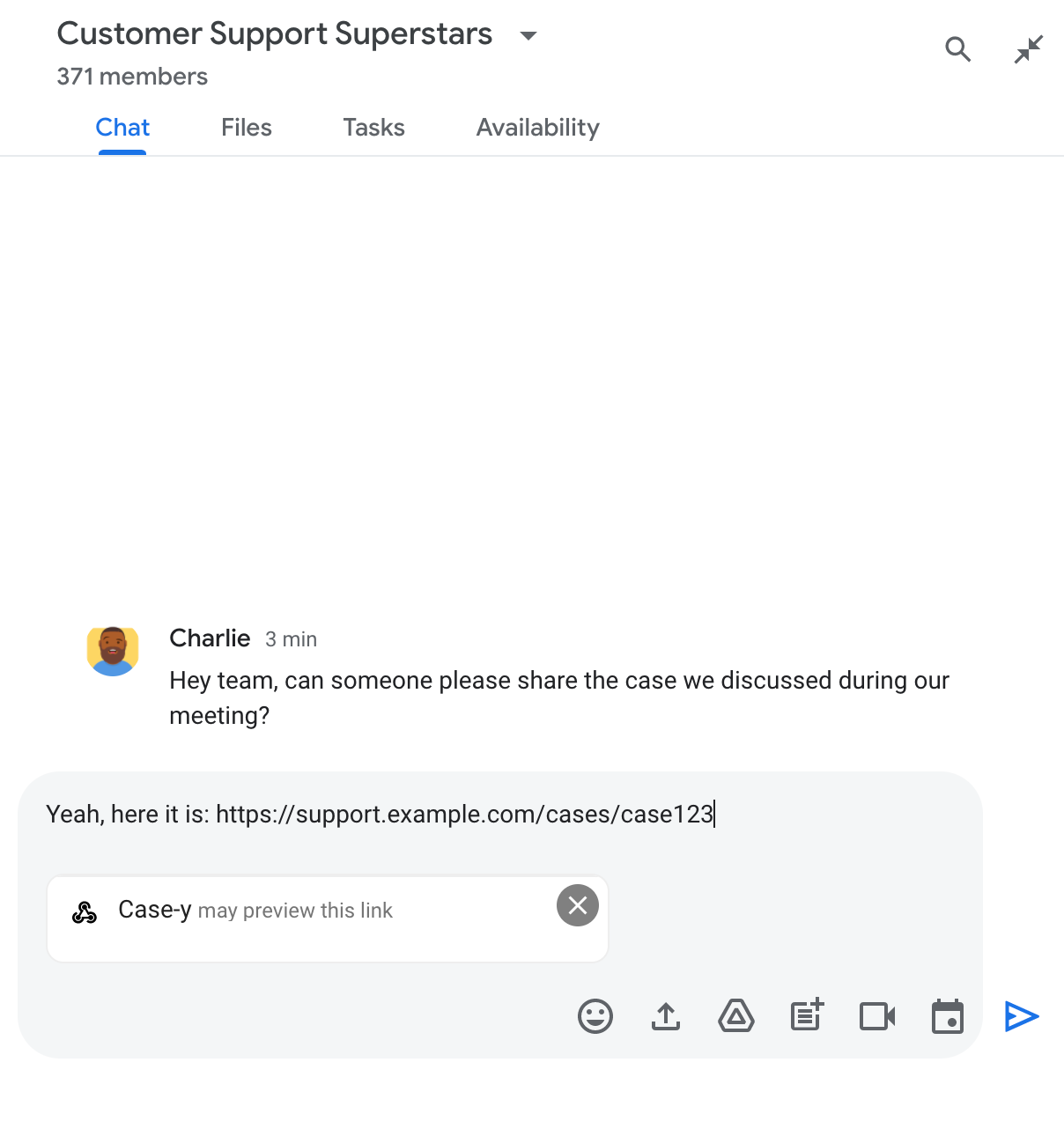
צ'יפ שמציין שאפליקציית Chat עשויה להציג תצוגה מקדימה של קישור

אחרי שליחת ההודעה, הקישור נשלח לאפליקציית Chat, שיוצרת ומצרפת את הכרטיס להודעה של המשתמש.
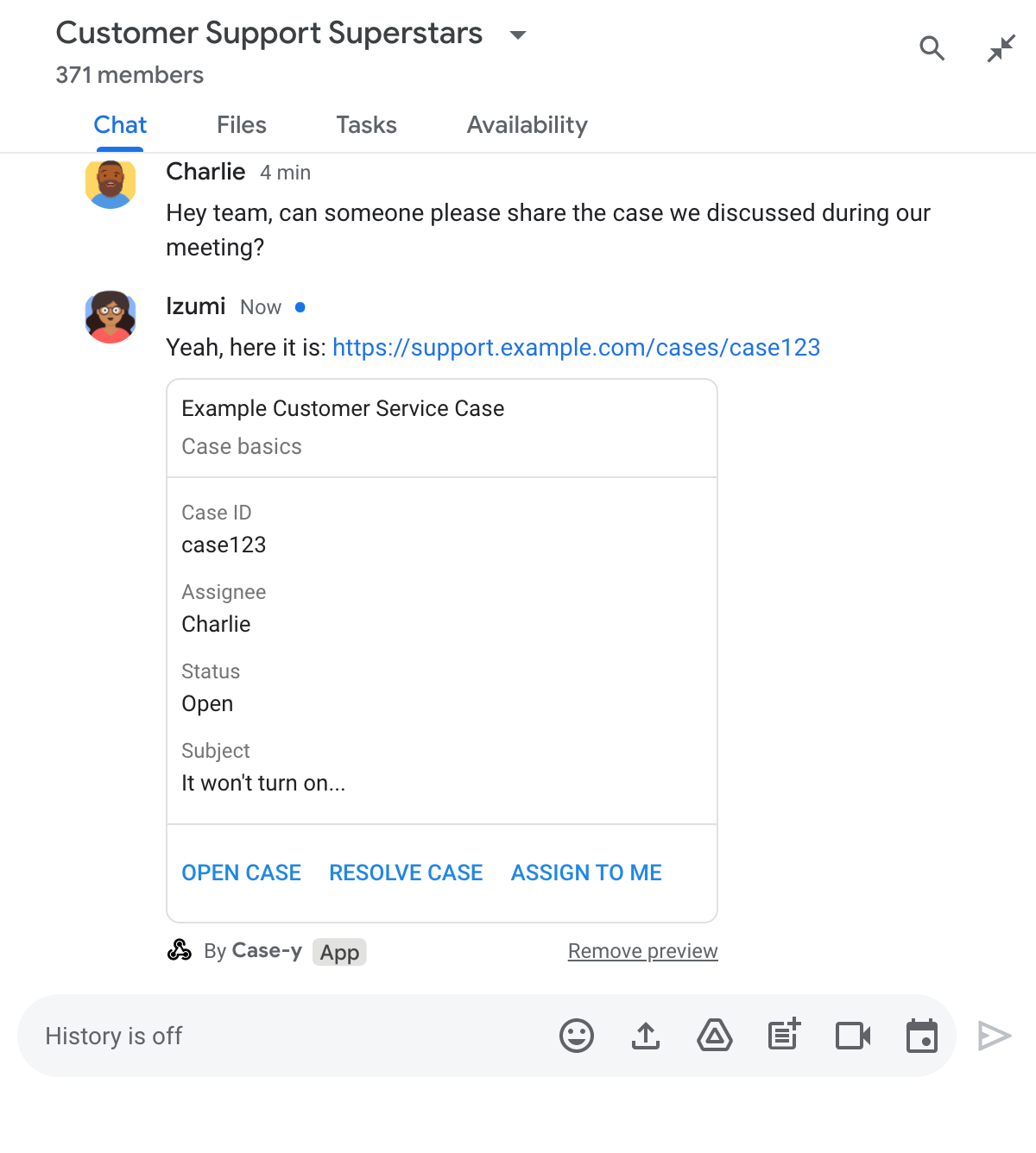
תצוגה מקדימה של קישור באפליקציית Chat על ידי צירוף כרטיס להודעה

בכרטיס מוצג מידע נוסף על הקישור, כולל רכיבים אינטראקטיביים כמו לחצנים. אפליקציית הצ'אט יכולה לעדכן את הכרטיס המצורף בתגובה לאינטראקציות של המשתמשים, כמו קליקים על לחצנים.

אם מישהו לא רוצה שאפליקציית Chat תציג תצוגה מקדימה של הקישור שלו על ידי צירוף כרטיס להודעה, הוא יכול למנוע את התצוגה המקדימה על ידי לחיצה על בצ'יפ התצוגה המקדימה. המשתמשים יכולים להסיר את הכרטיס המצורף בכל שלב על ידי לחיצה על הסרת התצוגה המקדימה.

דרישות מוקדמות

HTTP

אפליקציה ל-Google Chat שמקבלת אינטראקציות עם משתמשים ומגיבה להן. כדי ליצור אחד, צריך להשלים את המדריך למתחילים בנושא HTTP.

Apps Script

אפליקציה ל-Google Chat שמקבלת אינטראקציות עם משתמשים ומגיבה להן. כדי ליצור כזה, צריך להשלים את המדריך למתחילים של Apps Script.

רושמים קישורים ספציפיים – כמו example.com, ‏ support.example.com ו-support.example.com/cases/ – כתבניות של כתובות URL בדף ההגדרות של אפליקציית Chat במסוף Google Cloud, כדי שאפליקציית Chat תוכל להציג אותם בתצוגה מקדימה.
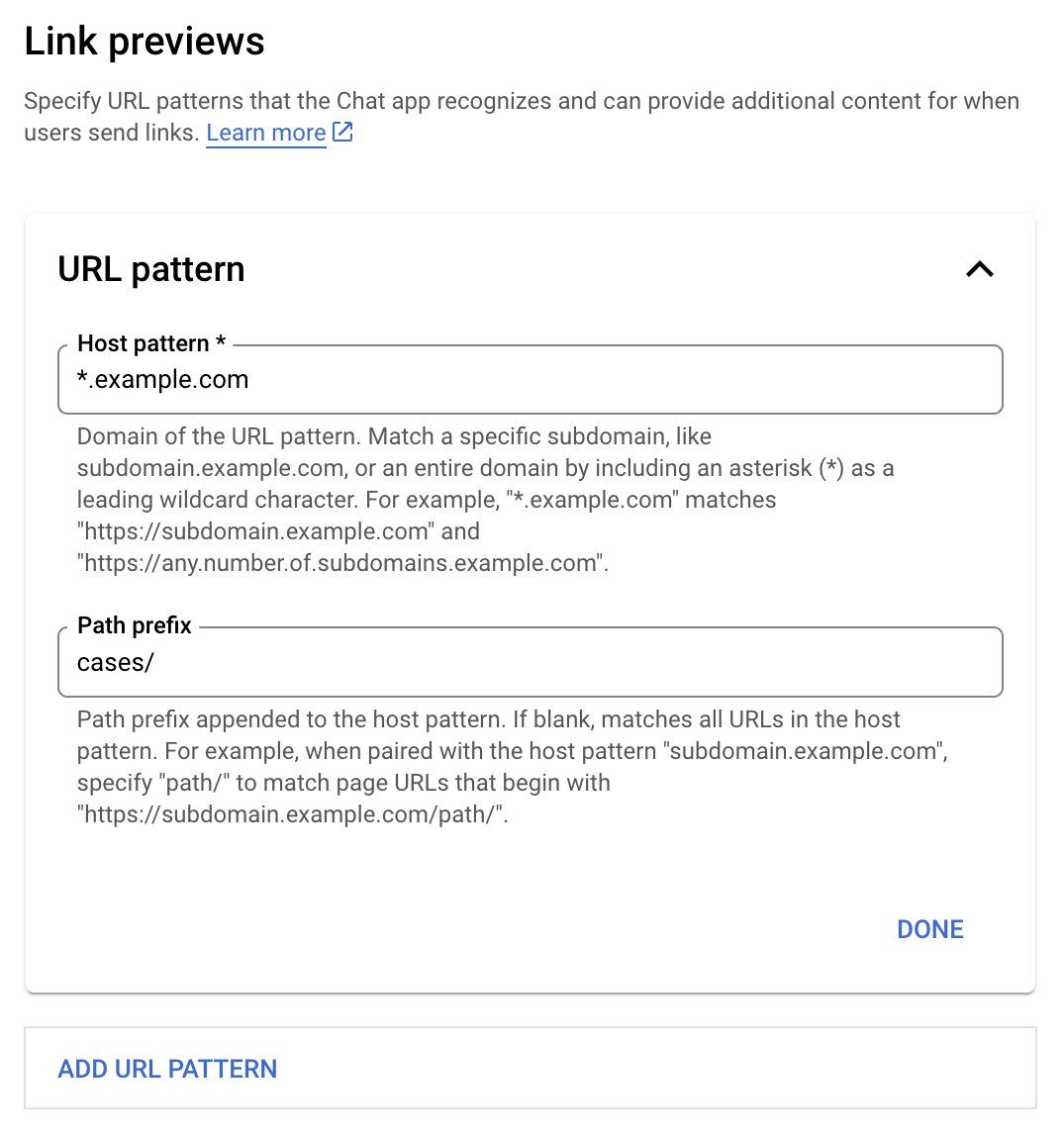
תפריט הגדרות לתצוגה מקדימה של קישור

  1. פותחים את מסוף Google Cloud.
  2. לצד Google Cloud, לוחצים על החץ למטה ופותחים את הפרויקט של אפליקציית Chat.
  3. בשדה החיפוש, מקלידים Google Chat API ולוחצים על Google Chat API.
  4. לוחצים על ניהול > הגדרה.
  5. בקטע 'תצוגה מקדימה של קישורים', מוסיפים או עורכים תבנית של כתובת URL.
    1. כדי להגדיר תצוגות מקדימות של קישורים לתבנית חדשה של כתובת URL, לוחצים על הוספת תבנית של כתובת URL.
    2. כדי לערוך את ההגדרה של תבנית כתובת URL קיימת, לוחצים על החץ למטה .
  6. בשדה תבנית מארח, מזינים את הדומיין של תבנית כתובת ה-URL. אפליקציית Chat תציג תצוגה מקדימה של קישורים לדומיין הזה.

    כדי שהאפליקציה של Chat תציג תצוגה מקדימה של קישורים לתת-דומיין ספציפי, כמו subdomain.example.com, צריך לכלול את תת-הדומיין.

    כדי שאפליקציית Chat תציג תצוגה מקדימה של קישורים לכל הדומיין, צריך לציין תו כללי עם כוכבית (*) כתת-הדומיין. לדוגמה, *.example.com מתאים ל-subdomain.example.com ול-any.number.of.subdomains.example.com.

  7. בשדה קידומת נתיב, מזינים נתיב לצירוף לדומיין של תבנית המארח.

    כדי להתאים את כל כתובות ה-URL בדומיין של תבנית המארח, משאירים את קידומת הנתיב ריקה.

    לדוגמה, אם תבנית המארח היא support.example.com, כדי להתאים לכתובות URL של מקרים שמתארחים ב-support.example.com/cases/, מזינים cases/.

  8. לוחצים על סיום.

  9. לוחצים על שמירה.

מעכשיו, בכל פעם שמישהו ישלח הודעה במרחב ב-Chat שכולל את אפליקציית Chat שלכם, וההודעה תכלול קישור שתואם לדפוס של כתובת URL לתצוגה מקדימה של קישור, האפליקציה שלכם תציג תצוגה מקדימה של הקישור.

אחרי שמגדירים תצוגה מקדימה של קישור מסוים, אפליקציית Chat יכולה לזהות את הקישור ולהציג אותו בתצוגה מקדימה על ידי צירוף מידע נוסף אליו.

במרחבים ב-Chat שכוללים את אפליקציית Chat שלכם, כשמישהו שולח הודעה שמכילה קישור שתואם לתבנית של כתובת URL לתצוגה מקדימה של קישור, אפליקציית Chat שלכם מקבלת אובייקט של אירוע עם MessagePayload. במטען הייעודי (Payload), האובייקט message.matchedUrl (chat.messagePayload.message.matchedUrl.url) מכיל את הקישור שהמשתמש כלל בהודעה:

JSON

message: {
  matchedUrl: {
    url: "https://support.example.com/cases/case123"
  },
  ... // other message attributes redacted
}

אפליקציית Chat יכולה להוסיף מידע להודעה עם הקישור לתצוגה המקדימה, על ידי בדיקה אם השדה matchedUrl קיים במטען הייעודי (payload) של אירוע MESSAGE (chat.messagePayload.message.matchedUrl.url). אפליקציית Chat יכולה לענות באמצעות הודעת טקסט בסיסית או לצרף כרטיס.

איך עונים להודעות טקסט

כדי לקבל תשובות בסיסיות, אפליקציית Chat יכולה להציג תצוגה מקדימה של קישור על ידי שליחת תשובה עם הודעת טקסט פשוטה לקישור. בדוגמה הזו מצורף הודעה שחוזרת על כתובת ה-URL של הקישור שתואמת לתבנית של כתובת ה-URL של התצוגה המקדימה של הקישור.

Node.js

node/chat/preview-link/index.js
// Reply with a text message for URLs of the subdomain "text"
if (chatMessage.matchedUrl.url.includes("text.example.com")) {
  return { hostAppDataAction: { chatDataAction: { createMessageAction: { message: {
    text: 'event.chat.messagePayload.message.matchedUrl.url: ' + chatMessage.matchedUrl.url
  }}}}};
}

מחליפים את הערך FUNCTION_URL בנקודת הקצה של ה-HTTP שמטפלת בלחיצות על הלחצן.

Python

python/chat/preview-link/main.py
# Reply with a text message for URLs of the subdomain "text"
if "text.example.com" in chatMessage.get('matchedUrl').get('url'):
  return { 'hostAppDataAction': { 'chatDataAction': { 'createMessageAction': { 'message': {
    'text': 'event.chat.messagePayload.message.matchedUrl.url: ' + chatMessage.get('matchedUrl').get('url')
  }}}}}

מחליפים את הערך FUNCTION_URL בנקודת הקצה של ה-HTTP שמטפלת בלחיצות על הלחצן.

Java

java/chat/preview-link/src/main/java/com/google/chat/previewLink/App.java
// Reply with a text message for URLs of the subdomain "text"
if (chatMessage.at("/matchedUrl/url").asText().contains("text.example.com")) {
  return new GenericJson() {{
    put("hostAppDataAction", new GenericJson() {{
      put("chatDataAction", new GenericJson() {{
        put("createMessageAction", new GenericJson() {{
          put("message", new Message()
            .setText("event.chat.messagePayload.message.matchedUrl.url: " + chatMessage.at("/matchedUrl/url").asText()));
        }});
      }});
    }});
  }};
}

מחליפים את הערך FUNCTION_URL בנקודת הקצה של ה-HTTP שמטפלת בלחיצות על הלחצן.

Apps Script

apps-script/chat/preview-link/preview-link.gs
// Reply with a text message for URLs of the subdomain "text".
if (chatMessage.matchedUrl.url.includes("text.example.com")) {
  return { hostAppDataAction: { chatDataAction: { createMessageAction: { message: {
    text: 'event.chat.messagePayload.message.matchedUrl.url: ' + chatMessage.matchedUrl.url
  }}}}};
}

כדי לצרף כרטיס לקישור בתצוגה מקדימה, מחזירים את הפעולה DataActions עם האובייקט ChatDataActionMarkup מסוג UpdateInlinePreviewAction.

בדוגמה הבאה, אפליקציה ל-Chat מוסיפה כרטיס תצוגה מקדימה להודעות שמכילות את תבנית כתובת ה-URL‏ support.example.com.

תצוגה מקדימה של קישור באפליקציית Chat על ידי צירוף כרטיס להודעה

Node.js

node/chat/preview-link/index.js
// Attach a card to the message for URLs of the subdomain "support"
if (chatMessage.matchedUrl.url.includes("support.example.com")) {
  // A hard-coded card is used in this example. In a real-life scenario,
  // the case information would be fetched and used to build the card.
  return { hostAppDataAction: { chatDataAction: { updateInlinePreviewAction: { cardsV2: [{
    cardId: 'attachCard',
    card: {
      header: {
        title: 'Example Customer Service Case',
        subtitle: 'Case basics',
      },
      sections: [{ widgets: [
      { decoratedText: { topLabel: 'Case ID', text: 'case123'}},
      { decoratedText: { topLabel: 'Assignee', text: 'Charlie'}},
      { decoratedText: { topLabel: 'Status', text: 'Open'}},
      { decoratedText: { topLabel: 'Subject', text: 'It won\'t turn on...' }},
      { buttonList: { buttons: [{
        text: 'OPEN CASE',
        onClick: { openLink: {
          url: 'https://support.example.com/orders/case123'
        }},
      }, {
        text: 'RESOLVE CASE',
        onClick: { openLink: {
          url: 'https://support.example.com/orders/case123?resolved=y',
        }},
      }, {
        text: 'ASSIGN TO ME',
        onClick: { action: { function: FUNCTION_URL }}
      }]}}
      ]}]
    }
  }]}}}};
}

מחליפים את הערך FUNCTION_URL בנקודת הקצה של ה-HTTP שמטפלת בלחיצות על הלחצן.

Python

python/chat/preview-link/main.py
# Attach a card to the message for URLs of the subdomain "support"
if "support.example.com" in chatMessage.get('matchedUrl').get('url'):
  # A hard-coded card is used in this example. In a real-life scenario,
  # the case information would be fetched and used to build the card.
  return { 'hostAppDataAction': { 'chatDataAction': { 'updateInlinePreviewAction': { 'cardsV2': [{
    'cardId': 'attachCard',
    'card': {
      'header': {
        'title': 'Example Customer Service Case',
        'subtitle': 'Case basics',
      },
      'sections': [{ 'widgets': [
      { 'decoratedText': { 'topLabel': 'Case ID', 'text': 'case123'}},
      { 'decoratedText': { 'topLabel': 'Assignee', 'text': 'Charlie'}},
      { 'decoratedText': { 'topLabel': 'Status', 'text': 'Open'}},
      { 'decoratedText': { 'topLabel': 'Subject', 'text': 'It won\'t turn on...' }},
      { 'buttonList': { 'buttons': [{
        'text': 'OPEN CASE',
        'onClick': { 'openLink': {
          'url': 'https://support.example.com/orders/case123'
        }},
      }, {
        'text': 'RESOLVE CASE',
        'onClick': { 'openLink': {
          'url': 'https://support.example.com/orders/case123?resolved=y',
        }},
      }, {
        'text': 'ASSIGN TO ME',
        'onClick': { 'action': { 'function': FUNCTION_URL }}
      }]}}
      ]}]
    }
  }]}}}}

מחליפים את הערך FUNCTION_URL בנקודת הקצה של ה-HTTP שמטפלת בלחיצות על הלחצן.

Java

java/chat/preview-link/src/main/java/com/google/chat/previewLink/App.java
// Attach a card to the message for URLs of the subdomain "support"
if (chatMessage.at("/matchedUrl/url").asText().contains("support.example.com")) {
  // A hard-coded card is used in this example. In a real-life scenario,
  // the case information would be fetched and used to build the card.
  CardWithId cardV2 = new CardWithId()
    .setCardId("attachCard")
    .setCard(new GoogleAppsCardV1Card()
      .setHeader(new GoogleAppsCardV1CardHeader()
        .setTitle("Example Customer Service Case")
        .setSubtitle("Case basics"))
      .setSections(List.of(new GoogleAppsCardV1Section().setWidgets(List.of(
        new GoogleAppsCardV1Widget().setDecoratedText(new GoogleAppsCardV1DecoratedText()
          .setTopLabel("Case ID")
          .setText("case123")),
        new GoogleAppsCardV1Widget().setDecoratedText(new GoogleAppsCardV1DecoratedText()
          .setTopLabel("Assignee")
          .setText("Charlie")),
        new GoogleAppsCardV1Widget().setDecoratedText(new GoogleAppsCardV1DecoratedText()
          .setTopLabel("Status")
          .setText("Open")),
        new GoogleAppsCardV1Widget().setDecoratedText(new GoogleAppsCardV1DecoratedText()
          .setTopLabel("Subject")
          .setText("It won't turn on...")),
        new GoogleAppsCardV1Widget().setButtonList(new GoogleAppsCardV1ButtonList()
          .setButtons(List.of(
            new GoogleAppsCardV1Button()
              .setText("OPEN CASE")
            .setOnClick(new GoogleAppsCardV1OnClick()
                .setOpenLink(new GoogleAppsCardV1OpenLink()
                  .setUrl("https://support.example.com/orders/case123"))),
            new GoogleAppsCardV1Button()
              .setText("RESOLVE CASE")
            .setOnClick(new GoogleAppsCardV1OnClick()
                .setOpenLink(new GoogleAppsCardV1OpenLink()
                  .setUrl("https://support.example.com/orders/case123?resolved=y"))),
            new GoogleAppsCardV1Button()
              .setText("ASSIGN TO ME")
              .setOnClick(new GoogleAppsCardV1OnClick()
                .setAction(new GoogleAppsCardV1Action().setFunction(FUNCTION_URL)))
          ))
        )
      ))))
    );

  return new GenericJson() {{
    put("hostAppDataAction", new GenericJson() {{
      put("chatDataAction", new GenericJson() {{
        put("updateInlinePreviewAction", new GenericJson() {{
          put("cardsV2", List.of(cardV2));
        }});
      }});
    }});
  }};
}

מחליפים את הערך FUNCTION_URL בנקודת הקצה של ה-HTTP שמטפלת בלחיצות על הלחצן.

Apps Script

apps-script/chat/preview-link/preview-link.gs
// Attach a card to the message for URLs of the subdomain "support".
if (chatMessage.matchedUrl.url.includes("support.example.com")) {
  // A hard-coded card is used in this example. In a real-life scenario,
  // the case information would be fetched and used to build the card.
  return { hostAppDataAction: { chatDataAction: { updateInlinePreviewAction: { cardsV2: [{
    cardId: 'attachCard',
    card: {
      header: {
        title: 'Example Customer Service Case',
        subtitle: 'Case summary',
      },
      sections: [{ widgets: [
      { decoratedText: { topLabel: 'Case ID', text: 'case123'}},
      { decoratedText: { topLabel: 'Assignee', text: 'Charlie'}},
      { decoratedText: { topLabel: 'Status', text: 'Open'}},
      { decoratedText: { topLabel: 'Subject', text: 'It won\'t turn on...' }},
      { buttonList: { buttons: [{
        text: 'OPEN CASE',
        onClick: { openLink: {
          url: 'https://support.example.com/orders/case123'
        }},
      }, {
        text: 'RESOLVE CASE',
        onClick: { openLink: {
          url: 'https://support.example.com/orders/case123?resolved=y',
        }},
      }, {
        text: 'ASSIGN TO ME',
        // Clicking this button triggers the execution of the function
        // "assign" from the Apps Script project.
        onClick: { action: { function: 'assign'}}
      }]}}
      ]}]
    }
  }]}}}};
}

אפליקציית Chat יכולה לעדכן את כרטיס התצוגה המקדימה של הקישור כשמשתמשים מבצעים פעולות בכרטיס, כמו לחיצה על לחצן.

כדי לעדכן את הכרטיס, אפליקציית Chat צריכה להחזיר את הפעולה DataActions עם אחד מאובייקטי ChatDataActionMarkup הבאים:

  • אם משתמש שלח את ההודעה, מחזירים אובייקט UpdateMessageAction.
  • אם ההודעה נשלחה מאפליקציית Chat, הפונקציה מחזירה אובייקט UpdateInlinePreviewAction.

כדי לדעת מי שלח את ההודעה, משתמשים במטען הייעודי (payload) של האירוע (buttonClickedPayload) כדי לבדוק אם השולח (message.sender.type) מוגדר כ-HUMAN (משתמש) או כ-BOT (אפליקציית Chat).

בדוגמה הבאה אפשר לראות איך אפליקציית Chat מעדכנת תצוגה מקדימה של קישור בכל פעם שמשתמש לוחץ על הלחצן הקצאה לי. האפליקציה מעדכנת את השדה מקבל ההקצאה בכרטיס ומשביתה את הלחצן.
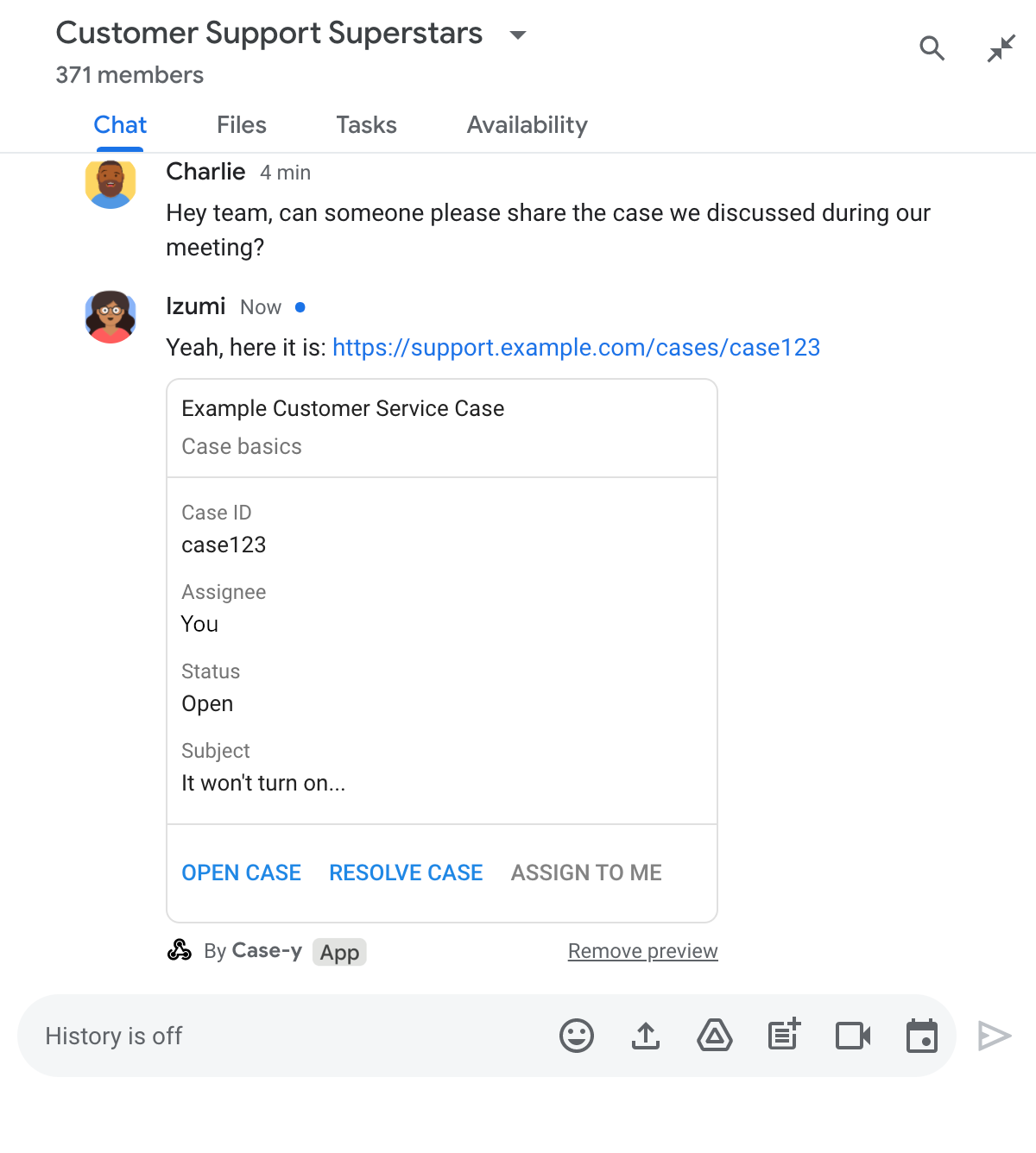
תצוגה מקדימה של קישור באפליקציית Chat עם גרסה מעודכנת של כרטיס שמצורף להודעה

Node.js

node/chat/preview-link/index.js
/**
 * Respond to clicks by assigning and updating the card that's attached to a
 * message previewed link of the pattern "support.example.com".
 *
 * @param {Object} chatMessage The chat message object from Google Workspace Add On event.
 * @return {Object} Action response depending on the message author.
 */
function handleCardClick(chatMessage) {
  // Creates the updated card that displays "You" for the assignee
  // and that disables the button.
  //
  // A hard-coded card is used in this example. In a real-life scenario,
  // an actual assign action would be performed before building the card.
  const message = { cardsV2: [{
    cardId: 'attachCard',
    card: {
      header: {
        title: 'Example Customer Service Case',
        subtitle: 'Case basics',
      },
      sections: [{ widgets: [
        { decoratedText: { topLabel: 'Case ID', text: 'case123'}},
        // The assignee is now "You"
        { decoratedText: { topLabel: 'Assignee', text: 'You'}},
        { decoratedText: { topLabel: 'Status', text: 'Open'}},
        { decoratedText: { topLabel: 'Subject', text: 'It won\'t turn on...' }},
        { buttonList: { buttons: [{
          text: 'OPEN CASE',
          onClick: { openLink: {
            url: 'https://support.example.com/orders/case123'
          }},
        }, {
          text: 'RESOLVE CASE',
          onClick: { openLink: {
            url: 'https://support.example.com/orders/case123?resolved=y',
          }},
        }, {
          text: 'ASSIGN TO ME',
          // The button is now disabled
          disabled: true,
          onClick: { action: { function: FUNCTION_URL }}
        }]}}
      ]}]
    }
  }]};

  // Use the adequate action response type. It depends on whether the message
  // the preview link card is attached to was created by a human or a Chat app.
  if(chatMessage.sender.type === 'HUMAN') {
    return { hostAppDataAction: { chatDataAction: { updateInlinePreviewAction: message }}};
  } else {
    return { hostAppDataAction: { chatDataAction: { updateMessageAction: message }}};
  }
}

מחליפים את הערך FUNCTION_URL בנקודת הקצה של ה-HTTP שמטפלת בלחיצות על הלחצן.

Python

python/chat/preview-link/main.py
def handle_card_click(chatMessage: dict) -> dict:
  """Respond to clicks by assigning and updating the card that's attached to a
  message previewed link of the pattern "support.example.com".

  - Reply with text messages that echo "text.example.com" link URLs in messages.
  - Attach cards to messages with "support.example.com" link URLs.

  Args:
      chatMessage (Mapping[str, Any]): The chat message object from Google Workspace Add On event.

  Returns:
      Mapping[str, Any]: Action response depending on the message author.
  """
  # Creates the updated card that displays "You" for the assignee
  # and that disables the button.
  #
  # A hard-coded card is used in this example. In a real-life scenario,
  # an actual assign action would be performed before building the card.
  message = { 'cardsV2': [{
    'cardId': 'attachCard',
    'card': {
      'header': {
        'title': 'Example Customer Service Case',
        'subtitle': 'Case basics',
      },
      'sections': [{ 'widgets': [
      { 'decoratedText': { 'topLabel': 'Case ID', 'text': 'case123'}},
      # The assignee is now "You"
      { 'decoratedText': { 'topLabel': 'Assignee', 'text': 'You'}},
      { 'decoratedText': { 'topLabel': 'Status', 'text': 'Open'}},
      { 'decoratedText': { 'topLabel': 'Subject', 'text': 'It won\'t turn on...' }},
      { 'buttonList': { 'buttons': [{
        'text': 'OPEN CASE',
        'onClick': { 'openLink': {
          'url': 'https://support.example.com/orders/case123'
        }},
      }, {
        'text': 'RESOLVE CASE',
        'onClick': { 'openLink': {
          'url': 'https://support.example.com/orders/case123?resolved=y',
        }},
      }, {
        'text': 'ASSIGN TO ME',
        # The button is now disabled
        'disabled': True,
        'onClick': { 'action': { 'function': FUNCTION_URL }}
      }]}}
      ]}]
    }
  }]}

  # Use the adequate action response type. It depends on whether the message
  # the preview link card is attached to was created by a human or a Chat app.
  if chatMessage.get('sender').get('type') == 'HUMAN':
    return { 'hostAppDataAction': { 'chatDataAction': { 'updateInlinePreviewAction': message }}}
  else:
    return { 'hostAppDataAction': { 'chatDataAction': { 'updateMessageAction': message }}}

מחליפים את הערך FUNCTION_URL בנקודת הקצה של ה-HTTP שמטפלת בלחיצות על הלחצן.

Java

java/chat/preview-link/src/main/java/com/google/chat/previewLink/App.java
/**
 * Respond to clicks by assigning and updating the card that's attached to a
 * message previewed link of the pattern "support.example.com".
 *
 * @param chatMessage The chat message object from Google Workspace Add On event.
 * @return Action response depending on the message author.
 */
GenericJson handleCardClick(JsonNode chatMessage) {
  // Creates the updated card that displays "You" for the assignee
  // and that disables the button.
  //
  // A hard-coded card is used in this example. In a real-life scenario,
  // an actual assign action would be performed before building the card.
  Message message = new Message().setCardsV2(List.of(new CardWithId()
    .setCardId("attachCard")
    .setCard(new GoogleAppsCardV1Card()
      .setHeader(new GoogleAppsCardV1CardHeader()
        .setTitle("Example Customer Service Case")
        .setSubtitle("Case basics"))
      .setSections(List.of(new GoogleAppsCardV1Section().setWidgets(List.of(
        new GoogleAppsCardV1Widget().setDecoratedText(new GoogleAppsCardV1DecoratedText()
          .setTopLabel("Case ID")
          .setText("case123")),
        // The assignee is now "You"
        new GoogleAppsCardV1Widget().setDecoratedText(new GoogleAppsCardV1DecoratedText()
          .setTopLabel("Assignee")
          .setText("You")),
        new GoogleAppsCardV1Widget().setDecoratedText(new GoogleAppsCardV1DecoratedText()
          .setTopLabel("Status")
          .setText("Open")),
        new GoogleAppsCardV1Widget().setDecoratedText(new GoogleAppsCardV1DecoratedText()
          .setTopLabel("Subject")
          .setText("It won't turn on...")),
        new GoogleAppsCardV1Widget().setButtonList(new GoogleAppsCardV1ButtonList()
          .setButtons(List.of(
            new GoogleAppsCardV1Button()
              .setText("OPEN CASE")
              .setOnClick(new GoogleAppsCardV1OnClick()
                .setOpenLink(new GoogleAppsCardV1OpenLink()
                  .setUrl("https://support.example.com/orders/case123"))),
            new GoogleAppsCardV1Button()
              .setText("RESOLVE CASE")
              .setOnClick(new GoogleAppsCardV1OnClick()
                .setOpenLink(new GoogleAppsCardV1OpenLink()
                  .setUrl("https://support.example.com/orders/case123?resolved=y"))),
            new GoogleAppsCardV1Button()
              .setText("ASSIGN TO ME")
              // The button is now disabled
              .setDisabled(true)
              .setOnClick(new GoogleAppsCardV1OnClick()
                .setAction(new GoogleAppsCardV1Action().setFunction(FUNCTION_URL)))
          ))
        )
      ))))
    )
  ));

  // Use the adequate action response type. It depends on whether the message
  // the preview link card is attached to was created by a human or a Chat app.
  if("HUMAN".equals(chatMessage.at("/sender/type").asText())) {
    return new GenericJson() {{
      put("hostAppDataAction", new GenericJson() {{
        put("chatDataAction", new GenericJson() {{
          put("updateInlinePreviewAction", message);
        }});
      }});
    }};
  } else {
    return new GenericJson() {{
      put("hostAppDataAction", new GenericJson() {{
        put("chatDataAction", new GenericJson() {{
          put("updateMessageAction", message);
        }});
      }});
    }};
  }
}

מחליפים את הערך FUNCTION_URL בנקודת הקצה של ה-HTTP שמטפלת בלחיצות על הלחצן.

Apps Script

apps-script/chat/preview-link/preview-link.gs
/**
 * Assigns and updates the card that's attached to a message with a
 * previewed link of the pattern "support.example.com".
 *
 * @param {Object} event The event object from the Google Workspace add-on.
 * @return {Object} Action response depending on the message author.
 */
function assign(event) {
  // Creates the updated card that displays "You" for the assignee
  // and that disables the button.
  //
  // A hard-coded card is used in this example. In a real-life scenario,
  // an actual assign action would be performed before building the card.
  const message = { cardsV2: [{
    cardId: 'attachCard',
    card: {
      header: {
        title: 'Example Customer Service Case',
        subtitle: 'Case summary',
      },
      sections: [{ widgets: [
        { decoratedText: { topLabel: 'Case ID', text: 'case123'}},
        // The assignee is now "You"
        { decoratedText: { topLabel: 'Assignee', text: 'You'}},
        { decoratedText: { topLabel: 'Status', text: 'Open'}},
        { decoratedText: { topLabel: 'Subject', text: 'It won\'t turn on...' }},
        { buttonList: { buttons: [{
          text: 'OPEN CASE',
          onClick: { openLink: {
            url: 'https://support.example.com/orders/case123'
          }},
        }, {
          text: 'RESOLVE CASE',
          onClick: { openLink: {
            url: 'https://support.example.com/orders/case123?resolved=y',
          }},
        }, {
          text: 'ASSIGN TO ME',
          // The button is now disabled
          disabled: true,
          onClick: { action: { function: 'assign'}}
        }]}}
      ]}]
    }
  }]};

  // Use the adequate action response type. It depends on whether the message
  // the preview link card is attached to was created by a human or a Chat app.
  if(event.chat.buttonClickedPayload.message.sender.type === 'HUMAN') {
    return { hostAppDataAction: { chatDataAction: { updateInlinePreviewAction: message }}};
  } else {
    return { hostAppDataAction: { chatDataAction: { updateMessageAction: message }}};
  }
}

מגבלות ושיקולים

כשמגדירים תצוגות מקדימות של קישורים לאפליקציית Chat, חשוב לשים לב למגבלות ולשיקולים הבאים:

  • כל אפליקציית Chat תומכת בתצוגה מקדימה של קישורים לעד 5 תבניות של כתובות URL.
  • אפליקציות ל-Chat מציגות תצוגה מקדימה של קישור אחד לכל הודעה. אם יש כמה קישורים שאפשר לראות את התצוגה המקדימה שלהם בהודעה אחת, רק התצוגה המקדימה של הקישור הראשון תוצג.
  • באפליקציות צ'אט מוצגת תצוגה מקדימה רק לקישורים שמתחילים ב-https://, כך שקישור כמו https://support.example.com/cases/ יוצג בתצוגה מקדימה, אבל קישור כמו support.example.com/cases/ לא יוצג.
  • אלא אם ההודעה כוללת מידע אחר שנשלח לאפליקציית Chat, כמו פקודה דרך שורת הפקודות, רק כתובת ה-URL של הקישור נשלחת לאפליקציית Chat בתצוגה המקדימה של הקישור.
  • אם משתמש מפרסם את הקישור, אפליקציית Chat יכולה לעדכן את כרטיס התצוגה המקדימה של הקישור רק אם משתמשים מקיימים אינטראקציה עם הכרטיס, למשל לחיצה על לחצן. אי אפשר להתקשר לשיטת update() של Chat API במשאב Message כדי לעדכן הודעה של משתמש באופן אסינכרוני.
  • אפליקציות ל-Chat צריכות להציג תצוגה מקדימה של קישורים לכל המשתתפים במרחב, ולכן ההודעה לא יכולה לכלול את השדה privateMessageViewer.

במהלך ההטמעה של תצוגה מקדימה של קישורים, יכול להיות שתצטרכו לנפות באגים באפליקציית Chat על ידי קריאת היומנים של האפליקציה. כדי לקרוא את היומנים, נכנסים אל Logs Explorer במסוף Google Cloud.

המסמכים הבאים רלוונטיים לאפליקציות ל-Chat שהן לא תוספים ל-Google Workspace. כדי להעביר אפליקציה ל-Chat שלא מוגדרת כתוסף, אפשר לעיין במאמר בנושא המרת אפליקציה ל-Google Chat לתוסף ל-Google Workspace.

במרחבים ב-Chat שכוללים אפליקציית Chat שהיא לא תוסף, כשמישהו שולח הודעה עם קישור שתואם לתבנית של כתובת URL לתצוגה מקדימה של קישור, אפליקציית Chat מקבלת אירוע אינטראקציה מסוג MESSAGE. מטען ה-JSON של אירוע האינטראקציה מכיל את השדה matchedUrl:

JSON

message: {
  matchedUrl: {
    url: "https://support.example.com/cases/case123"
  },
  ... // other message attributes redacted
}

אפליקציית Chat שהיא לא תוסף יכולה להוסיף מידע להודעה עם הקישור שמוצגת התצוגה המקדימה שלו, על ידי בדיקה אם השדה matchedUrl קיים במטען הייעודי (payload) של אירוע MESSAGE.

איך עונים להודעות טקסט

כדי לקבל תצוגה מקדימה של קישור בתשובה, אפליקציית Chat שלא מוגדרת כתוסף יכולה לשלוח הודעת טקסט פשוטה עם הקישור. בדוגמה הזו מצורף הודעה שחוזרת על כתובת ה-URL של הקישור שתואמת לתבנית של כתובת URL לתצוגה מקדימה של קישור:

Node.js

node/preview-link/index.js
// Reply with a text message for URLs of the subdomain "text"
if (event.message.matchedUrl.url.includes("text.example.com")) {
  return {
    text: 'event.message.matchedUrl.url: ' + event.message.matchedUrl.url
  };
}

Python

python/preview-link/main.py
# Reply with a text message for URLs of the subdomain "text"
if 'text.example.com' in event.get('message').get('matchedUrl').get('url'):
  return {
    'text': 'event.message.matchedUrl.url: ' +
            event.get('message').get('matchedUrl').get('url')
  }

Java

java/preview-link/src/main/java/com/google/chat/preview/App.java
// Reply with a text message for URLs of the subdomain "text"
if (event.at("/message/matchedUrl/url").asText().contains("text.example.com")) {
  return new Message().setText("event.message.matchedUrl.url: " +
    event.at("/message/matchedUrl/url").asText());
}

Apps Script

apps-script/preview-link/preview-link.gs
// Reply with a text message for URLs of the subdomain "text"
if (event.message.matchedUrl.url.includes("text.example.com")) {
  return {
    text: 'event.message.matchedUrl.url: ' + event.message.matchedUrl.url
  };
}

צירוף כרטיס עם תצוגה מקדימה של הקישור

כדי לצרף כרטיס לקישור בתצוגה מקדימה באפליקציית Chat שהיא לא תוסף, מחזירים ActionResponse מסוג UPDATE_USER_MESSAGE_CARDS. בדוגמה הזו מצורף כרטיס בסיסי:

Node.js

node/preview-link/index.js
// Attach a card to the message for URLs of the subdomain "support"
if (event.message.matchedUrl.url.includes("support.example.com")) {
  // A hard-coded card is used in this example. In a real-life scenario,
  // the case information would be fetched and used to build the card.
  return {
    actionResponse: { type: 'UPDATE_USER_MESSAGE_CARDS' },
    cardsV2: [{
      cardId: 'attachCard',
      card: {
        header: {
          title: 'Example Customer Service Case',
          subtitle: 'Case basics',
        },
        sections: [{ widgets: [
          { decoratedText: { topLabel: 'Case ID', text: 'case123'}},
          { decoratedText: { topLabel: 'Assignee', text: 'Charlie'}},
          { decoratedText: { topLabel: 'Status', text: 'Open'}},
          { decoratedText: { topLabel: 'Subject', text: 'It won\'t turn on...' }},
          { buttonList: { buttons: [{
            text: 'OPEN CASE',
            onClick: { openLink: {
              url: 'https://support.example.com/orders/case123'
            }},
          }, {
            text: 'RESOLVE CASE',
            onClick: { openLink: {
              url: 'https://support.example.com/orders/case123?resolved=y',
            }},
          }, {
            text: 'ASSIGN TO ME',
            onClick: { action: { function: 'assign'}}
          }]}}
        ]}]
      }
    }]
  };
}

Python

python/preview-link/main.py
# Attach a card to the message for URLs of the subdomain "support"
if 'support.example.com' in event.get('message').get('matchedUrl').get('url'):
  # A hard-coded card is used in this example. In a real-life scenario,
  # the case information would be fetched and used to build the card.
  return {
    'actionResponse': { 'type': 'UPDATE_USER_MESSAGE_CARDS' },
    'cardsV2': [{
      'cardId': 'attachCard',
      'card': {
        'header': {
          'title': 'Example Customer Service Case',
          'subtitle': 'Case basics',
        },
        'sections': [{ 'widgets': [
          { 'decoratedText': { 'topLabel': 'Case ID', 'text': 'case123'}},
          { 'decoratedText': { 'topLabel': 'Assignee', 'text': 'Charlie'}},
          { 'decoratedText': { 'topLabel': 'Status', 'text': 'Open'}},
          { 'decoratedText': { 'topLabel': 'Subject', 'text': 'It won\'t turn on...' }},
          { 'buttonList': { 'buttons': [{
            'text': 'OPEN CASE',
            'onClick': { 'openLink': {
              'url': 'https://support.example.com/orders/case123'
            }},
          }, {
            'text': 'RESOLVE CASE',
            'onClick': { 'openLink': {
              'url': 'https://support.example.com/orders/case123?resolved=y',
            }},
          }, {
            'text': 'ASSIGN TO ME',
            'onClick': { 'action': { 'function': 'assign'}}
          }]}}
        ]}]
      }
    }]
  }

Java

java/preview-link/src/main/java/com/google/chat/preview/App.java
// Attach a card to the message for URLs of the subdomain "support"
if (event.at("/message/matchedUrl/url").asText().contains("support.example.com")) {
  // A hard-coded card is used in this example. In a real-life scenario,
  // the case information would be fetched and used to build the card.
  return new Message()
    .setActionResponse(new ActionResponse()
      .setType("UPDATE_USER_MESSAGE_CARDS"))
    .setCardsV2(List.of(new CardWithId()
      .setCardId("attachCard")
      .setCard(new GoogleAppsCardV1Card()
        .setHeader(new GoogleAppsCardV1CardHeader()
          .setTitle("Example Customer Service Case")
          .setSubtitle("Case basics"))
        .setSections(List.of(new GoogleAppsCardV1Section().setWidgets(List.of(
          new GoogleAppsCardV1Widget().setDecoratedText(new GoogleAppsCardV1DecoratedText()
            .setTopLabel("Case ID")
            .setText("case123")),
          new GoogleAppsCardV1Widget().setDecoratedText(new GoogleAppsCardV1DecoratedText()
            .setTopLabel("Assignee")
            .setText("Charlie")),
          new GoogleAppsCardV1Widget().setDecoratedText(new GoogleAppsCardV1DecoratedText()
            .setTopLabel("Status")
            .setText("Open")),
          new GoogleAppsCardV1Widget().setDecoratedText(new GoogleAppsCardV1DecoratedText()
            .setTopLabel("Subject")
            .setText("It won't turn on...")),
          new GoogleAppsCardV1Widget()
            .setButtonList(new GoogleAppsCardV1ButtonList().setButtons(List.of(
              new GoogleAppsCardV1Button()
                .setText("OPEN CASE")
                .setOnClick(new GoogleAppsCardV1OnClick()
                  .setOpenLink(new GoogleAppsCardV1OpenLink()
                    .setUrl("https://support.example.com/orders/case123"))),
              new GoogleAppsCardV1Button()
                .setText("RESOLVE CASE")
                .setOnClick(new GoogleAppsCardV1OnClick()
                  .setOpenLink(new GoogleAppsCardV1OpenLink()
                    .setUrl("https://support.example.com/orders/case123?resolved=y"))),
              new GoogleAppsCardV1Button()
                .setText("ASSIGN TO ME")
                .setOnClick(new GoogleAppsCardV1OnClick()
                  .setAction(new GoogleAppsCardV1Action().setFunction("assign")))))))))))));
}

Apps Script

בדוגמה הזו, הודעת הכרטיס נשלחת על ידי החזרת JSON של הכרטיס. אפשר גם להשתמש בשירות הכרטיסים של Apps Script.

apps-script/preview-link/preview-link.gs
// Attach a card to the message for URLs of the subdomain "support"
if (event.message.matchedUrl.url.includes("support.example.com")) {
  // A hard-coded card is used in this example. In a real-life scenario,
  // the case information would be fetched and used to build the card.
  return {
    actionResponse: { type: 'UPDATE_USER_MESSAGE_CARDS' },
    cardsV2: [{
      cardId: 'attachCard',
      card: {
        header: {
          title: 'Example Customer Service Case',
          subtitle: 'Case basics',
        },
        sections: [{ widgets: [
          { decoratedText: { topLabel: 'Case ID', text: 'case123'}},
          { decoratedText: { topLabel: 'Assignee', text: 'Charlie'}},
          { decoratedText: { topLabel: 'Status', text: 'Open'}},
          { decoratedText: { topLabel: 'Subject', text: 'It won\'t turn on...' }},
          { buttonList: { buttons: [{
            text: 'OPEN CASE',
            onClick: { openLink: {
              url: 'https://support.example.com/orders/case123'
            }},
          }, {
            text: 'RESOLVE CASE',
            onClick: { openLink: {
              url: 'https://support.example.com/orders/case123?resolved=y',
            }},
          }, {
            text: 'ASSIGN TO ME',
            onClick: { action: { function: 'assign'}}
          }]}}
        ]}]
      }
    }]
  };
}

עדכון כרטיס תצוגה מקדימה של קישור

כדי לעדכן כרטיס של תצוגה מקדימה של קישור באפליקציית Chat שהיא לא תוסף, צריך לטפל באירוע האינטראקציה CARD_CLICKED ולהחזיר actionResponse בהתאם למי ששלח את ההודעה שמכילה את התצוגה המקדימה של הקישור:

  • אם משתמש שלח את ההודעה, צריך להגדיר את הערך של actionResponse.type ל-UPDATE_USER_MESSAGE_CARDS.
  • אם ההודעה נשלחה מאפליקציית Chat, צריך להגדיר את actionResponse.type ל-UPDATE_MESSAGE.

כדי לדעת מי שלח את ההודעה, אפשר להשתמש בשדה message.sender.type של אירוע האינטראקציה כדי לראות אם השולח היה משתמש HUMAN או BOT.

בדוגמה הבאה אפשר לראות איך אפליקציית Chat שהיא לא תוסף מעדכנת את התצוגה המקדימה של הקישור בכל פעם שמשתמש לוחץ על הלחצן הקצאה לי. האפליקציה מעדכנת את השדה מקבל ההקצאה בכרטיס ומשביתה את הלחצן:

Node.js

node/preview-link/index.js
/**
 * Updates a card that was attached to a message with a previewed link.
 *
 * @param {Object} event The event object from Chat.
 *
 * @return {Object} Response from the Chat app. Either a new card attached to
 * the message with the previewed link, or an update to an existing card.
 */
function onCardClick(event) {
  // To respond to the correct button, checks the button's actionMethodName.
  if (event.action.actionMethodName === 'assign') {
    // A hard-coded card is used in this example. In a real-life scenario,
    // an actual assign action would be performed before building the card.

    // Checks whether the message event originated from a human or a Chat app
    // and sets actionResponse.type to "UPDATE_USER_MESSAGE_CARDS if human or
    // "UPDATE_MESSAGE" if Chat app.
    const actionResponseType = event.message.sender.type === 'HUMAN' ?
      'UPDATE_USER_MESSAGE_CARDS' :
      'UPDATE_MESSAGE';

    // Returns the updated card that displays "You" for the assignee
    // and that disables the button.
    return {
      actionResponse: { type: actionResponseType },
      cardsV2: [{
        cardId: 'attachCard',
        card: {
          header: {
            title: 'Example Customer Service Case',
            subtitle: 'Case basics',
          },
          sections: [{ widgets: [
            { decoratedText: { topLabel: 'Case ID', text: 'case123'}},
            // The assignee is now "You"
            { decoratedText: { topLabel: 'Assignee', text: 'You'}},
            { decoratedText: { topLabel: 'Status', text: 'Open'}},
            { decoratedText: { topLabel: 'Subject', text: 'It won\'t turn on...' }},
            { buttonList: { buttons: [{
              text: 'OPEN CASE',
              onClick: { openLink: {
                url: 'https://support.example.com/orders/case123'
              }},
            }, {
              text: 'RESOLVE CASE',
              onClick: { openLink: {
                url: 'https://support.example.com/orders/case123?resolved=y',
              }},
            }, {
              text: 'ASSIGN TO ME',
              // The button is now disabled
              disabled: true,
              onClick: { action: { function: 'assign'}}
            }]}}
          ]}]
        }
      }]
    };
  }
}

Python

python/preview-link/main.py
def on_card_click(event: dict) -> dict:
  """Updates a card that was attached to a message with a previewed link."""
  # To respond to the correct button, checks the button's actionMethodName.
  if 'assign' == event.get('action').get('actionMethodName'):
    # A hard-coded card is used in this example. In a real-life scenario,
    # an actual assign action would be performed before building the card.

    # Checks whether the message event originated from a human or a Chat app
    # and sets actionResponse.type to "UPDATE_USER_MESSAGE_CARDS if human or
    # "UPDATE_MESSAGE" if Chat app.
    actionResponseType = 'UPDATE_USER_MESSAGE_CARDS' if \
      event.get('message').get('sender').get('type') == 'HUMAN' else \
      'UPDATE_MESSAGE'

    # Returns the updated card that displays "You" for the assignee
    # and that disables the button.
    return {
      'actionResponse': { 'type': actionResponseType },
      'cardsV2': [{
        'cardId': 'attachCard',
        'card': {
          'header': {
            'title': 'Example Customer Service Case',
            'subtitle': 'Case basics',
          },
          'sections': [{ 'widgets': [
            { 'decoratedText': { 'topLabel': 'Case ID', 'text': 'case123'}},
            # The assignee is now "You"
            { 'decoratedText': { 'topLabel': 'Assignee', 'text': 'You'}},
            { 'decoratedText': { 'topLabel': 'Status', 'text': 'Open'}},
            { 'decoratedText': { 'topLabel': 'Subject', 'text': 'It won\'t turn on...' }},
            { 'buttonList': { 'buttons': [{
              'text': 'OPEN CASE',
              'onClick': { 'openLink': {
                'url': 'https://support.example.com/orders/case123'
              }},
            }, {
              'text': 'RESOLVE CASE',
              'onClick': { 'openLink': {
                'url': 'https://support.example.com/orders/case123?resolved=y',
              }},
            }, {
              'text': 'ASSIGN TO ME',
              # The button is now disabled
              'disabled': True,
              'onClick': { 'action': { 'function': 'assign'}}
            }]}}
          ]}]
        }
      }]
    }

Java

java/preview-link/src/main/java/com/google/chat/preview/App.java
// Updates a card that was attached to a message with a previewed link.
Message onCardClick(JsonNode event) {
  // To respond to the correct button, checks the button's actionMethodName.
  if (event.at("/action/actionMethodName").asText().equals("assign")) {
    // A hard-coded card is used in this example. In a real-life scenario,
    // an actual assign action would be performed before building the card.

    // Checks whether the message event originated from a human or a Chat app
    // and sets actionResponse.type to "UPDATE_USER_MESSAGE_CARDS if human or
    // "UPDATE_MESSAGE" if Chat app.
    String actionResponseType =
      event.at("/message/sender/type").asText().equals("HUMAN")
      ? "UPDATE_USER_MESSAGE_CARDS" : "UPDATE_MESSAGE";

    // Returns the updated card that displays "You" for the assignee
    // and that disables the button.
    return new Message()
    .setActionResponse(new ActionResponse()
      .setType(actionResponseType))
    .setCardsV2(List.of(new CardWithId()
      .setCardId("attachCard")
      .setCard(new GoogleAppsCardV1Card()
        .setHeader(new GoogleAppsCardV1CardHeader()
          .setTitle("Example Customer Service Case")
          .setSubtitle("Case basics"))
        .setSections(List.of(new GoogleAppsCardV1Section().setWidgets(List.of(
          new GoogleAppsCardV1Widget().setDecoratedText(new GoogleAppsCardV1DecoratedText()
            .setTopLabel("Case ID")
            .setText("case123")),
          new GoogleAppsCardV1Widget().setDecoratedText(new GoogleAppsCardV1DecoratedText()
            .setTopLabel("Assignee")
            // The assignee is now "You"
            .setText("You")),
          new GoogleAppsCardV1Widget().setDecoratedText(new GoogleAppsCardV1DecoratedText()
            .setTopLabel("Status")
            .setText("Open")),
          new GoogleAppsCardV1Widget().setDecoratedText(new GoogleAppsCardV1DecoratedText()
            .setTopLabel("Subject")
            .setText("It won't turn on...")),
          new GoogleAppsCardV1Widget()
            .setButtonList(new GoogleAppsCardV1ButtonList().setButtons(List.of(
              new GoogleAppsCardV1Button()
                .setText("OPEN CASE")
                .setOnClick(new GoogleAppsCardV1OnClick()
                  .setOpenLink(new GoogleAppsCardV1OpenLink()
                    .setUrl("https://support.example.com/orders/case123"))),
              new GoogleAppsCardV1Button()
                .setText("RESOLVE CASE")
                .setOnClick(new GoogleAppsCardV1OnClick()
                  .setOpenLink(new GoogleAppsCardV1OpenLink()
                    .setUrl("https://support.example.com/orders/case123?resolved=y"))),
              new GoogleAppsCardV1Button()
                .setText("ASSIGN TO ME")
                // The button is now disabled
                .setDisabled(true)
                .setOnClick(new GoogleAppsCardV1OnClick()
                  .setAction(new GoogleAppsCardV1Action().setFunction("assign")))))))))))));
  }
  return null;
}

Apps Script

בדוגמה הזו, הודעת הכרטיס נשלחת על ידי החזרת JSON של הכרטיס. אפשר גם להשתמש בשירות הכרטיסים של Apps Script.

apps-script/preview-link/preview-link.gs
/**
 * Updates a card that was attached to a message with a previewed link.
 *
 * @param {Object} event The event object from Chat.
 *
 * @return {Object} Response from the Chat app. Either a new card attached to
 * the message with the previewed link, or an update to an existing card.
 */
function onCardClick(event) {
  // To respond to the correct button, checks the button's actionMethodName.
  if (event.action.actionMethodName === 'assign') {
    // A hard-coded card is used in this example. In a real-life scenario,
    // an actual assign action would be performed before building the card.

    // Checks whether the message event originated from a human or a Chat app
    // and sets actionResponse.type to "UPDATE_USER_MESSAGE_CARDS if human or
    // "UPDATE_MESSAGE" if Chat app.
    const actionResponseType = event.message.sender.type === 'HUMAN' ?
      'UPDATE_USER_MESSAGE_CARDS' :
      'UPDATE_MESSAGE';

    // Returns the updated card that displays "You" for the assignee
    // and that disables the button.
    return {
      actionResponse: { type: actionResponseType },
      cardsV2: [{
        cardId: 'attachCard',
        card: {
          header: {
            title: 'Example Customer Service Case',
            subtitle: 'Case basics',
          },
          sections: [{ widgets: [
            { decoratedText: { topLabel: 'Case ID', text: 'case123'}},
            // The assignee is now "You"
            { decoratedText: { topLabel: 'Assignee', text: 'You'}},
            { decoratedText: { topLabel: 'Status', text: 'Open'}},
            { decoratedText: { topLabel: 'Subject', text: 'It won\'t turn on...' }},
            { buttonList: { buttons: [{
              text: 'OPEN CASE',
              onClick: { openLink: {
                url: 'https://support.example.com/orders/case123'
              }},
            }, {
              text: 'RESOLVE CASE',
              onClick: { openLink: {
                url: 'https://support.example.com/orders/case123?resolved=y',
              }},
            }, {
              text: 'ASSIGN TO ME',
              // The button is now disabled
              disabled: true,
              onClick: { action: { function: 'assign'}}
            }]}}
          ]}]
        }
      }]
    };
  }
}