

בדף הזה מוסבר איך להגדיר אפליקציה ל-Google Chat ולהגיב לפקודות.
פקודות עוזרות למשתמשים לגלות ולהשתמש בתכונות מרכזיות של אפליקציית Chat. רק אפליקציות Chat יכולות לראות את התוכן של פקודה. לדוגמה, אם משתמש שולח הודעה עם פקודת לוכסן, ההודעה גלויה רק למשתמש ולאפליקציית Chat.
כדי להחליט אם כדאי ליצור פקודות, וכדי להבין איך לעצב אינטראקציות עם משתמשים, אפשר לעיין במאמר הגדרת כל תהליכי המשתמש.
סוגים של פקודות לאפליקציות ל-Chat
אפשר ליצור פקודות לאפליקציות ל-Chat כפקודות באמצעות לוכסן, כפקודות מהירות או כפעולות על הודעות. כדי להשתמש בכל סוג של פקודה, המשתמשים יכולים לבצע את הפעולות הבאות:-
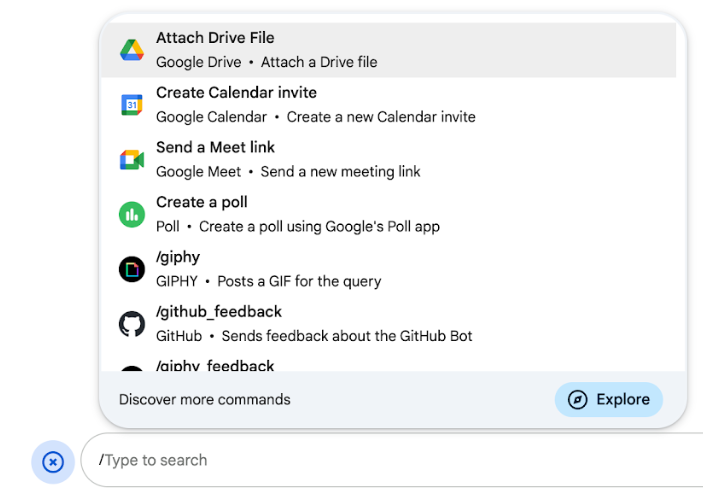
פקודות דרך שורת הפקודות: המשתמשים יכולים לבחור פקודה דרך שורת הפקודות מהתפריט או להקליד לוכסן (
/) ואז טקסט מוגדר מראש, כמו/about. בדרך כלל, אפליקציות צ'אט דורשות טקסט של ארגומנט לפקודה דרך שורת הפקודות.יוצרים פקודה דרך שורת הפקודות אם אפליקציית Chat דורשת קלט נוסף מהמשתמש. לדוגמה, אפשר ליצור פקודה דרך שורת הפקודות בשם
/searchשמופעלת אחרי שהמשתמש מזין ביטוי לחיפוש, כמו/search receipts. -
פקודות מהירות: משתמשים יכולים להשתמש בפקודות על ידי פתיחת התפריט מאזור התשובה של הודעת צ'אט. כדי להשתמש בפקודה, לוחצים על הוספה
 ובוחרים פקודה מהתפריט.
כדאי ליצור פקודה מהירה אם אפליקציית Chat יכולה להגיב למשתמש באופן מיידי, בלי לחכות לקלט נוסף. לדוגמה, אתם יכולים ליצור פקודה מהירה בשם תמונה אקראית שתגיב מיד עם תמונה.
-
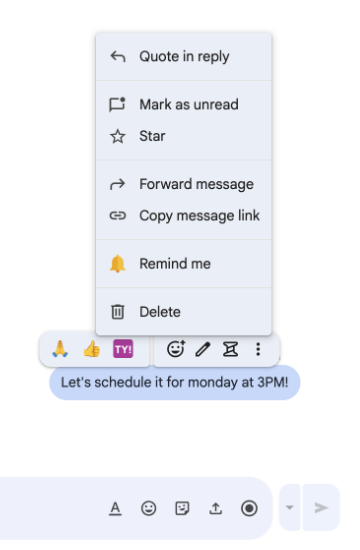
פעולות בהודעות: כדי להשתמש בפעולות בהודעות, המשתמשים מעבירים את העכבר מעל ההודעה ולוחצים על סמל האפשרויות הנוספות (3 נקודות). כדי להשתמש בפקודה, הם פותחים את תפריט שלוש הנקודות ובוחרים פקודה מהתפריט.
יוצרים פעולה בהודעה אם אפליקציית Chat יכולה לבצע פעולות על סמך ההקשר של ההודעה.
בתמונות הבאות אפשר לראות איך המשתמשים יכולים למצוא את התפריט של פקודות סלאש, פקודות מהירות ופעולות בהודעות:
דרישות מוקדמות
HTTP
אפליקציה ל-Google Chat שמקבלת אינטראקציות עם משתמשים ומגיבה להן. כדי ליצור אחד, צריך להשלים את המדריך למתחילים בנושא HTTP.
Apps Script
אפליקציה ל-Google Chat שמקבלת אינטראקציות עם משתמשים ומגיבה להן. כדי ליצור כזה, צריך להשלים את המדריך למתחילים של Apps Script.
הגדרת הפקודה
בקטע הזה מוסבר איך לבצע את השלבים הבאים כדי להגדיר פקודה:
- נותנים שם ומוסיפים תיאור לפקודה.
- מגדירים את הפקודה במסוף Google Cloud.
- אופציונלי: מיפוי פקודות להצעות לפרומפט.
נותנים שם ומתארים את הפקודה
השם של הפקודה הוא מה שהמשתמשים מקלידים או בוחרים כדי להפעיל את אפליקציית Chat. מתחת לשם מופיע גם תיאור קצר, כדי לתת למשתמשים עוד מידע על אופן השימוש בפקודה:

כשבוחרים שם ותיאור לפקודה, כדאי להביא בחשבון את ההמלצות הבאות:
כדי לתת שם לפקודה:
- כדי שהפקודות יהיו ברורות למשתמש, כדאי להשתמש במילים או בביטויים קצרים, תיאוריים ופרקטיים. לדוגמה, במקום השם
Create a reminder, צריך להשתמש בשםRemind me. - כדאי להשתמש בשם ייחודי או בשם נפוץ לפקודה. אם הפקודה מתארת אינטראקציה או תכונה טיפוסיות, אפשר להשתמש בשם נפוץ שהמשתמשים מכירים ומצפים לו, כמו
SettingsאוFeedback. אחרת, כדאי להשתמש בשמות פקודות ייחודיים, כי אם שם הפקודה שלכם זהה לשם של פקודה באפליקציות אחרות ל-Chat, המשתמש יצטרך לסנן בין פקודות דומות כדי למצוא את הפקודה שלכם ולהשתמש בה.
כדי לתאר פקודה:
- חשוב שהתיאור יהיה קצר וברור כדי שהמשתמשים ידעו למה לצפות כשהם משתמשים בפקודה.
- כדאי להודיע למשתמשים אם יש דרישות פורמט לפקודה. לדוגמה, אם
יוצרים פקודה דרך שורת הפקודות שדורשת טקסט של ארגומנט, מגדירים את התיאור למשהו כמו
Remind me to do [something] at [time]. - צריך להודיע למשתמשים אם אפליקציית Chat משיבה לכולם במרחב או באופן פרטי למשתמש שהפעיל את הפקודה. לדוגמה, אם רוצים להשתמש בפקודה המהירה
About, אפשר לתאר אותה כך:Learn about this app (Only visible to you).
הגדרת הפקודה במסוף Google Cloud
כדי ליצור פקודה דרך שורת הפקודות, פקודה מהירה או הצעה לפעולה, צריך לציין מידע על הפקודה או הפעולה בהגדרות של אפליקציית Chat עבור Google Chat API.
כדי להגדיר פקודה ב-Google Chat API, מבצעים את השלבים הבאים:
במסוף Google Cloud, לוחצים על סמל התפריט > APIs & Services > Enabled APIs & Services > Google Chat API
לוחצים על הגדרה.
בקטע הגדרות חיבור, עוברים אל טריגרים ומציינים את פרטי נקודת הקצה. צריך להשתמש בטריגר הזה בקטע הבא כדי להגיב לפקודה.
- כתובת URL של נקודת קצה (endpoint) ב-HTTP: אפשר לציין כאן כתובת URL אחת משותפת של נקודת קצה ב-HTTP. לחלופין, כדי להשתמש בנקודות קצה שונות של HTTP לטריגרים שונים, מציינים את נקודת הקצה ישירות בשדה App command (פקודת האפליקציה).
- Apps Script: מזינים את מזהה הפריסה של Apps Script. כברירת מחדל, הפונקציה
onAppCommandתופעל. כדי להשתמש בפונקציה אחרת של Apps Script, מציינים את שם הפונקציה בהתאמה אישית בשדה פקודת האפליקציה.
בקטע Commands, לוחצים על Add a command.
מזינים את המידע הבא על הפקודה:
- מזהה הפקודה: מספר מ-1 עד 1,000 שאפליקציית Chat משתמשת בו כדי לזהות את הפקודה ולהחזיר תשובה.
- Description: הטקסט שמתאר איך להשתמש בפקודה ואיך לעצב אותה. התיאורים יכולים להכיל עד 50 תווים.
- סוג הפקודה: בוחרים באפשרות פקודה מהירה, פקודה דרך שורת הפקודות או פעולה בהודעה.
- מציינים שם לפקודה:
- שם הפקודה המהירה: השם המוצג שהמשתמשים בוחרים מהתפריט כדי להפעיל את הפקודה. יכול לכלול עד 50 תווים, כולל תווים מיוחדים. לדוגמה,
Remind me. - שם הפקודה דרך שורת הפקודות: הטקסט שהמשתמשים מקלידים כדי להפעיל את הפקודה בהודעה. הנתיב חייב להתחיל בלוכסן, להכיל רק טקסט ולהיות באורך של עד 50 תווים. לדוגמה,
/remindMe. - שם ההצעה לפעולה: השם המוצג שהמשתמשים בוחרים מהתפריט כדי להפעיל את ההצעה לפעולה. יכול לכלול עד 50 תווים, כולל תווים מיוחדים. לדוגמה,
Remind me.
- שם הפקודה המהירה: השם המוצג שהמשתמשים בוחרים מהתפריט כדי להפעיל את הפקודה. יכול לכלול עד 50 תווים, כולל תווים מיוחדים. לדוגמה,
אופציונלי: הודעת טוסט על טעינה: הודעת טוסט שמוצגת למשתמש בזמן שההצעה לפעולה מתבצעת. האפשרות הזו זמינה רק לפעולות בהודעות שלא פותחות תיבות דו-שיח.
אופציונלי: אם רוצים שאפליקציית Chat תגיב לפקודה עם תיבת דו-שיח, מסמנים את התיבה פתיחת תיבת דו-שיח.
לוחצים על שמירה.
הפקודה מוגדרת עכשיו לאפליקציית Chat.
מיפוי פקודות להצעות לפרומפטים
אתם יכולים להציג את הפקודות שלכם כהנחיות ראשוניות כדי שהמשתמשים יראו אותן כצ'יפים אינטראקטיביים כשהם מתחילים צ'אט ישיר ריק עם אפליקציית Chat שלכם.
כדי למפות פקודה להצעה לפרומפט:
- חשוב לוודא שהפקודה לא דורשת ארגומנטים מותאמים אישית נוספים (רק פקודות עם No arguments או Basic arguments נתמכות כהנחיות התחלתיות).
- במסוף Google Cloud, עוברים לדף Configuration של Chat API.
- בקטע תכונות אינטראקטיביות > הצעות להתחלת שיחה, לוחצים על הוספת הצעה.
- מגדירים את הדירוג (1-3) של סדר ההצגה.
- בקטע בחירת סוג, בוחרים באפשרות שורת פקודה ובוחרים את הפקודה הרצויה מהתפריט הנפתח.
- לוחצים על סיום ולאחר מכן על שמירה.
איך מגיבים לפקודה
כשמשתמשים משתמשים בפקודה, אפליקציית Chat מקבלת אובייקט אירוע.
המטען הייעודי (payload) של האירוע (event.chat.appCommandPayload) מכיל אובייקט appCommandPayload עם פרטים על הפקודה שהופעלה (כולל מזהה הפקודה וסוג הפקודה), כדי שתוכלו להחזיר תגובה מתאימה.
אובייקט האירוע נשלח לנקודת הקצה של HTTP או לפונקציית Apps Script שציינתם כשהגדרתם את הטריגר App command.

/help כדי להסביר איך לקבל תמיכה.תשובה לפקודה דרך שורת הפקודות או לפקודה מהירה
הקוד הבא מציג דוגמה של אפליקציית Chat שעונה לפקודה דרך שורת הפקודות /about בהודעת טקסט. כדי להגיב לפקודות דרך שורת הפקודות או לפקודות מהירות, אפליקציית Chat מטפלת באובייקטים של אירועים (event.chat.appCommandPayload) מטריגר של פקודה לאפליקציה.
כשמטען הייעודי (payload) של אובייקט אירוע מכיל מזהה פקודה תואם, אפליקציית Chat מחזירה את הפעולה DataActions עם אובייקט createMessageAction (hostAppDataAction.chatDataAction.createMessageAction):
Node.js
Python
Java
Apps Script
כדי להשתמש בדוגמת הקוד הזו, מחליפים את ABOUT_COMMAND_ID במזהה הפקודה שציינתם כשהגדרתם את הפקודה ב-Chat API.
איך מגיבים להצעה לפעולה בהודעות
בדוגמה הבאה מוצג קוד של אפליקציית Chat שעונה על הצעה לפעולה של הודעה תזכורת בהודעת טקסט. כדי להגיב לפעולות בהודעות, אפליקציית Chat מטפלת באובייקטים של אירועים מטריגר של פקודת אפליקציה. כשמטען הייעודי (payload) של אובייקט אירוע מכיל מזהה של פקודת פעולה בהודעה, אפליקציית Chat מחזירה את הפעולה DataActions עם אובייקט createMessageAction:
Node.js
/**
 * Responds to an APP_COMMAND interaction event from Google Chat.
 *
 * @param {Object} event The interaction event from Google Chat.
 * @param {Object} res The HTTP response object.
 * @return {Object} The JSON response message with a confirmation.
 */
function onAppCommand(event, res) {
  // Collect the command ID and type from the event metadata.
  const {appCommandId, appCommandType} =
    event.chat.appCommandPayload.appCommandMetadata;

  if (appCommandType === 'MESSAGE_ACTION' &&
      appCommandId === REMIND_ME_COMMAND_ID) {

    // Message actions can access the context of the message they were
    // invoked on, such as the text or sender of that message.
    const messageText = event.chat.appCommandPayload.message.text;

    // Return a response that includes details from the original message.
    return res.json({
      "hostAppDataAction": {
        "chatDataAction": {
          "createMessageAction": {
            "message": {
              "text": `Setting a reminder for message: "${messageText}"`
            }
          }
        }
      }
    });
  }
}
Python
def on_app_command(event):
    """Responds to an APP_COMMAND interaction event from Google Chat.

    Args:
        event (dict): The interaction event from Google Chat.

    Returns:
        dict: The JSON response message with a confirmation.
    """
    # Collect the command ID and type from the event metadata.
    payload = event.get('chat', {}).get('appCommandPayload', {})
    metadata = payload.get('appCommandMetadata', {})
    if metadata.get('appCommandType') == 'MESSAGE_ACTION' and \
       metadata.get('appCommandId') == REMIND_ME_COMMAND_ID:

        # Message actions can access the context of the message they were
        # invoked on, such as the text or sender of that message.
        message_text = payload.get('message', {}).get('text')

        # Return a response that includes details from the original message.
        return {
            "hostAppDataAction": {
                "chatDataAction": {
                    "createMessageAction": {
                        "message": {
                            "text": f'Setting a reminder for message: "{message_text}"'
                        }
                    }
                }
            }
        }
Java
/**
 * Responds to an APP_COMMAND interaction event from Google Chat.
 *
 * @param event The interaction event from Google Chat.
 * @param response The HTTP response object.
 */
void onAppCommand(JsonObject event, HttpResponse response) throws Exception {
  // Collect the command ID and type from the event metadata.
  JsonObject payload = event.getAsJsonObject("chat").getAsJsonObject("appCommandPayload");
  JsonObject metadata = payload.getAsJsonObject("appCommandMetadata");
  String appCommandType = metadata.get("appCommandType").getAsString();

  if (appCommandType.equals("MESSAGE_ACTION")) {
    int commandId = metadata.get("appCommandId").getAsInt();
    if (commandId == REMIND_ME_COMMAND_ID) {
      // Message actions can access the context of the message they were
      // invoked on, such as the text or sender of that message.
      String messageText = payload.getAsJsonObject("message").get("text").getAsString();

      // Return a response that includes details from the original message.
      JsonObject responseMessage = new JsonObject();
      responseMessage.addProperty("text", "Setting a reminder for message: " + messageText);

      JsonObject createMessageAction = new JsonObject();
      createMessageAction.add("message", responseMessage);

      JsonObject chatDataAction = new JsonObject();
      chatDataAction.add("createMessageAction", createMessageAction);

      JsonObject hostAppDataAction = new JsonObject();
      hostAppDataAction.add("chatDataAction", chatDataAction);

      JsonObject finalResponse = new JsonObject();
      finalResponse.add("hostAppDataAction", hostAppDataAction);

      response.getWriter().write(finalResponse.toString());
    }
  }
}
Apps Script
/**
 * Responds to an APP_COMMAND interaction event in Google Chat.
 *
 * @param {Object} event The interaction event from Google Chat.
 * @return {Object} The JSON response message with a confirmation.
 */
function onAppCommand(event) {
  // Collect the command ID and type from the event metadata.
  const {appCommandId, appCommandType} =
    event.chat.appCommandPayload.appCommandMetadata;

  if (appCommandType === 'MESSAGE_ACTION' &&
      appCommandId === REMIND_ME_COMMAND_ID) {

    // Message actions can access the context of the message they were
    // invoked on, such as the text or sender of that message.
    const messageText = event.chat.appCommandPayload.message.text;

    // Return a response that includes details from the original message.
    return CardService.newChatResponseBuilder()
        .setText("Setting a reminder for message: " + messageText)
        .build();
  }
}
כדי להשתמש בדוגמת הקוד הזו, מחליפים את REMIND_ME_COMMAND_ID במזהה הפקודה שציינתם כשהגדרתם את הפקודה ב-Chat API.
בדיקת הפקודה
במאמר בדיקת תכונות אינטראקטיביות באפליקציות ל-Google Chat מוסבר איך לבדוק את הפקודה והקוד.
במאמר איך משתמשים באפליקציות ב-Google Chat במרכז העזרה של Google Chat מוסבר איך לבדוק את הפקודה ולהשתמש בה בממשק המשתמש של Chat.
נושאים קשורים
אפליקציות ל-Chat שלא מוגדרות כתוספים: מגיבות לפקודות
המסמכים הבאים רלוונטיים לאפליקציות ל-Chat שהן לא תוספים ל-Google Workspace. כדי להעביר אפליקציה ל-Chat שלא מוגדרת כתוסף, אפשר לעיין במאמר בנושא המרת אפליקציה ל-Google Chat לתוסף ל-Google Workspace.
כשמשתמשים מזינים פקודה, אפליקציה ל-Chat שהיא לא תוסף מקבלת אירוע אינטראקציה ויכולה להגיב על ידי החזרת אובייקט Message ישירות.
מטען הייעודי (payload) של האירוע מכיל מטא-נתונים עם פרטים על הפקודה שהופעלה (כולל מזהה הפקודה וסוג הפקודה), כדי שתוכלו להחזיר תגובה מתאימה.
כדי להגיב לכל סוג של פקודה באפליקציית Chat שהיא לא תוסף, צריך לטפל בסוגים שונים של אירועים ובאובייקטים של מטא-נתונים במטען הייעודי (payload) של האירוע:
| סוג הפקודה | סוג אירוע | מטא-נתונים של פקודות |
|---|---|---|
| פקודה דרך שורת הפקודות | MESSAGE |
message.slashCommand
או message.annotation.slashCommand |
| פקודה מהירה | APP_COMMAND |
appCommandMetadata
|
| הצעה לפעולה | APP_COMMAND |
appCommandMetadata
|
איך משיבים לפקודה דרך שורת הפקודות
הקוד הבא מציג דוגמה לאפליקציית Chat שאינה תוסף, שמגיבה לפקודה דרך שורת הפקודות /about. אפליקציית Chat
מטפלת באירועי אינטראקציה MESSAGE, מזהה אם אירוע האינטראקציה
מכיל את מזהה הפקודה התואם ומחזירה אובייקט פרטי Message:
Node.js
Apps Script
Python
Java
מחליפים את ABOUT_COMMAND_ID במזהה הפקודה שציינתם כשקבעתם את הגדרות הפקודה במסוף Google Cloud.
מענה לפקודה מהירה
הקוד הבא מציג דוגמה לאפליקציית Chat שהיא לא תוסף, שמשיבה לפקודה המהירה Help. אפליקציית Chat
מטפלת באירועי אינטראקציה APP_COMMAND, מזהה אם אירוע האינטראקציה
מכיל את מזהה הפקודה התואם ומחזירה אובייקט פרטי Message:
Node.js
Apps Script
Python
Java
מחליפים את HELP_COMMAND_ID במזהה הפקודה שציינתם כשקבעתם את הגדרות הפקודה במסוף Google Cloud.
איך מגיבים להצעה לפעולה בהודעות
בדוגמת הקוד הבאה אפשר לראות אפליקציה ל-Chat שהיא לא תוסף, שמגיבה לפעולת ההודעה תזכור לי. אפליקציית הצ'אט מטפלת באירועי אינטראקציה מסוג APP_COMMAND, מזהה אם אירוע האינטראקציה מכיל את מזהה הפקודה התואם ומחזירה אובייקט פרטי מסוג Message:
Node.js
/**
 * Responds to an APP_COMMAND interaction event from Google Chat.
 *
 * @param {Object} event The interaction event from Google Chat.
 * @param {Object} res The HTTP response object.
 * @return {Object} The JSON response message with a confirmation.
 */
function handleAppCommand(event, res) {
  // Collect the command ID and type from the event metadata.
  const {appCommandId, appCommandType} = event.appCommandMetadata;

  // Use appCommandType to detect message actions.
  if (appCommandType === 'MESSAGE_ACTION' &&
      appCommandId === REMIND_ME_COMMAND_ID) {

    // Message actions can access the context of the message they were
    // invoked on, such as the text or sender of that message.
    const messageText = event.message.text;

    // Return a response that includes details from the original message.
    return res.send({
      text: `Setting a reminder for this message: "${messageText}"`
    });
  }
}
Apps Script
/**
 * Responds to an APP_COMMAND interaction event in Google Chat.
 *
 * @param {Object} event The interaction event from Google Chat.
 * @return {Object} The JSON response message with a confirmation.
 */
function onAppCommand(event) {
  // Collect the command ID and type from the event metadata.
  const {appCommandId, appCommandType} = event.appCommandMetadata;

  if (appCommandType === 'MESSAGE_ACTION' &&
      appCommandId === REMIND_ME_COMMAND_ID) {

    // Message actions can access the context of the message they were
    // invoked on, such as the text or sender of that message.
    const messageText = event.message.text;

    // Return a response that includes details from the original message.
    return { "text": "Setting a reminder for message: " + messageText };
  }
}
Python
def handle_app_command(event):
    """Responds to an APP_COMMAND interaction event from Google Chat.

    Args:
        event (dict): The interaction event from Google Chat.

    Returns:
        dict: The JSON response message with a confirmation.
    """
    # Collect the command ID and type from the event metadata.
    metadata = event.get('appCommandMetadata', {})
    if metadata.get('appCommandType') == 'MESSAGE_ACTION' and \
       metadata.get('appCommandId') == REMIND_ME_COMMAND_ID:

        # Message actions can access the context of the message they were
        # invoked on, such as the text or sender of that message.
        message_text = event.get('message', {}).get('text')

        # Return a response that includes details from the original message.
        return {
            "text": f'Setting a reminder for message: "{message_text}"'
        }
Java
/**
 * Responds to an APP_COMMAND interaction event from Google Chat.
 *
 * @param event The interaction event from Google Chat.
 * @param response The HTTP response object.
 */
void handleAppCommand(JsonObject event, HttpResponse response) throws Exception {
  // Collect the command ID and type from the event metadata.
  JsonObject metadata = event.getAsJsonObject("appCommandMetadata");
  String appCommandType = metadata.get("appCommandType").getAsString();

  if (appCommandType.equals("MESSAGE_ACTION")) {
    int commandId = metadata.get("appCommandId").getAsInt();
    if (commandId == REMIND_ME_COMMAND_ID) {
      // Message actions can access the context of the message they were
      // invoked on, such as the text or sender of that message.
      String messageText = event.getAsJsonObject("message").get("text").getAsString();

      // Return a response that includes details from the original message.
      JsonObject responseMessage = new JsonObject();
      responseMessage.addProperty("text", "Setting a reminder for message: " + messageText);
      response.getWriter().write(responseMessage.toString());
    }
  }
}
מחליפים את REMIND_ME_COMMAND_ID במזהה הפקודה שציינתם כשקבעתם את הגדרות הפקודה במסוף Google Cloud.