

Bu sayfada, Cloud Pub/Sub kullanarak Chat'ten etkinlik alan bir Chat uygulaması oluşturma açıklanmaktadır. Bu mimari, Chat uygulamanız güvenlik duvarının arkasındaysa veya Google Workspace Events API ile bir Chat alanı ya da kullanıcı hakkında etkinlik göndermek veya almak istiyorsanız kullanışlıdır.
Aşağıdaki diyagramda, Pub/Sub ile oluşturulmuş bir Chat uygulamasının mimarisi gösterilmektedir:
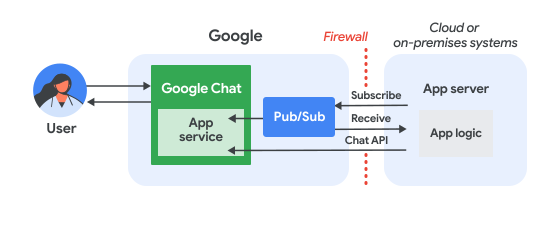
Önceki şemada, Pub/Sub Chat uygulamasıyla etkileşimde bulunan bir kullanıcının bilgi akışı şu şekildedir:
Bir kullanıcı, Chat uygulamasıyla etkileşime girer. Örneğin, uygulamaya mesaj gönderir, komut verir veya uygulamayı bir Chat alanına ekler ya da alandan kaldırır.
Chat, mesajı bir Pub/Sub konusuna gönderir.
Chat uygulaması mantığını içeren bir bulut veya şirket içi sistem olan uygulama sunucusu, mesajı güvenlik duvarı üzerinden almak için Pub/Sub konusuna abone olur.
İsteğe bağlı olarak, Chat uygulaması mesajları asenkron olarak yayınlamak veya başka işlemleri gerçekleştirmek için Chat API'yi çağırabilir.
Ön koşullar
Node.js
- Google Chat'e erişimi olan bir Business veya Enterprise Google Workspace hesabı.
- Faturalandırmanın etkin olduğu bir Google Cloud projesi. Mevcut bir projede faturalandırmanın etkinleştirilip etkinleştirilmediğini kontrol etmek için Projelerinizin faturalandırma durumunu doğrulama bölümüne bakın. Proje oluşturma ve faturalandırmayı ayarlama hakkında bilgi edinmek için Google Cloud projesi oluşturma bölümüne bakın.
- Node.js 14 veya daha yeni bir sürüm
- npm paket yönetim aracı
- Başlatılmış bir Node.js projesi. Yeni bir projeyi başlatmak için yeni bir klasör oluşturup bu klasöre geçin, ardından komut satırı arayüzünüzde aşağıdaki komutu çalıştırın:
npm init
Python
- Google Chat'e erişimi olan bir Business veya Enterprise Google Workspace hesabı.
- Faturalandırmanın etkin olduğu bir Google Cloud projesi. Mevcut bir projede faturalandırmanın etkinleştirilip etkinleştirilmediğini kontrol etmek için Projelerinizin faturalandırma durumunu doğrulama bölümüne bakın. Proje oluşturma ve faturalandırmayı ayarlama hakkında bilgi edinmek için Google Cloud projesi oluşturma bölümüne bakın.
- Python 3.6 veya sonraki sürümler
- pip paket yönetim aracı
Java
- Google Chat'e erişimi olan bir Business veya Enterprise Google Workspace hesabı.
- Faturalandırmanın etkin olduğu bir Google Cloud projesi. Mevcut bir projede faturalandırmanın etkinleştirilip etkinleştirilmediğini kontrol etmek için Projelerinizin faturalandırma durumunu doğrulama bölümüne bakın. Proje oluşturma ve faturalandırmayı ayarlama hakkında bilgi edinmek için Google Cloud projesi oluşturma bölümüne bakın.
- Java 11 veya üzeri
- Maven paket yönetimi aracı
API'leri etkinleştirme
Google API'lerini kullanmadan önce bir Google Cloud projesinde etkinleştirmeniz gerekir. Tek bir Google Cloud projesinde bir veya daha fazla API'yi etkinleştirebilirsiniz.Google Cloud Console'da Google Chat API ve Pub/Sub API'yi etkinleştirin.
Pub/Sub'ı ayarlama
Chat API'nin mesaj gönderebileceği bir Pub/Sub konusu oluşturun. Her Chat uygulaması için tek bir konu kullanmanızı öneririz.
Chat uygulaması için Pub/Sub ve Chat ile yetkilendirmek üzere bir hizmet hesabı oluşturun ve özel anahtar dosyasını çalışma dizininize kaydedin.
Konu için çekme aboneliği oluşturun.
Daha önce oluşturduğunuz hizmet hesabı için abonelikte Pub/Sub Abonesi Rolü'nü atayın.
Komut dosyasını yazma
Bu bölümde, sohbet uygulamanızın uygulama mantığını tanımlarsınız. Google Cloud ile kimlik doğrulaması yapan ve Pub/Sub konusuna abone olarak Chat'ten etkinlikler (ör. kullanıcı sohbet uygulamanıza mesaj gönderdiğinde) alan bir komut dosyası yazarsınız.
Komut dosyası bir mesaj aldığında etkinlik verilerini işler ve kullanıcıya veya alana yanıt göndermek için Google Chat API'yi kullanır. Bu kurulum, Chat uygulamanızın Chat kullanıcılarıyla etkileşimde bulunmaya devam ederken güvenlik duvarının arkasında çalışmasına olanak tanır.
Node.js
Bir KSA'da hizmet hesabı kimlik bilgilerini sağlayın:
export GOOGLE_APPLICATION_CREDENTIALS=SERVICE_ACCOUNT_FILE_PATHBir KSA'da Google Cloud proje kimliğini girin:
export PROJECT_ID=PROJECT_IDBir KSA'da, daha önce oluşturduğunuz Pub/Sub aboneliğinin abonelik kimliğini sağlayın:
export SUBSCRIPTION_ID=SUBSCRIPTION_IDÇalışma dizininizde
package.jsonadlı bir dosya oluşturun.package.jsondosyasına aşağıdaki kodu yapıştırın:{ "name": "pub-sub-app", "version": "1.0.0", "description": "Google Chat App that listens for messages via Cloud Pub/Sub", "main": "index.js", "scripts": { "start": "node index.js", "test": "echo \"Error: no test specified\" && exit 1" }, "dependencies": { "@google-apps/chat": "^0.4.0", "@google-cloud/pubsub": "^4.5.0" }, "license": "Apache-2.0" }Çalışma dizininizde
index.jsadlı bir dosya oluşturun.index.jsbölümüne aşağıdaki kodu yapıştırın:const {ChatServiceClient} = require('@google-apps/chat'); const {MessageReplyOption} = require('@google-apps/chat').protos.google.chat.v1.CreateMessageRequest; const {PubSub} = require('@google-cloud/pubsub'); const {SubscriberClient} = require('@google-cloud/pubsub/build/src/v1'); // Receives messages from a pull subscription. function receiveMessages() { const chat = new ChatServiceClient({ keyFile: process.env.GOOGLE_APPLICATION_CREDENTIALS, scopes: ['https://www.googleapis.com/auth/chat.bot'], }); const subscriptionPath = new SubscriberClient() .subscriptionPath(process.env.PROJECT_ID, process.env.SUBSCRIPTION_ID) const subscription = new PubSub() .subscription(subscriptionPath); // Handle incoming message, then acknowledge the received message const messageHandler = message => { console.log(`Id : ${message.id}`); const event = JSON.parse(message.data); console.log(`Data : ${JSON.stringify(event)}`); // Post the response to Google Chat. const request = formatRequest(event); if (request != null) { chat.createMessage(request); } // Acknowledge the message. message.ack(); } subscription.on('message', messageHandler); console.log(`Listening for messages on ${subscriptionPath}`); // Keep main thread from exiting while waiting for messages setTimeout(() => { subscription.removeListener('message', messageHandler); console.log(`Stopped listening for messages.`); }, 60 * 1000); } // Send message to Google Chat based on the type of event function formatRequest(event) { const chatEvent = event.chat || {}; // If the app was removed, we don't respond. if (chatEvent.removedFromSpacePayload) { console.log(`App removed from space.`); return null; } const payload = chatEvent.messagePayload || chatEvent.addedToSpacePayload; const spaceName = payload?.space?.name; if (!spaceName) { console.log('No space name in event.'); return null; } if (chatEvent.addedToSpacePayload) { // An app can also be added to a space by @mentioning it in a // message. In that case, we fall through to the message case // and let the app respond. If the app was added using the // invite flow, we just post a thank you message in the space. return { parent: spaceName, message: { text: 'Thank you for adding me!' }, }; } else if (chatEvent.messagePayload) { // In case of message, post the response in the same thread. const message = chatEvent.messagePayload.message; return { parent: spaceName, messageReplyOption: MessageReplyOption.REPLY_MESSAGE_FALLBACK_TO_NEW_THREAD, message: { text: 'You said: `' + message.text + '`', thread: { name: message.thread.name }, }, }; } } if (!process.env.PROJECT_ID) { console.log('Missing PROJECT_ID env var.'); process.exit(1); } if (!process.env.SUBSCRIPTION_ID) { console.log('Missing SUBSCRIPTION_ID env var.'); process.exit(1); } if (!process.env.GOOGLE_APPLICATION_CREDENTIALS) { console.log('Missing GOOGLE_APPLICATION_CREDENTIALS env var.'); process.exit(1); } receiveMessages();
Python
Bir KSA'da hizmet hesabı kimlik bilgilerini sağlayın:
export GOOGLE_APPLICATION_CREDENTIALS=SERVICE_ACCOUNT_FILE_PATHBir KSA'da Google Cloud proje kimliğini girin:
export PROJECT_ID=PROJECT_IDBir KSA'da, daha önce oluşturduğunuz Pub/Sub aboneliğinin abonelik kimliğini sağlayın:
export SUBSCRIPTION_ID=SUBSCRIPTION_IDÇalışma dizininizde
requirements.txtadlı bir dosya oluşturun.requirements.txtdosyasına aşağıdaki kodu yapıştırın:google-cloud-pubsub>=2.23.0 google-apps-chat==0.1.9Çalışma dizininizde
app.pyadlı bir dosya oluşturun.app.pybölümüne aşağıdaki kodu yapıştırın:import json import logging import os import sys import time from google.apps import chat_v1 as google_chat from google.cloud import pubsub_v1 from google.oauth2.service_account import Credentials def receive_messages(): """Receives messages from a pull subscription.""" scopes = ['https://www.googleapis.com/auth/chat.bot'] service_account_key_path = os.environ.get('GOOGLE_APPLICATION_CREDENTIALS') creds = Credentials.from_service_account_file(service_account_key_path) chat = google_chat.ChatServiceClient( credentials=creds, client_options={'scopes': scopes} ) project_id = os.environ.get('PROJECT_ID') subscription_id = os.environ.get('SUBSCRIPTION_ID') subscriber = pubsub_v1.SubscriberClient() subscription_path = subscriber.subscription_path(project_id, subscription_id) # Handle incoming message, then acknowledge the received message def callback(message): event = json.loads(message.data) logging.info('Data : %s', event) # Post the response to Google Chat. request = format_request(event) if request is not None: chat.create_message(request) # Acknowledge the message. message.ack() subscriber.subscribe(subscription_path, callback = callback) logging.info('Listening for messages on %s', subscription_path) # Keep main thread from exiting while waiting for messages while True: time.sleep(60) def format_request(event): """Send message to Google Chat based on the type of event. Args: event: A dictionary with the event data. """ chat_event = event.get('chat', {}) # If the app was removed, we don't respond. if 'removedFromSpacePayload' in chat_event: logging.info('App removed from space.') return payload = chat_event.get('messagePayload') or chat_event.get( 'addedToSpacePayload' ) space_name = payload.get('space', {}).get('name') if payload else None if not space_name: logging.warning('No space name in event.') return if 'addedToSpacePayload' in chat_event: # An app can also be added to a space by @mentioning it in a # message. In that case, we fall through to the message case # and let the app respond. If the app was added using the # invite flow, we just post a thank you message in the space. return google_chat.CreateMessageRequest( parent = space_name, message = { 'text': 'Thank you for adding me!' } ) elif 'messagePayload' in chat_event: # In case of message, post the response in the same thread. message = chat_event['messagePayload']['message'] return google_chat.CreateMessageRequest( parent = space_name, message_reply_option = google_chat.CreateMessageRequest.MessageReplyOption.REPLY_MESSAGE_FALLBACK_TO_NEW_THREAD, message = { 'text': 'You said: `' + message['text'] + '`', 'thread': { 'name': message['thread']['name'] } } ) if __name__ == '__main__': if 'PROJECT_ID' not in os.environ: logging.error('Missing PROJECT_ID env var.') sys.exit(1) if 'SUBSCRIPTION_ID' not in os.environ: logging.error('Missing SUBSCRIPTION_ID env var.') sys.exit(1) if 'GOOGLE_APPLICATION_CREDENTIALS' not in os.environ: logging.error('Missing GOOGLE_APPLICATION_CREDENTIALS env var.') sys.exit(1) logging.basicConfig( level=logging.INFO, style='{', format='{levelname:.1}{asctime} {filename}:{lineno}] {message}') receive_messages()
Java
Bir KSA'da hizmet hesabı kimlik bilgilerini sağlayın:
export GOOGLE_APPLICATION_CREDENTIALS=SERVICE_ACCOUNT_FILE_PATHBir KSA'da Google Cloud proje kimliğini girin:
export PROJECT_ID=PROJECT_IDBir KSA'da, daha önce oluşturduğunuz Pub/Sub aboneliğinin abonelik kimliğini sağlayın:
export SUBSCRIPTION_ID=SUBSCRIPTION_IDÇalışma dizininizde
pom.xmladlı bir dosya oluşturun.pom.xmldosyasına aşağıdaki kodu yapıştırın:<project xmlns="http://maven.apache.org/POM/4.0.0" xmlns:xsi="http://www.w3.org/2001/XMLSchema-instance" xsi:schemaLocation="http://maven.apache.org/POM/4.0.0 http://maven.apache.org/xsd/maven-4.0.0.xsd"> <modelVersion>4.0.0</modelVersion> <groupId>com.google.chat.addon</groupId> <artifactId>pubsub-addon-chat-app</artifactId> <version>0.1.0</version> <name>pubsub-addon-chat-app-java</name> <properties> <maven.compiler.release>11</maven.compiler.release> <project.build.sourceEncoding>UTF-8</project.build.sourceEncoding> </properties> <dependencyManagement> <dependencies> <dependency> <groupId>com.google.cloud</groupId> <artifactId>libraries-bom</artifactId> <version>26.41.0</version> <!-- Use a recent BOM version --> <type>pom</type> <scope>import</scope> </dependency> </dependencies> </dependencyManagement> <dependencies> <!-- Google Chat GAPIC library --> <dependency> <groupId>com.google.cloud</groupId> <artifactId>google-cloud-chat</artifactId> </dependency> <!-- Google Cloud Pub/Sub library --> <dependency> <groupId>com.google.cloud</groupId> <artifactId>google-cloud-pubsub</artifactId> </dependency> <!-- Google Apps Add-ons Event Object --> <dependency> <groupId>com.google.apps.addons.v1</groupId> <artifactId>google-apps-addons-v1-java</artifactId> <version>0.2.0</version> <!-- Check for latest version --> </dependency> <!-- Protobuf JSON utility --> <dependency> <groupId>com.google.protobuf</groupId> <artifactId>protobuf-java-util</artifactId> </dependency> <!-- Google Auth Library --> <dependency> <groupId>com.google.auth</groupId> <artifactId>google-auth-library-oauth2-http</artifactId> </dependency> <dependency> <groupId>com.google.api</groupId> <artifactId>gax</artifactId> </dependency> <!-- JSON utilities for PubSub message (if needed, though protobuf-java-util is primary for EventObject) --> <dependency> <groupId>com.fasterxml.jackson.core</groupId> <artifactId>jackson-databind</artifactId> <version>2.14.2</version> </dependency> <dependency> <groupId>org.slf4j</groupId> <artifactId>slf4j-jdk14</artifactId> <version>1.7.36</version> <scope>runtime</scope> </dependency> </dependencies> <build> <plugins> <plugin> <groupId>org.apache.maven.plugins</groupId> <artifactId>maven-compiler-plugin</artifactId> <version>3.13.0</version> <configuration> <source>11</source> <target>11</target> </configuration> </plugin> <plugin> <groupId>org.codehaus.mojo</groupId> <artifactId>exec-maven-plugin</artifactId> <version>3.3.0</version> <configuration> <mainClass>Main</mainClass> </configuration> </plugin> </plugins> </build> </project>Çalışma dizininizde
src/main/javadizin yapısını oluşturun.src/main/javadizinindeMain.javaadlı bir dosya oluşturun.Main.javabölümüne aşağıdaki kodu yapıştırın:import com.fasterxml.jackson.databind.JsonNode; import com.fasterxml.jackson.databind.ObjectMapper; import com.google.api.gax.core.FixedCredentialsProvider; import com.google.auth.oauth2.GoogleCredentials; import com.google.chat.v1.ChatServiceClient; import com.google.chat.v1.ChatServiceSettings; import com.google.chat.v1.CreateMessageRequest; import com.google.chat.v1.CreateMessageRequest.MessageReplyOption; import com.google.chat.v1.Message; import com.google.chat.v1.Thread; import com.google.cloud.pubsub.v1.AckReplyConsumer; import com.google.cloud.pubsub.v1.MessageReceiver; import com.google.cloud.pubsub.v1.Subscriber; import com.google.pubsub.v1.ProjectSubscriptionName; import com.google.pubsub.v1.PubsubMessage; import java.io.FileInputStream; import java.util.Collections; public class Main { public static final String PROJECT_ID_ENV_PROPERTY = "PROJECT_ID"; public static final String SUBSCRIPTION_ID_ENV_PROPERTY = "SUBSCRIPTION_ID"; public static final String CREDENTIALS_PATH_ENV_PROPERTY = "GOOGLE_APPLICATION_CREDENTIALS"; public static void main(String[] args) throws Exception { ProjectSubscriptionName subscriptionName = ProjectSubscriptionName.of( System.getenv(Main.PROJECT_ID_ENV_PROPERTY), System.getenv(Main.SUBSCRIPTION_ID_ENV_PROPERTY)); // Instantiate app, which implements an asynchronous message receiver. EchoApp echoApp = new EchoApp(); // Create a subscriber for <var>SUBSCRIPTION_ID</var> bound to the message receiver final Subscriber subscriber = Subscriber.newBuilder(subscriptionName, echoApp).build(); System.out.println("Subscriber is listening to events..."); subscriber.startAsync(); // Wait for termination subscriber.awaitTerminated(); } } /** * A demo app which implements {@link MessageReceiver} to receive messages. * It echoes incoming messages. */ class EchoApp implements MessageReceiver { // Path to the private key JSON file of the service account to be used for posting response // messages to Google Chat. // In this demo, we are using the same service account for authorizing with Cloud Pub/Sub to // receive messages and authorizing with Google Chat to post messages. If you are using // different service accounts, set the path to the private key JSON file of the service // account used to post messages to Google Chat here. private static final String SERVICE_ACCOUNT_KEY_PATH = System.getenv(Main.CREDENTIALS_PATH_ENV_PROPERTY); // Developer code for Google Chat API scope. private static final String GOOGLE_CHAT_API_SCOPE = "https://www.googleapis.com/auth/chat.bot"; private static final String ADDED_RESPONSE = "Thank you for adding me!"; ChatServiceClient chatServiceClient; EchoApp() throws Exception { GoogleCredentials credential = GoogleCredentials.fromStream(new FileInputStream(SERVICE_ACCOUNT_KEY_PATH)) .createScoped(Collections.singleton(GOOGLE_CHAT_API_SCOPE)); // Create the ChatServiceSettings with the app credentials ChatServiceSettings chatServiceSettings = ChatServiceSettings.newBuilder() .setCredentialsProvider(FixedCredentialsProvider.create(credential)) .build(); // Set the Chat service client chatServiceClient = ChatServiceClient.create(chatServiceSettings); } // Called when a message is received by the subscriber. @Override public void receiveMessage(PubsubMessage pubsubMessage, AckReplyConsumer consumer) { System.out.println("Id : " + pubsubMessage.getMessageId()); // Handle incoming message, then acknowledge the received message try { ObjectMapper mapper = new ObjectMapper(); JsonNode dataJson = mapper.readTree(pubsubMessage.getData().toStringUtf8()); System.out.println("Data : " + dataJson.toString()); handle(dataJson); consumer.ack(); } catch (Exception e) { System.out.println(e); // Negative acknowledgement makes Pub/Sub redeliver the message. consumer.nack(); } } // Send message to Google Chat based on the type of event. public void handle(JsonNode eventJson) throws Exception { // Google Chat events for add-ons are wrapped in a 'chat' object. if (!eventJson.has("chat")) { System.out.println("Ignored: Not a Chat event (missing 'chat' field)."); return; } JsonNode chatNode = eventJson.get("chat"); CreateMessageRequest createMessageRequest = null; if (chatNode.has("messagePayload")) { // HANDLE MESSAGE JsonNode messagePayload = chatNode.get("messagePayload"); JsonNode message = messagePayload.get("message"); JsonNode space = messagePayload.get("space"); String spaceName = space.get("name").asText(); String userText = message.has("text") ? message.get("text").asText() : ""; String threadName = message.has("thread") ? message.get("thread").get("name").asText() : ""; System.out.println("Received message in " + spaceName + ": " + userText); createMessageRequest = CreateMessageRequest.newBuilder() .setParent(spaceName) .setMessageReplyOption(MessageReplyOption.REPLY_MESSAGE_FALLBACK_TO_NEW_THREAD) .setMessage( Message.newBuilder() .setText("You said: `" + userText + "`") .setThread(Thread.newBuilder().setName(threadName).build()) .build()) .build(); } else if (chatNode.has("addedToSpacePayload")) { // HANDLE ADDED TO SPACE JsonNode addedPayload = chatNode.get("addedToSpacePayload"); JsonNode space = addedPayload.get("space"); String spaceName = space.get("name").asText(); System.out.println("Added to space: " + spaceName); createMessageRequest = CreateMessageRequest.newBuilder() .setParent(spaceName) .setMessage(Message.newBuilder().setText(ADDED_RESPONSE).build()) .build(); } else if (chatNode.has("removedFromSpacePayload")) { System.out.println("Removed from space."); return; } else { System.out.println("Ignored: Unhandled Chat event type."); return; } if (createMessageRequest != null) { // Post the response to Google Chat. chatServiceClient.createMessage(createMessageRequest); System.out.println("Sent reply."); } } }
Chat uygulamasını yapılandırma
Google Cloud Console'da Chat uygulamasını yapılandırarak ad ve avatar gibi ayrıntıları sağlayın ve Pub/Sub konusuyla bağlantıyı ayarlayın.
Pub/Sub konusuna bağlanarak Chat'in uygulamanıza etkinlik göndermesini sağlarsınız. Konuya abone olan komut dosyanız daha sonra bu etkinlikleri alabilir ve kullanıcılara yanıt verebilir.
Google Cloud Console'da Menü > API'ler ve Hizmetler > Etkin API'ler ve Hizmetler > Google Chat API > Yapılandırma'ya gidin.
Pub/Sub için Chat uygulamasını yapılandırın:
- Uygulama adı alanına
Add-on Chat Appyazın. - Avatar URL'si bölümüne
https://developers.google.com/workspace/add-ons/images/quickstart-app-avatar.pnggirin. - Açıklama bölümüne
Quickstart appgirin. - İşlevsellik bölümünde Alanlara ve grup görüşmelerine katılma'yı seçin.
- Bağlantı ayarları bölümünde Cloud Pub/Sub'ı seçin ve daha önce oluşturduğunuz Pub/Sub konusunun adını yapıştırın.
- Görünürlük bölümünde, alanınızdaki Bu Google Chat uygulamasını belirli kişiler ve gruplar için kullanılabilir yap'ı seçip e-posta adresinizi girin.
- Günlükler bölümünde Günlüğe kaydetme işlemine günlük hataları'nı seçin.
- Uygulama adı alanına
Kaydet'i tıklayın.
Chat uygulamasını yapılandırdığınıza göre artık bir Pub/Sub yapılandırmasını güncellemeniz gerekir.
- Chat API yapılandırma sayfasında, Bağlantı ayarları bölümünde, Google Cloud projeniz için oluşturulan benzersiz bir e-posta adresi olan Hizmet hesabı e-posta adresini kopyalayın.
Daha önce kopyaladığınız hizmet hesabı e-posta adresine Pub/Sub Yayıncısı rolünü atayarak konuya Chat yayınlama izni verin.
Uygulama, Chat'teki mesajları almaya ve yanıtlamaya hazırdır.
Komut dosyasını çalıştırma
Bir KSA'da çalışma dizininize geçin ve komut dosyasını çalıştırın:
Node.js
npm install
npm start
Python
python -m venv env
source env/bin/activate
pip install -r requirements.txt -U
python app.py
Java
mvn compile exec:java -Dexec.mainClass=Main
Kodu çalıştırdığınızda uygulama, Pub/Sub konusuna yayınlanan mesajları dinlemeye başlar.
Chat uygulamanızı test etme
Chat uygulamanızı test etmek için Chat uygulamasıyla doğrudan mesajlaşma alanı açın ve mesaj gönderin:
Kendinizi güvenilir test kullanıcıları arasına eklerken sağladığınız Google Workspace hesabını kullanarak Google Chat'i açın.
- Yeni sohbet'i tıklayın.
- 1 veya daha fazla kişi ekle alanına Chat uygulamanızın adını yazın.
Sonuçlardan Chat uygulamanızı seçin. Doğrudan mesaj açılır.
- Uygulamayla yeni doğrudan mesajda
Helloyazıpentertuşuna basın.
Güvenilir test kullanıcıları ekleme ve etkileşimli özellikleri test etme hakkında daha fazla bilgi edinmek için Google Chat uygulamalarında etkileşimli özellikleri test etme başlıklı makaleyi inceleyin.
Sorun giderme
Bir Google Chat uygulaması veya kartı hata döndürdüğünde Chat arayüzünde "Bir hata oluştu" veya "İsteğiniz işlenemiyor" mesajı gösterilir. Bazen Chat kullanıcı arayüzünde hata mesajı gösterilmez ancak Chat uygulaması veya kartı beklenmedik bir sonuç üretir. Örneğin, kart mesajı görünmeyebilir.
Chat kullanıcı arayüzünde hata mesajı gösterilmese de Chat uygulamaları için hata günlüğü kaydı etkinleştirildiğinde hataları düzeltmenize yardımcı olacak açıklayıcı hata mesajları ve günlük verileri kullanılabilir. Hataları görüntüleme, hata ayıklama ve düzeltme konusunda yardım için Google Chat hatalarını giderme ve düzeltme başlıklı makaleyi inceleyin.
Temizleme
Bu eğitimde kullanılan kaynaklar için Google Cloud hesabınızın ücretlendirilmesini önlemek istiyorsanız Cloud projesini silmenizi öneririz.
- Google Cloud Console'da Kaynakları yönetin sayfasına gidin. Şunu tıklayın: Menü > IAM & Admin > Kaynakları Yönetin.
- Proje listesinde, silmek istediğiniz projeyi seçin ve Sil'i tıklayın.
- İletişim kutusunda proje kimliğini yazın ve ardından projeyi silmek için Kapat'ı tıklayın.
İlgili konular
Chat uygulamanıza daha fazla özellik eklemek için aşağıdaki kaynaklara göz atın: