Google Chat メッセージのリンクをプレビューする

ユーザーが Google Chat でリンクを共有する際にコンテキストの切り替えが発生しないように、Chat アプリは、メッセージにカードを添付してリンクを プレビューできます。カードには詳細情報が表示され、ユーザーは Google Chat から直接アクションを実行できます。

たとえば、ある Google Chat スペースに、会社のすべてのカスタマー サービス エージェントと Case-y という名前の Chat アプリが含まれているとします。エージェントは Chat スペースでカスタマー サービス案件へのリンクを頻繁に共有しますが、同僚は案件のリンクを開いて、担当者、ステータス、件名などの詳細を確認する必要があります。同様に、案件の所有権を取得したり、ステータスを変更したりする場合も、リンクを開く必要があります。

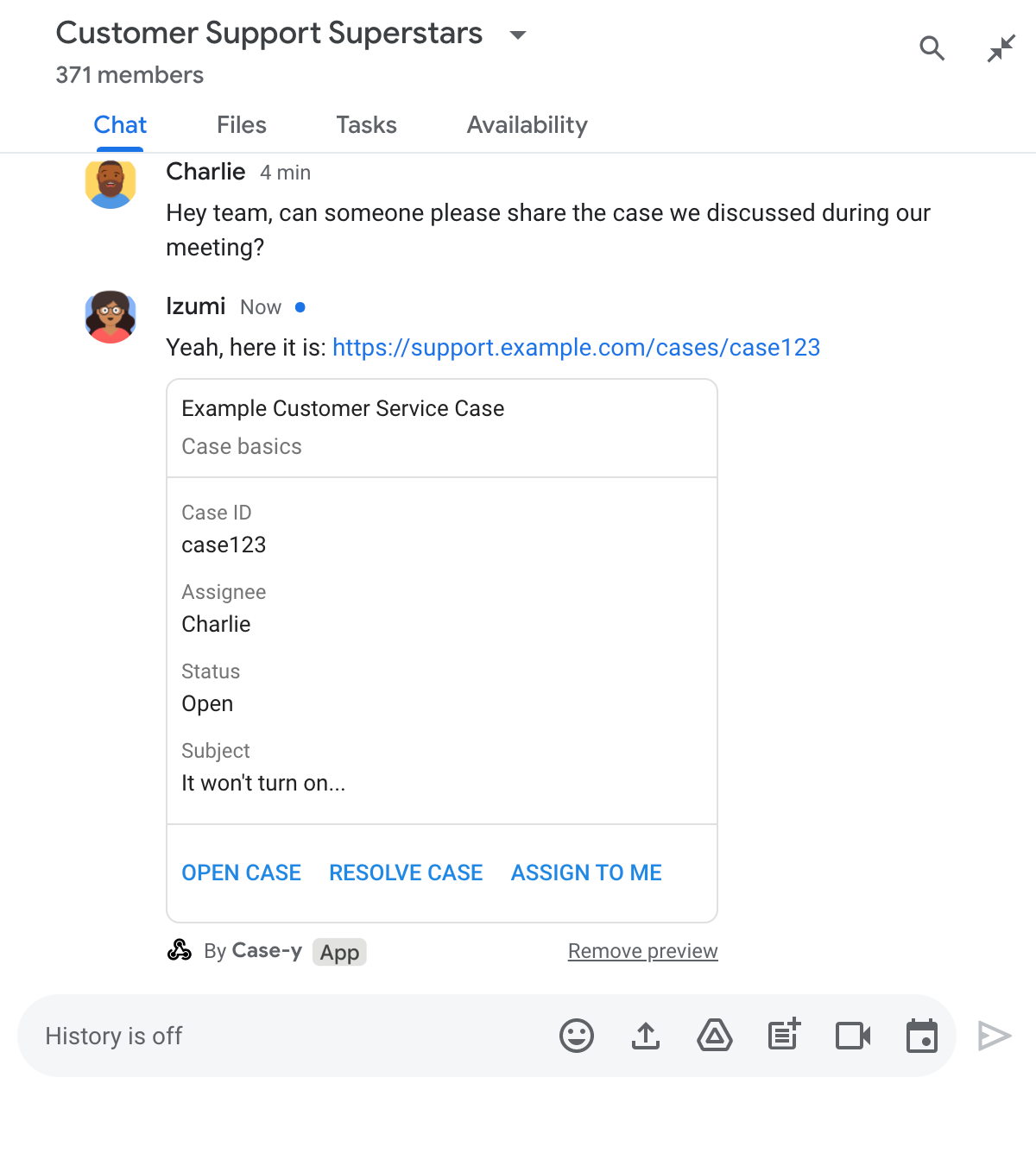
リンクのプレビューを使用すると、スペースの常駐 Chat アプリである Case-y は、誰かが案件のリンクを共有するたびに、割り当て先、ステータス、件名を示すカードを添付できます。カードのボタンを使用すると、エージェントはチャット ストリームから直接案件の所有権を取得し、ステータスを変更できます。

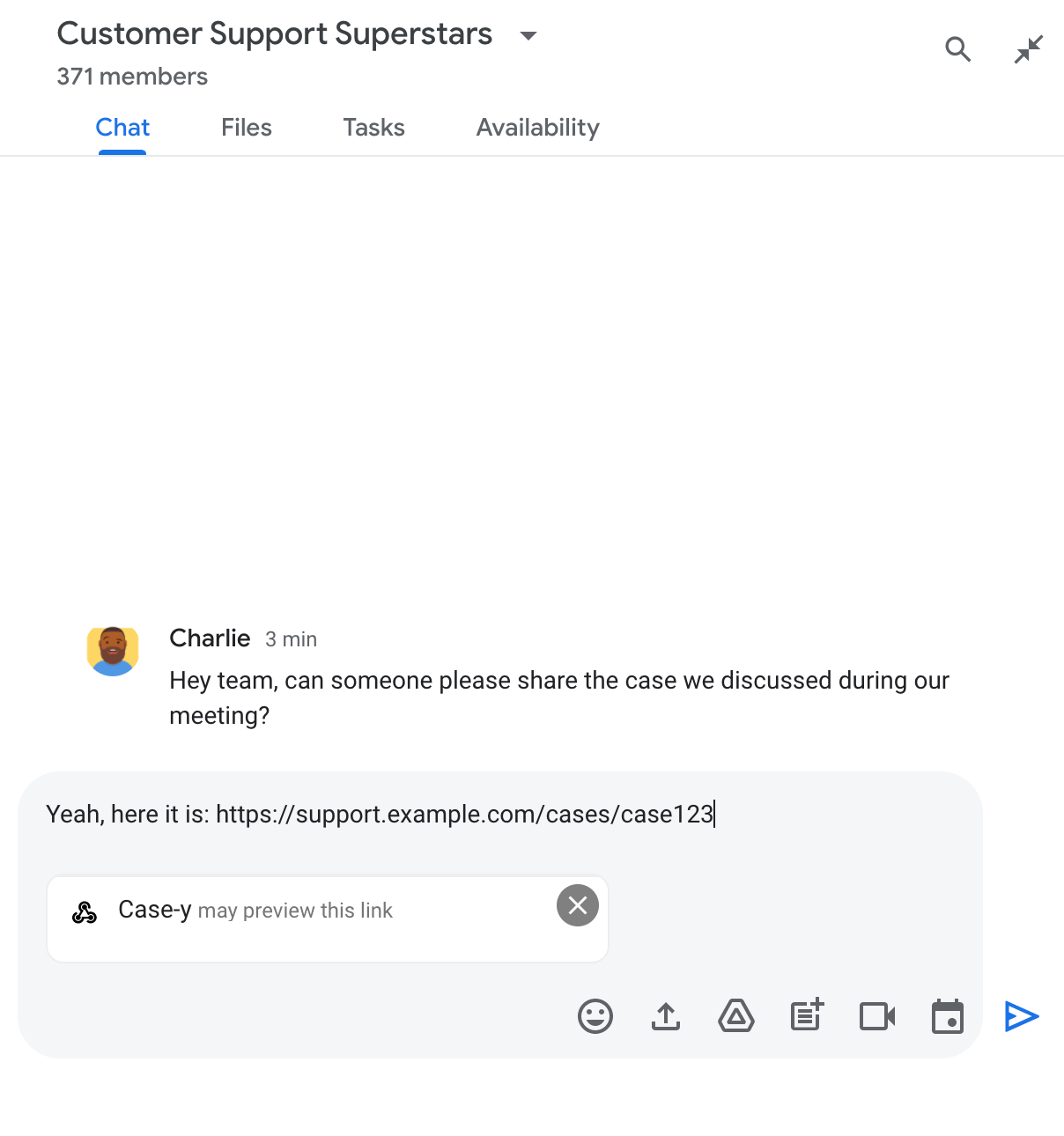
ユーザーがメッセージにリンクを追加すると、Chat アプリがリンクをプレビューする可能性があることを示すチップが表示されます。

Chat 用アプリがリンクをプレビューする可能性があることを示すチップ

メッセージを送信すると、リンクが Chat アプリに送信され、アプリがカードを生成してユーザーのメッセージに添付します。

メッセージにカードを添付してリンクをプレビューする Chat 用アプリ

カードには、リンクとともに、ボタンなどのインタラクティブな要素を含むリンクに関する追加情報が表示されます。Chat アプリは、ボタンのクリックなどのユーザー操作に応じて、添付されたカードを更新できます。

Chat アプリがメッセージにカードを添付してリンクをプレビューしないようにするには、プレビュー チップの をクリックしてプレビューを無効にできます。添付されたカードは、[プレビューを削除] をクリックしていつでも削除できます。

前提条件

HTTP

Google Chat を拡張する Google Workspace アドオン。作成するには、 HTTP クイックスタートを完了します。

Apps Script

Google Chat を拡張する Google Workspace アドオン。作成するには、 Apps Script クイックスタートを完了します。

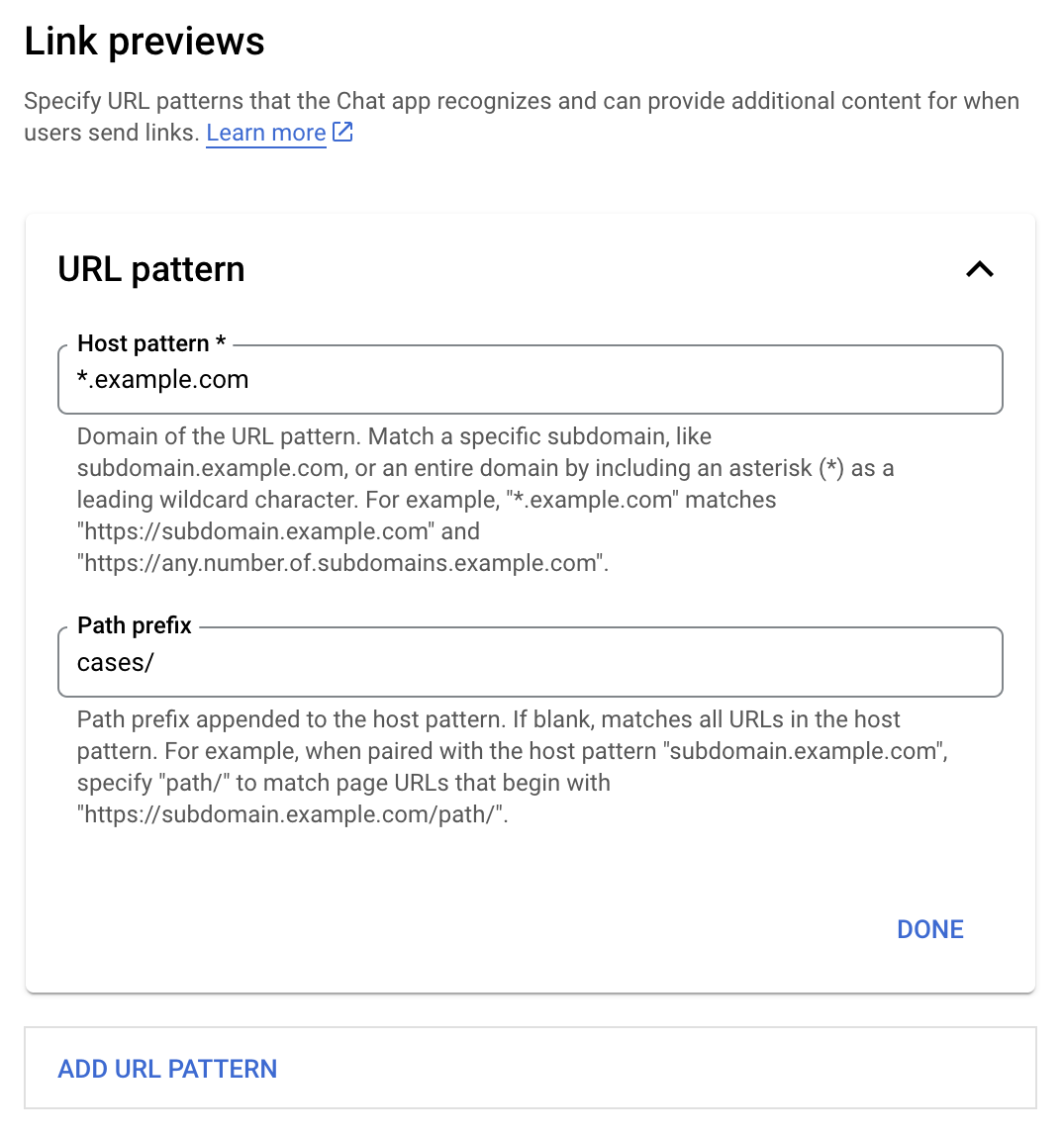
特定のリンク(example.comsupport.example.comsupport.example.com/cases/など)を、Google Cloud コンソールの Chat アプリの構成ページで URL パターンとして登録すると、Chat アプリでプレビューできるようになります。

リンク プレビューの構成メニュー

  1. Google Cloud コンソールを開きます。
  2. [Google Cloud] の横にある下矢印 をクリックして、Chat アプリのプロジェクトを開きます。
  3. 検索フィールドに「Google Chat API」と入力し、[Google Chat API] をクリックします。
  4. [管理 > 構成] をクリックします。
  5. [リンクのプレビュー] で、URL パターンを追加または編集します。
    1. 新しい URL パターンのリンク プレビューを構成するには、[URL パターンを追加] をクリックします。
    2. 既存の URL パターンの構成を編集するには、下矢印 をクリックします。
  6. [ホストパターン] フィールドに、URL パターンのドメインを入力します。Chat アプリは、このドメインへのリンクをプレビューします。

    Chat アプリで特定のサブドメイン(subdomain.example.com など)のリンクをプレビューするには、サブドメインを含めます。

    Chat アプリでドメイン全体のリンクをプレビューするには、サブドメインとしてアスタリスク(*)のワイルドカード文字を指定します。 たとえば、*.example.comsubdomain.example.comany.number.of.subdomains.example.com に一致します。

  7. [パスの接頭辞] フィールドに、ホストパターン ドメインに追加するパスを入力します。

    ホストパターン ドメイン内のすべての URL に一致させるには、[パスの接頭辞] を空白のままにします。

    たとえば、ホストパターンが support.example.com の場合、 support.example.com/cases/ でホストされている案件の URL に一致させるには、「cases/」と入力します。

  8. [完了] をクリックします。

  9. [保存] をクリックします。

これで、Chat アプリを含む Chat スペースのメッセージに、リンク プレビューの URL パターンに一致するリンクが含まれている場合、アプリがリンクをプレビューします。

特定のリンクのリンク プレビューを構成すると、Chat アプリはリンクを認識し、詳細情報を添付してプレビューできます。

Chat アプリを含む Chat スペース内で、メッセージにリンク プレビューの URL パターンに一致するリンクが含まれている場合、Chat アプリは イベント オブジェクト を含むMessagePayload を受け取ります。ペイロードの message.matchedUrl オブジェクトには、ユーザーがメッセージに含めたリンクが含まれています。

JSON

message: {
  matchedUrl: {
    url: "https://support.example.com/cases/case123"
  },
  ... // other message attributes redacted
}

MESSAGE イベント ペイロードに matchedUrl フィールドが存在するかどうかを確認することで、Chat アプリはプレビューされたリンクを含むメッセージに情報を追加できます。Chat アプリは、基本的なテキスト メッセージで返信するか、カードを添付できます。

テキスト メッセージで返信する

基本的なレスポンスの場合、Chat アプリはリンクにテキスト メッセージで返信することでリンクをプレビューできます。この例では、リンク プレビューの URL パターンに一致するリンク URL を繰り返すメッセージを添付します。

Node.js

node/chat/preview-link/index.js
// Reply with a text message for URLs of the subdomain "text"
if (chatMessage.matchedUrl.url.includes("text.example.com")) {
  return { hostAppDataAction: { chatDataAction: { createMessageAction: { message: {
    text: 'event.chat.messagePayload.message.matchedUrl.url: ' + chatMessage.matchedUrl.url
  }}}}};
}

FUNCTION_URL は、ボタンクリックを処理する HTTP エンドポイントに置き換えます。

Python

python/chat/preview-link/main.py
# Reply with a text message for URLs of the subdomain "text"
if "text.example.com" in chatMessage.get('matchedUrl').get('url'):
  return { 'hostAppDataAction': { 'chatDataAction': { 'createMessageAction': { 'message': {
    'text': 'event.chat.messagePayload.message.matchedUrl.url: ' + chatMessage.get('matchedUrl').get('url')
  }}}}}

FUNCTION_URL は、ボタンクリックを処理する HTTP エンドポイントに置き換えます。

Java

java/chat/preview-link/src/main/java/com/google/chat/previewLink/App.java
// Reply with a text message for URLs of the subdomain "text"
if (chatMessage.at("/matchedUrl/url").asText().contains("text.example.com")) {
  return new GenericJson() {{
    put("hostAppDataAction", new GenericJson() {{
      put("chatDataAction", new GenericJson() {{
        put("createMessageAction", new GenericJson() {{
          put("message", new Message()
            .setText("event.chat.messagePayload.message.matchedUrl.url: " + chatMessage.at("/matchedUrl/url").asText()));
        }});
      }});
    }});
  }};
}

FUNCTION_URL は、ボタンクリックを処理する HTTP エンドポイントに置き換えます。

Apps Script

apps-script/chat/preview-link/preview-link.gs
// Reply with a text message for URLs of the subdomain "text".
if (chatMessage.matchedUrl.url.includes("text.example.com")) {
  return { hostAppDataAction: { chatDataAction: { createMessageAction: { message: {
    text: 'event.chat.messagePayload.message.matchedUrl.url: ' + chatMessage.matchedUrl.url
  }}}}};
}

プレビューされたリンクにカードを添付するには、 タイプ UpdateInlinePreviewActionChatDataActionMarkup オブジェクトを使用してアクション DataActions を返します。

次の例では、Chat アプリが URL パターン support.example.com を含むメッセージにプレビュー カードを追加します。

メッセージにカードを添付してリンクをプレビューする Chat 用アプリ

Node.js

node/chat/preview-link/index.js
// Attach a card to the message for URLs of the subdomain "support"
if (chatMessage.matchedUrl.url.includes("support.example.com")) {
  // A hard-coded card is used in this example. In a real-life scenario,
  // the case information would be fetched and used to build the card.
  return { hostAppDataAction: { chatDataAction: { updateInlinePreviewAction: { cardsV2: [{
    cardId: 'attachCard',
    card: {
      header: {
        title: 'Example Customer Service Case',
        subtitle: 'Case basics',
      },
      sections: [{ widgets: [
      { decoratedText: { topLabel: 'Case ID', text: 'case123'}},
      { decoratedText: { topLabel: 'Assignee', text: 'Charlie'}},
      { decoratedText: { topLabel: 'Status', text: 'Open'}},
      { decoratedText: { topLabel: 'Subject', text: 'It won\'t turn on...' }},
      { buttonList: { buttons: [{
        text: 'OPEN CASE',
        onClick: { openLink: {
          url: 'https://support.example.com/orders/case123'
        }},
      }, {
        text: 'RESOLVE CASE',
        onClick: { openLink: {
          url: 'https://support.example.com/orders/case123?resolved=y',
        }},
      }, {
        text: 'ASSIGN TO ME',
        onClick: { action: { function: FUNCTION_URL }}
      }]}}
      ]}]
    }
  }]}}}};
}

FUNCTION_URL は、ボタンクリックを処理する HTTP エンドポイントに置き換えます。

Python

python/chat/preview-link/main.py
# Attach a card to the message for URLs of the subdomain "support"
if "support.example.com" in chatMessage.get('matchedUrl').get('url'):
  # A hard-coded card is used in this example. In a real-life scenario,
  # the case information would be fetched and used to build the card.
  return { 'hostAppDataAction': { 'chatDataAction': { 'updateInlinePreviewAction': { 'cardsV2': [{
    'cardId': 'attachCard',
    'card': {
      'header': {
        'title': 'Example Customer Service Case',
        'subtitle': 'Case basics',
      },
      'sections': [{ 'widgets': [
      { 'decoratedText': { 'topLabel': 'Case ID', 'text': 'case123'}},
      { 'decoratedText': { 'topLabel': 'Assignee', 'text': 'Charlie'}},
      { 'decoratedText': { 'topLabel': 'Status', 'text': 'Open'}},
      { 'decoratedText': { 'topLabel': 'Subject', 'text': 'It won\'t turn on...' }},
      { 'buttonList': { 'buttons': [{
        'text': 'OPEN CASE',
        'onClick': { 'openLink': {
          'url': 'https://support.example.com/orders/case123'
        }},
      }, {
        'text': 'RESOLVE CASE',
        'onClick': { 'openLink': {
          'url': 'https://support.example.com/orders/case123?resolved=y',
        }},
      }, {
        'text': 'ASSIGN TO ME',
        'onClick': { 'action': { 'function': FUNCTION_URL }}
      }]}}
      ]}]
    }
  }]}}}}

FUNCTION_URL は、ボタンクリックを処理する HTTP エンドポイントに置き換えます。

Java

java/chat/preview-link/src/main/java/com/google/chat/previewLink/App.java
// Attach a card to the message for URLs of the subdomain "support"
if (chatMessage.at("/matchedUrl/url").asText().contains("support.example.com")) {
  // A hard-coded card is used in this example. In a real-life scenario,
  // the case information would be fetched and used to build the card.
  CardWithId cardV2 = new CardWithId()
    .setCardId("attachCard")
    .setCard(new GoogleAppsCardV1Card()
      .setHeader(new GoogleAppsCardV1CardHeader()
        .setTitle("Example Customer Service Case")
        .setSubtitle("Case basics"))
      .setSections(List.of(new GoogleAppsCardV1Section().setWidgets(List.of(
        new GoogleAppsCardV1Widget().setDecoratedText(new GoogleAppsCardV1DecoratedText()
          .setTopLabel("Case ID")
          .setText("case123")),
        new GoogleAppsCardV1Widget().setDecoratedText(new GoogleAppsCardV1DecoratedText()
          .setTopLabel("Assignee")
          .setText("Charlie")),
        new GoogleAppsCardV1Widget().setDecoratedText(new GoogleAppsCardV1DecoratedText()
          .setTopLabel("Status")
          .setText("Open")),
        new GoogleAppsCardV1Widget().setDecoratedText(new GoogleAppsCardV1DecoratedText()
          .setTopLabel("Subject")
          .setText("It won't turn on...")),
        new GoogleAppsCardV1Widget().setButtonList(new GoogleAppsCardV1ButtonList()
          .setButtons(List.of(
            new GoogleAppsCardV1Button()
              .setText("OPEN CASE")
            .setOnClick(new GoogleAppsCardV1OnClick()
                .setOpenLink(new GoogleAppsCardV1OpenLink()
                  .setUrl("https://support.example.com/orders/case123"))),
            new GoogleAppsCardV1Button()
              .setText("RESOLVE CASE")
            .setOnClick(new GoogleAppsCardV1OnClick()
                .setOpenLink(new GoogleAppsCardV1OpenLink()
                  .setUrl("https://support.example.com/orders/case123?resolved=y"))),
            new GoogleAppsCardV1Button()
              .setText("ASSIGN TO ME")
              .setOnClick(new GoogleAppsCardV1OnClick()
                .setAction(new GoogleAppsCardV1Action().setFunction(FUNCTION_URL)))
          ))
        )
      ))))
    );

  return new GenericJson() {{
    put("hostAppDataAction", new GenericJson() {{
      put("chatDataAction", new GenericJson() {{
        put("updateInlinePreviewAction", new GenericJson() {{
          put("cardsV2", List.of(cardV2));
        }});
      }});
    }});
  }};
}

FUNCTION_URL は、ボタンクリックを処理する HTTP エンドポイントに置き換えます。

Apps Script

apps-script/chat/preview-link/preview-link.gs
// Attach a card to the message for URLs of the subdomain "support".
if (chatMessage.matchedUrl.url.includes("support.example.com")) {
  // A hard-coded card is used in this example. In a real-life scenario,
  // the case information would be fetched and used to build the card.
  return { hostAppDataAction: { chatDataAction: { updateInlinePreviewAction: { cardsV2: [{
    cardId: 'attachCard',
    card: {
      header: {
        title: 'Example Customer Service Case',
        subtitle: 'Case summary',
      },
      sections: [{ widgets: [
      { decoratedText: { topLabel: 'Case ID', text: 'case123'}},
      { decoratedText: { topLabel: 'Assignee', text: 'Charlie'}},
      { decoratedText: { topLabel: 'Status', text: 'Open'}},
      { decoratedText: { topLabel: 'Subject', text: 'It won\'t turn on...' }},
      { buttonList: { buttons: [{
        text: 'OPEN CASE',
        onClick: { openLink: {
          url: 'https://support.example.com/orders/case123'
        }},
      }, {
        text: 'RESOLVE CASE',
        onClick: { openLink: {
          url: 'https://support.example.com/orders/case123?resolved=y',
        }},
      }, {
        text: 'ASSIGN TO ME',
        // Clicking this button triggers the execution of the function
        // "assign" from the Apps Script project.
        onClick: { action: { function: 'assign'}}
      }]}}
      ]}]
    }
  }]}}}};
}

Chat アプリは、ユーザーがリンク プレビュー カードを操作したとき(カードのボタンをクリックしたときなど)に、リンク プレビュー カードを更新できます。

カードを更新するには、Chat アプリ は次のいずれかの ChatDataActionMarkup オブジェクトを使用してアクション DataActions を返す必要があります。

  • ユーザーがメッセージを送信した場合は、 UpdateMessageAction オブジェクトを返します。
  • Chat アプリがメッセージを送信した場合は、 UpdateInlinePreviewAction オブジェクトを返します。

メッセージを送信したユーザーを特定するには、イベント ペイロード (buttonClickedPayload) を使用して、送信者(message.sender.type)が HUMAN(ユーザー)または BOT(Chat アプリ)に設定されているかどうかを確認します。

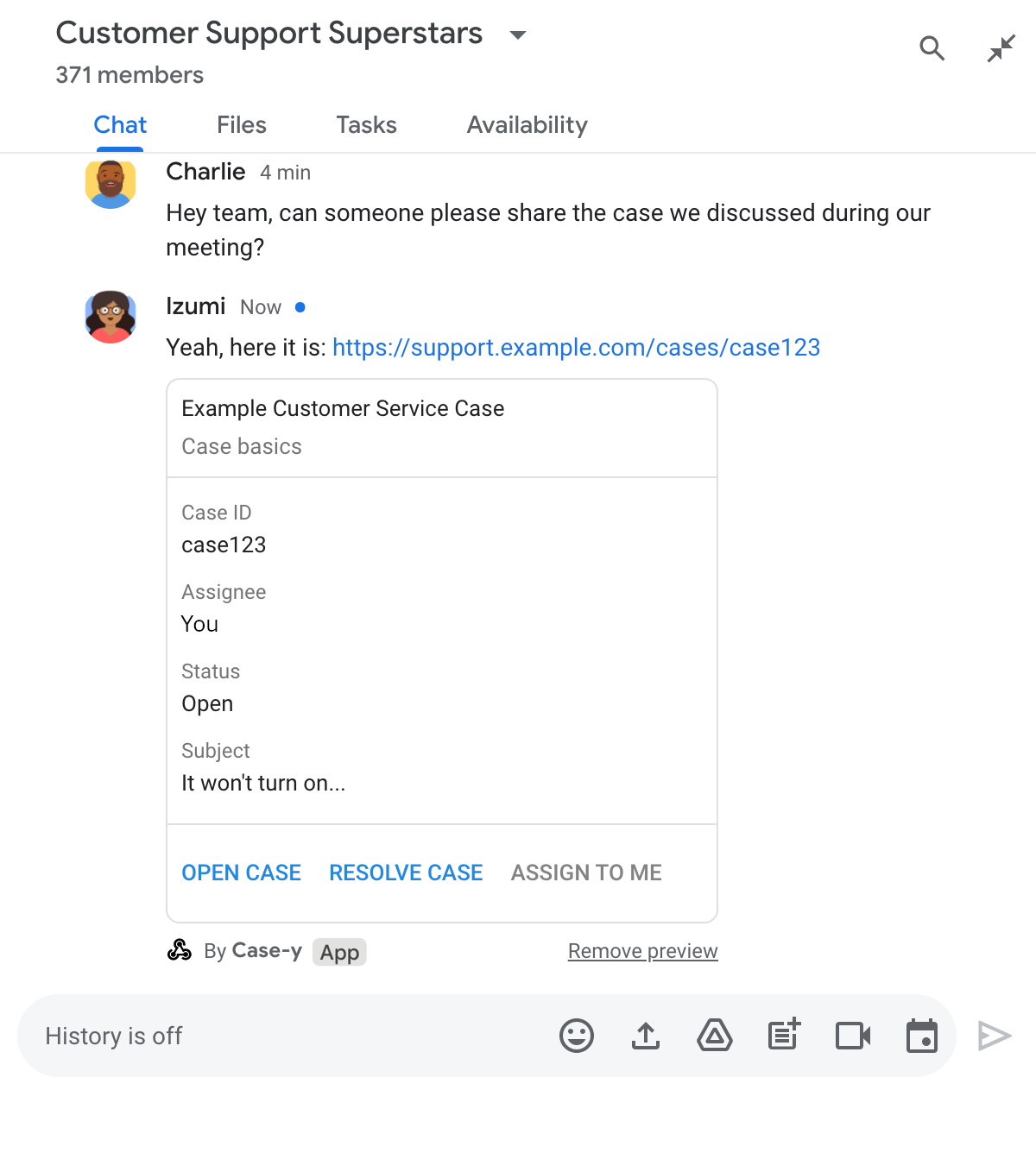
次の例では、ユーザーが [自分に割り当てる] ボタンをクリックするたびに、Chat アプリがカードの [担当者] フィールドを更新してボタンを無効にすることで、リンク プレビューを更新します。

メッセージに添付されたカードの更新バージョンを含むリンクをプレビューするチャットアプリ

Node.js

node/chat/preview-link/index.js
/**
 * Respond to clicks by assigning and updating the card that's attached to a
 * message previewed link of the pattern "support.example.com".
 *
 * @param {Object} chatMessage The chat message object from Google Workspace Add On event.
 * @return {Object} Action response depending on the message author.
 */
function handleCardClick(chatMessage) {
  // Creates the updated card that displays "You" for the assignee
  // and that disables the button.
  //
  // A hard-coded card is used in this example. In a real-life scenario,
  // an actual assign action would be performed before building the card.
  const message = { cardsV2: [{
    cardId: 'attachCard',
    card: {
      header: {
        title: 'Example Customer Service Case',
        subtitle: 'Case basics',
      },
      sections: [{ widgets: [
        { decoratedText: { topLabel: 'Case ID', text: 'case123'}},
        // The assignee is now "You"
        { decoratedText: { topLabel: 'Assignee', text: 'You'}},
        { decoratedText: { topLabel: 'Status', text: 'Open'}},
        { decoratedText: { topLabel: 'Subject', text: 'It won\'t turn on...' }},
        { buttonList: { buttons: [{
          text: 'OPEN CASE',
          onClick: { openLink: {
            url: 'https://support.example.com/orders/case123'
          }},
        }, {
          text: 'RESOLVE CASE',
          onClick: { openLink: {
            url: 'https://support.example.com/orders/case123?resolved=y',
          }},
        }, {
          text: 'ASSIGN TO ME',
          // The button is now disabled
          disabled: true,
          onClick: { action: { function: FUNCTION_URL }}
        }]}}
      ]}]
    }
  }]};

  // Use the adequate action response type. It depends on whether the message
  // the preview link card is attached to was created by a human or a Chat app.
  if(chatMessage.sender.type === 'HUMAN') {
    return { hostAppDataAction: { chatDataAction: { updateInlinePreviewAction: message }}};
  } else {
    return { hostAppDataAction: { chatDataAction: { updateMessageAction: message }}};
  }
}

FUNCTION_URL は、ボタンクリックを処理する HTTP エンドポイントに置き換えます。

Python

python/chat/preview-link/main.py
def handle_card_click(chatMessage: dict) -> dict:
  """Respond to clicks by assigning and updating the card that's attached to a
  message previewed link of the pattern "support.example.com".

  - Reply with text messages that echo "text.example.com" link URLs in messages.
  - Attach cards to messages with "support.example.com" link URLs.

  Args:
      chatMessage (Mapping[str, Any]): The chat message object from Google Workspace Add On event.

  Returns:
      Mapping[str, Any]: Action response depending on the message author.
  """
  # Creates the updated card that displays "You" for the assignee
  # and that disables the button.
  #
  # A hard-coded card is used in this example. In a real-life scenario,
  # an actual assign action would be performed before building the card.
  message = { 'cardsV2': [{
    'cardId': 'attachCard',
    'card': {
      'header': {
        'title': 'Example Customer Service Case',
        'subtitle': 'Case basics',
      },
      'sections': [{ 'widgets': [
      { 'decoratedText': { 'topLabel': 'Case ID', 'text': 'case123'}},
      # The assignee is now "You"
      { 'decoratedText': { 'topLabel': 'Assignee', 'text': 'You'}},
      { 'decoratedText': { 'topLabel': 'Status', 'text': 'Open'}},
      { 'decoratedText': { 'topLabel': 'Subject', 'text': 'It won\'t turn on...' }},
      { 'buttonList': { 'buttons': [{
        'text': 'OPEN CASE',
        'onClick': { 'openLink': {
          'url': 'https://support.example.com/orders/case123'
        }},
      }, {
        'text': 'RESOLVE CASE',
        'onClick': { 'openLink': {
          'url': 'https://support.example.com/orders/case123?resolved=y',
        }},
      }, {
        'text': 'ASSIGN TO ME',
        # The button is now disabled
        'disabled': True,
        'onClick': { 'action': { 'function': FUNCTION_URL }}
      }]}}
      ]}]
    }
  }]}

  # Use the adequate action response type. It depends on whether the message
  # the preview link card is attached to was created by a human or a Chat app.
  if chatMessage.get('sender').get('type') == 'HUMAN':
    return { 'hostAppDataAction': { 'chatDataAction': { 'updateInlinePreviewAction': message }}}
  else:
    return { 'hostAppDataAction': { 'chatDataAction': { 'updateMessageAction': message }}}

FUNCTION_URL は、ボタンクリックを処理する HTTP エンドポイントに置き換えます。

Java

java/chat/preview-link/src/main/java/com/google/chat/previewLink/App.java
/**
 * Respond to clicks by assigning and updating the card that's attached to a
 * message previewed link of the pattern "support.example.com".
 *
 * @param chatMessage The chat message object from Google Workspace Add On event.
 * @return Action response depending on the message author.
 */
GenericJson handleCardClick(JsonNode chatMessage) {
  // Creates the updated card that displays "You" for the assignee
  // and that disables the button.
  //
  // A hard-coded card is used in this example. In a real-life scenario,
  // an actual assign action would be performed before building the card.
  Message message = new Message().setCardsV2(List.of(new CardWithId()
    .setCardId("attachCard")
    .setCard(new GoogleAppsCardV1Card()
      .setHeader(new GoogleAppsCardV1CardHeader()
        .setTitle("Example Customer Service Case")
        .setSubtitle("Case basics"))
      .setSections(List.of(new GoogleAppsCardV1Section().setWidgets(List.of(
        new GoogleAppsCardV1Widget().setDecoratedText(new GoogleAppsCardV1DecoratedText()
          .setTopLabel("Case ID")
          .setText("case123")),
        // The assignee is now "You"
        new GoogleAppsCardV1Widget().setDecoratedText(new GoogleAppsCardV1DecoratedText()
          .setTopLabel("Assignee")
          .setText("You")),
        new GoogleAppsCardV1Widget().setDecoratedText(new GoogleAppsCardV1DecoratedText()
          .setTopLabel("Status")
          .setText("Open")),
        new GoogleAppsCardV1Widget().setDecoratedText(new GoogleAppsCardV1DecoratedText()
          .setTopLabel("Subject")
          .setText("It won't turn on...")),
        new GoogleAppsCardV1Widget().setButtonList(new GoogleAppsCardV1ButtonList()
          .setButtons(List.of(
            new GoogleAppsCardV1Button()
              .setText("OPEN CASE")
              .setOnClick(new GoogleAppsCardV1OnClick()
                .setOpenLink(new GoogleAppsCardV1OpenLink()
                  .setUrl("https://support.example.com/orders/case123"))),
            new GoogleAppsCardV1Button()
              .setText("RESOLVE CASE")
              .setOnClick(new GoogleAppsCardV1OnClick()
                .setOpenLink(new GoogleAppsCardV1OpenLink()
                  .setUrl("https://support.example.com/orders/case123?resolved=y"))),
            new GoogleAppsCardV1Button()
              .setText("ASSIGN TO ME")
              // The button is now disabled
              .setDisabled(true)
              .setOnClick(new GoogleAppsCardV1OnClick()
                .setAction(new GoogleAppsCardV1Action().setFunction(FUNCTION_URL)))
          ))
        )
      ))))
    )
  ));

  // Use the adequate action response type. It depends on whether the message
  // the preview link card is attached to was created by a human or a Chat app.
  if("HUMAN".equals(chatMessage.at("/sender/type").asText())) {
    return new GenericJson() {{
      put("hostAppDataAction", new GenericJson() {{
        put("chatDataAction", new GenericJson() {{
          put("updateInlinePreviewAction", message);
        }});
      }});
    }};
  } else {
    return new GenericJson() {{
      put("hostAppDataAction", new GenericJson() {{
        put("chatDataAction", new GenericJson() {{
          put("updateMessageAction", message);
        }});
      }});
    }};
  }
}

FUNCTION_URL は、ボタンクリックを処理する HTTP エンドポイントに置き換えます。

Apps Script

apps-script/chat/preview-link/preview-link.gs
/**
 * Assigns and updates the card that's attached to a message with a
 * previewed link of the pattern "support.example.com".
 *
 * @param {Object} event The event object from the Google Workspace add-on.
 * @return {Object} Action response depending on the message author.
 */
function assign(event) {
  // Creates the updated card that displays "You" for the assignee
  // and that disables the button.
  //
  // A hard-coded card is used in this example. In a real-life scenario,
  // an actual assign action would be performed before building the card.
  const message = { cardsV2: [{
    cardId: 'attachCard',
    card: {
      header: {
        title: 'Example Customer Service Case',
        subtitle: 'Case summary',
      },
      sections: [{ widgets: [
        { decoratedText: { topLabel: 'Case ID', text: 'case123'}},
        // The assignee is now "You"
        { decoratedText: { topLabel: 'Assignee', text: 'You'}},
        { decoratedText: { topLabel: 'Status', text: 'Open'}},
        { decoratedText: { topLabel: 'Subject', text: 'It won\'t turn on...' }},
        { buttonList: { buttons: [{
          text: 'OPEN CASE',
          onClick: { openLink: {
            url: 'https://support.example.com/orders/case123'
          }},
        }, {
          text: 'RESOLVE CASE',
          onClick: { openLink: {
            url: 'https://support.example.com/orders/case123?resolved=y',
          }},
        }, {
          text: 'ASSIGN TO ME',
          // The button is now disabled
          disabled: true,
          onClick: { action: { function: 'assign'}}
        }]}}
      ]}]
    }
  }]};

  // Use the adequate action response type. It depends on whether the message
  // the preview link card is attached to was created by a human or a Chat app.
  if(event.chat.buttonClickedPayload.message.sender.type === 'HUMAN') {
    return { hostAppDataAction: { chatDataAction: { updateInlinePreviewAction: message }}};
  } else {
    return { hostAppDataAction: { chatDataAction: { updateMessageAction: message }}};
  }
}

制限事項と考慮事項

Chat アプリのリンク プレビューを構成する際は、次の制限事項と考慮事項に注意してください。

  • 各 Chat アプリは、最大 5 つの URL パターンのリンク プレビューをサポートしています。
  • Chat アプリは、メッセージごとに 1 つのリンクをプレビューします。1 つのメッセージに複数のプレビュー可能なリンクがある場合は、最初のプレビュー可能なリンクのみがプレビューされます。
  • Chat アプリは https:// で始まるリンクのみをプレビューします。したがって、 https://support.example.com/cases/ はプレビューされますが、 support.example.com/cases/ はプレビューされません。
  • メッセージに、スラッシュ コマンドなど、Chat アプリに送信される他の情報が含まれていない限り、リンク プレビューによって Chat アプリに送信されるのはリンク URL のみです。
  • ユーザーがリンクを投稿した場合、Chat アプリは、ユーザーがカードを操作したとき(ボタンをクリックしたときなど)にのみ、リンク プレビュー カードを更新できます。Chat API の update() メソッドを Message リソースで呼び出して、ユーザーのメッセージを非同期で更新することはできません。
  • Chat アプリは、スペース内のすべてのユーザーのリンクをプレビューする必要があるため、メッセージに privateMessageViewer フィールドを含めることはできません。

リンク プレビューを実装する際に、アプリのログを読み取って Chat アプリをデバッグする必要が生じることがあります。ログを読み取るには、 Google Cloud コンソールのログ エクスプローラにアクセスします。