

Page Summary
-
Google Wallet allows transit ticket activation through a partner-specified endpoint, triggered by the user tapping an "Activate" button.
-
This endpoint, defined using
activationOptionswithin the transit class, receives activation requests and must update the pass with valid redemption information (barcode or visual inspection) and activation status. -
Device pinning, enabled using
deviceContextandhasLinkedDevice, restricts redemption information display to a specific device after activation. -
Activation requests to the partner endpoint include details like class ID, object IDs, expiration time, event type, nonce, and a device context identifier.
-
Partners must maintain a responsive activation endpoint and adhere to security measures, ensuring the endpoint is HTTPS-hosted and accessible by Google-Valuables user agent.
The Google Wallet Passes API provides the ability for partners to specify an endpoint for activation of a transit ticket. When activation is needed, an “Activate” button will be displayed for the user which when tapped will call the specified endpoint with parameters described below. The endpoint should ensure that the pass has valid redemption information (either barcode or visual inspection) before returning, at which point the pass in the user's Wallet will be updated to display the redemption information. Note that prior to activation, any existing redemption information will not be displayed.
Activation API
The activation endpoint is specified in the API using activationOptions on the
transit class.
The partner is responsible for maintaining a working activation endpoint with
reasonable latency.
  activationOptions: {
    activationUrl: string
}| Field | Description |
|---|---|
activationUrl |
URL for the partner endpoint that would be called for activation requests. The URL should be hosted on HTTPS and robots.txt should allow the URL path to be accessible by UserAgent:Google-Valuables. |
The state of activation is stored on the object using the activationStatus field.
Valid status's include NOT_ACTIVATED and ACTIVATED. The activation
endpoint should update the object with the ACTIVATED status as well as ensuring the
object has valid redemption information such as a barcode or visual inspection parameters. The
deviceContext field may be used for device pinning.
  activationStatus: enum (ActivationStatus),
  deviceContext: {
    deviceToken: string
  },
  hasLinkedDevice: boolean
| Field | Description |
|---|---|
activationStatus |
Activation status for this transit object. This status will change the representation of
the ticket and allow users to take action; eg. an Activate button will be rendered on
ticket details if this is set as Acceptable values are:
|
deviceContext |
A device context with which to associate the object. If set, redemption information will only be returned to the given device. |
hasLinkedDevice |
Whether this object is currently linked to a single device. |
| Field | Description |
|---|---|
deviceToken |
If set, redemption information will only be returned to the given device upon activation
of the object. This cannot be used as a stable identifier to trace a user's device. It
can change across different passes for the same device or even across different
activations for the same device. When setting this, callers must also set
Note the |
Device pinning
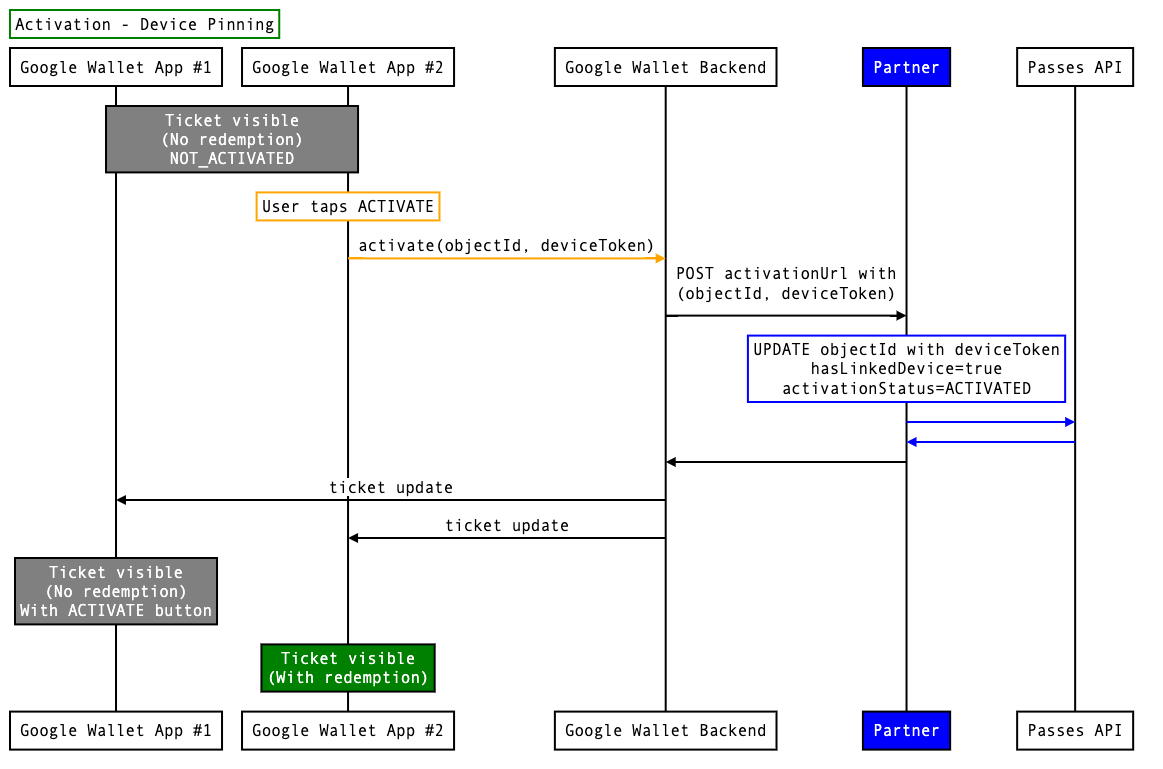
Device pinning is a feature that allows a user to activate the ticket on one device and have the
ticket redemption information display on only that device. This is separate from the
multipleDevicesAndHoldersAllowedStatus of ONE_USER_ONE_DEVICE, which
only allows the ticket to be displayed on a single device. It is recommended to use the status
ONE_USER_ALL_DEVICES with device pinning.
Prior to activation, the user is able to see the ticket and activate button on any device they
own. Once activated and pinned to a device, the pinned device will display redemption information
and other devices will display an activate button to allow the user to move the ticket to another
device. If moving the ticket is not desired functionality, but activating on any device is, then
it is possible to update the ticket during activation to ONE_USER_ONE_DEVICE rather
than using device pinning.
To implement device pinning, the object should be updated with the deviceToken field
which is received with the activation parameters as well as
setting hasLinkedDevice to true in the same API call. If desired, the ticket can then
be unlinked from a device by setting hasLinkedDevice to false in a future API call.
Activation parameters
The request to the activation endpoint will contain the following parameters.
JSON Example:
  {
    classId: “123.classId”,
    objectIds: [ “123.objectId” ],
    expTimeMillis: 1669671940735,
    eventType: “activate”,
    nonce: “1c6fccce-6f66-11ed-a1eb-0242ac120002”,
    deviceContext: “6fba937a-6f6e-11ed-a1eb-0242ac120002”
  }
| Identifier | Description |
|---|---|
classId |
Fully qualified class ID. Uses the following format: <issuer_id.class_id> |
objectIds |
Fully qualified array of object IDs which use the following format: <issuer_id.object_id> |
expTimeMillis |
Expiration time in milliseconds since EPOCH. After the expiration time, the message needs to be deemed invalid. |
eventType |
Always "activate".
|
nonce |
Nonce to track any duplicate deliveries. |
deviceContext |
A unique ID generated by Google representing the device the user is taking action on. This ID should be used when making updates that tie an object to a device. This ID may not be constant for future requests from a given device. |