Google uses AI technology to translate content into your preferred language. AI translations can contain errors.
以静态方式加载广告脚本
使用集合让一切井井有条
根据您的偏好保存内容并对其进行分类。
概览
此项评估旨在检查广告脚本是否注入到网页中。
网页上的其他资源可能会延迟提取和加载注入的
脚本,进而导致广告加载延迟。在某些情况下
可能根本无法提取脚本,
。
建议
通过异步脚本代码加载脚本,以提高速度。浏览器预加载扫描器
可以提前提取脚本标记,即使阻塞渲染的资源
脚本执行。
| 不正确 |
<script>
var el = document.createElement('script');
el.src = 'https://securepubads.g.doubleclick.net/tag/js/gpt.js';
var node = document.getElementsByTagName('script')[0];
node.parentNode.insertBefore(el, node);
</script>
|
| 正确 |
<script async src="https://securepubads.g.doubleclick.net/tag/js/gpt.js"></script>
|
确定所注入广告脚本的来源
有时,广告脚本是如何被注入到网页的,
甚至完全被注入。例如,在检查来源
已注入的脚本代码
无法与静态加载的代码区分开来。
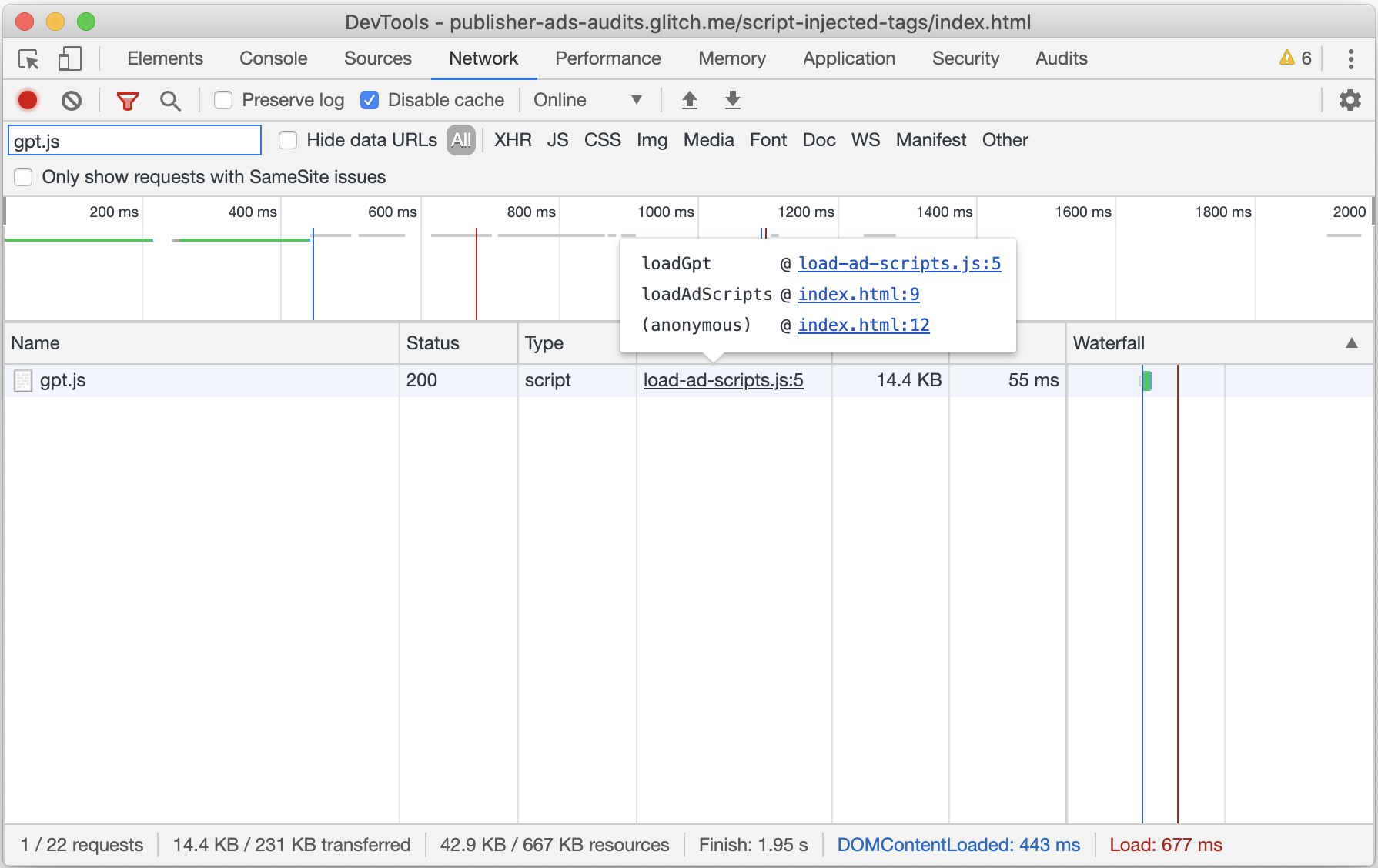
在这些情况下,请使用 Chrome 开发者工具中的“Network”标签页来确定来源
所注入的广告脚本
- 按
Control+Shift+J 或 Command+Option+J (Mac) 打开开发者工具。
- 前往 Network(网络)标签页。
- 点击过滤(如果尚未显示的话)
打开过滤器栏并输入
此审核标记的脚本名称输入到文本框中。
- 如果尚未显示,请右键点击任意表格标题,然后选择
Initiator:用于在网络请求中添加“Initiator”列
瀑布图
- 请重新加载页面以捕获网络流量。

如以上屏幕截图所示,“Initiator”(发起者)列将包含相关信息
相关脚本的来源。您可以点击来源链接
直接跳转到负责发出广告脚本请求的代码,或者
将鼠标悬停在来源链接上,可查看导致相应请求的所有调用。
此项审核所参照的许可名单包含已知安全的广告脚本
进行静态加载当前列表为:
| 库 |
脚本 |
| AdSense |
pagead2.googlesyndication.com/pagead/js/adsbygoogle.js
|
| Amazon 发布商服务 |
amazon-adsystem.com/aax2/apstag.js
|
| Criteo 直接出价方 |
static.criteo.net/js/*/publishertag.js
|
| Google 发布商代码 |
googletagservices.com/tag/js/gpt.js
securepubads.g.doubleclick.net/tag/js/gpt.js
|
| Index Exchange |
js-sec.indexww.com/ht/p/*.js
|
干预 document.write()
通过脚本注入的“异步脚本”被视为有害的内容
加速异步代码段
如未另行说明,那么本页面中的内容已根据知识共享署名 4.0 许可获得了许可,并且代码示例已根据 Apache 2.0 许可获得了许可。有关详情,请参阅 Google 开发者网站政策。Java 是 Oracle 和/或其关联公司的注册商标。
最后更新时间 (UTC):2024-08-22。
[[["易于理解","easyToUnderstand","thumb-up"],["解决了我的问题","solvedMyProblem","thumb-up"],["其他","otherUp","thumb-up"]],[["没有我需要的信息","missingTheInformationINeed","thumb-down"],["太复杂/步骤太多","tooComplicatedTooManySteps","thumb-down"],["内容需要更新","outOfDate","thumb-down"],["翻译问题","translationIssue","thumb-down"],["示例/代码问题","samplesCodeIssue","thumb-down"],["其他","otherDown","thumb-down"]],["最后更新时间 (UTC):2024-08-22。"],[],["Ad scripts injected into a page can delay or prevent ad loading. To improve speed, load scripts using `async` script tags, allowing the browser to fetch them earlier. To identify injected scripts, use Chrome DevTools' Network tab: filter by the script name and enable the \"Initiator\" column to find the source. The document provides examples of correct and incorrect code for loading scripts and includes a list of ad scripts from AdSense, Amazon, Criteo, Google Publisher Tag, and Index Exchange.\n"]]