

iOS 版 Navigation SDK 提供更完善的航點或導航點指定方式,可提供更準確的路線規劃和更優質的抵達體驗,特別是針對有多個入口或特定導航點的目的地。您可以使用 navigationPointToken 規劃前往精確位置的路線,這是一組編碼位置和額外路線環境的字串。您也可以結合經緯度座標和地點 ID,取得額外環境資訊。
背景
在 10.10 版之前,您可以透過位置座標或地點 ID 定義 Waypoint。雖然有時有效,但僅根據經緯度規劃路線有時會導致下車或上車地點不理想,特別是大型場地、公園或有多個入口的建築物。結果可能會對應到最近的路段,但這可能不是最方便或正確的進入點。
強化路線控點選項可提供更多背景資訊,解決這個問題。
使用導覽點權杖
如要取得最精確的路線,前往入口、裝卸貨碼頭或指定取貨區等特定存取點,可以使用 navigationPointToken。
這個權杖是透過呼叫 Geocoding API 的 Destinations 方法取得,代表與地點相關聯的特定可規劃路線導覽點。
如要指定導覽點權杖,請按照下列步驟操作:
從 Geocoding API 的 Destinations 方法回應中取得
navigationPointToken。建立
GMSNavigationWaypoint時,請指定navigationPointToken。
注意:您無法同時指定導航點權杖,以及位置和 PlaceID。
Swift
// Create a waypoint using a navigation endpoint token
let waypointTwo = GMSNavigationWaypoint(
  navigationPointToken: "ChIJALijSXPhQkARHmIozCCbXsASEgkFVjYHGH6PgBFrbM7wl3.."
  title: "Sydney Opera House")

// Route to the waypoint
navigator.setDestinations([waypointTwo]) { [weak self] routeStatus in
   self?.handleRouteCallback(status: routeStatus)
}
Objective-C
GMSNavigationWaypoint *waypointTwo = [[GMSNavigationWaypoint alloc] initWithNavigationPointToek:@"sampleNavigationPointToken"
使用導覽點權杖和路線權杖
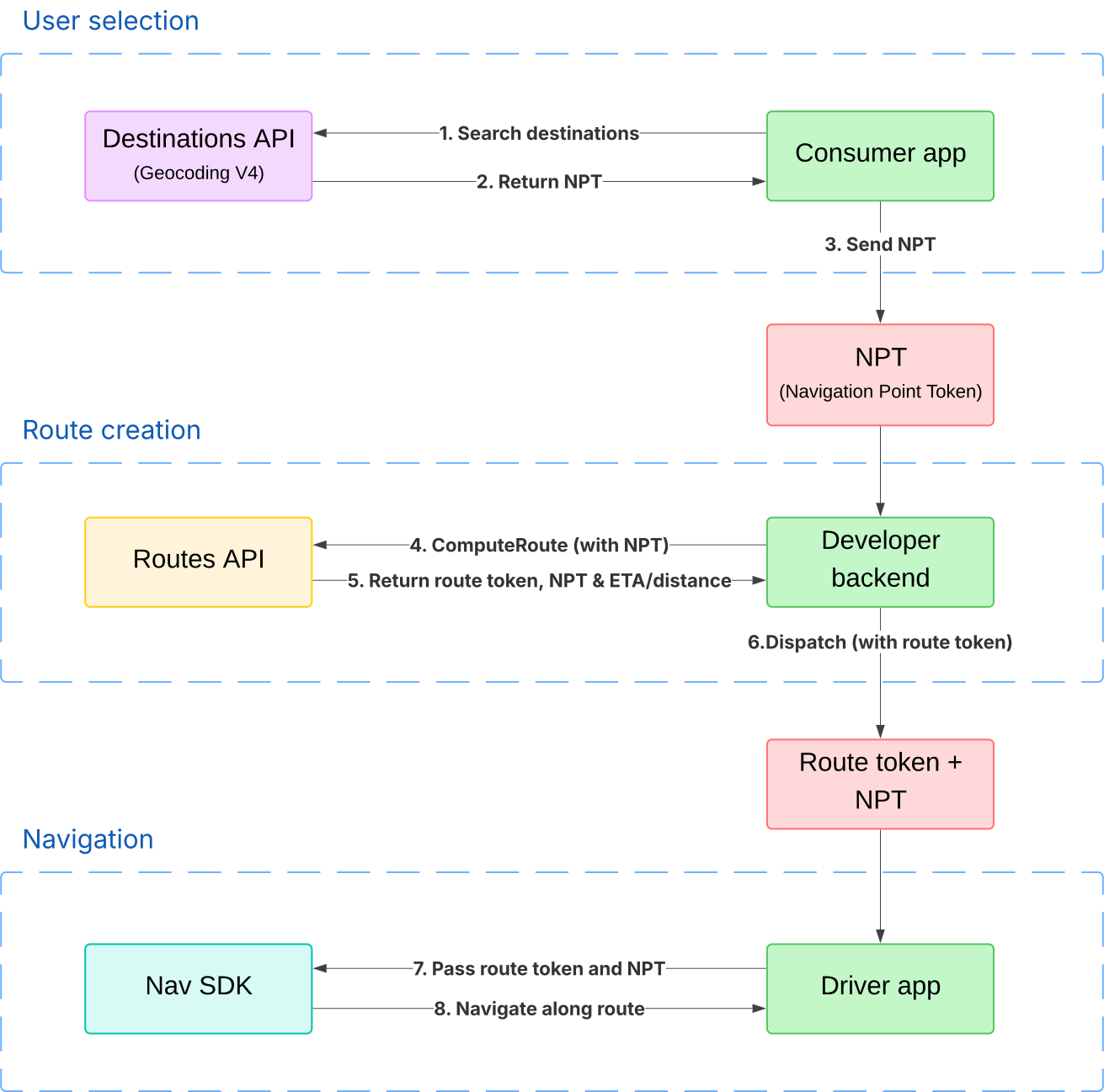
您可以透過 Geocoding API 擷取導航點權杖,從 Routes API 擷取路線權杖,然後將導航點權杖和路線權杖傳遞至 Navigation SDK。這在共乘或外送等情境中非常實用,您可以使用 Routes API 計算行程價格,並取得導航點權杖的精確度。
路線權杖會讓 Navigation SDK 選擇的路線,偏向用於定價的路線。這可降低行程使用較長或較短路線的風險,避免出現「價格震盪」。
如要進一步瞭解如何使用導覽點權杖指定位置和建立路徑權杖,請參閱 Routes API 說明文件。如要瞭解如何使用路徑權杖規劃路徑,請參閱「規劃路徑」。
下圖顯示共乘或外送應用程式如何一併使用導航點權杖和路線權杖:
結合地點 ID 和位置
從 10.10 版開始,建立途中的路線控點時,您可以同時提供地點 ID 和位置座標。如果您想指定精確地點,同時提供整體地點的背景資訊 (地點 ID),這個方法就十分實用。這樣一來,Navigation SDK 就能醒目顯示目的地建築物,或顯示與地點 ID 相關的附近搜尋點,提供更豐富的抵達體驗。
Swift
// Create a waypoint using both the latlng and placeID
let waypoint = GMSNavigationWaypoint(
  location: CLLocationCoordinate2DMake(-33.85657945261524, 151.21535034203333),
  placeID: "ChIJ3S-JXmauEmsRUcIaWtf4MzE",
  title: "Sydney Opera House")

// Route to the waypoint
navigator.setDestinations([waypoint]) { [weak self] routeStatus in
   self?.handleRouteCallback(status: routeStatus)
}
Objective-C
CLLocationCoordinate2D location = CLLocationCoordinate2DMake(47.67, -122.20);
GMSNavigationWaypoint *waypoint = [[GMSNavigationWaypoint alloc] initWithLocation:placeID:coordinate title:@"waypoint from location and placeiD"];
注意事項:
同時提供 placeID 和 location 時:
- 路線主要以指定的
location為目標。 - 系統會將「
placeId」做為背景資訊,提升抵達體驗。 - 回退:如果 SDK 判斷提供的
placeId對應的功能與指定的location相差太遠,系統就會忽略placeId。在這種情況下,系統只會繼續前往location,且無法提供地點專屬的抵達體驗強化功能。
有效路線控點設定摘要
| 規格 | location |
placeID |
navigationPointToken |
轉送行為 | 目的地醒目顯示 |
|---|---|---|---|---|---|
| 僅限地點座標 | set | 缺席 | 缺席 | 導向最接近所定義座標的路段 | 如果系統能以高準確度推斷目的地,就會顯示這項資訊 |
| 僅限地點 ID | 缺席 | set | 缺席 | 前往地點 ID 預設導航點的路線 | 起點地點 ID |
| 僅限導航點權杖 | 缺席 | 缺席 | set | 通往以符記表示的精確導航點的路線 | 從原始 Geocoding API 目的地方法要求中定義的目的地 |
| 位置座標和地點 ID 組合 | se | set | 缺席 | 導向最接近所定義座標的路段 | 從地點 ID (如果地點 ID 與經緯度座標的距離太遠,則不會顯示) |