

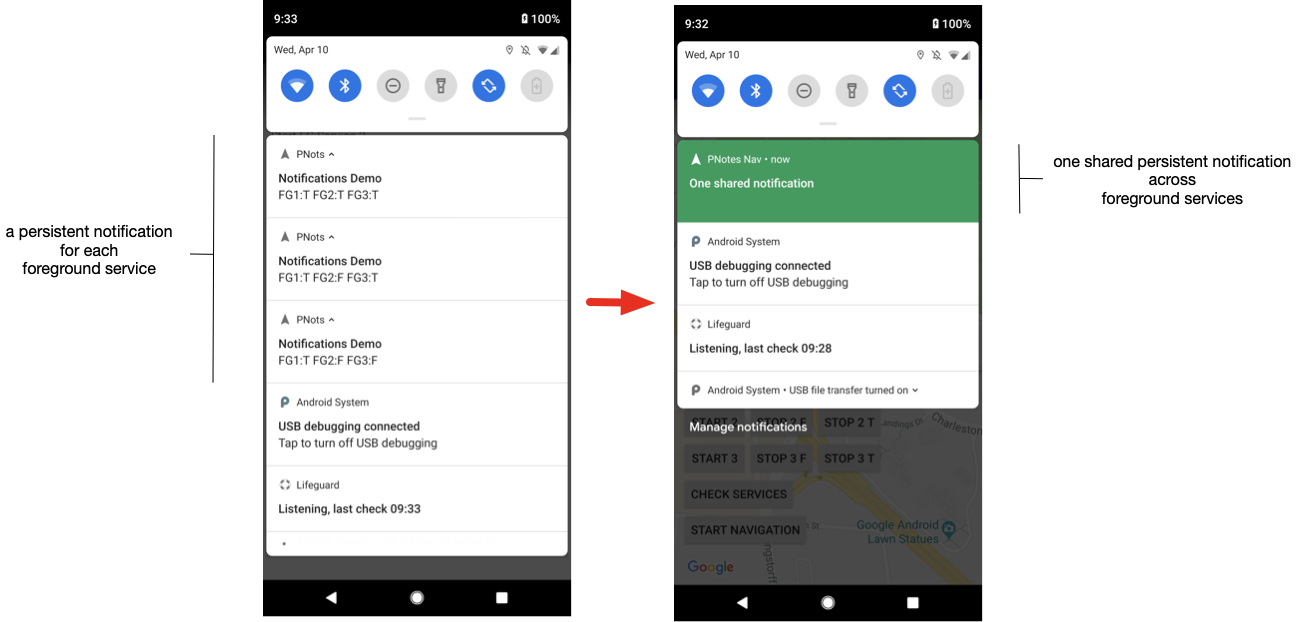
自 Android API 級別 26 起,前景服務必須使用持續性通知。這項規定旨在防止您隱藏可能對系統資源 (尤其是電池) 造成過度負擔的服務。這項規定可能會造成問題:如果具有多項前景服務的應用程式未妥善管理通知,導致通知在所有服務之間共用,則可能會有多個無法關閉的永久通知,導致通知清單雜亂。
如果使用 Navigation SDK 等 SDK,這個問題會變得更棘手,因為這類 SDK 執行的前景服務與應用程式無關,且有自己的獨立常駐通知,因此難以整合。為解決這些問題,Navigation SDK 1.11 版推出簡易 API,協助管理整個應用程式 (包括 SDK 內) 的永久通知。
元件
前景服務管理工具提供 Android 前景服務類別和常駐通知類別的包裝函式。這個包裝函式的主要功能是強制重複使用通知 ID,讓使用管理工具的所有前景服務共用通知。
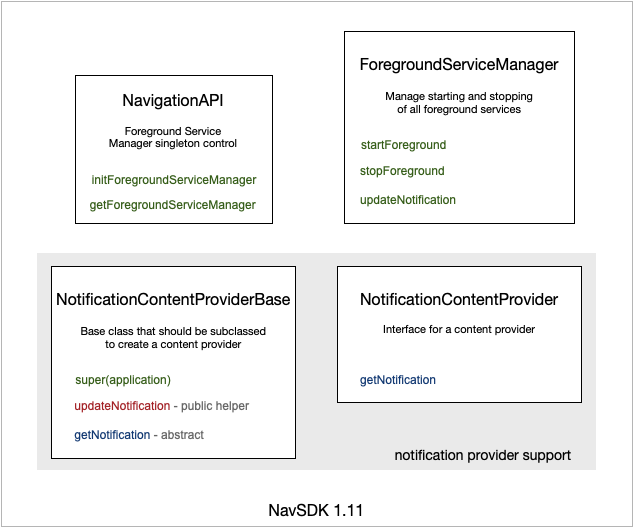
Navigation SDK 包含靜態方法,可用於初始化及取得 ForegroundServiceManager 單例。這個單例模式在 Navigation SDK 的生命週期內只能初始化一次。因此,如果您使用其中一個初始化呼叫 (initForegroundServiceManagerMessageAndIntent() 或 initForegroundServiceManagerProvider()),則應使用 try-catch 區塊將其包圍,以防重新輸入該路徑。如果您多次呼叫任一方法,Navigation SDK 會擲回執行階段例外狀況,除非您先清除 ForegroundServiceManager 的所有參照,並在每次後續呼叫前呼叫 clearForegroundServiceManager()。
initForegroundServiceManagerMessageAndIntent() 的四個參數分別是 application、notificationId、defaultMessage 和 resumeIntent。如果最後三個參數為空值,則通知為標準 Navigation SDK 通知。您仍可將應用程式中的其他前景服務隱藏在這則通知後方。notificationId 參數會指定通知應使用的通知 ID。如果為空值,則會使用任意值。您可以明確設定,避免與其他通知 (例如其他 SDK 的通知) 發生衝突。defaultMessage 是系統未導航時顯示的字串。resumeIntent 是在使用者點選通知時觸發的意圖。如果 resumeIntent 為空值,系統會忽略對通知的點擊。
initForegroundServiceManagerProvider() 的三個參數分別是 application、notificationId 和 notificationProvider。如果最後兩個參數為空值,則通知為標準 Navigation SDK 通知。notificationId 參數會指定通知應使用的通知 ID。如果為空值,則會使用任意值。您可以明確設定,避免與其他通知 (例如其他 SDK 的通知) 發生衝突。如果設定 notificationProvider,則供應器一律負責產生要顯示的通知。
Navigation SDK getForegroundServiceManager() 方法會傳回前景服務管理員單例。如果尚未產生,則等同於呼叫 initForegroundServiceManagerMessageAndIntent(),並為 notificationId、defaultMessage 和 resumeIntent 傳遞空值參數。
ForegroundServiceManager 有三種簡單的方法。前兩者用於將服務移入和移出前景,通常是從已建立的服務中呼叫。使用這些方法可確保服務與共用的永久通知建立關聯。最後一個方法 updateNotification() 會標記管理員,通知通知已變更,應重新算繪。
如需完全控管共用的永久通知,API 會提供 NotificationContentProvider 介面,用於定義通知供應器,其中包含取得目前內容通知的單一方法。此外,它也提供基礎類別,您可以選擇使用該類別來定義供應器。基礎類別的主要用途之一,是提供呼叫 updateNotification() 的方法,而不需要存取 ForegroundServiceManager。如果您使用通知供應器的例項接收新通知訊息,可以直接呼叫這個內部方法,在通知中顯示訊息。
使用情境
本節將詳細說明使用共用永久通知的情境。
- 隱藏其他應用程式前景服務的常駐通知
- 最簡單的做法是保留目前的行為,並只使用持續性通知來顯示 Navigation SDK 資訊。其他服務可以使用前景服務管理工具
startForeground()和stopForeground()方法,隱藏在這則通知背後。 - 隱藏其他應用程式前景服務的永久通知,但設定未導航時顯示的預設文字
- 第二簡單的做法是保留目前的行為,並只在系統未導航時,使用持續性通知顯示 Navigation SDK 資訊。系統未導航時,會顯示提供給
initForegroundServiceManagerMessageAndIntent()的字串,而非提及「Google 地圖」的預設 Navigation SDK 字串。您也可以使用這個呼叫,設定點選通知時觸發的繼續意圖。 - 完整控管持續性通知的顯示方式
- 最後一種情境需要定義及建立通知供應器,並使用
initForegroundServiceManagerProvider()將其傳遞至ForegroundServiceManager。這個選項可讓您完整控制通知中顯示的內容,但也會中斷 Navigation SDK 通知資訊與通知的連結,進而移除通知中顯示的實用即時路線提示。Google 並未提供簡單的方法來擷取這項資訊並插入通知中。
通知供應商範例
以下程式碼範例說明如何使用簡單的通知內容供應器,建立及傳回通知。
public class NotificationContentProviderImpl
   extends NotificationContentProviderBase
   implements NotificationContentProvider {
 private String channelId;
 private Context context;
 private String message;

 /** Constructor */
 public NotificationContentProviderImpl(Application application) {
   super(application);
   message = "-- uninitialized --";
   channelId = null;
   this.context = application;
 }

 /**
  * Sets message to display in the notification. Calls updateNotification
  * to display the message immediately.
  *
  * @param msg The message to display in the notification.
  */
 public void setMessage(String msg) {
   message = msg;
   updateNotification();
 }

 /**
  * Returns the notification as it should be rendered.
  */
 @Override
 public Notification getNotification() {
   Notification notification;

   if (android.os.Build.VERSION.SDK_INT >= android.os.Build.VERSION_CODES.O) {
     Spanned styledText = Html.fromHtml(message, FROM_HTML_MODE_LEGACY);
     String channelId = getChannelId(context);
     notification =
         new Notification.Builder(context, channelId)
             .setContentTitle("Notifications Demo")
             .setStyle(new Notification.BigTextStyle()
                 .bigText(styledText))
             .setSmallIcon(R.drawable.ic_navigation_white_24dp)
             .setTicker("ticker text")
             .build();
   } else {
     notification = new Notification.Builder(context)
         .setContentTitle("Notification Demo")
         .setContentText("testing non-O text")
         .build();
   }

   return notification;
 }

 // Helper to set up a channel ID.
 private String getChannelId(Context context) {
   if (android.os.Build.VERSION.SDK_INT >= android.os.Build.VERSION_CODES.O) {
     if (channelId == null) {
       NotificationManager notificationManager =
           (NotificationManager) context.getSystemService(Context.NOTIFICATION_SERVICE);
       NotificationChannel channel = new NotificationChannel(
           "default", "navigation", NotificationManager.IMPORTANCE_DEFAULT);
       channel.setDescription("For navigation persistent notification.");
       notificationManager.createNotificationChannel(channel);
       channelId = channel.getId();
     }
     return channelId;
   } else {
     return "";
   }
 }
}
建立 NotificationContentProviderImpl 後,請使用下列程式碼將 Navigation SDK 連結至該檢視畫面:
ForegroundServiceManager f = NavigationApi.getForegroundServiceManager(getApplication());
mNotification = new NotificationContentProviderImpl(getApplication());
NavigationApi.clearForegroundServiceManager();
NavigationApi.initForegroundServiceManagerProvider(getApplication(), null, mNotification);
注意事項和未來計畫
- 請務必提早呼叫
initForegroundServiceManagerMessageAndIntent()或initForegroundServiceManagerProvider(),以便明確定義預期的使用情境。您必須先呼叫這個方法,才能建立新的 Navigator。 - 請務必擷取呼叫
initForegroundServiceManagerMessageAndIntent()或initForegroundServiceManagerProvider()時發生的例外狀況,以免多次進入程式碼路徑。在 Navigation SDK 2.0 版中,多次呼叫這個方法會擲回受檢例外狀況,而非執行階段例外狀況。 - Google 可能仍須努力,才能在通知的生命週期內,讓通知樣式與標頭樣式保持一致。
- 定義通知供應器時,您可以透過優先順序控制抬頭通知行為。
- Google 並未提供簡單的方法,可擷取通知供應商可能插入通知的即時路線資訊。