Busca puntos de partida de viajes con la Selección de ubicación (beta)
Organiza tus páginas con colecciones
Guarda y categoriza el contenido según tus preferencias.
        const MAPS_API_KEY = '';  // Put your API Key for Maps SDK here
const LS_API_KEY = '';    // Put your API Key for Location Selection APIs here
const MAPS_URL = `https://maps.googleapis.com/maps/api/js?key=${
    MAPS_API_KEY}&libraries=places,geometry&callback=initMap`;
const LS_BASE_URL = 'https://locationselection.googleapis.com/v1beta';
const API_URL_PUPS_FOR_PLACE =
    `${LS_BASE_URL}:findPickupPointsForPlace?key=${LS_API_KEY}`;
const API_URL_PUPS_FOR_LOCATION =
    `${LS_BASE_URL}:findPickupPointsForLocation?key=${LS_API_KEY}`;
const API_URL_NEARBY_PLACES =
    `${LS_BASE_URL}:findNearbyPlaces?key=${LS_API_KEY}`;
const FORM_ID_PUPS_FOR_LOCATION = 'form-pups-for-location';
const FORM_ID_PUPS_FOR_PLACE = 'form-pups-for-place';
const FORM_ID_NEARBY_PLACES = 'form-nearby-places';
const FORM_TO_API_URL_MAP = {
  [FORM_ID_PUPS_FOR_LOCATION]: API_URL_PUPS_FOR_LOCATION,
  [FORM_ID_PUPS_FOR_PLACE]: API_URL_PUPS_FOR_PLACE,
  [FORM_ID_NEARBY_PLACES]: API_URL_NEARBY_PLACES,
};

const RED_PIN = 'http://maps.google.com/mapfiles/ms/icons/red-dot.png';
const GREEN_PIN = 'http://maps.google.com/mapfiles/ms/icons/green-dot.png';
const BLUE_PIN = 'http://maps.google.com/mapfiles/ms/icons/blue-dot.png';

const DEFAULT_ZOOM_LEVEL = 18;
// codepoint from https://fonts.google.com/icons
const SEARCH_LOCATION_MARKER = '\ue7f2';
const GOOGLEPLEX = {
  lat: 37.422001,
  lng: -122.084061
};
let map;
let polyLines = [];
let polygons = [];
let mapMarkers = [];
let entranceMarkers = [];

function loadMap() {
  const script = document.createElement('script');
  script.src = MAPS_URL;
  document.body.appendChild(script);
}

function initMap() {
  map = new google.maps.Map(
      document.getElementById('map'),
      {center: GOOGLEPLEX, zoom: DEFAULT_ZOOM_LEVEL});
}

function setupForm() {
  const form = document.getElementsByTagName('form')[0];
  form.addEventListener('submit', onFormSubmit);
}

function onFormSubmit(evt) {
  evt.preventDefault();
  evt.stopPropagation();
  const formData = new FormData(evt.target);
  fetchAPIResults(formData);
}

function transformFormData(fd) {
  let transformedFd = {
    localizationPreferences: {},
  };
  const formId = document.getElementsByTagName('form')[0].id;
  if (formId === FORM_ID_PUPS_FOR_LOCATION ||
      formId === FORM_ID_PUPS_FOR_PLACE) {
    transformedFd = {localizationPreferences: {}, travelModes: []};
  }
  const addSearchLocation = () => {
    if (transformedFd.searchLocation == null) {
      transformedFd.searchLocation = {};
    }
  };
  const addDestination = () => {
    if (transformedFd.destination == null) {
      transformedFd.destination = {};
    }
  };
  fd.forEach((value, key) => {
    switch (key) {
      case 'travelModes':
        transformedFd.travelModes.push(value);
        break;
      case 'languageCode':
        transformedFd.localizationPreferences[key] = value;
        break;
      case 'regionCode':
        transformedFd.localizationPreferences[key] = value;
        break;
      case 'searchLocation-latitude':
        if (value) {
          addSearchLocation();
          transformedFd.searchLocation['latitude'] = value;
        }
        break;
      case 'searchLocation-longitude':
        if (value) {
          addSearchLocation();
          transformedFd.searchLocation['longitude'] = value;
        }
        break;
      case 'destination-latitude':
        if (value) {
          addDestination();
          transformedFd.destination['latitude'] = value;
        }
        break;
      case 'destination-longitude':
        if (value) {
          addDestination();
          transformedFd.destination['longitude'] = value;
        }
        break;
      default:
        transformedFd[key] = value;
        break;
    }
  });
  const json = JSON.stringify(transformedFd, undefined, 2);
  return json;
}

async function fetchAPIResults(fd) {
  const formId = document.getElementsByTagName('form')[0].id;
  const url = FORM_TO_API_URL_MAP[formId];
  const transformedFd = transformFormData(fd);
  const response = await fetch(url, {method: 'POST', body: transformedFd});

  const result = await response.json();
  // Display JSON
  displayAPIResults(result);
  // Update map
  let searchLocation = {};
  if (JSON.parse(transformedFd).searchLocation) {
    searchLocation = {
      lat: Number(JSON.parse(transformedFd).searchLocation.latitude),
      lng: Number(JSON.parse(transformedFd).searchLocation.longitude),
    };
  }
  switch (formId) {
    case FORM_ID_PUPS_FOR_PLACE:
      markPickupPointsForPlace(result);
      break;
    case FORM_ID_PUPS_FOR_LOCATION:
      markPickupPointsForLocation(result, searchLocation);
      break;
    case FORM_ID_NEARBY_PLACES:
      markNearbyPlaces(result, searchLocation);
      break;
    default:
      break;
  }
}

function displayAPIResults(data) {
  const output = document.getElementById('output');
  output.textContent = JSON.stringify(data, undefined, 2);
}

function markNearbyPlaces(data, searchLocation) {
  if (data.error) {
    resetMap();
    return;
  }
  const places = [];
  for (const placeResult of data.placeResults) {
    places.push(placeResult.place);
  }

  resetMap(searchLocation);
  markPlaces(places, searchLocation);
  for (const place of places) {
    markEntrances(place.associatedCompounds, place);
  }
  markSearchLocation(searchLocation, '');
  for (const place of places) {
    mapPolygons(place.associatedCompounds);
  }
}

function markPickupPointsForPlace(data) {
  if (data.error) {
    resetMap();
    return;
  }
  const place = data.placeResult.place;
  const pickupPoints = data.pickupPointResults;
  const searchLocation = {
    lat: place.geometry.location.latitude,
    lng: place.geometry.location.longitude
  };
  resetMap(searchLocation);
  markPickupPoints(place, pickupPoints, searchLocation);
  markEntrances(place.associatedCompounds, place);
  markSearchLocation(searchLocation, place.displayName);
  createPolyLinesOneToMany(searchLocation, pickupPoints);
  mapPolygons(place.associatedCompounds);
}

function markPickupPointsForLocation(data, searchLocation) {
  if (data.error) {
    resetMap();
    return;
  }

  const placeIdToPlace = {};
  // A dict, and the key is placeId(str)s and the value is a list of pups.
  const placePickupPoints = {};
  data.placeResults.forEach(result => {
    placeIdToPlace[result.place.placeId] = result.place;
    placePickupPoints[result.place.placeId] = [];
  });
  data.placePickupPointResults.forEach(result => {
    placePickupPoints[result.associatedPlaceId].push(result.pickupPointResult);
  })
  resetMap(searchLocation);
  for (const placeId in placePickupPoints) {
    const place = placeIdToPlace[placeId];
    const pups = placePickupPoints[placeId];
    markEntrances(place.associatedCompounds, place);
    markPickupPoints(place, pups, searchLocation);
    createPolyLinesOneToMany(searchLocation, pups);
    mapPolygons(place.associatedCompounds);
  }
  // update the marker rank to global order
  for (let i = 0; i < mapMarkers.length; i++) {
    mapMarkers[i].label = String(i);
  }
  markSearchLocation(searchLocation, '');
}

function markPlaces(places, searchLocation) {
  for (const place of places) {
    const placeLocation = place.geometry.location;
    const infoWindow =
        new google.maps.InfoWindow({content: createInfoWindow(place, null)});
    const marker = new google.maps.Marker({
      position: toLatLngLiteral(placeLocation),
      animation: google.maps.Animation.DROP,
      map: map,
    });
    marker.addListener('click', () => {
      infoWindow.open(map, marker);
    });
    map.addListener('click', () => {
      infoWindow.close();
    });
    mapMarkers.push(marker);
  }
}

function markEntrances(compounds, place) {
  if (!compounds) {
    return;
  }
  for (const compound of compounds) {
    if (!compound.entrances) {
      continue;
    }
    for (const entrance of compound.entrances) {
      const entranceMarker = new google.maps.Marker({
        position: toLatLngLiteral(entrance.location),
        icon: {
          url: BLUE_PIN,
        },
        animation: google.maps.Animation.DROP,
        map: map,
      });
      const infoWindow =
          new google.maps.InfoWindow({content: createInfoWindow(place, null)});
      entranceMarker.addListener('click', () => {
        infoWindow.open(map, entranceMarker);
      });
      map.addListener('click', () => {
        infoWindow.close();
      });
      entranceMarkers.push(entranceMarker);
    }
  }
}

function mapPolygons(many) {
  if (!many) {
    return;
  }
  for (const toPoint of many) {
    const data = toPoint.geometry.displayBoundary;
    if (data == null || data.coordinates == null) {
      continue;
    }
    const value = data.coordinates;
    const polyArray = JSON.parse(JSON.stringify(value))[0];
    const usedColors = [];
    const finalLatLngs = [];
    let color = '';
    for (let i = 0; i < polyArray.length; ++i) {
      if (polyArray[i] != null && polyArray[i].length > 0) {
        color = getColor(usedColors);
        usedColors.push(color);
        if (isArrLatLng(polyArray[i])) {
          finalLatLngs.push({lat: polyArray[i][1], lng: polyArray[i][0]});
        }
      }
    }
    const poly = new google.maps.Polygon({
      strokeColor: color,
      strokeOpacity: 0.2,
      strokeWeight: 5,
      fillColor: color,
      fillOpacity: 0.1,
      paths: finalLatLngs,
      map: map,
    });
    polygons.push(poly);
  }
}

function getColor(usedColors) {
  let color = generateStrokeColor();
  while (usedColors.includes(color)) {
    color = generateStrokeColor();
  }
  return color;
}

function generateStrokeColor() {
  return Math.floor(Math.random() * 16777215).toString(16);
}

function isArrLatLng(currArr) {
  if (!currArr || currArr.length !== 2) {
    return false;
  }
  return ((typeof currArr[0]) === 'number') &&
      ((typeof currArr[1]) === 'number');
}

function toLatLngLiteral(latlng) {
  return {lat: latlng.latitude, lng: latlng.longitude};
}

function pickupHasRestrictions(pickupPointData) {
  let hasRestrictions = false;
  const travelDetails = pickupPointData.travelDetails;
  for (let i = 0; i < travelDetails.length; i++) {
    if (travelDetails[i].trafficRestriction !== 'NO_RESTRICTION') {
      hasRestrictions = true;
    }
  }
  return hasRestrictions;
}

function markPickupPoints(place, pickupPoints, searchLocation) {
  for (let i = 0; i < pickupPoints.length; i++) {
    const pickupPointData = pickupPoints[i];
    const pickupPoint = pickupPoints[i].pickupPoint;
    const pupIcon =
        pickupHasRestrictions(pickupPointData) ? RED_PIN : GREEN_PIN;
    const contentString = createInfoWindow(place, pickupPoint);
    const pupInfoWindow = new google.maps.InfoWindow({content: contentString});
    const marker = new google.maps.Marker({
      position: toLatLngLiteral(pickupPoint.location),
      label: {
        text: String(i),
        fontWeight: 'bold',
        fontSize: '20px',
        color: '#000'
      },
      animation: google.maps.Animation.DROP,
      map,
      icon: {
        url: pupIcon,
        anchor: new google.maps.Point(14, 43),
        labelOrigin: new google.maps.Point(-5, 5)
      },
    });
    marker.addListener('click', () => {
      pupInfoWindow.open(map, marker);
    });
    map.addListener('click', () => {
      pupInfoWindow.close();
    });
    mapMarkers.push(marker);
  }
}

function createInfoWindow(place, pickupPoint) {
  let result = [];
  const addResult = (value, key, map) =>
      result.push(`<p><span class="info-label">${key}:</span> ${value}</p>`);
  const formatAddress = (address) => address.lines.join(',');
  const placeFieldMap = new Map();
  if (place !== null) {
    placeFieldMap.set('Place', '');
    placeFieldMap.set('Name', place.displayName);
    placeFieldMap.set('Place ID', place.placeId);
    placeFieldMap.set('Address', formatAddress(place.address.formattedAddress));
  }
  const pickupPointFieldMap = new Map();
  if (pickupPoint !== null) {
    pickupPointFieldMap.set('Pickup point', '');
    pickupPointFieldMap.set('Name', pickupPoint.displayName);
  }
  placeFieldMap.forEach(addResult);
  result.push('<hr/>');
  pickupPointFieldMap.forEach(addResult);
  return result.join('');
}

function markSearchLocation(location, label) {
  const infoWindow =
      new google.maps.InfoWindow({content: `<p><b>Name: </b>${label}</p>`});
  const marker = new google.maps.Marker({
    position: location,
    map,
    label: {
      text: SEARCH_LOCATION_MARKER,
      fontFamily: 'Material Icons',
      color: '#ffffff',
      fontSize: '18px',
      fontWeight: 'bold',
    },
  });
  marker.addListener('click', () => {
    infoWindow.open(map, marker);
  });
  map.addListener('click', () => {
    infoWindow.close();
  });
  mapMarkers.push(marker);
}

function createPolyLinesOneToMany(one, many) {
  const lineSymbol = {
    path: google.maps.SymbolPath.FORWARD_CLOSED_ARROW,
  };
  for (const toPoint of many) {
    const line = new google.maps.Polyline({
      path: [one, toLatLngLiteral(toPoint.pickupPoint.location)],
      icons: [
        {
          icon: lineSymbol,
          offset: '100%',
        },
      ],
      map: map,
    });
    polyLines.push(line);
  }
}

/******* Reset the map ******/
function deleteMarkers() {
  for (const mapMarker of mapMarkers) {
    mapMarker.setMap(null);
  }
  mapMarkers = [];
}

function deletePolyLines() {
  for (const polyLine of polyLines) {
    polyLine.setMap(null);
  }
  polyLines = [];
}

function deleteEntranceMarkers() {
  for (const entranceMarker of entranceMarkers) {
    entranceMarker.setMap(null);
  }
  entranceMarkers = [];
}

function clearPolygons() {
  for (let i = 0; i < polygons.length; i++) {
    polygons[i].setMap(null);
  }
  polygons = [];
}

function resetMap(searchLocation) {
  if (searchLocation) {
    map.setCenter(searchLocation);
  } else {
    map.setCenter(GOOGLEPLEX);
  }
  map.setZoom(DEFAULT_ZOOM_LEVEL);
  deleteMarkers();
  deletePolyLines();
  deleteEntranceMarkers();
  clearPolygons();
}
// Initiate map & set form event handlers
loadMap();
setupForm();
Antes de usar la API de Location Selection para buscar puntos de partida de viajes, sigue las instrucciones para integrar la biblioteca cliente.
El servicio de Location Selection proporciona tres APIs para la selección de partida y destino: FindNearbyPlaces, FindPickupPointsForPlace y FindPickupPointsForLocation.
Usa FindNearbyPlaces para recuperar lugares cercanos a la búsqueda o la ubicación del dispositivo. Los lugares se clasifican según su proximidad a la ubicación y su relevancia para el transporte compartido. FindNearbyPlaces devuelve una lista de lugares que se pueden mostrar para que el usuario elija la mejor opción. Una vez que se selecciona un lugar, usa FindPickupPointsForPlace para recuperar los puntos de partida del lugar seleccionado.
Usa FindPickupPointsForLocation para recuperar lugares y sus puntos de partida asociados que se encuentren cerca de la ubicación de la búsqueda o del dispositivo en la misma llamada RPC.
Cada punto de partida está asociado con un lugar. Los puntos de partida se clasifican según su proximidad a la ubicación y su prominencia para el transporte compartido. Ten en cuenta que los puntos de partida para varios lugares se ordenan juntos. FindPickupPointsForLocation combina FindNearbyPlaces y FindPickupPointsForPlace. Por ejemplo, supongamos que la ubicación de la solicitud está cerca de los lugares P1, P2 y P3. Si el mejor punto de partida T1 se asocia con el lugar P2 y el siguiente mejor punto de partida se asocia con el lugar P1, los resultados tendrán el orden [T1:P2, T2:P1, …].
La clasificación de los puntos de partida depende de los criterios proporcionados en la solicitud.
Para obtener más información, consulta Cómo optimizar las partidas para varios viajes.
Cómo buscar por ubicación
Si prefieres mostrar lugares al usuario antes de que seleccione puntos de partida o mostrar lugares cercanos arrastrando un pin, usa la siguiente llamada RPC:
FindNearbyPlacesRequest find_nearby_places_request =
  FindNearbyPlacesRequest.newBuilder()
      .setLocalizationPreferences(LocalizationPreferences.newBuilder()
        // Language used for localizing text such as name or address.
        .setLanguageCode("en")
        .setRegionCode("US")
        .build())
      // Rider's location or location of dragged pin.
      .setSearchLocation(LatLng.newBuilder().setLatitude(37.365647).setLongitude(-121.925356))
      // Number of places requested.
      .setMaxResults(3)
      .build();

FindNearbyPlacesResponse findNearbyPlacesResponse =
  locationSelectionBetaClient.findNearbyPlaces(find_nearby_places_request);
La llamada RPC devuelve una lista clasificada de respuestas de lugares que cumplen con los criterios de entrada, ordenada por una combinación de proximidad y prominencia. Puedes dejar que el pasajero elija un lugar o usar el primer resultado y continuar con la selección del punto de partida. Cada respuesta de lugar tiene un place_id único que se puede usar en FindPickupPointsForPlaceRequest para recuperar puntos de partida. Para obtener más información, consulta Cómo buscar por ID de lugar.
FindPickupPointsForLocationRequest FindPickupPointsForLocationRequest =
    FindPickupPointsForLocationRequest.newBuilder()
        // Language used for localizing text such as name and address.
        .setLocalizationPreferences(LocalizationPreferences.newBuilder().setRegionCode("US").setLanguageCode("en"))
        // The search location of the rider or the dropped pin.
        .setSearchLocation(LatLng.newBuilder().setLatitude(-23.482049).setLongitude(-46.602135))
        // The max results returned.
        .setMaxResults(5)
        // List of travel modes. At least one of the travel modes must be supported by the pickup points.
        .addTravelModes(TravelMode.DRIVING)
        // Specifies the sorting order of matching pickup points.
        .setOrderBy(PickupPointOrder.DISTANCE_FROM_SEARCH_LOCATION)
        .build();

FindPickupPointsForLocationResponse FindPickupPointsForLocationResponse =
    locationSelectionService.FindPickupPointsForLocation(
        RpcClientContext.create(), FindPickupPointsForLocationRequest);
La llamada RPC devuelve una lista clasificada de puntos de partida que cumplen con los criterios de entrada, ordenada por una combinación de proximidad y prominencia. Esta llamada de RPC combina FindNearbyPlaces y FindPickupPointsForPlaceRequest, y se puede usar en lugar de combinar las otras dos llamadas.
Cómo buscar por ID de lugar
Puedes obtener un place_id con FindNearbyPlaces o con el servicio de autocompletado de la API de Places. Luego, usa la siguiente llamada RPC para proporcionar puntos de partida óptimos para el lugar especificado:
FindPickupPointsForPlaceRequest findPickupPointsForPlaceRequest =
    FindPickupPointsForPlaceRequest.newBuilder()
        // Language used for localizing text such as name and address.
        .setLocalizationPreferences(LocalizationPreferences.newBuilder().setRegionCode("US").setLanguageCode("en"))
        // Place ID of the place for which pickup points are being fetched;
        // for example, Hilton Hotel, Downtown San Jose.
        .setPlaceId("ChIJwTUa-q_Mj4ARff4yludGH-M")
        // List of travel modes. At least one of the travel modes must be supported by the pickup points.
        .addTravelModes(TravelMode.DRIVING)
        // Rider's location or location of dragged pin.
        // It is recommended to use the same location that was used in `FindNearbyPlaces` for better quality.
        .setSearchLocation(LatLng.newBuilder().setLatitude(37.329472).setLongitude(-121.890449))
        .setOrderBy(PickupPointOrder.DISTANCE_FROM_SEARCH_LOCATION)
        .setMaxResults(5)
         .build();

FindPickupPointsForPlaceResponse findPickupPointsForPlaceResponse =
    locationSelectionBetaClient.findPickupPointsForPlace(findPickupPointsForPlaceRequest);
FindPickupPointsForPlace devuelve PickupPointResponses con la latitud y
la longitud de los
puntos en los que se puede recoger a un pasajero.
Cómo optimizar las partidas para varios viajes
Para viajes compartidos o consecutivos, FindPickupPointsForPlace admite ordenar
los puntos de partida por DRIVING_ETA_FROM_PICKUP_POINT_TO_DESTINATION. Esto te permite
devolver un punto de partida para el próximo viaje que se optimice con la ruta de viaje actual
del conductor.
Ejemplo
FindPickupPointsForPlaceRequest findPickupPointsForPlaceRequest =
    FindPickupPointsForPlaceRequest.newBuilder()
        // Language used for localizing text such as name and address.
        .setLocalizationPreferences(LocalizationPreferences.newBuilder().setRegionCode("US").setLanguageCode("en"))
        // Place ID of the place for which pickup points are being fetched;
        // for example, Hilton Hotel, Downtown San Jose.
        .setPlaceId("ChIJwTUa-q_Mj4ARff4yludGH-M")
        // List of travel modes. At least one of the travel modes must be supported by the pickup points.
        .addTravelModes(TravelMode.DRIVING)
        // Second rider's location or location of dragged pin.
        .setSearchLocation(LatLng.newBuilder().setLatitude(37.329472).setLongitude(-121.890449))
        // Location of the driver's next drop off after picking up the second
        // rider. Note, it is not necessarily the second rider's destination.
        .setDestination(LatLng.newBuilder().setLatitude(37.329472).setLongitude(-121.890449))
        .setOrderBy(PickupPointOrder.DRIVING_ETA_FROM_PICKUP_POINT_TO_DESTINATION)
        .setComputeDrivingEta(true)
        .setMaxResults(5)
        .build();

FindPickupPointsForPlaceResponse findPickupPointsForPlaceResponse =
    locationSelectionBetaClient.findPickupPointsForPlace(findPickupPointsForPlaceRequest);
Muestra los contornos, las entradas y las salidas de los edificios
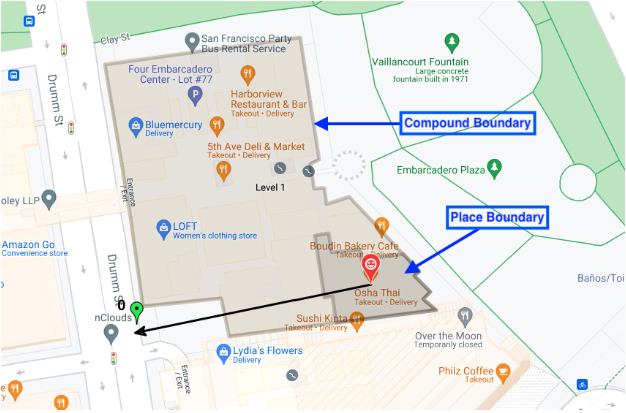
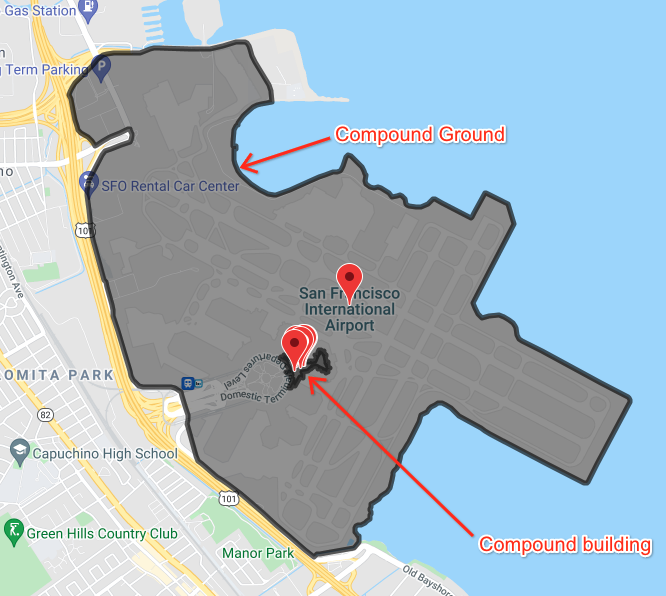
En el mensaje de respuesta .proto de lugar, el campo associatedCompounds identifica los compuestos asociados con el lugar. El mensaje compuesto contiene tres tipos de información:
Tipo de compuesto: Una de las cuatro opciones
compoundBuilding: Es un solo edificio independiente, como un centro comercial o un supermercado.
compoundSection: Es un recinto dentro de otro más grande, como una sola tienda en un centro comercial.
compoundGrounds: Es todo lo asociado a un compoundBuilding, como un centro comercial, su estacionamiento y cualquier otro edificio dentro de ese estacionamiento.
unrecognized: el valor predeterminado
Geometría: Son las coordenadas del polígono delineado, almacenadas en una estructura GeoJSON en el campo displayBoundary. Estas coordenadas se usan para crear el esquema de la sección, el edificio o los terrenos.
Entradas: Son las coordenadas de latitud y longitud de todas las entradas y salidas ubicadas.
La selección de ubicación devuelve cualquier tipo compuesto de asociado con la ubicación de búsqueda. Si la ubicación de búsqueda se encuentra en una tienda específica de un centro comercial, la selección de ubicación devuelve lo siguiente:
* La tienda específica, sus entradas y salidas, y el esquema de la tienda
* El edificio compuesto (el centro comercial), sus entradas y salidas, y el esquema del centro comercial
* Los terrenos compuestos (el centro comercial y el estacionamiento), sus entradas y salidas, y el esquema de todo el terreno
En esta imagen, se muestran los tres tipos de compuestos que se devuelven.
En esta imagen, se muestran varias ubicaciones dentro de un aeropuerto, con el límite de un edificio dentro del aeropuerto y el límite del aeropuerto y todos sus terrenos relacionados.
[[["Fácil de comprender","easyToUnderstand","thumb-up"],["Resolvió mi problema","solvedMyProblem","thumb-up"],["Otro","otherUp","thumb-up"]],[["Falta la información que necesito","missingTheInformationINeed","thumb-down"],["Muy complicado o demasiados pasos","tooComplicatedTooManySteps","thumb-down"],["Desactualizado","outOfDate","thumb-down"],["Problema de traducción","translationIssue","thumb-down"],["Problema con las muestras o los códigos","samplesCodeIssue","thumb-down"],["Otro","otherDown","thumb-down"]],["Última actualización: 2026-11-10 (UTC)"],[],["This application uses Google Maps and Location Selection APIs to display location data. Users input details like `placeId`, language/region codes, and coordinates to find pickup points. The form data is transformed into JSON and sent to the APIs. Results are displayed both as raw JSON and visually on a map. The map shows markers for places, pickup points, entrances, and polylines connecting locations and polygons for compound boundaries. Users can interact with markers to view info windows. It uses javascript functions for each action in order to process and display the results.\n"]]