
- 데이터 세트 제공
- 2023-05-30T00:00:00Z–2023-05-30T00:00:00Z
- 데이터 세트 출처
- Google Research - Open Buildings
- 태그
설명
이 대규모 개방 데이터 세트는 고해상도 50cm 위성 이미지에서 파생된 건물 윤곽선으로 구성됩니다. 아프리카, 라틴 아메리카, 카리브해, 남아시아, 동남아시아에 18억 개의 건물 감지 결과가 포함되어 있습니다. 추론은 5,800만 km²의 영역에 걸쳐 이루어졌습니다.
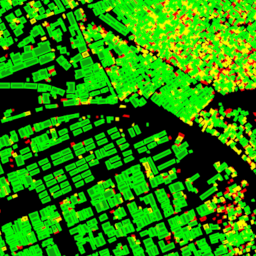
이 데이터 세트의 각 건물에는 건물의 바닥면 윤곽을 나타내는 다각형, 해당 개체가 얼마나 확실히 건물로 보이는지를 나타내는 신뢰도 점수, 건물의 중심을 나타내는 Plus Code가 포함됩니다. 건물의 유형, 상세 주소 또는 도형 이외의 세부정보는 없습니다.
건물 바닥면은 인구 추정, 도시 계획, 인도적 지원부터 환경 및 기후 과학에 이르기까지 다양한 중요한 애플리케이션에 유용합니다. 이 프로젝트는 가나에 기반을 두고 있으며, 처음에는 아프리카 대륙에 중점을 두었으며 남아시아, 동남아시아, 라틴 아메리카, 카리브해에 관한 새로운 업데이트가 제공됩니다.
추론은 2023년 5월에 실행되었습니다.
자세한 내용은 Open Buildings 데이터 세트의 공식 웹사이트를 참고하세요.
테이블 스키마
테이블 스키마
| 이름 | 유형 | 설명 |
|---|---|---|
| area_in_meters | DOUBLE | 다각형의 면적(제곱미터)입니다. |
| confidence | DOUBLE | 모델에서 할당한 신뢰도 점수[0.65;1.0] 입니다. |
| full_plus_code | STRING | 건물 다각형 중심의 전체 Plus Code입니다. |
| longitude_latitude | GEOMETRY | 다각형의 중심입니다. |
이용약관
이용약관
인용
W. Sirko, S. Kashubin, M. Ritter, A. Annkah, Y.S.E. Bouchareb, Y. Dauphin, D. Keysers, M. Neumann, M. Cisse, J.A. Quinn. Continental-scale building detection from high resolution satellite imagery. arXiv:2107.12283, 2021.
Earth Engine으로 탐색
코드 편집기 (JavaScript)
// Visualization of GOOGLE/Research/open-buildings/v3/polygons.

var t = ee.FeatureCollection('GOOGLE/Research/open-buildings/v3/polygons');

var t_065_070 = t.filter('confidence >= 0.65 && confidence < 0.7');
var t_070_075 = t.filter('confidence >= 0.7 && confidence < 0.75');
var t_gte_075 = t.filter('confidence >= 0.75');

Map.addLayer(t_065_070, {color: 'FF0000'}, 'Buildings confidence [0.65; 0.7)');
Map.addLayer(t_070_075, {color: 'FFFF00'}, 'Buildings confidence [0.7; 0.75)');
Map.addLayer(t_gte_075, {color: '00FF00'}, 'Buildings confidence >= 0.75');
Map.setCenter(3.389, 6.492, 17);  // Lagos, Nigeria
Map.setOptions('SATELLITE');
import ee
import geemap.core as geemap
Colab(Python)
# Visualization of GOOGLE/Research/open-buildings/v3/polygons.
t = ee.FeatureCollection('GOOGLE/Research/open-buildings/v3/polygons')

t_065_070 = t.filter('confidence >= 0.65 && confidence < 0.7')
t_070_075 = t.filter('confidence >= 0.7 && confidence < 0.75')
t_gte_075 = t.filter('confidence >= 0.75');

m = geemap.Map()
m.set_center(3.389, 6.492, 17)
m.add_layer(t_065_070, {'color': 'FF0000'}, 'Buildings confidence [0.65; 0.7)')
m.add_layer(t_070_075, {'color': 'FFFF00'}, 'Buildings confidence [0.7; 0.75)')
m.add_layer(t_gte_075, {'color': '00FF00'}, 'Buildings confidence >= 0.75')
m
FeatureView로 시각화
FeatureView는
FeatureCollection의 보기 전용 가속화된 표현입니다. 자세한 내용은
FeatureView 문서를 참고하세요.
코드 편집기 (JavaScript)
var fvLayer = ui.Map.FeatureViewLayer(
  'GOOGLE/Research/open-buildings/v3/polygons_FeatureView');

var visParams = {
  rules: [
    {
      filter: ee.Filter.expression('confidence >= 0.65 && confidence < 0.7'),
      color: 'FF0000'
    },
    {
      filter: ee.Filter.expression('confidence >= 0.7 && confidence < 0.75'),
      color: 'FFFF00'
    },
    {
      filter: ee.Filter.expression('confidence >= 0.75'),
      color: '00FF00'
    },
  ]
};

fvLayer.setVisParams(visParams);
fvLayer.setName('Buildings');

Map.setCenter(3.389, 6.492, 17);  // Lagos, Nigeria
Map.add(fvLayer);
Map.setOptions('SATELLITE');
import ee
import geemap.core as geemap
Colab (Python)
# Visualization of GOOGLE/Research/open-buildings/v3/polygons.
t = ee.FeatureCollection('GOOGLE/Research/open-buildings/v3/polygons')

t_065_070 = t.filter('confidence >= 0.65 && confidence < 0.7')
t_070_075 = t.filter('confidence >= 0.7 && confidence < 0.75')
t_gte_075 = t.filter('confidence >= 0.75');

m = geemap.Map()
m.set_center(3.389, 6.492, 17)
m.add_layer(t_065_070, {'color': 'FF0000'}, 'Buildings confidence [0.65; 0.7)')
m.add_layer(t_070_075, {'color': 'FFFF00'}, 'Buildings confidence [0.7; 0.75)')
m.add_layer(t_gte_075, {'color': '00FF00'}, 'Buildings confidence >= 0.75')
m