
- Dataset-Verfügbarkeit
- 2019-01-01T00:00:00Z–2019-12-31T00:00:00Z
- Ersteller des Datasets
- Biopama-Programm
- Tags
Beschreibung
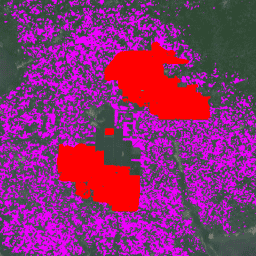
Der Datensatz ist eine globale Karte der industriellen und kleinbäuerlichen Ölpalmenplantagen für 2019 mit einer Auflösung von 10 m. Sie deckt Gebiete ab, in denen Ölpalmenplantagen erkannt wurden. Die klassifizierten Bilder sind die Ausgabe eines Convolutional Neural Network, das auf Sentinel-1- und Sentinel-2-Halbjahreskompositen basiert.
Weitere Informationen finden Sie in diesem Artikel.
Bänder
Bänder
Pixelgröße: 10 Meter (alle Bänder)
| Name | Pixelgröße | Beschreibung |
|---|---|---|
classification |
10 Meter | Beschreibung der Klasse „Ölpalme“ |
Klassentabelle für „classification“
| Wert | Farbe | Beschreibung |
|---|---|---|
| 1 | #ff0000 | Industrielle Ölpalmenplantagen mit geschlossenem Kronendach |
| 2 | #ef00ff | Ölpalmenplantagen von Kleinbauern mit geschlossenem Kronendach |
| 3 | #696969 | Andere Bodenbedeckungen und/oder ‑nutzungen, die keine Ölpalmen mit geschlossenem Kronendach sind. |
Nutzungsbedingungen
Nutzungsbedingungen
Zitate
Adrià, D., Serge, W., Erik, M., David, G., Stephen, P., & Zoltan, S. (2021). Globale Karte der industriellen und kleinbäuerlichen Ölpalmenplantagen für 2019 mit hoher Auflösung (Version v1) [Datensatz]. Zenodo. doi:10.5281/zenodo.4473715
DOIs
Die Earth Engine nutzen
Code-Editor (JavaScript)
// Import the dataset; a collection of composite granules from 2019.
var dataset = ee.ImageCollection('BIOPAMA/GlobalOilPalm/v1');

// Select the classification band.
var opClass = dataset.select('classification');

// Mosaic all of the granules into a single image.
var mosaic = opClass.mosaic();

// Define visualization parameters.
var classificationVis = {
  min: 1,
  max: 3,
  palette: ['ff0000','ef00ff', '696969']
};

// Create a mask to add transparency to non-oil palm plantation class pixels.
var mask = mosaic.neq(3);
mask = mask.where(mask.eq(0), 0.6);

// Display the data on the map.
Map.addLayer(mosaic.updateMask(mask),
             classificationVis, 'Oil palm plantation type', true);
Map.setCenter(-3.0175, 5.2745,12);
import ee
import geemap.core as geemap
Colab (Python)
# Import the dataset a collection of composite granules from 2019.
dataset = ee.ImageCollection('BIOPAMA/GlobalOilPalm/v1')

# Select the classification band.
op_class = dataset.select('classification')

# Mosaic all of the granules into a single image.
mosaic = op_class.mosaic()

# Define visualization parameters.
classification_vis = {
    'min': 1,
    'max': 3,
    'palette': ['ff0000', 'ef00ff', '696969'],
}

# Create a mask to add transparency to non-oil palm plantation class pixels.
mask = mosaic.neq(3)
mask = mask.where(mask.eq(0), 0.6)

# Display the data on the map.
m = geemap.Map()
m.add_layer(
    mosaic.updateMask(mask),
    classification_vis,
    'Oil palm plantation type',
    True,
)
m.set_center(-3.0175, 5.2745, 12)
m