This page provides information about the latest changes in RCS for Business.
July 31, 2026
Documentation enhancement
We've updated the Send messages documentation to clarify the automatic media compression and transcoding behavior for RCS for Business.
July 20, 2026
New
New audit trail feature: Capture acting_party in the RBM Operations API
To help you maintain accurate audit records, we are introducing an optional
acting_party parameter for the
brands.agents.updateLaunch
API.
Why we're making this change
When an agent launch status is updated using the RBM Operations API, the User ID field in history logs defaults to "API Call" because service account-based authentication lacks user context.
Key enhancements
- Identifiable API actions: API callers can now explicitly provide an
acting_partyparameter to represent the email address or identifier of the user executing the action. - Console and webhook visibility: The captured identifier is visible in
the Agent history of the Administration Console, and is included in
AgentLaunchEventwebhook notifications. - Audit trail consistency: Logs for API-initiated actions now match those generated by manual console approvals.
How to use the new parameter
To begin capturing user identifiers, append the acting_party query parameter
to your API requests for brands.agents.updateLaunch.
For more details, see the updated Change agent launch status guide.
July 13, 2026
New
New webhook HTTP header
The RCS for Business platform now includes an X-Goog-Webhook-Type HTTP header
in all webhook requests. This header lets you identify request types for
all incoming webhooks instantly, without needing to parse the JSON body.
For more details, see the updated Webhooks guide.
July 6, 2026
Changed
Analytics overview unsubscribe metrics
The RCS for Business Developer Console now shows unsubscribe metrics for non-promotional agents on the Analytics overview, replacing the 'N/A' placeholder.
June 26, 2026
New
Custom sorting for agent lists
The brands.agents.list endpoint now supports the orderBy query parameter.
This allows partners to sort their agents by name, creation time, or last
updated timestamp.
Key enhancements
- Multiple sorting fields: You can now order your agents using the
following fields:
updateTime: Sorts chronologically by the last update timestamp.displayName: Sorts alphabetically by the human-readable agent name.agentId: Sorts by the unique system-generated agent identifier.
- Directional control: You can set the sorting direction by adding an
" asc"or" desc"suffix to the field name. Fields specified without a suffix will default to ascending order. - Default sorting: If the
orderByparameter is omitted, the list defaults to sorting byagentIdin ascending order.
For more information, see the updated brands.agents.list reference documentation.
June 11, 2026
Documentation enhancement
We've updated our documentation to clarify that partners can transition an
agent's launch status from PENDING to UNLAUNCHED to cancel a pending launch
request.
For details, see the Receive events guide.
May 22, 2026
Enforcement of regional endpoints for batch capability checks
Changed
Starting May 4, 2026, the users.batchGet
method requires the use of regional endpoints. Batch requests must be sent
to the API endpoint that corresponds to the geographical region of the phone
numbers in that batch.
Why we're making this change
To optimize API performance and reliability, and to contain the impact of any potential disruptions.
What you need to do
- Update your application to call the correct regional endpoint
for your
users.batchGetrequests. - Ensure each
users.batchGetrequest contains phone numbers from a single region only. Requests containing mixed-region phone numbers or sent to the incorrect regional endpoint will fail with a 400 Bad Request error.
What's not changing
Single capability checks (phones.getCapabilities) and sending messages are not
affected by this enforcement at this time. However, we strongly recommend using
regionalized APIs for all calls to optimize API performance now and to prepare
for future updates.
May 12, 2026
New
Persistent suggestions for text messages
RCS for Business now supports persistent suggestions for standalone text messages. Unlike standard transient suggestions that disappear when a conversation continues, persistent suggestions are displayed inside the message bubble and remain fixed throughout the conversation.
Why we're making this change
This feature allows users to revisit useful actions—such as opening a URL, dialing a number, or viewing a location—long after the initial message was sent, providing a more consistent and reliable user experience.
"Open a URL" persistent suggestions display the destination URL directly within the button to build user confidence and reduce "click-hesitation" caused by unknown links.
Supported types of messages
- Supported: Standalone text messages.
- Not supported: Standalone media messages (image, video, GIF, PDF, or audio). For these use cases, use rich cards.
Combine suggestions
You can combine persistent and transient suggestions in a single text message. Each suggestion must "opt-in" to be persistent.
- Total limit: A single text message can support up to 11 total suggestions.
- Persistent suggestions: Up to four suggestions (displayed inside the bubble).
- Transient suggestions: Up to 11 transient suggestions (displayed outside the bubble).
Supported clients for persistent suggestions
- Supported: Google Messages (version
20260225.00or later). - Not supported: Google Messages versions earlier than
20260225.00, iOS, and Samsung Messages.
For more details, see our updated Suggestions guide.
April 27, 2026
Changed
Updated RBM branding and verification standards in Google Messages
We are introducing updates to RCS for Business branding and verification to enhance user trust and align with Google standards. These updates affect agents' appearance in the Google Messages conversations list, conversation screen, and conversation details.
Key enhancements
New logo shape: The logo is now a rounded square throughout Google Messages. The transition to the new rounded square shape is automatic.
Note: If your current logo is a circle on a transparent background, it will still be shown as a circle in the Google Messages app. We recommend you manually upload a full-background image to ensure it looks best in the new UI. For more information, see Edit agent information.
Verification checkmark: Verified agents now include a verification checkmark. The checkmark will appear automatically for agents that have completed the verification process.
| Before | After |
|---|---|
 |
 |
April 27, 2026
Documentation enhancement
We've updated the Webhooks documentation with new best practices for managing webhooks, specifically addressing how to handle the risks of shared partner queues and prevent message delivery failures.
For more information, see the updated Webhooks guide.
April 6, 2026
New
Upload and delete agent verification documents with the Business Communications API
To streamline the agent verification process, we have introduced new methods in the Business Communications API that allow partners to upload and delete supporting documents. This feature is optional.
Key enhancements
- New API methods: Partners can now use the following methods to manage
verification attachments:
attachments.create: Uploads a verification document.brands.agents.attachments.delete: Deletes an attached verification document.
- Carrier visibility: For carrier-managed launches, the uploaded documents are shared with each carrier you've selected for launch.
Technical details and limits
- File support: Initially, the API supports PDF files.
- Max file size: 50 MB per file.
- Quantity limit: Up to 5 unique documents per agent.
For more information on the verification process, see Submit verification information.
April 1, 2026
New
Cross-agent traffic limits for low-reputation promotional agents in India
We are introducing a cross-agent traffic limit to reduce user inbox fatigue for subscribers in India. This new limit restricts the total number of promotional messages a user can receive from all low reputation agents per day.
This limit applies across all low reputation agents. High and medium reputation agents are exempt from this cross-agent restriction.
For a detailed explanation of these new traffic limits and other business rules, see the Agent use cases and business rules page.
April 1, 2026
New
New visibility controls: Archive and hide agents
To help manage console clutter, we've introduced new visibility controls for both partners and carriers. These features let you remove old or unused agents from their primary views in the Console and through the API without affecting agents' operational state.
For partners: Archive and unarchive agents
You can archive or unarchive agents that are in an inactive state
(UNLAUNCHED, SUSPENDED, or REJECTED). You can't archive agents that are
LAUNCHED or PENDING on any carrier network.
Key features
- RCS for Business Developer Console: Archive or unarchive agents individually or in bulk (up to 100). For details, see Archive/Unarchive an agent.
- Management API: Programmatically manage an agent's archive status. For details, see Archive or unarchive an agent.
- Filtered views: By default, archived agents are excluded from the main list. To include the archived agents in their results, use filters in the Console or parameters in the API.
For carriers: Hide and unhide agents
You can hide or unhide agents that are in an inactive state (SUSPENDED or
REJECTED) on your network. You can't hide an agent if its launch status on
your network is LAUNCHED or PENDING.
Key features
- Administration Console: Hide and unhide agents individually or in bulk (up to 100). For details, see Hide/Unhide an agent.
- Operations API: Manage an agent's hidden status for your network. For details, see Hide/Unhide agents.
- Filtered views: By default, agents marked as hidden are excluded from the main list. To view these agents, use filters in the Console or parameters in the API.
March 10, 2026
Changed
We have updated the allowed launch state transitions when managing agents through RBM Operations API and Business Communications API and Administration Console and RCS for Business Developer Console. This ensures consistent logic and synchronization between API and Console.
Here are the updated allowed launch state transitions:
Carrier-initiated
- From
PENDINGtoLAUNCHEDorREJECTED - From
LAUNCHEDtoSUSPENDED - From
SUSPENDEDtoLAUNCHEDorUNLAUNCHED
Partner-initiated
- From
UNSPECIFIED,UNLAUNCHED, orREJECTEDtoPENDING
March 9, 2026
Changed
URL transparency in 'Open a URL' suggested action
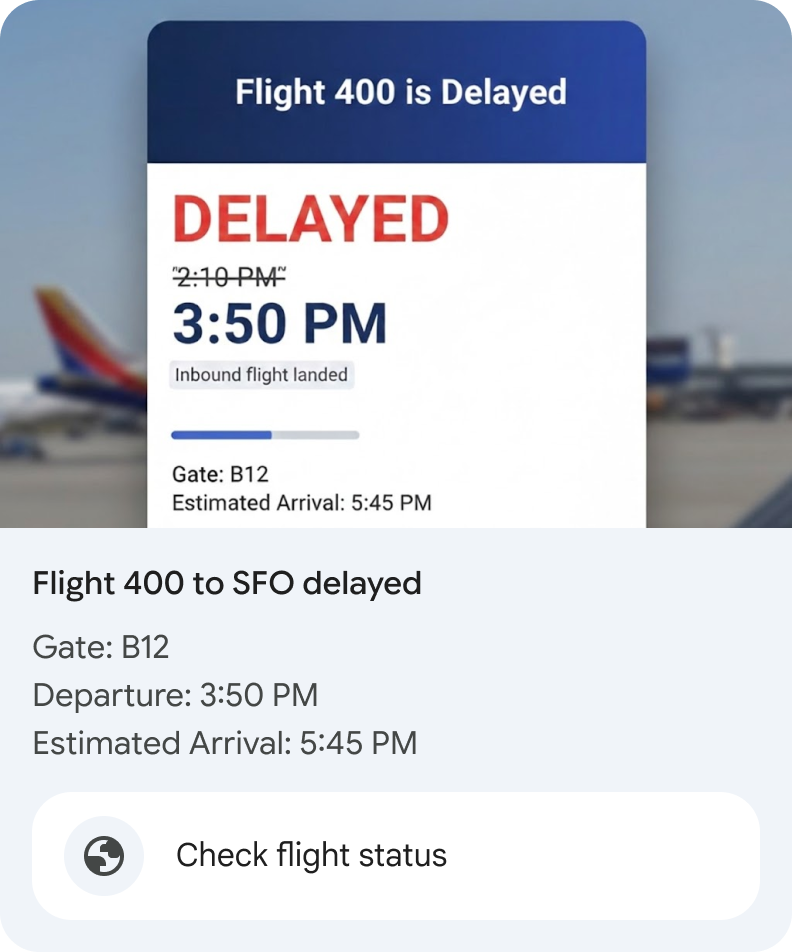
Google Messages now displays the underlying URL address directly within the 'Open a URL' action for in-card suggestions of rich cards and carousels. For details, see Open a URL.
| Before | After |
|---|---|
 |
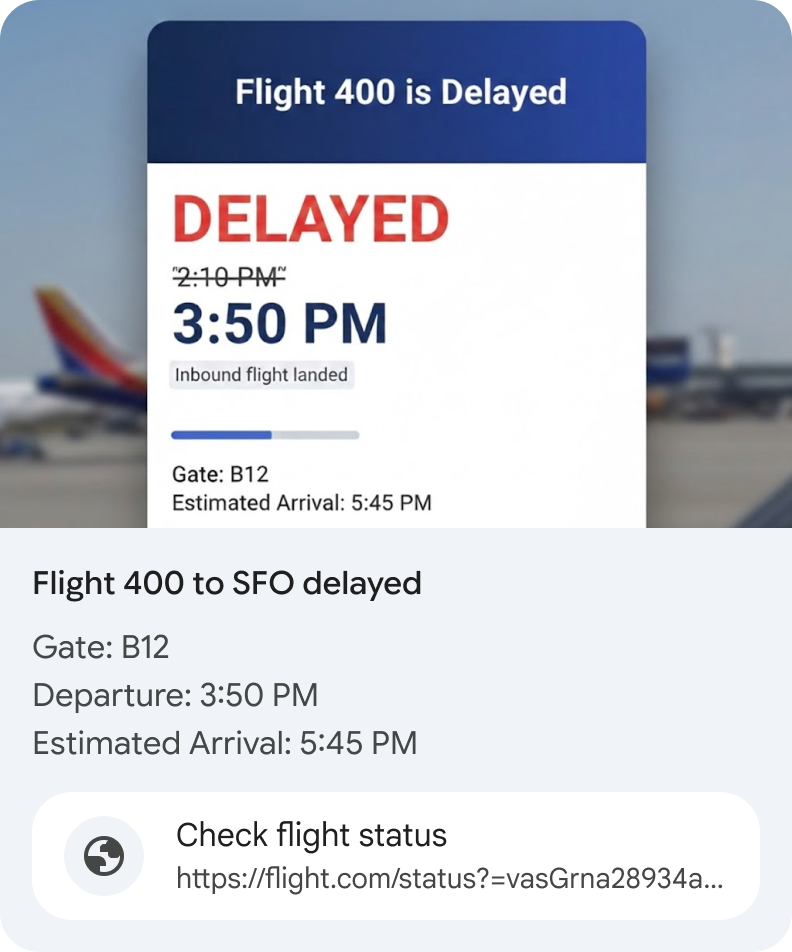 |
By surfacing the URL, we aim to:
- Build user confidence: Reduce friction and "click-hesitation" caused by unknown links.
- Drive engagement: Establish consistent and reliable usage habits within RCS for Business.
Recommended actions
- Deployment: This feature is enabled automatically; no technical integration or API changes are required on your part.
- Audit your links: Ensure your destination URLs are concise and consistent with your brand.
- Review UX: Check your current 'Open a URL' suggested actions in rich cards and carousels to ensure the display text and the now-visible URL don't feel redundant or cluttered.
February 28, 2026
Changed
API deprecation for the phones.testers resource
To provide more comprehensive control, we launched the new testers API for complete tester lifecycle management. Now you can send or resend invites, get status, and remove testers programmatically.
Because of this expanded functionality, we've deprecated the legacy
phones.testers resource.
To ensure uninterrupted testing for your agents, all partners are required to migrate their implementations to the new, streamlined testers API resource. Agents that haven't migrated won't be able to invite or manage test devices after this date.
| Resource | Status |
|---|---|
| phones.testers | Deprecated |
| testers | Current |
What you need to do:
- Review the new testers API reference and the updated guide to set up a test device.
- Update your existing code that calls the
phones.testers.createmethod to use the newtestersresource endpoints. - Implement and test the new logic.
February 16, 2026
New
New fields in analytics.agentPerformances.list response with additional
metrics
The analytics.agentPerformances.list method in the RCS Business Messaging API now includes additional fields in the AgentPerformance object related to Unsubscribe Reason and Spam Trend data.
February 12, 2026
Documentation enhancement
We've updated the Send messages documentation with a new Time to live (TTL) for a message section to clarify expected notification behavior and provide recommendations for managing delivery edge cases.
February 5, 2026
New
New Contact RCS for Business support page
We have replaced the "Email RBM support" link with a new Contact RCS for Business support page.
All technical support requests should now be initiated through the support contact form linked on this page, which ensures that issues are accurately captured and routed for faster resolution.
To help you prepare your submission, the page includes a quick start guide that outlines the mandatory information required for various issue categories.
February 5, 2026
Documentation enhancement
We've updated the
Send events
and
phones.agentEvent.create
documentation with information about the delivery behavior of the READ and
IS_TYPING agent events within RCS for Business.
- The updates specify that
READevents are persistent and stored for up to 30 days if a user has RCS enabled but is unreachable, whileIS_TYPINGevents remain ephemeral and expire after approximately 20 seconds.
January 30, 2026
New
Optional comments for agent launch approvals
Carriers can now provide additional comments when approving agent launch requests.
Console changes
Previously, when managing agents in the Administration Console, carriers could provide a comment with a reason only when rejecting, suspending, or terminating an agent.
With this update, we have introduced an optional comment field for the approval process. This allows carriers to share important context directly with agent owners at the point of approval. For more information, see Manage agents on your network.
Comments provided during approval are recorded in Agent history of both the Administration and Business Communications consoles.
RBM Operations API changes
The comment field now supports all state transitions when
changing an agent's launch status.
Carriers can now provide an optional reason for any status change to improve
communication and record-keeping. For more information, see
Manage agents with the RBM Operations API.
January 15, 2026
New
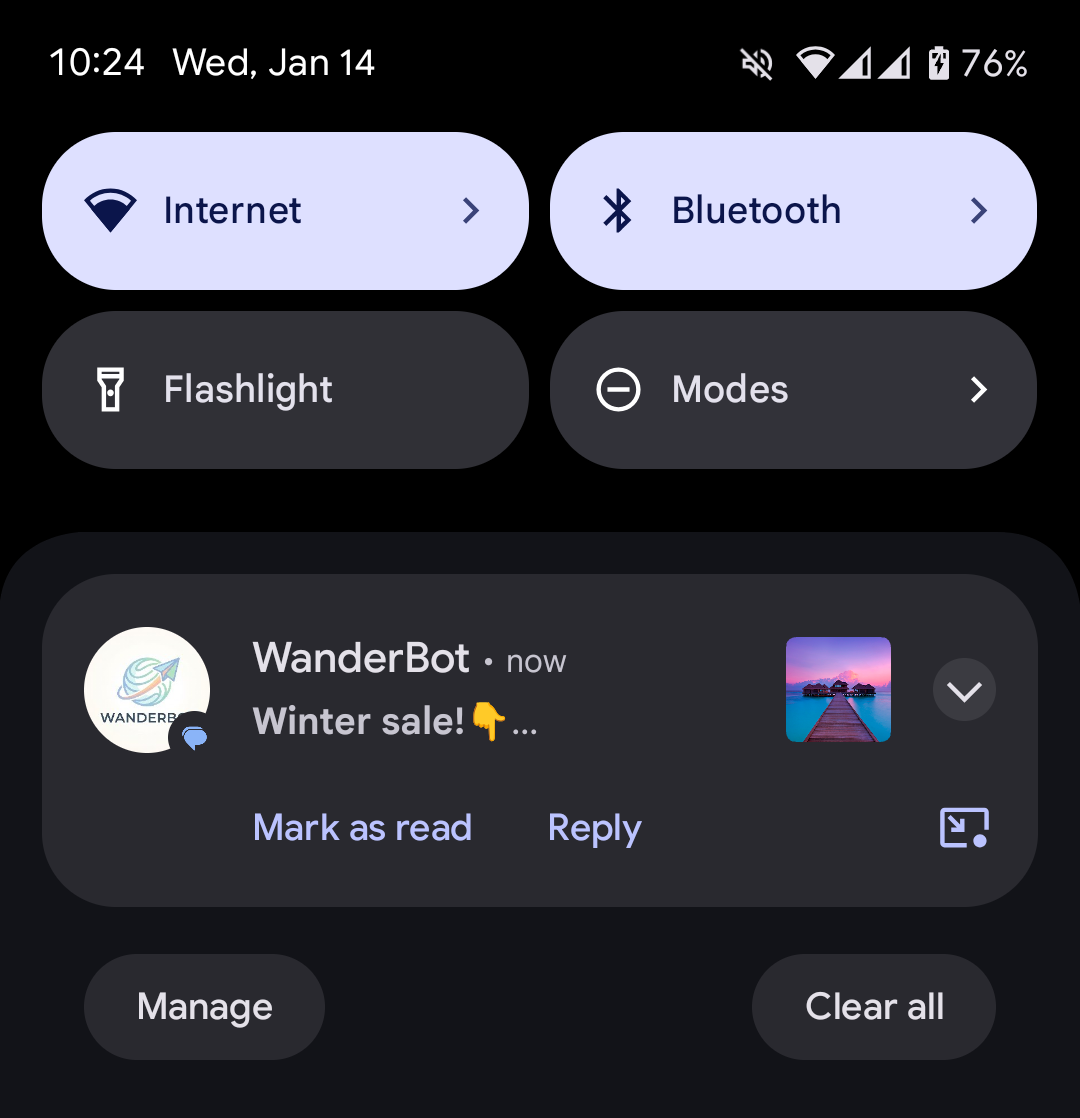
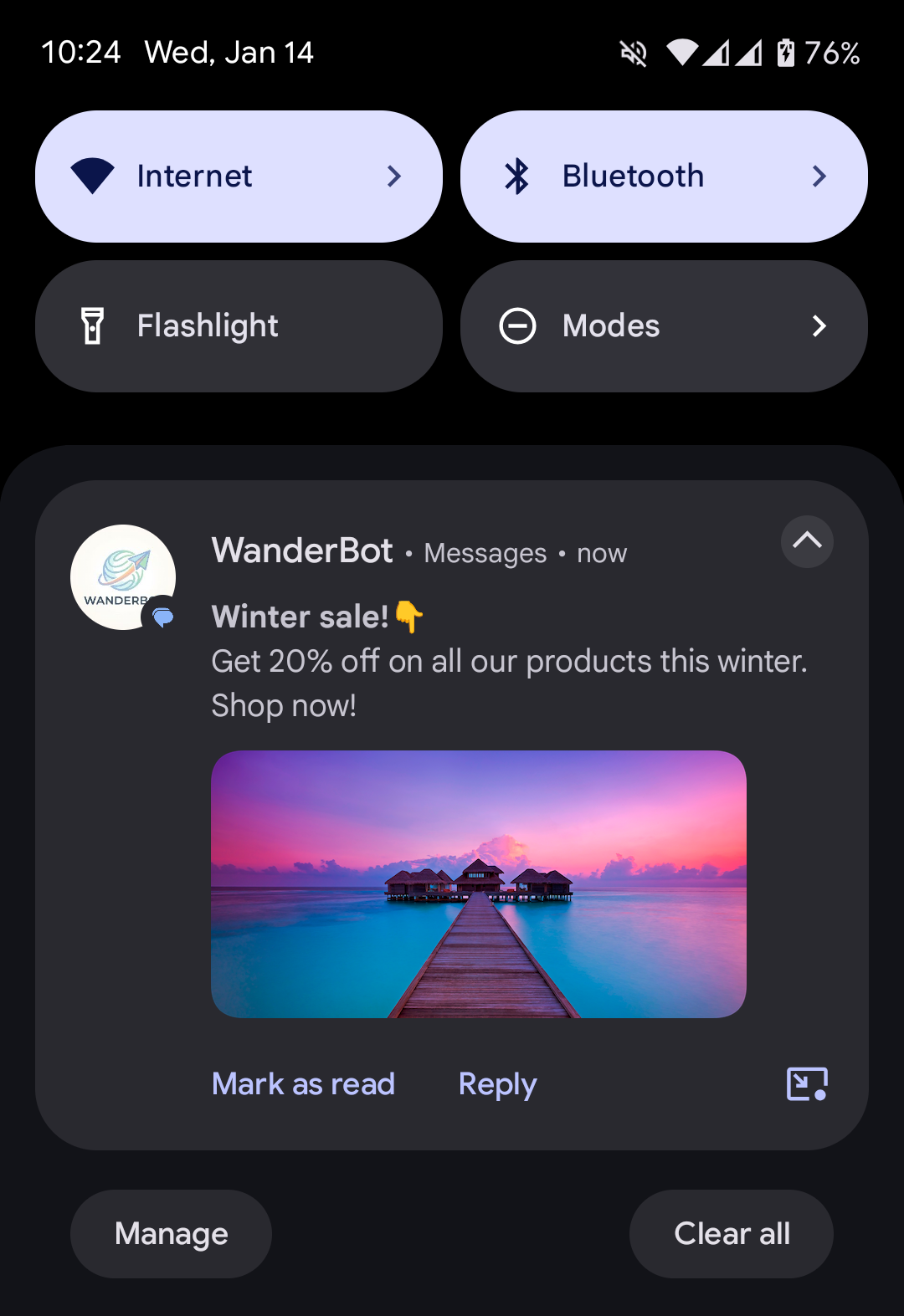
Notifications for rich cards and carousels in Google Messages now include a preview of the media, along with the title and description.
Media previews are only shown when:
- Rich cards: The card's media is an image or has a thumbnail.
- Carousels: The first card's media is an image or has a thumbnail.
| Collapsed notification | Expanded notification |
|---|---|
 |
 |
Why we're making this change
To boost engagement with your messages.
Action required
No action is required on your end.
New
File sharing for agent verification
To streamline the agent approval process, partners now have the option to upload supporting documents directly in the RCS for Business Developer Console.
Key enhancements
- Direct upload: Partners can now upload authorization letters and other supporting documents directly into the RCS for Business Developer Console. For more information, see Submit verification information. Note that even if an authorization letter is provided, the primary authorization method for launches on Google-managed carriers remains email.
- Visibility: Carriers who use the Administration Console can view these uploaded documents to speed up their review. For more information, see Manage agents on your network.
- Flexible verification options: The new feature supplements our standard email-based verification, which remains active.
While this feature is optional, keep the following technical limits in mind:
- File type: PDF only.
- Max file size: 50 MB per file.
- Quantity limit: Up to 5 unique documents. Avoid file duplications.
January 7, 2026
New
We are introducing new traffic limits for promotional RCS for Business agents in India.
Limits on total unique users
A new limit affects the total number of unique users an agent can message per 28 days based on its reputation. All new agents start with a low reputation by default.
For a detailed explanation of these new traffic limits and other business rules, see the Agent use cases and business rules page.