To contact support, you can use one of the following routes:
- To submit new requests or to request reprioritization of existing requests, use the support contact form.
- To submit an appeal for a suspended agent, use the agent suspension appeals form.
- To express interest in becoming an RCS for Business developer or to request an additional developer account, use the partner registration interest form.
- If you have access to Issue Tracker, use your existing Issue Tracker components to contact support. For optimal routing, create tickets under the RBM → Google-side Issues subcomponent.
Next steps: You will receive an acknowledgement from rbm-support@google.com. All future coordination will happen in that email thread.
For issues related to spam notices, warnings, suspensions, and appeals, the Spam Support team will be included in the email thread using the spam-support@google.com alias.
Before you start
Review the following guidelines to ensure you have all mandatory details ready.
Best practice: While not required, providing optional information (such as logs or timestamps) is highly encouraged. This extra content helps our support team troubleshoot and resolve your queries much faster.
For registered developers and aggregators
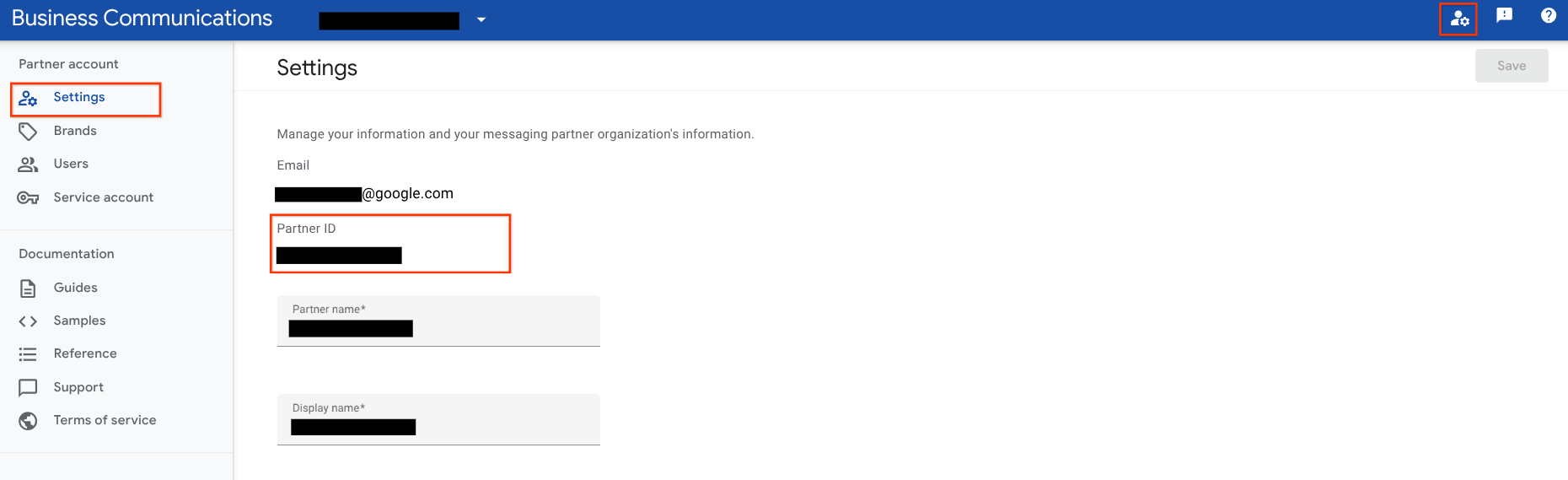
If you have access to the RCS for Business Developer Console and APIs, have your Partner ID ready. You can find it in the Developer Console under Partner account settings. See screenshot for help.
Refer to the following issue categories to identify the mandatory and optional, but recommended information required for your request.
Account management and console access
Includes issues with console access or updates to developer account info.
| Scenario | Mandatory | Recommended |
|---|---|---|
| Account update | Specific fields to change (such as owner email address, display name) and a justification. | Carrier approvals (if your account has agents live on carrier-managed networks). |
| Console access | N/A | Screenshots or video recording of the issue faced when trying to access the console. |
Agent management
Includes the full agent lifecycle: creation, updates, testing, and launch requests. Also includes detail viewing, migrations, suspensions, and spam warnings.
| Scenario | Mandatory | Recommended |
|---|---|---|
| Agent creation, testing, update, and launch (includes inquiry regarding agent launch status on Google-managed carriers) | • Agent ID. • ISO 8601 formatted timestamps (for example, 2026-01-09T21:07:47Z) of when the issue occurred. |
• Console: Screenshots or video recording of the issue. • API errors: Code snippets and error logs. • Testing issues: Phone number, carrier, and country, message ID with timestamps, a bug report from the device. |
| Viewing agent details | ISO 8601 formatted timestamps (for example, 2026-01-09T21:07:47Z) of when the issue occurred. | • Console: Screenshots or video recording of the issue. • API errors: Code snippets and error logs. |
| Post-launch agent updates and migration | • Agent ID. • Details to be updated, justification, and unlaunch confirmation (or carrier approvals). |
• For carrier-managed networks: Carrier approval. • Migration: Brand or brand partner approval. |
| Spam warnings and agent suspensions | Agent ID. | N/A |
Messaging operations and reporting
Includes capability checks, sending and receiving messages, revoking messages (TTL), greetings, uploading files, campaign measurements, or billing discrepancies.
| Mandatory | Recommended |
|---|---|
| • Agent ID. • ISO 8601 formatted timestamps (or the time period for reporting issues). |
• Code: The code used to execute the task and the error log. • Capability checks: Phone numbers with country codes. • Latency: Regression details, timestamp, and latency distribution (p50, p95, p99). • Sending messages: Sample IDs with the timestamp. • TTL revoke: JSON message payload, sample ID with timestamp, and bug report. • Webhook issues: Webhook URL, JSON payload, and % of impacted traffic, sample ID with timestamp, bug report. • P2A entrypoint creation: JavaScript error from the Developer Console. • Campaign analytics/Billing discrepancies: Any supporting file or screenshot to explain the issue. |
User experience and rendering
Agents
Includes how agents and their details are displayed to users.
| Mandatory | Recommended |
|---|---|
| • Messaging app and version. • Agent ID and the specific fields or elements where the issue is observed. • Device name and OS version. |
• A bug report from the device. • Screenshots or video of the rendering issue. • Message IDs with timestamps and JSON message payloads. • P2A: A phone number with the country code. |
Message rendering
| Mandatory | Recommended |
|---|---|
| • Messaging app and version. • Device name and OS version. |
• A bug report from the device. • Screenshots or video of the rendering issue. • Message IDs with timestamps. • JSON message payloads. • P2A: A phone number with the country code. |
Requests for Early Access Programs (EAP)
| Mandatory | Recommended |
|---|---|
| • The specific program you need access to. • The corporate email addresses that require access. |
N/A |
For registered carriers
Carriers should ideally use their dedicated Issue Tracker component. If you are using this form, have your Google partner domain account ID ready.
For issues shared with developers (such as User Experience or EAP requests), refer to the preparation steps in the section for registered developers and aggregators.
Carrier tools (Admin Console and RBM Operations API)
Includes access issues, API errors, or actions like launching, suspending, or terminating agents.
| Mandatory | Recommended |
|---|---|
| For agent management: Agent ID(s) impacted and timestamps of observed issues. | Screenshots of errors in the RBM Administration Console. |
Analytics and billing
| Mandatory | Recommended |
|---|---|
| Time period of observed issue ISO 8601 formatted. | Supporting files or screenshots to explain the issue. |
For brands
Recommendation: Contact the partner (Aggregator or Developer) who created your agent first. They can often resolve issues directly.
If you still need to contact Google, have the following ready:
- Service provider name: The company managing your agent.
- Verification: Brand-specific authorization letters or proof of relationship (especially for ownership changes).
For others
Use this path for general inquiries or if you are not yet a registered partner.