
कुछ इकाई टाइप के लिए, आपको अपने फ़ीड में मौजूद कॉन्टेंट के बीच संबंध तय करना होगा. इस जानकारी की मदद से, Google आपके कॉन्टेंट को उपयोगकर्ताओं को सही क्रम और स्ट्रक्चर में दिखा पाता है. साथ ही, जब उपयोगकर्ता की क्वेरी साफ़ तौर पर नहीं बताई गई हो, तब सही कॉन्टेंट की पहचान कर पाता है.
चुनें कि आपका कॉन्टेंट किस तरह का है:
टीवी शो
If you're a TV show provider, you need to add the TVEpisode, TVSeason, and TVSeries entity types in your media catalog feed. You can find the definitions for these entities in the Understand the available entity types section by filtering for these types.
Identify the relationships
Ensure the following relationships are established among them:
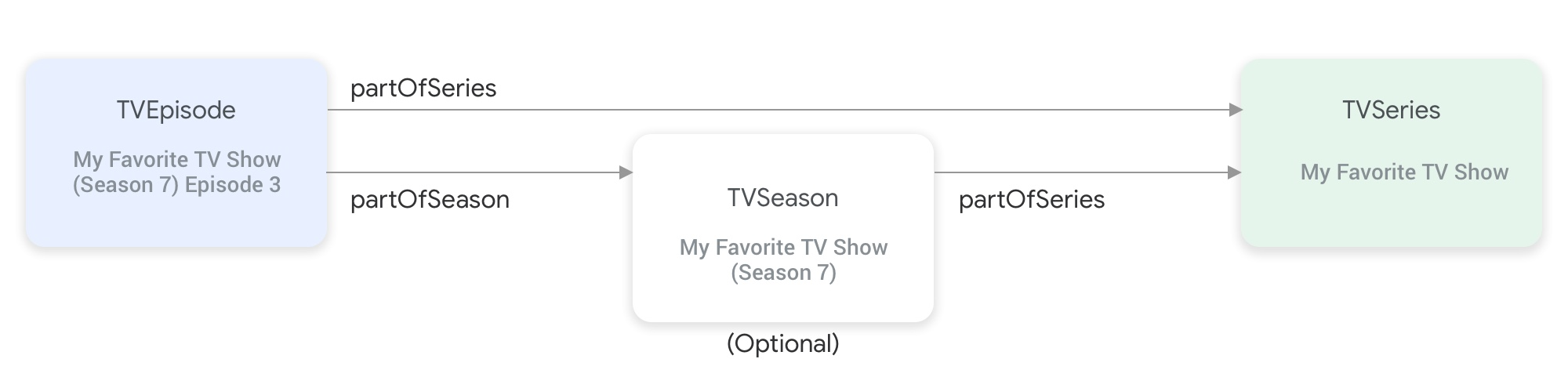
partOfSeries and partOfSeason properties connect the TV show entity types together.A
TVEpisodeentity requires you to provide thepartOfSeriesproperty, which specifies the@idandnameof the episode'sTVSeriesentity."partOfSeries": { "@type": "TVSeries", "@id": "http://www.example.com/my_favorite_tv_show", "name": "My Favorite TV Show", },If your feed contains TV seasons, a
TVSeasonentity also requires you to specify itsTVSeriesentity in thepartOfSeriesproperty.A
TVEpisodeentity requires you to provide thepartOfSeasonproperty, which specifies the@idandseasonNumberof the episode'sTVSeasonentity."partOfSeason": { "@type": "TVSeason", "@id": "http://www.example.com/my_favorite_tv_show/s7", "seasonNumber": 7 },If a
TVEpisodeentity doesn't have a correspondingTVSeasonentity in the feed, take the following steps to provide thepartOfSeason.@idandpartOfSeason.seasonNumberproperties for theTVEpisodeentity:- Take its
partofSeries.@idand attach a placeholder query field (for example, ?season1) to create a uniquepartOfSeason.@id(for example, http://www.example.com/my_favorite_tv_show?season1). - Set
partOfSeason.seasonNumberto 1.
partOfSeason.@idfor the correspondingTVSeasonentity or replace this placeholderpartOfSeason.@idwith the actual@idof theTVSeasonentity.- Take its
Example
TVSeries
My Favorite TV Show
{
"@context": ["http://schema.org", {"@language": "en"}],
"@type": "TVSeries",
"@id": "http://www.example.com/my_favorite_tv_show",
"url": "http://www.example.com/my_favorite_tv_show",
"name": "My Favorite TV Show",
"potentialAction":{ … },
...
}
TVSeason
My Favorite TV Show (season 7)
{
"@context": ["http://schema.org", {"@language": "en"}],
"@type": "TVSeason",
"@id": "http://www.example.com/my_favorite_tv_show/s7",
"url": "http://www.example.com/my_favorite_tv_show/s7",
"name": "My Favorite TV Show, Season 7",
"seasonNumber": 7,
"partOfSeries": {
  "@type": "TVSeries",
  "@id": "http://www.example.com/my_favorite_tv_show",
  "name": "My Favorite TV Show",
},
"potentialAction":{ … },
...
}
TVEpisode
Episode 3 of My Favorite TV Show (season 7)
{
"@context": ["http://schema.org", {"@language": "en"}],
"@type": "TVEpisode",
"@id": "http://www.example.com/my_favorite_tv_show/s7/e3",
"url": "http://www.example.com/my_favorite_tv_show/s7/e3",
"name": "John Doe returns at night",
"episodeNumber": 3,
"partOfSeason": {
  "@type": "TVSeason",
  "@id": "http://www.example.com/my_favorite_tv_show/s7",
  "seasonNumber": 7
},
"partOfSeries": {
"@type": "TVSeries",
"@id": "http://www.example.com/my_favorite_tv_show",
"name": "My Favorite TV Show",
},
"potentialAction":{ … },
...
}
लाइव टीवी
अगर आप लाइव टीवी की सेवा देने वाली कंपनी हैं, तो आपको अपने मीडिया कैटलॉग फ़ीड में Organization, BroadcastService, CableOrSatelliteService, और TelevisionChannel इकाई के टाइप जोड़ने होंगे. इससे आपके चैनल लाइनअप की जानकारी दिखेगी. आपको EPG (इलेक्ट्रॉनिक प्रोग्रामिंग गाइड) से जुड़ी जानकारी दिखाने के लिए, BroadcastEvent, TVSeries, TVEpisode, Movie, और SportsEvent इकाइयां भी देनी पड़ सकती हैं. इन इकाइयों की परिभाषाएं, उपलब्ध इकाई के टाइप के बारे में जानें सेक्शन में मिल सकती हैं. इसके लिए, इन टाइप के हिसाब से फ़िल्टर करें. ज़्यादा जानकारी के लिए, लाइव टीवी चैनल पेज पर जाएं.
लाइव टीवी चैनलों की जानकारी देने वाली इकाइयों के बीच संबंध
नीचे दी गई इमेज में दिखाया गया है कि Organization, BroadcastService, CableOrSatelliteService, और TelevisionChannel इकाइयां आपस में कैसे जुड़ी हैं:
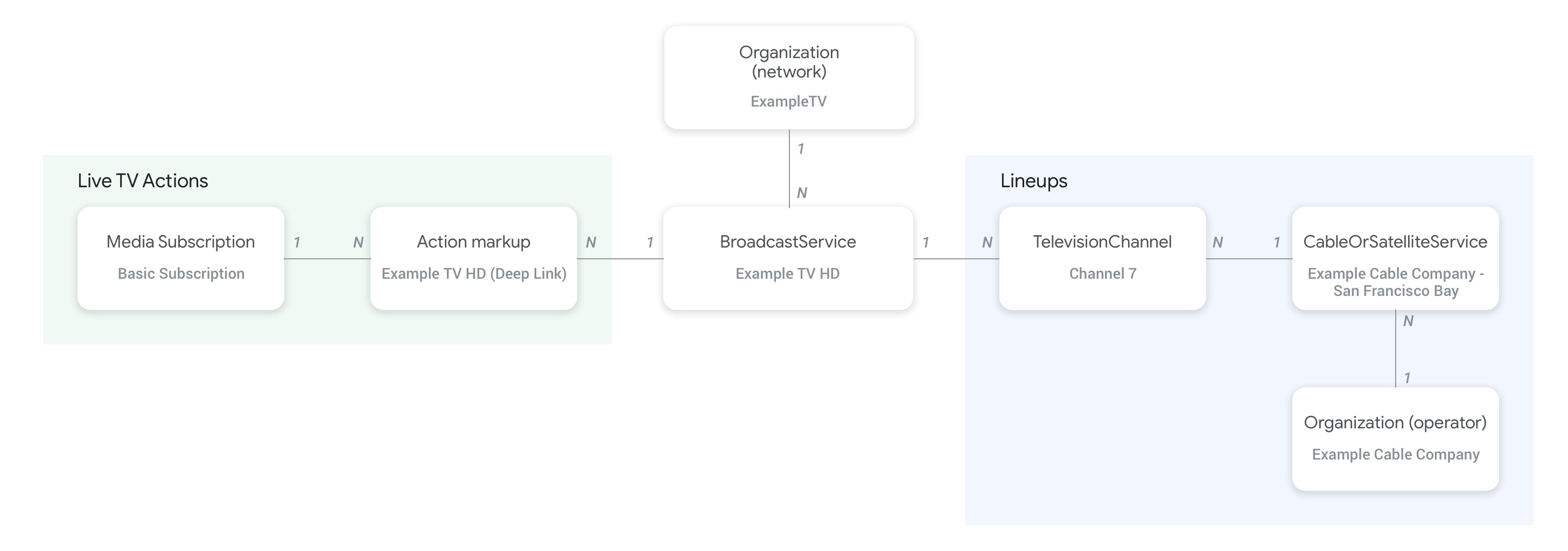
- फ़ीड उपलब्ध कराने वाली कंपनी और
CableOrSatelliteServiceसेवा के पैरंट संगठन की जानकारी देने वालीOrganization(ऑपरेटर) इकाई,CableOrSatelliteServiceइकाई पर मौजूदproviderप्रॉपर्टी का इस्तेमाल करके कनेक्ट होती है. BroadcastServiceइकाइयों से जुड़ीOrganizationइकाइयां,BroadcastServiceइकाई पर मौजूदbroadcastAffiliateOfप्रॉपर्टी का इस्तेमाल करके कनेक्ट होती हैं.TelevisionChannelइकाइयां,CableOrSatelliteServiceइकाई से कनेक्ट होती हैं. यह इकाई, उन चैनलों के लाइनअप की जानकारी देती है जिनसे ये इकाइयां जुड़ी होती हैं. इसके लिए,inBroadcastLineupप्रॉपर्टी का इस्तेमाल किया जाता है.TelevisionChannelइकाइयां,BroadcastServiceइकाई से कनेक्ट होती हैं. यह इकाई, उन चैनलों के प्रोग्रामिंग की जानकारी देती है जिनसे ये इकाइयां जुड़ी होती हैं. इसके लिए,providesBroadcastServiceप्रॉपर्टी का इस्तेमाल किया जाता है.
हमारा सुझाव है कि आप लाइव टीवी चैनलों के कॉन्सेप्ट वाले पेज पर जाएं. इससे आपको यह समझने में मदद मिलेगी कि BroadcastService और Organization इकाइयों के बीच संबंध कैसे बनाया जाता है. इस पेज पर, इसके ठोस उदाहरण दिए गए हैं.
चैनलों और उनकी प्रोग्रामिंग गाइड (EPG) के बीच संबंध
नीचे दी गई इमेज में दिखाया गया है कि BroadcastEvent इकाई, फ़ीड में मौजूद बाकी इकाइयों से कैसे लिंक होती है.
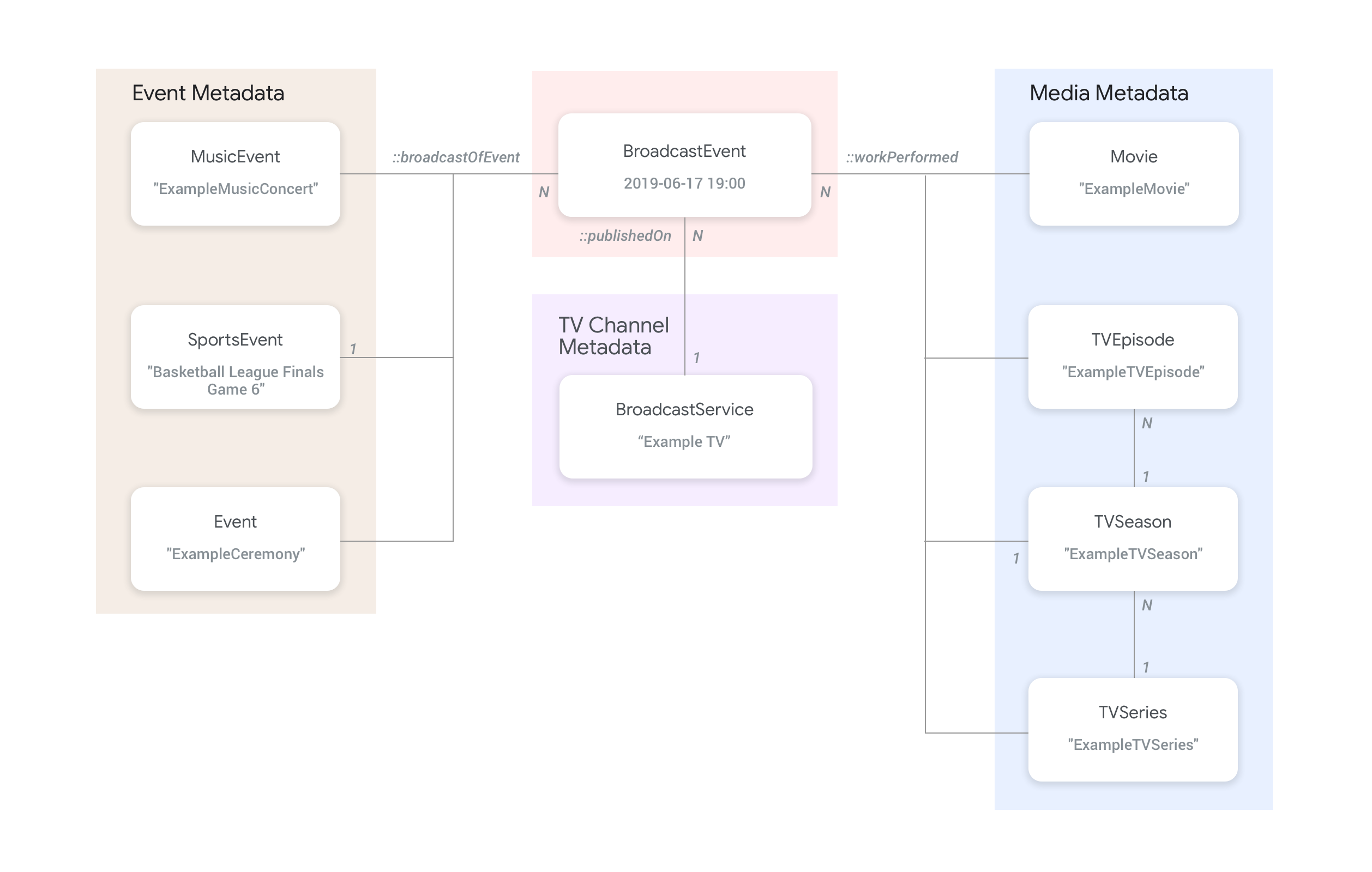
BroadcastServiceकी प्रोग्रामिंग गाइड (EPG) की जानकारी देने वालीBroadcastEventइकाइयां,BroadcastServiceइकाइयों से कनेक्ट होती हैं. इसके लिए,BroadcastEventइकाई पर मौजूदpublishedOnप्रॉपर्टी का इस्तेमाल किया जाता है.BroadcastEventइकाइयों को, टॉप लेवल कीTVEpisode,TVSeries,Movieइकाइयों से भी कनेक्ट किया जा सकता है. इसके लिए,workPerformedप्रॉपर्टी का इस्तेमाल करें.BroadcastEventइकाइयों को, टॉप लेवल कीSportsEventइकाइयों से भी कनेक्ट किया जा सकता है. इसके लिए,broadcastOfEventप्रॉपर्टी का इस्तेमाल करें.- ऑनलाइन स्ट्रीम किए जाने वाले ऐसे इवेंट जिनके लिए कोई चैनल नहीं है, उनकी
BroadcastEventइकाइयां, लाइव इवेंट की जानकारी देने वाली इकाई से कनेक्ट होती हैं. इसके लिए,workPerformedयाbroadcastOfEventप्रॉपर्टी का इस्तेमाल किया जाता है. यह इस बात पर निर्भर करता है कि लाइव स्ट्रीम क्या किया जा रहा है. ऐसे मामलों में,publishedOnप्रॉपर्टी की ज़रूरत नहीं होती, क्योंकि चैनल से कनेक्ट करने की ज़रूरत नहीं होती.
उदाहरण
इस सेक्शन में, 'देखें' ऐक्शन के अलग-अलग इस्तेमाल के उदाहरण और स्निपेट दिए गए हैं.
इंटरनेट पर राष्ट्रीय टीवी सेवा देने वाली कंपनी
संगठन
इंटरनेट प्रोटोकॉल टेलीविज़न सेवा देने वाली एक काल्पनिक कंपनी, ExampleTV Digital Service (Organization), इंटरनेट पर लाइव टीवी की सेवा देती है. इसमें ये दो चैनल शामिल हैं: ExampleTV-Movie (Organization) और ExampleTV-Comedy (Organization):
{
  "@context": ["http://schema.org", {"@language": "en"}],
  "@type":"Organization",
  "@id":"http://example.com/exampletv/digital",
  "name":"ExampleTV Digital Service",
  "sameAs": "https://en.wikipedia.org/wiki/exampletv_digital_service"
},
{
  "@context": ["http://schema.org", {"@language": "en"}],
  "@type":"Organization",
  "@id":"http://example.com/exampletv/movie",
  "name":"ExampleTV Movie",
  "sameAs": "https://en.wikipedia.org/wiki/exampletv_movie"
},
{
  "@context": ["http://schema.org", {"@language": "en"}],
  "@type":"Organization",
  "@id":"http://example.com/exampletv/comedy",
  "name":"ExampleTV Comedy",
  "sameAs": "https://en.wikipedia.org/wiki/exampletv_comedy"
}
BroadcastService
ये दो BroadcastService इकाइयां, काल्पनिक चैनल ExampleTV-Movie और ExampleTV-Comedy के डीप लिंक और ऐक्सेस की ज़रूरी शर्तों के बारे में जानकारी देती हैं:
{
  "@context": ["http://schema.org", {"@language": "en"}],
  "@type":"BroadcastService",
  "@id":"https://www.example.com/exampletv/broadcast/movie",
  "name": "ExampleTV-Movie",
  "alternateName": [
    "Example Television Movie",
    "Example TV Movie"
  ],
  "description": "A fictional Internet Protocol TV movie channel.",
  "broadcastDisplayName":"ExampleTV-Movie",
  "broadcastAffiliateOf":{
    "@type":"Organization",
    "@id":"http://www.example.com/exampletv/movie"
  },
  "potentialAction": {
    "@type": "WatchAction",
    "target": {
      "@type": "EntryPoint",
      "urlTemplate": "http://www.example.com/exampletv/broadcast/movie?autoplay=true",
      "inLanguage": "en",
      "actionPlatform": [
        "http://schema.org/DesktopWebPlatform",
        "http://schema.org/MobileWebPlatform",
        "http://schema.org/AndroidPlatform",
        "http://schema.org/AndroidTVPlatform",
        "http://schema.org/IOSPlatform",
        "http://schema.googleapis.com/GoogleVideoCast"
      ]
    },
    "actionAccessibilityRequirement": {
      "@type": "ActionAccessSpecification",
      "category": "subscription",
      "requiresSubscription": {
        "@type": "MediaSubscription",
        "@id": "http://www.example.com/exampletv/basic_subscription",
        "name": "Basic subscription",
        "identifier": "example.com:basic",
        "commonTier": true
      },
      "eligibleRegion": [
        {
          "@type": "Country",
          "name": "US"
        }
      ]
    }
  },
  "identifier": [
    {
      "@type": "PropertyValue",
      "propertyID": "TMS_ID",
      "value": "12345"
    },
    {
      "@type": "PropertyValue",
      "propertyID": "_PARTNER_ID_",
      "value": "exampletv-movie-33345"
    }
  ]
},
{
  "@context": ["http://schema.org", {"@language": "en"}],
  "@type":"BroadcastService",
  "@id":"https://www.example.com/exampletv/broadcast/comedy",
  "name": "ExampleTV-Comedy",
  "alternateName": [
    "Example Television Comedy",
    "Example TV Comedy"
  ],
  "description": "A fictional Internet Protocol TV comedy channel.",
  "broadcastDisplayName":"ExampleTV-Comedy",
  "broadcastAffiliateOf":{
    "@type":"Organization",
    "@id":"http://www.example.com/exampletv/comedy"
  },
  "potentialAction": {
    "@type": "WatchAction",
    "target": {
      "@type": "EntryPoint",
      "urlTemplate": "http://www.example.com/exampletv/broadcast/comedy?autoplay=true",
      "inLanguage": "en",
      "actionPlatform": [
        "http://schema.org/DesktopWebPlatform",
        "http://schema.org/MobileWebPlatform",
        "http://schema.org/AndroidPlatform",
        "http://schema.org/AndroidTVPlatform",
        "http://schema.org/IOSPlatform",
        "http://schema.googleapis.com/GoogleVideoCast"
      ]
    },
    "actionAccessibilityRequirement": {
      "@type": "ActionAccessSpecification",
      "category": "subscription",
      "requiresSubscription": {
        "@type": "MediaSubscription",
        "@id": "http://www.example.com/exampletv/basic_subscription",
        "name": "Basic subscription",
        "identifier": "example.com:basic",
        "commonTier": true
      },
      "eligibleRegion": [
        {
          "@type": "Country",
          "name": "US"
        }
      ]
    }
  },
  "identifier": [
    {
      "@type": "PropertyValue",
      "propertyID": "TMS_ID",
      "value": "15555"
    },
    {
      "@type": "PropertyValue",
      "propertyID": "_PARTNER_ID_",
      "value": "exampletv-comedy-12323"
    }
  ]
}
CableOrSatelliteService
CableOrSatelliteService इकाई, सेवा देने वाली कंपनी ExampleTV Digital Service के बारे में जानकारी देती है. इसकी सेवाएं पूरे देश में उपलब्ध हैं:
{
  "@context": ["http://schema.org", {"@language": "en"}],
  "@type":"CableOrSatelliteService",
  "@id":"http://example.com/example_iptv/us",
  "name":"Example TV Digital Service - US",
  "provider": {
    "@type": "Organization",
    "@id": "http://example.com/exampletv/digital",
  },
  "areaServed":[
    {
      "@type":"Country",
      "name": "US",
    }
  ]
}
TelevisionChannel
इन TelevisionChannel इकाइयों से पता चलता है कि ExampleTV Digital Service IPTV पर, चैनल ExTV-Movie पर ExampleTV Movie प्रोग्रामिंग और चैनल ExTV-Comedy पर ExampleTV Comedy प्रोग्रामिंग उपलब्ध है:
{
  "@context": ["http://schema.org", {"@language": "en"}],
  "@type":"TelevisionChannel",
  "@id":"http://example.com/exampletv/extv-movie",
  "broadcastChannelId":"ExTV-Movie",
  "broadcastServiceTier":"Basic",
  "inBroadcastLineup":{
    "@type":"CableOrSatelliteService",
    "@id":"http://example.com/example_iptv/us"
  },
  "providesBroadcastService":{
    "@type":"BroadcastService",
    "@id":"https://www.example.com/exampletv/broadcast/movie"
  }
},
{
  "@context": ["http://schema.org", {"@language": "en"}],
  "@type":"TelevisionChannel",
  "@id":"http://example.com/exampletv/extv-comedy",
  "broadcastChannelId":"ExTV-Comedy",
  "broadcastServiceTier":"Basic",
  "inBroadcastLineup":{
    "@type":"CableOrSatelliteService",
    "@id":"http://example.com/example_iptv/us"
  },
  "providesBroadcastService":{
    "@type":"BroadcastService",
    "@id":"https://www.example.com/exampletv/broadcast/comedy"
  }
}
ज़्यादा उदाहरणों के लिए, लाइव टीवी के उदाहरण सेक्शन देखें.
टीवी चैनल पर किसी फ़िल्म का ब्रॉडकास्ट
12 जुलाई, 2019 को शाम 5 बजे से 7 बजे के बीच, Example TV (BroadcastService) टेलीविज़न नेटवर्क पर एक फ़िल्म ब्रॉडकास्ट की गई.
BroadcastEvent
{
  "@context": ["http://schema.org", {"@language": "en"}],
  "@type": "BroadcastEvent",
  "@id": "http://example.com/live/movie/new_release",
  "name": "My Favorite Movie",
  "description": "John Doe spent years perfecting his survival skills in a tropical jungle.",
  "startDate": "2019-07-12T17:00-08:00",
  "endDate": "2019-07-12T19:00-08:00",
  "videoFormat": "HD",
  "isLiveBroadcast": "False",
  "publishedOn": {
    "@type": "BroadcastService",
    "@id": "http://example.com/stations/example_tv"
  },
  "workPerformed": {
    "@type": "Movie",
    "@id": "http://www.example.com/my_favorite_movie"
  }
}
BroadcastService
{
  "@context": ["http://schema.org", {"@language": "en"}],
  "@type":"BroadcastService",
  "@id":"http://example.com/stations/example_tv",
  "name":"EXAMPLE-TV",
  "broadcastDisplayName":"ABCD",
  "callSign": "EXA-TV",
  "videoFormat":"SD",
  "broadcastTimezone":"America/Los_Angeles",
  "broadcastAffiliateOf":{
    "@type":"Organization",
    "@id":"http://example.com/networks/abcd-network",
  }
  "identifier": [
   {
     "@type": "PropertyValue",
     "propertyID": "TMS_ID",
     "value": "12258"
   },
   {
     "@type": "PropertyValue",
     "propertyID": "_PARTNER_ID_",
     "value": "exampletv-123456"
   }
  ],
  "potentialAction": {
    "@type": "WatchAction",
    "target": {
      "@type": "EntryPoint",
      "urlTemplate": "http://example.com/livestream",
      "actionPlatform": [
        "http://schema.org/DesktopWebPlatform",
        "http://schema.org/MobileWebPlatform",
        "http://schema.org/AndroidPlatform",
        "http://schema.org/IOSPlatform",
        "http://schema.googleapis.com/GoogleVideoCast",
        "http://schema.org/AndroidTVPlatform"
      ]
    },
    "actionAccessibilityRequirement": {
      "@type": "ActionAccessSpecification",
      "category": "externalsubscription",
      "availabilityStarts": "2018-07-21T10:35:29Z",
      "availabilityEnds": "2019-10-21T10:35:29Z",
      "requiresSubscription": {
        "@type": "MediaSubscription",
        "@id": "http://example.com/subscription",
        "name": "ABCD",
        "sameAs": "http://example.com/subscription",
        "authenticator": {
          "@type": "Organization",
          "name": "TVE"
        }
      },
      "eligibleRegion": [
        {
          "@type": "Country",
          "name": "US"
        }
      ]
    }
  }
}
मूवी
{
  "@context": ["http://schema.org", {"@language": "en"}],
  "@type": "Movie",
  "@id": "http://www.example.com/my_favorite_movie",
  "url": "http://www.example.com/my_favorite_movie",
  "name": "My Favorite Movie",
  "sameAs": "https://en.wikipedia.org/wiki/my_favorite_movie",
  "releasedEvent": {
    "@type": "PublicationEvent",
    "startDate": "2008-01-20",
    "location": {
      "@type": "Country",
      "name": "US"
    }
  },
  "description": "John Doe spent years perfecting his survival skills in a tropical jungle.",
  "actor": [
    {
      "@type": "Person",
      "name": "John Doe",
      "sameAs": "https://en.wikipedia.org/wiki/John_Doe"
    },
    {
      "@type": "Person",
      "name": "Jane Doe",
      "sameAs": "https://en.wikipedia.org/wiki/Jane_Doe"
    }
  ],
  "identifier": [
    {
      "@type": "PropertyValue",
      "propertyID": "IMDB_ID",
      "value":  "tt0123456"
    }
  ]
}
ज़्यादा उदाहरणों के लिए, लाइव टीवी इवेंट के उदाहरण सेक्शन देखें.
ऑनलाइन स्ट्रीम किया गया लाइव स्पोर्ट्स गेम
ब्रॉडकास्ट इवेंट
{
  "@context": ["http://schema.org", {"@language": "en"}],
  "@type": "BroadcastEvent",
  "@id": "http://example.com/live_eevent/basketball/professional/final_game_6",
  "name": "2019 Professional Basketball Finals, Game 6: Team A at Team B",
  "description": "Game 6 of the 2019 Professional Basketball Finals. Team A leads the series 3-2 against Team B.",
  "startDate": "2018-09-16T10:00-08:00",
  "endDate": "2018-09-16T13:00-08:00",
  "videoFormat": "HD",
  "isLiveBroadcast": "False",
  "potentialAction": {
    "@type": "WatchAction",
    "target": {
      "@type": "EntryPoint",
      "urlTemplate": "http://www.example.com/pbl_semis_game?autoplay=true",
      "inLanguage": "en",
      "actionPlatform": [
        "http://schema.org/DesktopWebPlatform",
        "http://schema.org/MobileWebPlatform",
        "http://schema.org/AndroidPlatform",
        "http://schema.org/AndroidTVPlatform",
        "http://schema.org/IOSPlatform",
        "http://schema.googleapis.com/GoogleVideoCast"
      ]
    },
    "actionAccessibilityRequirement": {
      "@type": "ActionAccessSpecification",
      "category": "subscription",
      "availabilityStarts": "2018-09-16T10:00-08:00",
      "availabilityEnds": "2018-09-16T10:00-08:00",
      "requiresSubscription": {
        "@type": "MediaSubscription",
        "name": "Example Package",
        "commonTier": true,
        "@id": "http://www.example.com/example_package"
      },
      "eligibleRegion": [
        {
          "@type": "Country",
          "name": "US"
        }
      ]
    }
  },
  "broadcastOfEvent": {
    "@type": "SportsEvent",
    "@id": "http://example.com/basketball/professional/final_game_6"
  }
}
स्पोर्ट्स इवेंट
{
  "@context": ["http://schema.org", {"@language": "en"}],
  "@type":"SportsEvent",
  "@id": "http://example.com/basketball/professional/final_game_6",
  "name":"2019 Professional Basketball Finals, Game 6: Team A vs Team B",
  "sport":"https://en.wikipedia.org/wiki/Basketball",
  "description": {
      "@language": "en",
      "@value": "Game 6 of the 2019 Professional Basketball Finals. Team A leads the series 3-2 against Team B."
    },
  "startDate": "2019-09-16T10:00-08:00",
  "endDate": "2019-09-16T13:00-08:00",
  "homeTeam":{
    "@type":"SportsTeam",
    "name":"Team B",
    "sport":"https://en.wikipedia.org/wiki/Basketball",
    "parentOrganization":{
      "@type":"SportsOrganization",
      "name":"Professional Basketball League",
      "sameAs":"http://www.example.com/professional_basketball_league"
    },
    "athlete":[
      {
        "@type":"Person",
        "name":"John doe"
      }
    ]
  },
  "awayTeam":{
    "@type":"SportsTeam",
    "name":"Team A",
    "sport":"https://en.wikipedia.org/wiki/Basketball",
    "athlete":[
      {
        "@type":"Person",
        "name":"Jane Doe"
      }
    ]
  },
  "location":{
    "@type":"Place",
    "name":"Example Stadium",
    "address":{
      "@type":"PostalAddress",
      "streetAddress":"1600 Amphitheatre Pkwy",
      "addressLocality":"Mountain View",
      "addressRegion":"CA",
      "postalCode":"94043",
      "addressCountry":"US"
    }
  },
  "identifier": [
    {
      "@type": "PropertyValue",
      "propertyID": "TMS_ID",
      "value":  "TMS ID of this game"
    }
  ]
}
ज़्यादा उदाहरणों के लिए, स्पोर्ट्स के उदाहरण सेक्शन देखें.