
مقدمه
zero-touch enrollment API به فروشندگان دستگاه کمک میکند تا یکپارچهسازی خود را خودکار کنند. ابزارهای فروش سازمانتان میتوانند ثبتنام تمام خودکار را در خود جای دهند—و کاربران و مشتریانتان را بهرهورتر کنند. از میانای برنامهسازی کاربردی برای کمک به کاربران خود استفاده کنید:
- دستگاههای خریداریشده را به حساب ثبتنام تمامخودکار مشتری اختصاص دهید.
- حساب ثبتنام تمامخودکار مشتریتان را ایجاد کنید.
- تلفن سازمان و فراداده سفارش را به دستگاهها پیوست کنید.
- گزارشهایی درباره دستگاههای اختصاصدادهشده به مشتریانتان ایجاد کنید.
این سند API را معرفی میکند و الگوها را توضیح میدهد. اگر میخواهید خودتان API را کاوش کنید، شروع سریع را برای Java، NET.، یا Python امتحان کنید.
مفاهیم میانای برنامهسازی کاربردی
مشتریان و دستگاهها منابع اصلیای هستند که در API استفاده میکنید. برای ایجاد
مشتری، با create تماس بگیرید. میتوانید بااستفاده از روشهای API ادعا، دستگاه ایجاد کنید (به زیر مراجعه کنید). سازمانتان همچنین میتواند
بااستفاده از درگاه ثبتنام تمامخودکار، مشتری و دستگاه ایجاد کند.
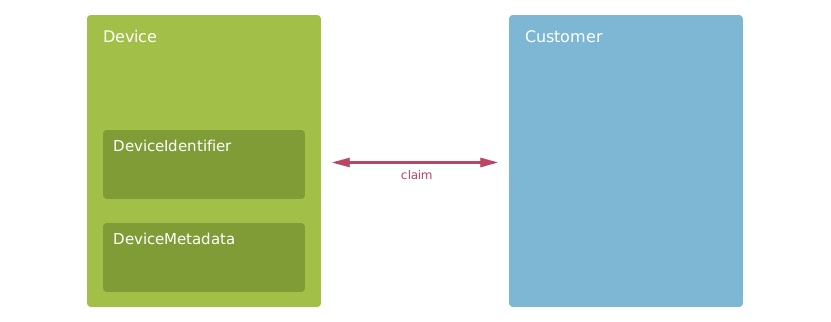
- مشتری
- شرکتهایی که سازمان شما به آنها دستگاه میفروشد. مشتریان
nameوIDدارند. وقتی میخواهید دستگاههای مشتری را مطالبه یا پیدا کنید، از مشتری استفاده کنید. برای کسب اطلاعات بیشتر،Customerرا ببینید. - دستگاه
- دستگاه Android یا ChromeOS با قابلیت ثبتنام تمام خودکار که سازمان شما به مشتری میفروشد. دستگاهها دارای شناسه سختافزار، فراداده، و ادعای مشتری هستند. دستگاهها در مرکز API قرار دارند، بنابراین تقریباً در همه روشها از آنها استفاده میکنید. برای کسب اطلاعات بیشتر،
Deviceرا ببینید. - DeviceIdentifier
- شناسههای سختافزاری، مانند IMEI یا MEID، را برای شناسایی دستگاه ساختهشده کپسولهسازی میکند. از
DeviceIdentifierبرای هدفیابی دستگاهی که میخواهید پیدا کنید، بهروز کنید، یا ادعای مالکیت کنید استفاده کنید. برای کسب اطلاعات بیشتر، شناسهها را بخوانید. - DeviceMetadata
- جفتهای کلید-مقدار فراداده را برای دستگاه ذخیره میکند. از
DeviceMetadataبرای ذخیره فراداده سازمانتان استفاده کنید. برای کسب اطلاعات بیشتر، فراداده دستگاه را بخوانید.
برای فهرست کردن همه روشها و منابع میانای برنامهسازی کاربردی که برنامهتان میتواند استفاده کند، مرجع میانای برنامهسازی کاربردی را ببینید.
ایجاد مشتریان
برای دستگاههای Android، فروشنده مجدد مسئول ایجاد حساب مشتری ازطرف مشتری خود است. مشتری از این حساب برای دسترسی به درگاه تمامخودکار استفاده خواهد کرد تا تنظیمات آمادهسازی را برای دستگاههایش پیکربندی کند. این کار برای دستگاههای ChromeOS که ازقبل حساب Google Workspace دارند و از آن برای پیکربندی تنظیمات تدارک استفاده میکنند لازم نیست.
میتوانید روش میانای برنامهسازی کاربردی create را برای ایجاد حسابهای مشتری برای ثبتنام تمام خودکار فراخوانی کنید. چون مشتریانتان نام شرکت را در پرتال ثبتنام تمام خودکار خود میبینند، کاربر برنامهتان باید تأیید کند که نام شرکت درست است. پساز ایجاد مشتری، نمیتوانید نام او را ویرایش کنید.
باید حداقل یک نشانی ایمیل شرکتی مرتبط با «حساب Google» را بهعنوان مالک اضافه کنید. نمیتوانید از حسابهای Gmail شخصی با API استفاده کنید. اگر مشتری برای مرتبط کردن حساب به کمک نیاز دارد، دستورالعملهای مرتبط کردن «حساب Google» را برایش ارسال کنید.
پساز اینکه با فراخوانی میانای برنامهسازی کاربردی مشتری ایجاد کردید، آنها دسترسی کارمندانشان به پرتال را مدیریت میکنند — نمیتوانید کاربران مشتریانتان را بااستفاده از میانای برنامهسازی کاربردی ویرایش کنید. قطعه کد زیر نشان میدهد که چگونه میتوانید یک مشتری ایجاد کنید:
جاوا
// Provide the customer data as a Company type.
// The API requires a name and owners.
Company customer = new Company();
customer.setCompanyName("XYZ Corp");
customer.setOwnerEmails(Arrays.asList("liz@example.com", "darcy@example.com"));
customer.setAdminEmails(Collections.singletonList("jane@example.com"));

// Use our reseller ID for the parent resource name.
String parentResource = String.format("partners/%d", PARTNER_ID);

// Call the API to create the customer using the values in the company object.
CreateCustomerRequest body = new CreateCustomerRequest();
body.setCustomer(customer);
Company response = service.partners().customers().create(parentResource, body).execute();
دات نت
// Provide the customer data as a Company type.
// The API requires a name and owners.
var customer = new Company
{
    CompanyName = "XYZ Corp",
    OwnerEmails = new String[] { "liz@example.com", "darcy@example.com" },
    AdminEmails = new String[] { "jane@example.com" }
};

// Use our reseller ID for the parent resource name.
var parentResource = String.Format("partners/{0}", PartnerId);

// Call the API to create the customer using the values in the company object.
var body = new CreateCustomerRequest
{
    Customer = customer
};
var request = service.Partners.Customers.Create(body, parentResource);
var response = request.Execute();
Python
# Provide the customer data as a Company type. The API requires
# a name and at least one owner.
company = {'companyName':'XYZ Corp', \
  'ownerEmails':['liz@example.com', 'darcy@example.com'], \
  'adminEmails':['jane@example.com']}

# Use our reseller ID for the parent resource name.
parent_resource = 'partners/{0}'.format(PARTNER_ID)

# Call the API to create the customer using the values in the company object.
response = service.partners().customers().create(parent=parent_resource,
    body={'customer':company}).execute()
برای کسب اطلاعات بیشتر درباره نقشهای مالک و سرپرست برای کارمندان مشتریتان، کاربران درگاه را بخوانید.
مطالبه دستگاهها برای مشتریان
پساز اینکه مشتریانتان دستگاهها را خریداری کردند، میخواهند تنظیمات تدارک را برای این دستگاهها در حسابشان پیکربندی کنند. با ادعای مالکیت دستگاه، دستگاه به ثبتنام تمام خودکار اضافه میشود و مشتری میتواند تنظیمات آمادهسازی را پیکربندی کند.
سوابق آمادهسازی دستگاه بخشی برای ثبتنام تمامخودکار دارد. با ادعای مالکیت بخش ثبتنام تمام خودکار سابقه برای مشتری، دستگاه را واگذار میکنید. روشهای partners.devices.claim یا
partners.devices.claimAsync را با
مشتری بهعنوان آرگومان فراخوانی کنید. همیشه SECTION_TYPE_ZERO_TOUCH را بهعنوان مقدار برای
sectionType ارائه دهید.
قبلاز اینکه بتوانید دستگاه مشتری را برای مشتری دیگری ادعای مالکیت کنید، باید ادعای مالکیت دستگاه مشتری را لغو کنید (به زیر مراجعه کنید). روشهای ادعا
فیلدهای DeviceIdentifier را
اعتبارسنجی میکنند،
ازجمله IMEI یا MEID، یا شماره سریال،
نام سازنده و مدل، و
شناسه دستگاه گواهیشده برای دستگاههای ChromeOS، هنگام ایجاد دستگاه جدید.
تکهکد زیر نحوه ادعای مالکیت دستگاه را نشان میدهد:
جاوا
// Identify the device to claim.
DeviceIdentifier identifier = new DeviceIdentifier();
// The manufacturer value is optional but recommended for cellular devices
identifier.setManufacturer("Google");
identifier.setImei("098765432109875");

// Create the body to connect the customer with the device.
ClaimDeviceRequest body = new ClaimDeviceRequest();
body.setDeviceIdentifier(identifier);
body.setCustomerId(customerId);
body.setSectionType("SECTION_TYPE_ZERO_TOUCH");

// Claim the device.
ClaimDeviceResponse response = service.partners().devices().claim(PARTNER_ID, body).execute();
دات نت
// Identify the device to claim.
var deviceIdentifier = new DeviceIdentifier
{
    // The manufacturer value is optional but recommended for cellular devices
    Manufacturer = "Google",
    Imei = "098765432109875"
};

// Create the body to connect the customer with the device.
ClaimDeviceRequest body = new ClaimDeviceRequest
{
    DeviceIdentifier = deviceIdentifier,
    CustomerId = CustomerId,
    SectionType = "SECTION_TYPE_ZERO_TOUCH"
};

// Claim the device.
var response = service.Partners.Devices.Claim(body, PartnerId).Execute();
Python
# Identify the device to claim.
# The manufacturer value is optional but recommended for cellular devices
device_identifier = {'manufacturer':'Google', 'imei':'098765432109875'}

# Create the body to connect the customer with the device.
request_body = {'deviceIdentifier':device_identifier, \
    'customerId':customer_id, \
    'sectionType':'SECTION_TYPE_ZERO_TOUCH'}

# Claim the device.
response = service.partners().devices().claim(partnerId=PARTNER_ID,
    body=request_body).execute()
درحال لغو ادعای مالکیت دستگاهها
سازمانتان میتواند مالکیت دستگاهی را از مشتری لغو کند. با لغو ادعای مالکیت دستگاه،
آن دستگاه از ثبتنام تمامخودکار برداشته میشود. ممکن است فروشنده دستگاهی را که میخواهد به حساب دیگری منتقل کند، برگرداند، یا بهاشتباه ادعای مالکیت کرده است، لغو ادعای مالکیت کند.
برای لغو ادعای مالکیت دستگاه از مشتری، روش partners.devices.unclaim یا partners.devices.unclaimAsync را فراخوانی کنید.
ارائهدهندگان
میتوانید از فروشندگان برای نمایش شرکای فروشنده در شبکه فروشنده، اپراتورهای محلی در شبکه فروشنده جهانی، یا هر سازمانی که دستگاهها را ازطرف شما میفروشد استفاده کنید. فروشندگان به شما کمک میکنند کاربران، مشتریان، و دستگاههایتان را از هم جدا کنید:
- فروشندگانی که ایجاد میکنید نمیتوانند حساب ثبتنام تمام خودکار شما یا حسابهای یکدیگر را ببینند.
- میتوانید مشتریان و دستگاههای فروشندگان را مشاهده کنید و میتوانید ثبت دستگاههای فروشندگان را لغو کنید. بااینحال، نمیتوانید دستگاهها را به مشتریان فروشندگانتان اختصاص دهید.
از درگاه برای ایجاد فروشندگان برای سازمانتان استفاده کنید — نمیتوانید از API استفاده کنید. برای ایجاد فروشنده جدید، نقش حساب شما باید
مالک باشد. اگر سازمانتان فروشنده دارد،
میتوانید partners.vendors.list را فراخوانی کنید تا
فروشندگانتان را فهرست کنید و partners.vendors.customers.list را فراخوانی کنید
تا مشتریان فروشندهتان را دریافت کنید. مثال زیر از هر دو روش برای چاپ گزارشی استفاده میکند که وضعیت «شرایط خدمات» را برای مشتریان فروشندگان نشان میدهد:
جاوا
// First, get the organization's vendors.
String parentResource = String.format("partners/%d", PARTNER_ID);
ListVendorsResponse results = service.partners().vendors().list(parentResource).execute();
if (results.getVendors() == null) {
  return;
}

// For each vendor, report the company name and a maximum 5 customers.
for (Company vendor: results.getVendors()) {
  System.out.format("\n%s customers\n", vendor.getCompanyName());
  System.out.println("---");
  // Use the vendor's API resource name as the parent resource.
  AndroidProvisioningPartner.Partners.Vendors.Customers.List customerRequest =
      service.partners().vendors().customers().list(vendor.getName());
  customerRequest.setPageSize(5);
  ListVendorCustomersResponse customerResponse = customerRequest.execute();

  List<Company> customers = customerResponse.getCustomers();
  if (customers == null) {
    System.out.println("No customers");
    break;
  } else {
    for (Company customer: customers) {
      System.out.format("%s: %s\n",
          customer.getCompanyName(),
          customer.getTermsStatus());
    }
  }
}
دات نت
// First, get the organization's vendors.
var parentResource = String.Format("partners/{0}", PartnerId);
var results = service.Partners.Vendors.List(parentResource).Execute();
if (results.Vendors == null)
{
    return;
}

// For each vendor, report the company name and a maximum 5 customers.
foreach (Company vendor in results.Vendors)
{
    Console.WriteLine("\n{0} customers", vendor);
    Console.WriteLine("---");
    // Use the vendor's API resource name as the parent resource.
    PartnersResource.VendorsResource.CustomersResource.ListRequest customerRequest =
        service.Partners.Vendors.Customers.List(vendor.Name);
    customerRequest.PageSize = 5;
    var customerResponse = customerRequest.Execute();

    IList<Company> customers = customerResponse.Customers;
    if (customers == null)
    {
        Console.WriteLine("No customers");
        break;
    }
    else
    {
        foreach (Company customer in customers)
        {
            Console.WriteLine("{0}: {1}", customer.Name, customer.TermsStatus);
        }
    }
}
Python
# First, get the organization's vendors.
parent_resource = 'partners/{0}'.format(PARTNER_ID)
vendor_response = service.partners().vendors().list(
    parent=parent_resource).execute()
if 'vendors' not in vendor_response:
  return

# For each vendor, report the company name and a maximum 5 customers.
for vendor in vendor_response['vendors']:
  print '\n{0} customers'.format(vendor['companyName'])
  print '---'
  # Use the vendor's API resource name as the parent resource.
  customer_response = service.partners().vendors().customers().list(
      parent=vendor['name'], pageSize=5).execute()
  if 'customers' not in customer_response:
    print 'No customers'
    break
  for customer in customer_response['customers']:
    print '  {0}: {1}'.format(customer['name'], customer['termsStatus'])
اگر مجموعهای از دستگاهها دارید، ممکن است لازم باشد بدانید کدام فروشنده یا
تأمینکننده ادعای مالکیت دستگاه را کرده است. برای دریافت شناسه عددی فروشنده، مقدار فیلد resellerId را در سابقه ادعای دستگاه بررسی کنید.
سازمانتان میتواند ادعای مالکیت دستگاهی را که فروشنده ادعای مالکیت آن را کرده است لغو کند. برای سایر فراخوانیهای میانای برنامهسازی کاربردی که دستگاهها را اصلاح میکنند، باید بررسی کنید که سازمانتان قبلاز فراخوانی روش میانای برنامهسازی کاربردی، مالکیت دستگاه را ادعا کرده باشد. مثال زیر نشان میدهد که چگونه میتوانید این کار را انجام دهید:
جاوا
// Get the devices claimed for two customers: one of our organization's
// customers and one of our vendor's customers.
FindDevicesByOwnerRequest body = new FindDevicesByOwnerRequest();
body.setSectionType("SECTION_TYPE_ZERO_TOUCH");
body.setCustomerId(Arrays.asList(resellerCustomerId, vendorCustomerId));
body.setLimit(MAX_PAGE_SIZE);
FindDevicesByOwnerResponse response =
    service.partners().devices().findByOwner(PARTNER_ID, body).execute();
if (response.getDevices() == null) {
  return;
}

for (Device device: response.getDevices()) {
  // Confirm the device was claimed by our reseller and not a vendor before
  // updating metadata in another method.
  for (DeviceClaim claim: device.getClaims()) {
    if (claim.getResellerId() == PARTNER_ID) {
      updateDeviceMetadata(device.getDeviceId());
      break;
    }
  }
}
دات نت
// Get the devices claimed for two customers: one of our organization's
// customers and one of our vendor's customers.
FindDevicesByOwnerRequest body = new FindDevicesByOwnerRequest
{
    Limit = MaxPageSize,
    SectionType = "SECTION_TYPE_ZERO_TOUCH",
    CustomerId = new List<long?>
    {
        resellerCustomerId,
        vendorCustomerId
    }
};
var response = service.Partners.Devices.FindByOwner(body, PartnerId).Execute();
if (response.Devices == null)
{
    return;
}

foreach (Device device in response.Devices)
{
    // Confirm the device was claimed by our reseller and not a vendor before
    // updating metadata in another method.
    foreach (DeviceClaim claim in device.Claims)
    {
        if (claim.ResellerId == PartnerId)
        {
            UpdateDeviceMetadata(device.DeviceId);
            break;
        }
    }
}
Python
# Get the devices claimed for two customers: one of our organization's
# customers and one of our vendor's customers.
request_body = {'limit':MAX_PAGE_SIZE, \
  'pageToken':None, \
  'customerId':[reseller_customer_id, vendor_customer_id], \
  'sectionType':'SECTION_TYPE_ZERO_TOUCH'}
response = service.partners().devices().findByOwner(partnerId=PARTNER_ID,
    body=request_body).execute()

for device in response['devices']:
  # Confirm the device was claimed by our reseller and not a vendor before
  # updating metadata in another method.
  for claim in device['claims']:
    if claim['resellerId'] == PARTNER_ID:
      update_device_metadata(device['deviceId'])
      break
عملیات دستهای طولانیمدت
این میانای برنامهسازی کاربردی شامل نسخههای ناهمگام روشهای دستگاه است.
این روشها امکان پردازش دستهای دستگاههای زیادی را فراهم میکنند، درحالیکه روشهای همگام
یک دستگاه را برای هر درخواست API پردازش میکنند. نامهای روش ناهمگام
پسوند Async دارند، برای مثال claimAsync.
روشهای میانای برنامهسازی کاربردی ناهمگام قبلاز تکمیل پردازش، نتیجه را برمیگردانند. روشهای ناهمگام همچنین به برنامه (یا ابزار) شما کمک میکنند تا زمانی که کاربران منتظر تکمیل عملیات طولانیمدت هستند، پاسخگو باقی بماند. برنامه شما باید وضعیت عملیات را بهطور دورهای بررسی کند.
عملیات
از Operation برای ردگیری عملیات دستهای طولانیمدت استفاده میکنید. فراخوانی موفقیتآمیز به روش ناهمگام، مرجعی به عملیات در پاسخ برمیگرداند. قطعه JSON زیر پاسخ معمولی را پساز فراخوانی
updateMetadataAsync نشان میدهد:
{
  "name": "operations/apibatchoperation/1234567890123476789"
}
هر عملیات شامل فهرستی از تکالیف جداگانه است. با
operations.get تماس بگیرید تا اطلاعاتی درباره وضعیت و
نتایج تکالیف موجود در عملیات دریافت کنید. قطعه کد زیر نشان میدهد که چگونه میتوانید این کار را انجام دهید. در برنامه خودتان، باید هرگونه خطایی را مدیریت کنید.
جاوا
// Build out the request body to apply the same order number to a customer's
// purchase of 2 devices.
UpdateMetadataArguments firstUpdate = new UpdateMetadataArguments();
firstUpdate.setDeviceMetadata(metadata);
firstUpdate.setDeviceId(firstTargetDeviceId);

UpdateMetadataArguments secondUpdate = new UpdateMetadataArguments();
secondUpdate.setDeviceMetadata(metadata);
secondUpdate.setDeviceId(firstTargetDeviceId);

// Start the device metadata update.
UpdateDeviceMetadataInBatchRequest body = new UpdateDeviceMetadataInBatchRequest();
body.setUpdates(Arrays.asList(firstUpdate, secondUpdate));
Operation response = service
    .partners()
    .devices()
    .updateMetadataAsync(PARTNER_ID, body)
    .execute();

// Assume the metadata update started, so get the Operation for the update.
Operation operation = service.operations().get(response.getName()).execute();
دات نت
// Build out the request body to apply the same order number to a customer's
// purchase of 2 devices.
var updates = new List<UpdateMetadataArguments>
{
    new UpdateMetadataArguments
    {
        DeviceMetadata = metadata,
        DeviceId = firstTargetDeviceId
    },
    new UpdateMetadataArguments
    {
        DeviceMetadata = metadata,
        DeviceId = secondTargetDeviceId
    }
};

// Start the device metadata update.
UpdateDeviceMetadataInBatchRequest body = new UpdateDeviceMetadataInBatchRequest
{
    Updates = updates
};
var response = service.Partners.Devices.UpdateMetadataAsync(body, PartnerId).Execute();

// Assume the metadata update started, so get the Operation for the update.
Operation operation = service.Operations.Get(response.Name).Execute();
Python
# Build out the request body to apply the same order number to a customer's
# purchase of 2 devices.
updates = [{'deviceMetadata':metadata,'deviceId':first_target_device_id},
    {'deviceMetadata':metadata,'deviceId':second_target_device_id}]

# Start the device metadata update.
response = service.partners().devices().updateMetadataAsync(
    partnerId=PARTNER_ID, body={'updates':updates}).execute()

# Assume the metadata update started, so get the Operation for the update.
operation = service.operations().get(name=response['name']).execute()
برای اینکه بدانید عملیاتی تمام شده است یا نه، فیلد done را با مقدار true در عملیات بررسی کنید. اگر done وجود ندارد یا false است، عملیات همچنان درحال اجرا است.
پاسخها
پساز پایان عملیات، API عملیات را با نتیجه بهروز میکند—حتی اگر همه یا هیچکدام از تکالیف جداگانه موفقیتآمیز نباشند. فیلد response یک
DevicesLongRunningOperationResponse
شیء است که جزئیات پردازش هر دستگاه را در عملیات ارائه میدهد.
فیلد successCount را بررسی کنید تا بهطور مؤثر متوجه شوید که آیا تکلیفی ناموفق بوده است یا نه و
از تکرار کردن در فهرستهای نتایج بزرگ اجتناب کنید. فیلد perDeviceStatus
DevicesLongRunningOperationResponse فهرستی از
نمونههای OperationPerDevice است که جزئیات هر دستگاه را در
عملیات شرح میدهد. ترتیب فهرست با تکالیف موجود در درخواست اصلی مطابقت دارد.
هر تکلیف OperationPerDevice حاوی فیلد result و خلاصه یادآوری
درخواست دریافتی از سرور است. بااستفاده از فیلد result،
بررسی کنید که تکلیف موفقیتآمیز بوده است یا نه.
قطعه JSON زیر بخشی از پاسخ معمول از یک عملیات را پساز
فراخوانی updateMetadataAsync نشان میدهد:
"response": {
  "perDeviceStatus": [
    {
      "result": {
        "deviceId": "12345678901234567",
        "status": "SINGLE_DEVICE_STATUS_SUCCESS"
      },
      "updateMetadata": {
        "deviceId": "12345678901234567",
        "deviceMetadata": {
          "entries": {
            "phonenumber": "+1 (800) 555-0100"
          }
        }
      }
    }
  ],
  "successCount": 1
}
پیگیری کردن پیشرفت
اگر برنامهتان نیاز به پیگیری پیشرفت دارد، باید بهطور دورهای عملیات را دوباره واکشی کنید. فیلد metadata حاوی یک
DevicesLongRunningOperationMetadata
نمونه است تا به برنامه شما کمک کند آخرین پیشرفت عملیات درحال اجرا را بررسی کند. از فیلدهای DevicesLongRunningOperationMetadata فهرستشده در جدول زیر برای پیگیری پیشرفت عملیات استفاده کنید:
| فیلد | استفاده معمول |
|---|---|
processingStatus
|
با پیشرفت عملیات، از BATCH_PROCESS_PENDING به
BATCH_PROCESS_IN_PROGRESS و سپس به
BATCH_PROCESS_PROCESSED تغییر میکند. |
progress
|
درصد بهروزرسانیهای پردازششده. برنامهتان میتواند از این اطلاعات برای تخمین زمان پایان استفاده کند. چون مقدار progress میتواند ۱۰۰ باشد درحالیکه عملیات درحال اتمام است،
فیلد done عملیات را بررسی کنید تا بدانید که آیا
تمام شده است و نتیجه دارد یا نه. |
devicesCount
|
تعداد بهروزرسانیها را در عملیات نشان میدهد. اگر API نتواند برخیاز بهروزرسانیها را تجزیه کند، ممکن است این تعداد با تعداد بهروزرسانیهای درخواست شما متفاوت باشد. |
مثال سادهشده زیر نشان میدهد که چگونه یک برنامه ممکن است از فراداده پیشرفت برای تنظیم فواصل نظرسنجی استفاده کند. در برنامهتان، ممکن است برای نظرسنجی به یک اجراکننده وظیفه پیچیدهتر نیاز داشته باشید. همچنین باید مدیریت خطا را اضافه کنید.
جاوا
// Milliseconds between polling the API.
private static long MIN_INTERVAL = 2000;
private static long MAX_INTERVAL = 10000;

// ...
// Start the device metadata update.
Operation response = service
    .partners()
    .devices()
    .updateMetadataAsync(PARTNER_ID, body)
    .execute();
String operationName = response.getName();

// Start polling for completion.
long startTime = new Date().getTime();
while (true) {

  // Get the latest update on the operation's progress using the API.
  Operation operation = service.operations().get(operationName).execute();

  if (operation.get("done") != null && operation.getDone()) {
    // The operation is finished. Print the status.
    System.out.format("Operation complete: %s of %s successful device updates\n",
        operation.getResponse().get("successCount"),
        operation.getMetadata().get("devicesCount"));
    break;

  } else {
    // Estimate how long the operation *should* take - within min and max value.
    BigDecimal opProgress = (BigDecimal) operation.getMetadata().get("progress");
    double progress = opProgress.longValue();
    long interval = MAX_INTERVAL;
    if (progress > 0) {
      interval = (long) ((new Date().getTime() - startTime) *
          ((100.0 - progress) / progress));
    }
    interval = Math.max(MIN_INTERVAL, Math.min(interval, MAX_INTERVAL));

    // Sleep until the operation should be complete.
    Thread.sleep(interval);
  }
}
دات نت
// Milliseconds between polling the API.
private static double MinInterval = 2000;
private static double MaxInterval = 10000;

// ...
// Start the device metadata update.
var response = service.Partners.Devices.UpdateMetadataAsync(body, PartnerId).Execute();
var operationName = response.Name;

// Start polling for completion.
var startTime = DateTime.Now;
while (true)
{

    // Get the latest update on the operation's progress using the API.
    Operation operation = service.Operations.Get(operationName).Execute();

    if (operation.Done == true)
    {
        // The operation is finished. Print the status.
        Console.WriteLine("Operation complete: {0} of {1} successful device updates",
                          operation.Response["successCount"],
                          operation.Metadata["devicesCount"]);
        break;
    }
    else
    {
        // Estimate how long the operation *should* take - within min and max value.
        double progress = (double)(long)operation.Metadata["progress"];
        double interval = MaxInterval;
        if (progress > 0)
        {
            interval = DateTime.Now.Subtract(startTime).TotalMilliseconds *
                                     ((100.0 - progress) / progress);
        }
        interval = Math.Max(MinInterval, Math.Min(interval, MaxInterval));

        // Sleep until the operation should be complete.
        System.Threading.Thread.Sleep((int)interval);
    }
}
Python
# Seconds between polling the API.
MIN_INTERVAL = 2;
MAX_INTERVAL = 10;

# ...
# Start the device metadata update
response = service.partners().devices().updateMetadataAsync(
  partnerId=PARTNER_ID, body={'updates':updates}).execute()

op_name = response['name']
start_time = time.time()

# Start polling for completion
while True:
  # Get the latest update on the operation's progress using the API
  op = service.operations().get(name=op_name).execute()

  if 'done' in op and op['done']:
    # The operation is finished. Print the status.
    print('Operation complete: {0} of {1} successful device updates'.format(
      op['response']['successCount'], op['metadata']['devicesCount']
    ))
    break
  else:
    # Estimate how long the operation *should* take - within min and max.
    progress = op['metadata']['progress']
    interval = MIN_INTERVAL
    if progress > 0:
      interval = (time.time() - start_time) * ((100.0 - progress) / progress)
    interval = max(MIN_INTERVAL, min(interval, MAX_INTERVAL))

    # Sleep until the operation should be complete.
    time.sleep(interval)
رویکرد نظرسنجیای را انتخاب کنید که برای کاربران برنامهتان منطقی باشد. برخیاز کاربران برنامه ممکن است از بهروزرسانیهای منظم پیشرفت بهرهمند شوند اگر منتظر تکمیل فرایندی باشند.
نتایج صفحهبندیشده
روش میانای برنامهسازی کاربردی partners.devices.findByOwner
ممکن است فهرستهای بسیار بزرگی از دستگاهها را برگرداند. برای کاهش اندازه پاسخ، این روش و
روشهای دیگر میانای برنامهسازی کاربردی (مانند
partners.devices.findByIdentifier)
از نتایج صفحهبندیشده پشتیبانی میکنند. با نتایج صفحهبندیشده، برنامهتان میتواند بهصورت تکراری
فهرستهای بزرگ را بهصورت یک صفحه در هر بار درخواست و پردازش کند.
پساز فراخوانی روش میانای برنامهسازی کاربردی، بررسی کنید که آیا پاسخ شامل مقداری برای
nextPageToken است یا نه. اگر nextPageToken
null نباشد، برنامهتان میتواند با فراخوانی مجدد روش، از آن برای واکشی صفحه دیگری از دستگاهها استفاده کند. باید حد بالایی برای تعداد دستگاهها در پارامتر limit تنظیم کنید. اگر nextPageToken null باشد، برنامهتان صفحه آخر را درخواست کرده است.
روش نمونه زیر نشان میدهد که برنامهتان چگونه میتواند فهرست دستگاهها را، هر بار یک صفحه، چاپ کند:
جاوا
private static long MAX_PAGE_SIZE = 10;

// ...
/**
 * Demonstrates how to loop through paginated lists of devices.
 * @param pageToken       The token specifying which result page to return.
 * @throws IOException    If the zero-touch API call fails.
 */
private void printDevices(String pageToken) throws IOException {

  // Create the request body to find the customer's devices.
  FindDevicesByOwnerRequest body = new FindDevicesByOwnerRequest();
  body.setLimit(MAX_PAGE_SIZE);
  body.setSectionType("SECTION_TYPE_ZERO_TOUCH");
  body.setCustomerId(Collections.singletonList(targetCustomerId));

  // Call the API to get a page of Devices. Send a page token from the method
  // argument (might be None). If the page token is None, the API returns the first page.
  FindDevicesByOwnerResponse response =
      service.partners().devices().findByOwner(PARTNER_ID, body).execute();
  if (response.getDevices() == null) {
    return;
  }

  // Print the devices included in this page of results.
  for (Device device: response.getDevices()) {
    System.out.format("Device %s\n", device.getName());
  }
  System.out.println("---");

  // Check to see if another page of devices is available. If yes,
  // fetch and print the devices.
  if (response.getNextPageToken() != null) {
    this.printDevices(response.getNextPageToken());
  }
}

// ...
// Pass null to start printing the first page of devices.
printDevices(null);
دات نت
private static int MaxPageSize = 10;

// ...
/// <summary>Demonstrates how to loop through paginated lists of devices.</summary>
/// <param name="pageToken">The token specifying which result page to return.</param>
private void PrintDevices(string pageToken)
{
    // Create the request body to find the customer's devices.
    FindDevicesByOwnerRequest body = new FindDevicesByOwnerRequest
    {
        PageToken = pageToken,
        Limit = MaxPageSize,
        SectionType = "SECTION_TYPE_ZERO_TOUCH",
        CustomerId = new List<long?>
        {
            targetCustomerId
        }
    };

    // Call the API to get a page of Devices. Send a page token from the method
    // argument (might be None). If the page token is None, the API returns the first page.
    var response = service.Partners.Devices.FindByOwner(body, PartnerId).Execute();
    if (response.Devices == null)
    {
        return;
    }

    // Print the devices included in this page of results.
    foreach (Device device in response.Devices)
    {
        Console.WriteLine("Device: {0}", device.Name);
    }
    Console.WriteLine("---");

    // Check to see if another page of devices is available. If yes,
    // fetch and print the devices.
    if (response.NextPageToken != null)
    {
        this.PrintDevices(response.NextPageToken);
    }
}

// ...
// Pass null to start printing the first page of devices.
PrintDevices(null);
Python
MAX_PAGE_SIZE = 10;

# ...
def print_devices(page_token):
  """Demonstrates how to loop through paginated lists of devices.

  Args:
    page_token: The token specifying which result page to return.
  """

   # Create the body to find the customer's devices.
  request_body = {'limit':MAX_PAGE_SIZE, \
    'pageToken':page_token, \
    'customerId':[target_customer_id], \
    'sectionType':'SECTION_TYPE_ZERO_TOUCH'}

  # Call the API to get a page of Devices. Send a page token from the method
  # argument (might be None). If the page token is None,
  # the API returns the first page.
  response = service.partners().devices().findByOwner(partnerId=PARTNER_ID,
    body=request_body).execute()

  # Print the devices included in this page of results.
  for device in response['devices']:
    print 'Device: {0}'.format(device['name'])
  print '---'

  # Check to see if another page of devices is available. If yes,
  # fetch and print the devices.
  if 'nextPageToken' in response:
    print_devices(response['nextPageToken'])

# ...
# Pass None to start printing the first page of devices.
print_devices(None);
مراحل بعدی
اکنون که با نحوه عملکرد API آشنا شدید، نمونهها را با شروع سریع برای Java، .NET، یا Python امتحان کنید. میتوانید از colab برای مشاهده نمونههای فراخوانی میانای برنامهسازی کاربردی و آزمایش فراخوانی میانای برنامهسازی کاربردی توسط خودتان استفاده کنید.