
میانای برنامهسازی کاربردی مشتری کنترل برنامهنویسیشده دستگاهها و پیکربندی را برای ثبتنام تمام خودکار Android ارائه میدهد. این سند API را به ارائهدهندگان مدیریت پویایی سازمانی (EMM) و توسعهدهندگان فناوری اطلاعات سازمانی معرفی میکند. پساز خواندن این سند، باید با منابع اصلی مورداستفاده در API و نحوه تعامل آنها آشنا شوید. اگر با ثبتنام تمامخودکار آشنا نیستید، مقدمه کوتاه android.com را بخوانید.
نمای کلی
میانای برنامهسازی کاربردی مشتری به سازمانهایی که دستگاههای ثبتنام تمام خودکار Android خریداری میکنند کمک میکند. برنامه یا ابزار شما میتواند به سرپرستان فناوری اطلاعات کمک کند کارهای زیر را انجام دهند:
- پیکربندیهای تدارک را ایجاد، ویرایش، و حذف کنید.
- پیکربندی را در دستگاه اعمال یا از آن بردارید.
- پیکربندی پیشفرضی را برای همه دستگاههایی که ازاینبهبعد به ثبتنام تمام خودکار اضافه میشوند انتخاب کنید.
ازطریق میانای برنامهسازی کاربردی، سرپرستان فناوری اطلاعات میتوانند ثبتنام تمام خودکار دستگاهها را نیز لغو کنند. سرپرستان فناوری اطلاعات برای مدیریت کاربران سازمانشان یا پذیرفتن «شرایط خدمات»، از پورتال ثبتنام تمام خودکار استفاده میکنند.
کاربران معمول این API ممکن است این موارد باشند:
- ارائهدهندگان «مدیریت سیار شرکتها» (EMM) که پشتیبانی از ثبتنام تمامخودکار را به کنسولشان اضافه میکنند.
- توسعهدهندگان فناوری اطلاعات سازمانی که ابزارهایی برای خودکارسازی تکالیف ثبتنام تمامخودکار ایجاد میکنند.
منابع اصلی
پیکربندیها و دستگاهها منابع اصلیای هستند که در API استفاده میکنید. سازمان همچنین میتواند بااستفاده از درگاه ثبتنام تمامخودکار، پیکربندیها و دستگاههایی ایجاد کند.
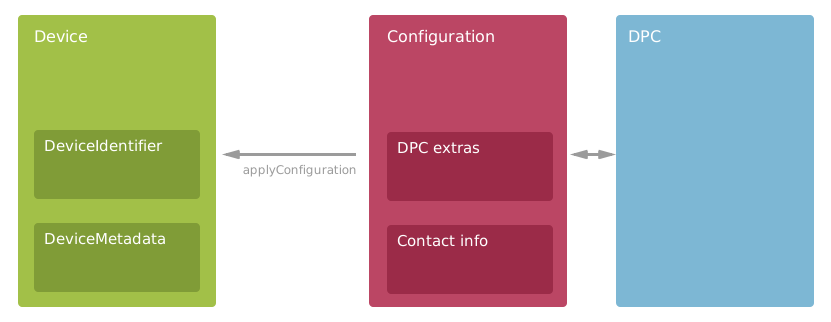
- پیکربندی
- سرپرستان فناوری اطلاعات گزینههای تدارک را برای دستگاهها بااستفاده از پیکربندی تنظیم میکنند. پیکربندیها شامل خطمشیهای تلفن همراه EMM و اطلاعات تماسی است که برای کمک به کاربران نمایش داده میشود. پیکربندیها برای میانای برنامهسازی کاربردی ضروری هستند، بنابراین از آنها در بسیاری از روشها استفاده میکنید. برای کسب اطلاعات بیشتر، پیکربندیها را در زیر ببینید.
- دستگاه
- دستگاه Android با قابلیت ثبتنام تمام خودکار که سازمان از توزیعکننده خود خریداری کرده است. پیکربندیای را اعمال کنید تا دستگاه در ثبتنام تمامخودکار گنجانده شود. دستگاهها دارای شناسه سختافزار و فراداده پیوستشده هستند. برای کسب اطلاعات بیشتر، دستگاهها را در زیر ببینید.
- DPC
- مرجع فقط خواندنی به DPC (کنترلکننده خطمشی دستگاه) مربوط به EMM. برای انتخاب راهکار «مدیریت دستگاههای همراه در شرکت» برای دستگاهها،
«کنترلکننده خطمشی دستگاه» را به پیکربندی اضافه کنید. همه DPCهای فهرستشده
توسط API از ثبتنام تمامخودکار پشتیبانی میکنند و در Google Play دردسترس هستند. برای
کسب اطلاعات بیشتر،
Dpcرا ببینید.
برای فهرست کردن همه روشها و منابع میانای برنامهسازی کاربردی که برنامهتان میتواند استفاده کند، مرجع میانای برنامهسازی کاربردی را ببینید.
پیکربندیها
منبع میانای برنامهسازی کاربردی Configuration موارد زیر را ترکیب میکند:
- DPC مربوط به EMM در دستگاهها نصب شده است.
- خطمشیهای EMM اعمالشده در دستگاهها.
- اطلاعات تماس در دستگاه نمایش داده میشود تا به کاربران درطول راهاندازی کمک کند.
بااستفاده از میانای برنامهسازی کاربردی، برنامهتان میتواند پیکربندیها را برای سرپرستان فناوری اطلاعات مدیریت کند. برای واکشی، ایجاد، بهروزرسانی، و حذف پیکربندیها، میانای برنامهسازی کاربردی را فراخوانی کنید. مثال زیر نشان میدهد که چگونه پیکربندی جدیدی ایجاد کنید:
جاوا
// Add metadata to help the device user during provisioning.
Configuration configuration = new Configuration();
configuration.setConfigurationName("Sales team");
configuration.setCompanyName("XYZ Corp.");
configuration.setContactEmail("it-support@example.com");
configuration.setContactPhone("+1 (800) 555-0112");
configuration.setCustomMessage("We're setting up your phone. Call or email for help.");

// Set the DPC that zero-touch enrollment downloads and installs from Google Play.
configuration.setDpcResourcePath(dpc.getName());

// Set the JSON-formatted EMM provisioning extras that are passed to the DPC.
configuration.setDpcExtras("{"
      + "\"android.app.extra.PROVISIONING_LEAVE_ALL_SYSTEM_APPS_ENABLED\":true,"
      + "\"android.app.extra.PROVISIONING_ADMIN_EXTRAS_BUNDLE\":{"
      + "\"default_min_password_length\":6,"
      + "\"company_name\":\"XYZ Corp\","
      + "\"management_server\":\"emm.example.com\","
      + "\"terms_url\":\"https://www.example.com/policies/terms/\","
      + "\"allowed_user_domains\":\"[\\\"example.com\\\", \\\"example.org\\\"]\""
      + "}"
      + "}");

// Create the new configuration on the server.
AndroidProvisioningPartner.Customers.Configurations.Create request =
      service.customers().configurations().create(customerAccount, configuration);
Configuration response = request.execute();
دات نت
// Add metadata to help the device user during provisioning.
Configuration configuration = new Configuration
{
    ConfigurationName = "Sales team",
    CompanyName = "XYZ Corp.",
    ContactEmail = "it-support@example.com",
    ContactPhone = "+1 (800) 555-0112",
    CustomMessage = "We're setting up your phone. Call or email for help."
};

// Set the DPC that zero-touch enrollment downloads and installs from Google Play.
configuration.DpcResourcePath = dpc.Name;

// Set the JSON-formatted EMM provisioning extras that are passed to the DPC.
configuration.DpcExtras = @"{
    ""android.app.extra.PROVISIONING_LEAVE_ALL_SYSTEM_APPS_ENABLED"":true,
    ""android.app.extra.PROVISIONING_ADMIN_EXTRAS_BUNDLE"":{
    ""default_min_password_length"":6,
    ""company_name"":""XYZ Corp"",
    ""management_server"":""emm.example.com"",
    ""terms_url"":""https://www.example.com/policies/terms/"",
    ""allowed_user_domains"":""[\""example.com\"", \""example.org\""]""
  }
}";

// Create the new configuration on the server.
var request = service.Customers.Configurations.Create(configuration, customerAccount);
var response = request.Execute();
Python
# Add metadata to help the device user during provisioning.
configuration = {
    'configurationName': 'Sales team',
    'companyName': 'XYZ Corp.',
    'contactEmail': 'it-support@example.com',
    'contactPhone': '+1 (800) 555-0112',
    'customMessage': 'We\'re setting up your phone. Call or email for help.'}

# Set the DPC that zero-touch enrollment installs from Google Play.
configuration['dpcResourcePath'] = dpc['name']

# Set the JSON-formatted EMM provisioning extras that are passed to the DPC.
configuration['dpcExtras'] = '''{
    "android.app.extra.PROVISIONING_LEAVE_ALL_SYSTEM_APPS_ENABLED":true,
    "android.app.extra.PROVISIONING_ADMIN_EXTRAS_BUNDLE":{
      "default_min_password_length":6,
      "company_name":"XYZ Corp",
      "management_server":"emm.example.com",
      "terms_url":"https://www.example.com/policies/terms/",
      "allowed_user_domains":"[\\"example.com\\", \\"example.org\\"]"}
}'''

# Create the new configuration on the server.
response = service.customers().configurations().create(
    parent=customer_account, body=configuration).execute()
وقتی پیکربندی را بااستفاده از میانای برنامهسازی کاربردی وصله بهروز میکنید، فراموش نکنید که
ماسک فیلد—یا
مقداری برای هر فیلدی که نمیخواهید null باشد اضافه کنید. برای دیدن نمونهای که نحوه بهروزرسانی کارآمد پیکربندی را نشان میدهد، پیکربندیهای
پیشفرض (در زیر) را ببینید.
حذف پیکربندیها
اگر پیکربندی هنوز بر دستگاهها اعمال میشود، نمیتوانید آن را حذف کنید. اگر بخواهید
پیکربندی درحال استفادهای را حذف کنید، روش API رمز وضعیت HTTP 400 Bad Request
و پیامی را برمیگرداند که توضیح میدهد چند دستگاه از این پیکربندی استفاده میکنند.
پیشاز امتحان مجدد، با
customers.devices.removeConfiguration
تماس بگیرید تا پیکربندی را از دستگاهها بردارید.
پیکربندیهای پیشفرض
ثبتنام تمام خودکار زمانی بهترین عملکرد را دارد که سازمان پیکربندی پیشفرضی را تنظیم کند که بر همه دستگاههای جدیدی که سازمان خریداری میکند اعمال شود.
اگر پیکربندی پیشفرضی تنظیم نشده است، از سرپرستان فناوری اطلاعات بخواهید پیکربندی پیشفرضی تنظیم کنند.
مثال زیر نشان میدهد که چگونه میتوان یک پیکربندی موجود را با تنظیم isDefault به true به عنوان پیشفرض قرار داد:
جاوا
// Send minimal data with the request. Just the 2 required fields.
// targetConfiguration is an existing configuration that we want to make the default.
Configuration configuration = new Configuration();
configuration.setIsDefault(true);
configuration.setConfigurationId(targetConfiguration.getConfigurationId());

// Call the API, including the FieldMask to avoid setting other fields to null.
AndroidProvisioningPartner.Customers.Configurations.Patch request = service
      .customers()
      .configurations()
      .patch(targetConfiguration.getName(), configuration);
request.setUpdateMask("isDefault");
Configuration results = request.execute();
دات نت
// Send minimal data with the request. Just the 2 required fields.
// targetConfiguration is an existing configuration that we want to make the default.
Configuration configuration = new Configuration
{
    IsDefault = true,
    ConfigurationId = targetConfiguration.ConfigurationId,
};

// Call the API, including the FieldMask to avoid setting other fields to null.
var request = service.Customers.Configurations.Patch(configuration,
                                                     targetConfiguration.Name);
request.UpdateMask = "IsDefault";
Configuration results = request.Execute();
Python
# Send minimal data with the request. Just the 2 required fields.
# target_configuration is an existing configuration we'll make the default.
configuration = {
    'isDefault': True,
    'configurationId': target_configuration['configurationId']}

# Call the API, including the FieldMask to avoid setting other fields to null.
response = service.customers().configurations().patch(
    name=target_configuration['name'],
    body=configuration, updateMask='isDefault').execute()
فقط یک پیکربندی پیشفرض میتواند وجود داشته باشد. با ایجاد پیکربندی پیشفرض جدید،
فیلد isDefault پیکربندی قبلی روی false تنظیم میشود. ممکن است لازم باشد
نمونههای ذخیرهشده در حافظه نهان Configuration را بازآوری کنید تا مقادیر صحیح را در
فیلدهای isDefault ببینید.
راهنمایی کاربران دستگاه
پیکربندی تمامخودکار، راهنمای کاربر سفارشیشدهای را در «دستیار راهاندازی» دستگاه نمایش میدهد تا به کاربران کمک کند. باید شماره تلفن و نشانی ایمیل مخاطب را بههمراه نام سازمانی که دستگاه را در پیکربندی مدیریت میکند اضافه کنید. همچنین توصیه میکنیم یک یا دو جمله در فیلد customMessage اضافه کنید تا جزئیات بیشتری درباره آنچه برای دستگاه کاربر اتفاق میافتد ارائه دهید.
چون کاربر نمیتواند از دستگاهی که درحال راهاندازی آن است تماس بگیرد یا ایمیل ارسال کند، شماره تلفن و نشانی ایمیل را بهگونهای قالببندی کنید که نگاه کردن به اطلاعات آسانتر شود.
دستگاهها
وقتی مشتری دستگاهی را برای ثبتنام تمام خودکار میخرد، شرکت واسطه آن دستگاه را ایجاد میکند—سرپرستان فناوری اطلاعات نمیتوانند دستگاه ایجاد کنند. برای کار با دستگاهها، روشها را در
منبع میانای برنامهسازی کاربردی Device فراخوانی کنید. اگر لازم است دستگاهها را جستجو کنید، همه دستگاهها را فهرست کنید و هر دسته را بهصورت محلی در برنامهتان فیلتر کنید. برای مثال، نتایج صفحهبندیشده را در زیر ببینید.
پیکربندی دستگاهها
اعمال پیکربندی بر دستگاه، دستگاه را برای ثبتنام تمامخودکار ثبت میکند. برای اعمال پیکربندی،
customers.devices.applyConfiguration را فراخوانی کنید.
پساز اعمال پیکربندی، دستگاه بهطور خودکار خودش را در اولین راهاندازی یا بازنشانی کارخانهای بعدی آمادهسازی میکند. مثال زیر نشان میدهد که چگونه میتوانید پیکربندی را برای مجموعهای از دستگاهها اعمال کنید:
جاوا
List<Device> devices = getDevicesToConfigure(service);
Configuration configurationToApply = getConfigurationToApply(service);

// Loop through the collection and apply the configuration to each device. This might
// take some time if the collection contains many devices.
for (Device device : devices) {
    System.out.println(device.getDeviceIdentifier().getImei());

    // Wrap the device ID in a DeviceReference.
    DeviceReference deviceRef = new DeviceReference();
    deviceRef.setDeviceId(device.getDeviceId());

    // Build and send the request to the API.
    CustomerApplyConfigurationRequest body = new CustomerApplyConfigurationRequest();
    body.setConfiguration(configurationToApply.getName());
    body.setDevice(deviceRef);

    AndroidProvisioningPartner.Customers.Devices.ApplyConfiguration request = service
          .customers()
          .devices()
          .applyConfiguration(customerAccount, body);
    request.execute();
}
دات نت
IList<Device> devices = GetDevicesToConfigure(service);
Configuration configurationToApply = GetConfigurationToApply(service);

// Loop through the collection and apply the configuration to each device. This might
// take some time if the collection contains many devices.
foreach (Device device in devices)
{
    Console.WriteLine(device.DeviceIdentifier.Imei);

    // Wrap the device ID in a DeviceReference.
    var deviceRef = new DeviceReference
    {
        DeviceId = device.DeviceId
    };

    // Build and send the request to the API.
    CustomerApplyConfigurationRequest body = new CustomerApplyConfigurationRequest
    {
        Configuration = configurationToApply.Name,
        Device = deviceRef
    };
    var request = service.Customers.Devices.ApplyConfiguration(body,
                                                               customerAccount);
    request.Execute();
}
Python
devices = get_devices_to_configure(service)
configuration = get_configuration_to_apply(service)

# Loop through the collection and apply the configuration to each device.
# This might take some time if the collection contains many devices.
for device in devices:
  print(device['deviceIdentifier']['imei'])

  # Wrap the device ID in a DeviceReference.
  device_ref = {'deviceId': device['deviceId']}

  # Build and send the request to the API.
  body = {'configuration': configuration['name'], 'device': device_ref}
  service.customers().devices().applyConfiguration(
      parent=customer_account, body=body).execute()
برای برداشتن پیکربندی از دستگاه،
customers.devices.removeConfiguration را فراخوانی کنید.
این تغییر پساز بازنشانی کارخانهای دستگاه اعمال میشود.
لغو مطالبه دستگاهها
سرپرستان فناوری اطلاعات میتوانند دستگاهی را لغو ادعا کنند تا آن را از ثبتنام تمام خودکار بردارند. سرپرست فناوری اطلاعات ممکن است ادعای مالکیت دستگاهی را که میخواهد به حساب دیگری منتقل کند، بفروشد، یا به فروشنده برگرداند لغو کند. برای لغو ادعای مالکیت دستگاه
از سازمان، روش
customers.devices.unclaim را فراخوانی کنید.
مثال زیر نشان میدهد که چگونه میتوان ادعای مالکیت دستگاهی را بااستفاده از شماره IMEI و نام سازنده لغو کرد:
جاوا
// Wrap the hardware ID and manufacturer values in a DeviceIdentifier.
// Then wrap the DeviceIdentifier in a DeviceReference.
DeviceIdentifier identifier = new DeviceIdentifier();
identifier.setImei("123456789012347");
identifier.setManufacturer("Google");
DeviceReference reference = new DeviceReference();
reference.setDeviceIdentifier(identifier);

// Create the body of the request.
CustomerUnclaimDeviceRequest body = new CustomerUnclaimDeviceRequest();
body.setDevice(reference);

// Call the API method to unclaim the device from the organization.
service.customers().devices().unclaim(customerAccount, body).execute();
دات نت
// Wrap the hardware ID and manufacturer values in a DeviceIdentifier.
// Then wrap the DeviceIdentifier in a DeviceReference.
DeviceIdentifier identifier = new DeviceIdentifier
{
    Imei = "123456789012347",
    Manufacturer = "Google"
};
DeviceReference reference = new DeviceReference();
reference.DeviceIdentifier = identifier;

// Create the body of the request.
CustomerUnclaimDeviceRequest body = new CustomerUnclaimDeviceRequest();
body.Device = reference;

// Call the API method to unclaim the device from the organization.
service.Customers.Devices.Unclaim(body, customerAccount).Execute();
Python
# Wrap the hardware ID and manufacturer values in a DeviceIdentifier.
# Then wrap the DeviceIdentifier in a DeviceReference.
identifier = {'imei': '123456789012347', 'manufacturer': 'Google'}
reference = {'deviceIdentifier': identifier}

# Create the body of the request.
body = {'device': reference}

# Call the API method to unclaim the device from the organization.
service.customers().devices().unclaim(
    parent=customer_account, body=body).execute()
فراداده دستگاه
سرپرست فناوری اطلاعات میتواند فرادادههای پیوستشده به دستگاه توسط فروشنده را ببیند. این فراداده دستگاه را در برنامهتان نمایش دهید تا به سرپرستان فناوری اطلاعات کمک کنید دستگاهها را تشخیص دهند.
برای کسب اطلاعات بیشتر درباره فرادادهای که ممکن است ببینید، راهنمای فراداده دستگاه را برای فروشندگان بخوانید.
نتایج صفحهبندیشده
روش میانای برنامهسازی کاربردی customers.devices.list ممکن است
فهرستهای بسیار بزرگی از دستگاهها را برگرداند. برای کاهش اندازه پاسخ، این روش و سایر روشهای API (مانند customers.list) از نتایج صفحهبندیشده پشتیبانی میکنند. با
نتایج صفحهبندیشده، برنامه شما میتواند بهصورت تکراری فهرستهای بزرگ را
صفحهبهصفحه درخواست و پردازش کند.
پساز فراخوانی روش میانای برنامهسازی کاربردی، بررسی کنید که آیا پاسخ شامل مقداری برای
nextPageToken است یا نه. اگر nextPageToken
null نباشد، برنامهتان میتواند از آن برای واکشی صفحه دیگری از دستگاهها با فراخوانی مجدد
روش استفاده کند. باید حد بالایی برای تعداد دستگاهها در پارامتر
pageSize تنظیم کنید. اگر nextPageToken null باشد، برنامهتان صفحه آخر را درخواست کرده است.
روش نمونه زیر نشان میدهد که برنامهتان چگونه میتواند فهرست دستگاهها را، هر بار یک صفحه، چاپ کند:
جاوا
private void printDevices(AndroidProvisioningPartner service, String customerAccount,
      String pageToken) throws IOException {

    // Call the API to get a page of Devices. Send a page token from the method argument.
    // If the page token is null, the API returns the first page.
    AndroidProvisioningPartner.Customers.Devices.List request =
          service.customers().devices().list(customerAccount);
    request.setPageSize(50L);
    request.setPageToken(pageToken);
    CustomerListDevicesResponse response = request.execute();

    // Print the devices included in this page of results.
    for (Device device : response.getDevices()) {
        System.out.format("Device: %s\n", device.getName());
    }
    System.out.println("---");

    // Check to see if another page of devices is available. If yes, fetch & print the devices.
    if (response.getNextPageToken() != null) {
        this.printDevices(service, customerAccount, response.getNextPageToken());
    }
}
دات نت
private void PrintDevices(AndroidProvisioningPartnerService service, String customerAccount,
                          String pageToken)
{
    // Call the API to get a page of Devices. Send a page token from the method argument.
    // If the page token is null, the API returns the first page.
    var request = service.Customers.Devices.List(customerAccount);
    request.PageSize = 50;
    request.PageToken = pageToken;
    var response = request.Execute();

    // Print the devices included in this page of results.
    foreach (Device device in response.Devices)
    {
        Console.WriteLine("Device: {0}", device.Name);
    }
    Console.WriteLine("---");

    // Check to see if another page of devices is available. If yes, fetch and print the devices.
    if (response.NextPageToken != null)
    {
        this.PrintDevices(service, customerAccount, response.NextPageToken);
    }
}
Python
def print_devices(service, customer_account, page_token):
  """Demonstrates how to loop through paginated lists of devices."""

  # Call the API to get a page of Devices. Send a page token from the method
  # argument. If the page token is None, the API returns the first page.
  response = service.customers().devices().list(
      parent=customer_account, pageSize=50, pageToken=page_token).execute()

  # Print the devices included in this page of results.
  for device in response['devices']:
    print('Device: {0}'.format(device['name']))
  print('---')

  # Check to see if another page of devices is available. If yes,
  # fetch and print the devices.
  if 'nextPageToken' in response:
    print_devices(service, customer_account, response['nextPageToken'])
شروع کنید
سپس، نحوه مجاز کردن تماسهای API را در مجوز بخوانید. اگر میخواهید میاناهای برنامهسازی کاربردی را کاوش کنید، به راهنماهای شروع سریع برای Java، .NET، و Python نگاهی بیندازید. میتوانید از colab برای مشاهده نمونههای فراخوانی میانای برنامهسازی کاربردی و آزمایش فراخوانی میانای برنامهسازی کاربردی توسط خودتان استفاده کنید.