
Customer API позволяет программно управлять устройствами и конфигурациями для автоматической настройки Android. Этот документ предназначен для поставщиков услуг по управлению мобильной инфраструктурой предприятия (EMM) и разработчиков корпоративных ИТ-решений. Прочитав эту статью, вы поймете, какие основные ресурсы используются в API и как они взаимодействуют. Если вы только начинаете работать с автоматической настройкой, прочитайте краткое введение на сайте android.com.
Общая информация
Customer API помогает организациям, которые приобретают устройства Android с автоматической настройкой. Ваше приложение или инструмент может помочь системным администраторам:
- Создание, изменение и удаление конфигураций инициализации.
- применять конфигурацию к устройству или удалять ее;
- Выберите конфигурацию по умолчанию для всех устройств, которые впоследствии будут добавляться в список для автоматической настройки.
С помощью API системные администраторы также могут отменять регистрацию устройств для автоматической настройки. Чтобы управлять пользователями организации или принять Условия использования, администраторы используют портал автоматической настройки.
Этот API может быть полезен:
- Поставщики услуг EMM, которые добавляют поддержку автоматической настройки в свою консоль.
- Разработчики корпоративных ИТ-решений, создающие инструменты для автоматизации задач по автоматической настройке.
Основные ресурсы
Конфигурации и устройства – это основные ресурсы, которые вы используете в API. Организация также может создавать конфигурации и устройства на портале автоматической настройки.
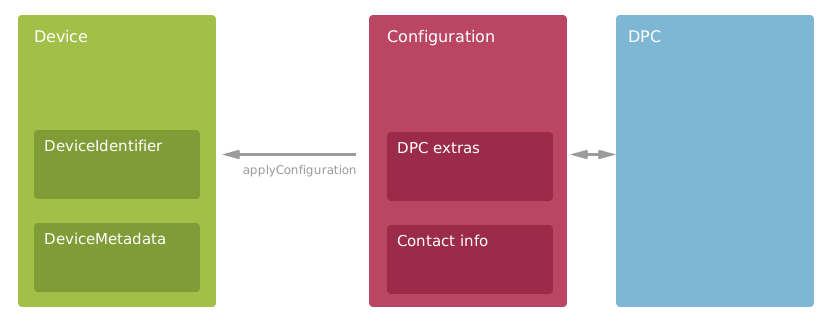
- Конфигурация
- Системные администраторы задают параметры инициализации устройств с помощью конфигурации. Конфигурации включают правила EMM для мобильных устройств и контактную информацию, которая показывается пользователям. Конфигурации – это центральный элемент API, поэтому они используются во многих методах. Подробнее о конфигурациях…
- Устройство
- Устройство Android с поддержкой автоматической настройки, приобретенное организацией у реселлера. Примените конфигурацию, чтобы включить устройство в автоматическую настройку. У устройств есть идентификаторы оборудования и прикрепленные метаданные. Подробнее об устройствах…
- DPC
- Ссылка только для чтения на контроллер политик EMM. Добавьте контроллер политики устройств в конфигурацию, чтобы выбрать решение EMM для устройств. Все контроллеры, перечисленные в API, поддерживают автоматическую настройку и доступны в Google Play. Подробнее
Dpc…
Список всех методов и ресурсов API, которые может использовать ваше приложение, приведен в документации по API.
Конфигурации
Ресурс API Configuration объединяет следующие элементы:
- Контроллер политик, установленный на устройствах.
- Правила EMM, которые должны использоваться на устройствах.
- Контактная информация, которая отображается на экране устройства во время настройки.
С помощью API ваше приложение может управлять конфигурациями для системных администраторов. Вызовите API, чтобы получить, создать, обновить или удалить конфигурации. В примере ниже показано, как создать новую конфигурацию.
Java
// Add metadata to help the device user during provisioning.
Configuration configuration = new Configuration();
configuration.setConfigurationName("Sales team");
configuration.setCompanyName("XYZ Corp.");
configuration.setContactEmail("it-support@example.com");
configuration.setContactPhone("+1 (800) 555-0112");
configuration.setCustomMessage("We're setting up your phone. Call or email for help.");

// Set the DPC that zero-touch enrollment downloads and installs from Google Play.
configuration.setDpcResourcePath(dpc.getName());

// Set the JSON-formatted EMM provisioning extras that are passed to the DPC.
configuration.setDpcExtras("{"
      + "\"android.app.extra.PROVISIONING_LEAVE_ALL_SYSTEM_APPS_ENABLED\":true,"
      + "\"android.app.extra.PROVISIONING_ADMIN_EXTRAS_BUNDLE\":{"
      + "\"default_min_password_length\":6,"
      + "\"company_name\":\"XYZ Corp\","
      + "\"management_server\":\"emm.example.com\","
      + "\"terms_url\":\"https://www.example.com/policies/terms/\","
      + "\"allowed_user_domains\":\"[\\\"example.com\\\", \\\"example.org\\\"]\""
      + "}"
      + "}");

// Create the new configuration on the server.
AndroidProvisioningPartner.Customers.Configurations.Create request =
      service.customers().configurations().create(customerAccount, configuration);
Configuration response = request.execute();
.NET
// Add metadata to help the device user during provisioning.
Configuration configuration = new Configuration
{
    ConfigurationName = "Sales team",
    CompanyName = "XYZ Corp.",
    ContactEmail = "it-support@example.com",
    ContactPhone = "+1 (800) 555-0112",
    CustomMessage = "We're setting up your phone. Call or email for help."
};

// Set the DPC that zero-touch enrollment downloads and installs from Google Play.
configuration.DpcResourcePath = dpc.Name;

// Set the JSON-formatted EMM provisioning extras that are passed to the DPC.
configuration.DpcExtras = @"{
    ""android.app.extra.PROVISIONING_LEAVE_ALL_SYSTEM_APPS_ENABLED"":true,
    ""android.app.extra.PROVISIONING_ADMIN_EXTRAS_BUNDLE"":{
    ""default_min_password_length"":6,
    ""company_name"":""XYZ Corp"",
    ""management_server"":""emm.example.com"",
    ""terms_url"":""https://www.example.com/policies/terms/"",
    ""allowed_user_domains"":""[\""example.com\"", \""example.org\""]""
  }
}";

// Create the new configuration on the server.
var request = service.Customers.Configurations.Create(configuration, customerAccount);
var response = request.Execute();
Python
# Add metadata to help the device user during provisioning.
configuration = {
    'configurationName': 'Sales team',
    'companyName': 'XYZ Corp.',
    'contactEmail': 'it-support@example.com',
    'contactPhone': '+1 (800) 555-0112',
    'customMessage': 'We\'re setting up your phone. Call or email for help.'}

# Set the DPC that zero-touch enrollment installs from Google Play.
configuration['dpcResourcePath'] = dpc['name']

# Set the JSON-formatted EMM provisioning extras that are passed to the DPC.
configuration['dpcExtras'] = '''{
    "android.app.extra.PROVISIONING_LEAVE_ALL_SYSTEM_APPS_ENABLED":true,
    "android.app.extra.PROVISIONING_ADMIN_EXTRAS_BUNDLE":{
      "default_min_password_length":6,
      "company_name":"XYZ Corp",
      "management_server":"emm.example.com",
      "terms_url":"https://www.example.com/policies/terms/",
      "allowed_user_domains":"[\\"example.com\\", \\"example.org\\"]"}
}'''

# Create the new configuration on the server.
response = service.customers().configurations().create(
    parent=customer_account, body=configuration).execute()
При обновлении конфигурации с помощью API patch не забудьте включить маску поля или значение для каждого поля, которое не должно быть null. Пример эффективного обновления конфигурации приведен в разделе Конфигурации по умолчанию ниже.
Удалить конфигурации
Вы не можете удалить конфигурацию, если она все ещё применяется к устройствам. Если вы попытаетесь удалить используемую конфигурацию, метод API вернет код статуса HTTP 400 Bad Request и сообщение о том, сколько устройств используют эту конфигурацию.
Вызовите customers.devices.removeConfiguration, чтобы удалить конфигурацию с устройств, и повторите попытку.
Конфигурации по умолчанию
Автоматическая настройка работает лучше всего, когда организация задает конфигурацию по умолчанию, которая применяется ко всем новым устройствам, приобретаемым организацией.
Если конфигурация по умолчанию не задана, предложите системным администраторам сделать это.
В примере ниже показано, как сделать существующую конфигурацию конфигурацией по умолчанию, задав для параметра isDefault значение true.
Java
// Send minimal data with the request. Just the 2 required fields.
// targetConfiguration is an existing configuration that we want to make the default.
Configuration configuration = new Configuration();
configuration.setIsDefault(true);
configuration.setConfigurationId(targetConfiguration.getConfigurationId());

// Call the API, including the FieldMask to avoid setting other fields to null.
AndroidProvisioningPartner.Customers.Configurations.Patch request = service
      .customers()
      .configurations()
      .patch(targetConfiguration.getName(), configuration);
request.setUpdateMask("isDefault");
Configuration results = request.execute();
.NET
// Send minimal data with the request. Just the 2 required fields.
// targetConfiguration is an existing configuration that we want to make the default.
Configuration configuration = new Configuration
{
    IsDefault = true,
    ConfigurationId = targetConfiguration.ConfigurationId,
};

// Call the API, including the FieldMask to avoid setting other fields to null.
var request = service.Customers.Configurations.Patch(configuration,
                                                     targetConfiguration.Name);
request.UpdateMask = "IsDefault";
Configuration results = request.Execute();
Python
# Send minimal data with the request. Just the 2 required fields.
# target_configuration is an existing configuration we'll make the default.
configuration = {
    'isDefault': True,
    'configurationId': target_configuration['configurationId']}

# Call the API, including the FieldMask to avoid setting other fields to null.
response = service.customers().configurations().patch(
    name=target_configuration['name'],
    body=configuration, updateMask='isDefault').execute()
Конфигурация по умолчанию может быть только одна. Если вы создадите новую конфигурацию по умолчанию, то для поля isDefault предыдущей конфигурации будет установлено значение false. Чтобы в полях isDefault отображались правильные значения, может потребоваться обновить кешированные экземпляры Configuration.
Инструкции для пользователей устройств
В мастере настройки устройств с автоматической настройкой показываются специальные инструкции для пользователей. В конфигурации необходимо указать контактный номер телефона и адрес электронной почты, а также название организации, которая управляет устройством. Мы также рекомендуем добавить в поле customMessage одно или два предложения с подробной информацией о том, что происходит с устройством пользователя.
Поскольку пользователь не сможет позвонить или отправить электронное письмо с настраиваемого устройства, укажите номер телефона и адрес электронной почты в удобном для чтения формате.
Устройства
Реселлеры создают устройства, когда клиент покупает их для автоматической настройки. Системные администраторы не могут создавать устройства. Для работы с устройствами вызывайте методы ресурса API Device. Если вам нужно найти устройства, получите список всех устройств и отфильтруйте каждую группу локально в приложении. Пример приведен в разделе Разбиение результатов на страницы ниже.
Настройка устройств
Применение конфигурации к устройству регистрирует его для автоматической настройки. Чтобы применить конфигурацию, вызовите метод customers.devices.applyConfiguration.
После применения конфигурации инициализация устройства осуществляется автоматически при первой загрузке или при сбросе настроек. В примере ниже показано, как применить конфигурацию к набору устройств.
Java
List<Device> devices = getDevicesToConfigure(service);
Configuration configurationToApply = getConfigurationToApply(service);

// Loop through the collection and apply the configuration to each device. This might
// take some time if the collection contains many devices.
for (Device device : devices) {
    System.out.println(device.getDeviceIdentifier().getImei());

    // Wrap the device ID in a DeviceReference.
    DeviceReference deviceRef = new DeviceReference();
    deviceRef.setDeviceId(device.getDeviceId());

    // Build and send the request to the API.
    CustomerApplyConfigurationRequest body = new CustomerApplyConfigurationRequest();
    body.setConfiguration(configurationToApply.getName());
    body.setDevice(deviceRef);

    AndroidProvisioningPartner.Customers.Devices.ApplyConfiguration request = service
          .customers()
          .devices()
          .applyConfiguration(customerAccount, body);
    request.execute();
}
.NET
IList<Device> devices = GetDevicesToConfigure(service);
Configuration configurationToApply = GetConfigurationToApply(service);

// Loop through the collection and apply the configuration to each device. This might
// take some time if the collection contains many devices.
foreach (Device device in devices)
{
    Console.WriteLine(device.DeviceIdentifier.Imei);

    // Wrap the device ID in a DeviceReference.
    var deviceRef = new DeviceReference
    {
        DeviceId = device.DeviceId
    };

    // Build and send the request to the API.
    CustomerApplyConfigurationRequest body = new CustomerApplyConfigurationRequest
    {
        Configuration = configurationToApply.Name,
        Device = deviceRef
    };
    var request = service.Customers.Devices.ApplyConfiguration(body,
                                                               customerAccount);
    request.Execute();
}
Python
devices = get_devices_to_configure(service)
configuration = get_configuration_to_apply(service)

# Loop through the collection and apply the configuration to each device.
# This might take some time if the collection contains many devices.
for device in devices:
  print(device['deviceIdentifier']['imei'])

  # Wrap the device ID in a DeviceReference.
  device_ref = {'deviceId': device['deviceId']}

  # Build and send the request to the API.
  body = {'configuration': configuration['name'], 'device': device_ref}
  service.customers().devices().applyConfiguration(
      parent=customer_account, body=body).execute()
Чтобы удалить конфигурацию с устройства, вызовите customers.devices.removeConfiguration.
Изменение вступит в силу после сброса настроек устройства.
Как отменить регистрацию устройств
Системные администраторы могут отказаться от прав на устройство, чтобы исключить его из автоматической настройки. Администратор может отказаться от прав на устройство, если его нужно перенести в другой аккаунт, продать или вернуть реселлеру. Вызовите метод customers.devices.unclaim, чтобы отменить связь устройства с организацией.
В примере ниже показано, как отменить регистрацию устройства по IMEI-коду и названию производителя.
Java
// Wrap the hardware ID and manufacturer values in a DeviceIdentifier.
// Then wrap the DeviceIdentifier in a DeviceReference.
DeviceIdentifier identifier = new DeviceIdentifier();
identifier.setImei("123456789012347");
identifier.setManufacturer("Google");
DeviceReference reference = new DeviceReference();
reference.setDeviceIdentifier(identifier);

// Create the body of the request.
CustomerUnclaimDeviceRequest body = new CustomerUnclaimDeviceRequest();
body.setDevice(reference);

// Call the API method to unclaim the device from the organization.
service.customers().devices().unclaim(customerAccount, body).execute();
.NET
// Wrap the hardware ID and manufacturer values in a DeviceIdentifier.
// Then wrap the DeviceIdentifier in a DeviceReference.
DeviceIdentifier identifier = new DeviceIdentifier
{
    Imei = "123456789012347",
    Manufacturer = "Google"
};
DeviceReference reference = new DeviceReference();
reference.DeviceIdentifier = identifier;

// Create the body of the request.
CustomerUnclaimDeviceRequest body = new CustomerUnclaimDeviceRequest();
body.Device = reference;

// Call the API method to unclaim the device from the organization.
service.Customers.Devices.Unclaim(body, customerAccount).Execute();
Python
# Wrap the hardware ID and manufacturer values in a DeviceIdentifier.
# Then wrap the DeviceIdentifier in a DeviceReference.
identifier = {'imei': '123456789012347', 'manufacturer': 'Google'}
reference = {'deviceIdentifier': identifier}

# Create the body of the request.
body = {'device': reference}

# Call the API method to unclaim the device from the organization.
service.customers().devices().unclaim(
    parent=customer_account, body=body).execute()
Метаданные устройства
Системный администратор может просматривать метаданные, прикрепленные к устройству реселлером. Показывайте эти метаданные в приложении, чтобы системным администраторам было проще распознавать устройства.
Подробную информацию о метаданных можно найти в руководстве по метаданным устройств для реселлеров.
Результаты с разбивкой по страницам
Метод API customers.devices.list может возвращать очень большие списки устройств. Чтобы уменьшить размер ответа, этот и другие методы API (например, customers.list) поддерживают постраничные результаты. Благодаря этому ваше приложение может запрашивать и обрабатывать большие списки по одной странице за раз.
После вызова метода API проверьте, содержит ли ответ значение для nextPageToken. Если значение nextPageToken не равно null, приложение может использовать его для получения другой страницы устройств, снова вызвав метод. В параметре pageSize необходимо указать максимальное количество устройств. Если nextPageToken – это null, ваше приложение запросило последнюю страницу.
В примере ниже показано, как приложение может выводить список устройств по одной странице за раз.
Java
private void printDevices(AndroidProvisioningPartner service, String customerAccount,
      String pageToken) throws IOException {

    // Call the API to get a page of Devices. Send a page token from the method argument.
    // If the page token is null, the API returns the first page.
    AndroidProvisioningPartner.Customers.Devices.List request =
          service.customers().devices().list(customerAccount);
    request.setPageSize(50L);
    request.setPageToken(pageToken);
    CustomerListDevicesResponse response = request.execute();

    // Print the devices included in this page of results.
    for (Device device : response.getDevices()) {
        System.out.format("Device: %s\n", device.getName());
    }
    System.out.println("---");

    // Check to see if another page of devices is available. If yes, fetch & print the devices.
    if (response.getNextPageToken() != null) {
        this.printDevices(service, customerAccount, response.getNextPageToken());
    }
}
.NET
private void PrintDevices(AndroidProvisioningPartnerService service, String customerAccount,
                          String pageToken)
{
    // Call the API to get a page of Devices. Send a page token from the method argument.
    // If the page token is null, the API returns the first page.
    var request = service.Customers.Devices.List(customerAccount);
    request.PageSize = 50;
    request.PageToken = pageToken;
    var response = request.Execute();

    // Print the devices included in this page of results.
    foreach (Device device in response.Devices)
    {
        Console.WriteLine("Device: {0}", device.Name);
    }
    Console.WriteLine("---");

    // Check to see if another page of devices is available. If yes, fetch and print the devices.
    if (response.NextPageToken != null)
    {
        this.PrintDevices(service, customerAccount, response.NextPageToken);
    }
}
Python
def print_devices(service, customer_account, page_token):
  """Demonstrates how to loop through paginated lists of devices."""

  # Call the API to get a page of Devices. Send a page token from the method
  # argument. If the page token is None, the API returns the first page.
  response = service.customers().devices().list(
      parent=customer_account, pageSize=50, pageToken=page_token).execute()

  # Print the devices included in this page of results.
  for device in response['devices']:
    print('Device: {0}'.format(device['name']))
  print('---')

  # Check to see if another page of devices is available. If yes,
  # fetch and print the devices.
  if 'nextPageToken' in response:
    print_devices(service, customer_account, response['nextPageToken'])
Начать
Затем прочитайте, как авторизовать вызовы API, в разделе Авторизация. Если вы хотите изучить API, ознакомьтесь с краткими руководствами по Java, .NET и Python. Вы можете использовать colab, чтобы посмотреть примеры вызовов API и поэкспериментировать с ними.