

Page Summary
-
Starboard's decode-to-texture API allows applications to receive video frames as texture objects for custom rendering, such as 360 video.
-
Applications can query for decode-to-texture support and, if available, create a player using
SbPlayerGetPreferredOutputMode()andSbPlayerCreate()with the appropriate output mode. -
SbPlayerGetCurrentFrame()is called repeatedly by the application's renderer thread to obtain the current video frame as anSbDecodeTargetobject. -
The application uses
SbDecodeTargetGetInfo()to access texture information within theSbDecodeTargetand then renders it, releasing the object withSbDecodeTargetRelease()when finished. -
Although decode-to-texture offers performance advantages by avoiding pixel copies, punch-through video playback may still be preferable for decoupling video rendering from the application's render loop.
Starboard declares the interfaces necessary to allow applications to query for video frames from the media player, and have them returned as texture objects (e.g. GLES textures). This is useful if the application would like to apply a geometrical transformation to the rendered video, in order to support 360 spherical video playback for example. Additionally, if a Starboard platform implementation does not support punch-through video playback, then applications can choose to use decode-to-texture instead.
API Overview
Decode-to-texture support involves multiple Starboard API functions spanning
both the starboard/player.h and
starboard/decode_target.h Starboard interface header
files. Support for decode-to-texture began in version 4 of the Starboard
API.
In particular, the following function implementations require consideration for decode-to-texture support:
From starboard/player.h,
SbPlayerCreate()SbPlayerGetPreferredOutputMode()SbPlayerGetCurrentFrame()
From starboard/decode_target.h,
SbDecodeTargetRelease()SbDecodeTargetGetInfo()
Note that it is possible that you may not need to use the
SbDecodeTargetGraphicsContextProvider parameter of SbPlayerCreate(). More on
this later.
Example Application Usage Pattern
We now describe an example, and typical, sequence of steps that an application will take when it wishes to make use of decode-to-texture support.
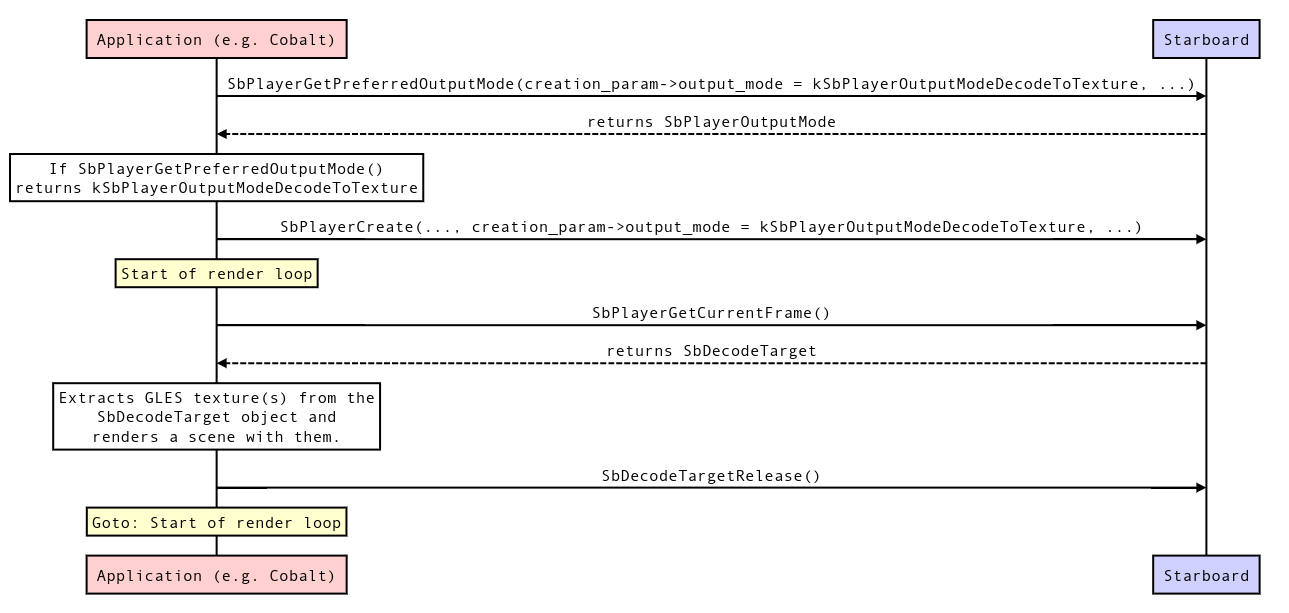
An application with the desire to make use of decode-to-texture will first call
SbPlayerGetPreferredOutputMode(), passing inkSbPlayerOutputModeDecodeToTexturefor itscreation_param->output_modeparameter. If the function doesn't returnkSbPlayerOutputModeDecodeToTexture, the application learns that decode-to-texture is not supported by the platform and it will not continue with a decode-to-texture flow.If
SbPlayerGetPreferredOutputMode()returnskSbPlayerOutputModeDecodeToTexture, the application will callSbPlayerCreate(), passing inkSbPlayerOutputModeDecodeToTexturefor thecreation_param->output_modeparameter, and also providing a validproviderparameter (more on this later). At this point, the Starboard platform is expected to have created a player with the decode-to-texture output mode.Once the player is started and playback has begun, the application's renderer thread (this may be a different thread than the one that called
SbPlayerCreate()) will repeatedly and frequently callSbPlayerGetCurrentFrame(). Since this function will be called from the application's renderer thread, it should be thread-safe. If the platform uses a GLES renderer, it is guaranteed that this function will be called with the GLES renderer context set as current. This function is expected to return the video frame that is to be displayed at the time the function is called as aSbDecodeTargetobject. TheSbPlayerGetCurrentFrame()will be called at the renderer's frequency, i.e. the application render loop's frame rate. If the application's frame rate is higher than the video's frame rate, then the same video frame will sometimes be returned in consecutive calls toSbPlayerGetCurrentFrame(). If the video's frame rate is higher than the application's (this should be rare), then some video frames will never be returned by calls toSbPlayerGetCurrentFrame(); in other words, video frames will be dropped.Once the application has acquired a valid SbDecodeTarget object through a call to
SbPlayerGetCurrentFrame(), it will callSbDecodeTargetGetInfo()on it to extract information about the opaqueSbDecodeTargetobject. TheSbDecodeTargetGetInfo()function fills out aSbDecodeTargetInfostructure which contains information about the decoded frame and, most importantly, a reference to a GLES texture ID on GLES platforms, or a reference to aSbBlitterSurfaceobject on Starboard Blitter API platforms. The application can then use this texture/surface handle to render the video frame as it wishes.When the application is finished using the
SbDecodeTargetthat it has acquired through theSbPlayerGetCurrentFrame()function, it will callSbDecodeTargetRelease()on it. The Starboard platform implementation should ensure that theSbDecodeTargetobject returned bySbPlayerGetCurrentFrame()remains valid until the corresponding call toSbDecodeTargetRelease()is made. A call toSbDecodeTargetRelease()will be made to match each call toSbPlayerGetCurrentFrame().
The SbDecodeTargetGraphicsContextProvider object
It is completely possible that a platform's Starboard implementation can
properly implement decode-to-texture support without dealing with the
SbDecodeTargetGraphicsContextProvider object (passed in to
SbPlayerCreate()). The SbDecodeTargetGraphicsContextProvider reference
gives platforms references to the graphics objects that will later be used to
render the decoded frames. For example, on Blitter API platforms, a reference
to the SbBlitterDevice object will be a mamber of
SbDecodeTargetGraphicsContextProvider. For EGL platforms, a EGLDisplay and
EGLContext will be available, but additionally a
SbDecodeTargetGlesContextRunner function pointer will be provided that will
allow you to run arbitrary code on the renderer thread with the EGLContext
held current. This may be useful if your SbDecodeTarget creation code will
required making GLES calls (e.g. glGenTextures()) in which a EGLContext must
be held current.
Performance Considerations
The decode-to-texture Starboard API is specifically designed to allow Starboard implementations to have the player decode directly to a texture, so that the application can then reference and render with that texture without at any point performing a pixel copy. The decode-to-texture path can therefore be highly performant.
It is still recommended however that platforms support the punch-through player mode if possible. When using the decode-to-texture player output mode, the video may be rendered within the application's render loop, which means that non-video-related time complexity in the application's render loop can affect video playback's apparent frame rate, potentially resulting in dropped frames. The platform can likely configure punch-through video to refresh on its own loop, decoupling it from the application render loop.
Implementation Strategies
Working with "push" players
If your player implementation is setup with a "push" framework where
frames are pushed out as soon as they are decoded, then you will need
to cache those frames (along with their timestamps) so that they can be
passed on to the application when SbPlayerGetCurrentFrame() is called.
This same strategy applies if the player pushes frames only when they are meant
to be rendered.