دمج البيانات في عرض تقديمي

أحد التطبيقات المفيدة لواجهة برمجة التطبيقات Google Slides API هو دمج المعلومات من مصدر بيانات واحد أو أكثر في عرض تقديمي مستند إلى نموذج.

توضّح هذه الصفحة كيفية أخذ البيانات من مصدر خارجي وإدراجها في عرض تقديمي حالي مستند إلى نموذج. يشبه المفهوم مفهوم دمج المراسلات باستخدام معالج نصوص وجدول بيانات.

هناك عدة أسباب تجعل هذا الأسلوب مفيدًا:

  • من السهل على المصمّمين تحسين تصميم العرض التقديمي باستخدام محرّر "العروض التقديمية من Google". هذا أسهل بكثير من ضبط المَعلمات في تطبيقك لضبط تصميم الشريحة المعروضة.

  • إنّ فصل المحتوى عن العرض التقديمي هو مبدأ تصميم معروف وله فوائد عديدة.
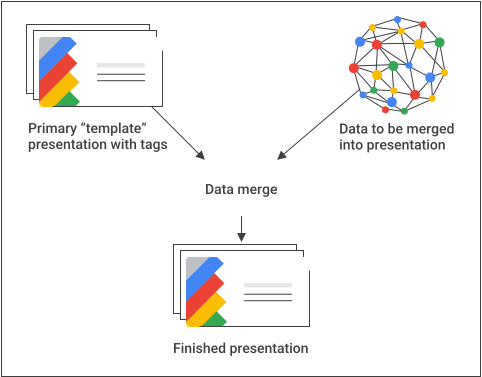
مخطط تصوّري لعملية الدمج

إعداد مسبق أساسي

في ما يلي مثال على كيفية استخدام Slides API لدمج البيانات في عرض تقديمي:

  1. يمكنك إنشاء العرض التقديمي بالطريقة التي تريدها باستخدام محتوى نائب لمساعدتك في التصميم.

  2. لكل عنصر محتوى ستدرجه، استبدِل المحتوى النائب بعلامة. العلامات هي مربّعات نص أو أشكال تحتوي على سلسلة فريدة. احرص على استخدام سلاسل من غير المرجّح أن تظهر بشكلٍ طبيعي. على سبيل المثال، قد تكون السلسلة {{account-holder-name}} علامة جيدة.

  3. في الرمز، استخدِم Google Drive API لإنشاء نسخة من العرض التقديمي.

  4. في الرمز، استخدِم طريقة Slides API's batchUpdate ، مع مجموعة من طلبات replaceAllText ، لإجراء جميع عمليات استبدال النص في العرض التقديمي. استخدِم replaceAllShapesWithImage طلبات لإجراء عمليات استبدال الصور في العرض التقديمي.

بعد إنشاء عرض تقديمي يحتوي على علامات، احرص على إنشاء نسخة واستخدِم Slides API لمعالجة النسخة. لا تستخدِم Slides API لمعالجة النسخة الأساسية "للنموذج".

تتضمّن الأقسام التالية مقتطفات من الرموز توضّح بعضًا من هذه العملية. يمكنك أيضًا مشاهدة الفيديو أعلاه للاطّلاع على مثال كامل (Python) يجمع بين العديد من المفاهيم من الأقسام الفردية أدناه.

دمج النص

يمكنك استخدام replaceAllText طلب لاستبدال جميع مثيلات سلسلة نصية معيّنة في عرض تقديمي بنص جديد. بالنسبة إلى عمليات الدمج، يكون هذا الإجراء أبسط من العثور على كل مثيل من النص واستبداله بشكلٍ فردي. أحد الأسباب التي تجعل هذا الأسلوب هو الأكثر تطورًا هو أنّ من الصعب توقّع أرقام تعريف عناصر الصفحة، خاصةً عندما يحرِّن المتعاونون العرض التقديمي المستند إلى نموذج ويحافظون عليه.

مثال

يستخدِم هذا المثال Drive API لنسخ عرض تقديمي مستند إلى نموذج، ما يؤدي إلى إنشاء مثيل جديد من العرض التقديمي. بعد ذلك، يستخدِم Google Sheets API لقراءة البيانات من جدول بيانات في "جداول بيانات Google"، وأخيرًا يستخدِم Slides API لتعديل العرض التقديمي الجديد.

يأخذ المثال بيانات من 3 خلايا في صف واحد من نطاق مُعنوَن في جدول البيانات. بعد ذلك، يستبدِل هذه البيانات في العرض التقديمي أينما تظهر السلاسل {{customer-name}}أو {{case-description}}أو {{total-portfolio}}.

برمجة التطبيقات

slides/api/Snippets.gs
/**
 * Use the Sheets API to load data, one record per row.
 * @param {string} templatePresentationId
 * @param {string} dataSpreadsheetId
 * @returns {*[]}
 */
function textMerging(templatePresentationId, dataSpreadsheetId) {
  const responses = [];
  const dataRangeNotation = "Customers!A2:M6";
  try {
    const values = SpreadsheetApp.openById(dataSpreadsheetId)
      .getRange(dataRangeNotation)
      .getValues();

    // For each record, create a new merged presentation.
    for (let i = 0; i < values.length; ++i) {
      const row = values[i];
      const customerName = row[2]; // name in column 3
      const caseDescription = row[5]; // case description in column 6
      const totalPortfolio = row[11]; // total portfolio in column 12

      // Duplicate the template presentation using the Drive API.
      const copyTitle = `${customerName} presentation`;
      let copyFile = {
        title: copyTitle,
        parents: [{ id: "root" }],
      };
      copyFile = Drive.Files.copy(copyFile, templatePresentationId);
      const presentationCopyId = copyFile.id;

      // Create the text merge (replaceAllText) requests for this presentation.
      const requests = [
        {
          replaceAllText: {
            containsText: {
              text: "{{customer-name}}",
              matchCase: true,
            },
            replaceText: customerName,
          },
        },
        {
          replaceAllText: {
            containsText: {
              text: "{{case-description}}",
              matchCase: true,
            },
            replaceText: caseDescription,
          },
        },
        {
          replaceAllText: {
            containsText: {
              text: "{{total-portfolio}}",
              matchCase: true,
            },
            replaceText: `${totalPortfolio}`,
          },
        },
      ];

      // Execute the requests for this presentation.
      const result = Slides.Presentations.batchUpdate(
        {
          requests: requests,
        },
        presentationCopyId,
      );
      // Count the total number of replacements made.
      let numReplacements = 0;
      for (const reply of result.replies) {
        numReplacements += reply.replaceAllText.occurrencesChanged;
      }
      console.log(
        "Created presentation for %s with ID: %s",
        customerName,
        presentationCopyId,
      );
      console.log("Replaced %s text instances", numReplacements);
    }
  } catch (err) {
    // TODO (Developer) - Handle exception
    console.log("Failed with error: %s", err.error);
  }
}

انتقال

slides/snippets/presentations.go
// Use the Sheets API to load data, one record per row.
dataRangeNotation := "Customers!A2:M6"
sheetsResponse, _ := sheetsService.Spreadsheets.Values.Get(dataSpreadsheetId, dataRangeNotation).Do()
values := sheetsResponse.Values

// For each record, create a new merged presentation.
for _, row := range values {
	customerName := row[2].(string)
	caseDescription := row[5].(string)
	totalPortfolio := row[11].(string)

	// Duplicate the template presentation using the Drive API.
	copyTitle := customerName + " presentation"
	file := drive.File{
		Title: copyTitle,
	}
	presentationFile, _ := driveService.Files.Copy(templatePresentationId, &file).Do()
	presentationId := presentationFile.Id

	// Create the text merge (replaceAllText) requests for this presentation.
	requests := []*slides.Request{{
		ReplaceAllText: &slides.ReplaceAllTextRequest{
			ContainsText: &slides.SubstringMatchCriteria{
				Text:      "{{customer-name}}",
				MatchCase: true,
			},
			ReplaceText: customerName,
		},
	}, {
		ReplaceAllText: &slides.ReplaceAllTextRequest{
			ContainsText: &slides.SubstringMatchCriteria{
				Text:      "{{case-description}}",
				MatchCase: true,
			},
			ReplaceText: caseDescription,
		},
	}, {
		ReplaceAllText: &slides.ReplaceAllTextRequest{
			ContainsText: &slides.SubstringMatchCriteria{
				Text:      "{{total-portfolio}}",
				MatchCase: true,
			},
			ReplaceText: totalPortfolio,
		},
	}}

	// Execute the requests for this presentation.
	body := &slides.BatchUpdatePresentationRequest{
		Requests: requests,
	}
	response, _ := slidesService.Presentations.BatchUpdate(presentationId, body).Do()

جافا

slides/snippets/src/main/java/TextMerging.java
import com.google.api.client.googleapis.json.GoogleJsonError;
import com.google.api.client.googleapis.json.GoogleJsonResponseException;
import com.google.api.client.http.HttpRequestInitializer;
import com.google.api.client.http.javanet.NetHttpTransport;
import com.google.api.client.json.gson.GsonFactory;
import com.google.api.services.drive.Drive;
import com.google.api.services.drive.model.File;
import com.google.api.services.sheets.v4.Sheets;
import com.google.api.services.sheets.v4.model.ValueRange;
import com.google.api.services.slides.v1.Slides;
import com.google.api.services.slides.v1.SlidesScopes;
import com.google.api.services.slides.v1.model.BatchUpdatePresentationRequest;
import com.google.api.services.slides.v1.model.BatchUpdatePresentationResponse;
import com.google.api.services.slides.v1.model.ReplaceAllTextRequest;
import com.google.api.services.slides.v1.model.Request;
import com.google.api.services.slides.v1.model.Response;
import com.google.api.services.slides.v1.model.SubstringMatchCriteria;
import com.google.auth.http.HttpCredentialsAdapter;
import com.google.auth.oauth2.GoogleCredentials;

import java.io.IOException;
import java.util.ArrayList;
import java.util.Arrays;
import java.util.List;

/* Class to demonstrate the use of Slides Text Merging API */
public class TextMerging {
  /**
   * Changes specified texts with data from spreadsheet.
   *
   * @param templatePresentationId - id of the presentation.
   * @param dataSpreadsheetId      - id of the spreadsheet containing data.
   * @return merged presentation id
   * @throws IOException - if credentials file not found.
   */
  public static List<BatchUpdatePresentationResponse> textMerging(
      String templatePresentationId, String dataSpreadsheetId) throws IOException {
        /* Load pre-authorized user credentials from the environment.
           TODO(developer) - See https://developers.google.com/identity for
            guides on implementing OAuth2 for your application. */
    GoogleCredentials credentials = GoogleCredentials.getApplicationDefault()
        .createScoped(Arrays.asList(SlidesScopes.PRESENTATIONS,
            SlidesScopes.DRIVE, SlidesScopes.SPREADSHEETS));
    HttpRequestInitializer requestInitializer = new HttpCredentialsAdapter(
        credentials);

    // Create the slides API client
    Slides service = new Slides.Builder(new NetHttpTransport(),
        GsonFactory.getDefaultInstance(),
        requestInitializer)
        .setApplicationName("Slides samples")
        .build();

    // Create the drive API client
    Drive driveService = new Drive.Builder(new NetHttpTransport(),
        GsonFactory.getDefaultInstance(),
        requestInitializer)
        .setApplicationName("Slides samples")
        .build();

    // Create the sheets API client
    Sheets sheetsService = new Sheets.Builder(new NetHttpTransport(),
        GsonFactory.getDefaultInstance(),
        requestInitializer)
        .setApplicationName("Slides samples")
        .build();

    List<BatchUpdatePresentationResponse> responses = new ArrayList<>(5);
    // Use the Sheets API to load data, one record per row.
    String dataRangeNotation = "Customers!A2:M6";
    ValueRange sheetsResponse = sheetsService.spreadsheets().values()
        .get(dataSpreadsheetId, dataRangeNotation).execute();
    List<List<Object>> values = sheetsResponse.getValues();

    try {
      // For each record, create a new merged presentation.
      for (List<Object> row : values) {
        String customerName = row.get(2).toString();     // name in column 3
        String caseDescription = row.get(5).toString();  // case description in column 6
        String totalPortfolio = row.get(11).toString();  // total portfolio in column 12

        // Duplicate the template presentation using the Drive API.
        String copyTitle = customerName + " presentation";
        File content = new File().setName(copyTitle);
        File presentationFile =
            driveService.files().copy(templatePresentationId, content).execute();
        String presentationId = presentationFile.getId();

        // Create the text merge (replaceAllText) requests for this presentation.
        List<Request> requests = new ArrayList<>();
        requests.add(new Request()
            .setReplaceAllText(new ReplaceAllTextRequest()
                .setContainsText(new SubstringMatchCriteria()
                    .setText("{{customer-name}}")
                    .setMatchCase(true))
                .setReplaceText(customerName)));
        requests.add(new Request()
            .setReplaceAllText(new ReplaceAllTextRequest()
                .setContainsText(new SubstringMatchCriteria()
                    .setText("{{case-description}}")
                    .setMatchCase(true))
                .setReplaceText(caseDescription)));
        requests.add(new Request()
            .setReplaceAllText(new ReplaceAllTextRequest()
                .setContainsText(new SubstringMatchCriteria()
                    .setText("{{total-portfolio}}")
                    .setMatchCase(true))
                .setReplaceText(totalPortfolio)));

        // Execute the requests for this presentation.
        BatchUpdatePresentationRequest body =
            new BatchUpdatePresentationRequest().setRequests(requests);
        BatchUpdatePresentationResponse response =
            service.presentations().batchUpdate(presentationId, body).execute();

        // Count total number of replacements made.
        int numReplacements = 0;
        for (Response resp : response.getReplies()) {
          numReplacements += resp.getReplaceAllText().getOccurrencesChanged();
        }
        // Prints the merged presentation id and count of replacements.
        System.out.println("Created merged presentation for " +
            customerName + " with ID: " + presentationId);
        System.out.println("Replaced " + numReplacements + " text instances.");
      }
    } catch (NullPointerException ne) {
      System.out.println("Text not found to replace with image.");
    } catch (GoogleJsonResponseException e) {
      // TODO(developer) - handle error appropriately
      GoogleJsonError error = e.getDetails();
      if (error.getCode() == 404) {
        System.out.printf("Presentation not found with id '%s'.\n", templatePresentationId);
      } else {
        throw e;
      }
    }
    return responses;
  }
}

JavaScript

slides/snippets/slides_text_merging.js
function textMerging(templatePresentationId, dataSpreadsheetId, callback) {
  // Use the Sheets API to load data, one record per row.
  const responses = [];
  const dataRangeNotation = 'Customers!A2:M6';
  try {
    gapi.client.sheets.spreadsheets.values.get({
      spreadsheetId: dataSpreadsheetId,
      range: dataRangeNotation,
    }).then((sheetsResponse) => {
      const values = sheetsResponse.result.values;
      // For each record, create a new merged presentation.
      for (let i = 0; i < values.length; ++i) {
        const row = values[i];
        const customerName = row[2]; // name in column 3
        const caseDescription = row[5]; // case description in column 6
        const totalPortfolio = row[11]; // total portfolio in column 12

        // Duplicate the template presentation using the Drive API.
        const copyTitle = customerName + ' presentation';
        const request = {
          name: copyTitle,
        };
        gapi.client.drive.files.copy({
          fileId: templatePresentationId,
          requests: request,
        }).then((driveResponse) => {
          const presentationCopyId = driveResponse.result.id;

          // Create the text merge (replaceAllText) requests for this presentation.
          const requests = [{
            replaceAllText: {
              containsText: {
                text: '{{customer-name}}',
                matchCase: true,
              },
              replaceText: customerName,
            },
          }, {
            replaceAllText: {
              containsText: {
                text: '{{case-description}}',
                matchCase: true,
              },
              replaceText: caseDescription,
            },
          }, {
            replaceAllText: {
              containsText: {
                text: '{{total-portfolio}}',
                matchCase: true,
              },
              replaceText: totalPortfolio,
            },
          }];

          // Execute the requests for this presentation.
          gapi.client.slides.presentations.batchUpdate({
            presentationId: presentationCopyId,
            requests: requests,
          }).then((batchUpdateResponse) => {
            const result = batchUpdateResponse.result;
            responses.push(result.replies);
            // Count the total number of replacements made.
            let numReplacements = 0;
            for (let i = 0; i < result.replies.length; ++i) {
              numReplacements += result.replies[i].replaceAllText.occurrencesChanged;
            }
            console.log(`Created presentation for ${customerName} with ID: ${presentationCopyId}`);
            console.log(`Replaced ${numReplacements} text instances`);
            if (responses.length === values.length) { // callback for the last value
              if (callback) callback(responses);
            }
          });
        });
      }
    });
  } catch (err) {
    document.getElementById('content').innerText = err.message;
    return;
  }
}

Node.js

slides/snippets/slides_text_merging.js
import {GoogleAuth} from 'google-auth-library';
import {google} from 'googleapis';

/**
 * Merges text from a spreadsheet into a template presentation.
 * @param {string} templatePresentationId The ID of the template presentation.
 * @param {string} dataSpreadsheetId The ID of the spreadsheet containing the data.
 */
async function textMerging(templatePresentationId, dataSpreadsheetId) {
  // Authenticate with Google and get an authorized client.
  const auth = new GoogleAuth({
    scopes: [
      'https://www.googleapis.com/auth/presentations',
      'https://www.googleapis.com/auth/drive',
      'https://www.googleapis.com/auth/spreadsheets',
    ],
  });

  // Create new clients for Slides, Sheets, and Drive APIs.
  const slidesService = google.slides({version: 'v1', auth});
  const sheetsService = google.sheets({version: 'v4', auth});
  const driveService = google.drive({version: 'v2', auth});

  // Use the Sheets API to load data from the spreadsheet.
  const dataRangeNotation = 'A2:M6';
  const sheetsResponse = await sheetsService.spreadsheets.values.get({
    spreadsheetId: dataSpreadsheetId,
    range: dataRangeNotation,
  });
  const values = sheetsResponse.data.values;

  // For each row of data, create a new presentation by copying the template
  // and replacing the placeholder text with the data.
  for (let i = 0; i < values.length; ++i) {
    const row = values[i];
    const customerName = row[2]; // Column 3
    const caseDescription = row[5]; // Column 6
    const totalPortfolio = row[11]; // Column 12

    // Duplicate the template presentation.
    const title = `${customerName} presentation`;
    const driveResponse = await driveService.files.copy({
      fileId: templatePresentationId,
      requestBody: {
        title,
      },
    });
    const presentationCopyId = driveResponse.data.id;

    // Create the text merge requests for this presentation.
    const requests = [
      {
        replaceAllText: {
          containsText: {
            text: '{{customer-name}}',
            matchCase: true,
          },
          replaceText: customerName,
        },
      },
      {
        replaceAllText: {
          containsText: {
            text: '{{case-description}}',
            matchCase: true,
          },
          replaceText: caseDescription,
        },
      },
      {
        replaceAllText: {
          containsText: {
            text: '{{total-portfolio}}',
            matchCase: true,
          },
          replaceText: totalPortfolio,
        },
      },
    ];

    // Execute the requests to replace the placeholder text.
    const batchUpdateResponse = await slidesService.presentations.batchUpdate({
      presentationId: presentationCopyId,
      requestBody: {
        requests,
      },
    });
    const result = batchUpdateResponse.data;

    // Count the total number of replacements made.
    let numReplacements = 0;
    for (let i = 0; i < result.replies.length; ++i) {
      numReplacements += result.replies[i].replaceAllText.occurrencesChanged;
    }
    console.log(
      `Created presentation for ${customerName} with ID: ${presentationCopyId}`,
    );
    console.log(`Replaced ${numReplacements} text instances.`);
  }
}

PHP

slides/snippets/src/SlidesTextMerging.php
<?php
use Google\Client;
use Google\Service\Drive;
use Google\Service\Slides;
use Google\Service\Slides\Request;

function textMerging($templatePresentationId, $dataSpreadsheetId)
{

    /* Load pre-authorized user credentials from the environment.
       TODO(developer) - See https://developers.google.com/identity for
        guides on implementing OAuth2 for your application. */
    $client = new Google\Client();
    $client->useApplicationDefaultCredentials();
    $client->addScope(Google\Service\Drive::DRIVE);
    $slidesService = new Google_Service_Slides($client);
    $driveService = new Google_Service_Drive($client);
    $sheetsService = new Google_Service_Sheets($client);
    try {
        $responses = array();
        // Use the Sheets API to load data, one record per row.
        $dataRangeNotation = 'Customers!A2:M6';
        $sheetsResponse =
            $sheetsService->spreadsheets_values->get($dataSpreadsheetId, $dataRangeNotation);
        $values = $sheetsResponse['values'];

        // For each record, create a new merged presentation.
        foreach ($values as $row) {
            $customerName = $row[2];     // name in column 3
            $caseDescription = $row[5];  // case description in column 6
            $totalPortfolio = $row[11];  // total portfolio in column 12

            // Duplicate the template presentation using the Drive API.
            $copy = new Google_Service_Drive_DriveFile(array(
                'name' => $customerName . ' presentation'
            ));
            $driveResponse = $driveService->files->copy($templatePresentationId, $copy);
            $presentationCopyId = $driveResponse->id;

            // Create the text merge (replaceAllText) requests for this presentation.
            $requests = array();
            $requests[] = new Google_Service_Slides_Request(array(
                'replaceAllText' => array(
                    'containsText' => array(
                        'text' => '{{customer-name}}',
                        'matchCase' => true
                    ),
                    'replaceText' => $customerName
                )
            ));
            $requests[] = new Google_Service_Slides_Request(array(
                'replaceAllText' => array(
                    'containsText' => array(
                        'text' => '{{case-description}}',
                        'matchCase' => true
                    ),
                    'replaceText' => $caseDescription
                )
            ));
            $requests[] = new Google_Service_Slides_Request(array(
                'replaceAllText' => array(
                    'containsText' => array(
                        'text' => '{{total-portfolio}}',
                        'matchCase' => true
                    ),
                    'replaceText' => $totalPortfolio
                )
            ));

            // Execute the requests for this presentation.
            $batchUpdateRequest = new Google_Service_Slides_BatchUpdatePresentationRequest(array(
                'requests' => $requests
            ));
            $response =
                $slidesService->presentations->batchUpdate($presentationCopyId, $batchUpdateRequest);
            $responses[] = $response;
            // Count the total number of replacements made.
            $numReplacements = 0;
            foreach ($response->getReplies() as $reply) {
                $numReplacements += $reply->getReplaceAllText()->getOccurrencesChanged();
            }
            printf("Created presentation for %s with ID: %s\n", $customerName, $presentationCopyId);
            printf("Replaced %d text instances.\n", $numReplacements);
        }
        return $responses;
    } catch (Exception $e) {
        echo 'Message: ' . $e->getMessage();
    }
}

Python

slides/snippets/slides_text_merging.py
import google.auth
from googleapiclient.discovery import build
from googleapiclient.errors import HttpError


def text_merging(template_presentation_id, data_spreadsheet_id):
  """
  Run Text merging the user has access to.
  Load pre-authorized user credentials from the environment.
  TODO(developer) - See https://developers.google.com/identity
  for guides on implementing OAuth2 for the application.
  """
  creds, _ = google.auth.default()
  # pylint: disable=maybe-no-member

  try:
    service = build("slides", "v1", credentials=creds)
    sheets_service = build("sheets", "v4", credentials=creds)
    drive_service = build("drive", "v3", credentials=creds)
    # Use the Sheets API to load data, one record per row.
    data_range_notation = "Customers!A2:M6"
    sheets_response = (
        sheets_service.spreadsheets()
        .values()
        .get(spreadsheetId=data_spreadsheet_id, range=data_range_notation)
        .execute()
    )
    values = sheets_response.get("values")

    # For each record, create a new merged presentation.
    for row in values:
      customer_name = row[2]  # name in column 3
      case_description = row[5]  # case description in column 6
      total_portfolio = row[11]  # total portfolio in column 12

      # Duplicate the template presentation using the Drive API.
      copy_title = customer_name + " presentation"
      body = {"name": copy_title}
      drive_response = (
          drive_service.files()
          .copy(fileId=template_presentation_id, body=body)
          .execute()
      )
      presentation_copy_id = drive_response.get("id")

      # Create the text merge (replaceAllText) requests
      # for this presentation.
      requests = [
          {
              "replaceAllText": {
                  "containsText": {
                      "text": "{{customer-name}}",
                      "matchCase": True,
                  },
                  "replaceText": customer_name,
              }
          },
          {
              "replaceAllText": {
                  "containsText": {
                      "text": "{{case-description}}",
                      "matchCase": True,
                  },
                  "replaceText": case_description,
              }
          },
          {
              "replaceAllText": {
                  "containsText": {
                      "text": "{{total-portfolio}}",
                      "matchCase": True,
                  },
                  "replaceText": total_portfolio,
              }
          },
      ]

      # Execute the requests for this presentation.
      body = {"requests": requests}
      response = (
          service.presentations()
          .batchUpdate(presentationId=presentation_copy_id, body=body)
          .execute()
      )

      # Count the total number of replacements made.
      num_replacements = 0
      for reply in response.get("replies"):
        if reply.get("occurrencesChanged") is not None:
          num_replacements += reply.get("replaceAllText").get(
              "occurrencesChanged"
          )
      print(
          "Created presentation for "
          f"{customer_name} with ID: {presentation_copy_id}"
      )
      print(f"Replaced {num_replacements} text instances")

  except HttpError as error:
    print(f"An error occurred: {error}")
    return error


if __name__ == "__main__":
  # Put the template_presentation_id, data_spreadsheet_id
  # of slides

  text_merging(
      "10QnVUx1X2qHsL17WUidGpPh_SQhXYx40CgIxaKk8jU4",
      "17eqFZl_WK4WVixX8PjvjfLD77DraoFwMDXeiHB3dvuM",
  )

Ruby

slides/snippets/lib/file_snippets.rb
# Use the Sheets API to load data, one record per row.
data_range_notation = 'Customers!A2:M6'
sheets_response = sheets_service.get_spreadsheet_values(
  data_spreadsheet_id,
  data_range_notation
)
values = sheets_response.values

# For each record, create a new merged presentation.
values.each do |row|
  customer_name = row[2]       # name in column 3
  case_description = row[5]    # case description in column 6
  total_portfolio = row[11]    # total portfolio in column 12

  # Duplicate the template presentation using the Drive API.
  copy_title = customer_name + ' presentation'
  body = Google::Apis::SlidesV1::Presentation.new
  body.title = copy_title
  drive_response = drive_service.copy_file(template_presentation_id, body)
  presentation_copy_id = drive_response.id

  # Create the text merge (replace_all_text) requests for this presentation.
  requests = [] << {
    replace_all_text: {
      contains_text: {
        text:       '{{customer-name}}',
        match_case: true
      },
      replace_text:  customer_name
    }
  } << {
    replace_all_text: {
      contains_text: {
        text:       '{{case-description}}',
        match_case: true
      },
      replace_text:  case_description
    }
  } << {
    replace_all_text: {
      contains_text: {
        text:       '{{total-portfolio}}',
        match_case: true
      },
      replace_text:  total_portfolio
    }
  }

  # Execute the requests for this presentation.
  req = Google::Apis::SlidesV1::BatchUpdatePresentationRequest.new(requests: requests)
  response = slides_service.batch_update_presentation(
    presentation_copy_id,
    req
  )

دمج الصور

يمكنك أيضًا دمج الصور في العرض التقديمي باستخدام a replaceAllShapesWithImage طلب. يستبدِل هذا الطلب جميع مثيلات الأشكال التي تحتوي على السلسلة النصية المقدَّمة بالصورة المقدَّمة. يضبط الطلب تلقائيًا موضع الصورة وحجمها لتناسب حدود شكل العلامة مع الحفاظ على نسبة العرض إلى الارتفاع للصورة.

مثال

يستخدِم هذا المثال Google Drive API لنسخ عرض تقديمي مستند إلى نموذج، ما يؤدي إلى إنشاء مثيل جديد من العرض التقديمي. بعد ذلك، يستخدِم Slides API للعثور على أي شكل يحتوي على النص {{company-logo}} واستبداله بصورة لشعار الشركة. يستبدِل الطلب أيضًا أي شكل يحتوي على النص {{customer-graphic}} بصورة مختلفة.

برمجة التطبيقات

slides/api/Snippets.gs
/**
 * Duplicate the template presentation using the Drive API.
 * @param {string} templatePresentationId
 * @param {string} imageUrl
 * @param {string} customerName
 * @returns {*}
 */
function imageMerging(templatePresentationId, imageUrl, customerName) {
  const logoUrl = imageUrl;
  const customerGraphicUrl = imageUrl;

  const copyTitle = `${customerName} presentation`;
  let copyFile = {
    title: copyTitle,
    parents: [{ id: "root" }],
  };

  try {
    copyFile = Drive.Files.copy(copyFile, templatePresentationId);
    const presentationCopyId = copyFile.id;

    // Create the image merge (replaceAllShapesWithImage) requests.
    const requests = [
      {
        replaceAllShapesWithImage: {
          imageUrl: logoUrl,
          imageReplaceMethod: "CENTER_INSIDE",
          containsText: {
            text: "{{company-logo}}",
            matchCase: true,
          },
        },
      },
      {
        replaceAllShapesWithImage: {
          imageUrl: customerGraphicUrl,
          imageReplaceMethod: "CENTER_INSIDE",
          containsText: {
            text: "{{customer-graphic}}",
            matchCase: true,
          },
        },
      },
    ];

    // Execute the requests for this presentation.
    const batchUpdateResponse = Slides.Presentations.batchUpdate(
      {
        requests: requests,
      },
      presentationCopyId,
    );
    let numReplacements = 0;
    for (const reply of batchUpdateResponse.replies) {
      numReplacements += reply.replaceAllShapesWithImage.occurrencesChanged;
    }
    console.log("Created merged presentation with ID: %s", presentationCopyId);
    console.log("Replaced %s shapes with images.", numReplacements);

    return batchUpdateResponse;
  } catch (err) {
    // TODO (Developer) - Handle exception
    console.log("Failed with error: %s", err.error);
  }
}

انتقال

slides/snippets/presentations.go
// Duplicate the template presentation using the Drive API.
copyTitle := customerName + " presentation"
file := drive.File{
	Title: copyTitle,
}
presentationFile, _ := driveService.Files.Copy(templatePresentationId, &file).Do()
presentationId := presentationFile.Id

// Create the image merge (replaceAllShapesWithImage) requests.
requests := []*slides.Request{{
	ReplaceAllShapesWithImage: &slides.ReplaceAllShapesWithImageRequest{
		ImageUrl:      logoURL,
		ReplaceMethod: "CENTER_INSIDE",
		ContainsText: &slides.SubstringMatchCriteria{
			Text:      "{{company-logo}}",
			MatchCase: true,
		},
	},
}, {
	ReplaceAllShapesWithImage: &slides.ReplaceAllShapesWithImageRequest{
		ImageUrl:      customerGraphicURL,
		ReplaceMethod: "CENTER_INSIDE",
		ContainsText: &slides.SubstringMatchCriteria{
			Text:      "{{customer-graphic}}",
			MatchCase: true,
		},
	},
}}

// Execute the requests for this presentation.
body := &slides.BatchUpdatePresentationRequest{Requests: requests}
response, _ := slidesService.Presentations.BatchUpdate(presentationId, body).Do()

// Count total number of replacements made.
var numReplacements int64 = 0
for _, resp := range response.Replies {
	numReplacements += resp.ReplaceAllShapesWithImage.OccurrencesChanged
}
fmt.Printf("Created merged presentation with ID %s\n", presentationId)
fmt.Printf("Replaced %d shapes instances with images.\n", numReplacements)

جافا

slides/snippets/src/main/java/ImageMerging.java
import com.google.api.client.http.HttpRequestInitializer;
import com.google.api.client.http.javanet.NetHttpTransport;
import com.google.api.client.json.gson.GsonFactory;
import com.google.api.services.drive.Drive;
import com.google.api.services.drive.model.File;
import com.google.api.services.slides.v1.Slides;
import com.google.api.services.slides.v1.SlidesScopes;
import com.google.api.services.slides.v1.model.BatchUpdatePresentationRequest;
import com.google.api.services.slides.v1.model.BatchUpdatePresentationResponse;
import com.google.api.services.slides.v1.model.Request;
import com.google.api.services.slides.v1.model.Response;
import com.google.api.services.slides.v1.model.ReplaceAllShapesWithImageRequest;
import com.google.api.services.slides.v1.model.SubstringMatchCriteria;
import com.google.auth.http.HttpCredentialsAdapter;
import com.google.auth.oauth2.GoogleCredentials;

import java.io.IOException;
import java.util.ArrayList;
import java.util.Arrays;
import java.util.List;

/* Class to demonstrate the use of Slides Image Merging API */
public class ImageMerging {
  /**
   * Changes specified texts into images.
   *
   * @param templatePresentationId - id of the presentation.
   * @param imageUrl               - Url of the image.
   * @param customerName           - Name of the customer.
   * @return merged presentation id
   * @throws IOException - if credentials file not found.
   */
  public static BatchUpdatePresentationResponse imageMerging(String templatePresentationId,
                                                             String imageUrl,
                                                             String customerName)
      throws IOException {
        /* Load pre-authorized user credentials from the environment.
           TODO(developer) - See https://developers.google.com/identity for
            guides on implementing OAuth2 for your application. */
    GoogleCredentials credentials = GoogleCredentials.getApplicationDefault()
        .createScoped(Arrays.asList(SlidesScopes.PRESENTATIONS,
            SlidesScopes.DRIVE));
    HttpRequestInitializer requestInitializer = new HttpCredentialsAdapter(
        credentials);

    // Create the slides API client
    Slides service = new Slides.Builder(new NetHttpTransport(),
        GsonFactory.getDefaultInstance(),
        requestInitializer)
        .setApplicationName("Slides samples")
        .build();

    // Create the drive API client
    Drive driveService = new Drive.Builder(new NetHttpTransport(),
        GsonFactory.getDefaultInstance(),
        requestInitializer)
        .setApplicationName("Slides samples")
        .build();

    // Duplicate the template presentation using the Drive API.
    String copyTitle = customerName + " presentation";
    File content = new File().setName(copyTitle);
    File presentationFile =
        driveService.files().copy(templatePresentationId, content).execute();
    String presentationId = presentationFile.getId();

    // Create the image merge (replaceAllShapesWithImage) requests.
    List<Request> requests = new ArrayList<>();
    requests.add(new Request()
        .setReplaceAllShapesWithImage(new ReplaceAllShapesWithImageRequest()
            .setImageUrl(imageUrl)
            .setImageReplaceMethod("CENTER_INSIDE")
            .setContainsText(new SubstringMatchCriteria()
                .setText("{{company-logo}}")
                .setMatchCase(true))));

    // Execute the requests.
    BatchUpdatePresentationRequest body =
        new BatchUpdatePresentationRequest().setRequests(requests);
    BatchUpdatePresentationResponse response =
        service.presentations().batchUpdate(presentationId, body).execute();

    int numReplacements = 0;
    try {
      // Count total number of replacements made.
      for (Response resp : response.getReplies()) {
        numReplacements += resp.getReplaceAllShapesWithImage().getOccurrencesChanged();
      }

      // Prints the merged presentation id and count of replacements.
      System.out.println("Created merged presentation with ID: " + presentationId);
      System.out.println("Replaced " + numReplacements + " shapes instances with images.");
    } catch (NullPointerException ne) {
      System.out.println("Text not found to replace with image.");
    }
    return response;
  }
}

JavaScript

slides/snippets/slides_image_merging.js
function imageMerging(
    templatePresentationId,
    imageUrl,
    customerName,
    callback,
) {
  const logoUrl = imageUrl;
  const customerGraphicUrl = imageUrl;

  // Duplicate the template presentation using the Drive API.
  const copyTitle = customerName + ' presentation';
  try {
    gapi.client.drive.files
        .copy({
          fileId: templatePresentationId,
          resource: {
            name: copyTitle,
          },
        })
        .then((driveResponse) => {
          const presentationCopyId = driveResponse.result.id;

          // Create the image merge (replaceAllShapesWithImage) requests.
          const requests = [
            {
              replaceAllShapesWithImage: {
                imageUrl: logoUrl,
                replaceMethod: 'CENTER_INSIDE',
                containsText: {
                  text: '{{company-logo}}',
                  matchCase: true,
                },
              },
            },
            {
              replaceAllShapesWithImage: {
                imageUrl: customerGraphicUrl,
                replaceMethod: 'CENTER_INSIDE',
                containsText: {
                  text: '{{customer-graphic}}',
                  matchCase: true,
                },
              },
            },
          ];
          // Execute the requests for this presentation.
          gapi.client.slides.presentations
              .batchUpdate({
                presentationId: presentationCopyId,
                requests: requests,
              })
              .then((batchUpdateResponse) => {
                let numReplacements = 0;
                for (
                  let i = 0;
                  i < batchUpdateResponse.result.replies.length;
                  ++i
                ) {
                  numReplacements +=
                batchUpdateResponse.result.replies[i].replaceAllShapesWithImage
                    .occurrencesChanged;
                }
                console.log(
                    `Created merged presentation with ID: ${presentationCopyId}`,
                );
                console.log(`Replaced ${numReplacements} shapes with images.`);
                if (callback) callback(batchUpdateResponse.result);
              });
        });
  } catch (err) {
    document.getElementById('content').innerText = err.message;
    return;
  }
}

Node.js

slides/snippets/slides_image_merging.js
import {GoogleAuth} from 'google-auth-library';
import {google} from 'googleapis';

/**
 * Replaces shapes in a presentation with images.
 * @param {string} templatePresentationId The ID of the template presentation.
 * @param {string} imageUrl The URL of the image to use.
 * @param {string} customerName The name of the customer for the new presentation title.
 * @return {Promise<object>} The response from the batch update.
 */
async function imageMerging(templatePresentationId, imageUrl, customerName) {
  // Authenticate with Google and get an authorized client.
  const auth = new GoogleAuth({
    scopes: [
      'https://www.googleapis.com/auth/presentations',
      'https://www.googleapis.com/auth/drive',
    ],
  });

  // Create new clients for Slides and Drive APIs.
  const slidesService = google.slides({version: 'v1', auth});
  const driveService = google.drive({version: 'v2', auth});

  const logoUrl = imageUrl;
  const customerGraphicUrl = imageUrl;

  // Duplicate the template presentation.
  const copyTitle = `${customerName} presentation`;
  const driveResponse = await driveService.files.copy({
    fileId: templatePresentationId,
    requestBody: {
      name: copyTitle,
    },
  });
  const presentationCopyId = driveResponse.data.id;

  // Create the image merge requests.
  const requests = [
    {
      replaceAllShapesWithImage: {
        imageUrl: logoUrl,
        replaceMethod: 'CENTER_INSIDE',
        containsText: {
          text: '{{company-logo}}',
          matchCase: true,
        },
      },
    },
    {
      replaceAllShapesWithImage: {
        imageUrl: customerGraphicUrl,
        replaceMethod: 'CENTER_INSIDE',
        containsText: {
          text: '{{customer-graphic}}',
          matchCase: true,
        },
      },
    },
  ];

  // Execute the requests to replace the shapes with images.
  const batchUpdateResponse = await slidesService.presentations.batchUpdate({
    presentationId: presentationCopyId,
    requestBody: {
      requests,
    },
  });

  // Count the total number of replacements made.
  let numReplacements = 0;
  for (let i = 0; i < batchUpdateResponse.data.replies.length; ++i) {
    numReplacements +=
      batchUpdateResponse.data.replies[i].replaceAllShapesWithImage
        .occurrencesChanged;
  }
  console.log(`Created merged presentation with ID: ${presentationCopyId}`);
  console.log(`Replaced ${numReplacements} shapes with images.`);
  return batchUpdateResponse.data;
}

PHP

slides/snippets/src/SlidesImageMerging.php
<?php
use Google\Client;
use Google\Service\Drive;
use Google\Service\Slides;
use Google\Service\DriveFile;
use Google\Service\Slides\Request;


function imageMerging($templatePresentationId, $imageUrl, $customerName)
{
    /* Load pre-authorized user credentials from the environment.
       TODO(developer) - See https://developers.google.com/identity for
        guides on implementing OAuth2 for your application. */
    $client = new Google\Client();
    $client->useApplicationDefaultCredentials();
    $client->addScope(Google\Service\Drive::DRIVE);
    $slidesService = new Google_Service_Slides($client);
    $driveService = new Google_Service_Drive($client);
    // Duplicate the template presentation using the Drive API.
    $copy = new Google_Service_Drive_DriveFile([
        'name' => $customerName . ' presentation'
    ]);

    $driveResponse = $driveService->files->copy($templatePresentationId, $copy);
    $presentationCopyId = $driveResponse->id;

    // Create the image merge (replaceAllShapesWithImage) requests.

    $requests[] = new Google_Service_Slides_Request([
        'replaceAllShapesWithImage' => [
            'imageUrl' => $imageUrl,
            'replaceMethod' => 'CENTER_INSIDE',
            'containsText' => [
                'text' => '{{company-logo}}',
                'matchCase' => true
            ]
        ]
    ]);
    $requests[] = new Google_Service_Slides_Request([
        'replaceAllShapesWithImage' => [
            'imageUrl' => $imageUrl,
            'replaceMethod' => 'CENTER_INSIDE',
            'containsText' => [
                'text' => '{{customer-graphic}}',
                'matchCase' => true
            ]
        ]
    ]);

    // Execute the requests.
    $batchUpdateRequest = new Google_Service_Slides_BatchUpdatePresentationRequest([
        'requests' => $requests
    ]);
    $response =
        $slidesService->presentations->batchUpdate($presentationCopyId, $batchUpdateRequest);

    // Count the total number of replacements made.
    $numReplacements = 0;
    foreach ($response->getReplies() as $reply) {
        $numReplacements += $reply->getReplaceAllShapesWithImage()->getOccurrencesChanged();
    }
    printf("Created presentation for %s with ID: %s\n", $customerName, $presentationCopyId);
    printf("Replaced %d shapes with images.\n", $numReplacements);
    return $response;
}

Python

slides/snippets/slides_image_merging.py
import google.auth
from googleapiclient.discovery import build
from googleapiclient.errors import HttpError


def image_merging(template_presentation_id, image_url, customer_name):
  """image_merging require template_presentation_id,
  image_url and customer_name
  Load pre-authorized user credentials from the environment.
  TODO(developer) - See https://developers.google.com/identity
  for guides on implementing OAuth2 for the application.
  """
  creds, _ = google.auth.default()
  # pylint: disable=maybe-no-member
  try:
    slides_service = build("slides", "v1", credentials=creds)
    drive_service = build("drive", "v3", credentials=creds)
    logo_url = image_url

    customer_graphic_url = image_url

    # Duplicate the template presentation using the Drive API.
    copy_title = customer_name + " presentation"
    drive_response = (
        drive_service.files()
        .copy(fileId=template_presentation_id, body={"name": copy_title})
        .execute()
    )
    presentation_copy_id = drive_response.get("id")

    # Create the image merge (replaceAllShapesWithImage) requests.
    requests = []
    requests.append(
        {
            "replaceAllShapesWithImage": {
                "imageUrl": logo_url,
                "replaceMethod": "CENTER_INSIDE",
                "containsText": {
                    "text": "{{company-logo}}",
                    "matchCase": True,
                },
            }
        }
    )
    requests.append(
        {
            "replaceAllShapesWithImage": {
                "imageUrl": customer_graphic_url,
                "replaceMethod": "CENTER_INSIDE",
                "containsText": {
                    "text": "{{customer-graphic}}",
                    "matchCase": True,
                },
            }
        }
    )

    # Execute the requests.
    body = {"requests": requests}
    response = (
        slides_service.presentations()
        .batchUpdate(presentationId=presentation_copy_id, body=body)
        .execute()
    )

    # Count the number of replacements made.
    num_replacements = 0

    for reply in response.get("replies"):
      # add below line

      if reply.get("occurrencesChanged") is not None:
        # end tag
        num_replacements += reply.get("replaceAllShapesWithImage").get(
            "occurrencesChanged"
        )

    print(f"Created merged presentation with ID:{presentation_copy_id}")
    print(f"Replaced {num_replacements} shapes with images")
  except HttpError as error:
    print(f"An error occurred: {error}")
    print("Images is not merged")
    return error

  return response


if __name__ == "__main__":
  # Put the template_presentation_id, image_url and customer_name

  image_merging(
      "10QnVUx1X2qHsL17WUidGpPh_SQhXYx40CgIxaKk8jU4",
      "https://www.google.com/images/branding/"
      "googlelogo/2x/googlelogo_color_272x92dp.png",
      "Fake Customer",
  )

Ruby

slides/snippets/lib/file_snippets.rb
# Duplicate the template presentation using the Drive API.
copy_title = customer_name + ' presentation'
body = Google::Apis::SlidesV1::Presentation.new
body.title = copy_title
drive_response = drive_service.copy_file(template_presentation_id, body)
presentation_copy_id = drive_response.id

# Create the image merge (replace_all_shapes_with_image) requests.
requests = [] << {
  replace_all_shapes_with_image: {
    image_url:      logo_url,
    replace_method: 'CENTER_INSIDE',
    contains_text:  {
      text:       '{{company-logo}}',
      match_case: true
    }
  }
} << {
  replace_all_shapes_with_image: {
    image_url:      customer_graphic_url,
    replace_method: 'CENTER_INSIDE',
    contains_text:  {
      text:       '{{customer-graphic}}',
      match_case: true
    }
  }
}

# Execute the requests.
req = Google::Apis::SlidesV1::BatchUpdatePresentationRequest.new(requests: requests)
response = slides_service.batch_update_presentation(
  presentation_copy_id,
  req
)

# Count the number of replacements made.
num_replacements = 0
response.replies.each do |reply|
  num_replacements += reply.replace_all_shapes_with_image.occurrences_changed
end
puts "Created presentation for #{customer_name} with ID: #{presentation_copy_id}"
puts "Replaced #{num_replacements} shapes with images"

استبدال مثيلات معيّنة من مربّع نص أو صورة

تكون طلبات replaceAllText و replaceAllShapesWithImage مفيدة لاستبدال العلامات في جميع أنحاء العرض التقديمي، ولكن في بعض الأحيان تحتاج فقط إلى استبدال العناصر وفقًا لمعيار آخر، مثل أن تكون موجودة على شريحة معيّنة.

في هذه الحالات، عليك استرداد أرقام تعريف أشكال العلامات التي تريد استبدالها. بالنسبة إلى عمليات استبدال النص، عليك حذف النص الحالي في هذه الأشكال ثم إدراج النص الجديد (راجِع المثال تعديل نص في شكل معيّن).

تكون عمليات استبدال الصور أكثر تعقيدًا. لدمج صورة، عليك إجراء ما يلي:

  1. الحصول على رقم تعريف شكل العلامة
  2. نسخ معلومات الحجم والتحويل من العلامة
  3. إضافة الصورة إلى الصفحة باستخدام معلومات الحجم والتحويل
  4. حذف شكل العلامة

قد يتطلب الحفاظ على نسبة العرض إلى الارتفاع للصورة أثناء تغيير حجمها إلى الحجم المطلوب بعض العناية، كما هو موضّح في القسم التالي. راجِع أيضًا هذا المثال: استبدال علامة شكل بصورة.

الحفاظ على نسبة العرض إلى الارتفاع

عند إنشاء صور باستخدام Slides API، تستند عمليات الملاءمة إلى نسبة العرض إلى الارتفاع فقط إلى حجم الصورة، وليس إلى بيانات الحجم والتحويل. تُعتبر بيانات الحجم التي تقدّمها في الـ createImage طلب هي الحجم المطلوب للصورة. تُلاءِم واجهة برمجة التطبيقات نسبة العرض إلى الارتفاع للصورة مع هذا الحجم المطلوب، ثم تطبِّق التحويل المقدَّم.

عند استبدال علامة بصورة، يمكنك الحفاظ على نسبة العرض إلى الارتفاع للصورة من خلال ضبط حجم الصورة وتغيير حجمها على النحو التالي:

  • العرض: يتم ضبطه على ناتج ضرب width العلامة في scaleX
  • الارتفاع: يتم ضبطه على ناتج ضرب height العلامة في scaleY
  • scale_x: يتم ضبطه على 1
  • scale_y: يتم ضبطه على 1

يؤدي ذلك إلى أن تُلاءِم Slides API نسبة العرض إلى الارتفاع للصورة وفقًا للحجم المرئي للعلامة ، وليس حجمها غير المعدَّل (راجِع استبدال علامة شكل بصورة). يمنع ضبط مَعلمات تغيير الحجم على 1 تغيير حجم الصورة مرّتين.

يضمن هذا الترتيب الحفاظ على نسبة العرض إلى الارتفاع للصورة، ويمنع تجاوز حجم شكل العلامة. تحتوي الصورة على نقطة مركزية نفسها التي يحتوي عليها شكل العلامة.

إدارة النماذج

بالنسبة إلى العروض التقديمية المستندة إلى نماذج التي يحدّدها التطبيق ويملكها، يمكنك إنشاء النموذج باستخدام حساب مخصّص يمثّل التطبيق. تُعدّ حسابات الخدمة خيارًا جيدًا وتتجنّب المشاكل المتعلقة بسياسات Google Workspace التي تقيّد المشاركة.

عند إنشاء مثيلات من العروض التقديمية من النماذج، استخدِم دائمًا بيانات اعتماد المستخدم النهائي. يمنح ذلك المستخدمين تحكّمًا كاملاً في العرض التقديمي الناتج ويمنع مشاكل تغيير الحجم المتعلقة بالحدود المفروضة على كل مستخدم في Google Drive.

لإنشاء نموذج باستخدام حساب خدمة، اتّبِع الخطوات التالية باستخدام بيانات اعتماد التطبيق:

  1. يمكنك إنشاء عرض تقديمي باستخدام presentations.create في Slides API.
  2. يمكنك تعديل الأذونات للسماح لمستلِمي العرض التقديمي بقراءته باستخدام permissions.create في Drive API.
  3. يمكنك تعديل الأذونات للسماح لمؤلّفي النماذج بالكتابة إليه باستخدام permissions.create في Drive API.
  4. يمكنك تعديل النموذج حسب الحاجة.

لإنشاء مثيل من العرض التقديمي، اتّبِع الخطوات التالية باستخدام بيانات اعتماد المستخدم:

  1. يمكنك إنشاء نسخة من النموذج باستخدام files.copy في Drive API.
  2. يمكنك استبدال القيم باستخدام presentation.batchUpdate في Slides API.