
The Connector SDK and Cloud Search API support creating Cloud Search Indexing Queues. Use these queues to:
- Maintain per-document state (status, hashes, etc.) to keep your index in sync.
- Maintain a list of items to be indexed, as discovered during traversal.
- Prioritize items based on their status.
- Maintain state information like checkpoints and change tokens.
A queue is a label assigned to an indexed item (e.g., "default").
Status and priority
A document's priority depends on its
ItemStatus
code. Possible codes, in order of priority (highest to lowest), are:
ERROR: The item encountered an asynchronous error and needs reindexing.MODIFIED: The item was previously indexed but has changed in the repository.NEW_ITEM: The item is not yet indexed.ACCEPTED: The item was previously indexed and hasn't changed.
For items with the same status, higher priority goes to those that have been in the queue longest.
Index a new or changed item
Figure 1 shows the steps to index a new or changed item using an indexing queue. These steps reflect REST API calls; for SDK equivalents, see Queue operations (Connector SDK).
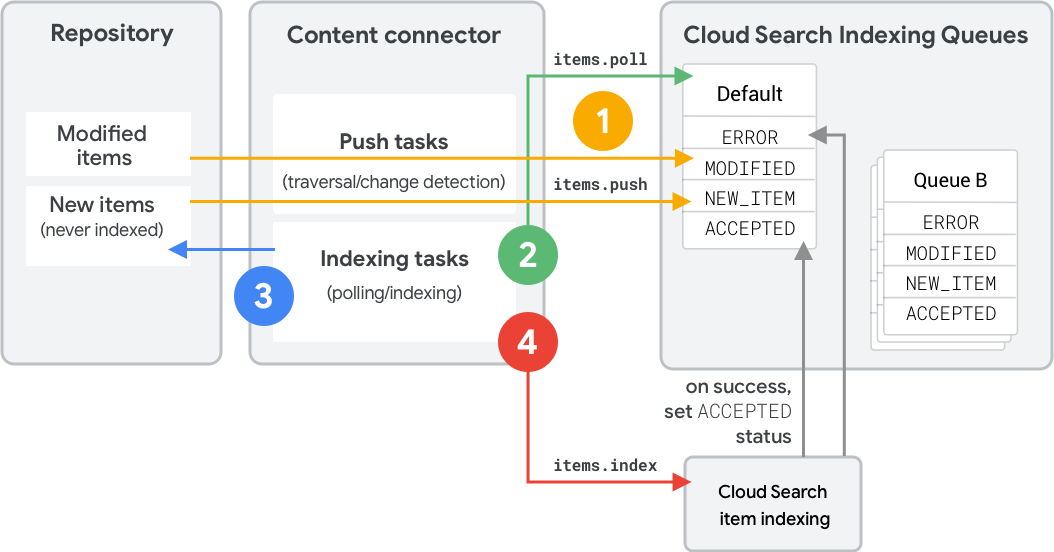
- The content connector uses
items.pushto push metadata and hashes into a queue.- If the connector includes a push
typeorcontentHash, Cloud Search determines the status. - Unknown items receive the
NEW_ITEMstatus. - Existing items with matching hashes stay
ACCEPTED. - Existing items with different hashes become
MODIFIED.
- If the connector includes a push
- The connector uses
items.pollto determine which items to index. Cloud Search returns items in priority order. - The connector retrieves items from the repository and builds index API requests.
- The connector uses
items.indexto index the items. An item enters theACCEPTEDstate after successful processing.
Delete an item
The full-traversal strategy uses two queues to index items and detect deletions. Figure 2 shows the second traversal in this strategy.
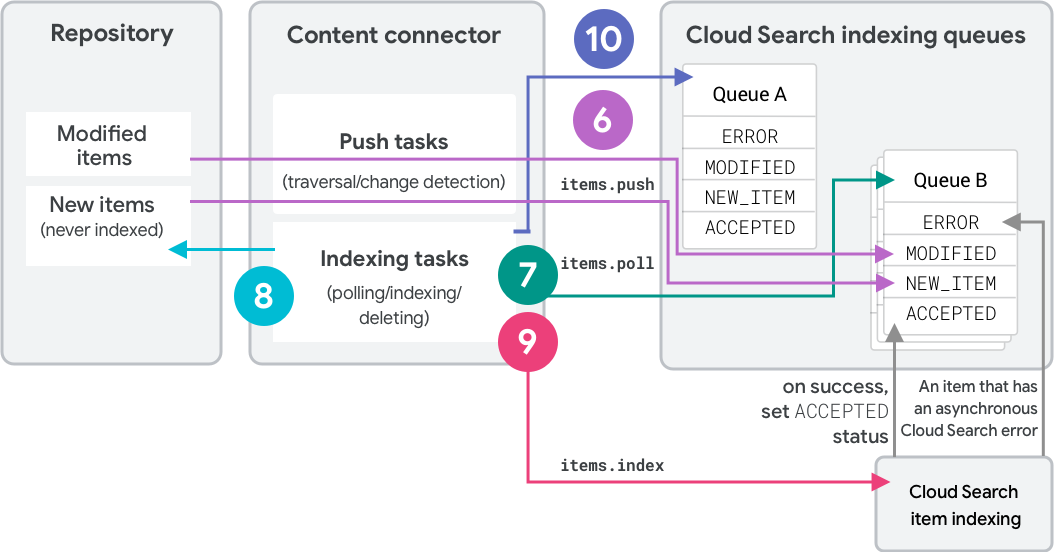
- On the initial traversal, the connector pushes items into "queue A" as
NEW_ITEM. Each item receives label "A." - The connector polls queue A and indexes the items.
- On the second full traversal, the connector pushes items into "queue B."
- Unknown items receive label "B" and status
NEW_ITEM. - Existing items with matching hashes change their label to "B" and stay
ACCEPTED. - Existing items with different hashes change their label to "B" and
become
MODIFIED.
- Unknown items receive label "B" and status
- The connector polls queue B and indexes the items.
- Finally, the connector calls
deleteQueueItemson queue A. This deletes all previously indexed items that still have label "A." - Subsequent traversals swap the roles of the two queues.
Queue operations (Connector SDK)
Use the
pushItems
builder to push items. The SDK automatically pulls items from the queue in
priority order using the Repository class's
getDoc
method.
Queue operations (REST API)
- To push: use
Items.push. - To poll: use
Items.poll.
You can also use
Items.index
to push items during indexing. These items receive the ACCEPTED status
automatically.
Items.push
This method adds IDs to the queue. The
type
determines the result. Pushing a new ID adds an entry with NEW_ITEM status.
The optional payload returns during polling.
Polled items are reserved and cannot be returned by other poll calls. Using
Items.push with type set to NOT_MODIFIED, REPOSITORY_ERROR, or
REQUEUE unreserves the entries.
Items.push with hashes
Specify metadata or content hashes in the push request.
Cloud Search compares these to stored values. If they mismatch,
the entry becomes MODIFIED. Mismatched IDs that don't exist become
NEW_ITEM.
Items.poll
This method retrieves high-priority entries. Each returned entry is reserved
until it times out, is reindexed, or is unreserved using Items.push.