
Cloud Search query interpretation automatically converts operators and filters in a user's query into a structured, operator-based query. The feature uses operators defined in the schema and indexed documents to deduce query intent. This lets users search with minimal keywords and obtain precise results.
Presentation of results depends on confidence. Confidence increases when
query strings consistently appear in specific schema fields (e.g., "Tom Hanks"
in an actors field). Confidence decreases when strings appear within general
prose. High confidence displays only interpreted results, while lower
confidence blends them with standard keyword results.
Example query interpretation
Consider a database containing movie information. Figure 1 shows a sample search query and its interpretation.
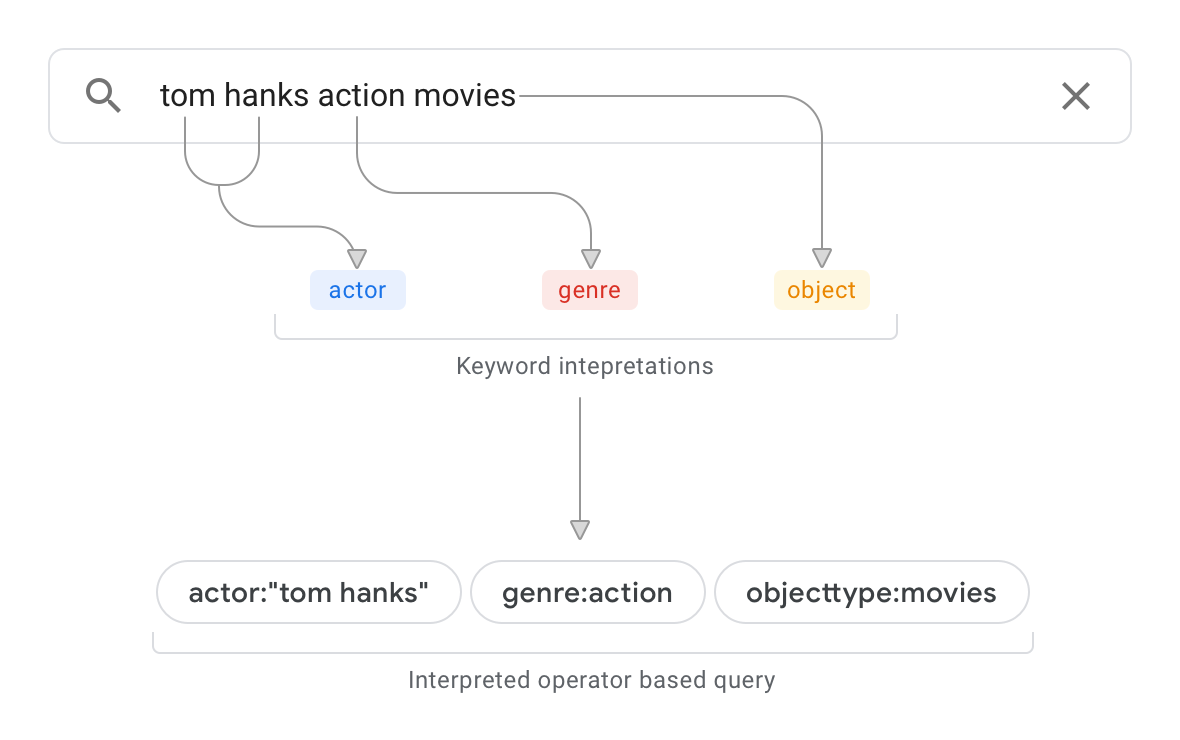
For this example, query interpretation:
- Determines from the schema that top-level objects are
objecttype:movies. - Scans documents to identify where "action" occurs. If it primarily appears
in a
genrefield, confidence increases that it is a property value for that field.
The resulting interpretation is:
actor:"tom hanks" genre:action objecttype:movies
Query interpretation is automatic for all users, but you can optimize it by structuring your schema as described in the following sections.
Structure your schema for query interpretation
Optimizing your schema ensures you benefit from query interpretation.
Enable display name interpretations
Query interpretation uses objectDefinitions and propertyDefinitions to
interpret queries. Create intuitive display names using
displayLabel
for properties,
objectDisplayLabel
for objects, and operatorName for operators.
This example shows intuitive display names for a movie object:
{
  "objectDefinitions": [{
    "name": "movie",
    "options": {
      "displayOptions": { "objectDisplayLabel": "Films" }
    },
    "propertyDefinitions": [{
      "name": "genre",
      "isReturnable": true,
      "textPropertyOptions": {
        "operatorOptions": { "operatorName": "genre" }
      },
      "displayOptions": { "displayLabel": "Category" }
    }]
  }]
}
These display names enable interpretations like:
- "action movies" ->
genre:action object:movies - "movies with genre action or thriller" ->
objecttype:movies genre:(action OR thriller) - "comedy category movies" ->
genre:comedy objecttype:movies
Enable date, numerical, and sort interpretations
Define lessThanOperatorName and greaterThanOperatorName in
IntegerOperatorOptions
for all date and numerical properties. To enable sorting, set isSortable.
This example enables these options:
{
  "objectDefinitions": [{
    "propertyDefinitions": [
      {
        "name": "runtime",
        "isSortable": true,
        "integerPropertyOptions": {
          "operatorOptions": {
            "operatorName": "runtime",
            "lessThanOperatorName": "runtimelessthan",
            "greaterThanOperatorName": "runtimegreaterthan"
          }
        }
      },
      {
        "name": "releasedate",
        "isSortable": true,
        "datePropertyOptions": {
          "operatorOptions": {
            "operatorName": "releasedate",
            "lessThanOperatorName": "releasedbefore",
            "greaterThanOperatorName": "releasedafter"
          }
        }
      }
    ]
  }]
}
These settings enable interpretations like:
- "movies released this year" ->
objecttype:movies releasedafter:2019-1-1 releasedbefore:2019-12-31 - "movies with runtime less than 90" ->
objecttype:movies runtimelessthan:90
Enable reserved operator interpretation
Use built-in operators like type, before, after, and objecttype:
- Populate
updateTimeinItemMetadatato usebeforeandafter. - Populate
mimeTypeinItemMetadatafor autodetection. For example, "action videos" lists documents with video MIME types.
Query interpretation limitations
- Works only for these data source ACLs:
- Domain public.
- Data source public.
- Majority of documents share the same inherited ACL.
- Shared operator names (e.g.,
priorityandseverityboth using 0-3) lower confidence. - By default, interpretation uses lowercase for field values unless you use
exactMatchWithOperator. - The
sourceoperator is not supported. - Combined operator and free-text terms (e.g., "p0 cases severity:s0") are not interpreted.
- Results are always blended with relevance-ranked results.