同步多个不同的身份系统

如需在 Google Cloud Search 中实现访问权限控制,您需要用到用户的 Google 账号。 将内容编入索引时,必须将各项内容中的所有 ACL 解析为有效的 Google 用户或群组 ID(电子邮件地址)。

在许多情况下,代码库中不会直接存储 Google 账号的信息。相反,本地账号代表用户,或者用户使用与身份提供商的联合登录。电子邮件地址以外的这种标识称为外部 ID

如果使用管理控制台创建身份源,可通过以下方式弥合多个身份系统之间的上述差异:

在以下情况下,请使用身份源:

  • 代码库不知道用户在 Google Workspace 或 Google Cloud Directory 中的主电子邮件地址。
  • 代码库定义的访问权限控制群组与 Google Workspace 中基于电子邮件地址的群组不对应。

身份源的优点是可通过将索引与身份映射分离来提高效率。这样一来,您就可以在创建 ACL 和将各项内容编入索引时推迟查询用户。

部署示例

图 1 展示了同时使用本地代码库和云端代码库的企业。每种代码库都使用不同类型的外部 ID。
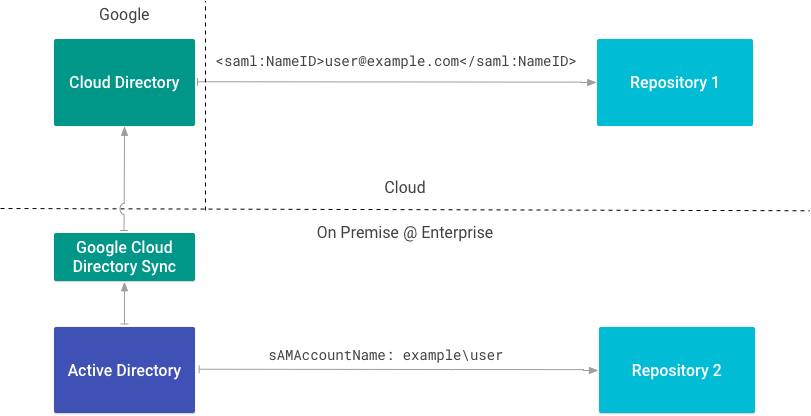
具有不同身份类型的企业部署示例
图 1. 具有不同身份类型的企业部署示例。

代码库 1 使用 SAML 通过电子邮件地址标识用户。由于它知道 Google Workspace 或 Cloud Directory 中的主电子邮件地址,因此不需要身份源。

代码库 2 与本地目录集成,并通过 sAMAccountName 标识用户。由于它使用此属性作为外部 ID,因此需要身份源。

创建身份源

如果您需要用到身份源,请参阅在 Cloud Search 中映射用户身份

在创建内容连接器之前,请先创建身份源;您需要使用其 ID 来创建 ACL 并将数据编入索引。创建身份源时还会在 Cloud Directory 中创建自定义用户属性以存储外部 ID。属性名称遵循 IDENTITY_SOURCE_ID_identity 命名规范。

下表显示了两个身份源:一个用于 SAM 账号名称,另一个用于用户 ID (uid)。

身份源 用户属性 外部 ID
id1 id1_identity sAMAccountName
id2 id2_identity uid

为企业中使用的每种类型的外部 ID 创建一个身份源。

下表显示了具有 Google 账号和两个外部 ID 的用户在 Cloud Directory 中的显示方式:

用户 电子邮件 id1_identity id2_identity
小安 ann@example.com example\ann 1001

在生成用于索引的 ACL 时,您可以使用这些 ID 中的任意一个来引用同一用户。

编写用户 ACL

使用 getUserPrincipal()getGroupPrincipal() 可使用外部 ID 创建主账号。

此示例检索文件权限,包括具有访问权限的用户:

FilePermissionSample.java
/**
 * Sample for mapping permissions from a source repository to Cloud Search
 * ACLs. In this example, POSIX file permissions are used a the source
 * permissions.
 *
 * @return Acl
 * @throws IOException if unable to read file permissions
 */
static Acl mapPosixFilePermissionToCloudSearchAcl(Path pathToFile) throws IOException {
  // Id of the identity source for external user/group IDs. Shown here,
  // but may be omitted in the SDK as it is automatically applied
  // based on the `api.identitySourceId` configuration parameter.
  String identitySourceId = "abcdef12345";

  // Retrieve the file system permissions for the item being indexed.
  PosixFileAttributeView attributeView = Files.getFileAttributeView(
      pathToFile,
      PosixFileAttributeView.class,
      LinkOption.NOFOLLOW_LINKS);

  if (attributeView == null) {
    // Can't read, return empty ACl
    return new Acl.Builder().build();
  }

  PosixFileAttributes attrs = attributeView.readAttributes();
  // ...
}

以下代码段使用 externalUserName 属性为所有者创建了主账号:

FilePermissionSample.java
// Owner, for search quality.
// Note that for principals the name is not the primary
// email address in Cloud Directory, but the local ID defined
// by the OS. Users and groups must be referred to by their
// external ID and mapped via an identity source.
List<Principal> owners = Collections.singletonList(
    Acl.getUserPrincipal(attrs.owner().getName(), identitySourceId)
);

此代码段会为读者创建主账号:

FilePermissionSample.java
// List of users to grant access to
List<Principal> readers = new ArrayList<>();

// Add owner, group, others to readers list if permissions
// exist. For this example, other is mapped to everyone
// in the organization.
Set<PosixFilePermission> permissions = attrs.permissions();
if (permissions.contains(PosixFilePermission.OWNER_READ)) {
  readers.add(Acl.getUserPrincipal(attrs.owner().getName(), identitySourceId));
}
if (permissions.contains(PosixFilePermission.GROUP_READ)) {
  String externalGroupName = attrs.group().getName();
  Principal group = Acl.getGroupPrincipal(externalGroupName, identitySourceId);
  readers.add(group);
}
if (permissions.contains(PosixFilePermission.OTHERS_READ)) {
  Principal everyone = Acl.getCustomerPrincipal();
  readers.add(everyone);
}

掌握读取者和所有者的信息后,您便可以创建 ACL:

FilePermissionSample.java
// Build the Cloud Search ACL. Note that inheritance of permissions
// from parents is omitted. See `setInheritFrom()` and `setInheritanceType()`
// methods on the builder if required by your implementation.
Acl acl = new Acl.Builder()
    .setReaders(readers)
    .setOwners(owners)
    .build();

REST API 使用以下格式:identitysources/IDENTITY_SOURCE_ID/users/EXTERNAL_ID。 安的 id1_identity 解析为 identitysources/id1_identity/users/example/ann。这是用户的中间 ID

如需详细了解如何为代码库 ACL 建模,请参阅 ACL

映射群组

除上述作用外,身份源还可用作 ACL 群组的命名空间。使用此功能可创建和映射仅用于安全目的或存储在代码库的群组。

您可以使用 Cloud Identity Groups API 创建群组以及管理成员。使用身份源名称作为命名空间,将群组与身份源相关联。

此代码段会创建一个群组:

CreateGroupCommand.java
String namespace = "identitysources/" + idSource;
Group group = new Group()
    .setGroupKey(new EntityKey().setNamespace(namespace).setId(groupId))
    .setDescription("Demo group")
    .setDisplayName(groupName)
    .setLabels(Collections.singletonMap("system/groups/external", ""))
    .setParent(namespace);
try {
  CloudIdentity service = Utils.buildCloudIdentityService();
  Operation createOperation = service.groups().create(group).execute();

  if (createOperation.getDone()) {
    // Note: The response contains the data for a Group object, but as
    // individual fields. To convert to a Group instance, either populate
    // the fields individually or serialize & deserialize to/from JSON.
    //
    // Example:
    // String json = service.getJsonFactory().toString(response);
    // Group createdGroup =  service.getObjectParser()
    //     .parseAndClose(new StringReader(json), Group.class);
    System.out.printf("Group: %s\n",
        createOperation.getResponse().toString());
  } else {
    // Handle case where operation not yet complete, poll for
    // completion. API is currently synchronous and all operations return
    // as completed.
    // ...
  }
} catch (Exception e) {
  System.err.printf("Unable to create group: %s", e.getMessage());
  e.printStackTrace(System.err);
}

创建群组 ACL

使用 getGroupPrincipal() 创建具有外部 ID 的群组主账号,然后构建 ACL:

FilePermissionSample.java
if (permissions.contains(PosixFilePermission.GROUP_READ)) {
  String externalGroupName = attrs.group().getName();
  Principal group = Acl.getGroupPrincipal(externalGroupName, identitySourceId);
  readers.add(group);
}

身份连接器

在用户的外部 ID 解析为 Cloud Directory 中的 Google ID 之前,用户无法查看搜索结果中的内容。您可以通过以下三种方式确保这一点:

身份连接器可将企业身份的外部 ID 映射到内部 Google 身份。如果您创建身份源,还必须创建身份连接器。

Google Cloud Directory Sync (GCDS) 就是一个身份连接器。它将用户和群组信息从 Active Directory 映射到 Cloud Directory。

使用 REST API 同步身份

使用 update 方法同步身份。

重新映射身份

重新映射身份后,您必须重新为商品编制索引,才能使更改生效。

  • 如果您移除或更改用户映射,则原始映射会一直保留,直到重新编制索引。
  • 如果您删除已映射的群组并创建具有相同 groupKey 的新群组,则在重新编制索引之前,新群组不会获得访问权限。