

การควบคุมการเข้าถึงใน Google Cloud Search จะอิงตามบัญชี Google ของผู้ใช้ เมื่อจัดทำดัชนีเนื้อหา ACL ของรายการทั้งหมดต้องเปลี่ยนเป็นรหัสผู้ใช้หรือกลุ่ม Google ที่ถูกต้อง (อีเมล)
ในหลายกรณี ที่เก็บไม่มีความรู้โดยตรงเกี่ยวกับบัญชี Google แต่บัญชีในเครื่องจะแสดงถึงผู้ใช้ หรือผู้ใช้จะใช้การลงชื่อเข้าใช้แบบรวมกับผู้ให้บริการข้อมูลประจำตัว การระบุตัวตนนี้ซึ่งไม่ใช่ที่อยู่อีเมลเรียกว่ารหัสภายนอก
แหล่งที่มาของข้อมูลประจำตัวที่สร้างขึ้นโดยใช้คอนโซลผู้ดูแลระบบจะช่วยเชื่อมช่องว่างระหว่างระบบข้อมูลประจำตัวโดยทำสิ่งต่อไปนี้
- การกําหนดฟิลด์ผู้ใช้ที่กําหนดเอง เพื่อจัดเก็บรหัสภายนอก ฟิลด์นี้จะแปลงรหัสภายนอกเป็นบัญชี Google
- การกำหนดเนมสเปซสำหรับกลุ่มความปลอดภัย ที่จัดการโดยที่เก็บหรือผู้ให้บริการข้อมูลประจำตัว
ใช้แหล่งที่มาของข้อมูลประจำตัวในกรณีต่อไปนี้
- ที่เก็บไม่ทราบอีเมลหลักของผู้ใช้ใน Google Workspace หรือ Google Cloud Directory
- ที่เก็บจะกำหนดกลุ่มควบคุมการเข้าถึงที่ไม่สอดคล้องกับกลุ่มที่อิงตามอีเมลใน Google Workspace
แหล่งที่มาของข้อมูลประจำตัวช่วยเพิ่มประสิทธิภาพด้วยการแยกการจัดทำดัชนีจากการแมปข้อมูลประจำตัว ซึ่งช่วยให้คุณเลื่อนการค้นหาผู้ใช้เมื่อสร้าง ACL และจัดทำดัชนีรายการได้
ตัวอย่างการติดตั้งใช้งาน
รูปที่ 1 แสดงองค์กรที่ใช้ทั้งที่เก็บข้อมูลในองค์กรและที่เก็บข้อมูลในระบบคลาวด์ โดยแต่ละรายการจะใช้รหัสภายนอกประเภทต่างๆ
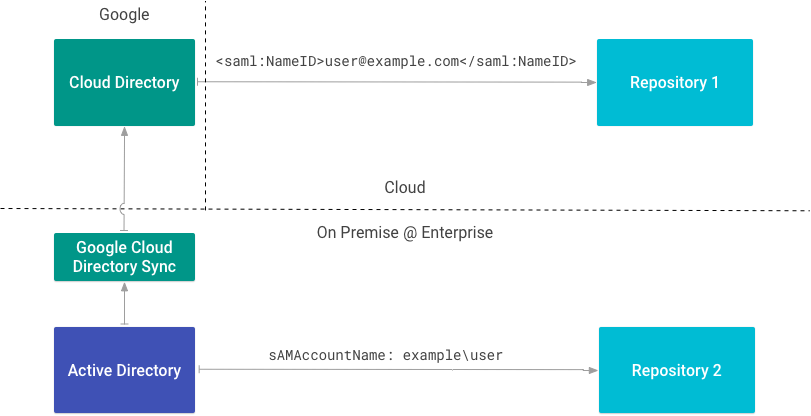
ที่เก็บ 1 ระบุผู้ใช้ด้วยอีเมลโดยใช้ SAML เนื่องจากทราบ อีเมลหลักใน Google Workspace หรือ Cloud Directory จึง ไม่จำเป็นต้องมีแหล่งข้อมูลประจำตัว
ที่เก็บ 2 ทำงานร่วมกับไดเรกทอรีในองค์กรและระบุผู้ใช้ตาม
sAMAccountName เนื่องจากใช้แอตทริบิวต์นี้เป็นรหัสภายนอก จึงต้องมีแหล่งที่มาของข้อมูลระบุตัวตน
สร้างแหล่งที่มาของข้อมูลประจำตัว
หากต้องการแหล่งที่มาของข้อมูลประจำตัว โปรดดูแมปข้อมูลประจำตัวของผู้ใช้ใน Cloud Search
สร้างแหล่งที่มาของข้อมูลประจำตัวก่อนสร้างตัวเชื่อมต่อเนื้อหา คุณต้องใช้รหัสของแหล่งที่มาของข้อมูลประจำตัวเพื่อสร้าง ACL และจัดทำดัชนีข้อมูล การสร้างแหล่งที่มาของข้อมูลประจำตัวยังสร้างพร็อพเพอร์ตี้ผู้ใช้ที่กำหนดเองใน Cloud Directory เพื่อจัดเก็บรหัสภายนอกด้วย ชื่อพร็อพเพอร์ตี้ใช้รูปแบบ IDENTITY_SOURCE_ID_identity
ตารางนี้แสดงแหล่งที่มาของข้อมูลประจำตัว 2 แหล่ง ได้แก่ แหล่งที่มาสำหรับชื่อบัญชี SAM และแหล่งที่มาสำหรับ รหัสผู้ใช้ (uid)
| แหล่งที่มาของข้อมูลประจำตัว | พร็อพเพอร์ตี้ผู้ใช้ | รหัสภายนอก |
|---|---|---|
id1 |
id1_identity |
sAMAccountName |
id2 |
id2_identity |
uid |
สร้างแหล่งที่มาของข้อมูลประจำตัวสำหรับรหัสภายนอกแต่ละประเภทที่ใช้ในองค์กร
ตารางนี้แสดงลักษณะของผู้ใช้ที่มีบัญชี Google และรหัสภายนอก 2 รายการ ใน Cloud Directory
| ผู้ใช้ | อีเมล | id1_identity |
id2_identity |
|---|---|---|---|
| Ann | ann@example.com |
example\ann |
1001 |
คุณอ้างอิงผู้ใช้รายเดียวกันได้โดยใช้รหัสใดก็ได้เหล่านี้เมื่อสร้าง ACL สำหรับ การจัดทำดัชนี
เขียน ACL ของผู้ใช้
ใช้
getUserPrincipal()
หรือ
getGroupPrincipal()
เพื่อสร้างหลักการโดยใช้รหัสภายนอก
ตัวอย่างนี้จะดึงสิทธิ์ในไฟล์ รวมถึงผู้ใช้ที่มีสิทธิ์เข้าถึง
ข้อมูลโค้ดนี้จะสร้างหลักการสำหรับเจ้าของโดยใช้แอตทริบิวต์ externalUserName
ข้อมูลโค้ดนี้จะสร้างหลักการสำหรับผู้อ่าน
เมื่อมีผู้อ่านและเจ้าของแล้ว ให้สร้าง ACL ดังนี้
REST API ใช้รูปแบบ
identitysources/IDENTITY_SOURCE_ID/users/EXTERNAL_ID
id1_identity ของ Ann เปลี่ยนเป็น
identitysources/id1_identity/users/example/ann นี่คือรหัสระดับกลางของผู้ใช้
ดูข้อมูลเพิ่มเติมเกี่ยวกับการสร้าง ACL ของที่เก็บได้ที่ ACL
แมปกลุ่ม
แหล่งที่มาของข้อมูลระบุตัวตนยังทำหน้าที่เป็นเนมสเปซสำหรับกลุ่ม ACL ด้วย ใช้เพื่อสร้าง และแมปกลุ่มที่ใช้เพื่อความปลอดภัยเท่านั้นหรือเฉพาะที่ในที่เก็บ
ใช้ Cloud Identity Groups API เพื่อสร้างกลุ่มและจัดการการเป็นสมาชิก เชื่อมโยงกลุ่มกับแหล่งข้อมูลประจำตัวโดยใช้ชื่อแหล่งข้อมูลประจำตัวเป็นเนมสเปซ
ข้อมูลโค้ดนี้จะสร้างกลุ่ม
สร้าง ACL ของกลุ่ม
ใช้ getGroupPrincipal()
เพื่อสร้างหลักของกลุ่มที่มีรหัสภายนอก จากนั้นสร้าง ACL ดังนี้
เครื่องมือเชื่อมต่อข้อมูลประจำตัว
ผู้ใช้จะดูรายการในผลการค้นหาไม่ได้จนกว่ารหัสภายนอกจะเปลี่ยนเป็น รหัส Google ใน Cloud Directory คุณตรวจสอบได้ 3 วิธีดังนี้
- อัปเดตโปรไฟล์ผู้ใช้ด้วยตนเองในคอนโซลผู้ดูแลระบบ (แนะนําสําหรับการทดสอบเท่านั้น)
- แมปรหัสโดยใช้ Directory API
- สร้างโปรแกรมเชื่อมต่อข้อมูลประจำตัว โดยใช้ SDK ของโปรแกรมเชื่อมต่อข้อมูลประจำตัว
ตัวเชื่อมต่อข้อมูลประจำตัวจะจับคู่รหัสภายนอกจากข้อมูลประจำตัวขององค์กรกับข้อมูลประจำตัวภายในของ Google หากสร้างแหล่งข้อมูลประจำตัว คุณต้องสร้าง เครื่องมือเชื่อมต่อข้อมูลประจำตัวด้วย
Google Cloud Directory Sync (GCDS) เป็นตัวอย่างของตัวเชื่อมต่อข้อมูลประจำตัว โดยจะแมปข้อมูลผู้ใช้และกลุ่ม จาก Active Directory ไปยัง Cloud Directory
ซิงค์ข้อมูลประจำตัวโดยใช้ REST API
ใช้วิธี update
เพื่อซิงค์ข้อมูลประจำตัว
แมปข้อมูลประจำตัวใหม่
หลังจากแมปข้อมูลระบุตัวตนใหม่แล้ว คุณต้องจัดทำดัชนีรายการอีกครั้งเพื่อให้การเปลี่ยนแปลงมีผล
- หากนำการแมปผู้ใช้ออกหรือเปลี่ยนการแมปผู้ใช้ การแมปเดิมจะยังคงอยู่จนกว่าจะมีการจัดทำดัชนีอีกครั้ง
- หากลบกลุ่มที่แมปไว้และสร้างกลุ่มใหม่โดยใช้
groupKeyเดียวกัน ระบบจะไม่ให้สิทธิ์เข้าถึงจนกว่าคุณจะจัดทำดัชนีอีกครั้ง