
To ensure that only users with access to an item can see it in search results, index items with their access control lists (ACLs) from the enterprise repository. You must model the repository ACLs and include them when indexing items. The Content Connector SDK provides methods to model the ACLs of most repositories.
Create an ACL
Creating an ACL is a two-step process:
- Create a
Principalusing static methods in the ACL class. - Use the
Acl.Builderclass to build the ACL using the principal.
This document covers concepts to model and create ACLs, such as inheritance and containment.
Create a principal using an external ID
Google Cloud Search requires users and groups to resolve to Google email
addresses. When indexing repository items, content connectors might not have
these email addresses. However, the Content Connector SDK lets you use an
external ID (an ID granting a user or group access to repository items)
instead of an email address to index an item. Use the
getUserPrincipal
method or the
getGroupPrincipal
method to create principals containing external IDs. The
ACL
class includes several other static methods to build Principal objects.
After remapping an item's identity, you must reindex items for the new identity to take effect. For more information, refer to Remapping identities.
ACL inheritance
ACL inheritance refers to the authorization for a specific item and user based on the combined ACLs of the item and its inheritance chain. The rules for an authorization decision depend on the repository and the item properties.
Set inheritance
Each item can have direct allowed principals and direct denied principals,
specified using the
setReaders
and
setDeniedReaders
methods. A direct allowed principal is a user identified in an ACL with direct
access to an item. A direct denied principal is a user identified in an ACL as
not having access to an item.
An item can also inherit indirect allowed principals and indirect denied
principals using the
setInheritFrom
method. An indirect allowed principal has indirect access to an item through ACL
inheritance. An indirect denied principal is denied access through inheritance.
Figure 1 shows how to use the
setInheritFrom
method to inherit principals.
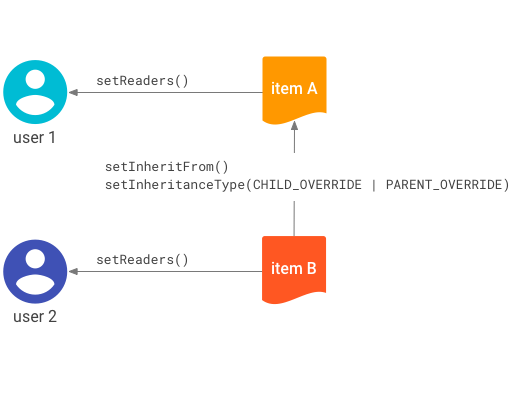
setInheritFrom
method.Figure 1 represents these access controls:
- User 1 is a direct allowed principal of item A.
- User 2 is a direct allowed principal of item B.
- Item B inherits the ACL of item A.
Based on these controls, the access rules are:
- User 1 is an indirect allowed principal of item B without being explicitly specified; the access is inherited from item A.
- User 2 is not an indirect allowed principal of item A.
Set inheritance type
If you set inheritance using the
setInheritFrom
method, you must set the inheritance type using the
setInheritanceType
method. The inheritance type determines how a child ACL combines with a parent
ACL. The
Acl.InheritanceType
implements three types:
BOTH_PERMIT- Grant access only when both the child and parent ACLs allow it.CHILD_OVERRIDE- The child ACL takes precedence over the parent ACL in case of conflict. A user can access the child even if the parent denies it, or be denied access to the child even if the parent allows it.PARENT_OVERRIDE- The parent ACL takes precedence over the child ACL in case of conflict.
Cloud Search evaluates ACL inheritance chains from leaf to root. The evaluation starts with the child and its parents, and can progress to the root parent.
For example, if the child uses CHILD_OVERRIDE and the user has access,
Cloud Search doesn't need to evaluate the parent. However, if the
child uses PARENT_OVERRIDE or BOTH_PERMIT, Cloud Search
continues evaluating up the chain.
Containment and item deletion
When indexing an item, you can label it as a container using the
setContainer
method of the
IndexingItemBuilder
class. This relationship establishes the physical hierarchy and ensures proper
deletion. When you delete a container, its contained items are also deleted.
Containment relationships are independent from ACL inheritance rules. For example, a folder can contain a file for deletion purposes, but the file can inherit its ACL from a different folder. Deleting a folder doesn't delete items that inherit its ACL unless those items are also in its containment hierarchy.
Figure 2 represents these access controls:
- User 1 is a direct allowed principal of item A.
- User 2 is a direct allowed principal of item B.
- User 3 is a direct allowed principal of item C.
- Item C inherits the ACL of item A.
- Item B names item A as its container.
- Item C names item B as its container.
Based on these controls, the access rules are:
- Indirect access comes from the
setInheritFrommethod. User 1 can access item C because it inherits from item A. - Indirect access doesn't come from containment. User 2 cannot access item C.
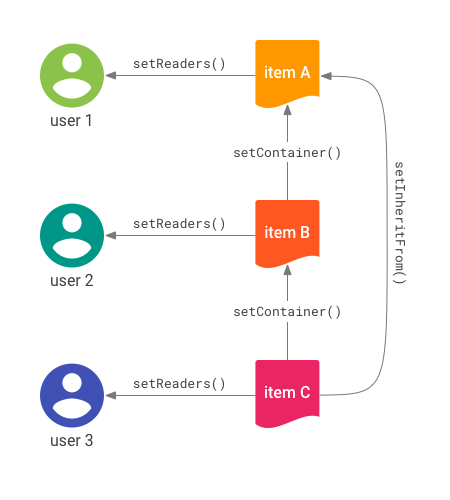
setInheritFrom
method in use.The separation of ACL inheritance from containment lets you model many structures.
When you delete an item:
- Any item containing the deleted item becomes unsearchable and is scheduled for deletion.
- Any item specifying the deleted item in
setInheritFrombecomes unsearchable.
If a resource uses setInheritFrom for a deleted item but has no container set
or its hierarchy contains no deleted items, the item remains in the data source.
You are responsible for deleting it.
Figure 3 shows an example of deletion for an item hierarchy.
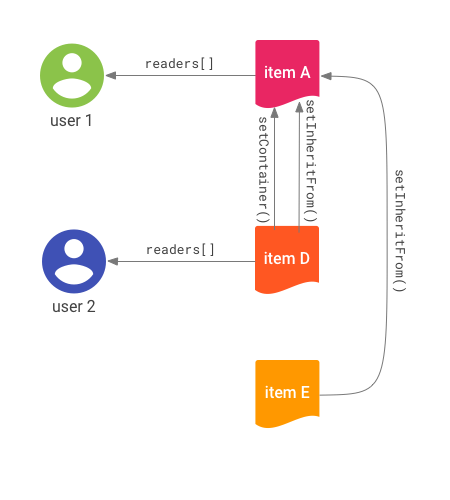
Figure 3 represents these access controls:
- User 1 is a direct allowed principal of item A.
- User 2 is a direct allowed principal of item D.
- Items D and E both inherit from item A.
- Item D names item A as its container.
- Items A and E are root-level items.
Deletions cascade through container references. When you delete item A:
- All descendants of the
setInheritFromreference lose access. - Users can no longer access item A.
- Item D is implicitly deleted and becomes inaccessible.
- Item E is not deleted but becomes unreachable and unsearchable.