

rubric คือเทมเพลตที่ครูใช้ได้เมื่อให้คะแนนงานที่นักเรียนส่ง
Classroom API ช่วยให้คุณดำเนินการในนามของครูเพื่อจัดการเกณฑ์การให้คะแนนเหล่านี้ รวมถึงอ่านคะแนนตามเกณฑ์การให้คะแนนในงานที่นักเรียนส่ง
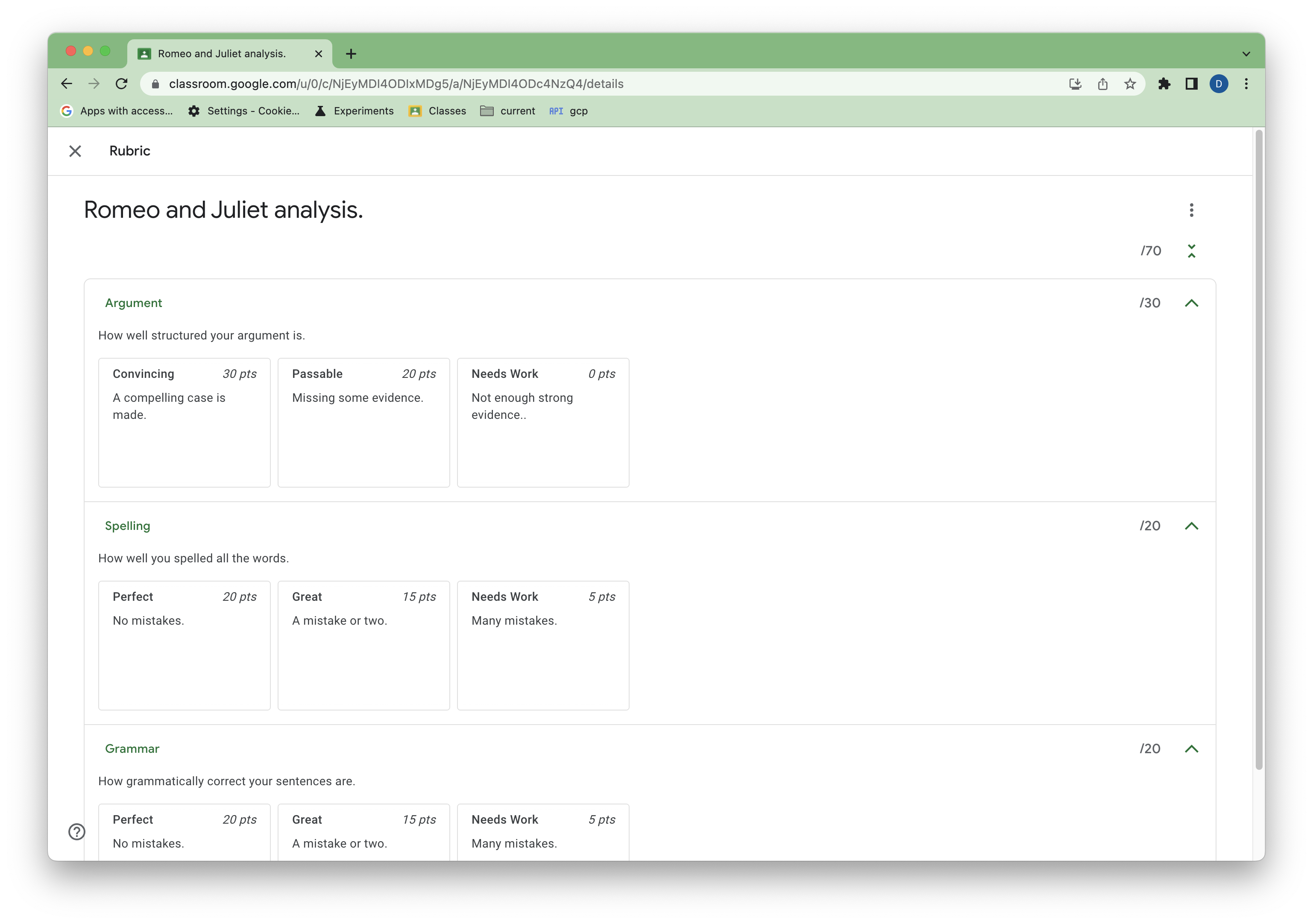 รูปที่ 1 มุมมองของเกณฑ์การให้คะแนนตัวอย่างในงานของ Classroom
คู่มือนี้จะอธิบายแนวคิดและฟังก์ชันการทำงานพื้นฐานของ Rubrics API โปรดดู บทความในศูนย์ช่วยเหลือเหล่านี้เพื่อดูโครงสร้างทั่วไปของเกณฑ์การให้คะแนน และวิธีให้คะแนนตามเกณฑ์การให้คะแนนใน UI ของ Classroom
ข้อกำหนดเบื้องต้น
คู่มือนี้จะถือว่าคุณมีสิ่งต่อไปนี้
- Python 3.8.6 ขึ้นไป
- เครื่องมือจัดการแพ็กเกจ pip
- โปรเจ็กต์ Google Cloud
บัญชีสถานศึกษา Google Workspace for Education ที่เปิดใช้ Google Classroom และมีใบอนุญาต Google Workspace for Education Plus มอบหมายให้บัญชีดังกล่าว คุณขอรับบัญชีเดโมสำหรับนักพัฒนาแอป ที่อัปเกรดแล้วได้หากยังไม่มี
ได้ที่ฟีเจอร์และแผนงานเวอร์ชันตัวอย่างชั้นเรียนทดสอบที่มีบัญชีนักเรียนทดสอบอย่างน้อย 1 บัญชี หากไม่มีชั้นเรียนใน Classroom ที่ใช้ทดสอบได้ ให้สร้างชั้นเรียนใน UI แล้ว เพิ่มนักเรียนทดสอบ
ให้สิทธิ์ข้อมูลเข้าสู่ระบบสำหรับแอปพลิเคชันบนเดสก์ท็อป
หากต้องการตรวจสอบสิทธิ์ในฐานะผู้ใช้ปลายทางและเข้าถึงข้อมูลผู้ใช้ในแอป คุณต้องสร้างรหัสไคลเอ็นต์ OAuth 2.0 อย่างน้อย 1 รายการ รหัสไคลเอ็นต์ใช้เพื่อระบุแอปเดี่ยวไปยังเซิร์ฟเวอร์ OAuth ของ Google หากแอปทำงานบนหลายแพลตฟอร์ม คุณต้องสร้างรหัสไคลเอ็นต์แยกต่างหากสำหรับแต่ละแพลตฟอร์ม
- ไปที่หน้าข้อมูลเข้าสู่ระบบของ Google Cloud ใน คอนโซล Google Cloud
- คลิกสร้างข้อมูลเข้าสู่ระบบ > รหัสไคลเอ็นต์ OAuth
- คลิกประเภทแอปพลิเคชัน > แอปบนเดสก์ท็อป
- พิมพ์ชื่อของข้อมูลเข้าสู่ระบบในช่องชื่อ ชื่อนี้จะแสดงในคอนโซล Google Cloud เท่านั้น เช่น "ไคลเอ็นต์เกณฑ์การให้คะแนน"
- คลิกสร้าง หน้าจอ "สร้างไคลเอ็นต์ OAuth แล้ว" จะปรากฏขึ้นพร้อมแสดงรหัสไคลเอ็นต์และรหัสลับไคลเอ็นต์ใหม่
- คลิกดาวน์โหลด JSON แล้วคลิกตกลง ข้อมูลเข้าสู่ระบบที่สร้างขึ้นใหม่จะปรากฏในส่วนรหัสไคลเอ็นต์ OAuth 2.0
- บันทึกไฟล์ JSON ที่ดาวน์โหลดเป็น
credentials.jsonแล้วย้ายไฟล์ไปยังไดเรกทอรีงาน - คลิกสร้างข้อมูลเข้าสู่ระบบ > คีย์ API แล้วจดคีย์ API ไว้
ดูข้อมูลเพิ่มเติมได้ที่ สร้างข้อมูลเข้าสู่ระบบ
กำหนดค่าขอบเขต OAuth
คุณอาจต้องกำหนดค่าขอบเขตเพิ่มเติม ทั้งนี้ขึ้นอยู่กับขอบเขต OAuth ที่มีอยู่ของโปรเจ็กต์
- ไปที่หน้าจอขอความยินยอม OAuth
- คลิกแก้ไขแอป > บันทึกและดำเนินการต่อ เพื่อไปยังหน้าจอขอบเขต
- คลิกเพิ่มหรือนำขอบเขตออก
- เพิ่มขอบเขตต่อไปนี้หากยังไม่มี
https://www.googleapis.com/auth/classroom.coursework.studentshttps://www.googleapis.com/auth/classroom.courses
- จากนั้นคลิกอัปเดต > บันทึกและดำเนินการต่อ > บันทึกและดำเนินการต่อ > กลับไปยังหน้าแดชบอร์ด
ดูข้อมูลเพิ่มเติมได้ที่ กำหนดค่าหน้าจอขอความยินยอม OAuth
ขอบเขต classroom.coursework.students ช่วยให้เข้าถึงเกณฑ์การให้คะแนนได้ทั้งแบบอ่านและเขียน (รวมถึงเข้าถึง CourseWork) และขอบเขต classroom.courses ช่วยให้อ่านและเขียนหลักสูตรได้
ขอบเขตที่จำเป็นสำหรับเมธอดหนึ่งๆ จะแสดงอยู่ในเอกสารอ้างอิงของเมธอดนั้น ดูขอบเขตการให้สิทธิ์ courses.courseWork.rubrics.create
เป็นตัวอย่าง คุณจะเห็นขอบเขตทั้งหมดของ Classroom ใน ขอบเขต OAuth 2.0 สำหรับ Google
APIs
กำหนดค่าตัวอย่าง
ติดตั้งไลบรารีของไคลเอ็นต์ Google สำหรับ Python ในไดเรกทอรีงานโดยทำดังนี้
pip install --upgrade google-api-python-client google-auth-httplib2 google-auth-oauthlib
สร้างไฟล์ชื่อ main.py ที่สร้างไลบรารีของไคลเอ็นต์และให้สิทธิ์ผู้ใช้ โดยใช้คีย์ API แทน YOUR_API_KEY ดังนี้
import json
import os.path

from google.auth.transport.requests import Request
from google.oauth2.credentials import Credentials
from google_auth_oauthlib.flow import InstalledAppFlow
from googleapiclient.discovery import build
from googleapiclient.errors import HttpError

# If modifying these scopes, delete the file token.json.
SCOPES = ['https://www.googleapis.com/auth/classroom.courses',
          'https://www.googleapis.com/auth/classroom.coursework.students']

def build_authenticated_service(api_key):
    """Builds the Classroom service."""
    creds = None
    # The file token.json stores the user's access and refresh tokens, and is
    # created automatically when the authorization flow completes for the first
    # time.
    if os.path.exists('token.json'):
        creds = Credentials.from_authorized_user_file('token.json', SCOPES)
    # If there are no (valid) credentials available, let the user log in.
    if not creds or not creds.valid:
        if creds and creds.expired and creds.refresh_token:
            creds.refresh(Request())
        else:
            flow = InstalledAppFlow.from_client_secrets_file(
                'credentials.json', SCOPES)
            creds = flow.run_local_server(port=0)
        # Save the credentials for the next run.
        with open('token.json', 'w') as token:
            token.write(creds.to_json())

    try:
        # Build the Classroom service.
        service = build(
            serviceName="classroom",
            version="v1",
            credentials=creds,
            discoveryServiceUrl=f"https://classroom.googleapis.com/$discovery/rest?labels=DEVELOPER_PREVIEW&key={api_key}")

        return service

    except HttpError as error:
        print('An error occurred: %s' % error)

if __name__ == '__main__':
    service = build_authenticated_service(YOUR_API_KEY)
เรียกใช้สคริปต์โดยใช้ python main.py ระบบควรแจ้งให้คุณลงชื่อเข้าใช้และให้ความยินยอมขอบเขต OAuth
สร้างงาน
เกณฑ์การให้คะแนนจะเชื่อมโยงกับงานหรือ CourseWork และมีความหมายเฉพาะในบริบทของ CourseWork นั้นๆ เกณฑ์การให้คะแนนจะสร้างได้โดยโปรเจ็กต์ที่อยู่ในระบบคลาวด์ของ Google ที่สร้างรายการ CourseWork หลัก เท่านั้น สำหรับคู่มือนี้ ให้สร้างงาน CourseWork ใหม่ด้วยสคริปต์
เพิ่มโค้ดต่อไปนี้ลงใน main.py
def get_latest_course(service):
    """Retrieves the last created course."""
    try:
        response = service.courses().list(pageSize=1).execute()
        courses = response.get("courses", [])
        if not courses:
            print("No courses found. Did you remember to create one in the UI?")
            return
        course = courses[0]
        return course

    except HttpError as error:
        print(f"An error occurred: {error}")
        return error

def create_coursework(service, course_id):
    """Creates and returns a sample coursework."""
    try:
        coursework = {
            "title": "Romeo and Juliet analysis.",
            "description": """Write a paper arguing that Romeo and Juliet were
                                time travelers from the future.""",
            "workType": "ASSIGNMENT",
            "state": "PUBLISHED",
        }
        coursework = service.courses().courseWork().create(
            courseId=course_id, body=coursework).execute()
        return coursework

    except HttpError as error:
        print(f"An error occurred: {error}")
        return error
ตอนนี้ให้อัปเดต main.py เพื่อดึงข้อมูล course_id ของชั้นเรียนทดสอบที่คุณเพิ่งสร้าง สร้างงานตัวอย่างใหม่ และดึงข้อมูล coursework_id ของงาน
if __name__ == '__main__':
    service = build_authenticated_service(YOUR_API_KEY)

    course = get_latest_course(service)
    course_id = course.get("id")
    course_name = course.get("name")
    print(f"'{course_name}' course ID: {course_id}")

    coursework = create_coursework(service, course_id)
    coursework_id = coursework.get("id")
    print(f"Assignment created with ID {coursework_id}")

    #TODO(developer): Save the printed course and coursework IDs.
บันทึก course_id และ coursework_id คุณต้องใช้รหัสเหล่านี้สำหรับการดำเนินการ CRUD ทั้งหมดของเกณฑ์การให้คะแนน
ตอนนี้คุณควรมี CourseWork ตัวอย่างใน Classroom แล้ว
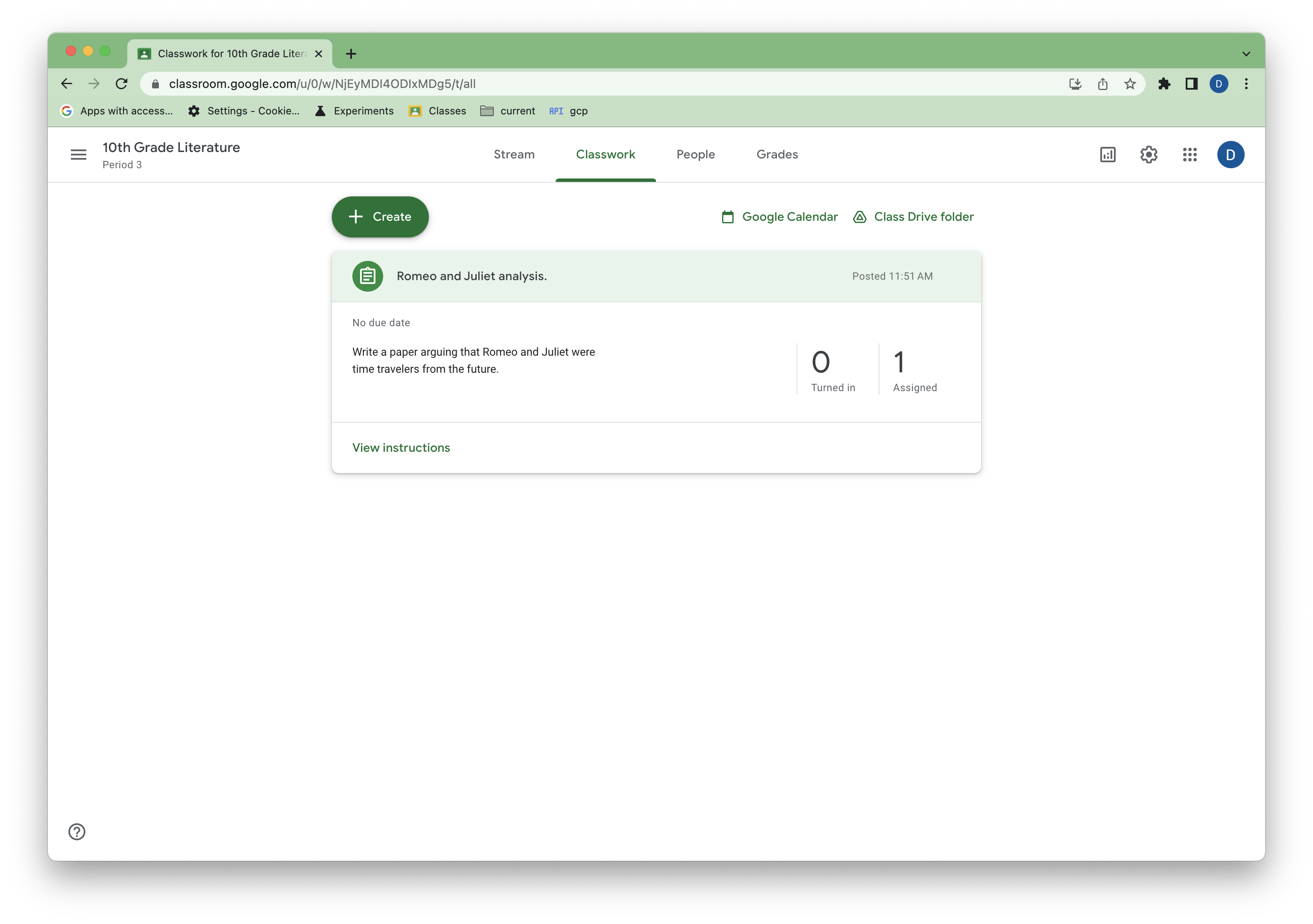 รูปที่ 2 มุมมองของงานตัวอย่างใน Classroom
ตรวจสอบสิทธิ์ของผู้ใช้
การสร้างและอัปเดตเกณฑ์การให้คะแนนกำหนดให้ทั้งผู้ใช้ที่ส่งคำขอ และเจ้าของหลักสูตรที่เกี่ยวข้องต้องมีใบอนุญาต Google Workspace for Education Plus มอบหมายให้ Classroom รองรับปลายทางสิทธิ์ของผู้ใช้ เพื่อช่วยให้นักพัฒนาแอปกำหนดความสามารถที่ผู้ใช้มีสิทธิ์เข้าถึงได้
อัปเดตและเรียกใช้ main.py เพื่อยืนยันว่าบัญชีทดสอบของคุณมีสิทธิ์เข้าถึงความสามารถของเกณฑ์การให้คะแนน
if __name__ == '__main__':
    service = build_authenticated_service(YOUR_API_KEY)

    capability = service.userProfiles().checkUserCapability(
        userId='me',
        # Specify the preview version. checkUserCapability is
        # supported in V1_20240930_PREVIEW and later.
        previewVersion="V1_20240930_PREVIEW",
        capability="CREATE_RUBRIC").execute()

    if not capability.get('allowed'):
      print('User ineligible for rubrics creation.')
      # TODO(developer): in a production app, this signal could be used to
      # proactively hide any rubrics related features from users or encourage
      # them to upgrade to the appropriate license.
    else:
      print('User eligible for rubrics creation.')
สร้างเกณฑ์การให้คะแนน
ตอนนี้คุณพร้อมที่จะเริ่มจัดการเกณฑ์การให้คะแนนแล้ว
คุณสร้างเกณฑ์การให้คะแนนใน CourseWork ได้ด้วยการเรียก create() ที่มี
ออบเจ็กต์เกณฑ์การให้คะแนนแบบเต็ม โดยละเว้นพร็อพเพอร์ตี้ ID สำหรับเกณฑ์และระดับ (ระบบจะสร้างพร็อพเพอร์ตี้เหล่านี้เมื่อสร้าง)
เพิ่มฟังก์ชันต่อไปนี้ลงใน main.py
def create_rubric(service, course_id, coursework_id):
    """Creates an example rubric on a coursework."""
    try:
        body = {
            "criteria": [
                {
                    "title": "Argument",
                    "description": "How well structured your argument is.",
                    "levels": [
                        {"title": "Convincing",
                         "description": "A compelling case is made.", "points": 30},
                        {"title": "Passable",
                         "description": "Missing some evidence.", "points": 20},
                        {"title": "Needs Work",
                         "description": "Not enough strong evidence..", "points": 0},
                    ]
                },
                {
                    "title": "Spelling",
                    "description": "How well you spelled all the words.",
                    "levels": [
                        {"title": "Perfect",
                         "description": "No mistakes.", "points": 20},
                        {"title": "Great",
                         "description": "A mistake or two.", "points": 15},
                        {"title": "Needs Work",
                         "description": "Many mistakes.", "points": 5},
                    ]
                },
                {
                    "title": "Grammar",
                    "description": "How grammatically correct your sentences are.",
                    "levels": [
                        {"title": "Perfect",
                         "description": "No mistakes.", "points": 20},
                        {"title": "Great",
                         "description": "A mistake or two.", "points": 15},
                        {"title": "Needs Work",
                         "description": "Many mistakes.", "points": 5},
                    ]
                },
            ]
        }

        rubric = service.courses().courseWork().rubrics().create(
            courseId=course_id, courseWorkId=coursework_id, body=body
            ).execute()
        print(f"Rubric created with ID {rubric.get('id')}")
        return rubric

    except HttpError as error:
        print(f"An error occurred: {error}")
        return error
จากนั้นให้อัปเดตและเรียกใช้ main.py เพื่อสร้างเกณฑ์การให้คะแนนตัวอย่าง โดยใช้รหัส Course
และ CourseWork จากก่อนหน้านี้
if __name__ == '__main__':
    service = build_authenticated_service(YOUR_API_KEY)

    capability = service.userProfiles().checkUserCapability(
        userId='me',
        # Specify the preview version. checkUserCapability is
        # supported in V1_20240930_PREVIEW and later.
        previewVersion="V1_20240930_PREVIEW",
        capability="CREATE_RUBRIC").execute()

    if not capability.get('allowed'):
      print('User ineligible for rubrics creation.')
      # TODO(developer): in a production app, this signal could be used to
      # proactively hide any rubrics related features from users or encourage
      # them to upgrade to the appropriate license.
    else:
      rubric = create_rubric(service, YOUR_COURSE_ID, YOUR_COURSEWORK_ID)
      print(json.dumps(rubric, indent=4))
ข้อควรทราบบางประการเกี่ยวกับการแสดงเกณฑ์การให้คะแนน
- ลำดับเกณฑ์และระดับจะแสดงใน UI ของ Classroom
- ระดับที่มีคะแนน (ระดับที่มีพร็อพเพอร์ตี้
points) ต้องเรียงตามคะแนนจากน้อยไปมากหรือมากไปน้อย (จะเรียงแบบสุ่มไม่ได้) - ครูสามารถเรียงเกณฑ์และระดับที่มีคะแนนใหม่ (แต่เรียงระดับที่ไม่มีคะแนนไม่ได้) ใน UI และการดำเนินการดังกล่าวจะเปลี่ยนลำดับในข้อมูล
ดูข้อควรระวังเพิ่มเติมเกี่ยวกับโครงสร้างเกณฑ์การให้คะแนนได้ที่ ข้อจำกัด
กลับไปที่ UI คุณจะเห็นเกณฑ์การให้คะแนนในงาน
รูปที่ 3 มุมมองของเกณฑ์การให้คะแนนตัวอย่างในงานของ Classroom
อ่านเกณฑ์การให้คะแนน
คุณอ่านเกณฑ์การให้คะแนนได้ด้วยเมธอด list() และ get() มาตรฐาน
งานหนึ่งๆ มีเกณฑ์การให้คะแนนได้ไม่เกิน 1 รายการ ดังนั้น list() อาจดูไม่ตรงกับที่คาดไว้ แต่จะมีประโยชน์หากคุณยังไม่มีรหัสเกณฑ์การให้คะแนน หากไม่มีเกณฑ์การให้คะแนนที่เชื่อมโยงกับ CourseWork การตอบกลับ list() จะว่างเปล่า
เพิ่มฟังก์ชันต่อไปนี้ลงใน main.py
def get_rubric(service, course_id, coursework_id):
    """
    Get the rubric on a coursework. There can only be at most one.
    Returns null if there is no rubric.
    """
    try:
        response = service.courses().courseWork().rubrics().list(
            courseId=course_id, courseWorkId=coursework_id
            ).execute()

        rubrics = response.get("rubrics", [])
        if not rubrics:
            print("No rubric found for this assignment.")
            return
        rubric = rubrics[0]
        return rubric

    except HttpError as error:
        print(f"An error occurred: {error}")
        return error
อัปเดตและเรียกใช้ main.py เพื่อดึงข้อมูลเกณฑ์การให้คะแนนที่คุณเพิ่ม
if __name__ == '__main__':
    service = build_authenticated_service(YOUR_API_KEY)

    rubric = get_rubric(service, YOUR_COURSE_ID, YOUR_COURSEWORK_ID)
    print(json.dumps(rubric, indent=4))

    #TODO(developer): Save the printed rubric ID.
จดพร็อพเพอร์ตี้ id ในเกณฑ์การให้คะแนนไว้สำหรับขั้นตอนต่อๆ ไป
Get() เหมาะสำหรับกรณีที่คุณมีรหัสเกณฑ์การให้คะแนน การใช้ get() ในฟังก์ชันแทนอาจมีลักษณะดังนี้
def get_rubric(service, course_id, coursework_id, rubric_id):
    """
    Get the rubric on a coursework. There can only be at most one.
    Returns a 404 if there is no rubric.
    """
    try:
        rubric = service.courses().courseWork().rubrics().get(
            courseId=course_id,
            courseWorkId=coursework_id,
            id=rubric_id
        ).execute()

        return rubric

    except HttpError as error:
        print(f"An error occurred: {error}")
        return error
การใช้งานนี้จะแสดงผล 404 หากไม่มีเกณฑ์การให้คะแนน
อัปเดตเกณฑ์การให้คะแนน
การอัปเดตเกณฑ์การให้คะแนนทำได้ด้วยการเรียก patch() เนื่องจากเกณฑ์การให้คะแนนมีโครงสร้างที่ซับซ้อน การอัปเดตจึงต้องทำตามรูปแบบอ่าน-แก้ไข-เขียน โดยแทนที่พร็อพเพอร์ตี้ criteria ทั้งหมด
กฎการอัปเดตมีดังนี้
- เกณฑ์หรือระดับที่เพิ่มโดยไม่มี ID ถือเป็นการเพิ่ม
- เกณฑ์หรือระดับที่หายไป จากก่อนหน้านี้ถือเป็นการลบ
- เกณฑ์หรือระดับที่มี ID อยู่แล้วแต่ข้อมูลมีการแก้ไข ถือเป็นการแก้ไข ระบบจะคงพร็อพเพอร์ตี้ที่ไม่ได้แก้ไขไว้ตามเดิม
- เกณฑ์หรือระดับที่ระบุรหัสใหม่หรือรหัสที่ไม่รู้จัก ถือเป็นข้อผิดพลาด
- ลำดับของเกณฑ์และระดับใหม่ถือเป็นลำดับ UI ใหม่ (โดยมีข้อจำกัดที่กล่าวถึงข้างต้น)
เพิ่มฟังก์ชันสำหรับการอัปเดตเกณฑ์การให้คะแนน
def update_rubric(service, course_id, coursework_id, rubric_id, body):
    """
    Updates the rubric on a coursework.
    """
    try:
        rubric = service.courses().courseWork().rubrics().patch(
            courseId=course_id,
            courseWorkId=coursework_id,
            id=rubric_id,
            body=body,
            updateMask='criteria'
        ).execute()

        return rubric

    except HttpError as error:
        print(f"An error occurred: {error}")
        return error
ในตัวอย่างนี้ ระบบจะระบุช่อง criteria เพื่อแก้ไขด้วย
updateMask
จากนั้นให้แก้ไข main.py เพื่อทำการเปลี่ยนแปลงตามกฎการอัปเดตที่กล่าวถึงแต่ละข้อ
if __name__ == '__main__':
    service = build_authenticated_service(YOUR_API_KEY)

    capability = service.userProfiles().checkUserCapability(
        userId='me',
        # Specify the preview version. checkUserCapability is
        # supported in V1_20240930_PREVIEW and later.
        previewVersion="V1_20240930_PREVIEW",
        capability="CREATE_RUBRIC").execute()

    if not capability.get('allowed'):
      print('User ineligible for rubrics creation.')
      # TODO(developer): in a production app, this signal could be used to
      # proactively hide any rubrics related features from users or encourage
      # them to upgrade to the appropriate license.
    else:
        # Get the latest rubric.
        rubric = get_rubric(service, YOUR_COURSE_ID, YOUR_COURSEWORK_ID)
        criteria = rubric.get("criteria")
        """
        The "criteria" property should look like this:
        [
            {
                "id": "NkEyMdMyMzM2Nxkw",
                "title": "Argument",
                "description": "How well structured your argument is.",
                "levels": [
                    {
                        "id": "NkEyMdMyMzM2Nxkx",
                        "title": "Convincing",
                        "description": "A compelling case is made.",
                        "points": 30
                    },
                    {
                        "id": "NkEyMdMyMzM2Nxky",
                        "title": "Passable",
                        "description": "Missing some evidence.",
                        "points": 20
                    },
                    {
                        "id": "NkEyMdMyMzM2Nxkz",
                        "title": "Needs Work",
                        "description": "Not enough strong evidence..",
                        "points": 0
                    }
                ]
            },
            {
                "id": "NkEyMdMyMzM2Nxk0",
                "title": "Spelling",
                "description": "How well you spelled all the words.",
                "levels": [...]
            },
            {
                "id": "NkEyMdMyMzM2Nxk4",
                "title": "Grammar",
                "description": "How grammatically correct your sentences are.",
                "levels": [...]
            }
        ]
        """

        # Make edits. This example will make one of each type of change.

        # Add a new level to the first criteria. Levels must remain sorted by
        # points.
        new_level = {
            "title": "Profound",
            "description": "Truly unique insight.",
            "points": 50
        }
        criteria[0]["levels"].insert(0, new_level)

        # Remove the last criteria.
        del criteria[-1]

        # Update the criteria titles with numeric prefixes.
        for index, criterion in enumerate(criteria):
            criterion["title"] = f"{index}: {criterion['title']}"

        # Resort the levels from descending to ascending points.
        for criterion in criteria:
            criterion["levels"].sort(key=lambda level: level["points"])

        # Update the rubric with a patch call.
        new_rubric = update_rubric(
            service, YOUR_COURSE_ID, YOUR_COURSEWORK_ID, YOUR_RUBRIC_ID, rubric)

        print(json.dumps(new_rubric, indent=4))
ตอนนี้การเปลี่ยนแปลงควรแสดงให้ครูเห็นใน Classroom แล้ว
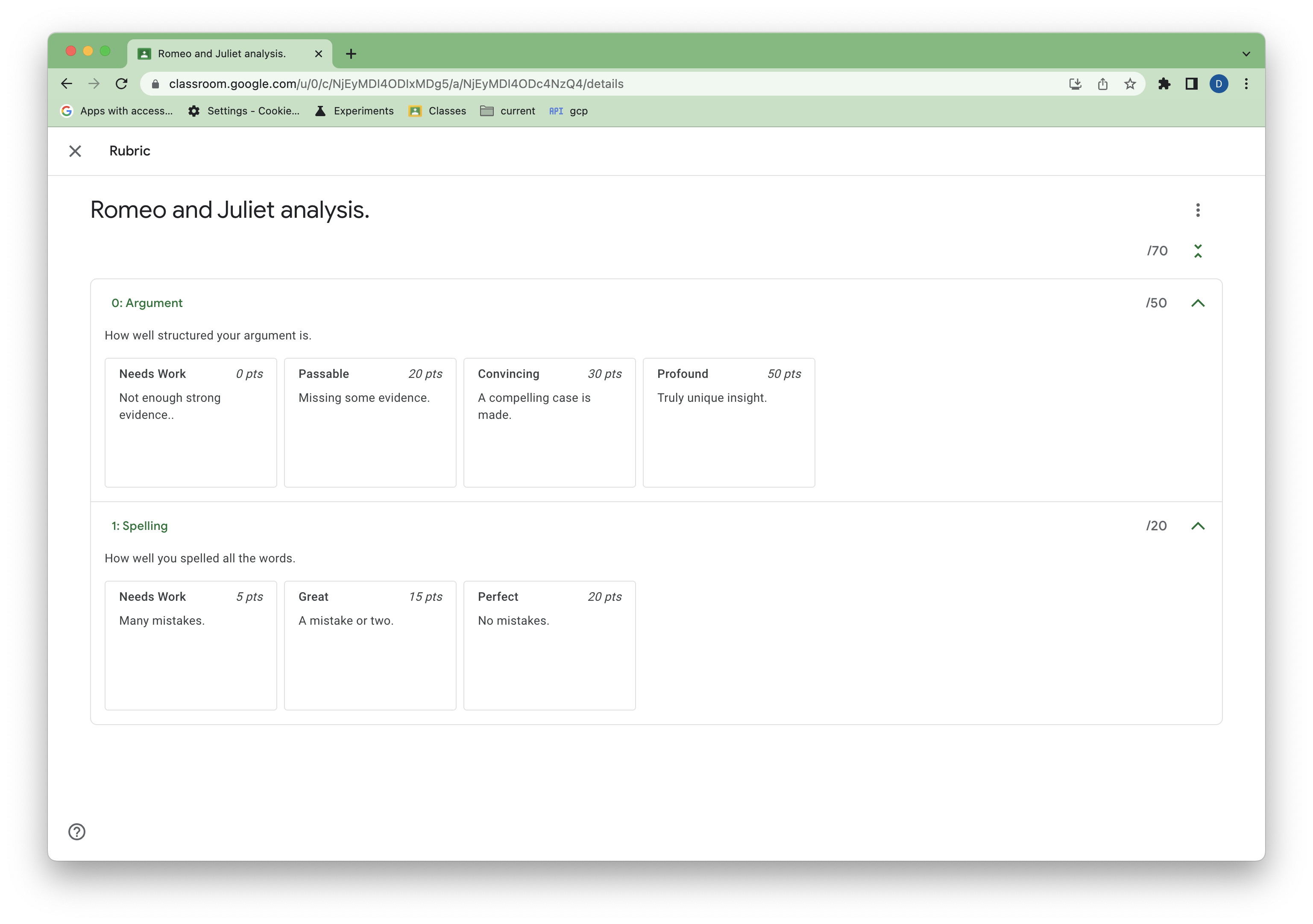 รูปที่ 4 มุมมองของเกณฑ์การให้คะแนนที่อัปเดต
ดูงานที่ส่งซึ่งให้คะแนนตามเกณฑ์การให้คะแนน
ในตอนนี้ API ยังให้คะแนนงานที่นักเรียนส่งด้วยเกณฑ์การให้คะแนนไม่ได้ แต่คุณสามารถอ่านคะแนนตามเกณฑ์การให้คะแนนสำหรับงานที่ส่งซึ่งให้คะแนนตามเกณฑ์การให้คะแนนใน UI ของ Classroom ได้
ในฐานะนักเรียนใน UI ของ Classroom ให้ทำและ ส่งงานตัวอย่าง จากนั้นในฐานะครู ให้ให้คะแนนงานด้วยตนเองโดยใช้เกณฑ์การให้คะแนน
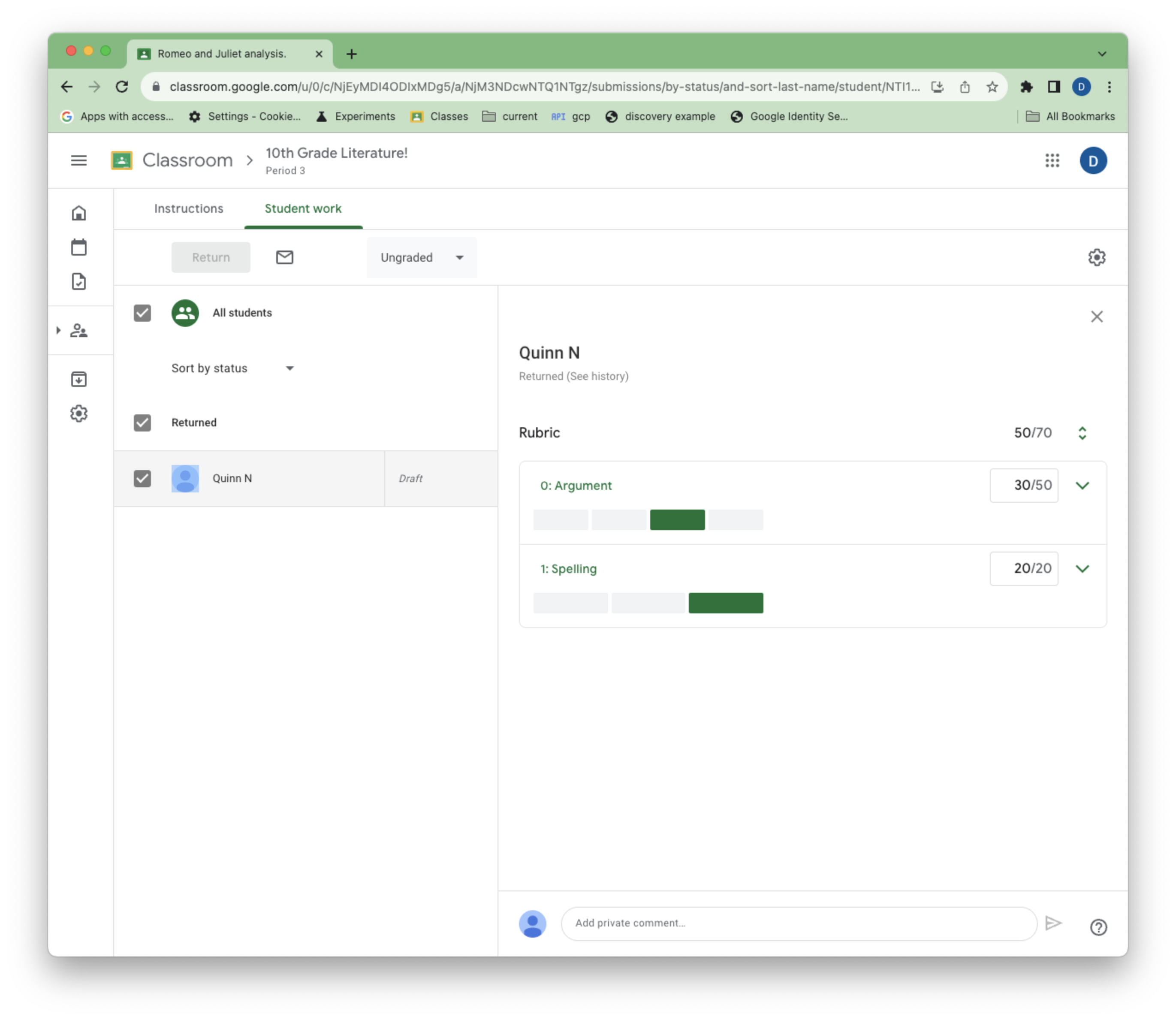 รูปที่ 5 มุมมองของครูเกี่ยวกับเกณฑ์การให้คะแนนระหว่างการให้คะแนน
StudentSubmissions ที่ให้คะแนนตามเกณฑ์การให้คะแนนจะมีพร็อพเพอร์ตี้ใหม่ 2 รายการ ได้แก่ draftRubricGrades และ assignedRubricGrades ซึ่งแสดงคะแนนและระดับที่ครูเลือกในสถานะการให้คะแนนแบบฉบับร่างและแบบมอบหมายตามลำดับ
คุณสามารถใช้เมธอด studentSubmissions.get() และ
studentSubmissions.list() ที่มีอยู่เพื่อดูงานที่ส่งซึ่งให้คะแนนแล้ว
เพิ่มฟังก์ชันต่อไปนี้ลงใน main.py เพื่อแสดงรายการงานที่นักเรียนส่ง
def get_latest_submission(service, course_id, coursework_id):
    """Retrieves the last submission for an assignment."""
    try:
        response = service.courses().courseWork().studentSubmissions().list(
            courseId = course_id,
            courseWorkId = coursework_id,
            pageSize=1
        ).execute()
        submissions = response.get("studentSubmissions", [])
        if not submissions:
            print(
                """No submissions found. Did you remember to turn in and grade
                   the assignment in the UI?""")
            return
        submission = submissions[0]
        return submission

    except HttpError as error:
        print(f"An error occurred: {error}")
        return error
จากนั้นให้อัปเดตและเรียกใช้ main.py เพื่อดูคะแนนงานที่ส่ง
if __name__ == '__main__':
    service = build_authenticated_service(YOUR_API_KEY)

    submission = get_latest_submission(
        service, YOUR_COURSE_ID, YOUR_COURSEWORK_ID)
    print(json.dumps(submission, indent=4))
draftRubricGrades และ assignedRubricGrades มีข้อมูลต่อไปนี้
criterionIdของเกณฑ์การให้คะแนนที่เกี่ยวข้องpointsที่ครูมอบหมายให้สำหรับเกณฑ์แต่ละรายการ คะแนนนี้อาจมาจากระดับที่เลือก แต่ครูอาจลบล้างคะแนนนี้ก็ได้levelIdของระดับที่เลือกสำหรับเกณฑ์แต่ละรายการ หากครูไม่ได้เลือกระดับ แต่ยังคงมอบหมายคะแนนสำหรับเกณฑ์ ช่องนี้จะไม่ปรากฏ
รายการเหล่านี้จะมีเฉพาะรายการสำหรับเกณฑ์ที่ครูเลือกระดับหรือตั้งคะแนน เช่น หากครูเลือกที่จะโต้ตอบกับเกณฑ์เพียงรายการเดียวระหว่างการให้คะแนน draftRubricGrades และ assignedRubricGrades จะมีเพียง 1 รายการเท่านั้น แม้ว่าเกณฑ์การให้คะแนนจะมีเกณฑ์หลายรายการก็ตาม
ลบเกณฑ์การให้คะแนน
คุณลบเกณฑ์การให้คะแนนได้ด้วยคำขอ delete() มาตรฐาน โค้ดต่อไปนี้แสดงฟังก์ชันตัวอย่างเพื่อความสมบูรณ์ แต่เนื่องจากเริ่มให้คะแนนแล้ว คุณจึงลบเกณฑ์การให้คะแนนปัจจุบันไม่ได้
def delete_rubric(service, course_id, coursework_id, rubric_id):
    """Deletes the rubric on a coursework."""
    try:
        service.courses().courseWork().rubrics().delete(
            courseId=course_id,
            courseWorkId=coursework_id,
            id=rubric_id
        ).execute()

    except HttpError as error:
        print(f"An error occurred: {error}")
        return error
ส่งออกและนำเข้าเกณฑ์การให้คะแนน
คุณส่งออกเกณฑ์การให้คะแนนไปยัง Google ชีตด้วยตนเองเพื่อให้ ครูนำไปใช้ซ้ำได้
นอกจากการระบุเกณฑ์การให้คะแนนในโค้ดแล้ว คุณยังสร้างและอัปเดตเกณฑ์การให้คะแนนจากชีตที่ส่งออกเหล่านี้ได้โดยระบุ sourceSpreadsheetId ในเนื้อหาเกณฑ์การให้คะแนนแทน criteria
def create_rubric_from_sheet(service, course_id, coursework_id, sheet_id):
    """Creates an example rubric on a coursework."""
    try:
        body = {
            "sourceSpreadsheetId": sheet_id
        }

        rubric = service.courses().courseWork().rubrics().create(
            courseId=course_id, courseWorkId=coursework_id, body=body
            ).execute()

        print(f"Rubric created with ID {rubric.get('id')}")
        return rubric

    except HttpError as error:
        print(f"An error occurred: {error}")
        return error