

使用者可以在 Google Classroom 中為課程和作業設定學習目標。
Classroom API 也會顯示相同的學習目標。您可以設定、擷取及修改 Course 資源的學習標準集,以及 CourseWork、CourseWorkMaterial 和 Rubric 資源的學習目標。本指南說明如何使用 Classroom API 存取及修改學習目標和標準集。
運作方式
資料來源
Classroom 中的學習目標依賴 Satchel Rosetta Exchange (前身為 CASE Network) 提供的穩定全域專屬 ID (GUID)。Exchange 中的標準會整理成節點樹狀結構,其中根節點是特定主題的綜合標準集,子節點則會逐步說明更具體的學習成效。網路中任何具有標準程式碼或葉節點的節點 ID,都可以設為 CourseWork 的學習目標,而任何非葉節點都可以設為 Course 的學習標準集。
Course資源的學習標準組合代表標準群組,老師標記學習目標時,這些標準會顯示在 Classroom 使用者介面中。- 附加至
CourseWork、CourseWorkMaterial或Rubric資源的學習目標代表與該作業、問題、教材或特定評分量表準則相關聯的標準或技能。
Google 會使用 Satchel Rosetta Exchange 的五項資訊:
- 文件 ID:根層級節點的 GUID。這個 ID 與頂層標準容器相符,且所有子節點都通用。
- 文件標題:整個標準文件的名稱,方便使用者閱讀。
- 項目 ID:單一標準的 GUID (即非根節點)。
- 標準名稱:單一標準的說明文字,方便使用者閱讀。
- 標準代碼:特定標準的縮寫,方便使用者閱讀。
找出標準和目標的值
如要瞭解這些值的位置,請參考紐約州數學標準的範例。從根節點開始:
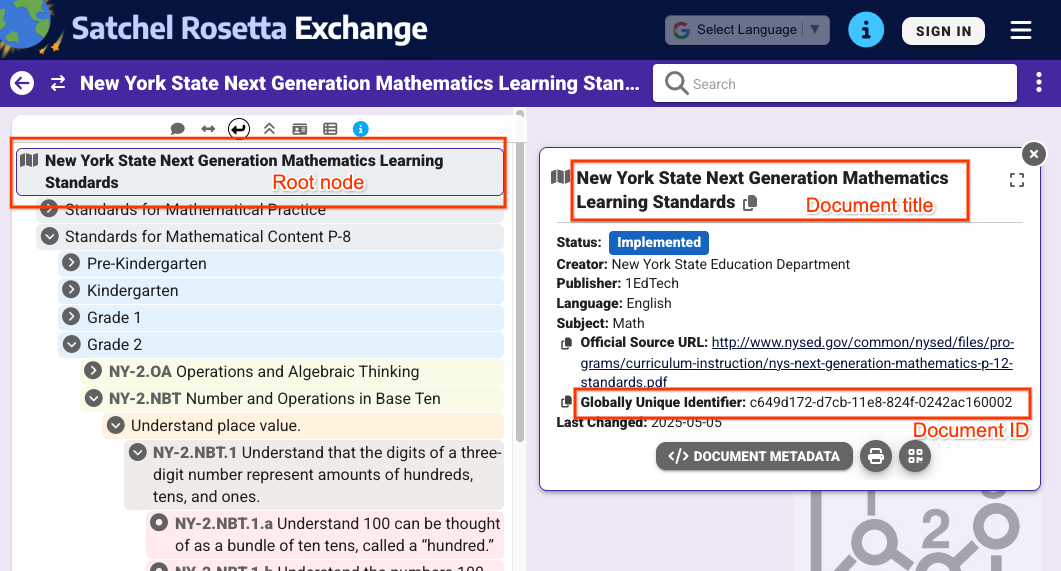 圖 1:在 Satchel Rosetta Exchange 中選取根節點時的檢視畫面。這會顯示文件標題和文件 ID,這些是這個頁面上所有節點的共同屬性。
從圖 1 的檢視畫面中,您可以擷取下列值:
- 文件 ID:
c649d172-d7cb-11e8-824f-0242ac160002 - 文件標題:
New York State Next Generation Mathematics Learning
Standards
如要取得個別標準的值,請按一下標準並展開其 metadata:
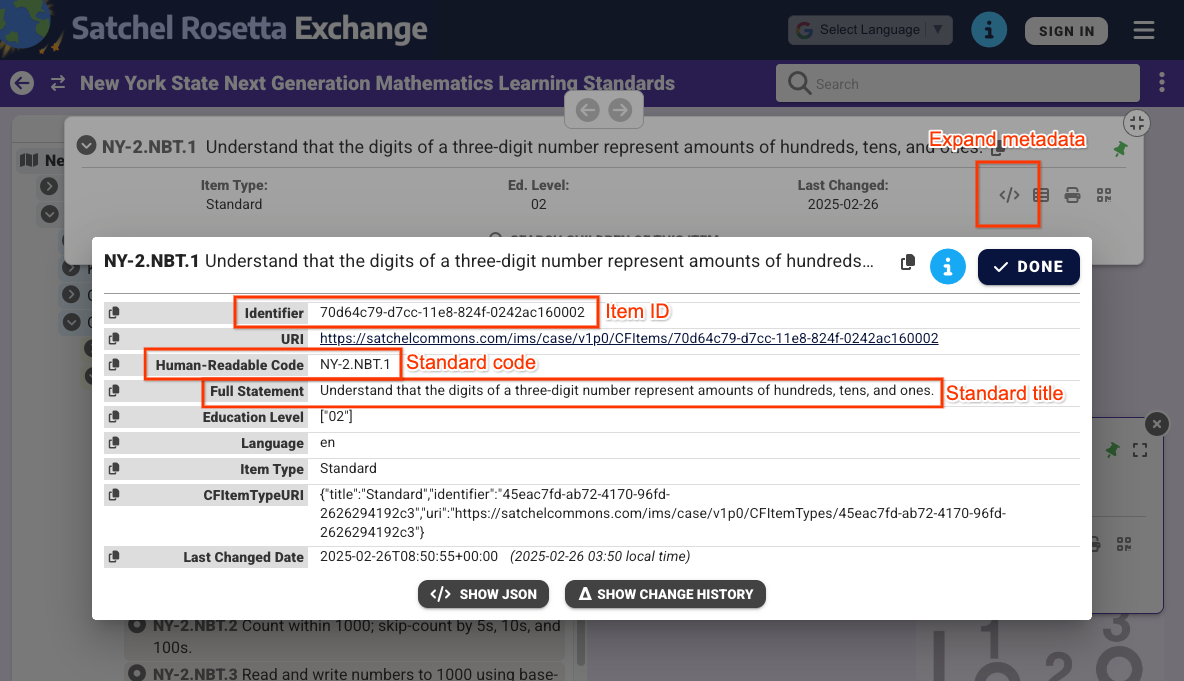 圖 2:在 Satchel Rosetta Exchange 中選取非根節點時,顯示的中繼資料。這會顯示項目 ID、標準代碼和標準名稱。這些值僅適用於這個標準。
從圖 2 的檢視畫面中,您可以找到下列值:
- 項目 ID:
70d64c79-d7cc-11e8-824f-0242ac160002 - 標準標題:
Understand that the digits of a three-digit number represent amounts of hundreds, tens, and ones. - 標準代碼:
NY-2.NBT.4
請注意,文件和項目 ID 也可以從每個節點的 Satchel Rosetta Exchange 網址中擷取。這些網址的模式為 https://rosetta.commongoodlt.com/{document_id}/{item_id}。
連結項目數量上限
- 每個
Course最多可有 20 組學習標準。 - 每個
CourseWork最多可有 10 個學習目標。 - 每個評量表
Criterion最多可有 1 個學習目標。
管理課程學習標準組合
修改學習標準組合
如要修改 Course 學習標準組合,請使用 standardSets 物件填入 Course.learningStandardSettings 欄位。每個 standardSet 都必須包含 caseGuid 物件,其中包含 caseDocumentId,以及選用的 caseItemId。
您可以使用任何 Course 變動要求 (例如 courses.create() 或 courses.patch()),透過 learningStandardSettings 更新遮罩新增學習標準集。
以下範例會為現有課程設定兩組標準。
Python
service = build("classroom", "v1", credentials=creds)
course = {
    "learningStandardSettings": {
        # Each Course can have up to 20 learning standard sets.
        "standardSets": [
            # Construct a GUID for the NYS Next Gen Math Standards top-level node.
            # This is a top-level non-leaf node, so it only has a Document ID.
            {
                "caseGuid": {
                    "caseDocumentId": "c649d172-d7cb-11e8-824f-0242ac160002"
                }
            },
            # Construct a GUID for the AAS ELA21.AAS.K Standard node.
            # This is a mid-level non-leaf node, so it has both Document and Item IDs.
            {
                "caseGuid": {
                    "caseDocumentId": "bfc264b3-b4d1-4780-84ff-26b12e6945a6",
                    "caseItemId": "ada2cc30-7d6d-494e-8c6b-c998bae98f0b",
                }
            },
        ]
    }
}

course = (
    service.courses()
    .patch(
      id=course_id,
      updateMask="learningStandardSettings",
      body=course,
      # Specify the preview version while the feature is in Developer Preview.
      # Learning standards and goals are supported in V1_20260316_PREVIEW and
      # later.
      previewVersion="V1_20260316_PREVIEW")
    .execute()
)
print(f"Course updated: {course.get('name')}")
擷取學習標準組合
如要查看課程目前的學習標準組合,請檢查 Course.learningStandardSettings 欄位。這個欄位包含一系列 standardSets 物件,如果課程中沒有任何學習標準集,這個欄位可能會空白。
請注意,回應中的每個 standardSet 都包含標準說明和根文件標題。老師和學生也會在 Classroom 使用者介面中看到這些文字。您也會收到 sourceDataAvailabilityStatus,指出標準是否可在 Satchel Rosetta Exchange 中使用。
{
  "id": "123456789",
  "name": "LSS test class",
  "learningStandardSettings": {
    "standardSets": [
      {
        "caseGuid": {
          "caseDocumentId": "c649d172-d7cb-11e8-824f-0242ac160002"
        },
        "documentTitle": "New York State Next Generation Mathematics Learning Standards",
        "sourceDataAvailabilityStatus": "LEARNING_STANDARD_AVAILABLE"
      },
      {
        "caseGuid": {
          "caseDocumentId": "bfc264b3-b4d1-4780-84ff-26b12e6945a6",
          "caseItemId": "ada2cc30-7d6d-494e-8c6b-c998bae98f0b"
        },
        "documentTitle": "AAS English Language Arts (2021)",
        "standardTitle": "Kindergarten",
        "sourceDataAvailabilityStatus": "LEARNING_STANDARD_AVAILABLE"
      }
    ]
  }
}
管理 CourseWork、CouseWorkMaterial 和 Rubric 學習目標
修改學習目標
您可以在任何變動要求中,將學習目標附加至 CourseWork、CourseWorkMaterial 和評分量表 Criterion 資源。在 CourseWork.learningGoals 或 Rubric.Criterion.learningGoal 欄位中設定文件和項目 ID。這些 ID 與先前所述相同。
請注意,附加至 Rubric 準則的學習目標必須已附加至 Rubric 連結的作業。
以下範例會建立 CourseWork 指派作業,並附加兩個學習目標。
Python
# Create a CourseWork assignment with two attached learning goals.
service = build("classroom", "v1", credentials=creds)
coursework = {
    "title": "Ant colonies",
    "description": "Read the article about ant colonies and complete the quiz.",
    "materials": [
        {"link": {"url": "http://example.com/ant-colonies"}},
        {"link": {"url": "http://example.com/ant-quiz"}},
    ],
    "workType": "ASSIGNMENT",
    "state": "PUBLISHED",
    # Each CourseWork can have up to 10 learning goals.
    "learningGoals": [
        {
            "learningStandardInfo": {
                # Construct a GUID for the ELA21.AAS.11.11c Standard node.
                # This is a non-root node, so it has both Document and Item IDs.
                "caseGuid": {
                    "caseDocumentId": "bfc264b3-b4d1-4780-84ff-26b12e6945a6",
                    "caseItemId": "6d922f1f-b580-42a1-b6d2-5ee5b39c561d",
                }
            }
        },
        {
            "learningStandardInfo": {
                # Construct a GUID for the ELA21.AAS.11.22a Standard node.
                # This is a non-root node, so it has both Document and Item IDs.
                "caseGuid": {
                    "caseDocumentId": "bfc264b3-b4d1-4780-84ff-26b12e6945a6",
                    "caseItemId": "a684609a-c3ec-42da-8b7f-7a325b31ea4a",
                }
            }
        },
    ],
}

coursework = (
    service.courses()
    .courseWork()
    .create(
      courseId=course_id,
      body=coursework,
      # Specify the preview version while the feature is in Developer Preview.
      # Learning standards and goals are supported in V1_20260316_PREVIEW and
      # later.
      previewVersion="V1_20260316_PREVIEW")
    .execute()
)
print(f"Assignment created with ID {coursework.get('id')}")
以下範例會建立 Rubric,並為每個評分標準附加學習目標。
Python
# Create a new Rubric with a learning goal attached to each criterion.
service = build("classroom", "v1", credentials=creds)
body = {
    "criteria": [
        {
            "title": "Argument",
            "description": "How well structured your argument is.",
            "levels": [
                {
                    "title": "Convincing",
                    "description": "A compelling case is made.",
                    "points": 30,
                },
                {
                    "title": "Passable",
                    "description": "Missing some evidence.",
                    "points": 20,
                },
                {
                    "title": "Needs Work",
                    "description": "Not enough strong evidence.",
                    "points": 0,
                },
            ],
            # Each Criterion can have one learning goal.
            "learningGoal": {
                "learningStandardInfo": {
                    # Construct a GUID for the ELA21.AAS.11.11c Standard node.
                    # This is a non-root node, so it has both Document and Item IDs.
                    "caseGuid": {
                        "caseDocumentId": "bfc264b3-b4d1-4780-84ff-26b12e6945a6",
                        "caseItemId": "6d922f1f-b580-42a1-b6d2-5ee5b39c561d",
                    }
                }
            },
        },
        {
            "title": "Spelling",
            "description": "How well you spelled all the words.",
            "levels": [
                {"title": "Perfect", "description": "No mistakes.", "points": 20},
                {"title": "Great", "description": "A mistake or two.", "points": 15},
                {"title": "Needs Work", "description": "Many mistakes.", "points": 5},
            ],
            # Each Criterion can have one learning goal.
            "learningGoal": {
                "learningStandardInfo": {
                    # Construct a GUID for the ELA21.AAS.11.22a Standard node.
                    # This is a non-root node, so it has both Document and Item IDs.
                    "caseGuid": {
                        "caseDocumentId": "bfc264b3-b4d1-4780-84ff-26b12e6945a6",
                        "caseItemId": "a684609a-c3ec-42da-8b7f-7a325b31ea4a",
                    }
                }
            },
        },
    ]
}

rubric = (
    service.courses()
    .courseWork()
    .rubrics()
    .create(
      courseId=course_id,
      courseWorkId=coursework_id,
      body=body,
      # Specify the preview version while the feature is in Developer Preview.
      # Learning standards and goals are supported in V1_20260316_PREVIEW and
      # later.
      previewVersion="V1_20260316_PREVIEW")
    .execute()
)
print(f"Rubric created with ID {rubric.get('id')}")
擷取學習目標
如要查看作業、問題或教材的目前學習目標,請檢查 CourseWork.learningGoals 欄位。每個學習目標物件都包含根層級的文件標題和學習標準代碼。
請注意,老師也可以在 Classroom 使用者介面中,為課業和教材新增技能標記。API 無法存取技能標記。
{
  "course_id": "123456789",
  "id": "987654321",
  "title": "Test ELA Assignment",
  "state": "PUBLISHED",
  "learningGoals": [
    {
      "id": "871768554412",
      "courseId": "123456789",
      "learningStandardInfo": {
        "standardCode": "ELA21.AAS.11.22a",
        "caseGuid": {
          "caseDocumentId": "bfc264b3-b4d1-4780-84ff-26b12e6945a6",
          "caseItemId": "a684609a-c3ec-42da-8b7f-7a325b31ea4a"
        }
      },
      "title": "Identify a sentence that uses correct capitalization (i.e., beginning of sentence, names, cities, states, countries, towns, titles, days, months)."
    },
    {
      "id": "871768554411",
      "courseId": "123456789",
      "learningStandardInfo": {
        "standardCode": "ELA21.AAS.11.11c",
        "caseGuid": {
          "caseDocumentId": "bfc264b3-b4d1-4780-84ff-26b12e6945a6",
          "caseItemId": "6d922f1f-b580-42a1-b6d2-5ee5b39c561d"
        }
      },
      "title": "Compose argumentative texts by stating a topic, providing reasons that support the argument, and providing an appropriate conclusion related to the topic."
    }
  ]
}
Rubric 回應會傳回類似資料,每個條件都包含一個 learningGoal。