

ユーザーは Google Classroom でコースと課題の学習目標を設定できます。同じ学習目標は Classroom API でも公開されています。Course リソースの学習基準セットと、CourseWork、CourseWorkMaterial、Rubric リソースの学習目標を設定、取得、変更できます。このガイドでは、Classroom API を使用して学習目標と標準セットにアクセスして変更する方法について説明します。
仕組み
データソース
Classroom の学習目標は、Satchel Rosetta Exchange(旧 CASE Network)が提供する安定したグローバルに一意の識別子(GUID)に依存しています。Exchange の基準はノードのツリーに整理されています。ルートは特定の科目の包括的な基準セットであり、子ノードはより具体的な学習成果を段階的に記述しています。ネットワーク内の標準コードまたはリーフノードを持つノードの識別子は CourseWork の学習目標として設定でき、リーフノード以外のノードは Course の学習基準として設定できます。
Courseリソースの学習基準セットは、教師が学習目標をタグ付けするときに Classroom UI に表示される基準のグループを表します。CourseWork、CourseWorkMaterial、またはRubricリソースに関連付けられた学習目標は、その課題、質問、教材、または特定のルーブリック評価基準に関連付けられた基準またはスキルを表します。
Google は Satchel Rosetta Exchange から次の 5 つの情報を使用します。
- ドキュメント ID: ルートレベル ノードの GUID。この ID は最上位の標準コンテナと一致し、すべての子ノードに共通です。
- Document Title: 標準ドキュメント全体の人が読める形式の名前。
- 商品アイテム ID: 単一の標準(ルートノード以外)の GUID。
- 標準タイトル: 単一の標準の人が読める形式の説明テキスト。
- 標準コード: 特定の標準の人が読める形式の略称。
基準と目標の値を検索する
これらの値がどこにあるかを理解するために、ニューヨーク州の数学の基準の例を考えてみましょう。ルートノードから開始します。
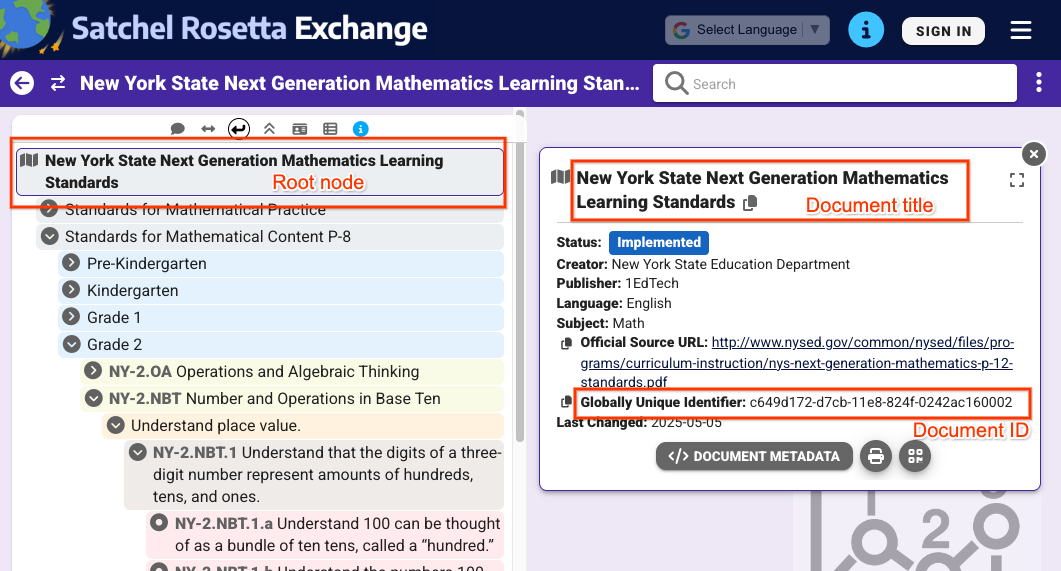 図 1: Satchel Rosetta Exchange でルートノードを選択したときのビュー。このページ上のすべてのノードに共通するドキュメントのタイトルとドキュメント ID が表示されます。
図 1 のビューから、次の値を抽出できます。
- ドキュメント ID:
c649d172-d7cb-11e8-824f-0242ac160002 - ドキュメントのタイトル:
New York State Next Generation Mathematics Learning
Standards
個々の標準の値を取得するには、標準をクリックしてメタデータを展開します。
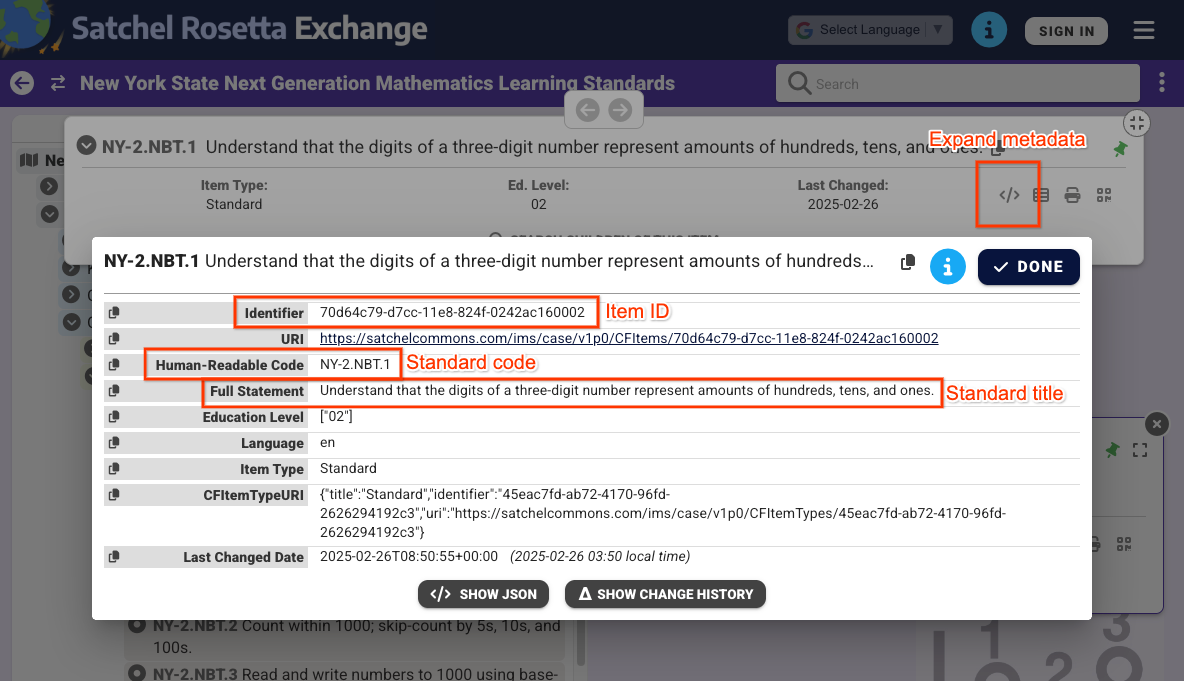 図 2: Satchel Rosetta Exchange で選択された非ルートノードのメタデータのビュー。商品アイテム ID、標準コード、標準タイトルが表示されます。これらの値は、この標準に固有のものです。
図 2 のビューから、次の値を確認できます。
- 商品アイテム ID:
70d64c79-d7cc-11e8-824f-0242ac160002 - 標準タイトル:
Understand that the digits of a three-digit number represent amounts of hundreds, tens, and ones. - 標準コード:
NY-2.NBT.4
ドキュメント ID とアイテム ID は、各ノードの Satchel Rosetta Exchange URL から抽出することもできます。これらの URL は https://rosetta.commongoodlt.com/{document_id}/{item_id} というパターンに従います。
最大リンク アイテム数
- 各
Courseには、最大 20 個の学習基準セットを設定できます。 - 各
CourseWorkには、最大 10 個の学習目標を設定できます。 - 各ルーブリック
Criterionには 1 つの学習目標を設定できます。
コースの学習基準セットを管理する
学習基準セットを変更する
Course 学習標準セットを変更するには、Course.learningStandardSettings フィールドに standardSets オブジェクトを入力します。各 standardSet には caseGuid オブジェクトが含まれている必要があります。このオブジェクトには caseDocumentId と、必要に応じて caseItemId が含まれます。
learningStandardSettings 更新マスクを使用して、courses.create() や courses.patch() などの Course 変更リクエストを使用して、学習基準セットを追加できます。
次の例では、既存のコースに 2 つの標準セットを設定します。
Python
service = build("classroom", "v1", credentials=creds)
course = {
    "learningStandardSettings": {
        # Each Course can have up to 20 learning standard sets.
        "standardSets": [
            # Construct a GUID for the NYS Next Gen Math Standards top-level node.
            # This is a top-level non-leaf node, so it only has a Document ID.
            {
                "caseGuid": {
                    "caseDocumentId": "c649d172-d7cb-11e8-824f-0242ac160002"
                }
            },
            # Construct a GUID for the AAS ELA21.AAS.K Standard node.
            # This is a mid-level non-leaf node, so it has both Document and Item IDs.
            {
                "caseGuid": {
                    "caseDocumentId": "bfc264b3-b4d1-4780-84ff-26b12e6945a6",
                    "caseItemId": "ada2cc30-7d6d-494e-8c6b-c998bae98f0b",
                }
            },
        ]
    }
}

course = (
    service.courses()
    .patch(
      id=course_id,
      updateMask="learningStandardSettings",
      body=course,
      # Specify the preview version while the feature is in Developer Preview.
      # Learning standards and goals are supported in V1_20260316_PREVIEW and
      # later.
      previewVersion="V1_20260316_PREVIEW")
    .execute()
)
print(f"Course updated: {course.get('name')}")
学習基準セットを取得する
コースの現在の学習基準セットを確認するには、Course.learningStandardSettings フィールドを調べます。このフィールドには standardSets オブジェクトのシーケンスが含まれます。コースに学習基準セットがない場合は空にできます。
レスポンス内の各 standardSet には、標準の説明とそのルート ドキュメントのタイトルが含まれます。これらのテキストは、Classroom の UI で教師と生徒にも表示されます。また、sourceDataAvailabilityStatus も受け取ります。これは、Satchel Rosetta Exchange で標準が利用可能かどうかを示します。
{
  "id": "123456789",
  "name": "LSS test class",
  "learningStandardSettings": {
    "standardSets": [
      {
        "caseGuid": {
          "caseDocumentId": "c649d172-d7cb-11e8-824f-0242ac160002"
        },
        "documentTitle": "New York State Next Generation Mathematics Learning Standards",
        "sourceDataAvailabilityStatus": "LEARNING_STANDARD_AVAILABLE"
      },
      {
        "caseGuid": {
          "caseDocumentId": "bfc264b3-b4d1-4780-84ff-26b12e6945a6",
          "caseItemId": "ada2cc30-7d6d-494e-8c6b-c998bae98f0b"
        },
        "documentTitle": "AAS English Language Arts (2021)",
        "standardTitle": "Kindergarten",
        "sourceDataAvailabilityStatus": "LEARNING_STANDARD_AVAILABLE"
      }
    ]
  }
}
CourseWork、CourseWorkMaterial、ルーブリックの学習目標を管理する
学習目標を変更する
学習目標は、任意のミューテーション リクエストで CourseWork、CourseWorkMaterial、ルーブリック Criterion リソースに関連付けることができます。CourseWork.learningGoals フィールドまたは Rubric.Criterion.learningGoal フィールドでドキュメントとアイテムの識別子を設定します。これらは、前述と同じ識別子です。
Rubric 基準に関連付けられた学習目標は、Rubric がリンクされている課題にすでにリンクされている必要があります。
次の例では、2 つの学習目標が関連付けられた CourseWork 課題を作成します。
Python
# Create a CourseWork assignment with two attached learning goals.
service = build("classroom", "v1", credentials=creds)
coursework = {
    "title": "Ant colonies",
    "description": "Read the article about ant colonies and complete the quiz.",
    "materials": [
        {"link": {"url": "http://example.com/ant-colonies"}},
        {"link": {"url": "http://example.com/ant-quiz"}},
    ],
    "workType": "ASSIGNMENT",
    "state": "PUBLISHED",
    # Each CourseWork can have up to 10 learning goals.
    "learningGoals": [
        {
            "learningStandardInfo": {
                # Construct a GUID for the ELA21.AAS.11.11c Standard node.
                # This is a non-root node, so it has both Document and Item IDs.
                "caseGuid": {
                    "caseDocumentId": "bfc264b3-b4d1-4780-84ff-26b12e6945a6",
                    "caseItemId": "6d922f1f-b580-42a1-b6d2-5ee5b39c561d",
                }
            }
        },
        {
            "learningStandardInfo": {
                # Construct a GUID for the ELA21.AAS.11.22a Standard node.
                # This is a non-root node, so it has both Document and Item IDs.
                "caseGuid": {
                    "caseDocumentId": "bfc264b3-b4d1-4780-84ff-26b12e6945a6",
                    "caseItemId": "a684609a-c3ec-42da-8b7f-7a325b31ea4a",
                }
            }
        },
    ],
}

coursework = (
    service.courses()
    .courseWork()
    .create(
      courseId=course_id,
      body=coursework,
      # Specify the preview version while the feature is in Developer Preview.
      # Learning standards and goals are supported in V1_20260316_PREVIEW and
      # later.
      previewVersion="V1_20260316_PREVIEW")
    .execute()
)
print(f"Assignment created with ID {coursework.get('id')}")
次の例では、各条件に学習目標が関連付けられた Rubric を作成します。
Python
# Create a new Rubric with a learning goal attached to each criterion.
service = build("classroom", "v1", credentials=creds)
body = {
    "criteria": [
        {
            "title": "Argument",
            "description": "How well structured your argument is.",
            "levels": [
                {
                    "title": "Convincing",
                    "description": "A compelling case is made.",
                    "points": 30,
                },
                {
                    "title": "Passable",
                    "description": "Missing some evidence.",
                    "points": 20,
                },
                {
                    "title": "Needs Work",
                    "description": "Not enough strong evidence.",
                    "points": 0,
                },
            ],
            # Each Criterion can have one learning goal.
            "learningGoal": {
                "learningStandardInfo": {
                    # Construct a GUID for the ELA21.AAS.11.11c Standard node.
                    # This is a non-root node, so it has both Document and Item IDs.
                    "caseGuid": {
                        "caseDocumentId": "bfc264b3-b4d1-4780-84ff-26b12e6945a6",
                        "caseItemId": "6d922f1f-b580-42a1-b6d2-5ee5b39c561d",
                    }
                }
            },
        },
        {
            "title": "Spelling",
            "description": "How well you spelled all the words.",
            "levels": [
                {"title": "Perfect", "description": "No mistakes.", "points": 20},
                {"title": "Great", "description": "A mistake or two.", "points": 15},
                {"title": "Needs Work", "description": "Many mistakes.", "points": 5},
            ],
            # Each Criterion can have one learning goal.
            "learningGoal": {
                "learningStandardInfo": {
                    # Construct a GUID for the ELA21.AAS.11.22a Standard node.
                    # This is a non-root node, so it has both Document and Item IDs.
                    "caseGuid": {
                        "caseDocumentId": "bfc264b3-b4d1-4780-84ff-26b12e6945a6",
                        "caseItemId": "a684609a-c3ec-42da-8b7f-7a325b31ea4a",
                    }
                }
            },
        },
    ]
}

rubric = (
    service.courses()
    .courseWork()
    .rubrics()
    .create(
      courseId=course_id,
      courseWorkId=coursework_id,
      body=body,
      # Specify the preview version while the feature is in Developer Preview.
      # Learning standards and goals are supported in V1_20260316_PREVIEW and
      # later.
      previewVersion="V1_20260316_PREVIEW")
    .execute()
)
print(f"Rubric created with ID {rubric.get('id')}")
学習目標を取得する
課題、質問、教材の現在の学習目標を確認するには、CourseWork.learningGoals フィールドを調べます。各学習目標オブジェクトには、ルートレベルのドキュメント タイトルと学習基準コードが含まれています。
教師は、Classroom UI でコースワークや資料にスキルタグを追加することもできます。スキルタグは API でアクセスできません。
{
  "course_id": "123456789",
  "id": "987654321",
  "title": "Test ELA Assignment",
  "state": "PUBLISHED",
  "learningGoals": [
    {
      "id": "871768554412",
      "courseId": "123456789",
      "learningStandardInfo": {
        "standardCode": "ELA21.AAS.11.22a",
        "caseGuid": {
          "caseDocumentId": "bfc264b3-b4d1-4780-84ff-26b12e6945a6",
          "caseItemId": "a684609a-c3ec-42da-8b7f-7a325b31ea4a"
        }
      },
      "title": "Identify a sentence that uses correct capitalization (i.e., beginning of sentence, names, cities, states, countries, towns, titles, days, months)."
    },
    {
      "id": "871768554411",
      "courseId": "123456789",
      "learningStandardInfo": {
        "standardCode": "ELA21.AAS.11.11c",
        "caseGuid": {
          "caseDocumentId": "bfc264b3-b4d1-4780-84ff-26b12e6945a6",
          "caseItemId": "6d922f1f-b580-42a1-b6d2-5ee5b39c561d"
        }
      },
      "title": "Compose argumentative texts by stating a topic, providing reasons that support the argument, and providing an appropriate conclusion related to the topic."
    }
  ]
}
同様のデータが Rubric レスポンスで返されます。これには、基準ごとに 1 つの learningGoal が含まれています。