

उपयोगकर्ता, Google Classroom में कोर्स और असाइनमेंट के लिए सीखने के लक्ष्य सेट कर सकते हैं.
ये लर्निंग गोल, Classroom API में भी दिखते हैं. Course
संसाधनों और CourseWork, CourseWorkMaterial, और Rubric संसाधनों पर, सीखने के स्टैंडर्ड सेट
सेट किए जा सकते हैं. साथ ही, उन्हें वापस पाया जा सकता है और उनमें बदलाव किया जा सकता है.
इस गाइड में, Classroom API का इस्तेमाल करके, सीखने के लक्ष्यों और स्टैंडर्ड सेट को ऐक्सेस करने और उनमें बदलाव करने का तरीका बताया गया है.
यह कैसे काम करता है
डेटा सोर्स
Classroom में लर्निंग गोल, Satchel Rosetta Exchange (पहले इसे CASE Network कहा जाता था) से मिले स्टेबल ग्लोबल यूनीक आइडेंटिफ़ायर (GUID) पर निर्भर करते हैं. Exchange में मौजूद स्टैंडर्ड को नोड के ट्री में व्यवस्थित किया जाता है. इसमें रूट नोड, किसी विषय के लिए तय किया गया एक व्यापक स्टैंडर्ड होता है. वहीं, चाइल्ड नोड में सीखने के ज़्यादा से ज़्यादा खास नतीजों के बारे में बताया जाता है. नेटवर्क में स्टैंडर्ड कोड या लीफ़ नोड वाले किसी भी नोड के आइडेंटिफ़ायर को CourseWork पर सीखने के लक्ष्य के तौर पर सेट किया जा सकता है. वहीं, किसी भी नॉन-लीफ़ नोड को Course पर सीखने के स्टैंडर्ड सेट के तौर पर सेट किया जा सकता है.
Courseसंसाधन के लिए सीखने के स्टैंडर्ड के सेट, स्टैंडर्ड के उस ग्रुप को दिखाते हैं जो Classroom के यूज़र इंटरफ़ेस (यूआई) में तब दिखता है, जब शिक्षक सीखने के लक्ष्यों को टैग करते हैं.CourseWork,CourseWorkMaterialयाRubricसंसाधन से जुड़े सीखने के लक्ष्य, उस असाइनमेंट, सवाल, मटीरियल या रूब्रिक के किसी खास मापदंड से जुड़े स्टैंडर्ड या कौशल को दिखाते हैं.
Google, Satchel Rosetta Exchange से पांच तरह की जानकारी का इस्तेमाल करता है:
- दस्तावेज़ आईडी: यह रूट-लेवल नोड के लिए GUID होता है. यह आईडी, टॉप-लेवल के स्टैंडर्ड कंटेनर से मेल खाता है. साथ ही, यह सभी चाइल्ड नोड में एक जैसा होता है.
- दस्तावेज़ का टाइटल: पूरे स्टैंडर्ड दस्तावेज़ का ऐसा नाम जिसे लोग आसानी से समझ सकें.
- आइटम आईडी: यह एक स्टैंडर्ड (यानी कि नॉन-रूट नोड) के लिए GUID होता है.
- स्टैंडर्ड टाइटल: किसी एक स्टैंडर्ड का ऐसा ब्यौरा जिसे कोई भी व्यक्ति आसानी से पढ़ सकता है.
- स्टैंडर्ड कोड: किसी स्टैंडर्ड के लिए, ऐसा संक्षिप्त नाम जिसे कोई भी व्यक्ति आसानी से पढ़ सकता है.
स्टैंडर्ड और लक्ष्यों के लिए वैल्यू ढूंढना
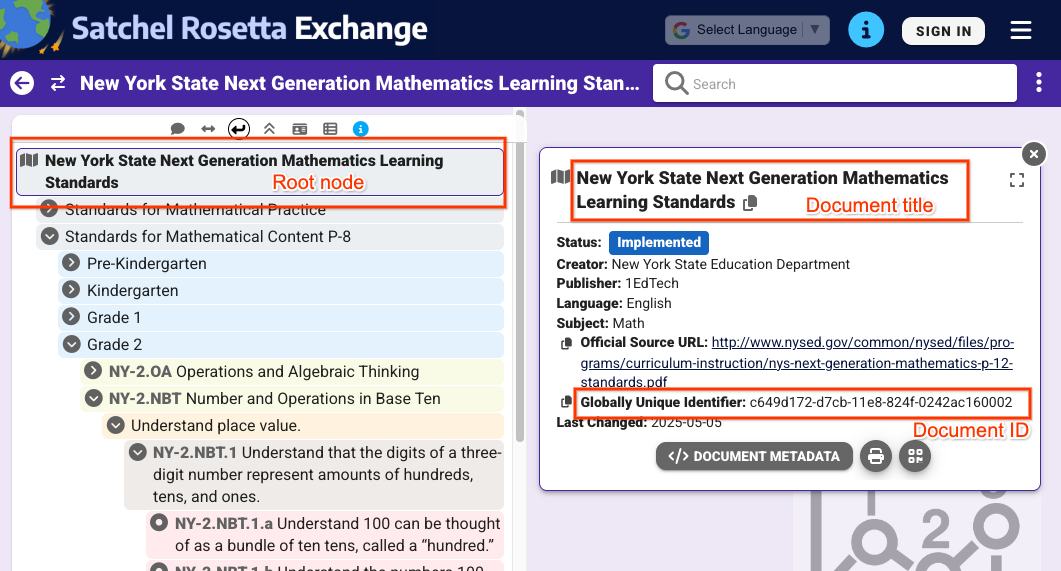
इन वैल्यू को कहां ढूंढें, यह समझने के लिए न्यूयॉर्क स्टेट के गणित के एक उदाहरण पर विचार करें. रूट नोड से शुरू करें:
 आंकड़ा
1: Satchel Rosetta Exchange में चुने जाने पर, रूट नोड का व्यू. इससे दस्तावेज़ का टाइटल और दस्तावेज़ का आईडी दिखता है. ये दोनों इस पेज पर मौजूद सभी नोड के लिए एक जैसे होते हैं.
आंकड़ा
1: Satchel Rosetta Exchange में चुने जाने पर, रूट नोड का व्यू. इससे दस्तावेज़ का टाइटल और दस्तावेज़ का आईडी दिखता है. ये दोनों इस पेज पर मौजूद सभी नोड के लिए एक जैसे होते हैं.
पहली इमेज में दिए गए व्यू से, ये वैल्यू निकाली जा सकती हैं:
- दस्तावेज़ आईडी:
c649d172-d7cb-11e8-824f-0242ac160002 - दस्तावेज़ का टाइटल:
New York State Next Generation Mathematics Learning
Standards
किसी स्टैंडर्ड की वैल्यू पाने के लिए, स्टैंडर्ड पर क्लिक करें और उसके मेटाडेटा को बड़ा करें:
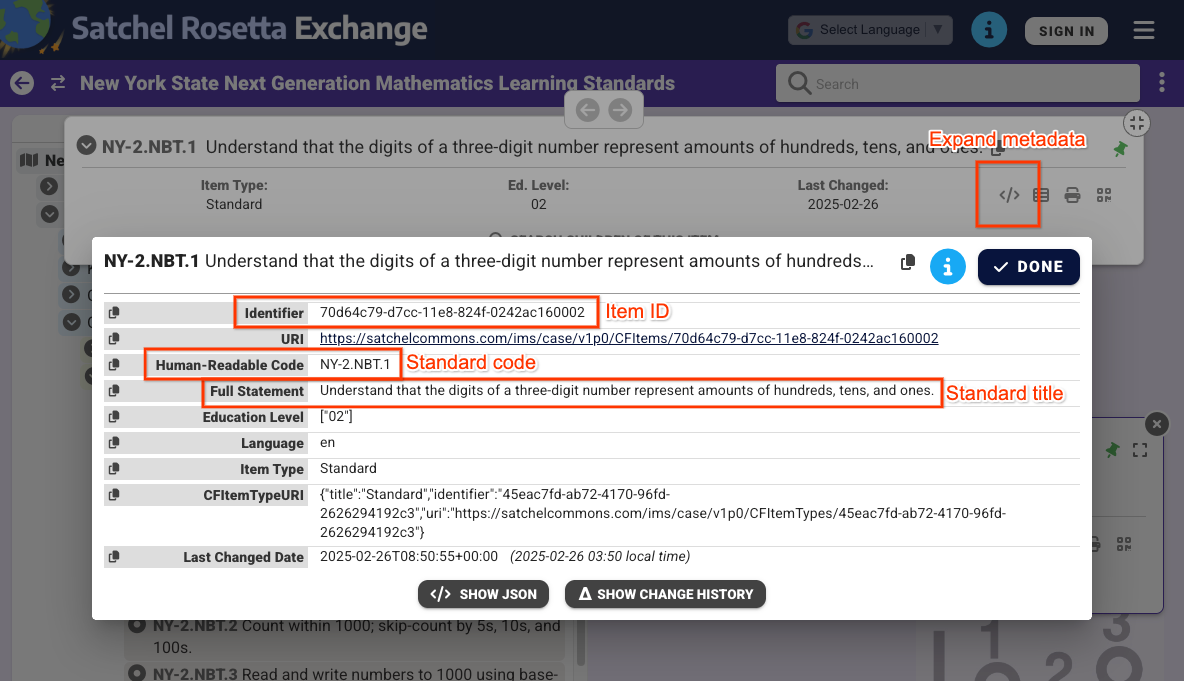 दूसरी इमेज: Satchel Rosetta Exchange में चुने जाने पर, नॉन-रूट नोड के मेटाडेटा का व्यू. इससे आइटम आईडी, स्टैंडर्ड कोड, और स्टैंडर्ड टाइटल दिखता है. ये वैल्यू सिर्फ़ इस स्टैंडर्ड के लिए हैं.
इमेज 2 में दिए गए व्यू से, आपको ये वैल्यू मिल सकती हैं:
- आइटम आईडी:
70d64c79-d7cc-11e8-824f-0242ac160002 - स्टैंडर्ड का टाइटल:
Understand that the digits of a three-digit number represent amounts of hundreds, tens, and ones. - स्टैंडर्ड कोड:
NY-2.NBT.4
ध्यान दें कि दस्तावेज़ और सामान के आईडी, हर नोड के Satchel Rosetta Exchange यूआरएल से भी निकाले जा सकते हैं. ये यूआरएल, https://rosetta.commongoodlt.com/{document_id}/{item_id} पैटर्न के मुताबिक होते हैं.
लिंक किए गए आइटम की ज़्यादा से ज़्यादा संख्या
- हर
Courseमें ज़्यादा से ज़्यादा 20 लर्निंग स्टैंडर्ड सेट हो सकते हैं. - हर
CourseWorkमें ज़्यादा से ज़्यादा 10 लर्निंग गोल हो सकते हैं. - हर रूब्रिक
Criterionमें, सीखने का एक लक्ष्य हो सकता है.
कोर्स के लर्निंग स्टैंडर्ड सेट मैनेज करना
सीखने के स्टैंडर्ड से जुड़े सेट में बदलाव करना
Course लर्निंग स्टैंडर्ड सेट में बदलाव करने के लिए, Course.learningStandardSettings फ़ील्ड में standardSets ऑब्जेक्ट डालें. हर
standardSet में एक caseGuid ऑब्जेक्ट होना चाहिए. इसमें एक
caseDocumentId और एक caseItemId शामिल होता है. को शामिल करना ज़रूरी नहीं है.
Course म्यूटेट अनुरोध का इस्तेमाल करके, लर्निंग स्टैंडर्ड सेट जोड़े जा सकते हैं. जैसे, courses.create() या courses.patch() के साथ learningStandardSettings अपडेट मास्क.
इस उदाहरण में, किसी मौजूदा कोर्स के लिए दो स्टैंडर्ड सेट सेट किए गए हैं.
Python
service = build("classroom", "v1", credentials=creds)
course = {
    "learningStandardSettings": {
        # Each Course can have up to 20 learning standard sets.
        "standardSets": [
            # Construct a GUID for the NYS Next Gen Math Standards top-level node.
            # This is a top-level non-leaf node, so it only has a Document ID.
            {
                "caseGuid": {
                    "caseDocumentId": "c649d172-d7cb-11e8-824f-0242ac160002"
                }
            },
            # Construct a GUID for the AAS ELA21.AAS.K Standard node.
            # This is a mid-level non-leaf node, so it has both Document and Item IDs.
            {
                "caseGuid": {
                    "caseDocumentId": "bfc264b3-b4d1-4780-84ff-26b12e6945a6",
                    "caseItemId": "ada2cc30-7d6d-494e-8c6b-c998bae98f0b",
                }
            },
        ]
    }
}

course = (
    service.courses()
    .patch(
      id=course_id,
      updateMask="learningStandardSettings",
      body=course,
      # Specify the preview version while the feature is in Developer Preview.
      # Learning standards and goals are supported in V1_20260316_PREVIEW and
      # later.
      previewVersion="V1_20260316_PREVIEW")
    .execute()
)
print(f"Course updated: {course.get('name')}")
लर्निंग स्टैंडर्ड सेट वापस पाना
किसी कोर्स के मौजूदा लर्निंग स्टैंडर्ड सेट देखने के लिए, Course.learningStandardSettings फ़ील्ड की जांच करें. इस फ़ील्ड में standardSets ऑब्जेक्ट की एक सीरीज़ होती है. अगर कोर्स में कोई लर्निंग स्टैंडर्ड सेट मौजूद नहीं है, तो यह फ़ील्ड खाली हो सकता है.
ध्यान दें कि जवाब में मौजूद हर standardSet में, स्टैंडर्ड का ब्यौरा और उसके मूल दस्तावेज़ का टाइटल शामिल होता है. ये टेक्स्ट, शिक्षकों और छात्र-छात्राओं को Classroom के यूज़र इंटरफ़ेस (यूआई) में भी दिखते हैं. आपको sourceDataAvailabilityStatus भी मिलता है. इससे पता चलता है कि Satchel Rosetta Exchange में स्टैंडर्ड उपलब्ध है या नहीं.
{
  "id": "123456789",
  "name": "LSS test class",
  "learningStandardSettings": {
    "standardSets": [
      {
        "caseGuid": {
          "caseDocumentId": "c649d172-d7cb-11e8-824f-0242ac160002"
        },
        "documentTitle": "New York State Next Generation Mathematics Learning Standards",
        "sourceDataAvailabilityStatus": "LEARNING_STANDARD_AVAILABLE"
      },
      {
        "caseGuid": {
          "caseDocumentId": "bfc264b3-b4d1-4780-84ff-26b12e6945a6",
          "caseItemId": "ada2cc30-7d6d-494e-8c6b-c998bae98f0b"
        },
        "documentTitle": "AAS English Language Arts (2021)",
        "standardTitle": "Kindergarten",
        "sourceDataAvailabilityStatus": "LEARNING_STANDARD_AVAILABLE"
      }
    ]
  }
}
CourseWork, CouseWorkMaterial, और Rubric के लर्निंग लक्ष्यों को मैनेज करना
सीखने के लक्ष्यों में बदलाव करना
सीखने के लक्ष्यों को किसी भी म्यूटेट अनुरोध में, CourseWork,
CourseWorkMaterial, और रूब्रिक Criterion
संसाधनों से जोड़ा जा सकता है. CourseWork.learningGoals या Rubric.Criterion.learningGoal फ़ील्ड में, दस्तावेज़ और आइटम के आइडेंटिफ़ायर सेट करें. ये वही आइडेंटिफ़ायर हैं जिनके बारे में पहले बताया गया है.
ध्यान दें कि Rubric से जुड़े सीखने के लक्ष्यों को, उस असाइनमेंट से पहले ही जोड़ दिया गया हो जिससे Rubric लिंक किया गया है.
यहां दिए गए उदाहरण में, दो लर्निंग लक्ष्यों के साथ टैग किया गया CourseWork असाइनमेंट बनाने का तरीका बताया गया है.
Python
# Create a CourseWork assignment with two attached learning goals.
service = build("classroom", "v1", credentials=creds)
coursework = {
    "title": "Ant colonies",
    "description": "Read the article about ant colonies and complete the quiz.",
    "materials": [
        {"link": {"url": "http://example.com/ant-colonies"}},
        {"link": {"url": "http://example.com/ant-quiz"}},
    ],
    "workType": "ASSIGNMENT",
    "state": "PUBLISHED",
    # Each CourseWork can have up to 10 learning goals.
    "learningGoals": [
        {
            "learningStandardInfo": {
                # Construct a GUID for the ELA21.AAS.11.11c Standard node.
                # This is a non-root node, so it has both Document and Item IDs.
                "caseGuid": {
                    "caseDocumentId": "bfc264b3-b4d1-4780-84ff-26b12e6945a6",
                    "caseItemId": "6d922f1f-b580-42a1-b6d2-5ee5b39c561d",
                }
            }
        },
        {
            "learningStandardInfo": {
                # Construct a GUID for the ELA21.AAS.11.22a Standard node.
                # This is a non-root node, so it has both Document and Item IDs.
                "caseGuid": {
                    "caseDocumentId": "bfc264b3-b4d1-4780-84ff-26b12e6945a6",
                    "caseItemId": "a684609a-c3ec-42da-8b7f-7a325b31ea4a",
                }
            }
        },
    ],
}

coursework = (
    service.courses()
    .courseWork()
    .create(
      courseId=course_id,
      body=coursework,
      # Specify the preview version while the feature is in Developer Preview.
      # Learning standards and goals are supported in V1_20260316_PREVIEW and
      # later.
      previewVersion="V1_20260316_PREVIEW")
    .execute()
)
print(f"Assignment created with ID {coursework.get('id')}")
यहां दिए गए उदाहरण में, एक Rubric बनाया गया है. इसमें हर मानदंड के साथ सीखने का लक्ष्य अटैच किया गया है.
Python
# Create a new Rubric with a learning goal attached to each criterion.
service = build("classroom", "v1", credentials=creds)
body = {
    "criteria": [
        {
            "title": "Argument",
            "description": "How well structured your argument is.",
            "levels": [
                {
                    "title": "Convincing",
                    "description": "A compelling case is made.",
                    "points": 30,
                },
                {
                    "title": "Passable",
                    "description": "Missing some evidence.",
                    "points": 20,
                },
                {
                    "title": "Needs Work",
                    "description": "Not enough strong evidence.",
                    "points": 0,
                },
            ],
            # Each Criterion can have one learning goal.
            "learningGoal": {
                "learningStandardInfo": {
                    # Construct a GUID for the ELA21.AAS.11.11c Standard node.
                    # This is a non-root node, so it has both Document and Item IDs.
                    "caseGuid": {
                        "caseDocumentId": "bfc264b3-b4d1-4780-84ff-26b12e6945a6",
                        "caseItemId": "6d922f1f-b580-42a1-b6d2-5ee5b39c561d",
                    }
                }
            },
        },
        {
            "title": "Spelling",
            "description": "How well you spelled all the words.",
            "levels": [
                {"title": "Perfect", "description": "No mistakes.", "points": 20},
                {"title": "Great", "description": "A mistake or two.", "points": 15},
                {"title": "Needs Work", "description": "Many mistakes.", "points": 5},
            ],
            # Each Criterion can have one learning goal.
            "learningGoal": {
                "learningStandardInfo": {
                    # Construct a GUID for the ELA21.AAS.11.22a Standard node.
                    # This is a non-root node, so it has both Document and Item IDs.
                    "caseGuid": {
                        "caseDocumentId": "bfc264b3-b4d1-4780-84ff-26b12e6945a6",
                        "caseItemId": "a684609a-c3ec-42da-8b7f-7a325b31ea4a",
                    }
                }
            },
        },
    ]
}

rubric = (
    service.courses()
    .courseWork()
    .rubrics()
    .create(
      courseId=course_id,
      courseWorkId=coursework_id,
      body=body,
      # Specify the preview version while the feature is in Developer Preview.
      # Learning standards and goals are supported in V1_20260316_PREVIEW and
      # later.
      previewVersion="V1_20260316_PREVIEW")
    .execute()
)
print(f"Rubric created with ID {rubric.get('id')}")
सीखने के लक्ष्यों को वापस पाना
किसी असाइनमेंट, सवाल या संसाधन के मौजूदा लर्निंग गोल देखने के लिए, CourseWork.learningGoals फ़ील्ड की जांच करें. हर लर्निंग गोल ऑब्जेक्ट में, रूट-लेवल के दस्तावेज़ का टाइटल और लर्निंग स्टैंडर्ड कोड होता है.
ध्यान दें कि शिक्षक, Classroom के यूज़र इंटरफ़ेस (यूआई) में कोर्सवर्क और संसाधनों में भी स्किल टैग जोड़ सकते हैं. एपीआई में स्किल टैग ऐक्सेस नहीं किए जा सकते.
{
  "course_id": "123456789",
  "id": "987654321",
  "title": "Test ELA Assignment",
  "state": "PUBLISHED",
  "learningGoals": [
    {
      "id": "871768554412",
      "courseId": "123456789",
      "learningStandardInfo": {
        "standardCode": "ELA21.AAS.11.22a",
        "caseGuid": {
          "caseDocumentId": "bfc264b3-b4d1-4780-84ff-26b12e6945a6",
          "caseItemId": "a684609a-c3ec-42da-8b7f-7a325b31ea4a"
        }
      },
      "title": "Identify a sentence that uses correct capitalization (i.e., beginning of sentence, names, cities, states, countries, towns, titles, days, months)."
    },
    {
      "id": "871768554411",
      "courseId": "123456789",
      "learningStandardInfo": {
        "standardCode": "ELA21.AAS.11.11c",
        "caseGuid": {
          "caseDocumentId": "bfc264b3-b4d1-4780-84ff-26b12e6945a6",
          "caseItemId": "6d922f1f-b580-42a1-b6d2-5ee5b39c561d"
        }
      },
      "title": "Compose argumentative texts by stating a topic, providing reasons that support the argument, and providing an appropriate conclusion related to the topic."
    }
  ]
}
Rubric रिस्पॉन्स में भी इसी तरह का डेटा मिलता है. इसमें हर शर्त के लिए एक learningGoal होता है.