

המשתמשים יכולים להגדיר יעדי למידה לקורסים ולמטלות ב-Google Classroom.
אותם יעדי למידה מוצגים גם ב-Classroom API. אפשר להגדיר, לאחזר ולשנות קבוצות של תקני למידה במשאבי Course ויעדי למידה במשאבי CourseWork, CourseWorkMaterial ו-Rubric.
במדריך הזה מוסבר איך לגשת ליעדי למידה ולמערכות סטנדרטים ולשנות אותם באמצעות Classroom API.
איך זה עובד
מקור נתונים
הגדרת יעדי למידה ב-Classroom מתבססת על מזהים ייחודיים גלובליים (GUID) יציבים שסופקו על ידי Satchel Rosetta Exchange (לשעבר CASE Network). התקנים ב-Exchange מאורגנים במבנה של עץ צמתים, שבו הצומת הבסיסי הוא קבוצת תקנים מקיפה לנושא מסוים, והצמתים הנמוכים יותר מתארים תוצאות למידה ספציפיות יותר. אפשר להגדיר את המזהה של כל צומת עם קוד רגיל או צומת עלה ברשת כיעד למידה בCourseWork, ואילו כל צומת שאינו צומת עלה יכול להיות מוגדר כסטנדרט למידה בCourse.
- קבוצות של מדדי הערכה למשאב
Courseמייצגות את קבוצת המדדים שמופיעה בממשק המשתמש של Classroom כשמורים מתייגים יעדי למידה. - יעדי למידה שמצורפים למשאב מסוג
CourseWork,CourseWorkMaterialאוRubricמייצגים את הסטנדרט או את הכישורים שמשויכים למטלה, לשאלה, לחומר או לקריטריון הערכה ספציפי.
Google משתמשת בחמישה פריטי מידע מ-Satchel Rosetta Exchange:
- Document ID: GUID לצומת ברמת הבסיס. המזהה הזה תואם לקונטיינר של תקנים ברמה העליונה, והוא משותף לכל הצמתים המשניים.
- שם המסמך: השם של המסמך כולו, שקריא לבני אדם.
- מזהה פריט: GUID של תקן יחיד (כלומר, צומת שאינו צומת הבסיס).
- כותרת רגילה: טקסט תיאורי של תקן יחיד שקריא לבני אדם.
- קוד רגיל: קיצור של שם תקן ספציפי שקריא לבני אדם.
חיפוש ערכים של תקנים ויעדים
כדי להבין איפה אפשר למצוא את הערכים האלה, אפשר לעיין בדוגמה של תקן במתמטיקה ממדינת ניו יורק. מתחילים בצומת הבסיס:
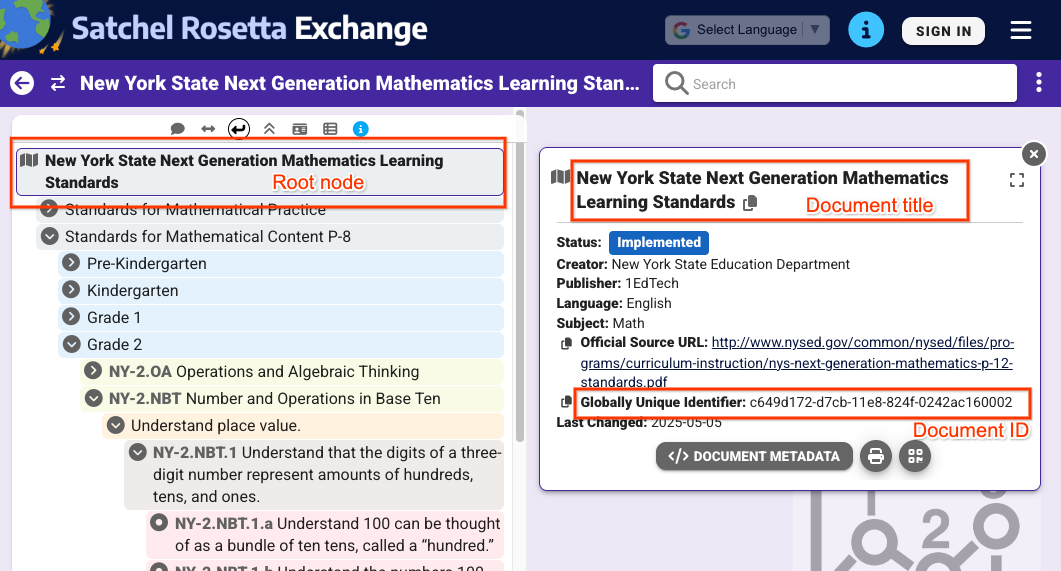 איור 1: תצוגה של צומת ברמה הבסיסית כשבוחרים אותו ב-Satchel Rosetta Exchange. מוצגים כותרת המסמך ומזהה המסמך, שמשותפים לכל הצמתים בדף הזה.
מהתצוגה באיור 1, אפשר לחלץ את הערכים הבאים:
- מזהה המסמך:
c649d172-d7cb-11e8-824f-0242ac160002 - כותרת המסמך:
New York State Next Generation Mathematics Learning
Standards
כדי לקבל ערכים עבור תקן מסוים, לוחצים על התקן ומרחיבים את המטא-נתונים שלו:
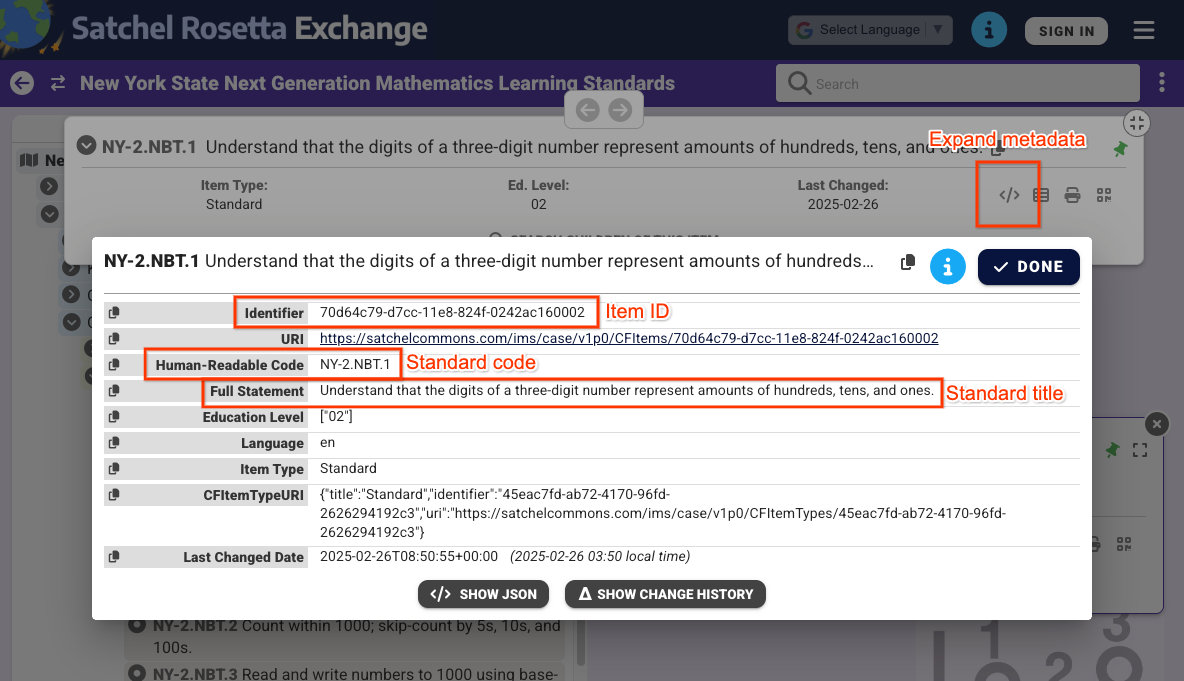 איור 2: תצוגה של המטא-נתונים של צומת שאינו צומת הבסיס כשבוחרים אותו ב-Satchel Rosetta Exchange. כאן מוצגים מזהה הפריט, קוד התקן ושם התקן. הערכים האלה ספציפיים רק לתקן הזה.
בתצוגה באיור 2 אפשר לראות את הערכים הבאים:
- מזהה הפריט:
70d64c79-d7cc-11e8-824f-0242ac160002 - שם רגיל:
Understand that the digits of a three-digit number represent amounts of hundreds, tens, and ones. - קוד רגיל:
NY-2.NBT.4
שימו לב שאפשר לחלץ את מזהי המסמכים והפריטים גם מכתובת ה-URL של כל צומת ב-Satchel Rosetta Exchange. כתובות ה-URL האלה תואמות לתבנית
https://rosetta.commongoodlt.com/{document_id}/{item_id}.
מספר מקסימלי של פריטים מקושרים
- כל
Courseיכול להכיל עד 20 קבוצות של תקני למידה. - לכל
CourseWorkאפשר להוסיף עד 10 יעדי למידה. - כל קריטריון הערכה
Criterionיכול להכיל יעד למידה אחד.
ניהול קבוצות של מדדי הערכה בקורס
שינוי של קבוצות מדדי הערכה
כדי לשנות את קבוצות מדדי ההערכה Course, מאכלסים את השדה Course.learningStandardSettings באובייקטים standardSets. כל רכיב standardSet חייב להכיל אובייקט caseGuid, שכולל caseDocumentId ואופציונלית caseItemId.
אפשר להוסיף קבוצות של תקני למידה באמצעות כל Course בקשה לשינוי נתונים, כמו courses.create() או courses.patch() עם learningStandardSettings מסכת העדכון.
בדוגמה הבאה מוגדרות שתי קבוצות סטנדרטיות בקורס קיים.
Python
service = build("classroom", "v1", credentials=creds)
course = {
    "learningStandardSettings": {
        # Each Course can have up to 20 learning standard sets.
        "standardSets": [
            # Construct a GUID for the NYS Next Gen Math Standards top-level node.
            # This is a top-level non-leaf node, so it only has a Document ID.
            {
                "caseGuid": {
                    "caseDocumentId": "c649d172-d7cb-11e8-824f-0242ac160002"
                }
            },
            # Construct a GUID for the AAS ELA21.AAS.K Standard node.
            # This is a mid-level non-leaf node, so it has both Document and Item IDs.
            {
                "caseGuid": {
                    "caseDocumentId": "bfc264b3-b4d1-4780-84ff-26b12e6945a6",
                    "caseItemId": "ada2cc30-7d6d-494e-8c6b-c998bae98f0b",
                }
            },
        ]
    }
}

course = (
    service.courses()
    .patch(
      id=course_id,
      updateMask="learningStandardSettings",
      body=course,
      # Specify the preview version while the feature is in Developer Preview.
      # Learning standards and goals are supported in V1_20260316_PREVIEW and
      # later.
      previewVersion="V1_20260316_PREVIEW")
    .execute()
)
print(f"Course updated: {course.get('name')}")
אחזור קבוצות של מדדי הערכה
כדי לראות את קבוצות מדדי הערכת הלמידה הנוכחיות של קורס, בודקים את השדה Course.learningStandardSettings. השדה הזה מכיל סדרה של אובייקטים מסוג standardSets, והוא יכול להיות ריק אם אין קבוצות של תקני למידה בקורס.
שימו לב שכל standardSet בתשובה מכיל את התיאור של התקן ואת הכותרת של מסמך הבסיס שלו. הטקסטים האלה מופיעים גם למורים ולתלמידים בממשק המשתמש של Classroom. מקבלים גם את
sourceDataAvailabilityStatus, שמציין אם התקן זמין ב-Satchel Rosetta Exchange.
{
  "id": "123456789",
  "name": "LSS test class",
  "learningStandardSettings": {
    "standardSets": [
      {
        "caseGuid": {
          "caseDocumentId": "c649d172-d7cb-11e8-824f-0242ac160002"
        },
        "documentTitle": "New York State Next Generation Mathematics Learning Standards",
        "sourceDataAvailabilityStatus": "LEARNING_STANDARD_AVAILABLE"
      },
      {
        "caseGuid": {
          "caseDocumentId": "bfc264b3-b4d1-4780-84ff-26b12e6945a6",
          "caseItemId": "ada2cc30-7d6d-494e-8c6b-c998bae98f0b"
        },
        "documentTitle": "AAS English Language Arts (2021)",
        "standardTitle": "Kindergarten",
        "sourceDataAvailabilityStatus": "LEARNING_STANDARD_AVAILABLE"
      }
    ]
  }
}
ניהול יעדי למידה בכלי המשימות, בחומרי לימוד ובקריטריון הערכה
שינוי יעדי הלמידה
אפשר לצרף יעדי למידה למשאבי CourseWork, CourseWorkMaterial וקריטריון הערכה Criterion בכל בקשת שינוי. מגדירים מזהים של מסמכים ופריטים בשדות CourseWork.learningGoals או Rubric.Criterion.learningGoal. אלה אותם מזהים שתוארו קודם.
שימו לב: יעדי למידה שמצורפים לקריטריונים של Rubric חייבים להיות כבר מצורפים למטלה שאליה מקושר Rubric.
בדוגמה הבאה נוצרת מטלה CourseWork עם שני יעדי למידה מצורפים.
Python
# Create a CourseWork assignment with two attached learning goals.
service = build("classroom", "v1", credentials=creds)
coursework = {
    "title": "Ant colonies",
    "description": "Read the article about ant colonies and complete the quiz.",
    "materials": [
        {"link": {"url": "http://example.com/ant-colonies"}},
        {"link": {"url": "http://example.com/ant-quiz"}},
    ],
    "workType": "ASSIGNMENT",
    "state": "PUBLISHED",
    # Each CourseWork can have up to 10 learning goals.
    "learningGoals": [
        {
            "learningStandardInfo": {
                # Construct a GUID for the ELA21.AAS.11.11c Standard node.
                # This is a non-root node, so it has both Document and Item IDs.
                "caseGuid": {
                    "caseDocumentId": "bfc264b3-b4d1-4780-84ff-26b12e6945a6",
                    "caseItemId": "6d922f1f-b580-42a1-b6d2-5ee5b39c561d",
                }
            }
        },
        {
            "learningStandardInfo": {
                # Construct a GUID for the ELA21.AAS.11.22a Standard node.
                # This is a non-root node, so it has both Document and Item IDs.
                "caseGuid": {
                    "caseDocumentId": "bfc264b3-b4d1-4780-84ff-26b12e6945a6",
                    "caseItemId": "a684609a-c3ec-42da-8b7f-7a325b31ea4a",
                }
            }
        },
    ],
}

coursework = (
    service.courses()
    .courseWork()
    .create(
      courseId=course_id,
      body=coursework,
      # Specify the preview version while the feature is in Developer Preview.
      # Learning standards and goals are supported in V1_20260316_PREVIEW and
      # later.
      previewVersion="V1_20260316_PREVIEW")
    .execute()
)
print(f"Assignment created with ID {coursework.get('id')}")
בדוגמה הבאה נוצר Rubric עם יעד למידה שמצורף לכל קריטריון.
Python
# Create a new Rubric with a learning goal attached to each criterion.
service = build("classroom", "v1", credentials=creds)
body = {
    "criteria": [
        {
            "title": "Argument",
            "description": "How well structured your argument is.",
            "levels": [
                {
                    "title": "Convincing",
                    "description": "A compelling case is made.",
                    "points": 30,
                },
                {
                    "title": "Passable",
                    "description": "Missing some evidence.",
                    "points": 20,
                },
                {
                    "title": "Needs Work",
                    "description": "Not enough strong evidence.",
                    "points": 0,
                },
            ],
            # Each Criterion can have one learning goal.
            "learningGoal": {
                "learningStandardInfo": {
                    # Construct a GUID for the ELA21.AAS.11.11c Standard node.
                    # This is a non-root node, so it has both Document and Item IDs.
                    "caseGuid": {
                        "caseDocumentId": "bfc264b3-b4d1-4780-84ff-26b12e6945a6",
                        "caseItemId": "6d922f1f-b580-42a1-b6d2-5ee5b39c561d",
                    }
                }
            },
        },
        {
            "title": "Spelling",
            "description": "How well you spelled all the words.",
            "levels": [
                {"title": "Perfect", "description": "No mistakes.", "points": 20},
                {"title": "Great", "description": "A mistake or two.", "points": 15},
                {"title": "Needs Work", "description": "Many mistakes.", "points": 5},
            ],
            # Each Criterion can have one learning goal.
            "learningGoal": {
                "learningStandardInfo": {
                    # Construct a GUID for the ELA21.AAS.11.22a Standard node.
                    # This is a non-root node, so it has both Document and Item IDs.
                    "caseGuid": {
                        "caseDocumentId": "bfc264b3-b4d1-4780-84ff-26b12e6945a6",
                        "caseItemId": "a684609a-c3ec-42da-8b7f-7a325b31ea4a",
                    }
                }
            },
        },
    ]
}

rubric = (
    service.courses()
    .courseWork()
    .rubrics()
    .create(
      courseId=course_id,
      courseWorkId=coursework_id,
      body=body,
      # Specify the preview version while the feature is in Developer Preview.
      # Learning standards and goals are supported in V1_20260316_PREVIEW and
      # later.
      previewVersion="V1_20260316_PREVIEW")
    .execute()
)
print(f"Rubric created with ID {rubric.get('id')}")
אחזור יעדי למידה
כדי לראות את יעדי הלמידה הנוכחיים במטלה, בשאלה או בחומר, בודקים את השדה CourseWork.learningGoals. כל אובייקט של יעד למידה מכיל את הכותרת של המסמך ברמת הבסיס ואת קוד תקן הלמידה.
הערה: מורים יכולים גם להוסיף תגי מיומנויות למטלות ולחומרי לימוד בממשק המשתמש של Classroom. אי אפשר לגשת לתגי מיומנויות דרך ה-API.
{
  "course_id": "123456789",
  "id": "987654321",
  "title": "Test ELA Assignment",
  "state": "PUBLISHED",
  "learningGoals": [
    {
      "id": "871768554412",
      "courseId": "123456789",
      "learningStandardInfo": {
        "standardCode": "ELA21.AAS.11.22a",
        "caseGuid": {
          "caseDocumentId": "bfc264b3-b4d1-4780-84ff-26b12e6945a6",
          "caseItemId": "a684609a-c3ec-42da-8b7f-7a325b31ea4a"
        }
      },
      "title": "Identify a sentence that uses correct capitalization (i.e., beginning of sentence, names, cities, states, countries, towns, titles, days, months)."
    },
    {
      "id": "871768554411",
      "courseId": "123456789",
      "learningStandardInfo": {
        "standardCode": "ELA21.AAS.11.11c",
        "caseGuid": {
          "caseDocumentId": "bfc264b3-b4d1-4780-84ff-26b12e6945a6",
          "caseItemId": "6d922f1f-b580-42a1-b6d2-5ee5b39c561d"
        }
      },
      "title": "Compose argumentative texts by stating a topic, providing reasons that support the argument, and providing an appropriate conclusion related to the topic."
    }
  ]
}
נתונים דומים מוחזרים בתגובות של Rubric, עם learningGoal אחד לכל קריטריון.