

যেহেতু সাইন-ইন অভিজ্ঞতাটিই আপনার অ্যাড-অনের সাথে একজন ব্যবহারকারীর প্রথম সংযোগ, তাই এটি গুরুত্বপূর্ণ যে তারা যেন প্রক্রিয়াটি যতটা সম্ভব নির্বিঘ্নে সম্পন্ন করতে পারে। বিভিন্ন সাইন-ইন এপিআই, সাইন-ইন সম্পর্কিত কোয়েরি প্যারামিটার, পপ-আপ ব্লকার কীভাবে পরিচালনা করতে হয় এবং ডেভেলপমেন্টের সময় আপনি সেরা অনুশীলনগুলো অনুসরণ করছেন কিনা তা নিশ্চিত করার জন্য ব্যবহারযোগ্য একটি টেস্ট প্ল্যান সম্পর্কে পরিচিত হতে নিচের বিভাগগুলো পড়ুন।
SSO বাস্তবায়নের বিবরণ
গুগলের OAuth 2.0 অনেক OAuth 2.0 স্ট্যাকের সাথে সামঞ্জস্যপূর্ণ। আমরা সার্ভার-সাইড অথরাইজেশন প্রয়োগ করার জন্য দৃঢ়ভাবে সুপারিশ করি, কারণ এটি সর্বোচ্চ নিরাপত্তা বিকল্প এবং আইফ্রেম কোয়েরি প্যারামিটার ব্যবহার সমর্থন করে।
গুগল সাইন-ইন প্রয়োগ করার সময় গুগল আইডেন্টিটি ওয়েবসাইটে প্রদত্ত প্রযুক্তিগত নির্দেশিকা দেখুন। গুগল সাইন-ইন ব্র্যান্ডিং নির্দেশিকা অবশ্যই অনুসরণ করুন। ডাউনলোডের জন্য স্কেচ, SVG, এবং EPS ফাইল সরবরাহ করা হয়েছে।
সাইন-ইন পরীক্ষা
পর্যালোচনার জন্য আপনার অ্যাড-অন জমা দেওয়ার আগে, সেটি প্রয়োজনীয় মান পূরণ করছে এবং পরিচিত এজ কেসগুলো (edge cases) সামলাতে সক্ষম কিনা তা যাচাই করতে অ্যাড-অন টেস্ট প্ল্যানটি ব্যবহার করুন। এই পরীক্ষাগুলো ক্লাসরুম অ্যাড-অন রিকোয়ারমেন্টস চেকলিস্টের সাথে হুবহু মিলে যায় এবং আপনার অ্যাড-অন সেই প্রয়োজনীয়তাগুলো পূরণ করে কিনা তা কীভাবে পরীক্ষা করবেন, সে বিষয়ে আপনাকে ধাপে ধাপে নির্দেশনা দেয়। প্রকাশনার সময় আপনার অ্যাপ্লিকেশনটি এই একই পরীক্ষাগুলোর ভিত্তিতেই যাচাই করা হয়।
সাইন-ইন কোয়েরি প্যারামিটার
বারবার সাইন-ইন সহজ করার জন্য গুগল ক্লাসরুম login_hint কোয়েরি প্যারামিটারটি প্রদান করে। অতিরিক্ত তথ্যের জন্য iframe কোয়েরি প্যারামিটার পৃষ্ঠার সাইন-ইন সম্পর্কিত প্যারামিটার বিভাগটি দেখুন। নমুনা কোড আমাদের ডেভেলপার ওয়াকথ্রুগুলোর ' handle repeat visits' ওয়াকথ্রু- তে পাওয়া যাবে।
পপ-আপ ব্লকার পরিচালনা করুন
সাইন-ইন ডায়ালগ উইন্ডোর মাধ্যমে অ্যাড-অনটিতে সাইন ইন করা সহজ হয়। এই উইন্ডোটি অ্যাকাউন্ট সিলেক্টর স্ক্রিন প্রদর্শন করে এবং ব্যবহারকারীকে OAuth অনুমতি দেওয়ার সুযোগ দেয়। একজন ব্যবহারকারীর পপ-আপ ব্লকার তাকে সাইন-ইন প্রক্রিয়াটি সম্পন্ন করতে বাধা দিতে পারে।
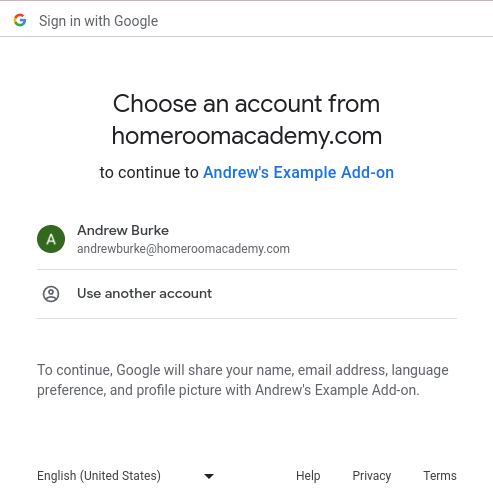
চিত্র ১. একটি অ্যাকাউন্ট নির্বাচক স্ক্রিনের উদাহরণ।
এই সমস্যাটি সমাধান করতে, পপ-আপ ব্লকারটি এড়িয়ে যাওয়ার জন্য ব্যবহারকারীকে একটি বাটন দিন। এই ব্যবস্থাটি সাইন-ইন ডায়ালগটি প্রদর্শন করে, ফলে ব্যবহারকারী সাইন-ইন প্রক্রিয়াটি চালিয়ে যেতে পারেন। নিশ্চিত করুন যে আপনার দেওয়া বাটনটি সাইন-ইন ব্র্যান্ডিং নির্দেশিকা অনুসরণ করে।
একটি গুগল ব্র্যান্ডেড সাইন-ইন বাটন তৈরি করতে আমাদের ডেভেলপার ওয়াকথ্রু-তে দেওয়া সাইন-ইন প্রক্রিয়াটি অনুসরণ করুন, যেটিতে ক্লিক করলে সাইন-ইন ডায়ালগটি চালু হবে।
একাধিক লগইন
একই সময়ে একাধিক অ্যাকাউন্ট সাইন-ইন করা থাকলে ব্রাউজারে অ্যাড-অন ব্যবহারের স্বাভাবিক প্রক্রিয়া ব্যাহত হতে পারে। ব্যবহারকারীরা হয় তাদের বর্তমান ব্রাউজার থেকে সমস্ত গুগল অ্যাকাউন্ট থেকে সাইন আউট করতে পারেন , অথবা সঠিক অ্যাকাউন্ট দিয়ে সাইন-ইন করার আগে এবং প্রক্রিয়াটি পুনরায় চেষ্টা করার আগে একটি ইনকগনিটো ক্রোম উইন্ডোতে ক্লাসরুম খুলতে পারেন।
একাধিক লগইনের সমস্যার কারণে যদি কোনো ভুল ব্যবহারকারী অ্যাড-অনটিতে সাইন-ইন করে থাকেন, তাহলে আপনার Classroom অ্যাড-অন API-এর কলগুলো একটি InvalidAddOnToken ত্রুটির কারণে ব্যর্থ হতে পারে। আপনি যদি এই ধরনের কোনো ত্রুটি পান, তাহলে ব্যবহারকারীকে ব্রাউজারে থাকা অন্য সব অ্যাকাউন্ট থেকে সাইন আউট করতে অথবা এর পরিবর্তে একটি ইনকগনিটো ক্রোম উইন্ডোতে Classroom খুলতে নির্দেশ দিন।