ดูตัวอย่างลิงก์ที่มีชิปอัจฉริยะ

หน้านี้อธิบายวิธีสร้างส่วนเสริมของ Google Workspace ที่ช่วยให้ผู้ใช้ Google เอกสาร, ชีต และสไลด์ดูตัวอย่างลิงก์จากบริการของบุคคลที่สามได้

ส่วนเสริมของ Google Workspace สามารถตรวจหาลิงก์ของบริการและแจ้งให้ ผู้ใช้ดูตัวอย่างได้ คุณสามารถกำหนดค่า ส่วนเสริมเพื่อแสดงตัวอย่างรูปแบบ URL หลายรายการ เช่น ลิงก์ ไปยังเคสสนับสนุน ผู้มีโอกาสเป็นลูกค้า และโปรไฟล์พนักงาน

วิธีที่ผู้ใช้ดูตัวอย่างลิงก์

หากต้องการดูตัวอย่างลิงก์ ผู้ใช้จะต้องโต้ตอบกับชิปอัจฉริยะ และการ์ด
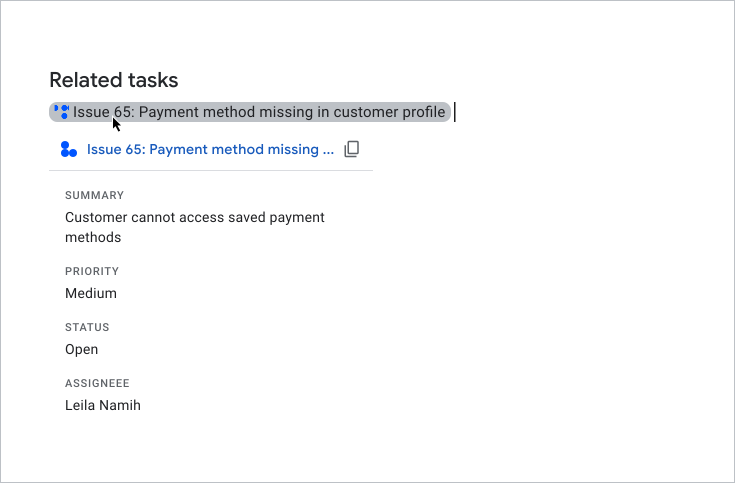
ผู้ใช้ดูตัวอย่างการ์ด

เมื่อผู้ใช้พิมพ์หรือวาง URL ลงในเอกสารหรือสเปรดชีต Google เอกสารหรือ Google ชีต จะแจ้งให้ผู้ใช้แทนที่ลิงก์ด้วยชิปอัจฉริยะ ชิปอัจฉริยะจะแสดงไอคอน และชื่อย่อหรือคำอธิบายสั้นๆ ของเนื้อหาในลิงก์ เมื่อผู้ใช้วางเมาส์เหนือชิป จะเห็นอินเทอร์เฟซการ์ดที่แสดงตัวอย่างข้อมูลเพิ่มเติมเกี่ยวกับไฟล์หรือลิงก์

วิดีโอต่อไปนี้แสดงวิธีที่ผู้ใช้แปลงลิงก์เป็นชิปอัจฉริยะและ ดูตัวอย่างการ์ด

วิธีที่ผู้ใช้ดูตัวอย่างลิงก์ในสไลด์

Slides ไม่รองรับชิปอัจฉริยะของบุคคลที่สามสำหรับการแสดงตัวอย่างลิงก์ เมื่อผู้ใช้พิมพ์หรือ วาง URL ลงในงานนำเสนอ สไลด์จะแจ้งให้ผู้ใช้แทนที่ลิงก์ด้วยชื่อเป็น ข้อความที่ลิงก์แทนชิป เมื่อ ผู้ใช้วางเมาส์เหนือชื่อลิงก์ จะเห็นอินเทอร์เฟซการ์ดที่แสดงตัวอย่าง ข้อมูลเกี่ยวกับลิงก์

รูปภาพต่อไปนี้แสดงวิธีแสดงตัวอย่างลิงก์ในสไลด์

ตัวอย่างการแสดงตัวอย่างลิงก์สำหรับสไลด์

ข้อกำหนดเบื้องต้น

Apps Script

Node.js

Python

Java

ไม่บังคับ: ตั้งค่าการตรวจสอบสิทธิ์ไปยังบริการของบุคคลที่สาม

หากส่วนเสริมเชื่อมต่อกับบริการที่ต้องมีการให้สิทธิ์ ผู้ใช้ต้องตรวจสอบสิทธิ์กับบริการเพื่อดูตัวอย่างลิงก์ ซึ่งหมายความว่าเมื่อผู้ใช้วางลิงก์จากบริการของคุณลงในไฟล์เอกสาร ชีต หรือสไลด์เป็นครั้งแรก ส่วนเสริมของคุณต้องเรียกใช้ขั้นตอนการให้สิทธิ์

หากต้องการตั้งค่าบริการ OAuth หรือข้อความแจ้งการให้สิทธิ์ที่กำหนดเอง โปรดดูเชื่อมต่อส่วนเสริมกับบริการของบุคคลที่สาม

ส่วนนี้จะอธิบายวิธีตั้งค่าตัวอย่างลิงก์สำหรับส่วนเสริม ซึ่งรวมถึงขั้นตอนต่อไปนี้

  1. กำหนดค่าตัวอย่างลิงก์ในไฟล์ Manifest ของส่วนเสริม
  2. สร้างอินเทอร์เฟซชิปอัจฉริยะและการ์ดสำหรับลิงก์

กำหนดค่าตัวอย่างลิงก์

หากต้องการกำหนดค่าตัวอย่างลิงก์ ให้ระบุส่วนและช่องต่อไปนี้ในไฟล์ Manifest ของส่วนเสริม

  1. ในส่วน addOns ให้เพิ่มฟิลด์ docs เพื่อขยายเอกสาร ฟิลด์ sheets เพื่อขยายชีต และฟิลด์ slides เพื่อขยายสไลด์
  2. ในแต่ละช่อง ให้ใช้linkPreviewTriggersทริกเกอร์ ที่มีrunFunction (คุณกำหนดฟังก์ชันนี้ในส่วนสร้างชิปอัจฉริยะและการ์ดต่อไปนี้)

    ดูข้อมูลเกี่ยวกับฟิลด์ที่ระบุได้ในlinkPreviewTriggersทริกเกอร์ได้ที่เอกสารอ้างอิงสำหรับไฟล์ Manifest ของ Apps Script หรือทรัพยากรการติดตั้งใช้งานสำหรับรันไทม์อื่นๆ

  3. ในช่อง oauthScopes ให้เพิ่มขอบเขต https://www.googleapis.com/auth/workspace.linkpreview เพื่อให้ผู้ใช้ ให้สิทธิ์ส่วนเสริมเพื่อดูตัวอย่างลิงก์ในนามของตนเอง

ตัวอย่างเช่น ดูส่วน oauthScopes และ addons ของไฟล์ Manifest ต่อไปนี้ ซึ่งกำหนดค่าตัวอย่างลิงก์สำหรับบริการเคสขอรับความช่วยเหลือ

{
  "oauthScopes": [
    "https://www.googleapis.com/auth/workspace.linkpreview"
  ],
  "addOns": {
    "common": {
      "name": "Preview support cases",
      "logoUrl": "https://www.example.com/images/company-logo.png",
      "layoutProperties": {
        "primaryColor": "#dd4b39"
      }
    },
    "docs": {
      "linkPreviewTriggers": [
        {
          "runFunction": "caseLinkPreview",
          "patterns": [
            {
              "hostPattern": "example.com",
              "pathPrefix": "support/cases"
            },
            {
              "hostPattern": "*.example.com",
              "pathPrefix": "cases"
            },
            {
              "hostPattern": "cases.example.com"
            }
          ],
          "labelText": "Support case",
          "logoUrl": "https://www.example.com/images/support-icon.png",
          "localizedLabelText": {
            "es": "Caso de soporte"
          }
        }
      ]
    },
    "sheets": {
      "linkPreviewTriggers": [
        {
          "runFunction": "caseLinkPreview",
          "patterns": [
            {
              "hostPattern": "example.com",
              "pathPrefix": "support/cases"
            },
            {
              "hostPattern": "*.example.com",
              "pathPrefix": "cases"
            },
            {
              "hostPattern": "cases.example.com"
            }
          ],
          "labelText": "Support case",
          "logoUrl": "https://www.example.com/images/support-icon.png",
          "localizedLabelText": {
            "es": "Caso de soporte"
          }
        }
      ]
    },
    "slides": {
      "linkPreviewTriggers": [
        {
          "runFunction": "caseLinkPreview",
          "patterns": [
            {
              "hostPattern": "example.com",
              "pathPrefix": "support/cases"
            },
            {
              "hostPattern": "*.example.com",
              "pathPrefix": "cases"
            },
            {
              "hostPattern": "cases.example.com"
            }
          ],
          "labelText": "Support case",
          "logoUrl": "https://www.example.com/images/support-icon.png",
          "localizedLabelText": {
            "es": "Caso de soporte"
          }
        }
      ]
    }
  }
}

ในตัวอย่างนี้ ส่วนเสริม Google Workspace จะแสดงตัวอย่างลิงก์สำหรับบริการเคสขอรับความช่วยเหลือของบริษัท ส่วนเสริมจะระบุรูปแบบ URL 3 รูปแบบเพื่อแสดงตัวอย่างลิงก์ เมื่อใดก็ตามที่ลิงก์ตรงกับรูปแบบ URL รายการใดรายการหนึ่ง ฟังก์ชัน Callback caseLinkPreview จะสร้างและแสดงการ์ดและชิปอัจฉริยะในเอกสาร ชีต หรือสไลด์ และแทนที่ URL ด้วยชื่อลิงก์

สร้างชิปอัจฉริยะและการ์ด

หากต้องการแสดงชิปอัจฉริยะและการ์ดสำหรับลิงก์ คุณต้องใช้ฟังก์ชันใดก็ตาม ที่คุณระบุไว้ในออบเจ็กต์ linkPreviewTriggers

เมื่อผู้ใช้โต้ตอบกับลิงก์ที่ตรงกับรูปแบบ URL ที่ระบุ linkPreviewTriggersทริกเกอร์จะเริ่มทำงานและฟังก์ชัน Callback จะส่งออบเจ็กต์เหตุการณ์ EDITOR_NAME.matchedUrl.url เป็นอาร์กิวเมนต์ คุณใช้ เพย์โหลดของออบเจ็กต์เหตุการณ์นี้เพื่อสร้างชิปอัจฉริยะและการ์ดสำหรับ ตัวอย่างลิงก์

เช่น หากผู้ใช้ดูตัวอย่างลิงก์ https://www.example.com/cases/123456 ในเอกสาร ระบบจะแสดงเพย์โหลดเหตุการณ์ต่อไปนี้

JSON

{
  "docs": {
    "matchedUrl": {
        "url": "https://www.example.com/support/cases/123456"
    }
  }
}

หากต้องการสร้างอินเทอร์เฟซการ์ด คุณต้องใช้วิดเจ็ตเพื่อแสดงข้อมูลเกี่ยวกับลิงก์ นอกจากนี้ คุณยังสร้างการดำเนินการที่อนุญาตให้ผู้ใช้เปิดลิงก์หรือแก้ไขเนื้อหาของลิงก์ได้ด้วย ดูรายการวิดเจ็ตและการดำเนินการที่พร้อมใช้งานได้ที่คอมโพเนนต์ที่รองรับ สำหรับการ์ดแสดงตัวอย่าง

วิธีสร้างชิปอัจฉริยะและการ์ดสำหรับการแสดงตัวอย่างลิงก์

  1. ใช้ฟังก์ชันที่คุณระบุไว้ในlinkPreviewTriggersส่วนของไฟล์ Manifest ของส่วนเสริม ดังนี้
    1. ฟังก์ชันต้องยอมรับออบเจ็กต์เหตุการณ์ที่มี EDITOR_NAME.matchedUrl.url เป็นอาร์กิวเมนต์ และแสดงผล ออบเจ็กต์ Card รายการเดียว
    2. หากบริการของคุณต้องมีการให้สิทธิ์ ฟังก์ชันต้องเรียกใช้โฟลว์การให้สิทธิ์ด้วย
  2. สําหรับการ์ดตัวอย่างแต่ละรายการ ให้ใช้ฟังก์ชันเรียกกลับที่ให้ การโต้ตอบของวิดเจ็ตสําหรับอินเทอร์เฟซ เช่น หากคุณใส่ปุ่มที่ระบุว่า "ดูลิงก์" คุณจะสร้างการดำเนินการที่ระบุฟังก์ชัน Callback เพื่อเปิดลิงก์ในหน้าต่างใหม่ได้ ดูข้อมูลเพิ่มเติมเกี่ยวกับ การโต้ตอบวิดเจ็ตได้ที่การดำเนินการของส่วนเสริม

โค้ดต่อไปนี้จะสร้างฟังก์ชัน Callback caseLinkPreview สำหรับ เอกสาร:

Apps Script

apps-script/3p-resources/3p-resources.gs
/**
* Entry point for a support case link preview.
*
* @param {!Object} event The event object.
* @return {!Card} The resulting preview link card.
*/
function caseLinkPreview(event) {

  // If the event object URL matches a specified pattern for support case links.
  if (event.docs.matchedUrl.url) {

    // Uses the event object to parse the URL and identify the case details.
    const caseDetails = parseQuery(event.docs.matchedUrl.url);

    // Builds a preview card with the case name, and description
    const caseHeader = CardService.newCardHeader()
      .setTitle(`Case ${caseDetails["name"][0]}`);
    const caseDescription = CardService.newTextParagraph()
      .setText(caseDetails["description"][0]);

    // Returns the card.
    // Uses the text from the card's header for the title of the smart chip.
    return CardService.newCardBuilder()
      .setHeader(caseHeader)
      .addSection(CardService.newCardSection().addWidget(caseDescription))
      .build();
  }
}

/**
* Extracts the URL parameters from the given URL.
*
* @param {!string} url The URL to parse.
* @return {!Map} A map with the extracted URL parameters.
*/
function parseQuery(url) {
  const query = url.split("?")[1];
  if (query) {
    return query.split("&")
    .reduce(function(o, e) {
      var temp = e.split("=");
      var key = temp[0].trim();
      var value = temp[1].trim();
      value = isNaN(value) ? value : Number(value);
      if (o[key]) {
        o[key].push(value);
      } else {
        o[key] = [value];
      }
      return o;
    }, {});
  }
  return null;
}

Node.js

node/3p-resources/index.js
/**
 * 
 * A support case link preview.
 *
 * @param {!URL} url The event object.
 * @return {!Card} The resulting preview link card.
 */
function caseLinkPreview(url) {
  // Builds a preview card with the case name, and description
  // Uses the text from the card's header for the title of the smart chip.
  // Parses the URL and identify the case details.
  const name = `Case ${url.searchParams.get("name")}`;
  return {
    action: {
      linkPreview: {
        title: name,
        previewCard: {
          header: {
            title: name
          },
          sections: [{
            widgets: [{
              textParagraph: {
                text: url.searchParams.get("description")
              }
            }]
          }]
        }
      }
    }
  };
}

Python

python/3p-resources/create_link_preview/main.py
def case_link_preview(url):
    """A support case link preview.
    Args:
      url: A matching URL.
    Returns:
      The resulting preview link card.
    """

    # Parses the URL and identify the case details.
    query_string = parse_qs(url.query)
    name = f'Case {query_string["name"][0]}'
    # Uses the text from the card's header for the title of the smart chip.
    return {
        "action": {
            "linkPreview": {
                "title": name,
                "previewCard": {
                    "header": {
                        "title": name
                    },
                    "sections": [{
                        "widgets": [{
                            "textParagraph": {
                                "text": query_string["description"][0]
                            }
                        }]
                    }],
                }
            }
        }
    }

Java

java/3p-resources/src/main/java/CreateLinkPreview.java
/**
 * A support case link preview.
 *
 * @param url A matching URL.
 * @return The resulting preview link card.
 */
JsonObject caseLinkPreview(URL url) throws UnsupportedEncodingException {
  // Parses the URL and identify the case details.
  Map<String, String> caseDetails = new HashMap<String, String>();
  for (String pair : url.getQuery().split("&")) {
      caseDetails.put(URLDecoder.decode(pair.split("=")[0], "UTF-8"), URLDecoder.decode(pair.split("=")[1], "UTF-8"));
  }

  // Builds a preview card with the case name, and description
  // Uses the text from the card's header for the title of the smart chip.
  JsonObject cardHeader = new JsonObject();
  String caseName = String.format("Case %s", caseDetails.get("name"));
  cardHeader.add("title", new JsonPrimitive(caseName));

  JsonObject textParagraph = new JsonObject();
  textParagraph.add("text", new JsonPrimitive(caseDetails.get("description")));

  JsonObject widget = new JsonObject();
  widget.add("textParagraph", textParagraph);

  JsonArray widgets = new JsonArray();
  widgets.add(widget);

  JsonObject section = new JsonObject();
  section.add("widgets", widgets);

  JsonArray sections = new JsonArray();
  sections.add(section);

  JsonObject previewCard = new JsonObject();
  previewCard.add("header", cardHeader);
  previewCard.add("sections", sections);

  JsonObject linkPreview = new JsonObject();
  linkPreview.add("title", new JsonPrimitive(caseName));
  linkPreview.add("previewCard", previewCard);

  JsonObject action = new JsonObject();
  action.add("linkPreview", linkPreview);

  JsonObject renderActions = new JsonObject();
  renderActions.add("action", action);

  return renderActions;
}

คอมโพเนนต์ที่รองรับสำหรับการ์ดแสดงตัวอย่าง

ส่วนเสริมของ Google Workspace รองรับวิดเจ็ตและการดำเนินการต่อไปนี้สำหรับลิงก์ตัวอย่าง การ์ด

Apps Script

ฟิลด์บริการการ์ด ประเภท
TextParagraph วิดเจ็ต
DecoratedText วิดเจ็ต
Image วิดเจ็ต
IconImage วิดเจ็ต
ButtonSet วิดเจ็ต
TextButton วิดเจ็ต
ImageButton วิดเจ็ต
Grid วิดเจ็ต
Divider วิดเจ็ต
OpenLink การดำเนินการ
Navigation การดำเนินการ
รองรับเฉพาะเมธอด updateCard

JSON

ฟิลด์การ์ด (google.apps.card.v1) ประเภท
TextParagraph วิดเจ็ต
DecoratedText วิดเจ็ต
Image วิดเจ็ต
Icon วิดเจ็ต
ButtonList วิดเจ็ต
Button วิดเจ็ต
Grid วิดเจ็ต
Divider วิดเจ็ต
OpenLink การดำเนินการ
Navigation การดำเนินการ
รองรับเฉพาะเมธอด updateCard

ตัวอย่างที่สมบูรณ์: ส่วนเสริมเคสขอรับความช่วยเหลือ

ตัวอย่างต่อไปนี้แสดงส่วนเสริม Google Workspace ที่แสดงตัวอย่างลิงก์ ไปยังเคสขอรับความช่วยเหลือของบริษัทใน Google เอกสาร

ตัวอย่างจะทำสิ่งต่อไปนี้

  • แสดงตัวอย่างลิงก์ไปยังเคสขอรับความช่วยเหลือ เช่น https://www.example.com/support/cases/1234 ชิปอัจฉริยะจะแสดง ไอคอนการสนับสนุน และการ์ดตัวอย่างจะมีรหัสเคสและคำอธิบาย
  • หากตั้งค่าภาษาของผู้ใช้เป็นสเปน ชิปอัจฉริยะจะแปลlabelTextเป็นภาษาสเปน

ไฟล์ Manifest

Apps Script

apps-script/3p-resources/appsscript.json
{
  "timeZone": "America/New_York",
  "exceptionLogging": "STACKDRIVER",
  "runtimeVersion": "V8",
  "oauthScopes": [
    "https://www.googleapis.com/auth/workspace.linkpreview",
    "https://www.googleapis.com/auth/workspace.linkcreate"
  ],
  "addOns": {
    "common": {
      "name": "Manage support cases",
      "logoUrl": "https://developers.google.com/workspace/add-ons/images/support-icon.png",
      "layoutProperties": {
        "primaryColor": "#dd4b39"
      }
    },
    "docs": {
      "linkPreviewTriggers": [
        {
          "runFunction": "caseLinkPreview",
          "patterns": [
            {
              "hostPattern": "example.com",
              "pathPrefix": "support/cases"
            },
            {
              "hostPattern": "*.example.com",
              "pathPrefix": "cases"
            },
            {
              "hostPattern": "cases.example.com"
            }
          ],
          "labelText": "Support case",
          "localizedLabelText": {
            "es": "Caso de soporte"
          },
          "logoUrl": "https://developers.google.com/workspace/add-ons/images/support-icon.png"
        }
      ],
      "createActionTriggers": [
        {
          "id": "createCase",
          "labelText": "Create support case",
          "localizedLabelText": {
            "es": "Crear caso de soporte"
          },
          "runFunction": "createCaseInputCard",
          "logoUrl": "https://developers.google.com/workspace/add-ons/images/support-icon.png"
        }
      ]
    }
  }
}

JSON

{
  "oauthScopes": [
    "https://www.googleapis.com/auth/workspace.linkpreview"
  ],
  "addOns": {
    "common": {
      "name": "Preview support cases",
      "logoUrl": "https://developers.google.com/workspace/add-ons/images/support-icon.png",
      "layoutProperties": {
        "primaryColor": "#dd4b39"
      }
    },
    "docs": {
      "linkPreviewTriggers": [
        {
          "runFunction": "URL",
          "patterns": [
            {
              "hostPattern": "example.com",
              "pathPrefix": "support/cases"
            },
            {
              "hostPattern": "*.example.com",
              "pathPrefix": "cases"
            },
            {
              "hostPattern": "cases.example.com"
            }
          ],
          "labelText": "Support case",
          "localizedLabelText": {
            "es": "Caso de soporte"
          },
          "logoUrl": "https://developers.google.com/workspace/add-ons/images/support-icon.png"
        }
      ]
    }
  }
}

รหัส

Apps Script

apps-script/3p-resources/3p-resources.gs
/**
* Entry point for a support case link preview.
*
* @param {!Object} event The event object.
* @return {!Card} The resulting preview link card.
*/
function caseLinkPreview(event) {

  // If the event object URL matches a specified pattern for support case links.
  if (event.docs.matchedUrl.url) {

    // Uses the event object to parse the URL and identify the case details.
    const caseDetails = parseQuery(event.docs.matchedUrl.url);

    // Builds a preview card with the case name, and description
    const caseHeader = CardService.newCardHeader()
      .setTitle(`Case ${caseDetails["name"][0]}`);
    const caseDescription = CardService.newTextParagraph()
      .setText(caseDetails["description"][0]);

    // Returns the card.
    // Uses the text from the card's header for the title of the smart chip.
    return CardService.newCardBuilder()
      .setHeader(caseHeader)
      .addSection(CardService.newCardSection().addWidget(caseDescription))
      .build();
  }
}

/**
* Extracts the URL parameters from the given URL.
*
* @param {!string} url The URL to parse.
* @return {!Map} A map with the extracted URL parameters.
*/
function parseQuery(url) {
  const query = url.split("?")[1];
  if (query) {
    return query.split("&")
    .reduce(function(o, e) {
      var temp = e.split("=");
      var key = temp[0].trim();
      var value = temp[1].trim();
      value = isNaN(value) ? value : Number(value);
      if (o[key]) {
        o[key].push(value);
      } else {
        o[key] = [value];
      }
      return o;
    }, {});
  }
  return null;
}

Node.js

node/3p-resources/index.js
/**
 * Responds to any HTTP request related to link previews.
 *
 * @param {Object} req An HTTP request context.
 * @param {Object} res An HTTP response context.
 */
exports.createLinkPreview = (req, res) => {
  const event = req.body;
  if (event.docs.matchedUrl.url) {
    const url = event.docs.matchedUrl.url;
    const parsedUrl = new URL(url);
    // If the event object URL matches a specified pattern for preview links.
    if (parsedUrl.hostname === 'example.com') {
      if (parsedUrl.pathname.startsWith('/support/cases/')) {
        return res.json(caseLinkPreview(parsedUrl));
      }
    }
  }
};


/**
 * 
 * A support case link preview.
 *
 * @param {!URL} url The event object.
 * @return {!Card} The resulting preview link card.
 */
function caseLinkPreview(url) {
  // Builds a preview card with the case name, and description
  // Uses the text from the card's header for the title of the smart chip.
  // Parses the URL and identify the case details.
  const name = `Case ${url.searchParams.get("name")}`;
  return {
    action: {
      linkPreview: {
        title: name,
        previewCard: {
          header: {
            title: name
          },
          sections: [{
            widgets: [{
              textParagraph: {
                text: url.searchParams.get("description")
              }
            }]
          }]
        }
      }
    }
  };
}

Python

python/3p-resources/create_link_preview/main.py
from typing import Any, Mapping
from urllib.parse import urlparse, parse_qs

import flask
import functions_framework


@functions_framework.http
def create_link_preview(req: flask.Request):
    """Responds to any HTTP request related to link previews.
    Args:
      req: An HTTP request context.
    Returns:
      An HTTP response context.
    """
    event = req.get_json(silent=True)
    if event["docs"]["matchedUrl"]["url"]:
        url = event["docs"]["matchedUrl"]["url"]
        parsed_url = urlparse(url)
        # If the event object URL matches a specified pattern for preview links.
        if parsed_url.hostname == "example.com":
            if parsed_url.path.startswith("/support/cases/"):
                return case_link_preview(parsed_url)

    return {}


def case_link_preview(url):
    """A support case link preview.
    Args:
      url: A matching URL.
    Returns:
      The resulting preview link card.
    """

    # Parses the URL and identify the case details.
    query_string = parse_qs(url.query)
    name = f'Case {query_string["name"][0]}'
    # Uses the text from the card's header for the title of the smart chip.
    return {
        "action": {
            "linkPreview": {
                "title": name,
                "previewCard": {
                    "header": {
                        "title": name
                    },
                    "sections": [{
                        "widgets": [{
                            "textParagraph": {
                                "text": query_string["description"][0]
                            }
                        }]
                    }],
                }
            }
        }
    }

Java

java/3p-resources/src/main/java/CreateLinkPreview.java
import com.google.cloud.functions.HttpFunction;
import com.google.cloud.functions.HttpRequest;
import com.google.cloud.functions.HttpResponse;
import com.google.gson.Gson;
import com.google.gson.JsonArray;
import com.google.gson.JsonObject;
import com.google.gson.JsonPrimitive;

import java.io.UnsupportedEncodingException;
import java.net.URL;
import java.net.URLDecoder;
import java.util.HashMap;
import java.util.Map;

public class CreateLinkPreview implements HttpFunction {
  private static final Gson gson = new Gson();

  /**
   * Responds to any HTTP request related to link previews.
   *
   * @param request An HTTP request context.
   * @param response An HTTP response context.
   */
  @Override
  public void service(HttpRequest request, HttpResponse response) throws Exception {
    JsonObject event = gson.fromJson(request.getReader(), JsonObject.class);
    String url = event.getAsJsonObject("docs")
        .getAsJsonObject("matchedUrl")
        .get("url")
        .getAsString();
    URL parsedURL = new URL(url);
    // If the event object URL matches a specified pattern for preview links.
    if ("example.com".equals(parsedURL.getHost())) {
      if (parsedURL.getPath().startsWith("/support/cases/")) {
        response.getWriter().write(gson.toJson(caseLinkPreview(parsedURL)));
        return;
      }
    }

    response.getWriter().write("{}");
  }


  /**
   * A support case link preview.
   *
   * @param url A matching URL.
   * @return The resulting preview link card.
   */
  JsonObject caseLinkPreview(URL url) throws UnsupportedEncodingException {
    // Parses the URL and identify the case details.
    Map<String, String> caseDetails = new HashMap<String, String>();
    for (String pair : url.getQuery().split("&")) {
        caseDetails.put(URLDecoder.decode(pair.split("=")[0], "UTF-8"), URLDecoder.decode(pair.split("=")[1], "UTF-8"));
    }

    // Builds a preview card with the case name, and description
    // Uses the text from the card's header for the title of the smart chip.
    JsonObject cardHeader = new JsonObject();
    String caseName = String.format("Case %s", caseDetails.get("name"));
    cardHeader.add("title", new JsonPrimitive(caseName));

    JsonObject textParagraph = new JsonObject();
    textParagraph.add("text", new JsonPrimitive(caseDetails.get("description")));

    JsonObject widget = new JsonObject();
    widget.add("textParagraph", textParagraph);

    JsonArray widgets = new JsonArray();
    widgets.add(widget);

    JsonObject section = new JsonObject();
    section.add("widgets", widgets);

    JsonArray sections = new JsonArray();
    sections.add(section);

    JsonObject previewCard = new JsonObject();
    previewCard.add("header", cardHeader);
    previewCard.add("sections", sections);

    JsonObject linkPreview = new JsonObject();
    linkPreview.add("title", new JsonPrimitive(caseName));
    linkPreview.add("previewCard", previewCard);

    JsonObject action = new JsonObject();
    action.add("linkPreview", linkPreview);

    JsonObject renderActions = new JsonObject();
    renderActions.add("action", action);

    return renderActions;
  }

}