To maximize reader engagement and account linking conversion rates (CVR), publishers should follow these implementation best practices. Analysis of top-performing publications reveals that an automatic invocation strategy combined with a disciplined re-engagement cooldown schedule drives the highest success rates.
Invocation strategy
We recommend adopting a primary automatic invocation model, with an optional secondary button-triggered invocation for signed-in readers.
Primary: Automatic invocation
Trigger the Subscription Linking prompt automatically at the moment of highest value unlock:
- Post-purchase: Immediately following an in-house subscription purchase, upon closing the confirmation modal.
- User sign-in: Upon user login when existing subscribers access paywalled content (as part of a re-engagement strategy).
Secondary: Button-triggered invocation
For signed-in readers who haven't linked their accounts yet, display a persistent, non-intrusive linking button or call-to-action (CTA):
- Article header or footer: Place a linking button in a sticky article header or footer bar alongside social share icons. Authenticated readers land primarily on article detail pages, so anchoring the CTA directly to the content being consumed maximizes linking opportunities.
- Membership management page: Promote Subscription Linking on the reader's account or membership management page with an explanation of the benefits of linking their Google Account.
Re-engagement and cooldown logic
Don't treat Subscription Linking as a one-time prompt. If a reader dismisses or declines the linking prompt, implement a recurring cooldown period before presenting the CTA again.
- Recommended cooldown period: Implement a waiting period of 30 to 45 days (or shorter, depending on your publication's preference) after a user dismisses or rejects the prompt before re-prompting them.
Detecting rejection with eventListener
To implement your re-engagement and cooldown logic, use the swg.js eventManager to detect when a user closes or rejects the Subscription Linking dialog without linking. For the full list of analytics events, see the event definitions on GitHub.
When a rejection or dismissal event occurs, store a timestamp in your account database to suppress automatic re-prompting until the cooldown period expires.
// AnalyticsEvent numeric IDs from api_messages.ts
// list of the events: https://github.com/subscriptions-project/swg-js/blob/main/src/proto/api_messages.ts#L32
const ACTION_SUBSCRIPTION_LINKING_CLOSE = 1086;
const EVENT_SUBSCRIPTION_LINKING_FAILED = 2005;

subscriptions.getEventManager().then(manager => {
  manager.registerEventListener((event) => {
    // Inspect the analytics event
    console.log("Analytics event: ", event);

    // If the event indicates the user closed or rejected the linking prompt,
    // record the timestamp to enforce your 30-45 day cooldown schedule.
    if (event.eventType === ACTION_SUBSCRIPTION_LINKING_CLOSE ||
        event.eventType === EVENT_SUBSCRIPTION_LINKING_FAILED) {
      // Record rejection timestamp for cooldown suppression
      recordLinkingRejectionTimestamp();
    }
  });
});
Periodically sync reader entitlements
In addition to updating entitlements immediately when a subscription event occurs (such as a new purchase, renewal, upgrade, or cancellation), implement a periodic server-side synchronization job.
- Regular batch syncing: Run a recurring scheduled job (such as a daily
or weekly cron task) using the
updateReaderEntitlementsAPI method to refresh the status of all active readers. - Data consistency: A periodic sync ensures that your database and Google's systems remain aligned, correcting any discrepancies caused by temporary network failures, missed webhook events, or expired subscription tokens.
For complete implementation details and code examples, review the Synchronize user entitlements guide.
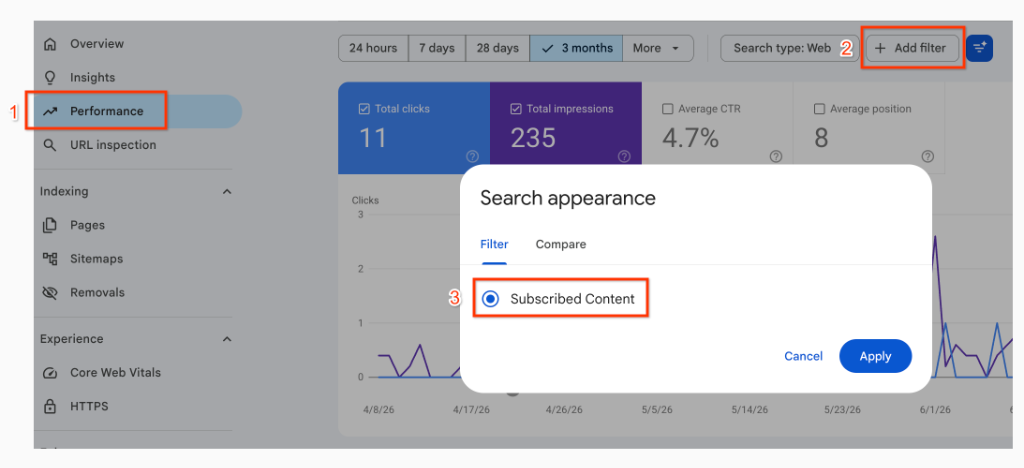
Check performance on Search Console
You can monitor the direct impact and health of your Subscription Linking integration using Google Search Console.
- Track engagement metrics: Measure clicks, impressions, and
click-through rates (CTR) for your highlighted subscriber articles by
opening your Search Console performance reports and filtering by the
Subscribed Content search appearance type (see
search appearance reports).
- Monitor structured data health: Use the rich result report for Subscribed Content to identify and troubleshoot any syntax or validation errors in your structured data markup across your publication's pages.