

Page Summary
-
The Route Optimization API returns optimized routes for vehicles, assigning shipments and potentially skipping some based on constraints and costs.
-
The API response includes
routesfor each vehicle, detailing their assigned shipments, start and end times, along with aggregatedmetricsfor the entire solution. -
Shipments that cannot be performed within the specified constraints or are too costly are listed in
skippedShipments. -
validationErrorshighlight issues with the request when usingVALIDATE_ONLYsolving mode, aiding in debugging. -
Each route includes
visitsrepresenting shipment pickups and deliveries, andtransitionsdetailing travel between them, with associated metrics like duration and distance.
Note for production
For simplicity, this guide uses REST and JSON. For your production environment, however, the overall recommendation is to use gRPC and the client libraries for better performance. For more information, see the Route Optimization API client libraries.
After you send the request in Make your first request, the optimizer
returns an OptimizeToursResponse. This response is the route plan for
your driver to follow. This guide shows you how to read it.
Route plan summary
For the doggy daycare scenario, the optimizer assigns the Bernese mountain dog and the Chihuahua to your van and skips the German shepherd. Your driver's route plan is as follows:
- Start shift at 7:55 AM at the daycare center.
- Pick up the Bernese mountain dog near Coit Tower at 8:20 AM.
- Pick up the Chihuahua at South Sunset Playground Park at 8:58 AM.
- Arrive back at the daycare center at 9:24 AM, and wait until the dropoff window opens at 9:30 AM.
- Drop off the Bernese mountain dog at 9:30 AM.
- Drop off the Chihuahua at 9:35 AM.
- Finish shift at 9:40 AM.
The route plan costs $147.22, including a $100 penalty for skipping the German shepherd.
To check your results, compare your response with the full example response. Your results might differ slightly because travel times and distances depend on current road data.
Full example response
{
  "routes": [
    {
      "vehicleStartTime": "2024-02-13T15:55:04Z",
      "vehicleEndTime": "2024-02-13T17:40:00Z",
      "visits": [
        {
          "isPickup": true,
          "startTime": "2024-02-13T16:20:00Z",
          "detour": "0s",
          "shipmentLabel": "Bernese mountain dog",
          "visitType": "PICKUP_SHIPMENT"
        },
        {
          "shipmentIndex": 1,
          "isPickup": true,
          "startTime": "2024-02-13T16:58:12Z",
          "detour": "2600s",
          "shipmentLabel": "Chihuahua",
          "visitType": "PICKUP_SHIPMENT"
        },
        {
          "startTime": "2024-02-13T17:30:00Z",
          "detour": "2297s",
          "shipmentLabel": "Bernese mountain dog",
          "visitType": "DELIVER_SHIPMENT"
        },
        {
          "shipmentIndex": 1,
          "startTime": "2024-02-13T17:35:00Z",
          "detour": "656s",
          "shipmentLabel": "Chihuahua",
          "visitType": "DELIVER_SHIPMENT"
        }
      ],
      "transitions": [
        {
          "travelDuration": "1496s",
          "travelDistanceMeters": 7082,
          "waitDuration": "0s",
          "totalDuration": "1496s",
          "startTime": "2024-02-13T15:55:04Z"
        },
        {
          "travelDuration": "1992s",
          "travelDistanceMeters": 16589,
          "waitDuration": "0s",
          "totalDuration": "1992s",
          "startTime": "2024-02-13T16:25:00Z"
        },
        {
          "travelDuration": "1252s",
          "travelDistanceMeters": 7860,
          "waitDuration": "356s",
          "totalDuration": "1608s",
          "startTime": "2024-02-13T17:03:12Z"
        },
        {
          "travelDuration": "0s",
          "waitDuration": "0s",
          "totalDuration": "0s",
          "startTime": "2024-02-13T17:35:00Z"
        },
        {
          "travelDuration": "0s",
          "waitDuration": "0s",
          "totalDuration": "0s",
          "startTime": "2024-02-13T17:40:00Z"
        }
      ],
      "metrics": {
        "performedShipmentCount": 2,
        "travelDuration": "4740s",
        "waitDuration": "356s",
        "delayDuration": "0s",
        "breakDuration": "0s",
        "visitDuration": "1200s",
        "totalDuration": "6296s",
        "travelDistanceMeters": 31531,
        "performedShipmentPenaltyCostSum": 2000
      },
      "routeCosts": {
        "model.vehicles.cost_per_hour": 47.22
      },
      "routeTotalCost": 47.22,
      "vehicleFullness": {
        "maxFullness": 0.3497777777777778,
        "activeSpan": 0.3497777777777778
      }
    }
  ],
  "skippedShipments": [
    {
      "index": 2,
      "label": "German shepherd",
      "penaltyCost": 100
    }
  ],
  "metrics": {
    "aggregatedRouteMetrics": {
      "performedShipmentCount": 2,
      "travelDuration": "4740s",
      "waitDuration": "356s",
      "delayDuration": "0s",
      "breakDuration": "0s",
      "visitDuration": "1200s",
      "totalDuration": "6296s",
      "travelDistanceMeters": 31531,
      "performedShipmentPenaltyCostSum": 2000
    },
    "usedVehicleCount": 1,
    "earliestVehicleStartTime": "2024-02-13T15:55:04Z",
    "latestVehicleEndTime": "2024-02-13T17:40:00Z",
    "totalCost": 147.22,
    "costs": {
      "model.vehicles.cost_per_hour": 47.22,
      "model.shipments.penalty_cost": 100
    }
  }
}
Response structure
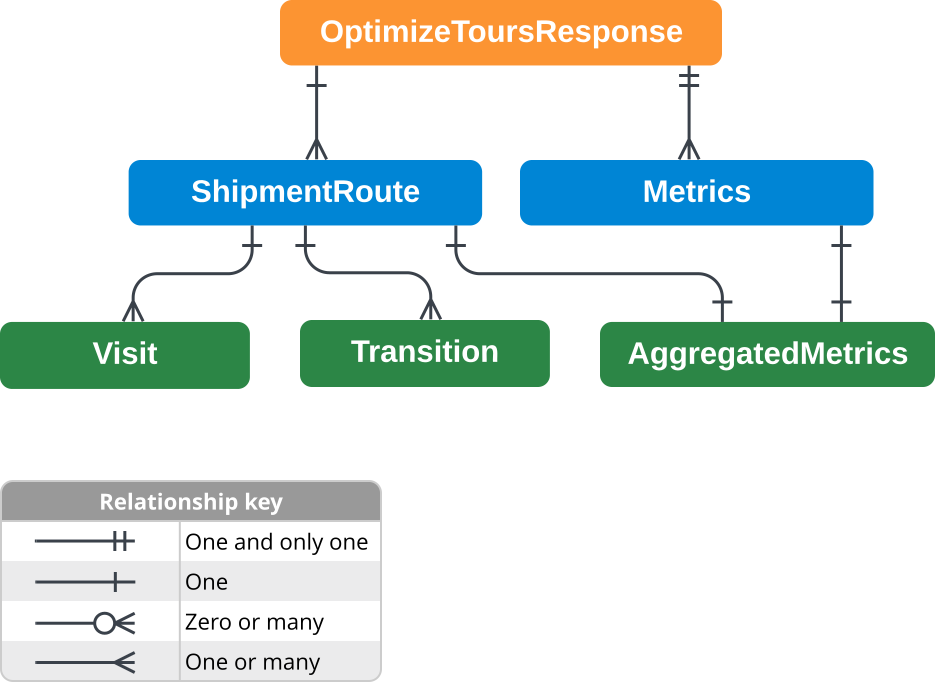
The OptimizeToursResponse contains two main components:
routes: The route plan for each vehicle in your fleet, including the order and times for each pickup and delivery. You have one van, so there's one route plan.metrics: A summary of the whole route plan, including the total cost, duration, and distance.
Because the optimizer skips the German shepherd, the response also includes
skippedShipments.
The following sections show you where to find each detail of the route plan summary in the response.
Which vehicle runs which route?
The optimizer generates a route plan (the routes array) that corresponds
to the order of vehicles in your request.
The vehicleIndex field identifies each vehicle based on its zero-based
position, which for your van is 0. The vehicleStartTime and
vehicleEndTime fields instruct the driver on when to start and end their
shift.
The Route Optimization API returns timestamps in UTC, marked by the Z suffix,
regardless of the offset in your request. To get San Francisco time, subtract 8
hours. For your van, the shift runs from 7:55 AM to 9:40 AM, as shown in the
following code sample.
{
"routes": [
    {
    // "vehicleIndex": 0, // Omitted in actual JSON response because it's 0
    "vehicleStartTime": "2024-02-13T15:55:04Z",
    "vehicleEndTime": "2024-02-13T17:40:00Z",
    ...
    }
  ]
  ...
}
What is the pickup and dropoff order?
Within each route, the visits array contains every pickup and delivery
for the assigned vehicle in chronological order.
Each visit's shipmentIndex is the shipment's zero-based position in your
request: 0 is the Bernese mountain dog, and 1 is the Chihuahua. The
shipmentLabel field shows the label you set for each shipment.
To distinguish between a pickup and a dropoff (or delivery), you can check
either the visitType or isPickup fields:
visitType: Explicitly defines the visit action.- Pickup:
visitType="PICKUP_SHIPMENT" - Delivery:
visitType="DELIVER_SHIPMENT"
- Pickup:
isPickup: A boolean helper field.- Pickup:
isPickup=true - Delivery:
isPickup=false(omitted in JSON)
- Pickup:
To determine the exact sequence of events and the expected arrival time at each
location, read the visits array in order. The following table shows the route
plan action based on the order and values of the shipmentIndex, isPickup or
visitType, and startTime fields.
| Sequence | shipmentIndex value |
isPickup or visitType value |
startTime value (UTC) |
Action |
|---|---|---|---|---|
| First visit | 0 (omitted in JSON) | True or PICKUP_SHIPMENT |
2024-02-13T16:20:00Z | Pick up the Bernese mountain dog at 8:20 AM. |
| Second visit | 1 | True or PICKUP_SHIPMENT |
2024-02-13T16:58:12Z | Pick up the Chihuahua at 8:58 AM. |
| Third visit | 0 (omitted in JSON) | False (omitted) or DELIVER_SHIPMENT |
2024-02-13T17:30:00Z | Drop off the Bernese mountain dog at the doggy daycare center at 9:30 AM. |
| Fourth visit | 1 | False (omitted) or DELIVER_SHIPMENT |
2024-02-13T17:35:00Z | Drop off the Chihuahua at the doggy daycare center at 9:35 AM. |
The following code sample shows how the response provides this sequence:
{
  "routes": [
    {
      "visits": [
        {
          // "shipmentIndex": 0, // Omitted in actual JSON response because it's 0
          "isPickup": true,
          "startTime": "2024-02-13T16:20:00Z",
          "shipmentLabel": "Bernese mountain dog",
          "visitType": "PICKUP_SHIPMENT"
        },
        {
          "shipmentIndex": 1,
          "isPickup": true,
          "startTime": "2024-02-13T16:58:12Z",
          "shipmentLabel": "Chihuahua",
          "visitType": "PICKUP_SHIPMENT"
        },
        {
          // "shipmentIndex": 0, // Omitted in actual JSON response because it's 0
          // "isPickup": false, // Omitted in actual JSON response because it's false
          "startTime": "2024-02-13T17:30:00Z",
          "shipmentLabel": "Bernese mountain dog",
          "visitType": "DELIVER_SHIPMENT"
        },
        {
          "shipmentIndex": 1,
          // "isPickup": false, // Omitted in actual JSON response because it's false
          "startTime": "2024-02-13T17:35:00Z",
          "shipmentLabel": "Chihuahua",
          "visitType": "DELIVER_SHIPMENT"
        }
      ]
    }
  ]
}
Each visit also has a visitRequestIndex, which is the zero-based
position of the pickup or dropoff option that the optimizer chose for the
shipment. Each dog in this scenario has only one pickup option and one dropoff
option, so visitRequestIndex is always 0, and the response omits it.
What happens between visits?
Within each route, the transitions array lists travel details between
visits. Although visits and transitions are separate lists, they
interleave in time, as follows:
transitions[0](Drive from start to first visit)visits[0](First visit)transitions[1](Drive from first visit to second visit)visits[1](Second visit)...visits[N-1](Last visit, where N is the total number of visits)transitions[N](Drive from the last visit to the end)
You can follow the timeline of the route by looking at the startTime field in
both arrays. A transition's startTime is when the driver starts
traveling, and a visit's startTime is when the driver begins the pickup
or dropoff.
Each transition shows the expected driving time and distance between locations.
The following table maps both the transitions and visits fields to the
chronological route actions for the doggy daycare scenario.
| Sequence | Field name | startTime value (UTC) |
Details | Action |
|---|---|---|---|---|
| First transition | transitions[0] |
2024-02-13T15:55:04Z |
travelDuration: 1496stravelDistanceMeters: 7082 |
Drive 7 km for 25 minutes from the daycare center to pick up the Bernese mountain dog. Shift starts at 7:55 AM. |
| First visit | visits[0] |
2024-02-13T16:20:00Z |
shipmentIndex: 0 (omitted in JSON)isPickup: True |
Pick up the Bernese mountain dog starting at 8:20 AM. Visit takes 5 minutes. |
| Second transition | transitions[1] |
2024-02-13T16:25:00Z |
travelDuration: 1992stravelDistanceMeters: 16589 |
Drive 17 km for 33 minutes from Coit Tower to pick up the Chihuahua starting at 8:25 AM. |
| Second visit | visits[1] |
2024-02-13T16:58:12Z |
shipmentIndex: 1isPickup: True |
Pick up the Chihuahua starting at 8:58 AM. Visit takes 5 minutes. |
| Third transition | transitions[2] |
2024-02-13T17:03:12Z |
travelDuration: 1252stravelDistanceMeters: 7860waitDuration: 356s |
Drive 8 km for 21 minutes from South Sunset Playground back to the daycare center starting at 9:03 AM. Arrives at 9:24 AM and waits for 6 minutes for the dropoff window to open. |
| Third visit | visits[2] |
2024-02-13T17:30:00Z |
shipmentIndex: 0 (omitted in JSON)isPickup: False (omitted in JSON) |
Drop off the Bernese mountain dog at the doggy daycare center starting at 9:30 AM. Visit takes 5 minutes. |
| Fourth transition | transitions[3] |
2024-02-13T17:35:00Z |
travelDuration: 0stravelDistanceMeters: 0 (omitted in JSON) |
No driving. Ready to drop off the Chihuahua at the daycare center at 9:35 AM. |
| Fourth visit | visits[3] |
2024-02-13T17:35:00Z |
shipmentIndex: 1isPickup: False (omitted in JSON) |
Drop off the Chihuahua at the doggy daycare center starting at 9:35 AM. Visit takes 5 minutes. |
| Fifth transition | transitions[4] |
2024-02-13T17:40:00Z |
travelDuration: 0stravelDistanceMeters: 0 (omitted in JSON) |
No driving. Driver ends shift at 9:40 AM. |
The following code sample shows how the response provides this sequence for
transitions[0] and transitions[1]:
{
  "routes": [
    {
      "transitions": [
        {
          "travelDuration": "1496s",
          "travelDistanceMeters": 7082,
          "waitDuration": "0s",
          "totalDuration": "1496s",
          "startTime": "2024-02-13T15:55:04Z"
        },
        {
          "travelDuration": "1992s",
          "travelDistanceMeters": 16589,
          "waitDuration": "0s",
          "totalDuration": "1992s",
          "startTime": "2024-02-13T16:25:00Z"
        },
        ...
      ]
    }
  ]
}
How much does the route cost?
You can look at several fields in the response depending on whether you need the cost for a specific vehicle or the total cost for the entire fleet.
The following table lists all the ways you can find cost information in the response:
| Parent | Parameter | Scope | Description |
|---|---|---|---|
ShipmentRoute |
routeCosts |
Per-route | A breakdown of specific cost components (like cost per hour) for that specific route. |
routeTotalCost |
Per-route | The total cost calculated for that specific route. | |
Metrics |
totalCost |
Total (All routes) | The aggregated total cost for all routes in the solution. |
costs |
Total (All routes) | A breakdown of aggregated cost components across all routes in the solution. |
The costs specified in routeCosts and costs reflect the cost
constraints that you specify in your request. For more information, see the
Cost model key concept document.
For this doggy daycare scenario, because you have a skipped shipment, the per-route cost and the aggregated total cost are different. The route cost only includes the costs associated with that specific route (the driver's wage), while the aggregated total cost also includes the penalty for the skipped shipment. The following code sample shows where to find these values in the response:
{
  "routes": [
    {
      "vehicleStartTime": "2024-02-13T15:55:04Z",
      "vehicleEndTime": "2024-02-13T17:40:00Z",
      ...
      "routeCosts": {
        "model.vehicles.cost_per_hour": 47.22
      },
      "routeTotalCost": 47.22
    }
  ],
  "metrics": {
    "totalCost": 147.22,
    "costs": {
      "model.shipments.penalty_cost": 100,
      "model.vehicles.cost_per_hour": 47.22
    },
    ...
  }
}
According to the route plan, the driver operates the van from 7:55 AM to 9:40 AM, which is approximately 1 hour and 45 minutes (6296 seconds). At your defined rate of $27 per hour, the route cost is $47.22. Because the optimizer skipped the German shepherd shipment, it adds a penalty cost of $100, bringing the aggregated total cost to $147.22.
Why was a shipment skipped?
The optimizer lists any shipment it doesn't perform in the
skippedShipments array. Why it skips a shipment depends on whether you
set a penaltyCost:
- Mandatory shipments (no
penaltyCost): The optimizer never skips these just because they're expensive to perform. It skips one only if it can't fit the shipment into any route, for example, because its time window conflicts with other shipments. - Optional shipments (with a
penaltyCost): The optimizer can also skip these when performing them costs more than the penalty. You can set different penalty costs to prioritize some shipments over others.
For this scenario, the German shepherd's pickup window conflicts with the Bernese mountain dog's window. Coit Tower and Land's End are 25 minutes apart, so the driver can't make both pickups within the 20-minute window. The optimizer must skip one of them. Because the German shepherd has the lower penalty cost ($100 versus $1,000 for the regular client), the optimizer skips it and incurs the $100 penalty.
The following code sample shows the skippedShipments object in the response:
{
  ...
  "skippedShipments": [
    {
      "index": 2,
      "label": "German shepherd",
      "penaltyCost": 100
    }
  ],
  ...
}
The skippedShipments object in the response contains the following fields:
index: The zero-based index of the shipment in your request (2 for the third shipment).label: The label you specified in the request ("German shepherd").penaltyCost: The penalty cost you specified in the request, which the API adds to the total cost.
To keep the optimizer from skipping a shipment, loosen the constraint that
causes the conflict. For example, ask the German shepherd's owner for a more
flexible pickup window, and then update the timeWindows for that pickup
in your request.
Response fields in the example
The following table describes all of the response fields returned in the
OptimizeToursResponse of the example scenario. While you don't need to
use every field to understand the route plan, you can analyze these fields to
determine how to adjust your OptimizeToursRequest to suit your business
needs. For more information, see Route plan lifecycle.
You can filter the contents by parent or by text search.
| Parent | Parameter | Property Type | Description |
|---|---|---|---|
OptimizeToursResponse |
routes |
Array of objects (ShipmentRoute) |
This contains the list of routes computed for each vehicle (one per vehicle). For this doggy daycare scenario, this contains the detailed route plan for your single van. |
metrics |
Object (Metrics) |
This contains the overall metrics for the solution, aggregated across all routes. For this doggy daycare scenario, this is the summary of costs and operational durations for the day. | |
skippedShipments |
Array of objects (SkippedShipment) |
This contains the list of shipments that were skipped in the solution. For this scenario, the third dog (German shepherd) is skipped. | |
ShipmentRoute |
vehicleStartTime |
Timestamp | This is the time when the vehicle starts its route. For this doggy daycare scenario, the driver starts driving the van at 7:55 AM. |
vehicleEndTime |
Timestamp | This is the time when the vehicle finishes its route. For this doggy daycare scenario, the driver finishes driving the van at 9:40 AM. | |
visits |
Array of objects (Visit) |
This is the ordered list of pickups and deliveries on the route. For this doggy daycare scenario, this is the sequence of picking up and dropping off the two dogs. | |
transitions |
Array of objects (Transition) |
This is the ordered list of distance, and travel and wait time between visits. For this doggy daycare scenario, this details the driving distance and time between Coit Tower, South Sunset Playground Park, and the daycare. | |
metrics |
Object (AggregatedMetrics) |
These are the metrics specific to this single route. For this doggy daycare scenario, these are the stats for this specific van. These metrics are based on the costs that you specified in your request. For more details, see the Cost model key concept document. | |
routeCosts |
Object (Map) | This is a breakdown of specific costs for this route. For this doggy daycare scenario, this shows the cost calculated from the driver's wage of $27 per hour. | |
routeTotalCost |
Number | This is the total cost for this specific route. For this doggy
daycare scenario, the total cost is 47.22 for this van's route. |
|
vehicleFullness |
Object (VehicleFullness) |
This is a breakdown of how close the vehicle comes to its operational
limits, such as time, distance, and load. For this doggy daycare scenario,
only the shift start and end times constrain the driver, so the optimizer
computes vehicleFullness as the fraction of the actual route
duration and the maximum time available for the driver's shift. |
|
Visit |
shipmentIndex |
Integer | This is the zero-based index of the shipment in the original request. For this doggy daycare scenario, 0 represents the Bernese mountain dog, and 1 represents the Chihuahua. |
isPickup |
Boolean | This field is true if this visit is a pickup. For this doggy daycare scenario, it is true when picking up a dog and false (or missing) when dropping off a dog at the daycare. | |
startTime |
Timestamp | This is the estimated start time of the visit. For this doggy daycare scenario, this is when the driver knocks on the door. | |
detour |
Duration | This is the extra time the optimizer adds to this specific shipment's
journey. A detour is the difference between the actual route plan and
the ideal direct trip if the driver has no other shipments or tasks
to complete. For this doggy daycare scenario, the first visit, which is to pick up the Bernese mountain dog, has a detour of 0 because the driver goes directly from the daycare center to this pickup. For the Chihuahua pickup, the detour is 43 minutes because the driver picks up the Bernese mountain dog first (and spends 5 minutes loading). |
|
shipmentLabel |
String | This is the label from the request for each shipment. For this doggy daycare scenario, the labels are "Chihuahua" or "Bernese mountain dog". | |
visitType |
String (Enum) | This indicates the type of the visit, which can be PICKUP_SHIPMENT
for pickups or DELIVER_SHIPMENT for deliveries. For this scenario,
it is either PICKUP_SHIPMENT or DELIVER_SHIPMENT. |
|
Transition |
travelDuration |
Duration | This is the time spent traveling during this transition between visits. For example, in this doggy daycare scenario, the driver spends approximately 25 minutes driving from the daycare to Coit Tower to pick up the Bernese mountain dog. |
travelDistanceMeters |
Integer | This is the distance traveled in meters during this transition. For example, in this doggy daycare scenario, the driver travels 7 kilometers from the daycare to Coit Tower to pick up the Bernese mountain dog. | |
waitDuration |
Duration | This is the time spent waiting before the next pickup or delivery. For this doggy daycare scenario, this is 6 minutes (356 seconds) for the third transition, because the driver arrives at the daycare center before the dropoff window opens at 9:30 AM. For other transitions, this value is 0. | |
totalDuration |
Duration | This is the total duration of the transition, including driving and waiting. For example, the driver spends 25 minutes (25 minutes driving and 0 minutes waiting) on the first transition, and 27 minutes (21 minutes driving and 6 minutes waiting) on the third transition back to the daycare. | |
startTime |
Timestamp | This is the time when travel begins. It matches the completion time of the preceding visit (or, for the first transition, the vehicle's start time). For the doggy daycare scenario, the first transition starts at 7:55 AM when the driver leaves the daycare, and the second transition starts at 8:25 AM when the driver leaves Coit Tower. | |
Metrics |
aggregatedRouteMetrics |
Object (AggregatedMetrics) |
This is the sum of metrics across all routes. For this doggy daycare scenario, these are the total metrics for your one van. |
usedVehicleCount |
Integer | This is the number of vehicles used in the solution. For this doggy daycare scenario, you only use one van. | |
earliestVehicleStartTime |
Timestamp | This is the earliest start time among all vehicles. For this doggy daycare scenario, the van's route begins at 7:55 AM. | |
latestVehicleEndTime |
Timestamp | This is the latest end time among all vehicles. For this doggy daycare scenario, the van's route ends at 9:40 AM. | |
totalCost |
Number | This is the total cost of the solution. For this doggy daycare
scenario, the entire route plan costs 147.22 for the day (including 47.22 driver wage and 100 skipped shipment penalty). |
|
costs |
Object (Map) | This is a breakdown of the total cost by category. For this doggy daycare scenario, the optimizer calculated the cost of the route based on cost per hour and the penalty cost for the skipped German shepherd. | |
AggregatedMetrics |
performedShipmentCount |
Integer | This is the number of shipments successfully routed. For this doggy daycare scenario, the driver transports two dogs. |
travelDuration |
Duration | This is the total time spent traveling. For this doggy daycare scenario, the driver travels for 79 minutes. | |
waitDuration |
Duration | This is the total time spent waiting. For this doggy daycare scenario, the driver idles for 6 minutes (356 seconds) at the daycare center waiting for the dropoff window to open. | |
delayDuration |
Duration | This is the extra duration you define using transition attributes, such as time reserved for parking. For this doggy daycare scenario, you didn't define any transition attributes in the request, so this value is zero. | |
breakDuration |
Duration | This is the total time spent on breaks. For this doggy daycare scenario, there are no breaks. | |
visitDuration |
Duration | This is the total time spent performing services at visits. For this doggy daycare scenario, this is 20 minutes (5 minutes per visit for 4 visits). | |
totalDuration |
Duration | This is the sum of all duration components. For this doggy daycare scenario, the total duration is 105 minutes (6296 seconds). | |
travelDistanceMeters |
Integer | This is the total travel distance in meters. For this doggy daycare scenario, the driver travels a total distance of 31.5 km. | |
performedShipmentPenaltyCostSum |
Double | This is the sum of penalty costs of all performed shipments. For this scenario, this is 2000 because the driver picked up the Bernese mountain dog and Chihuahua (each with a penalty cost of 1000). |
|
VehicleFullness |
maxFullness |
Number | This is the highest utilization ratio across all the VehicleFullness fields. For this doggy daycare scenario, this is 0.35 because the driver only operates the van for 105 minutes of the entire morning shift, which you defined as 5 hours in the request. |
activeSpan |
Number | This is the ratio of the driver's total shift length compared to the route plan's operating hours. A lower number means the driver spends less of the business day operating the vehicle. For this doggy daycare scenario, this is 0.35 because the driver operates the van for 105 mins during the 5 hour shift. | |
SkippedShipment |
index |
Integer | This is the zero-based index of the shipment in the original request. For this scenario, 2 represents the German shepherd. |
label |
String | This is the label you specified for the shipment in the request. | |
penaltyCost |
Number | This is the penalty cost you incur when the optimizer skips this shipment. It
matches the penaltyCost you specified in the request. |