

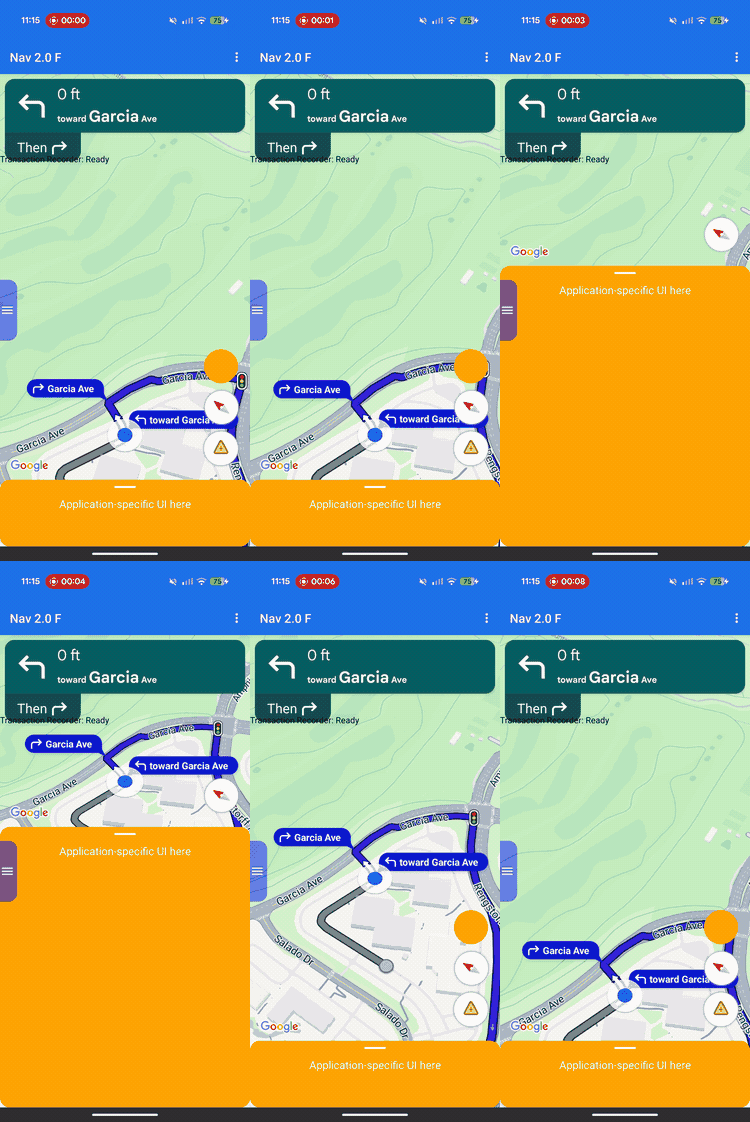
אתם יכולים להשתמש בהתאמה אישית של הפריסה כדי לשלוט בהיררכיית התצוגות ובמיקום במסך של התצוגות ש-Google מספקת ושל התצוגות העסקיות בהתאמה אישית.
במקום להוסיף תצוגות מותאמות אישית למשבצות מוגדרות מראש של כותרת עליונה או תחתונה, מטמיעים נציג פריסה כדי לנהל את הפריסה של המסך כולו. במהלך מעברים בין מצבי ניווט, הנציג של הפריסה מקבל את הרכיבים ש-Google מספקת, כמו כרטיס הפנייה, כרטיסיית פרטי זמן הגעה משוער והלחצנים. אתם יכולים למקם את הרכיבים האלה לצד התוכן המותאם אישית שלכם באמצעות מערכות פריסה סטנדרטיות של Android, כמו ConstraintLayout, CoordinatorLayout או LinearLayout.
אתם יכולים להשתמש במסגרת הזו כדי למקם פרטים עסקיים בהתאמה אישית, כמו סטטוס הזמנה או הוראות איסוף, בדיוק במקום הרצוי במסך, בלי שהתצוגות יחפפו.
איך פועלת התכונה "התאמה אישית של הפריסה"
התאמה אישית של פריסה משתמשת בתבנית עיצוב של הקצאת הרשאות. במקום לשרטט או למקם באופן אוטומטי רכיבים של ממשק המשתמש במסך, ה-SDK מעביר אותם ישירות למחלקה בהתאמה אישית שאתם כותבים: נציג הפריסה.
כדי להתאים אישית את הפריסה, יוצרים מחלקה שמרחיבה את המחלקה המופשטתNavigationLayoutDelegate ומקצים מופע ל-NavigationView או ל-SupportNavigationFragment. בכל פעם שמצב הניווט משתנה – למשל, מעבר מהמפה הבסיסית להנחיה פעילה במסלול מפורט – ה-SDK מפעיל את שיטות הקריאה החוזרת (callback) בנציג ומספק את רכיבי ממשק המשתמש שזמינים למצב הספציפי הזה.
כדי לספק חוויית משתמש חלקה ומשולבת, המסגרת הזו יוצרת הפרדה ברורה בין תחומי האחריות של האפליקציה לבין אלה של ה-SDK. אפשר להשתמש ב-layout delegate כדי להתאים אישית את הדברים הבאים:
- בניית היררכיית התצוגות: בוחרים בדיוק אילו רכיבים של Google ותצוגות עסקיות בהתאמה אישית להוסיף למסך בכל מצב של ממשק המשתמש.
- מיקום כל רכיב: הגדרת עוגנים מדויקים במסך, שוליים ומיקום הפריסה. אל תגדירו אילוצים מותאמים אישית לרוחב או לגובה של רכיבי Google, כי הרכיבים של Google מחשבים את המידות הפנימיות שלהם.
- הגדרת גבולות המפה הבסיסית: מגדירים את הגבולות הגלויים של מצלמת המפה באמצעות הקואורדינטות של רכיב אזור התצוגה.
- שכבות במסך: אתם יכולים להחליט אם התצוגות בהתאמה אישית יופיעו מעל, מתחת או לצד הפקדים המובנים של Google.
בינתיים, אי אפשר להתאים אישית את הרכיבים הבאים של Google באמצעות נציג הפריסה:
- מידות הרכיבים: הגודל והמידות הפנימיות של הרכיבים ש-Google מספקת, שה-SDK מחשב באופן אוטומטי.
- תנאי הפעלה: מתי מופיעות התראות או הנחיות דינמיות על סמך נתוני מסלול בזמן אמת.
עקרונות ההטמעה
כשכותבים נציג פריסה, חשוב לזכור את הכללים הבאים כדי למנוע באגים בפריסה או קריסות בזמן הריצה:
- כברירת מחדל, המסך ריק: הרכיבים ש-Google מספקת מופיעים רק אם הנציג מוסיף אותם באופן מפורש להיררכיית התצוגות וממקם אותם.
- אין תמיכה בממשקי API מדור קודם: מאפיינים ושיטות ששולטים במודל הפריסה מדור קודם שמבוסס על מיקומי מודעות לא נתמכים, ויכול להיות שהם לא יפעלו כמו שצריך כשנציג בהתאמה אישית פעיל.
- אל תשנו את המבנים הפנימיים של התצוגות:
אל תשתמשו בשיטות כמו
findViewById()כדי לעבור בין היררכיות התצוגות של רכיבים ש-Google מספקת (כמו כרטיס הפנייה או כרטיס זמן ההגעה המשוער) או לשנות אותן. היררכיות התצוגות הפנימיות האלה הן פרטי הטמעה בסיסיים, ולכן הן עשויות להשתנות בין גרסאות ה-SDK. שינוי שלהם עלול לגרום לפריסה להשתבש בעדכונים עתידיים של ה-SDK.
תאימות ל-API מדור קודם
כדי שהפריסה תפעל בצורה תקינה כשמשתמשים בנציג פריסה בהתאמה אישית, מומלץ להימנע משימוש בממשקי ה-API הקודמים הבאים שמבוססים על משבצות, כי אנחנו מתכננים להוציא אותם משימוש. כדי להעביר אפליקציה קיימת, צריך להחליף את השימוש בממשקי ה-API האלה בקוד ב-custom layout delegate:
הצגת ממשקי API קודמים שמבוססים על מיקומי מודעות
| API מדור קודם | החלפת נציג הפריסה |
|---|---|
setCustomControl(View, CustomControlPosition) |
מוסיפים את התצוגות ישירות ל-ConstraintLayout או לקבוצת תצוגות אחרת. |
removeCustomControl(View) |
להסיר תצוגות ישירות מהיררכיית התצוגות. |
setEtaCardEnabled(boolean) |
קוראים את התצוגה etaCard ב-onEnterActiveGuidance. |
setHeaderEnabled(boolean) |
קוראים את התצוגה turnCard ב-onEnterActiveGuidance. |
setReportIncidentButtonEnabled(boolean) |
מאתרים את הלחצן REPORTING בgetActiveGuidanceButtons(). |
setTripProgressBarEnabled(boolean) |
קוראים את התצוגה tripProgressBar ב-onEnterActiveGuidance. |
addOnNavigationUiChangedListener(...) |
להסתמך על הקריאות החוזרות (callbacks) של שינוי מצב הצבירה ב-NavigationLayoutDelegate. |
removeOnNavigationUiChangedListener(...) |
ניהול מעברים בין מצבי פריסה ישירות באמצעות ה-delegate. |
addPromptVisibilityChangedListener(...) |
להסתמך על קריאות חוזרות (callback) של בקשות NavigationLayoutDelegate (כמו onShowPrompt()). |
removePromptVisibilityChangedListener(...) |
לנהל את הלוגיקה של הצגת ההודעה ישירות באמצעות ה-delegate. |
setCompassEnabled(boolean) |
מוצאים את המצפן ב-getNavigationReadyButtons() או ב-getActiveGuidanceButtons(). |
רשימת משימות חיוניות
כדי להטמיע את נציג הפריסה, צריך לפעול לפי השלבים והדרישות הבאים:
-
מפעילים את ה-delegate לפני שיוצרים את ממשק המשתמש: מפעילים את
setLayoutDelegate()לפני שה-SDK מפעיל את ממשק המשתמש של הניווט. כדי לוודא שהתזמון של ההגדרה מתאים למבנה של האפליקציה, כדאי לעיין בדוגמאות הבאות להטמעת קוד. אתחול של הנציג אחרי יצירת ממשק המשתמש מפעילApiIllegalStateException.Kotlin
// For SupportNavigationFragment
override fun onCreate(savedInstanceState: Bundle?) {
    super.onCreate(savedInstanceState)
    setContentView(R.layout.activity_main)
    val navFragment = supportFragmentManager.findFragmentById(R.id.nav_fragment) as SupportNavigationFragment
    navFragment.setLayoutDelegate(MyLayoutDelegate())
}

// For a programmatic NavigationView
val navigationView = NavigationView(context)
navigationView.setLayoutDelegate(MyLayoutDelegate())
navigationView.onCreate(savedInstanceState)
Java
// For SupportNavigationFragment
@Override
protected void onCreate(Bundle savedInstanceState) {
    super.onCreate(savedInstanceState);
    setContentView(R.layout.activity_main);
    SupportNavigationFragment navFragment = (SupportNavigationFragment) getSupportFragmentManager().findFragmentById(R.id.nav_fragment);
    navFragment.setLayoutDelegate(new MyLayoutDelegate());
}

// For a programmatic NavigationView
NavigationView navigationView = new NavigationView(context);
navigationView.setLayoutDelegate(new MyLayoutDelegate());
navigationView.onCreate(savedInstanceState);
-
בניית מאגר פריסה משלכם: יוצרים קבוצת תצוגה בהתאמה אישית, כמו
ConstraintLayout, כדי להכיל את הרכיבים של ממשק המשתמש בהתאמה אישית ואת התצוגות ש-Google מספקת. -
הוספת תצוגות חובה: צריך להוסיף את הלוגו של Google (
getGoogleLogo()) ואת אזור התצוגה (getViewport()) למאגר הפריסה בכל מצבי הניווט. אם לא תכללו את שתי התצוגות האלה, תופעל שגיאת זמן ריצה (runtime)ApiIllegalStateExceptionוהאפליקציה תקרוס. -
Respect fixed dimensions (התאמה למידות קבועות): ערכת ה-SDK קובעת את המידות של כמה רכיבים ש-Google מספקת. אל תגדירו מגבלות מותאמות אישית לרוחב או לגובה של הרכיבים הבאים:
- כרטיס תור
- כרטיסיית פרטי זמן הגעה משוער
- הודעות נכנסות
- הלוגו של Google
- ווידג'ט מהירות
-
מצרפים את הפריסה לתצוגה: מפעילים את
navigationView.setNavigationLayout()בתוך הקריאות החוזרות (callbacks) שלonEnterNavigationReady()ו-onEnterActiveGuidance()כדי לצרף את הקונטיינר להיררכיית התצוגות של המפה. -
ניקוי ביציאה מהמצב: צריך להפעיל את
navigationView.removeNavigationLayout()ולהסיר את התצוגות בהתאמה אישית בתוך פונקציות ה-Callback שלonLeaveכדי למנוע דליפות זיכרון ומצבים חופפים של ממשק המשתמש. -
הימנעו משימוש בממשקי API מדור קודם לפריסה: אל תפעילו ממשקי API מבוססי-משבצות שהוצאו משימוש, כמו
setCustomControl()אוsetHeaderEnabled(), בזמן שהנציג בהתאמה אישית פעיל. יכול להיות שערכת ה-SDK תתעלם משיחות בשיטה הקודמת של Meet כשמצורף נציג בהתאמה אישית.
מצבים של ממשק המשתמש ורכיבים של Google
כשמתרחש מעבר בין מצבי ניווט, ה-SDK מעביר אובייקט UiState לקריאה בלבד לקריאה החוזרת (callback) של הנציג. האובייקט הזה מקבץ את דגלי הגדרת הפריסה הנוכחיים עם רכיבי Google (למשל, מופעים של View) שנדרשים כדי להציג את המסך.
ה-layout delegate מנהל את היררכיית התצוגות בארבעה מצבי פעולה. בתרשים המצבים הבא מוצג איך ה-SDK עובר בין מצבי הניווט ואילו שיטות קריאה חוזרת (callback) הוא מפעיל ב-delegate:
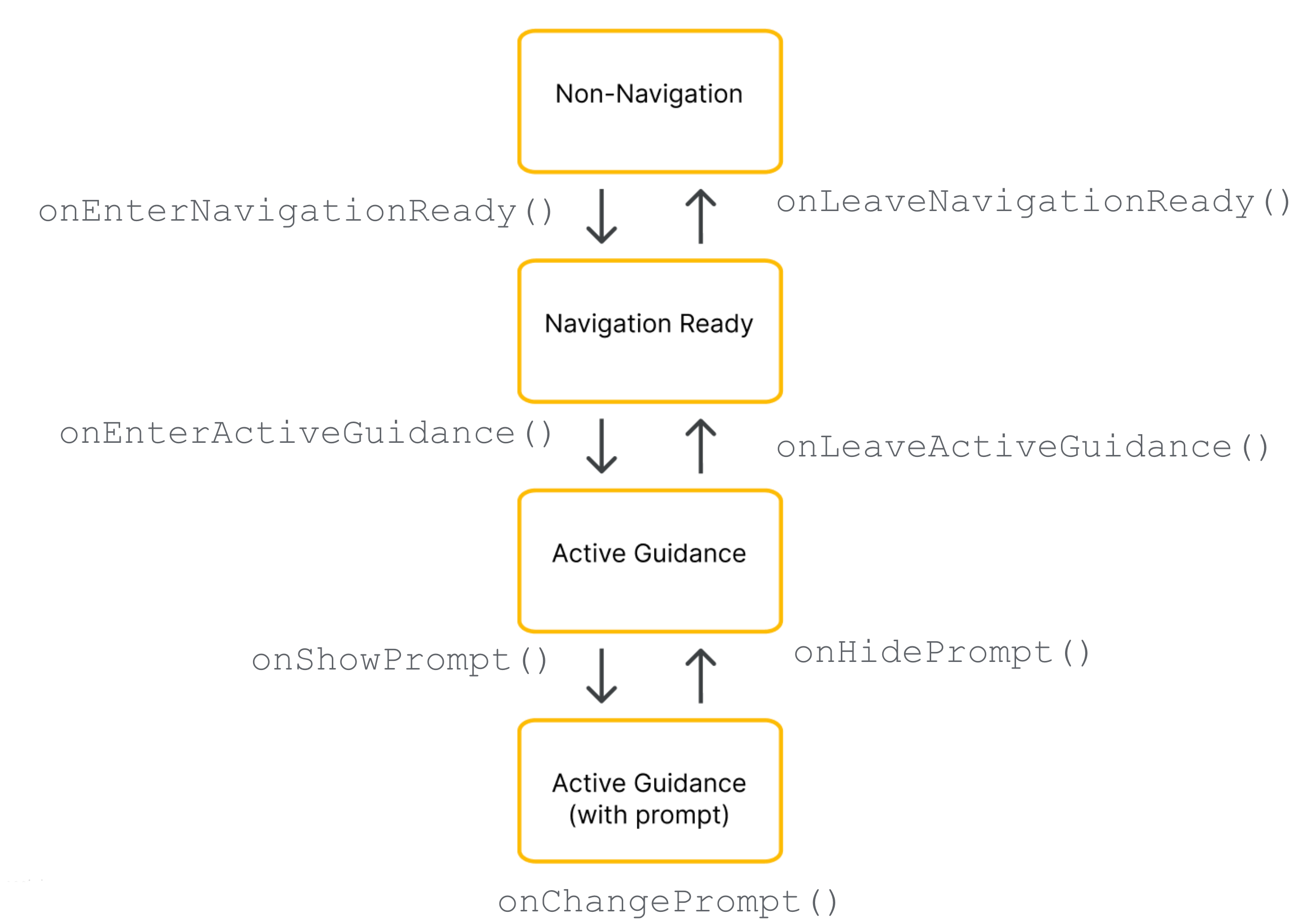
הרכיבים הספציפיים של Google שמועברים לנציג תלויים בשלב הנוכחי במחזור החיים של הניווט.
רכיבי חובה (כל מצבי הניווט)
לא משנה מהו שלב הניווט הנוכחי, צריך לכלול, למקם ולהשאיר את הרכיבים הבאים של Google גלויים בהיררכיית התצוגות:
הלוגו של Google (
getGoogleLogo()): הרכיב הזה מציג את הלוגו של מפות Google, שחובה להציג. אם הלחצן מרכוז מחדש מופעל, הלוגו הופך אוטומטית ללחצן הזה כשהנהג גולל את המפה הרחק מהרכב. לכן, המיקום של הלוגו קובע איפה יופיע הכפתור מרכוז מחדש. מומלץ למקם את הלוגו בפינה השמאלית התחתונה של הפריסה, בהתאם לציפיות של ממשק המשתמש הרגיל של המפה.אזור תצוגה (
getViewport()):Viewבלתי נראה שמגדיר את גבולות הפריים של המצלמה. המיקום של אזור התצוגה קובע בדיוק איפה ה-SDK ממקם את סמל הרכב ומשרטט את קו המסלול הפעיל. מקמו את אזור התצוגה כך שיכסה את האזור הפתוח והלא מוסתר של המסך, כדי להימנע משכבות אטומות כמו גיליונות תחתונים בהתאמה אישית.
רכיבים שמוכנים לניווט
במצב "מוכן לניווט", ממשק המשתמש נשאר מינימלי כדי שהמיקוד יישאר במפה הבסיסית. האובייקט NavigationReadyUiState מספק גישה לפריטים הבאים:
- getNavigationReadyButtons(): רשימה של תצוגות פעולה צפות שמוגדרות למפה הבסיסית (בדרך כלל רק כפתור המצפן). יכול להיות ש-Google תוסיף לחצנים או תשנה את הסדר שלהם בגרסאות עתידיות של ה-SDK, לכן אל תסתמכו על אינדקסים קבועים של רשימות. במקום זאת, צריך לעבור על הרשימה, לקרוא את הסוג של כל לחצן על ידי השוואה בין
getType()ל-ButtonKnownType.COMPASS, ולחלץ את התצוגה הפיזית באמצעות קריאה ל-getView(). שימו לב שהכפתורים המדויקים ברשימה הזו שונים מאלה שזמינים במהלך הנחיה פעילה.
רכיבי הדרכה פעילים
כשההנחיה במסלול מפורט מתחילה, ה-SDK פותח את כל חבילת אמצעי הבקרה לניווט. האובייקט ActiveGuidanceUiState מספק גישה לרכיבים הבאים של Google:
getTurnCard(): הבאנר הראשי בכותרת, שבו מוצגים הוראות לתמרון הבא, מדידות מרחק והנחיות לנתיב. כדאי למקם אותו בחלק העליון של הפריסה כדי ליצור היררכיית ניווט מוכרת ולעגן את התצוגות המותאמות אישית סביבו.
getEtaCard(): הבאנר בכותרת התחתונה שבו מוצגים זמן ההגעה המשוער, משך הנסיעה שנותר והמרחק שנותר עד ליעד. אפשר למקם אותו לאורך הקצה התחתון של המסך, או לשלב את הקואורדינטות שלו בגיליונות המותאמים אישית לניהול משימות.
getTripProgressBar(): סרגל התקדמות אנכי שמראה לנהג כמה הוא התקדם במסלול הנוכחי. בניגוד לפריסות הקודמות, שבהן המיקום היה קבוע בקצה המפה, עכשיו אתם יכולים לעגן את הרכיב בכל מקום שתרצו – למשל, לאורך הקצה הצדדי של מאגר התגים המותאם אישית.
getSpeedWidget(): פקד צף למד המהירות ולמהירות המותרת. בהתאם להגדרות ה-API ולזמינות הנתונים, התצוגה הזו משנה את הגודל באופן דינמי בין ארבעה מצבים חזותיים בזמן הריצה (לא מוצג כלום, מוצגת רק המהירות הנוכחית, מוצגת רק מגבלת המהירות או מוצגות שתי הקריאות). הווידג'ט יכול לעבור בין הגדלים האלה בלי הודעה מוקדמת, לכן תמיד צריך לעגן את התצוגות שמסביב באמצעות אילוצים, כדי שהפריסה תתאים את עצמה באופן אוטומטי ותמנע חפיפות מרחביות.
-
getActiveGuidanceButtons(): רשימה מורחבת של תצוגות פעולה צפות למצב ההנחיה הפעיל (בדרך כלל כוללת גם את המצפן וגם את הכפתור "דיווח על אירוע"). כמו במצב "מוכן לניווט", אפשר לאתר ולחלץ תצוגות של לחצנים ספציפיים על ידי סינון הרשימה לפיButtonKnownType(COMPASSאוREPORTING) וחילוץ התצוגה באמצעותgetView(). אחר כך אפשר למקם אותם בנפרד או להשתמש בפריסה כמוAutoHidingLinearLayoutכדי לערום את המערך בצורה בטוחה בלי התנגשויות מרחביות.
רכיבים של הנחיה דינמית
הנחיות, כמו התראות על אירועים או אזהרות לגבי מצלמות מהירות, מופעלות באופן עצמאי במהלך ההנחיה הפעילה.
כשההודעה מוכנה להצגה, ה-SDK מפעיל את הקריאה החוזרת (callback) של onShowPrompt() של הנציג ומעביר תצוגה של newPrompt. הנציג אחראי על מיקום ההודעה הזו בצורה חלקה מעל הפריסה (בדרך כלל היא מעוגנת לקצה התחתון של מאגר המפות).
ההודעה הנכנסת מכסה את החלק התחתון של המסך, לכן צריך לעדכן את הפריסה כדי שההודעה לא תסתיר את אזור התצוגה, את הלוגו של Google או לחצנים שמיושרים לתחתית המסך.
טיפול בגודל המסך ובמצב רחב
כדי לטפל בשינויים בממדי המפה ובכיוון המסך, נציג הפריסה משתמש בתכונות הבאות:
שינוי גודל התצוגה: התאמת הפריסה בכל פעם שהגודל הפיזי של המפה משתנה.
מצב רחב: מעבר לפריסה בפורמט רחב כשהמפה רחבה מספיק.
תגובה לשינוי גודל התצוגה
בכל פעם שהממדים הפיזיים של מאגר המפה משתנים, ה-SDK מפעיל את הקריאה החוזרת (callback) שלonSizeChanged(). פריסות של מסך מפוצל, פסי הזזה של פריסות וסיבוב המכשיר בדרך כלל מפעילים את פונקציית ה-callback onSizeChanged(). אפשר להשתמש בקריאה החוזרת הזו כדי לבצע התאמות רספונסיביות כלליות בממשק המשתמש המותאם אישית. מטמיעים את onSizeChanged() כדי לשנות את המיקום של רכיבים בהתאמה אישית ליחס גובה-רוחב חדש של המסך, להחיל נקודות עצירה בהתאמה אישית לרוחב או לגובה, ולזהות מתי אירוע של שינוי גודל מחליף את המצב הרחב כדי להחליף בבטחה את וריאציות הפריסה.
הסבר על מצב רחב
מצב רחב מופעל כשמאגר המפה רחב מספיק כדי להציג רכיבי ממשק משתמש זה לצד זה.
קוראים את הערך הבוליאני isWideMode() מאובייקט המצב כדי לשנות את המיקום של רכיבי ממשק המשתמש בהתאמה אישית, וכדי שמרכז המפה יהיה פנוי לנהג. מכיוון שרכיבים ש-Google מספקת, כמו כרטיס הפנייה וכרטיסיית פרטי זמן הגעה משוער, מתכווצים ומשנים את הצורה שלהם באופן אוטומטי במצב רחב, קריאת הערך הבוליאני הזה מבטיחה שהפריסה תשתנה בדיוק באותו רגע שבו הרכיבים של Google מתעדכנים.
הנה כמה דוגמאות למיקום של רכיבי הפריסה במצב רגיל ובמצב רחב:
מצב לאורך רגיל: כרטיס הפנייה ממוקם בחלק העליון של המסך וכרטיס זמן ההגעה המשוער ממוקם בחלק התחתון.
מצב רחב: כרטיס הפנייה עובר לצד של תחילת המסך וכרטיסיית פרטי זמן הגעה משוער עוברת לצד של סוף המסך.
בדיקת המצב הרחב במהלך מעברי מצב
אם הפריסה תומכת בווריאציה של מצב רחב, צריך להעריך את הערך הבוליאני isWideMode() בתוך כל קריאה חוזרת (callback) של מעבר בין מצבים, במקום להסתמך רק על onSizeChanged().
onEnterNavigationReady() ו-onEnterActiveGuidance() כדי לטפל בהפעלות ראשוניות של האפליקציה במצב פריסה לרוחב. הגישה הזו מגינה על הפריסה מפני אירועים במחזור החיים של מערכת Android, כמו יצירה מחדש של Activity כברירת מחדל, שעוקפים לחלוטין את הקריאה החוזרת (callback) לשינוי הגודל. כך מובטח שהגרסה הנכונה של הפריסה הרגילה או הרחבה תופעל ברגע שיתחיל מצב Navigation חדש.
התאמה לסגנון של Google
כדי לעזור לכם להתאים את ממשק המשתמש המותאם אישית לקצב החזותי של Google, ערכת ה-SDK מספקת את מחלקת השירות StyleValues. אתם יכולים לקרוא את הערכים האלה בפיקסלים שלא תלויים בצפיפות (dp) כדי להתאים את התצוגות שלכם בצורה מושלמת לרכיבים של Google.
לדוגמה, אם רוצים להציב כפתור בהתאמה אישית בפינה העליונה של המסך מול כרטיס הפנייה, אפשר להפעיל את StyleValues.headerTopPaddingDp() ולהקצות את הערך שמוחזר בתור השוליים העליונים של הכפתור. כך הכפתור המותאם אישית יתיישר מבחינה חזותית עם הקצה העליון של כרטיס הפנייה, והסימטריה של המסך תישמר.
אלה המרווחים והמידות שאפשר להגדיר:
StyleValues.headerNominalHeightDp()StyleValues.headerTopPaddingDp()StyleValues.headerFooterSidePaddingDp()StyleValues.mapControlSidePaddingDp()StyleValues.buttonMapControlSidePaddingDp()
דוגמה: הטמעה של פריסה מבוססת-אילוצים
בדוגמה הבאה מוצג נציג פריסה בסיסי שמנהל את מעברי המצבים באמצעות הגדרות פרוגרמטיות של ConstraintLayout ו-ConstraintSet.
למרות שהדוגמה הזו יוצרת אילוצי תצוגה בקוד, נציגי פריסה יכולים גם לנפח פריסות XML רגילות של Android.
Kotlin
/*
 * Copyright 2026 Google LLC
 *
 * Licensed under the Apache License, Version 2.0 (the "License");
 * you may not use this file except in compliance with the License.
 * You may obtain a copy of the License at
 *
 *     http://www.apache.org/licenses/LICENSE-2.0
 *
 * Unless required by applicable law or agreed to in writing, software
 * distributed under the License is distributed on an "AS IS" BASIS,
 * WITHOUT WARRANTIES OR CONDITIONS OF ANY KIND, either express or implied.
 * See the License for the specific language governing permissions and
 * limitations under the License.
 */

package com.example.navigationapidemo.layoutdelegate

import android.content.Context
import android.util.TypedValue
import android.view.View
import android.view.ViewGroup
import androidx.constraintlayout.widget.ConstraintLayout
import androidx.constraintlayout.widget.ConstraintSet
import com.google.android.libraries.navigation.layoutcustomization.ActiveGuidanceUiState
import com.google.android.libraries.navigation.layoutcustomization.AutoHidingVerticalLayout
import com.google.android.libraries.navigation.layoutcustomization.NavigationLayoutDelegate
import com.google.android.libraries.navigation.layoutcustomization.NavigationReadyUiState
import com.google.android.libraries.navigation.layoutcustomization.NavigationUiButton.ButtonKnownType.COMPASS
import com.google.android.libraries.navigation.layoutcustomization.NavigationUiParent
import com.google.android.libraries.navigation.layoutcustomization.StyleValues.headerNominalHeightDp

/** Kotlin equivalent of StandardUiElementsLayoutDelegate. */
class StandardUiElementsLayoutDelegateKt : NavigationLayoutDelegate() {

  private val layoutId = View.generateViewId()
  private val buttonsContainerId = View.generateViewId()

  private var layout: ConstraintLayout? = null
  private var buttonsContainer: AutoHidingVerticalLayout? = null

  private var navigationReadyConstraintSet: ConstraintSet? = null
  private var activeGuidanceConstraintSet: ConstraintSet? = null
  private var activeGuidanceWithPromptConstraintSet: ConstraintSet? = null

  private var activeGuidanceUiState: ActiveGuidanceUiState? = null

  override fun onEnterNavigationReady(
    navigationUiParent: NavigationUiParent,
    newState: NavigationReadyUiState,
  ) {
    val context = navigationUiParent.viewContext

    var currentLayout = layout
    if (currentLayout == null) {
      currentLayout =
        ConstraintLayout(context).apply {
          layoutParams =
            ViewGroup.LayoutParams(
              ViewGroup.LayoutParams.MATCH_PARENT,
              ViewGroup.LayoutParams.MATCH_PARENT,
            )
          id = layoutId
        }
      layout = currentLayout
    }

    removeFromParentView(newState.viewport)
    currentLayout.addView(
      newState.viewport,
      ViewGroup.LayoutParams(
        ViewGroup.LayoutParams.MATCH_PARENT,
        ViewGroup.LayoutParams.MATCH_PARENT,
      ),
    )

    removeFromParentView(newState.googleLogo)
    currentLayout.addView(
      newState.googleLogo,
      ViewGroup.LayoutParams(
        ViewGroup.LayoutParams.MATCH_PARENT,
        ViewGroup.LayoutParams.WRAP_CONTENT,
      ),
    )

    var currentButtonsContainer = buttonsContainer
    if (currentButtonsContainer == null) {
      currentButtonsContainer = AutoHidingVerticalLayout(context).apply { id = buttonsContainerId }
      buttonsContainer = currentButtonsContainer
    }

    removeFromParentView(currentButtonsContainer)
    currentLayout.addView(
      currentButtonsContainer,
      ViewGroup.LayoutParams(
        ViewGroup.LayoutParams.WRAP_CONTENT,
        ConstraintLayout.LayoutParams.MATCH_CONSTRAINT,
      ),
    )

    for (button in newState.navigationReadyButtons) {
      removeFromParentView(button.view)
      currentButtonsContainer.addView(button.view)
    }

    if (navigationReadyConstraintSet == null) {
      navigationReadyConstraintSet = buildNavigationReadyConstraintSet(newState)
    }
    navigationReadyConstraintSet?.applyTo(currentLayout)

    navigationUiParent.removeNavigationLayout(currentLayout)
    navigationUiParent.setNavigationLayout(currentLayout)
  }

  private fun buildNavigationReadyConstraintSet(uiState: NavigationReadyUiState): ConstraintSet {
    return ConstraintSet().apply {
      clone(layout)

      connect(
        uiState.viewport.id,
        ConstraintSet.START,
        ConstraintSet.PARENT_ID,
        ConstraintSet.START,
      )
      connect(uiState.viewport.id, ConstraintSet.TOP, ConstraintSet.PARENT_ID, ConstraintSet.TOP)
      connect(uiState.viewport.id, ConstraintSet.END, ConstraintSet.PARENT_ID, ConstraintSet.END)
      connect(
        uiState.viewport.id,
        ConstraintSet.BOTTOM,
        ConstraintSet.PARENT_ID,
        ConstraintSet.BOTTOM,
      )

      connect(
        uiState.googleLogo.id,
        ConstraintSet.BOTTOM,
        ConstraintSet.PARENT_ID,
        ConstraintSet.BOTTOM,
      )
      connect(
        uiState.googleLogo.id,
        ConstraintSet.START,
        ConstraintSet.PARENT_ID,
        ConstraintSet.START,
      )

      constrainButtonsToBottomEnd()
    }
  }

  override fun onLeaveNavigationReady(
    navigationUiParent: NavigationUiParent,
    oldState: NavigationReadyUiState,
  ) {
    buttonsContainer?.removeAllViews()
    layout?.removeAllViews()
    layout?.let { navigationUiParent.removeNavigationLayout(it) }
  }

  override fun onEnterActiveGuidance(
    navigationUiParent: NavigationUiParent,
    oldState: NavigationReadyUiState,
    newState: ActiveGuidanceUiState,
  ) {
    activeGuidanceUiState = newState
    val context = navigationUiParent.viewContext
    val currentLayout = checkNotNull(layout) { "layout must be initialized" }
    val currentButtonsContainer =
      checkNotNull(buttonsContainer) { "buttonsContainer must be initialized" }

    removeFromParentView(newState.turnCard)
    currentLayout.addView(
      newState.turnCard,
      ViewGroup.LayoutParams(
        ViewGroup.LayoutParams.WRAP_CONTENT,
        ViewGroup.LayoutParams.WRAP_CONTENT,
      ),
    )

    removeFromParentView(newState.etaCard)
    currentLayout.addView(
      newState.etaCard,
      ViewGroup.LayoutParams(
        ViewGroup.LayoutParams.WRAP_CONTENT,
        ViewGroup.LayoutParams.WRAP_CONTENT,
      ),
    )

    for (button in oldState.navigationReadyButtons) {
      removeFromParentView(button.view)
    }

    for (button in newState.activeGuidanceButtons) {
      val buttonLayoutParams =
        AutoHidingVerticalLayout.LayoutParams(
          ViewGroup.LayoutParams.WRAP_CONTENT,
          ViewGroup.LayoutParams.WRAP_CONTENT,
        )
      if (button.type == COMPASS) {
        buttonLayoutParams.isHighPriority = true
      }
      removeFromParentView(button.view)
      currentButtonsContainer.addView(button.view, buttonLayoutParams)
    }

    if (activeGuidanceConstraintSet == null) {
      activeGuidanceConstraintSet = buildActiveGuidanceConstraintSet(context, newState)
    }

    activeGuidanceConstraintSet?.applyTo(currentLayout)
  }

  override fun onLeaveActiveGuidance(
    navigationUiParent: NavigationUiParent,
    oldState: ActiveGuidanceUiState,
    newState: NavigationReadyUiState,
  ) {
    removeFromParentView(oldState.etaCard)
    removeFromParentView(oldState.turnCard)
    buttonsContainer?.removeAllViews()

    val currentButtonsContainer =
      checkNotNull(buttonsContainer) { "buttonsContainer must be initialized" }
    for (button in newState.navigationReadyButtons) {
      currentButtonsContainer.addView(
        button.view,
        ViewGroup.LayoutParams(
          ViewGroup.LayoutParams.WRAP_CONTENT,
          ViewGroup.LayoutParams.WRAP_CONTENT,
        ),
      )
    }

    navigationReadyConstraintSet?.applyTo(layout)
  }

  private fun buildActiveGuidanceConstraintSet(
    context: Context,
    uiState: ActiveGuidanceUiState,
  ): ConstraintSet {
    return ConstraintSet().apply {
      clone(layout)

      connect(uiState.turnCard.id, ConstraintSet.TOP, ConstraintSet.PARENT_ID, ConstraintSet.TOP)
      connect(
        uiState.turnCard.id,
        ConstraintSet.START,
        ConstraintSet.PARENT_ID,
        ConstraintSet.START,
      )

      clear(uiState.viewport.id)
      connect(
        uiState.viewport.id,
        ConstraintSet.START,
        ConstraintSet.PARENT_ID,
        ConstraintSet.START,
      )
      connect(uiState.viewport.id, ConstraintSet.TOP, ConstraintSet.PARENT_ID, ConstraintSet.TOP)
      setMargin(uiState.viewport.id, ConstraintSet.TOP, dpToPx(headerNominalHeightDp(), context))
      connect(uiState.viewport.id, ConstraintSet.END, ConstraintSet.PARENT_ID, ConstraintSet.END)
      connect(uiState.viewport.id, ConstraintSet.BOTTOM, uiState.etaCard.id, ConstraintSet.TOP)

      clear(uiState.googleLogo.id, ConstraintSet.BOTTOM)
      constrainLogoToTopOfEtaCard(uiState)
      constrainEtaCardToBottomStart(uiState)
      constrainButtonsToTopOfEtaCard(context, uiState)
    }
  }

  private fun ConstraintSet.constrainEtaCardToBottomStart(uiState: ActiveGuidanceUiState) {
    connect(uiState.etaCard.id, ConstraintSet.START, ConstraintSet.PARENT_ID, ConstraintSet.START)
    connect(uiState.etaCard.id, ConstraintSet.BOTTOM, ConstraintSet.PARENT_ID, ConstraintSet.BOTTOM)
  }

  private fun ConstraintSet.constrainLogoToTopOfEtaCard(uiState: ActiveGuidanceUiState) {
    connect(uiState.googleLogo.id, ConstraintSet.BOTTOM, uiState.etaCard.id, ConstraintSet.TOP)
  }

  private fun ConstraintSet.constrainButtonsToBottomEnd() {
    clear(buttonsContainerId, ConstraintSet.BOTTOM)
    clear(buttonsContainerId, ConstraintSet.TOP)
    connect(buttonsContainerId, ConstraintSet.TOP, ConstraintSet.PARENT_ID, ConstraintSet.TOP)
    connect(buttonsContainerId, ConstraintSet.BOTTOM, ConstraintSet.PARENT_ID, ConstraintSet.BOTTOM)
    connect(buttonsContainerId, ConstraintSet.END, ConstraintSet.PARENT_ID, ConstraintSet.END)
  }

  private fun ConstraintSet.constrainButtonsToTopOfEtaCard(
    context: Context,
    uiState: ActiveGuidanceUiState,
  ) {
    clear(buttonsContainerId, ConstraintSet.BOTTOM)
    clear(buttonsContainerId, ConstraintSet.TOP)
    connect(buttonsContainerId, ConstraintSet.BOTTOM, uiState.etaCard.id, ConstraintSet.TOP)
    connect(buttonsContainerId, ConstraintSet.TOP, ConstraintSet.PARENT_ID, ConstraintSet.TOP)
    connect(buttonsContainerId, ConstraintSet.END, ConstraintSet.PARENT_ID, ConstraintSet.END)
    setMargin(buttonsContainerId, ConstraintSet.TOP, dpToPx(headerNominalHeightDp(), context))
  }

  override fun onShowPrompt(navigationUiParent: NavigationUiParent, newPrompt: View) {
    val context = navigationUiParent.viewContext
    layout?.addView(newPrompt)

    if (activeGuidanceUiState != null) {
      activeGuidanceWithPromptConstraintSet =
        buildActiveGuidanceWithPromptConstraintSet(context, newPrompt)
      activeGuidanceWithPromptConstraintSet?.applyTo(layout)
    }
  }

  override fun onChangePrompt(
    navigationUiParent: NavigationUiParent,
    oldPrompt: View,
    newPrompt: View,
  ) {
    val context = navigationUiParent.viewContext
    activeGuidanceWithPromptConstraintSet?.clear(oldPrompt.id)

    val currentLayout = checkNotNull(layout) { "layout must be initialized" }
    currentLayout.removeView(oldPrompt)
    currentLayout.addView(newPrompt)

    if (activeGuidanceUiState != null) {
      activeGuidanceWithPromptConstraintSet =
        buildActiveGuidanceWithPromptConstraintSet(context, newPrompt)
      activeGuidanceWithPromptConstraintSet?.applyTo(currentLayout)
    }
  }

  override fun onHidePrompt(navigationUiParent: NavigationUiParent, oldPrompt: View) {
    activeGuidanceWithPromptConstraintSet?.clear(oldPrompt.id)
    layout?.removeView(oldPrompt)

    activeGuidanceConstraintSet?.applyTo(layout)
  }

  private fun buildActiveGuidanceWithPromptConstraintSet(
    context: Context,
    prompt: View,
  ): ConstraintSet {
    return ConstraintSet().apply {
      clone(layout)

      val state =
        checkNotNull(activeGuidanceUiState) { "activeGuidanceUiState must be initialized" }

      clear(state.viewport.id)
      connect(state.viewport.id, ConstraintSet.START, ConstraintSet.PARENT_ID, ConstraintSet.START)
      connect(state.viewport.id, ConstraintSet.TOP, ConstraintSet.PARENT_ID, ConstraintSet.TOP)
      setMargin(state.viewport.id, ConstraintSet.TOP, dpToPx(headerNominalHeightDp(), context))
      connect(state.viewport.id, ConstraintSet.END, ConstraintSet.PARENT_ID, ConstraintSet.END)
      connect(state.viewport.id, ConstraintSet.BOTTOM, prompt.id, ConstraintSet.TOP)

      clear(state.googleLogo.id, ConstraintSet.BOTTOM)
      connect(state.googleLogo.id, ConstraintSet.BOTTOM, prompt.id, ConstraintSet.TOP)

      connect(prompt.id, ConstraintSet.START, ConstraintSet.PARENT_ID, ConstraintSet.START)
      connect(prompt.id, ConstraintSet.BOTTOM, ConstraintSet.PARENT_ID, ConstraintSet.BOTTOM)
    }
  }

  private fun removeFromParentView(view: View?) {
    if (view?.parent != null) {
      (view.parent as ViewGroup).removeView(view)
    }
  }

  private fun dpToPx(dp: Int, context: Context): Int {
    return TypedValue.applyDimension(
        TypedValue.COMPLEX_UNIT_DIP,
        dp.toFloat(),
        context.resources.displayMetrics,
      )
      .toInt()
  }
}
Java
/*
 * Copyright 2026 Google LLC
 *
 * Licensed under the Apache License, Version 2.0 (the "License");
 * you may not use this file except in compliance with the License.
 * You may obtain a copy of the License at
 *
 *     http://www.apache.org/licenses/LICENSE-2.0
 *
 * Unless required by applicable law or agreed to in writing, software
 * distributed under the License is distributed on an "AS IS" BASIS,
 * WITHOUT WARRANTIES OR CONDITIONS OF ANY KIND, either express or implied.
 * See the License for the specific language governing permissions and
 * limitations under the License.
 */

package com.example.navigationapidemo.layoutdelegate;

import static android.view.ViewGroup.LayoutParams.MATCH_PARENT;
import static android.view.ViewGroup.LayoutParams.WRAP_CONTENT;
import static androidx.constraintlayout.widget.ConstraintLayout.LayoutParams.MATCH_CONSTRAINT;
import static com.google.android.libraries.navigation.layoutcustomization.NavigationUiButton.ButtonKnownType.COMPASS;

import android.content.Context;
import android.util.TypedValue;
import android.view.View;
import android.view.ViewGroup;
import android.view.ViewGroup.LayoutParams;
import androidx.constraintlayout.widget.ConstraintLayout;
import androidx.constraintlayout.widget.ConstraintSet;
import com.google.android.libraries.navigation.layoutcustomization.ActiveGuidanceUiState;
import com.google.android.libraries.navigation.layoutcustomization.AutoHidingVerticalLayout;
import com.google.android.libraries.navigation.layoutcustomization.NavigationLayoutDelegate;
import com.google.android.libraries.navigation.layoutcustomization.NavigationReadyUiState;
import com.google.android.libraries.navigation.layoutcustomization.NavigationUiButton;
import com.google.android.libraries.navigation.layoutcustomization.NavigationUiParent;
import com.google.android.libraries.navigation.layoutcustomization.StyleValues;

/**
 * A sample implementation of {@link NavigationLayoutDelegate} demonstrating a basic,
 * portrait-optimized layout using {@link ConstraintLayout}.
 *
 * <p><b>Understanding the Layout Delegate State Machine:</b> Navigation SDK transitions through
 * distinct states, each calling corresponding lifecycle methods on this delegate:
 *
 * <ul>
 *   <li><b>Navigation Ready:</b> Initiated by {@link #onEnterNavigationReady}. We initialize the
 *       layout here and add non-guidance views, then pass it to {@link NavigationUiParent} as the
 *       navigation layout.
 *   <li><b>Active Guidance (Turn-by-Turn Mode):</b> Initiated by {@link #onEnterActiveGuidance}. We
 *       set up the layout for Active Guidance, adding elements such as the turn card and ETA card.
 *   <li><b>Prompts:</b> Prompts (e.g., incident alerts) may be triggered during Active Guidance
 *       mode and can be added to the layout via {@link #onShowPrompt}.
 * </ul>
 *
 * This class caches its {@link ConstraintSet}s to ensure smooth transitions without needing to
 * recreate or inflate layouts continuously.
 */
public class StandardUiElementsLayoutDelegate extends NavigationLayoutDelegate {
  private final int layoutId;
  private final int buttonsContainerId;

  private ConstraintLayout layout;
  private AutoHidingVerticalLayout buttonsContainer;

  // We cache our ConstraintSet definitions to avoid cloning or rebuilding
  // constraint configurations programmatically on every transition. This optimization
  // keeps UI state switches (such as entering active guidance or popping up prompts) highly
  // performant.
  private ConstraintSet navigationReadyConstraintSet;
  private ConstraintSet activeGuidanceConstraintSet;
  private ConstraintSet activeGuidanceWithPromptConstraintSet;

  private ActiveGuidanceUiState activeGuidanceUiState;

  public StandardUiElementsLayoutDelegate() {
    layoutId = View.generateViewId();
    buttonsContainerId = View.generateViewId();
  }

  @Override
  public void onEnterNavigationReady(
      NavigationUiParent navigationUiParent, NavigationReadyUiState newState) {
    Context context = navigationUiParent.getViewContext();

    // Implementation Tip: For simplicity, this sample instantiates views and constraints
    // programmatically. In a production application, you can safely inflate standard XML
    // layout templates to build your layout hierarchies and define base UI constraints.

    // Create the root layout
    if (layout == null) {
      layout = new ConstraintLayout(context);
      LayoutParams layoutParams = new LayoutParams(MATCH_PARENT, MATCH_PARENT);
      layout.setLayoutParams(layoutParams);
      layout.setId(layoutId);
    }

    // Add the Viewport (REQUIRED):
    // The viewport is an invisible bounding box used by Nav SDK to frame the vehicle
    // chevron and the upcoming route line. We want to position this view such that it avoids
    // being obscured by fully-opaque UI elements (like the turn card or the ETA card).
    removeFromParentView(newState.getViewport());
    LayoutParams viewportLayoutParams = new LayoutParams(MATCH_PARENT, MATCH_PARENT);
    layout.addView(newState.getViewport(), viewportLayoutParams);

    // Add the Google Logo / Re-center Button (REQUIRED):
    // This view displays the Google logo during guidance and may transition into a
    // "Re-center" button if the user scrolls away from the vehicle chevron. It must
    // be added to the view hierarchy in all states.
    removeFromParentView(newState.getGoogleLogo());
    LayoutParams googleLogoLayoutParams = new LayoutParams(MATCH_PARENT, WRAP_CONTENT);
    layout.addView(newState.getGoogleLogo(), googleLogoLayoutParams);

    // Add the container for UI buttons
    if (buttonsContainer == null) {
      // We use AutoHidingVerticalLayout to create an adaptive vertical button container that
      // automatically hides or shows child views based on available screen height.
      buttonsContainer = new AutoHidingVerticalLayout(context);
      buttonsContainer.setId(buttonsContainerId);
    }
    removeFromParentView(buttonsContainer);
    LayoutParams buttonsContainerLayoutParams = new LayoutParams(WRAP_CONTENT, MATCH_CONSTRAINT);
    layout.addView(buttonsContainer, buttonsContainerLayoutParams);

    // Add UI buttons to the container
    for (NavigationUiButton button : newState.getNavigationReadyButtons()) {
      removeFromParentView(button.getView());
      buttonsContainer.addView(button.getView());
    }

    // Build constraint set for Navigation Ready state
    if (navigationReadyConstraintSet == null) {
      navigationReadyConstraintSet = buildNavigationReadyConstraintSet(newState);
    }

    // Apply the constraints
    navigationReadyConstraintSet.applyTo(layout);

    // Set the layout in NavigationUiParent
    navigationUiParent.removeNavigationLayout(layout);
    navigationUiParent.setNavigationLayout(layout);
  }

  private ConstraintSet buildNavigationReadyConstraintSet(NavigationReadyUiState uiState) {
    ConstraintSet constraintSet = new ConstraintSet();
    constraintSet.clone(layout);

    // Constrain viewport to the edges of its parent
    constraintSet.connect(
        uiState.getViewport().getId(),
        ConstraintSet.START,
        ConstraintSet.PARENT_ID,
        ConstraintSet.START);
    constraintSet.connect(
        uiState.getViewport().getId(),
        ConstraintSet.TOP,
        ConstraintSet.PARENT_ID,
        ConstraintSet.TOP);
    constraintSet.connect(
        uiState.getViewport().getId(),
        ConstraintSet.END,
        ConstraintSet.PARENT_ID,
        ConstraintSet.END);
    constraintSet.connect(
        uiState.getViewport().getId(),
        ConstraintSet.BOTTOM,
        ConstraintSet.PARENT_ID,
        ConstraintSet.BOTTOM);

    // Constrain the logo to the bottom start corner
    constraintSet.connect(
        uiState.getGoogleLogo().getId(),
        ConstraintSet.BOTTOM,
        ConstraintSet.PARENT_ID,
        ConstraintSet.BOTTOM);
    constraintSet.connect(
        uiState.getGoogleLogo().getId(),
        ConstraintSet.START,
        ConstraintSet.PARENT_ID,
        ConstraintSet.START);

    constrainButtonsToBottomEnd(constraintSet);

    return constraintSet;
  }

  @Override
  public void onLeaveNavigationReady(
      NavigationUiParent navigationUiParent, NavigationReadyUiState oldState) {
    buttonsContainer.removeAllViews();
    layout.removeAllViews();
    navigationUiParent.removeNavigationLayout(layout);
  }

  @Override
  public void onEnterActiveGuidance(
      NavigationUiParent navigationUiParent,
      NavigationReadyUiState oldState,
      ActiveGuidanceUiState newState) {
    activeGuidanceUiState = newState;

    Context context = navigationUiParent.getViewContext();

    // Sizing Guideline: The turn card and ETA card are internally configured to adapt and size
    // themselves dynamically based on the layout width (non-wideMode vs. wideMode). Forcing fixed
    // widths or heights on these elements via layouts is unsupported. Always use WRAP_CONTENT to
    // let the elements determine their optimal proportions.

    // Add the turn card
    removeFromParentView(newState.getTurnCard());
    LayoutParams turnCardLayoutParams = new LayoutParams(WRAP_CONTENT, WRAP_CONTENT);
    layout.addView(newState.getTurnCard(), turnCardLayoutParams);

    // Add the ETA card
    removeFromParentView(newState.getEtaCard());
    LayoutParams etaCardLayoutParams = new LayoutParams(WRAP_CONTENT, WRAP_CONTENT);
    layout.addView(newState.getEtaCard(), etaCardLayoutParams);

    // Remove the Navigation Ready UI buttons
    for (NavigationUiButton button : oldState.getNavigationReadyButtons()) {
      removeFromParentView(button.getView());
    }

    // By adding all buttons to the AutoHidingVerticalLayout, we can easily incorporate the latest
    // set of buttons when upgrading without any code changes required
    for (NavigationUiButton button : newState.getActiveGuidanceButtons()) {
      AutoHidingVerticalLayout.LayoutParams buttonLayoutParams =
          new AutoHidingVerticalLayout.LayoutParams(
              ViewGroup.LayoutParams.WRAP_CONTENT, ViewGroup.LayoutParams.WRAP_CONTENT);

      // Mark critical buttons (such as the compass) as high priority so they are the last to be
      // hidden by AutoHidingVerticalLayout when layout space is limited.
      if (button.getType() == COMPASS) {
        buttonLayoutParams.isHighPriority = true;
      }

      removeFromParentView(button.getView());
      buttonsContainer.addView(button.getView(), buttonLayoutParams);
    }

    // Build constraint set for Active Guidance state
    if (activeGuidanceConstraintSet == null) {
      activeGuidanceConstraintSet = buildActiveGuidanceConstraintSet(context, newState);
    }

    // Apply the constraints
    activeGuidanceConstraintSet.applyTo(layout);
  }

  @Override
  public void onLeaveActiveGuidance(
      NavigationUiParent navigationUiParent,
      ActiveGuidanceUiState oldState,
      NavigationReadyUiState newState) {

    // Remove Active Guidance UI elements
    removeFromParentView(oldState.getEtaCard());
    removeFromParentView(oldState.getTurnCard());
    buttonsContainer.removeAllViews();

    // Add Navigation Ready UI buttons
    for (NavigationUiButton button : newState.getNavigationReadyButtons()) {
      LayoutParams buttonLayoutParams = new LayoutParams(WRAP_CONTENT, WRAP_CONTENT);
      buttonsContainer.addView(button.getView(), buttonLayoutParams);
    }

    navigationReadyConstraintSet.applyTo(layout);
  }

  private ConstraintSet buildActiveGuidanceConstraintSet(
      Context context, ActiveGuidanceUiState uiState) {
    ConstraintSet constraintSet = new ConstraintSet();
    constraintSet.clone(layout);

    // Constrain turn card to top start corner
    constraintSet.connect(
        uiState.getTurnCard().getId(),
        ConstraintSet.TOP,
        ConstraintSet.PARENT_ID,
        ConstraintSet.TOP);
    constraintSet.connect(
        uiState.getTurnCard().getId(),
        ConstraintSet.START,
        ConstraintSet.PARENT_ID,
        ConstraintSet.START);

    // Constrain viewport to top of ETA card
    constraintSet.clear(uiState.getViewport().getId());
    constraintSet.connect(
        uiState.getViewport().getId(),
        ConstraintSet.START,
        ConstraintSet.PARENT_ID,
        ConstraintSet.START);
    constraintSet.connect(
        uiState.getViewport().getId(),
        ConstraintSet.TOP,
        ConstraintSet.PARENT_ID,
        ConstraintSet.TOP);

    // Instead of constraining the viewport's top directly to the bottom of the turn card
    // (which varies in height and would trigger jumpy camera framing updates), we use a fixed
    // nominal height to estimate the height of the turncard.
    constraintSet.setMargin(
        uiState.getViewport().getId(),
        ConstraintSet.TOP,
        dpToPx(StyleValues.headerNominalHeightDp(), context));

    constraintSet.connect(
        uiState.getViewport().getId(),
        ConstraintSet.END,
        ConstraintSet.PARENT_ID,
        ConstraintSet.END);
    constraintSet.connect(
        uiState.getViewport().getId(),
        ConstraintSet.BOTTOM,
        uiState.getEtaCard().getId(),
        ConstraintSet.TOP);

    constraintSet.clear(uiState.getGoogleLogo().getId(), ConstraintSet.BOTTOM);
    constrainLogoToTopOfEtaCard(uiState, constraintSet);

    constrainEtaCardToBottomStart(uiState, constraintSet);

    constrainButtonsToTopOfEtaCard(context, uiState, constraintSet);

    return constraintSet;
  }

  private static void constrainEtaCardToBottomStart(
      ActiveGuidanceUiState uiState, ConstraintSet constraintSet) {
    constraintSet.connect(
        uiState.getEtaCard().getId(),
        ConstraintSet.START,
        ConstraintSet.PARENT_ID,
        ConstraintSet.START);
    constraintSet.connect(
        uiState.getEtaCard().getId(),
        ConstraintSet.BOTTOM,
        ConstraintSet.PARENT_ID,
        ConstraintSet.BOTTOM);
  }

  private static void constrainLogoToTopOfEtaCard(
      ActiveGuidanceUiState uiState, ConstraintSet constraintSet) {
    constraintSet.connect(
        uiState.getGoogleLogo().getId(),
        ConstraintSet.BOTTOM,
        uiState.getEtaCard().getId(),
        ConstraintSet.TOP);
  }

  private void constrainButtonsToBottomEnd(ConstraintSet constraintSet) {
    constraintSet.clear(buttonsContainerId, ConstraintSet.BOTTOM);
    constraintSet.clear(buttonsContainerId, ConstraintSet.TOP);
    constraintSet.connect(
        buttonsContainerId, ConstraintSet.TOP, ConstraintSet.PARENT_ID, ConstraintSet.TOP);
    constraintSet.connect(
        buttonsContainerId, ConstraintSet.BOTTOM, ConstraintSet.PARENT_ID, ConstraintSet.BOTTOM);
    constraintSet.connect(
        buttonsContainerId, ConstraintSet.END, ConstraintSet.PARENT_ID, ConstraintSet.END);
  }

  private void constrainButtonsToTopOfEtaCard(
      Context context, ActiveGuidanceUiState uiState, ConstraintSet constraintSet) {
    constraintSet.clear(buttonsContainerId, ConstraintSet.BOTTOM);
    constraintSet.clear(buttonsContainerId, ConstraintSet.TOP);
    constraintSet.connect(
        buttonsContainerId, ConstraintSet.BOTTOM, uiState.getEtaCard().getId(), ConstraintSet.TOP);
    constraintSet.connect(
        buttonsContainerId, ConstraintSet.TOP, ConstraintSet.PARENT_ID, ConstraintSet.TOP);
    constraintSet.connect(
        buttonsContainerId, ConstraintSet.END, ConstraintSet.PARENT_ID, ConstraintSet.END);
    constraintSet.setMargin(
        buttonsContainerId,
        ConstraintSet.TOP,
        dpToPx(StyleValues.headerNominalHeightDp(), context));
  }

  @Override
  public void onShowPrompt(NavigationUiParent navigationUiParent, View newPrompt) {
    Context context = navigationUiParent.getViewContext();

    layout.addView(newPrompt);

    // When a prompt is displayed at the bottom of the screen, we update our active constraints so
    // that the invisible Viewport sits entirely above the prompt. This automatically forces the
    // Nav SDK camera to adjust its zoom and framing so that the route chevron is always visible to
    // the driver.
    activeGuidanceWithPromptConstraintSet =
        buildActiveGuidanceWithPromptConstraintSet(context, newPrompt);
    activeGuidanceWithPromptConstraintSet.applyTo(layout);
  }

  @Override
  public void onChangePrompt(
      NavigationUiParent navigationUiParent, View oldPrompt, View newPrompt) {
    Context context = navigationUiParent.getViewContext();

    activeGuidanceWithPromptConstraintSet.clear(oldPrompt.getId());

    layout.removeView(oldPrompt);
    layout.addView(newPrompt);

    // When a prompt is displayed at the bottom of the screen, we update our active constraints so
    // that the invisible Viewport sits entirely above the prompt. This automatically forces the
    // Nav SDK camera to adjust its zoom and framing so that the route chevron is always visible to
    // the driver.
    activeGuidanceWithPromptConstraintSet =
        buildActiveGuidanceWithPromptConstraintSet(context, newPrompt);
    activeGuidanceWithPromptConstraintSet.applyTo(layout);
  }

  @Override
  public void onHidePrompt(NavigationUiParent navigationUiParent, View oldPrompt) {
    activeGuidanceWithPromptConstraintSet.clear(oldPrompt.getId());

    layout.removeView(oldPrompt);

    activeGuidanceConstraintSet.applyTo(layout);
  }

  private ConstraintSet buildActiveGuidanceWithPromptConstraintSet(Context context, View prompt) {
    ConstraintSet constraintSet = new ConstraintSet();
    constraintSet.clone(layout);

    // Constrain viewport to top of prompt
    constraintSet.clear(activeGuidanceUiState.getViewport().getId());
    constraintSet.connect(
        activeGuidanceUiState.getViewport().getId(),
        ConstraintSet.START,
        ConstraintSet.PARENT_ID,
        ConstraintSet.START);
    constraintSet.connect(
        activeGuidanceUiState.getViewport().getId(),
        ConstraintSet.TOP,
        ConstraintSet.PARENT_ID,
        ConstraintSet.TOP);
    constraintSet.setMargin(
        activeGuidanceUiState.getViewport().getId(),
        ConstraintSet.TOP,
        dpToPx(StyleValues.headerNominalHeightDp(), context));
    constraintSet.connect(
        activeGuidanceUiState.getViewport().getId(),
        ConstraintSet.END,
        ConstraintSet.PARENT_ID,
        ConstraintSet.END);
    constraintSet.connect(
        activeGuidanceUiState.getViewport().getId(),
        ConstraintSet.BOTTOM,
        prompt.getId(),
        ConstraintSet.TOP);

    // Constrain prompt to bottom start corner
    constraintSet.connect(
        prompt.getId(), ConstraintSet.START, ConstraintSet.PARENT_ID, ConstraintSet.START);
    constraintSet.connect(
        prompt.getId(), ConstraintSet.BOTTOM, ConstraintSet.PARENT_ID, ConstraintSet.BOTTOM);

    return constraintSet;
  }

  private void removeFromParentView(View view) {
    if (view != null && view.getParent() != null) {
      ((ViewGroup) view.getParent()).removeView(view);
    }
  }

  private static int dpToPx(int dp, Context context) {
    return (int)
        TypedValue.applyDimension(
            TypedValue.COMPLEX_UNIT_DIP, dp, context.getResources().getDisplayMetrics());
  }
}
כדי לראות את קוד לדוגמה המלא או לבדוק הטמעות נוספות של נציגי פריסה, עיינו בדוגמאות לנציגי פריסה ב-GitHub. אפשר גם לראות את קובצי המקור הנפרדים של הדוגמה הזו ב-GitHub: