

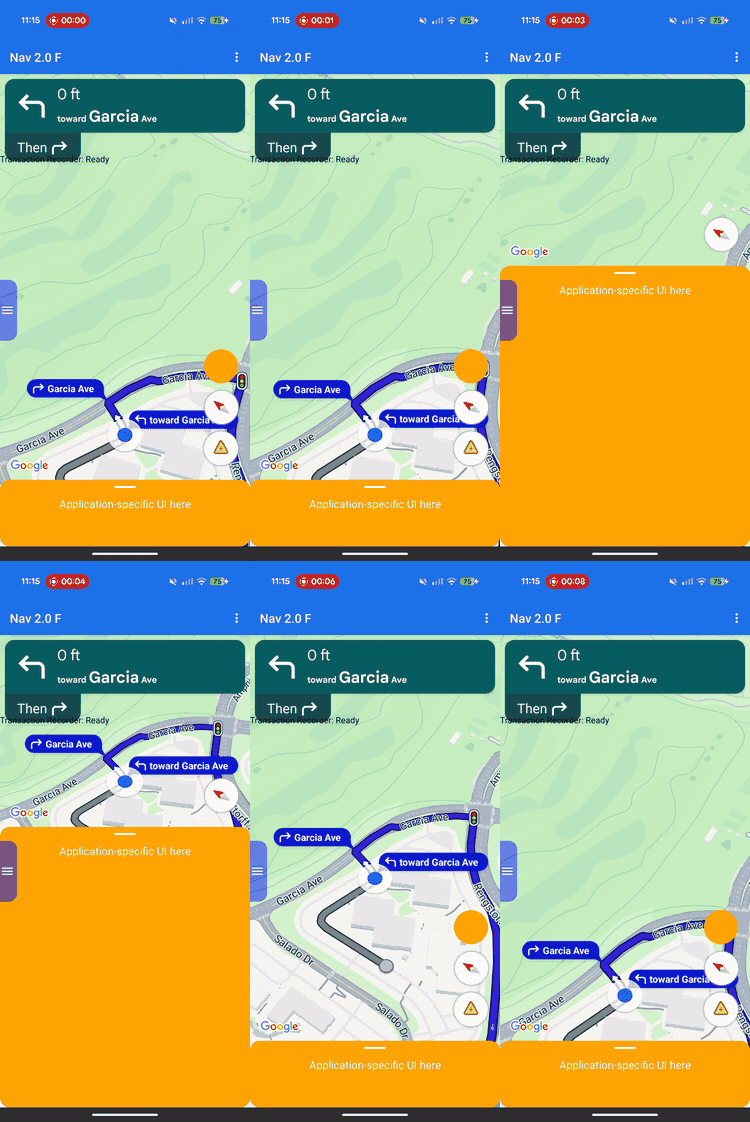
ใช้การปรับแต่งเลย์เอาต์เพื่อควบคุมลำดับชั้นการแสดงผลและการจัดวางหน้าจอสำหรับทั้งมุมมองที่ Google มีให้และมุมมองธุรกิจที่กำหนดเองของคุณ
แทนที่จะเพิ่มมุมมองที่กำหนดเองลงในช่องส่วนหัวหรือส่วนท้ายที่กำหนดไว้ล่วงหน้า ให้ใช้ตัวแทนเลย์เอาต์เพื่อจัดการเลย์เอาต์สำหรับทั้งหน้าจอ ในระหว่างการเปลี่ยนสถานะการนำทาง ตัวแทนเลย์เอาต์จะได้รับคอมโพเนนต์ที่ Google มีให้ เช่น การ์ดเลี้ยว การ์ด ETA และปุ่มต่างๆ จัดตำแหน่งองค์ประกอบเหล่านี้ควบคู่ไปกับเนื้อหาที่กำหนดเองโดยใช้ระบบเลย์เอาต์ Android มาตรฐาน เช่น ConstraintLayout, CoordinatorLayout หรือ LinearLayout
ใช้เฟรมเวิร์กนี้เพื่อจัดตำแหน่งข้อมูลทางธุรกิจที่กำหนดเอง เช่น สถานะการสั่งซื้อหรือวิธีการรับสินค้า บนหน้าจออย่างแม่นยำพร้อมทั้งป้องกันไม่ให้มุมมองซ้อนทับกัน
วิธีการทำงานของการปรับแต่งเลย์เอาต์
การปรับแต่งเลย์เอาต์ใช้รูปแบบการออกแบบการมอบสิทธิ์ แทนที่จะวาดหรือวางตำแหน่งคอมโพเนนต์ UI บนหน้าจอโดยอัตโนมัติ SDK จะส่งคอมโพเนนต์เหล่านั้นไปยังคลาสที่กำหนดเองที่คุณเขียนโดยตรง ซึ่งก็คือผู้รับมอบสิทธิ์เลย์เอาต์
หากต้องการปรับแต่งเลย์เอาต์ ให้สร้างคลาสที่ขยายคลาสNavigationLayoutDelegate นามธรรมและกำหนดอินสแตนซ์ให้กับ NavigationView หรือ SupportNavigationFragment เมื่อใดก็ตามที่สถานะการนำทางเปลี่ยนไป เช่น การย้ายจากแผนที่ฐานไปยังคำแนะนำแบบเลี้ยวต่อเลี้ยวที่ใช้งานอยู่ SDK จะเรียกใช้เมธอด Callback ในตัวแทนของคุณและจัดเตรียมคอมโพเนนต์ UI ที่พร้อมใช้งานสำหรับสถานะที่เฉพาะเจาะจงนั้น
เฟรมเวิร์กนี้จะแยกความรับผิดชอบระหว่างแอปกับ SDK อย่างชัดเจนเพื่อมอบประสบการณ์ของผู้ใช้ที่ราบรื่นและผสานรวม ใช้ตัวแทนเลย์เอาต์เพื่อปรับแต่งสิ่งต่อไปนี้
- สร้างลำดับชั้นการแสดงผล: เลือกคอมโพเนนต์ของ Google และมุมมองธุรกิจที่กำหนดเองที่ต้องการเพิ่มลงในหน้าจอสำหรับสถานะ UI แต่ละสถานะ
- จัดตำแหน่งทุกองค์ประกอบ: ตั้งค่า Anchor ของหน้าจอ ระยะขอบ และตำแหน่งเลย์เอาต์ที่แม่นยำ หลีกเลี่ยงการใช้ข้อจำกัดความกว้างหรือความสูงที่กำหนดเองกับคอมโพเนนต์ของ Google เนื่องจากคอมโพเนนต์ของ Google จะคำนวณขนาดภายในของตนเอง
- จัดเฟรมแผนที่ฐาน: กำหนดขอบเขตที่มองเห็นได้ของกล้องแผนที่โดยใช้พิกัดของคอมโพเนนต์วิวพอร์ต
- จัดเลเยอร์หน้าจอ: เลือกว่าจะให้มุมมองที่กำหนดเองลอยอยู่ด้านบน ด้านล่าง หรืออยู่ข้างๆ ตัวควบคุมในตัวของ Google
ในระหว่างนี้ คุณจะไม่สามารถปรับแต่งคอมโพเนนต์ Google ต่อไปนี้ด้วย Layout Delegate
- ขนาดคอมโพเนนต์: ขนาดและขนาดภายในของคอมโพเนนต์ที่ Google มีให้ ซึ่ง SDK จะคำนวณโดยอัตโนมัติ
- เงื่อนไขทริกเกอร์: เมื่อการแจ้งเตือนหรือข้อความแจ้งแบบไดนามิกปรากฏขึ้นตามข้อมูลเส้นทางแบบเรียลไทม์
หลักการติดตั้งใช้งาน
เมื่อเขียนตัวแทนเลย์เอาต์ โปรดคำนึงถึงกฎต่อไปนี้เพื่อป้องกันข้อบกพร่องของเลย์เอาต์หรือข้อขัดข้องของรันไทม์
- ค่าเริ่มต้นคือหน้าจอว่างเปล่า: คอมโพเนนต์ที่ Google มีให้จะปรากฏก็ต่อเมื่อผู้รับมอบสิทธิ์เพิ่มคอมโพเนนต์เหล่านั้นลงในลำดับชั้นการแสดงผลและจัดตำแหน่งอย่างชัดเจนเท่านั้น
- ไม่รองรับ API เดิม: ระบบจะไม่รองรับพร็อพเพอร์ตี้และเมธอดที่ควบคุมโมเดลเลย์เอาต์ตามช่องแบบเดิม และอาจไม่ทำงานตามที่คาดไว้เมื่อผู้รับมอบสิทธิ์ที่กำหนดเองทำงานอยู่
- อย่าแก้ไขโครงสร้างมุมมองภายใน:
อย่าใช้วิธีการต่างๆ เช่น
findViewById()เพื่อข้ามหรือแก้ไขลำดับชั้นการแสดงผลของคอมโพเนนต์ที่ Google มีให้ (เช่น การ์ดเลี้ยวหรือการ์ด ETA) เนื่องจากลำดับชั้นการแสดงผลภายในเหล่านี้เป็นรายละเอียดการใช้งานเบื้องหลัง จึงอาจมีการเปลี่ยนแปลงใน SDK รุ่นต่างๆ การแก้ไขอาจทำให้เลย์เอาต์เสียหายระหว่างการอัปเดต SDK ในอนาคต
ความเข้ากันได้กับ API เดิมของ
เพื่อลักษณะการทำงานของเลย์เอาต์ที่เชื่อถือได้เมื่อใช้ตัวแทนเลย์เอาต์ที่กำหนดเอง ให้หลีกเลี่ยงการใช้ API แบบอิงตามช่องเดิมต่อไปนี้ ซึ่งมีแผนที่จะเลิกใช้งาน หากต้องการย้ายข้อมูลแอปที่มีอยู่ ให้แทนที่การใช้ API เหล่านี้ด้วยโค้ดในตัวแทนเลย์เอาต์ที่กำหนดเอง ดังนี้
แสดง API ตามช่องแบบเดิม
| API เดิม | การแทนที่ Layout Delegate |
|---|---|
setCustomControl(View, CustomControlPosition) |
เพิ่มมุมมองลงใน ConstraintLayout หรือกลุ่มมุมมองอื่นๆ โดยตรง |
removeCustomControl(View) |
นำมุมมองออกจากลำดับชั้นการแสดงผลโดยตรง |
setEtaCardEnabled(boolean) |
อ่านมุมมอง etaCard ใน onEnterActiveGuidance |
setHeaderEnabled(boolean) |
อ่านมุมมอง turnCard ใน onEnterActiveGuidance |
setReportIncidentButtonEnabled(boolean) |
ค้นหาปุ่ม REPORTING ใน getActiveGuidanceButtons() |
setTripProgressBarEnabled(boolean) |
อ่านมุมมอง tripProgressBar ใน onEnterActiveGuidance |
addOnNavigationUiChangedListener(...) |
ใช้ Callback การเปลี่ยนสถานะ NavigationLayoutDelegate |
removeOnNavigationUiChangedListener(...) |
จัดการการเปลี่ยนสถานะเลย์เอาต์โดยตรงโดยใช้ผู้รับมอบสิทธิ์ |
addPromptVisibilityChangedListener(...) |
ใช้ Callback ของพรอมต์ NavigationLayoutDelegate (เช่น onShowPrompt()) |
removePromptVisibilityChangedListener(...) |
จัดการตรรกะการแสดงข้อความแจ้งโดยตรงโดยใช้ผู้รับมอบสิทธิ์ |
setCompassEnabled(boolean) |
ค้นหาเข็มทิศใน getNavigationReadyButtons() หรือ getActiveGuidanceButtons() |
รายการตรวจสอบ Essentials
ทำตามขั้นตอนและข้อกำหนดที่สำคัญต่อไปนี้เพื่อติดตั้งใช้งาน Layout Delegate ให้สำเร็จ
-
เริ่มต้นผู้รับมอบสิทธิ์ก่อนสร้าง UI: เรียกใช้
setLayoutDelegate()ก่อนที่ SDK จะเริ่มต้น UI การนำทาง ดูตัวอย่างการติดตั้งใช้งานโค้ดต่อไปนี้เพื่อยืนยันเวลาการตั้งค่าที่แน่นอนสำหรับโครงสร้างแอปพลิเคชันของคุณ การเริ่มต้นผู้รับมอบสิทธิ์หลังจากการสร้าง UI จะทริกเกอร์ApiIllegalStateExceptionKotlin
// For SupportNavigationFragment
override fun onCreate(savedInstanceState: Bundle?) {
    super.onCreate(savedInstanceState)
    setContentView(R.layout.activity_main)
    val navFragment = supportFragmentManager.findFragmentById(R.id.nav_fragment) as SupportNavigationFragment
    navFragment.setLayoutDelegate(MyLayoutDelegate())
}

// For a programmatic NavigationView
val navigationView = NavigationView(context)
navigationView.setLayoutDelegate(MyLayoutDelegate())
navigationView.onCreate(savedInstanceState)
Java
// For SupportNavigationFragment
@Override
protected void onCreate(Bundle savedInstanceState) {
    super.onCreate(savedInstanceState);
    setContentView(R.layout.activity_main);
    SupportNavigationFragment navFragment = (SupportNavigationFragment) getSupportFragmentManager().findFragmentById(R.id.nav_fragment);
    navFragment.setLayoutDelegate(new MyLayoutDelegate());
}

// For a programmatic NavigationView
NavigationView navigationView = new NavigationView(context);
navigationView.setLayoutDelegate(new MyLayoutDelegate());
navigationView.onCreate(savedInstanceState);
-
สร้างคอนเทนเนอร์เลย์เอาต์ของคุณเอง: สร้างกลุ่มมุมมองที่กำหนดเอง เช่น
ConstraintLayoutเพื่อเก็บองค์ประกอบ UI ที่กำหนดเองและมุมมองที่ Google มีให้ -
แนบมุมมองที่จำเป็น: คุณต้องเพิ่มโลโก้ Google (
getGoogleLogo()) และวิวพอร์ต (getViewport()) ลงในคอนเทนเนอร์เลย์เอาต์ในสถานะการนำทางทั้งหมด การไม่รวมทั้ง 2 มุมมองนี้จะทริกเกอร์ApiIllegalStateExceptionของรันไทม์และทำให้แอปขัดข้อง -
ใช้ขนาดคงที่: SDK จะกำหนดขนาดสำหรับคอมโพเนนต์หลายรายการที่ Google มีให้ อย่าใช้ข้อจำกัดความกว้างหรือความสูงที่กำหนดเองกับองค์ประกอบต่อไปนี้
- การ์ดเทิร์น
- การ์ด ETA
- พรอมต์ขาเข้า
- โลโก้ Google
- วิดเจ็ตความเร็ว
-
แนบเลย์เอาต์กับมุมมอง: เรียกใช้
navigationView.setNavigationLayout()ภายใน CallbackonEnterNavigationReady()และonEnterActiveGuidance()เพื่อแนบคอนเทนเนอร์กับลำดับชั้นการแสดงผลแผนที่ -
ล้างข้อมูลเมื่อออกจากสถานะ: เรียกใช้
navigationView.removeNavigationLayout()และนำมุมมองที่กำหนดเองภายใน CallbackonLeaveออกเพื่อป้องกันไม่ให้หน่วยความจำรั่วไหลและสถานะ UI ทับซ้อนกัน -
หลีกเลี่ยง API เลย์เอาต์เดิม: อย่าเรียกใช้ API ที่อิงตามช่องซึ่งเลิกใช้งานแล้ว เช่น
setCustomControl()หรือsetHeaderEnabled()ขณะที่ผู้รับมอบสิทธิ์ที่กำหนดเองทำงานอยู่ SDK อาจละเว้นการโทรเวอร์ชันเดิมเหล่านี้เมื่อมีการแนบผู้รับมอบสิทธิ์ที่กำหนดเอง
สถานะ UI และคอมโพเนนต์ของ Google
เมื่อเกิดการเปลี่ยนสถานะการนำทาง SDK จะส่งออบเจ็กต์ UiState แบบอ่านอย่างเดียวไปยัง Callback ของผู้รับมอบสิทธิ์ ออบเจ็กต์นี้จะรวมแฟล็กการกำหนดค่าเลย์เอาต์ปัจจุบันเข้ากับคอมโพเนนต์ของ Google (เช่น อินสแตนซ์ View) ที่คุณต้องใช้ในการแสดงผลหน้าจอ
ผู้รับมอบสิทธิ์เลย์เอาต์จะจัดการลำดับชั้นการแสดงผลในสถานะการทำงาน 4 สถานะ แผนภาพสถานะต่อไปนี้แสดงวิธีที่ SDK เปลี่ยนสถานะการนำทางและเมธอด Callback ที่ SDK เรียกใช้ในตัวแทนของคุณ
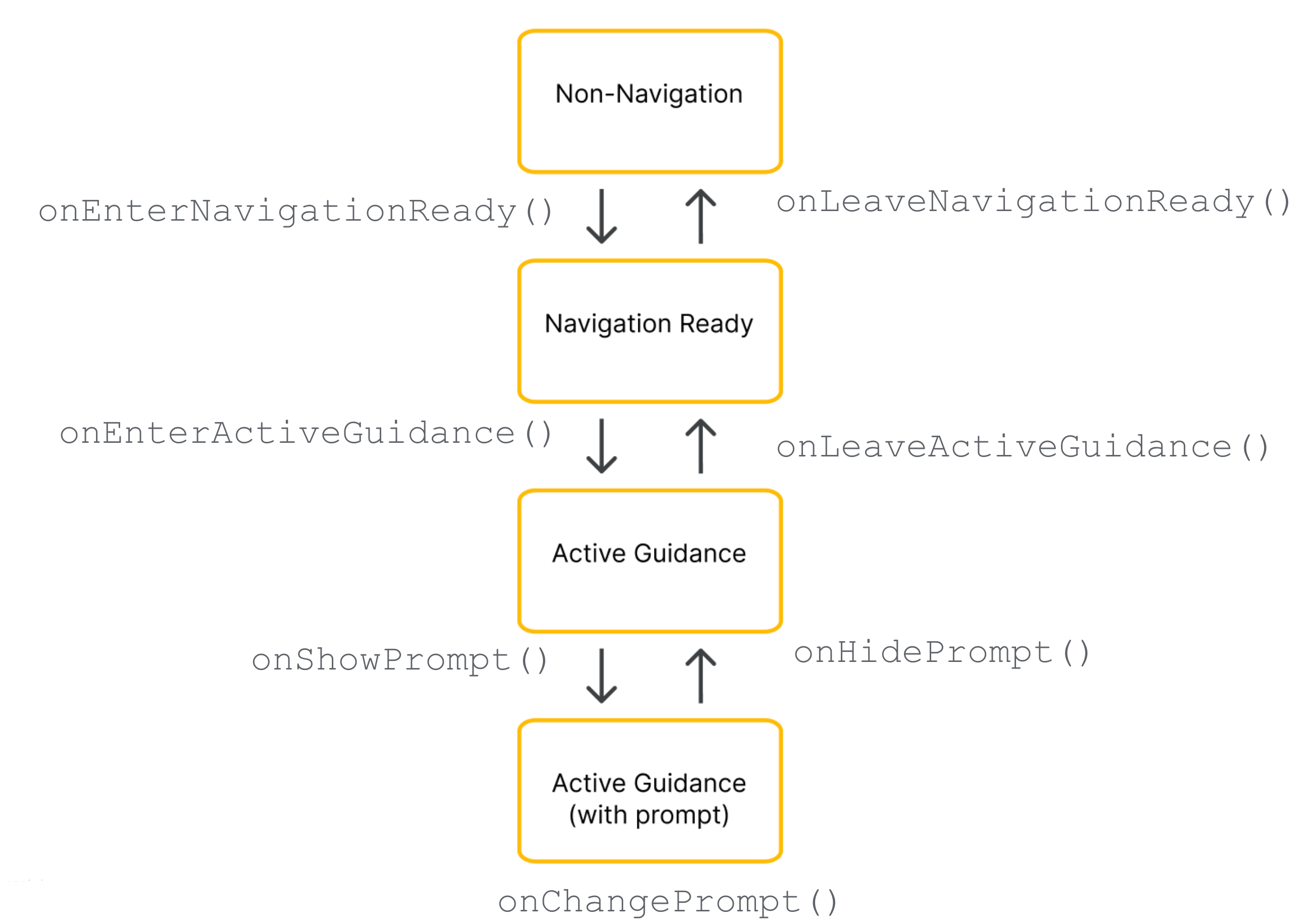
คอมโพเนนต์เฉพาะของ Google ที่มอบให้แก่ผู้รับมอบสิทธิ์จะขึ้นอยู่กับระยะปัจจุบันของวงจรการนําทาง
องค์ประกอบที่จำเป็น (สถานะการนำทางทั้งหมด)
ไม่ว่าจะเป็นระยะการนำทางใด คุณต้องรวม จัดตำแหน่ง และแสดงคอมโพเนนต์ของ Google ต่อไปนี้ให้เห็นในลำดับชั้นการแสดงผล
โลโก้ Google (
getGoogleLogo()): คอมโพเนนต์นี้จะแสดงโลโก้ Google Maps ที่จำเป็น หากปุ่มจัดให้อยู่ตรงกลางเปิดใช้อยู่ โลโก้จะเปลี่ยนเป็นปุ่มนี้โดยอัตโนมัติเมื่อคนขับเลื่อนแผนที่ออกจากยานพาหนะของตน ด้วยเหตุนี้ ตำแหน่งของโลโก้จึงเป็นตัวกำหนดตำแหน่งที่ปุ่มจัดให้อยู่ตรงกลางจะปรากฏขึ้น เราขอแนะนำให้วางโลโก้ไว้ที่มุมล่างซ้ายของเลย์เอาต์เพื่อให้ตรงกับความคาดหวังของ UI แผนที่มาตรฐานวิวพอร์ต (
getViewport()):Viewที่มองไม่เห็นซึ่งกำหนดขอบเขตการจัดเฟรมของกล้อง ตำแหน่งของวิวพอร์ตจะเป็นตัวกำหนดตำแหน่งที่ SDK จะจัดกึ่งกลางเครื่องหมายบั้งของยานพาหนะและวาดเส้นทางที่ใช้งานอยู่ จัดตำแหน่งวิวพอร์ตให้ครอบคลุมพื้นที่ที่เปิดอยู่และไม่มีสิ่งบดบังบนหน้าจอ โดยหลีกเลี่ยงการวางซ้อนทับแบบทึบแสง เช่น Bottom Sheet ที่กำหนดเองได้อย่างปลอดภัย
คอมโพเนนต์ที่พร้อมสำหรับการนำทาง รายการ
ในระหว่างสถานะพร้อมนำทาง UI จะยังคงมีขนาดเล็กที่สุดเพื่อมุ่งเน้นไปที่แผนที่ฐาน ออบเจ็กต์ NavigationReadyUiState ให้สิทธิ์เข้าถึงสิ่งต่อไปนี้
- getNavigationReadyButtons(): รายการมุมมองการดำเนินการแบบลอยที่กำหนดค่าไว้สำหรับแผนที่ฐาน (โดยปกติจะเป็นเพียงปุ่มเข็มทิศ) เนื่องจาก Google อาจเพิ่มหรือจัดเรียงปุ่มใหม่ใน SDK รุ่นต่อๆ ไป โปรดหลีกเลี่ยงการใช้ดัชนีรายการแบบคงที่ แต่ให้ทำซ้ำผ่านรายการ อ่านประเภทของปุ่มแต่ละปุ่มโดยเปรียบเทียบ
getType()กับButtonKnownType.COMPASSและดึงข้อมูลมุมมองจริงโดยเรียกใช้getView()โปรดทราบว่าปุ่มที่แน่นอนในรายการนี้แตกต่างจากปุ่มที่ใช้ได้ระหว่างการนำทางที่ใช้งานอยู่
องค์ประกอบคำแนะนำที่ใช้งานอยู่ รายการ
เมื่อคำแนะนำแบบเลี้ยวต่อเลี้ยวเริ่มต้นขึ้น SDK จะปลดล็อกชุดการควบคุมการนำทางทั้งหมด ออบเจ็กต์ ActiveGuidanceUiState ของคุณให้สิทธิ์เข้าถึงคอมโพเนนต์ต่อไปนี้ของ Google
แบนเนอร์ส่วนหัวหลัก
getTurnCard()ที่แสดงทิศทางการเคลื่อนที่ ระยะทาง และคำแนะนำช่องทางที่กำลังจะมาถึง วางไว้ที่ด้านบนของเลย์เอาต์เพื่อสร้างลำดับชั้นการนำทางที่คุ้นเคยและยึดมุมมองที่กำหนดเองไว้รอบๆgetEtaCard(): แบนเนอร์ส่วนท้ายที่แสดงเวลาถึงโดยประมาณ ระยะเวลาการเดินทางที่เหลือ และระยะทางที่เหลือไปยังจุดหมาย วางไว้ที่ขอบด้านล่างของหน้าจอ หรือผสานรวมพิกัดของวิดเจ็ตกับชีตการจัดการงานที่กำหนดเองgetTripProgressBar(): แถบความคืบหน้าแนวตั้งที่แสดงให้คนขับเห็นว่าเดินทางมาไกลแค่ไหนแล้วตามเส้นทางปัจจุบัน ซึ่งแตกต่างจากเลย์เอาต์เดิมที่กำหนดให้องค์ประกอบนี้อยู่ติดกับขอบแผนที่อย่างเคร่งครัด คุณมีอิสระอย่างเต็มที่ในการยึดองค์ประกอบนี้ไว้ที่ใดก็ได้ เช่น ตามขอบด้านข้างของคอนเทนเนอร์ที่กำหนดเองgetSpeedWidget(): ตัวควบคุมแบบลอยสำหรับมาตรวัดความเร็วและขีดจำกัดความเร็วที่แสดง มุมมองนี้จะปรับขนาดแบบไดนามิกระหว่างสถานะภาพ 4 สถานะขณะรันไทม์ (ไม่แสดงอะไรเลย แสดงเฉพาะความเร็วปัจจุบัน แสดงเฉพาะขีดจำกัดความเร็ว หรือแสดงทั้ง 2 ค่า) ทั้งนี้ขึ้นอยู่กับการตั้งค่า API และความพร้อมใช้งานของข้อมูล เนื่องจากวิดเจ็ตสามารถเปลี่ยนขนาดเหล่านี้ได้โดยไม่ต้องแจ้งให้ทราบ ให้ยึดมุมมองโดยรอบโดยใช้ข้อจำกัดเสมอเพื่อให้เลย์เอาต์ของคุณ ปรับโดยอัตโนมัติเพื่อป้องกันการทับซ้อนกันของพื้นที่
getActiveGuidanceButtons(): รายการมุมมองการทำงานแบบลอยที่ขยายออกสำหรับสถานะคำแนะนำที่ใช้งานอยู่ (โดยปกติจะรวมทั้งเข็มทิศและปุ่มรายงานเหตุการณ์) เช่นเดียวกับในสถานะพร้อมสำหรับการนำทาง คุณสามารถค้นหาและดึงข้อมูลมุมมองปุ่มแต่ละรายการได้โดยกรองรายการตามButtonKnownType(COMPASSหรือREPORTING) และดึงข้อมูลมุมมองโดยใช้getView()จากนั้นคุณสามารถจัดตำแหน่งได้อย่างอิสระหรือใช้เลย์เอาต์อย่างAutoHidingLinearLayoutเพื่อวางซ้อนอาร์เรย์ได้อย่างปลอดภัยโดยไม่มีความขัดแย้งเชิงพื้นที่
องค์ประกอบพรอมต์แบบไดนามิก รายการ
ข้อความแจ้ง เช่น การแจ้งเตือนเหตุการณ์หรือคำเตือนเกี่ยวกับกล้องจับความปลอดภัย จะทริกเกอร์โดยอิสระระหว่างการนำทางที่ใช้งานอยู่
เมื่อข้อความแจ้งพร้อมแสดง SDK จะเรียกใช้ Callback onShowPrompt() ของผู้รับมอบสิทธิ์และส่งมุมมอง newPrompt ผู้รับมอบสิทธิ์มีหน้าที่จัดตำแหน่งข้อความแจ้งนี้ให้อยู่เหนือเลย์เอาต์อย่างราบรื่น (โดยปกติจะยึดไว้ที่ขอบด้านล่างของคอนเทนเนอร์แผนที่)
เนื่องจากข้อความแจ้งที่เข้ามาจะครอบคลุมส่วนล่างของหน้าจอ คุณจึงต้องอัปเดตเลย์เอาต์เพื่อป้องกันไม่ให้ข้อความแจ้งทับซ้อนกับวิวพอร์ต โลโก้ Google หรือปุ่มที่จัดชิดด้านล่าง
การจัดการขนาดหน้าจอและโหมดหน้าจอกว้าง
ในการจัดการการเปลี่ยนแปลงขนาดแผนที่และการวางแนวหน้าจอ ตัวแทนเลย์เอาต์จะใช้ฟีเจอร์ต่อไปนี้
การปรับขนาดมุมมอง: ปรับเลย์เอาต์เมื่อใดก็ตามที่ขนาดจริงของแผนที่เปลี่ยนแปลง
โหมดกว้าง: สลับไปใช้ตัวแปรเลย์เอาต์รูปแบบกว้างเมื่อแผนที่กว้างพอ
การตอบสนองต่อการปรับขนาดมุมมอง
เมื่อใดก็ตามที่ขนาดทางกายภาพของคอนเทนเนอร์แผนที่มีการเปลี่ยนแปลง SDK จะเรียกใช้ CallbackonSizeChanged() เลย์เอาต์แบบแยกหน้าจอ แถบเลื่อนเลย์เอาต์ และการหมุนอุปกรณ์มักจะทริกเกอร์ Callback onSizeChanged() ใช้ Callback นี้เพื่อทำการปรับเปลี่ยน UI ที่กำหนดเองให้ปรับเปลี่ยนตามพื้นที่โฆษณาโดยทั่วไป ใช้ onSizeChanged() เพื่อเปลี่ยนตำแหน่งองค์ประกอบที่กำหนดเองสำหรับสัดส่วนภาพของหน้าจอใหม่ ใช้เบรกพอยต์ความกว้างหรือความสูงที่กำหนดเอง และตรวจจับเมื่อเหตุการณ์การปรับขนาดสลับโหมดกว้างเพื่อสลับตัวแปรเลย์เอาต์อย่างปลอดภัย
ทำความเข้าใจโหมดกว้าง
โหมดกว้างจะเปิดใช้งานเมื่อคอนเทนเนอร์แผนที่กว้างพอที่จะแสดงคอมโพเนนต์ UI เคียงข้างกัน
อ่านบูลีน isWideMode() จากออบเจ็กต์สถานะเพื่อเปลี่ยนตำแหน่งองค์ประกอบ UI ที่กำหนดเองและทำให้ตรงกลางแผนที่ว่างสำหรับคนขับ เนื่องจากคอมโพเนนต์ที่ Google มีให้ เช่น การ์ดเลี้ยวและการ์ด ETA จะหดและเปลี่ยนรูปร่างโดยอัตโนมัติในโหมดกว้าง การอ่านบูลีนนี้จะช่วยให้มั่นใจได้ว่าเลย์เอาต์ของคุณจะปรับเปลี่ยนในขณะเดียวกันกับที่คอมโพเนนต์ของ Google อัปเดต
พิจารณาตัวอย่างต่อไปนี้สำหรับการจัดตำแหน่งคอมโพเนนต์เลย์เอาต์ในโหมดมาตรฐานและโหมดกว้าง
โหมดแนวตั้งมาตรฐาน: วางการ์ดเลี้ยวไว้ที่ด้านบนของหน้าจอและการ์ด ETA ไว้ที่ด้านล่าง
โหมดกว้าง: ย้ายการ์ดเลี้ยวไปที่ด้านเริ่มต้นของหน้าจอและการ์ด ETA ไปที่ด้านสิ้นสุด
กำลังตรวจสอบโหมดกว้างระหว่างการเปลี่ยนสถานะ
หากเลย์เอาต์รองรับรูปแบบโหมดกว้าง ให้ประเมินบูลีน isWideMode() ภายใน Callback การเปลี่ยนสถานะทุกครั้ง แทนที่จะอาศัยเพียง onSizeChanged()
onEnterNavigationReady() และ onEnterActiveGuidance() เพื่อจัดการการเปิดแอปครั้งแรกในโหมดแนวนอน วิธีนี้จะช่วยปกป้องเลย์เอาต์จากเหตุการณ์ในวงจรของระบบ Android เช่น การสร้างกิจกรรมเริ่มต้นขึ้นมาใหม่ ซึ่งจะข้าม Callback การปรับขนาดทั้งหมด เพื่อให้มั่นใจว่าตัวแปรเลย์เอาต์มาตรฐานหรือแบบกว้างที่ถูกต้องจะเปิดใช้งานทันทีที่สถานะการนำทางใหม่เริ่มต้นขึ้น
การปรับให้สอดคล้องกับรูปแบบของ Google
SDK มีคลาสยูทิลิตี StyleValues เพื่อช่วยให้ UI ที่กำหนดเองสอดคล้องกับจังหวะภาพของ Google คุณสามารถอ่านค่าเหล่านี้ในหน่วยความหนาแน่นของพิกเซลอิสระ (dp) เพื่อจัดแนวข้อมูลพร็อพเพอร์ตี้ให้สอดคล้องกับคอมโพเนนต์ของ Google ได้อย่างสมบูรณ์แบบ
ตัวอย่างเช่น หากต้องการวางปุ่มที่กำหนดเองไว้ที่มุมด้านบนของหน้าจอตรงข้ามกับการ์ดเลี้ยว คุณสามารถเรียกใช้ StyleValues.headerTopPaddingDp() และกำหนดค่าที่แสดงผลเป็นระยะขอบด้านบนของปุ่ม วิธีนี้ช่วยให้มั่นใจได้ว่าปุ่มที่กำหนดเองจะอยู่ในแนวเดียวกับขอบด้านบนของการ์ดเลี้ยว เพื่อรักษาความสมมาตรของหน้าจอ
ระยะห่างจากขอบและขนาดของสไตล์ที่ใช้ได้มีดังนี้
StyleValues.headerNominalHeightDp()StyleValues.headerTopPaddingDp()StyleValues.headerFooterSidePaddingDp()StyleValues.mapControlSidePaddingDp()StyleValues.buttonMapControlSidePaddingDp()
ตัวอย่าง: การติดตั้งใช้งานเลย์เอาต์ตามข้อจำกัด
ตัวอย่างต่อไปนี้แสดงตัวแทนเลย์เอาต์พื้นฐานที่จัดการการเปลี่ยนสถานะโดยใช้คำจำกัดความ ConstraintLayout และ ConstraintSet แบบเป็นโปรแกรม
แม้ว่าตัวอย่างนี้จะสร้างข้อจำกัดของมุมมองในโค้ด แต่ผู้รับมอบสิทธิ์เลย์เอาต์ก็สามารถขยายเลย์เอาต์ XML มาตรฐานของ Android ได้เช่นกัน
Kotlin
/*
 * Copyright 2026 Google LLC
 *
 * Licensed under the Apache License, Version 2.0 (the "License");
 * you may not use this file except in compliance with the License.
 * You may obtain a copy of the License at
 *
 *     http://www.apache.org/licenses/LICENSE-2.0
 *
 * Unless required by applicable law or agreed to in writing, software
 * distributed under the License is distributed on an "AS IS" BASIS,
 * WITHOUT WARRANTIES OR CONDITIONS OF ANY KIND, either express or implied.
 * See the License for the specific language governing permissions and
 * limitations under the License.
 */

package com.example.navigationapidemo.layoutdelegate

import android.content.Context
import android.util.TypedValue
import android.view.View
import android.view.ViewGroup
import androidx.constraintlayout.widget.ConstraintLayout
import androidx.constraintlayout.widget.ConstraintSet
import com.google.android.libraries.navigation.layoutcustomization.ActiveGuidanceUiState
import com.google.android.libraries.navigation.layoutcustomization.AutoHidingVerticalLayout
import com.google.android.libraries.navigation.layoutcustomization.NavigationLayoutDelegate
import com.google.android.libraries.navigation.layoutcustomization.NavigationReadyUiState
import com.google.android.libraries.navigation.layoutcustomization.NavigationUiButton.ButtonKnownType.COMPASS
import com.google.android.libraries.navigation.layoutcustomization.NavigationUiParent
import com.google.android.libraries.navigation.layoutcustomization.StyleValues.headerNominalHeightDp

/** Kotlin equivalent of StandardUiElementsLayoutDelegate. */
class StandardUiElementsLayoutDelegateKt : NavigationLayoutDelegate() {

  private val layoutId = View.generateViewId()
  private val buttonsContainerId = View.generateViewId()

  private var layout: ConstraintLayout? = null
  private var buttonsContainer: AutoHidingVerticalLayout? = null

  private var navigationReadyConstraintSet: ConstraintSet? = null
  private var activeGuidanceConstraintSet: ConstraintSet? = null
  private var activeGuidanceWithPromptConstraintSet: ConstraintSet? = null

  private var activeGuidanceUiState: ActiveGuidanceUiState? = null

  override fun onEnterNavigationReady(
    navigationUiParent: NavigationUiParent,
    newState: NavigationReadyUiState,
  ) {
    val context = navigationUiParent.viewContext

    var currentLayout = layout
    if (currentLayout == null) {
      currentLayout =
        ConstraintLayout(context).apply {
          layoutParams =
            ViewGroup.LayoutParams(
              ViewGroup.LayoutParams.MATCH_PARENT,
              ViewGroup.LayoutParams.MATCH_PARENT,
            )
          id = layoutId
        }
      layout = currentLayout
    }

    removeFromParentView(newState.viewport)
    currentLayout.addView(
      newState.viewport,
      ViewGroup.LayoutParams(
        ViewGroup.LayoutParams.MATCH_PARENT,
        ViewGroup.LayoutParams.MATCH_PARENT,
      ),
    )

    removeFromParentView(newState.googleLogo)
    currentLayout.addView(
      newState.googleLogo,
      ViewGroup.LayoutParams(
        ViewGroup.LayoutParams.MATCH_PARENT,
        ViewGroup.LayoutParams.WRAP_CONTENT,
      ),
    )

    var currentButtonsContainer = buttonsContainer
    if (currentButtonsContainer == null) {
      currentButtonsContainer = AutoHidingVerticalLayout(context).apply { id = buttonsContainerId }
      buttonsContainer = currentButtonsContainer
    }

    removeFromParentView(currentButtonsContainer)
    currentLayout.addView(
      currentButtonsContainer,
      ViewGroup.LayoutParams(
        ViewGroup.LayoutParams.WRAP_CONTENT,
        ConstraintLayout.LayoutParams.MATCH_CONSTRAINT,
      ),
    )

    for (button in newState.navigationReadyButtons) {
      removeFromParentView(button.view)
      currentButtonsContainer.addView(button.view)
    }

    if (navigationReadyConstraintSet == null) {
      navigationReadyConstraintSet = buildNavigationReadyConstraintSet(newState)
    }
    navigationReadyConstraintSet?.applyTo(currentLayout)

    navigationUiParent.removeNavigationLayout(currentLayout)
    navigationUiParent.setNavigationLayout(currentLayout)
  }

  private fun buildNavigationReadyConstraintSet(uiState: NavigationReadyUiState): ConstraintSet {
    return ConstraintSet().apply {
      clone(layout)

      connect(
        uiState.viewport.id,
        ConstraintSet.START,
        ConstraintSet.PARENT_ID,
        ConstraintSet.START,
      )
      connect(uiState.viewport.id, ConstraintSet.TOP, ConstraintSet.PARENT_ID, ConstraintSet.TOP)
      connect(uiState.viewport.id, ConstraintSet.END, ConstraintSet.PARENT_ID, ConstraintSet.END)
      connect(
        uiState.viewport.id,
        ConstraintSet.BOTTOM,
        ConstraintSet.PARENT_ID,
        ConstraintSet.BOTTOM,
      )

      connect(
        uiState.googleLogo.id,
        ConstraintSet.BOTTOM,
        ConstraintSet.PARENT_ID,
        ConstraintSet.BOTTOM,
      )
      connect(
        uiState.googleLogo.id,
        ConstraintSet.START,
        ConstraintSet.PARENT_ID,
        ConstraintSet.START,
      )

      constrainButtonsToBottomEnd()
    }
  }

  override fun onLeaveNavigationReady(
    navigationUiParent: NavigationUiParent,
    oldState: NavigationReadyUiState,
  ) {
    buttonsContainer?.removeAllViews()
    layout?.removeAllViews()
    layout?.let { navigationUiParent.removeNavigationLayout(it) }
  }

  override fun onEnterActiveGuidance(
    navigationUiParent: NavigationUiParent,
    oldState: NavigationReadyUiState,
    newState: ActiveGuidanceUiState,
  ) {
    activeGuidanceUiState = newState
    val context = navigationUiParent.viewContext
    val currentLayout = checkNotNull(layout) { "layout must be initialized" }
    val currentButtonsContainer =
      checkNotNull(buttonsContainer) { "buttonsContainer must be initialized" }

    removeFromParentView(newState.turnCard)
    currentLayout.addView(
      newState.turnCard,
      ViewGroup.LayoutParams(
        ViewGroup.LayoutParams.WRAP_CONTENT,
        ViewGroup.LayoutParams.WRAP_CONTENT,
      ),
    )

    removeFromParentView(newState.etaCard)
    currentLayout.addView(
      newState.etaCard,
      ViewGroup.LayoutParams(
        ViewGroup.LayoutParams.WRAP_CONTENT,
        ViewGroup.LayoutParams.WRAP_CONTENT,
      ),
    )

    for (button in oldState.navigationReadyButtons) {
      removeFromParentView(button.view)
    }

    for (button in newState.activeGuidanceButtons) {
      val buttonLayoutParams =
        AutoHidingVerticalLayout.LayoutParams(
          ViewGroup.LayoutParams.WRAP_CONTENT,
          ViewGroup.LayoutParams.WRAP_CONTENT,
        )
      if (button.type == COMPASS) {
        buttonLayoutParams.isHighPriority = true
      }
      removeFromParentView(button.view)
      currentButtonsContainer.addView(button.view, buttonLayoutParams)
    }

    if (activeGuidanceConstraintSet == null) {
      activeGuidanceConstraintSet = buildActiveGuidanceConstraintSet(context, newState)
    }

    activeGuidanceConstraintSet?.applyTo(currentLayout)
  }

  override fun onLeaveActiveGuidance(
    navigationUiParent: NavigationUiParent,
    oldState: ActiveGuidanceUiState,
    newState: NavigationReadyUiState,
  ) {
    removeFromParentView(oldState.etaCard)
    removeFromParentView(oldState.turnCard)
    buttonsContainer?.removeAllViews()

    val currentButtonsContainer =
      checkNotNull(buttonsContainer) { "buttonsContainer must be initialized" }
    for (button in newState.navigationReadyButtons) {
      currentButtonsContainer.addView(
        button.view,
        ViewGroup.LayoutParams(
          ViewGroup.LayoutParams.WRAP_CONTENT,
          ViewGroup.LayoutParams.WRAP_CONTENT,
        ),
      )
    }

    navigationReadyConstraintSet?.applyTo(layout)
  }

  private fun buildActiveGuidanceConstraintSet(
    context: Context,
    uiState: ActiveGuidanceUiState,
  ): ConstraintSet {
    return ConstraintSet().apply {
      clone(layout)

      connect(uiState.turnCard.id, ConstraintSet.TOP, ConstraintSet.PARENT_ID, ConstraintSet.TOP)
      connect(
        uiState.turnCard.id,
        ConstraintSet.START,
        ConstraintSet.PARENT_ID,
        ConstraintSet.START,
      )

      clear(uiState.viewport.id)
      connect(
        uiState.viewport.id,
        ConstraintSet.START,
        ConstraintSet.PARENT_ID,
        ConstraintSet.START,
      )
      connect(uiState.viewport.id, ConstraintSet.TOP, ConstraintSet.PARENT_ID, ConstraintSet.TOP)
      setMargin(uiState.viewport.id, ConstraintSet.TOP, dpToPx(headerNominalHeightDp(), context))
      connect(uiState.viewport.id, ConstraintSet.END, ConstraintSet.PARENT_ID, ConstraintSet.END)
      connect(uiState.viewport.id, ConstraintSet.BOTTOM, uiState.etaCard.id, ConstraintSet.TOP)

      clear(uiState.googleLogo.id, ConstraintSet.BOTTOM)
      constrainLogoToTopOfEtaCard(uiState)
      constrainEtaCardToBottomStart(uiState)
      constrainButtonsToTopOfEtaCard(context, uiState)
    }
  }

  private fun ConstraintSet.constrainEtaCardToBottomStart(uiState: ActiveGuidanceUiState) {
    connect(uiState.etaCard.id, ConstraintSet.START, ConstraintSet.PARENT_ID, ConstraintSet.START)
    connect(uiState.etaCard.id, ConstraintSet.BOTTOM, ConstraintSet.PARENT_ID, ConstraintSet.BOTTOM)
  }

  private fun ConstraintSet.constrainLogoToTopOfEtaCard(uiState: ActiveGuidanceUiState) {
    connect(uiState.googleLogo.id, ConstraintSet.BOTTOM, uiState.etaCard.id, ConstraintSet.TOP)
  }

  private fun ConstraintSet.constrainButtonsToBottomEnd() {
    clear(buttonsContainerId, ConstraintSet.BOTTOM)
    clear(buttonsContainerId, ConstraintSet.TOP)
    connect(buttonsContainerId, ConstraintSet.TOP, ConstraintSet.PARENT_ID, ConstraintSet.TOP)
    connect(buttonsContainerId, ConstraintSet.BOTTOM, ConstraintSet.PARENT_ID, ConstraintSet.BOTTOM)
    connect(buttonsContainerId, ConstraintSet.END, ConstraintSet.PARENT_ID, ConstraintSet.END)
  }

  private fun ConstraintSet.constrainButtonsToTopOfEtaCard(
    context: Context,
    uiState: ActiveGuidanceUiState,
  ) {
    clear(buttonsContainerId, ConstraintSet.BOTTOM)
    clear(buttonsContainerId, ConstraintSet.TOP)
    connect(buttonsContainerId, ConstraintSet.BOTTOM, uiState.etaCard.id, ConstraintSet.TOP)
    connect(buttonsContainerId, ConstraintSet.TOP, ConstraintSet.PARENT_ID, ConstraintSet.TOP)
    connect(buttonsContainerId, ConstraintSet.END, ConstraintSet.PARENT_ID, ConstraintSet.END)
    setMargin(buttonsContainerId, ConstraintSet.TOP, dpToPx(headerNominalHeightDp(), context))
  }

  override fun onShowPrompt(navigationUiParent: NavigationUiParent, newPrompt: View) {
    val context = navigationUiParent.viewContext
    layout?.addView(newPrompt)

    if (activeGuidanceUiState != null) {
      activeGuidanceWithPromptConstraintSet =
        buildActiveGuidanceWithPromptConstraintSet(context, newPrompt)
      activeGuidanceWithPromptConstraintSet?.applyTo(layout)
    }
  }

  override fun onChangePrompt(
    navigationUiParent: NavigationUiParent,
    oldPrompt: View,
    newPrompt: View,
  ) {
    val context = navigationUiParent.viewContext
    activeGuidanceWithPromptConstraintSet?.clear(oldPrompt.id)

    val currentLayout = checkNotNull(layout) { "layout must be initialized" }
    currentLayout.removeView(oldPrompt)
    currentLayout.addView(newPrompt)

    if (activeGuidanceUiState != null) {
      activeGuidanceWithPromptConstraintSet =
        buildActiveGuidanceWithPromptConstraintSet(context, newPrompt)
      activeGuidanceWithPromptConstraintSet?.applyTo(currentLayout)
    }
  }

  override fun onHidePrompt(navigationUiParent: NavigationUiParent, oldPrompt: View) {
    activeGuidanceWithPromptConstraintSet?.clear(oldPrompt.id)
    layout?.removeView(oldPrompt)

    activeGuidanceConstraintSet?.applyTo(layout)
  }

  private fun buildActiveGuidanceWithPromptConstraintSet(
    context: Context,
    prompt: View,
  ): ConstraintSet {
    return ConstraintSet().apply {
      clone(layout)

      val state =
        checkNotNull(activeGuidanceUiState) { "activeGuidanceUiState must be initialized" }

      clear(state.viewport.id)
      connect(state.viewport.id, ConstraintSet.START, ConstraintSet.PARENT_ID, ConstraintSet.START)
      connect(state.viewport.id, ConstraintSet.TOP, ConstraintSet.PARENT_ID, ConstraintSet.TOP)
      setMargin(state.viewport.id, ConstraintSet.TOP, dpToPx(headerNominalHeightDp(), context))
      connect(state.viewport.id, ConstraintSet.END, ConstraintSet.PARENT_ID, ConstraintSet.END)
      connect(state.viewport.id, ConstraintSet.BOTTOM, prompt.id, ConstraintSet.TOP)

      clear(state.googleLogo.id, ConstraintSet.BOTTOM)
      connect(state.googleLogo.id, ConstraintSet.BOTTOM, prompt.id, ConstraintSet.TOP)

      connect(prompt.id, ConstraintSet.START, ConstraintSet.PARENT_ID, ConstraintSet.START)
      connect(prompt.id, ConstraintSet.BOTTOM, ConstraintSet.PARENT_ID, ConstraintSet.BOTTOM)
    }
  }

  private fun removeFromParentView(view: View?) {
    if (view?.parent != null) {
      (view.parent as ViewGroup).removeView(view)
    }
  }

  private fun dpToPx(dp: Int, context: Context): Int {
    return TypedValue.applyDimension(
        TypedValue.COMPLEX_UNIT_DIP,
        dp.toFloat(),
        context.resources.displayMetrics,
      )
      .toInt()
  }
}
Java
/*
 * Copyright 2026 Google LLC
 *
 * Licensed under the Apache License, Version 2.0 (the "License");
 * you may not use this file except in compliance with the License.
 * You may obtain a copy of the License at
 *
 *     http://www.apache.org/licenses/LICENSE-2.0
 *
 * Unless required by applicable law or agreed to in writing, software
 * distributed under the License is distributed on an "AS IS" BASIS,
 * WITHOUT WARRANTIES OR CONDITIONS OF ANY KIND, either express or implied.
 * See the License for the specific language governing permissions and
 * limitations under the License.
 */

package com.example.navigationapidemo.layoutdelegate;

import static android.view.ViewGroup.LayoutParams.MATCH_PARENT;
import static android.view.ViewGroup.LayoutParams.WRAP_CONTENT;
import static androidx.constraintlayout.widget.ConstraintLayout.LayoutParams.MATCH_CONSTRAINT;
import static com.google.android.libraries.navigation.layoutcustomization.NavigationUiButton.ButtonKnownType.COMPASS;

import android.content.Context;
import android.util.TypedValue;
import android.view.View;
import android.view.ViewGroup;
import android.view.ViewGroup.LayoutParams;
import androidx.constraintlayout.widget.ConstraintLayout;
import androidx.constraintlayout.widget.ConstraintSet;
import com.google.android.libraries.navigation.layoutcustomization.ActiveGuidanceUiState;
import com.google.android.libraries.navigation.layoutcustomization.AutoHidingVerticalLayout;
import com.google.android.libraries.navigation.layoutcustomization.NavigationLayoutDelegate;
import com.google.android.libraries.navigation.layoutcustomization.NavigationReadyUiState;
import com.google.android.libraries.navigation.layoutcustomization.NavigationUiButton;
import com.google.android.libraries.navigation.layoutcustomization.NavigationUiParent;
import com.google.android.libraries.navigation.layoutcustomization.StyleValues;

/**
 * A sample implementation of {@link NavigationLayoutDelegate} demonstrating a basic,
 * portrait-optimized layout using {@link ConstraintLayout}.
 *
 * <p><b>Understanding the Layout Delegate State Machine:</b> Navigation SDK transitions through
 * distinct states, each calling corresponding lifecycle methods on this delegate:
 *
 * <ul>
 *   <li><b>Navigation Ready:</b> Initiated by {@link #onEnterNavigationReady}. We initialize the
 *       layout here and add non-guidance views, then pass it to {@link NavigationUiParent} as the
 *       navigation layout.
 *   <li><b>Active Guidance (Turn-by-Turn Mode):</b> Initiated by {@link #onEnterActiveGuidance}. We
 *       set up the layout for Active Guidance, adding elements such as the turn card and ETA card.
 *   <li><b>Prompts:</b> Prompts (e.g., incident alerts) may be triggered during Active Guidance
 *       mode and can be added to the layout via {@link #onShowPrompt}.
 * </ul>
 *
 * This class caches its {@link ConstraintSet}s to ensure smooth transitions without needing to
 * recreate or inflate layouts continuously.
 */
public class StandardUiElementsLayoutDelegate extends NavigationLayoutDelegate {
  private final int layoutId;
  private final int buttonsContainerId;

  private ConstraintLayout layout;
  private AutoHidingVerticalLayout buttonsContainer;

  // We cache our ConstraintSet definitions to avoid cloning or rebuilding
  // constraint configurations programmatically on every transition. This optimization
  // keeps UI state switches (such as entering active guidance or popping up prompts) highly
  // performant.
  private ConstraintSet navigationReadyConstraintSet;
  private ConstraintSet activeGuidanceConstraintSet;
  private ConstraintSet activeGuidanceWithPromptConstraintSet;

  private ActiveGuidanceUiState activeGuidanceUiState;

  public StandardUiElementsLayoutDelegate() {
    layoutId = View.generateViewId();
    buttonsContainerId = View.generateViewId();
  }

  @Override
  public void onEnterNavigationReady(
      NavigationUiParent navigationUiParent, NavigationReadyUiState newState) {
    Context context = navigationUiParent.getViewContext();

    // Implementation Tip: For simplicity, this sample instantiates views and constraints
    // programmatically. In a production application, you can safely inflate standard XML
    // layout templates to build your layout hierarchies and define base UI constraints.

    // Create the root layout
    if (layout == null) {
      layout = new ConstraintLayout(context);
      LayoutParams layoutParams = new LayoutParams(MATCH_PARENT, MATCH_PARENT);
      layout.setLayoutParams(layoutParams);
      layout.setId(layoutId);
    }

    // Add the Viewport (REQUIRED):
    // The viewport is an invisible bounding box used by Nav SDK to frame the vehicle
    // chevron and the upcoming route line. We want to position this view such that it avoids
    // being obscured by fully-opaque UI elements (like the turn card or the ETA card).
    removeFromParentView(newState.getViewport());
    LayoutParams viewportLayoutParams = new LayoutParams(MATCH_PARENT, MATCH_PARENT);
    layout.addView(newState.getViewport(), viewportLayoutParams);

    // Add the Google Logo / Re-center Button (REQUIRED):
    // This view displays the Google logo during guidance and may transition into a
    // "Re-center" button if the user scrolls away from the vehicle chevron. It must
    // be added to the view hierarchy in all states.
    removeFromParentView(newState.getGoogleLogo());
    LayoutParams googleLogoLayoutParams = new LayoutParams(MATCH_PARENT, WRAP_CONTENT);
    layout.addView(newState.getGoogleLogo(), googleLogoLayoutParams);

    // Add the container for UI buttons
    if (buttonsContainer == null) {
      // We use AutoHidingVerticalLayout to create an adaptive vertical button container that
      // automatically hides or shows child views based on available screen height.
      buttonsContainer = new AutoHidingVerticalLayout(context);
      buttonsContainer.setId(buttonsContainerId);
    }
    removeFromParentView(buttonsContainer);
    LayoutParams buttonsContainerLayoutParams = new LayoutParams(WRAP_CONTENT, MATCH_CONSTRAINT);
    layout.addView(buttonsContainer, buttonsContainerLayoutParams);

    // Add UI buttons to the container
    for (NavigationUiButton button : newState.getNavigationReadyButtons()) {
      removeFromParentView(button.getView());
      buttonsContainer.addView(button.getView());
    }

    // Build constraint set for Navigation Ready state
    if (navigationReadyConstraintSet == null) {
      navigationReadyConstraintSet = buildNavigationReadyConstraintSet(newState);
    }

    // Apply the constraints
    navigationReadyConstraintSet.applyTo(layout);

    // Set the layout in NavigationUiParent
    navigationUiParent.removeNavigationLayout(layout);
    navigationUiParent.setNavigationLayout(layout);
  }

  private ConstraintSet buildNavigationReadyConstraintSet(NavigationReadyUiState uiState) {
    ConstraintSet constraintSet = new ConstraintSet();
    constraintSet.clone(layout);

    // Constrain viewport to the edges of its parent
    constraintSet.connect(
        uiState.getViewport().getId(),
        ConstraintSet.START,
        ConstraintSet.PARENT_ID,
        ConstraintSet.START);
    constraintSet.connect(
        uiState.getViewport().getId(),
        ConstraintSet.TOP,
        ConstraintSet.PARENT_ID,
        ConstraintSet.TOP);
    constraintSet.connect(
        uiState.getViewport().getId(),
        ConstraintSet.END,
        ConstraintSet.PARENT_ID,
        ConstraintSet.END);
    constraintSet.connect(
        uiState.getViewport().getId(),
        ConstraintSet.BOTTOM,
        ConstraintSet.PARENT_ID,
        ConstraintSet.BOTTOM);

    // Constrain the logo to the bottom start corner
    constraintSet.connect(
        uiState.getGoogleLogo().getId(),
        ConstraintSet.BOTTOM,
        ConstraintSet.PARENT_ID,
        ConstraintSet.BOTTOM);
    constraintSet.connect(
        uiState.getGoogleLogo().getId(),
        ConstraintSet.START,
        ConstraintSet.PARENT_ID,
        ConstraintSet.START);

    constrainButtonsToBottomEnd(constraintSet);

    return constraintSet;
  }

  @Override
  public void onLeaveNavigationReady(
      NavigationUiParent navigationUiParent, NavigationReadyUiState oldState) {
    buttonsContainer.removeAllViews();
    layout.removeAllViews();
    navigationUiParent.removeNavigationLayout(layout);
  }

  @Override
  public void onEnterActiveGuidance(
      NavigationUiParent navigationUiParent,
      NavigationReadyUiState oldState,
      ActiveGuidanceUiState newState) {
    activeGuidanceUiState = newState;

    Context context = navigationUiParent.getViewContext();

    // Sizing Guideline: The turn card and ETA card are internally configured to adapt and size
    // themselves dynamically based on the layout width (non-wideMode vs. wideMode). Forcing fixed
    // widths or heights on these elements via layouts is unsupported. Always use WRAP_CONTENT to
    // let the elements determine their optimal proportions.

    // Add the turn card
    removeFromParentView(newState.getTurnCard());
    LayoutParams turnCardLayoutParams = new LayoutParams(WRAP_CONTENT, WRAP_CONTENT);
    layout.addView(newState.getTurnCard(), turnCardLayoutParams);

    // Add the ETA card
    removeFromParentView(newState.getEtaCard());
    LayoutParams etaCardLayoutParams = new LayoutParams(WRAP_CONTENT, WRAP_CONTENT);
    layout.addView(newState.getEtaCard(), etaCardLayoutParams);

    // Remove the Navigation Ready UI buttons
    for (NavigationUiButton button : oldState.getNavigationReadyButtons()) {
      removeFromParentView(button.getView());
    }

    // By adding all buttons to the AutoHidingVerticalLayout, we can easily incorporate the latest
    // set of buttons when upgrading without any code changes required
    for (NavigationUiButton button : newState.getActiveGuidanceButtons()) {
      AutoHidingVerticalLayout.LayoutParams buttonLayoutParams =
          new AutoHidingVerticalLayout.LayoutParams(
              ViewGroup.LayoutParams.WRAP_CONTENT, ViewGroup.LayoutParams.WRAP_CONTENT);

      // Mark critical buttons (such as the compass) as high priority so they are the last to be
      // hidden by AutoHidingVerticalLayout when layout space is limited.
      if (button.getType() == COMPASS) {
        buttonLayoutParams.isHighPriority = true;
      }

      removeFromParentView(button.getView());
      buttonsContainer.addView(button.getView(), buttonLayoutParams);
    }

    // Build constraint set for Active Guidance state
    if (activeGuidanceConstraintSet == null) {
      activeGuidanceConstraintSet = buildActiveGuidanceConstraintSet(context, newState);
    }

    // Apply the constraints
    activeGuidanceConstraintSet.applyTo(layout);
  }

  @Override
  public void onLeaveActiveGuidance(
      NavigationUiParent navigationUiParent,
      ActiveGuidanceUiState oldState,
      NavigationReadyUiState newState) {

    // Remove Active Guidance UI elements
    removeFromParentView(oldState.getEtaCard());
    removeFromParentView(oldState.getTurnCard());
    buttonsContainer.removeAllViews();

    // Add Navigation Ready UI buttons
    for (NavigationUiButton button : newState.getNavigationReadyButtons()) {
      LayoutParams buttonLayoutParams = new LayoutParams(WRAP_CONTENT, WRAP_CONTENT);
      buttonsContainer.addView(button.getView(), buttonLayoutParams);
    }

    navigationReadyConstraintSet.applyTo(layout);
  }

  private ConstraintSet buildActiveGuidanceConstraintSet(
      Context context, ActiveGuidanceUiState uiState) {
    ConstraintSet constraintSet = new ConstraintSet();
    constraintSet.clone(layout);

    // Constrain turn card to top start corner
    constraintSet.connect(
        uiState.getTurnCard().getId(),
        ConstraintSet.TOP,
        ConstraintSet.PARENT_ID,
        ConstraintSet.TOP);
    constraintSet.connect(
        uiState.getTurnCard().getId(),
        ConstraintSet.START,
        ConstraintSet.PARENT_ID,
        ConstraintSet.START);

    // Constrain viewport to top of ETA card
    constraintSet.clear(uiState.getViewport().getId());
    constraintSet.connect(
        uiState.getViewport().getId(),
        ConstraintSet.START,
        ConstraintSet.PARENT_ID,
        ConstraintSet.START);
    constraintSet.connect(
        uiState.getViewport().getId(),
        ConstraintSet.TOP,
        ConstraintSet.PARENT_ID,
        ConstraintSet.TOP);

    // Instead of constraining the viewport's top directly to the bottom of the turn card
    // (which varies in height and would trigger jumpy camera framing updates), we use a fixed
    // nominal height to estimate the height of the turncard.
    constraintSet.setMargin(
        uiState.getViewport().getId(),
        ConstraintSet.TOP,
        dpToPx(StyleValues.headerNominalHeightDp(), context));

    constraintSet.connect(
        uiState.getViewport().getId(),
        ConstraintSet.END,
        ConstraintSet.PARENT_ID,
        ConstraintSet.END);
    constraintSet.connect(
        uiState.getViewport().getId(),
        ConstraintSet.BOTTOM,
        uiState.getEtaCard().getId(),
        ConstraintSet.TOP);

    constraintSet.clear(uiState.getGoogleLogo().getId(), ConstraintSet.BOTTOM);
    constrainLogoToTopOfEtaCard(uiState, constraintSet);

    constrainEtaCardToBottomStart(uiState, constraintSet);

    constrainButtonsToTopOfEtaCard(context, uiState, constraintSet);

    return constraintSet;
  }

  private static void constrainEtaCardToBottomStart(
      ActiveGuidanceUiState uiState, ConstraintSet constraintSet) {
    constraintSet.connect(
        uiState.getEtaCard().getId(),
        ConstraintSet.START,
        ConstraintSet.PARENT_ID,
        ConstraintSet.START);
    constraintSet.connect(
        uiState.getEtaCard().getId(),
        ConstraintSet.BOTTOM,
        ConstraintSet.PARENT_ID,
        ConstraintSet.BOTTOM);
  }

  private static void constrainLogoToTopOfEtaCard(
      ActiveGuidanceUiState uiState, ConstraintSet constraintSet) {
    constraintSet.connect(
        uiState.getGoogleLogo().getId(),
        ConstraintSet.BOTTOM,
        uiState.getEtaCard().getId(),
        ConstraintSet.TOP);
  }

  private void constrainButtonsToBottomEnd(ConstraintSet constraintSet) {
    constraintSet.clear(buttonsContainerId, ConstraintSet.BOTTOM);
    constraintSet.clear(buttonsContainerId, ConstraintSet.TOP);
    constraintSet.connect(
        buttonsContainerId, ConstraintSet.TOP, ConstraintSet.PARENT_ID, ConstraintSet.TOP);
    constraintSet.connect(
        buttonsContainerId, ConstraintSet.BOTTOM, ConstraintSet.PARENT_ID, ConstraintSet.BOTTOM);
    constraintSet.connect(
        buttonsContainerId, ConstraintSet.END, ConstraintSet.PARENT_ID, ConstraintSet.END);
  }

  private void constrainButtonsToTopOfEtaCard(
      Context context, ActiveGuidanceUiState uiState, ConstraintSet constraintSet) {
    constraintSet.clear(buttonsContainerId, ConstraintSet.BOTTOM);
    constraintSet.clear(buttonsContainerId, ConstraintSet.TOP);
    constraintSet.connect(
        buttonsContainerId, ConstraintSet.BOTTOM, uiState.getEtaCard().getId(), ConstraintSet.TOP);
    constraintSet.connect(
        buttonsContainerId, ConstraintSet.TOP, ConstraintSet.PARENT_ID, ConstraintSet.TOP);
    constraintSet.connect(
        buttonsContainerId, ConstraintSet.END, ConstraintSet.PARENT_ID, ConstraintSet.END);
    constraintSet.setMargin(
        buttonsContainerId,
        ConstraintSet.TOP,
        dpToPx(StyleValues.headerNominalHeightDp(), context));
  }

  @Override
  public void onShowPrompt(NavigationUiParent navigationUiParent, View newPrompt) {
    Context context = navigationUiParent.getViewContext();

    layout.addView(newPrompt);

    // When a prompt is displayed at the bottom of the screen, we update our active constraints so
    // that the invisible Viewport sits entirely above the prompt. This automatically forces the
    // Nav SDK camera to adjust its zoom and framing so that the route chevron is always visible to
    // the driver.
    activeGuidanceWithPromptConstraintSet =
        buildActiveGuidanceWithPromptConstraintSet(context, newPrompt);
    activeGuidanceWithPromptConstraintSet.applyTo(layout);
  }

  @Override
  public void onChangePrompt(
      NavigationUiParent navigationUiParent, View oldPrompt, View newPrompt) {
    Context context = navigationUiParent.getViewContext();

    activeGuidanceWithPromptConstraintSet.clear(oldPrompt.getId());

    layout.removeView(oldPrompt);
    layout.addView(newPrompt);

    // When a prompt is displayed at the bottom of the screen, we update our active constraints so
    // that the invisible Viewport sits entirely above the prompt. This automatically forces the
    // Nav SDK camera to adjust its zoom and framing so that the route chevron is always visible to
    // the driver.
    activeGuidanceWithPromptConstraintSet =
        buildActiveGuidanceWithPromptConstraintSet(context, newPrompt);
    activeGuidanceWithPromptConstraintSet.applyTo(layout);
  }

  @Override
  public void onHidePrompt(NavigationUiParent navigationUiParent, View oldPrompt) {
    activeGuidanceWithPromptConstraintSet.clear(oldPrompt.getId());

    layout.removeView(oldPrompt);

    activeGuidanceConstraintSet.applyTo(layout);
  }

  private ConstraintSet buildActiveGuidanceWithPromptConstraintSet(Context context, View prompt) {
    ConstraintSet constraintSet = new ConstraintSet();
    constraintSet.clone(layout);

    // Constrain viewport to top of prompt
    constraintSet.clear(activeGuidanceUiState.getViewport().getId());
    constraintSet.connect(
        activeGuidanceUiState.getViewport().getId(),
        ConstraintSet.START,
        ConstraintSet.PARENT_ID,
        ConstraintSet.START);
    constraintSet.connect(
        activeGuidanceUiState.getViewport().getId(),
        ConstraintSet.TOP,
        ConstraintSet.PARENT_ID,
        ConstraintSet.TOP);
    constraintSet.setMargin(
        activeGuidanceUiState.getViewport().getId(),
        ConstraintSet.TOP,
        dpToPx(StyleValues.headerNominalHeightDp(), context));
    constraintSet.connect(
        activeGuidanceUiState.getViewport().getId(),
        ConstraintSet.END,
        ConstraintSet.PARENT_ID,
        ConstraintSet.END);
    constraintSet.connect(
        activeGuidanceUiState.getViewport().getId(),
        ConstraintSet.BOTTOM,
        prompt.getId(),
        ConstraintSet.TOP);

    // Constrain prompt to bottom start corner
    constraintSet.connect(
        prompt.getId(), ConstraintSet.START, ConstraintSet.PARENT_ID, ConstraintSet.START);
    constraintSet.connect(
        prompt.getId(), ConstraintSet.BOTTOM, ConstraintSet.PARENT_ID, ConstraintSet.BOTTOM);

    return constraintSet;
  }

  private void removeFromParentView(View view) {
    if (view != null && view.getParent() != null) {
      ((ViewGroup) view.getParent()).removeView(view);
    }
  }

  private static int dpToPx(int dp, Context context) {
    return (int)
        TypedValue.applyDimension(
            TypedValue.COMPLEX_UNIT_DIP, dp, context.getResources().getDisplayMetrics());
  }
}
หากต้องการดูโค้ดตัวอย่างที่สมบูรณ์หรือสำรวจการติดตั้งใช้งานตัวแทนเลย์เอาต์เพิ่มเติม โปรดดูตัวอย่างตัวแทนเลย์เอาต์ใน GitHub นอกจากนี้ คุณยังดูไฟล์ต้นฉบับแต่ละไฟล์สำหรับตัวอย่างนี้ได้ใน GitHub ดังนี้