

इस सेक्शन में, कार के लिए Android की ऐप्लिकेशन लाइब्रेरी के साथ Navigation SDK का इस्तेमाल करने का तरीका बताया गया है. इससे, डैशबोर्ड में मौजूद मुख्य यूनिट पर, आपके ऐप्लिकेशन का नेविगेशन अनुभव दिखाया जा सकता है. अगर किसी उपयोगकर्ता के इन-डैश सिस्टम में Android Auto की सुविधा काम करती है, तो उपयोगकर्ता अपने फ़ोन को यूनिट से कनेक्ट करके, सीधे अपनी कार के डिसप्ले पर आपके ऐप्लिकेशन का इस्तेमाल कर सकते हैं. आवाज़ से रास्ता बताने की सुविधा, कार के स्पीकर पर भी काम करती है.
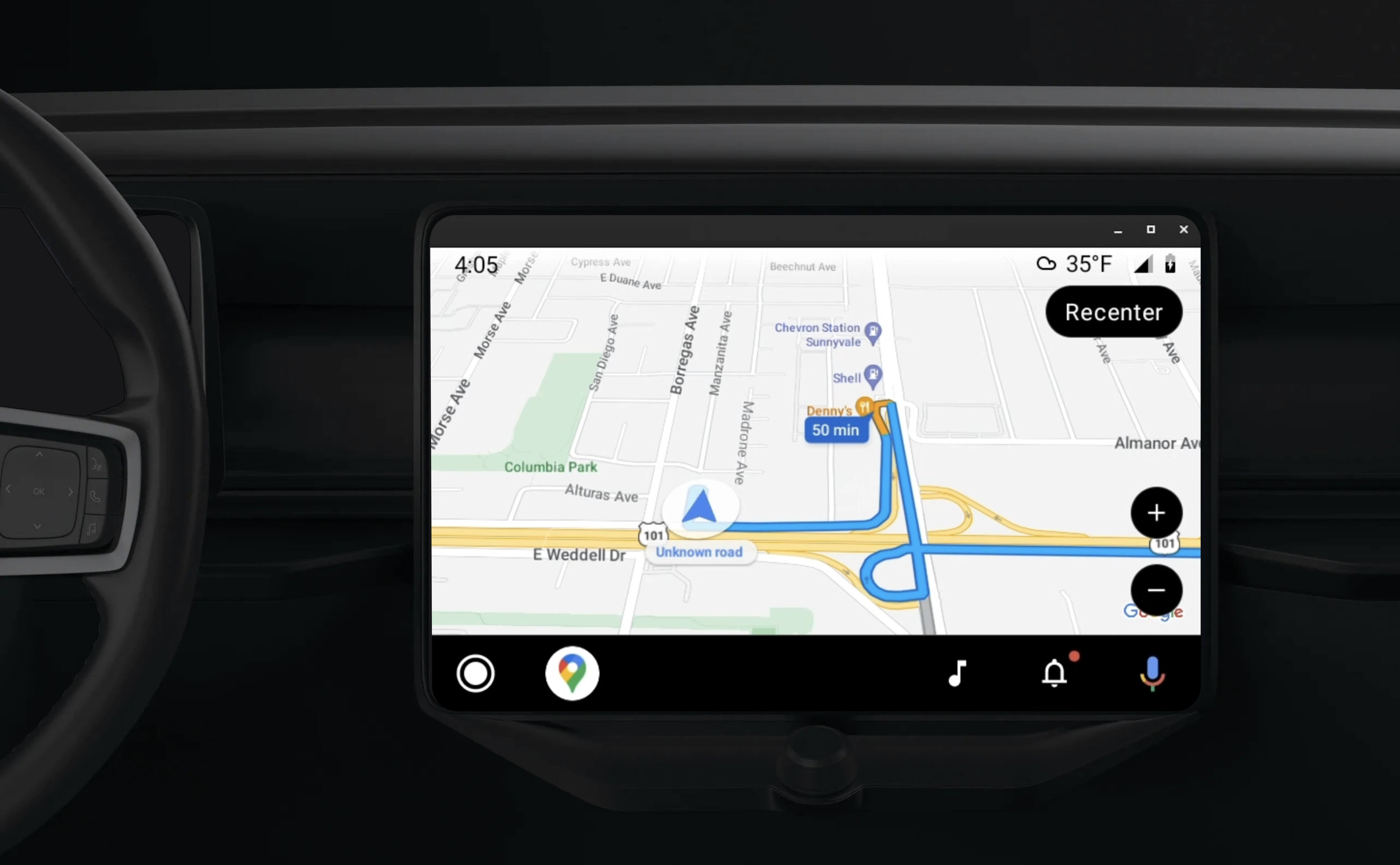
कार के लिए Android ऐप्लिकेशन की लाइब्रेरी, Android ऐप्लिकेशन को Android Auto पर चलाने की सुविधा देती है. इसके लिए, वह विज़ुअल टेंप्लेट का एक सेट उपलब्ध कराती है जिसे ड्राइवर की सुरक्षा के लिए मंज़ूरी मिली है. इन टेंप्लेट में, डैशबोर्ड में मौजूद यूज़र इंटरफ़ेस (यूआई) कंट्रोल को फ़ोन में मौजूद यूज़र इंटरफ़ेस (यूआई) कंट्रोल से जान-बूझकर सीमित किया जाता है. इससे ड्राइवर का ध्यान भटकने से रोका जा सकता है.
Navigation SDK की मदद से काम करने वाले ऐप्लिकेशन को Android Auto के साथ काम करने की अनुमति देने पर, आपको नेविगेशन के लिए एक और व्यू मिलता है.
इससे मैप को दो व्यू में देखा जा सकता है—एक फ़ोन के लिए और दूसरा मुख्य यूनिट के लिए. दोनों डिसप्ले को Navigator.java से निर्देश मिलते हैं, जो एक सिंगलटन है.
डैशबोर्ड में मौजूद सिस्टम, सुरक्षा के लिहाज़ से मंज़ूर किए गए इंटरैक्टिव एलिमेंट दिखाता है, ताकि उपयोगकर्ता बिना किसी रुकावट के सुरक्षित तरीके से अपनी मंज़िल तक पहुंच सके. उपयोगकर्ता, आपके ऐप्लिकेशन के लिए खास तौर पर उपलब्ध सुविधाओं का भी इस्तेमाल कर सकता है. जैसे, ऑर्डर स्वीकार करना या अस्वीकार करना या मैप पर ग्राहक की जगह की जानकारी देखना. ऑर्डर के स्टेटस से जुड़े अपडेट, डैशबोर्ड यूनिट में भी दिख सकते हैं.
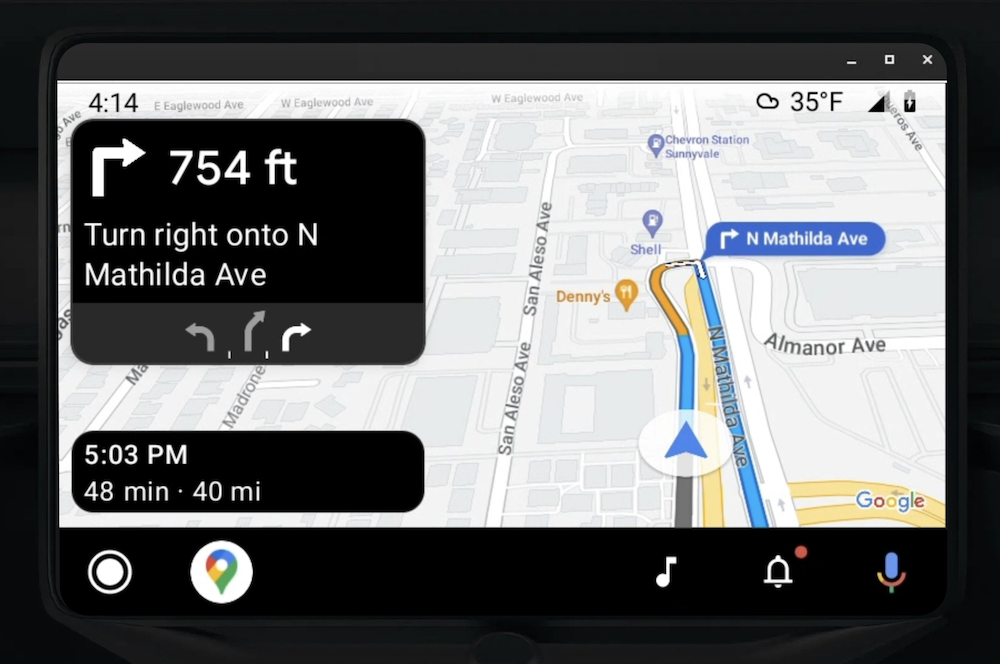
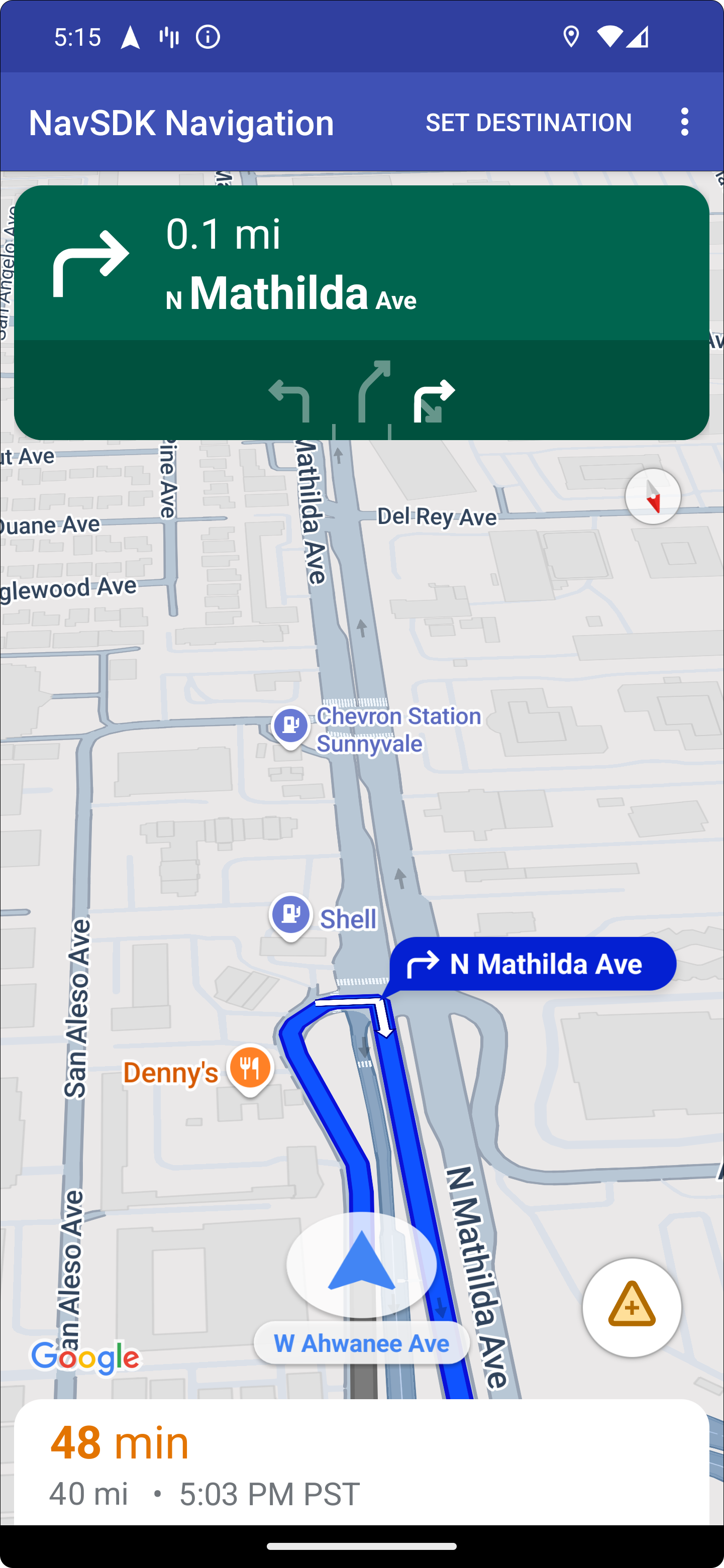
कनेक्ट किया गया फ़ोन, Navigation SDK का स्टैंडर्ड व्यू या आपके ऐप्लिकेशन में कोई अन्य व्यू या वर्कफ़्लो दिखाना जारी रख सकता है. इस सुविधा की मदद से, पसंद के मुताबिक बनाई गई ऐसी सुविधाएं उपलब्ध कराई जा सकती हैं जो शायद कार की स्क्रीन पर ठीक से काम न करें.
सेट अप करें
Android Auto के साथ अपने ऐप्लिकेशन को इस्तेमाल करने के लिए, सबसे पहले आपको Android Auto के साथ कार की सेवा सेट अप करनी होगी. इसके बाद, अपने Navigation SDK ऐप्लिकेशन में TurnByTurn लाइब्रेरी को चालू करना होगा.
Android Auto का इस्तेमाल शुरू करना
Android Auto के साथ काम करने के लिए डिज़ाइन की गई Navigation SDK की सुविधाओं का इस्तेमाल शुरू करने से पहले, आपको अपने ऐप्लिकेशन के लिए कार की सेवा सेट अप करनी होगी. इससे Android Auto आपके ऐप्लिकेशन को ढूंढ पाएगा.
इसके लिए, यह तरीका अपनाएं. इसके बारे में पूरी जानकारी, Android for Cars के डेवलपर दस्तावेज़ में दी गई है:
- Android Auto की बुनियादी सुविधाओं के बारे में जानें.
- कार के लिए Android ऐप्लिकेशन की लाइब्रेरी को इंस्टॉल करें.
- Android Auto को शामिल करने के लिए, अपने ऐप्लिकेशन की मेनिफ़ेस्ट फ़ाइल को कॉन्फ़िगर करें.
- अपने मेनिफ़ेस्ट में, कार में इस्तेमाल किए जाने वाले ऐप्लिकेशन के कम से कम लेवल 1 का एलान करें.
CarAppServiceऔर सेशन बनाएं.
Navigation SDK को सेट अप करना
कार ऐप्लिकेशन की सेवा सेट अप करने के बाद, Navigation SDK का इस्तेमाल किया जा सकता है.
- अगर आपने अब तक अपने ऐप्लिकेशन में Navigation SDK को इंटिग्रेट नहीं किया है, तो अपना प्रोजेक्ट सेट अप करें.
- अपने ऐप्लिकेशन के लिए, मोड़-दर-मोड़ दिशा-निर्देश देने वाला फ़ीड चालू करें.
- ज़रूरी नहीं. Navigation SDK से जनरेट किए गए आइकॉन इस्तेमाल करें.
Screenक्लास में दिए गए Android Auto Surface पर,NavigationViewForAutoक्लास का इस्तेमाल करके मैप बनाएं.- TurnbyTurn लाइब्रेरी के डेटा की मदद से, Android Auto नेविगेशन टेंप्लेट को भरें.
अब आपके पास अपने ऐप्लिकेशन को नेविगेशन की जानकारी देने के लिए, रजिस्टर की गई सेवा है. साथ ही, आपका ऐप्लिकेशन Android Auto से कनेक्ट हो सकता है. इसलिए, अब आपके पास नेविगेशन के बाकी एलिमेंट बनाने का विकल्प है. ये एलिमेंट, आपके ऐप्लिकेशन को Android Auto के साथ ठीक से काम करने के लिए ज़रूरी हैं:
- मैप और नेविगेशन यूज़र इंटरफ़ेस (यूआई) को ड्रॉ करना
- मैप इंटरैक्शन की सुविधा चालू करना
- नेविगेशन के निर्देश दिखाना
- पक्का करें कि दिशा-निर्देशों के टाइप सही हों
मैप और नेविगेशन यूज़र इंटरफ़ेस (यूआई) को ड्रॉ करना
NavigationViewForAuto क्लास, Android Auto की स्क्रीन पर मैप और नेविगेशन यूज़र इंटरफ़ेस (यूआई) रेंडर करती है. यह फ़ोन के लिए उपलब्ध NavigationView की तरह ही ज़्यादातर सुविधाएं देता है. हालांकि, इसमें इंटरैक्टिविटी सीमित होती है. Android Auto से मिले सरफ़ेस पर ड्रॉ करने के लिए, NavigationViewForAuto का इस्तेमाल करें:
private boolean isSurfaceReady(SurfaceContainer surfaceContainer) {
  return surfaceContainer.getSurface() != null
        && surfaceContainer.getDpi() != 0
        && surfaceContainer.getHeight() != 0
        && surfaceContainer.getWidth() != 0;
}

@Override
public void onSurfaceAvailable(@NonNull SurfaceContainer surfaceContainer) {
  if (!isSurfaceReady(surfaceContainer)) {
    return;
   }
  virtualDisplay =
      getCarContext()
          .getSystemService(DisplayManager.class)
          .createVirtualDisplay(
            VIRTUAL_DISPLAY_NAME,
            surfaceContainer.getWidth(),
            surfaceContainer.getHeight(),
            surfaceContainer.getDpi(),
            surfaceContainer.getSurface(),
            DisplayManager.VIRTUAL_DISPLAY_FLAG_OWN_CONTENT_ONLY);
    presentation = new Presentation(getCarContext(), virtualDisplay.getDisplay());

    navigationView = new NavigationViewForAuto(getCarContext());
    navigationView.onCreate(null);
    navigationView.onStart();
    navigationView.onResume();

    presentation.setContentView(navigationView);
    presentation.show();

    navigationView.getMapAsync(googleMap -> this.googleMap = googleMap);
  }

@Override
public void onSurfaceDestroyed(@NonNull SurfaceContainer surfaceContainer) {
  navigationView.onPause();
  navigationView.onStop();
  navigationView.onDestroy();

  presentation.dismiss();
  virtualDisplay.release();
}
मैप इंटरैक्शन की सुविधा चालू करना
ड्राइवर की सुरक्षा के लिए, Android Auto स्क्रीन की सतह पर होने वाले इंटरैक्शन को सीमित करता है. इसके लिए, वह SurfaceCallback के कई तरीकों का इस्तेमाल करता है. इन कॉलबैक का इस्तेमाल करके, डैशबोर्ड में मौजूद स्क्रीन पर ड्राइवर को मैप के साथ सीमित इंटरैक्शन की सुविधा दें. उदाहरण के लिए, onClick और onScale, उपयोगकर्ता के टैप और पिंच जेस्चर से जुड़े हैं. इंटरैक्टिविटी कॉलबैक में, मैप ऐक्शन स्ट्रिप का इस्तेमाल इस तरह किया जाना चाहिए:
मैप इंटरैक्टिविटी कॉलबैक पाने के लिए, आपके ऐप्लिकेशन को Action.PAN बटन का इस्तेमाल करना होगा.
उपयोगकर्ता की अन्य कार्रवाइयों के लिए, मैप ऐक्शन स्ट्रिप में बटन जोड़ें.
सरफ़ेस कॉलबैक चालू करना
@NonNull
@Override
public Template onGetTemplate() {
  return new NavigationTemplate.Builder()
    .setActionStrip(new ActionStrip.Builder().build())
    .setMapActionStrip(new ActionStrip.Builder().addAction(Action.PAN).build())
    .build();
}
पिंच करके ज़ूम करना
@Override
public void onScale(float focusX, float focusY, float scaleFactor) {
  CameraUpdate update =
      CameraUpdateFactory.zoomBy((scaleFactor - 1),
                                  new Point((int) focusX, (int) focusY));
  googleMap.animateCamera(update); // map is set in onSurfaceAvailable.
}
पैनिंग
@Override
public void onScroll(float distanceX, float distanceY) {
  googleMap.moveCamera(CameraUpdateFactory.scrollBy(distanceX, distanceY));
}
नेविगेशन के निर्देश दिखाना
इस सेक्शन में, नेविगेशन पोस्ट के लिए ऑब्ज़र्वर सेट अप करने और टर्न कार्ड टेंप्लेट में नेविगेशन के निर्देश भरने का तरीका बताया गया है.
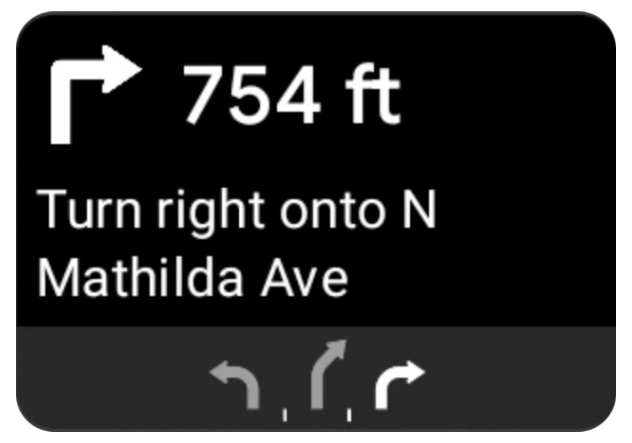
Android Auto के नेविगेशन टेंप्लेट में एक टर्न कार्ड होता है. इसमें मौजूदा यात्रा से जुड़ी नेविगेशन की जानकारी दिखती है. Navigation SDK में मौजूद TurnByTurn लाइब्रेरी, नेविगेशन की यह जानकारी उपलब्ध कराती है. आपका कोड इस जानकारी का इस्तेमाल करके, Android Auto के नेविगेशन टेंप्लेट को भरता है.
ऑब्ज़र्वर सेट अप करना
इस उदाहरण में, SampleApplication एक कस्टम ऐप्लिकेशन क्लास है, जो MutableLiveData<NavInfo> ऑब्जेक्ट को बनाए रखती है. जब ऑब्ज़र्वर को नेविगेटर ऑब्जेक्ट से कोई अपडेट मिलता है, तो वह इस NavInfo ऑब्जेक्ट को NavInfoMutableLiveData पर पोस्ट करता है. इसे SampleApplication क्लास मैनेज करती है.
नीचे दिए गए उदाहरण में, Android Auto की स्क्रीन को लागू करने के लिए, इस ऑब्जेक्ट के लिए एक ऑब्ज़र्वर को रजिस्टर किया गया है.
public SampleAndroidAutoNavigationScreen(@NonNull CarContext carContext,
                                     SampleApplication application) {
  super(carContext);
  getCarContext().getCarService(AppManager.class).setSurfaceCallback(this);
  application.getNavInfoMutableLiveData().observe(this, this::processNextStep);
}
नेविगेशन की जानकारी भरना
यहां दिए गए कोड स्निपेट से पता चलता है कि Android Auto टेंप्लेट में, मौजूदा रास्ते की जानकारी कैसे भरी जाती है. इसमें कदम, दूरी, और आइकॉन शामिल हैं. फ़ीड डिसप्ले को पॉप्युलेट करना लेख में, इन डिसप्ले एलिमेंट के बारे में ज़्यादा जानकारी पढ़ी जा सकती है.
कोड का उदाहरण देखने के लिए, इसे बड़ा करें.
private RoutingInfo currentRoutingInfo;

@NonNull
@Override
public Template onGetTemplate() {
NavigationTemplate.Builder navigationTemplateBuilder =
  new NavigationTemplate.Builder()
    .setActionStrip(...)
    .setMapActionStrip(...)
  if (currentRoutingInfo != null) {
    navigationTemplateBuilder.setNavigationInfo(currentRoutingInfo);
  }
  return navigationTemplateBuilder.build();
}

private void processNextStep(NavInfo navInfo) {
  if (navInfo == null || navinfo.getCurrentStep() == null) {
    return;
  }

/**
*   Converts data received from the Navigation data feed
*   into Android-Auto compatible data structures. For more information
*   see the "Ensure correct maneuver types" below.
*/
  Step currentStep = buildStepFromStepInfo(navInfo.getCurrentStep());
  Distance distanceToStep =
              buildDistanceFromMeters(navInfo.getDistanceToCurrentStepMeters());

  currentRoutingInfo =
     new RoutingInfo.Builder().setCurrentStep(currentStep, distanceToStep).build();

  // Invalidate the current template which leads to another onGetTemplate call.
  invalidate();
}

private Step buildStepFromStepInfo(StepInfo stepInfo) {
  IconCompat maneuverIcon =
               IconCompat.createWithBitmap(stepInfo.getManeuverBitmap());
  Maneuver.Builder
            maneuverBuilder = newManeuver.Builder(
                  ManeuverConverter
                          .getAndroidAutoManeuverType(stepInfo.getManeuver()));
  CarIcon maneuverCarIcon = new CarIcon.Builder(maneuverIcon).build();
  maneuverBuilder.setIcon(maneuverCarIcon);
  Step.Builder stepBuilder =
    new Step.Builder()
       .setRoad(stepInfo.getFullRoadName())
       .setCue(stepInfo.getFullInstructionText())
       .setManeuver(maneuverBuilder.build());

  if (stepInfo.getLanes() != null
           && stepInfo.getLanesBitmap() != null) {
    for (Lane lane : buildAndroidAutoLanesFromStep(stepInfo)) {
      stepBuilder.addLane(lane);
    }
    IconCompat lanesIcon =
               IconCompat.createWithBitmap(stepInfo.getLanesBitmap());
    CarIcon lanesImage = new CarIcon.Builder(lanesIcon).build();
    stepBuilder.setLanesImage(lanesImage);
  }
    return stepBuilder.build();
}

/*
*   Constructs a {@code Distance} object in imperial measurement units.
*   In a real world scenario, units would be based on locale.
*/
private Distance buildDistanceFromMeters(int distanceMeters) {

// Distance can be negative so set the min distance to 0.
  int remainingFeet = (int) max(0, distanceMeters * DistanceConstants.FEET_PER_METER);
  double remainingMiles = ((double) remainingFeet) / DistanceConstants.FEET_PER_MILE;

// Only use the tenths place digit if distance is less than 10 miles and show
// feet if distance is less than 0.25 miles.

  if (remainingMiles >= DistanceConstants.MIN_MILES_TO_SHOW_INTEGER) {
    return Distance.create((int) round(remainingMiles), Distance.UNIT_MILES);
  } else if (remainingMiles >= 0.25) {
    return Distance.create((int) remainingMiles, Distance.UNIT_MILES);
  } else {
    return Distance.create(remainingFeet, Distance.UNIT_FEET);
  }
}
सही दिशा-निर्देशों की पुष्टि करना
Android Auto Car लाइब्रेरी में इस्तेमाल किए जाने वाले निर्देश, TurnByTurn लाइब्रेरी में दिए गए निर्देशों से पूरी तरह मेल खाते हैं. हालांकि, आपको Navigation SDK टूल के मैन्यूवर को Android Auto Car लाइब्रेरी में मान्य एलान में बदलना होगा. यहां दी गई टेबल में, कुछ फ़ील्ड के बीच का अंतर दिखाया गया है. इसके बाद, आपकी सुविधा के लिए सैंपल कन्वर्टर यूटिलिटी दी गई है.
| मोड़-दर-मोड़ लाइब्रेरी मैन्यूवर | Android Auto Maneuver |
|---|---|
DEPART |
TYPE_DEPART |
DESTINATION |
TYPE_DESTINATION |
DESTINATION_LEFT |
TYPE_DESTINATION_LEFT |
DESTINATION_RIGHT |
TYPE_DESTINATION_RIGHT |
TURN_U_TURN_CLOCKWISE |
TYPE_U_TURN_RIGHT |
ON_RAMP_LEFT |
TYPE_ON_RAMP_NORMAL_LEFT |
ON_RAMP_RIGHT |
TYPE_ON_RAMP_NORMAL_RIGHT |
ON_RAMP_SLIGHT_LEFT |
TYPE_ON_RAMP_SLIGHT_LEFT |
FORK_RIGHT |
TYPE_FORK_RIGHT |
कोड का उदाहरण देखने के लिए, इसे बड़ा करें.
import com.google.android.libraries.mapsplatform.turnbyturn.model.Maneuver;
import com.google.common.collect.ImmutableMap;
import javax.annotation.Nullable;

/** Converter that converts between turn-by-turn and Android Auto Maneuvers. */
public final class ManeuverConverter {
  private ManeuverConverter() {}

  // Map from turn-by-turn Maneuver to Android Auto Maneuver.Type.
  private static final ImmutableMap<Integer, Integer> MANEUVER_TO_ANDROID_AUTO_MANEUVER_TYPE =
      ImmutableMap.<Integer, Integer>builder()
          .put(Maneuver.DEPART, androidx.car.app.navigation.model.Maneuver.TYPE_DEPART)
          .put(Maneuver.DESTINATION, androidx.car.app.navigation.model.Maneuver.TYPE_DESTINATION)
          .put(
              Maneuver.DESTINATION_LEFT,
              androidx.car.app.navigation.model.Maneuver.TYPE_DESTINATION_LEFT)
          .put(
              Maneuver.DESTINATION_RIGHT,
              androidx.car.app.navigation.model.Maneuver.TYPE_DESTINATION_RIGHT)
          .put(Maneuver.STRAIGHT, androidx.car.app.navigation.model.Maneuver.TYPE_STRAIGHT)
          .put(Maneuver.TURN_LEFT, androidx.car.app.navigation.model.Maneuver.TYPE_TURN_NORMAL_LEFT)
          .put(
              Maneuver.TURN_RIGHT,
              androidx.car.app.navigation.model.Maneuver.TYPE_TURN_NORMAL_RIGHT)
          .put(Maneuver.TURN_KEEP_LEFT, androidx.car.app.navigation.model.Maneuver.TYPE_KEEP_LEFT)
          .put(Maneuver.TURN_KEEP_RIGHT, androidx.car.app.navigation.model.Maneuver.TYPE_KEEP_RIGHT)
          .put(
              Maneuver.TURN_SLIGHT_LEFT,
              androidx.car.app.navigation.model.Maneuver.TYPE_TURN_SLIGHT_LEFT)
          .put(
              Maneuver.TURN_SLIGHT_RIGHT,
              androidx.car.app.navigation.model.Maneuver.TYPE_TURN_SLIGHT_RIGHT)
          .put(
              Maneuver.TURN_SHARP_LEFT,
              androidx.car.app.navigation.model.Maneuver.TYPE_TURN_SHARP_LEFT)
          .put(
              Maneuver.TURN_SHARP_RIGHT,
              androidx.car.app.navigation.model.Maneuver.TYPE_ON_RAMP_SHARP_RIGHT)
          .put(
              Maneuver.TURN_U_TURN_CLOCKWISE,
              androidx.car.app.navigation.model.Maneuver.TYPE_U_TURN_RIGHT)
          .put(
              Maneuver.TURN_U_TURN_COUNTERCLOCKWISE,
              androidx.car.app.navigation.model.Maneuver.TYPE_U_TURN_LEFT)
          .put(
              Maneuver.MERGE_UNSPECIFIED,
              androidx.car.app.navigation.model.Maneuver.TYPE_MERGE_SIDE_UNSPECIFIED)
          .put(Maneuver.MERGE_LEFT, androidx.car.app.navigation.model.Maneuver.TYPE_MERGE_LEFT)
          .put(Maneuver.MERGE_RIGHT, androidx.car.app.navigation.model.Maneuver.TYPE_MERGE_RIGHT)
          .put(Maneuver.FORK_LEFT, androidx.car.app.navigation.model.Maneuver.TYPE_FORK_LEFT)
          .put(Maneuver.FORK_RIGHT, androidx.car.app.navigation.model.Maneuver.TYPE_FORK_RIGHT)
          .put(
              Maneuver.ON_RAMP_UNSPECIFIED,
              androidx.car.app.navigation.model.Maneuver.TYPE_ON_RAMP_NORMAL_RIGHT)
          .put(
              Maneuver.ON_RAMP_LEFT,
              androidx.car.app.navigation.model.Maneuver.TYPE_ON_RAMP_NORMAL_LEFT)
          .put(
              Maneuver.ON_RAMP_RIGHT,
              androidx.car.app.navigation.model.Maneuver.TYPE_ON_RAMP_NORMAL_RIGHT)
          .put(
              Maneuver.ON_RAMP_KEEP_LEFT,
              androidx.car.app.navigation.model.Maneuver.TYPE_ON_RAMP_NORMAL_LEFT)
          .put(
              Maneuver.ON_RAMP_KEEP_RIGHT,
              androidx.car.app.navigation.model.Maneuver.TYPE_ON_RAMP_NORMAL_RIGHT)
          .put(
              Maneuver.ON_RAMP_SLIGHT_LEFT,
              androidx.car.app.navigation.model.Maneuver.TYPE_ON_RAMP_SLIGHT_LEFT)
          .put(
              Maneuver.ON_RAMP_SLIGHT_RIGHT,
              androidx.car.app.navigation.model.Maneuver.TYPE_ON_RAMP_SLIGHT_RIGHT)
          .put(
              Maneuver.ON_RAMP_SHARP_LEFT,
              androidx.car.app.navigation.model.Maneuver.TYPE_ON_RAMP_SHARP_LEFT)
          .put(
              Maneuver.ON_RAMP_SHARP_RIGHT,
              androidx.car.app.navigation.model.Maneuver.TYPE_ON_RAMP_SHARP_RIGHT)
          .put(
              Maneuver.ON_RAMP_U_TURN_CLOCKWISE,
              androidx.car.app.navigation.model.Maneuver.TYPE_ON_RAMP_U_TURN_RIGHT)
          .put(
              Maneuver.ON_RAMP_U_TURN_COUNTERCLOCKWISE,
              androidx.car.app.navigation.model.Maneuver.TYPE_ON_RAMP_U_TURN_LEFT)
          .put(
              Maneuver.OFF_RAMP_LEFT,
              androidx.car.app.navigation.model.Maneuver.TYPE_OFF_RAMP_NORMAL_LEFT)
          .put(
              Maneuver.OFF_RAMP_RIGHT,
              androidx.car.app.navigation.model.Maneuver.TYPE_OFF_RAMP_NORMAL_RIGHT)
          .put(
              Maneuver.OFF_RAMP_KEEP_LEFT,
              androidx.car.app.navigation.model.Maneuver.TYPE_OFF_RAMP_SLIGHT_LEFT)
          .put(
              Maneuver.OFF_RAMP_KEEP_RIGHT,
              androidx.car.app.navigation.model.Maneuver.TYPE_OFF_RAMP_SLIGHT_RIGHT)
          .put(
              Maneuver.OFF_RAMP_SLIGHT_LEFT,
              androidx.car.app.navigation.model.Maneuver.TYPE_OFF_RAMP_SLIGHT_LEFT)
          .put(
              Maneuver.OFF_RAMP_SLIGHT_RIGHT,
              androidx.car.app.navigation.model.Maneuver.TYPE_OFF_RAMP_SLIGHT_RIGHT)
          .put(
              Maneuver.OFF_RAMP_SHARP_LEFT,
              androidx.car.app.navigation.model.Maneuver.TYPE_OFF_RAMP_NORMAL_LEFT)
          .put(
              Maneuver.OFF_RAMP_SHARP_RIGHT,
              androidx.car.app.navigation.model.Maneuver.TYPE_OFF_RAMP_NORMAL_RIGHT)
          .put(
              Maneuver.ROUNDABOUT_CLOCKWISE,
              androidx.car.app.navigation.model.Maneuver.TYPE_ROUNDABOUT_ENTER_AND_EXIT_CW)
          .put(
              Maneuver.ROUNDABOUT_COUNTERCLOCKWISE,
              androidx.car.app.navigation.model.Maneuver.TYPE_ROUNDABOUT_ENTER_AND_EXIT_CCW)
          .put(
              Maneuver.ROUNDABOUT_STRAIGHT_CLOCKWISE,
              androidx.car.app.navigation.model.Maneuver.TYPE_ROUNDABOUT_ENTER_CW)
          .put(
              Maneuver.ROUNDABOUT_STRAIGHT_COUNTERCLOCKWISE,
              androidx.car.app.navigation.model.Maneuver.TYPE_ROUNDABOUT_ENTER_CCW)
          .put(
              Maneuver.ROUNDABOUT_LEFT_CLOCKWISE,
              androidx.car.app.navigation.model.Maneuver
                  .TYPE_ROUNDABOUT_ENTER_AND_EXIT_CW_WITH_ANGLE)
          .put(
              Maneuver.ROUNDABOUT_LEFT_COUNTERCLOCKWISE,
              androidx.car.app.navigation.model.Maneuver
                  .TYPE_ROUNDABOUT_ENTER_AND_EXIT_CCW_WITH_ANGLE)
          .put(
              Maneuver.ROUNDABOUT_RIGHT_CLOCKWISE,
              androidx.car.app.navigation.model.Maneuver
                  .TYPE_ROUNDABOUT_ENTER_AND_EXIT_CW_WITH_ANGLE)
          .put(
              Maneuver.ROUNDABOUT_RIGHT_COUNTERCLOCKWISE,
              androidx.car.app.navigation.model.Maneuver
                  .TYPE_ROUNDABOUT_ENTER_AND_EXIT_CCW_WITH_ANGLE)
          .put(
              Maneuver.ROUNDABOUT_SLIGHT_LEFT_CLOCKWISE,
              androidx.car.app.navigation.model.Maneuver
                  .TYPE_ROUNDABOUT_ENTER_AND_EXIT_CW_WITH_ANGLE)
          .put(
              Maneuver.ROUNDABOUT_SLIGHT_LEFT_COUNTERCLOCKWISE,
              androidx.car.app.navigation.model.Maneuver
                  .TYPE_ROUNDABOUT_ENTER_AND_EXIT_CCW_WITH_ANGLE)
          .put(
              Maneuver.ROUNDABOUT_SLIGHT_RIGHT_CLOCKWISE,
              androidx.car.app.navigation.model.Maneuver
                  .TYPE_ROUNDABOUT_ENTER_AND_EXIT_CW_WITH_ANGLE)
          .put(
              Maneuver.ROUNDABOUT_SLIGHT_RIGHT_COUNTERCLOCKWISE,
              androidx.car.app.navigation.model.Maneuver
                  .TYPE_ROUNDABOUT_ENTER_AND_EXIT_CCW_WITH_ANGLE)
          .put(
              Maneuver.ROUNDABOUT_SHARP_LEFT_CLOCKWISE,
              androidx.car.app.navigation.model.Maneuver
                  .TYPE_ROUNDABOUT_ENTER_AND_EXIT_CW_WITH_ANGLE)
          .put(
              Maneuver.ROUNDABOUT_SHARP_LEFT_COUNTERCLOCKWISE,
              androidx.car.app.navigation.model.Maneuver
                  .TYPE_ROUNDABOUT_ENTER_AND_EXIT_CCW_WITH_ANGLE)
          .put(
              Maneuver.ROUNDABOUT_SHARP_RIGHT_CLOCKWISE,
              androidx.car.app.navigation.model.Maneuver
                  .TYPE_ROUNDABOUT_ENTER_AND_EXIT_CW_WITH_ANGLE)
          .put(
              Maneuver.ROUNDABOUT_SHARP_RIGHT_COUNTERCLOCKWISE,
              androidx.car.app.navigation.model.Maneuver
                  .TYPE_ROUNDABOUT_ENTER_AND_EXIT_CCW_WITH_ANGLE)
          .put(
              Maneuver.ROUNDABOUT_U_TURN_CLOCKWISE,
              androidx.car.app.navigation.model.Maneuver
                  .TYPE_ROUNDABOUT_ENTER_AND_EXIT_CW_WITH_ANGLE)
          .put(
              Maneuver.ROUNDABOUT_U_TURN_COUNTERCLOCKWISE,
              androidx.car.app.navigation.model.Maneuver
                  .TYPE_ROUNDABOUT_ENTER_AND_EXIT_CCW_WITH_ANGLE)
          .put(
              Maneuver.ROUNDABOUT_EXIT_CLOCKWISE,
              androidx.car.app.navigation.model.Maneuver.TYPE_ROUNDABOUT_EXIT_CW)
          .put(
              Maneuver.ROUNDABOUT_EXIT_COUNTERCLOCKWISE,
              androidx.car.app.navigation.model.Maneuver.TYPE_ROUNDABOUT_EXIT_CCW)
          .put(Maneuver.FERRY_BOAT, androidx.car.app.navigation.model.Maneuver.TYPE_FERRY_BOAT)
          .put(Maneuver.FERRY_TRAIN, androidx.car.app.navigation.model.Maneuver.TYPE_FERRY_TRAIN)
          .put(Maneuver.NAME_CHANGE, androidx.car.app.navigation.model.Maneuver.TYPE_NAME_CHANGE)
          .buildOrThrow();

  /** Represents the roundabout turn angle for a slight turn in either right or left directions. */
  private static final int ROUNDABOUT_ANGLE_SLIGHT = 10;

  /** Represents the roundabout turn angle for a normal turn in either right or left directions. */
  private static final int ROUNDABOUT_ANGLE_NORMAL = 45;

  /** Represents the roundabout turn angle for a sharp turn in either right or left directions. */
  private static final int ROUNDABOUT_ANGLE_SHARP = 135;

  /** Represents the roundabout turn angle for a u-turn in either right or left directions. */
  private static final int ROUNDABOUT_ANGLE_U_TURN = 180;

  /**
   * Returns the corresponding {@link androidx.car.app.navigation.model.Maneuver.Type} for the given
   * direction {@link Maneuver}
   *
   * @throws {@link IllegalArgumentException} if the given maneuver does not have a corresponding
   *     Android Auto Maneuver type.
   */
  public static int getAndroidAutoManeuverType(@Maneuver int maneuver) {
    if (MANEUVER_TO_ANDROID_AUTO_MANEUVER_TYPE.containsKey(maneuver)) {
      return MANEUVER_TO_ANDROID_AUTO_MANEUVER_TYPE.get(maneuver);
    }
    throw new IllegalArgumentException(
        String.format(
            "Given turn-by-turn Maneuver %d cannot be converted to an Android Auto equivalent.",
            maneuver));
  }

  /**
   * Returns the corresponding Android Auto roundabout angle for the given turn {@link Maneuver}.
   * Returns {@code null} if given maneuver does not involve a roundabout with a turn.
   */
  @Nullable
  public static Integer getAndroidAutoRoundaboutAngle(@Maneuver int maneuver) {
    if (maneuver == Maneuver.ROUNDABOUT_LEFT_CLOCKWISE
        || maneuver == Maneuver.ROUNDABOUT_RIGHT_CLOCKWISE
        || maneuver == Maneuver.ROUNDABOUT_LEFT_COUNTERCLOCKWISE
        || maneuver == Maneuver.ROUNDABOUT_RIGHT_COUNTERCLOCKWISE) {
      return ROUNDABOUT_ANGLE_NORMAL;
    }
    if (maneuver == Maneuver.ROUNDABOUT_SHARP_LEFT_CLOCKWISE
        || maneuver == Maneuver.ROUNDABOUT_SHARP_RIGHT_CLOCKWISE
        || maneuver == Maneuver.ROUNDABOUT_SHARP_LEFT_COUNTERCLOCKWISE
        || maneuver == Maneuver.ROUNDABOUT_SHARP_RIGHT_COUNTERCLOCKWISE) {
      return ROUNDABOUT_ANGLE_SHARP;
    }
    if (maneuver == Maneuver.ROUNDABOUT_SLIGHT_LEFT_CLOCKWISE
        || maneuver == Maneuver.ROUNDABOUT_SLIGHT_RIGHT_CLOCKWISE
        || maneuver == Maneuver.ROUNDABOUT_SLIGHT_LEFT_COUNTERCLOCKWISE
        || maneuver == Maneuver.ROUNDABOUT_SLIGHT_RIGHT_COUNTERCLOCKWISE) {
      return ROUNDABOUT_ANGLE_SLIGHT;
    }
    if (maneuver == Maneuver.ROUNDABOUT_U_TURN_CLOCKWISE
        || maneuver == Maneuver.ROUNDABOUT_U_TURN_COUNTERCLOCKWISE) {
      return ROUNDABOUT_ANGLE_U_TURN;
    }
    return null;
  }
}
इससे जुड़े दस्तावेज़
- मोड़-दर-मोड़ दिशा-निर्देश देने वाली फ़ीड चालू करना: सबसे पहले, मोड़-दर-मोड़ दिशा-निर्देश देने वाली सुविधा को इंटिग्रेट करें, ताकि आपका ऐप्लिकेशन Android Auto के साथ काम कर सके.
- फ़ीड डिसप्ले को पॉप्युलेट करना: दिशा-निर्देशों की जानकारी के लिए डेटा फ़ील्ड ऐक्सेस करें और आइकॉन इस्तेमाल करें.