

ส่วนนี้อธิบายวิธีใช้ Navigation SDK กับไลบรารีแอป Android สำหรับรถยนต์เพื่อแสดงประสบการณ์การนำทางของแอปในเครื่องเล่นวิทยุบนแผงหน้าปัด หากระบบในแผงหน้าปัดของผู้ใช้รองรับ Android Auto ผู้ใช้จะใช้แอปของคุณบนจอแสดงผลของรถยนต์ได้โดยตรงด้วยการเชื่อมต่อโทรศัพท์กับอุปกรณ์ การนำทางด้วยเสียงจะทำงานผ่านลำโพงของรถด้วย
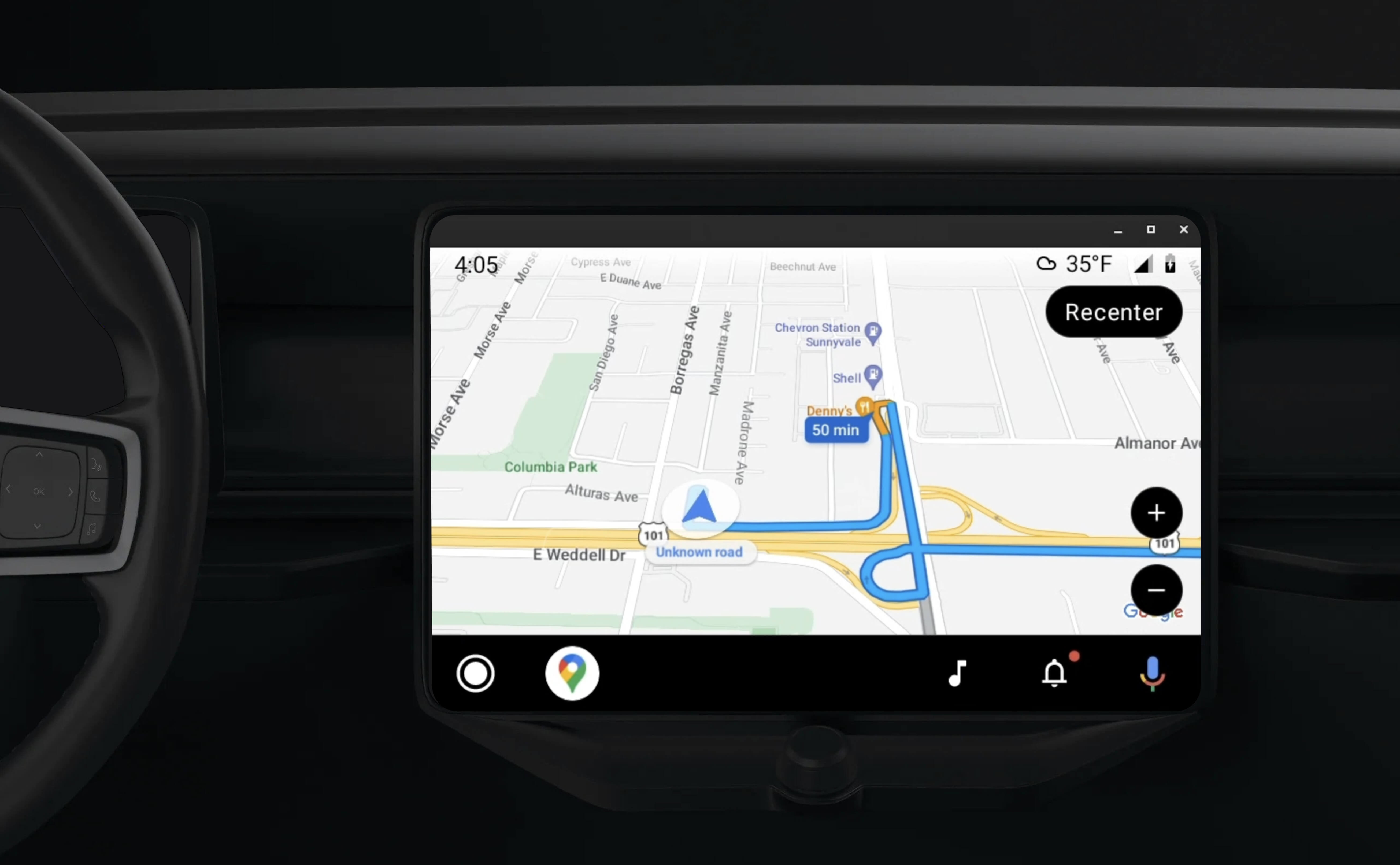
ไลบรารีแอป Android สำหรับรถยนต์ช่วยให้แอปพลิเคชัน Android ทำงานบน Android Auto ได้โดยการจัดเตรียมชุดเทมเพลตภาพที่ได้รับอนุมัติเพื่อความปลอดภัยของผู้ขับขี่ เทมเพลตเหล่านี้จำกัดตัวควบคุม UI ในแดชบอร์ดจากโทรศัพท์โดยเจตนาเพื่อลดการเสียสมาธิของผู้ขับ
เมื่อเปิดใช้แอปที่ทำงานด้วย Navigation SDK ให้ทำงานร่วมกับ Android Auto คุณจะมอบมุมมองเพิ่มเติมสำหรับประสบการณ์การนำทาง
ซึ่งจะช่วยให้คุณดูแผนที่ได้ 2 มุมมอง โดยมุมมองหนึ่งสำหรับโทรศัพท์และอีกมุมมองหนึ่งสำหรับเครื่องเล่นวิทยุ จอแสดงผลทั้ง 2 จอจะได้รับคำแนะนำจาก Navigator.java ซึ่งเป็นซิงเกิลตัน
ระบบในแดชบอร์ดจะแสดงองค์ประกอบแบบอินเทอร์แอกทีฟที่ผ่านการรับรองความปลอดภัย เพื่อให้ผู้ใช้ไปยังจุดหมายได้อย่างปลอดภัยโดยไม่มีสิ่งรบกวนที่ไม่จำเป็น นอกจากนี้ ผู้ใช้ยังโต้ตอบกับฟังก์ชันการทำงานเฉพาะแอปได้ด้วย เช่น การยอมรับหรือปฏิเสธคำสั่งซื้อ หรือการดูตำแหน่งของลูกค้าบนแผนที่ นอกจากนี้ การอัปเดตสถานะการสั่งซื้อยังปรากฏในหน่วยแดชบอร์ดในรถยนต์ด้วย
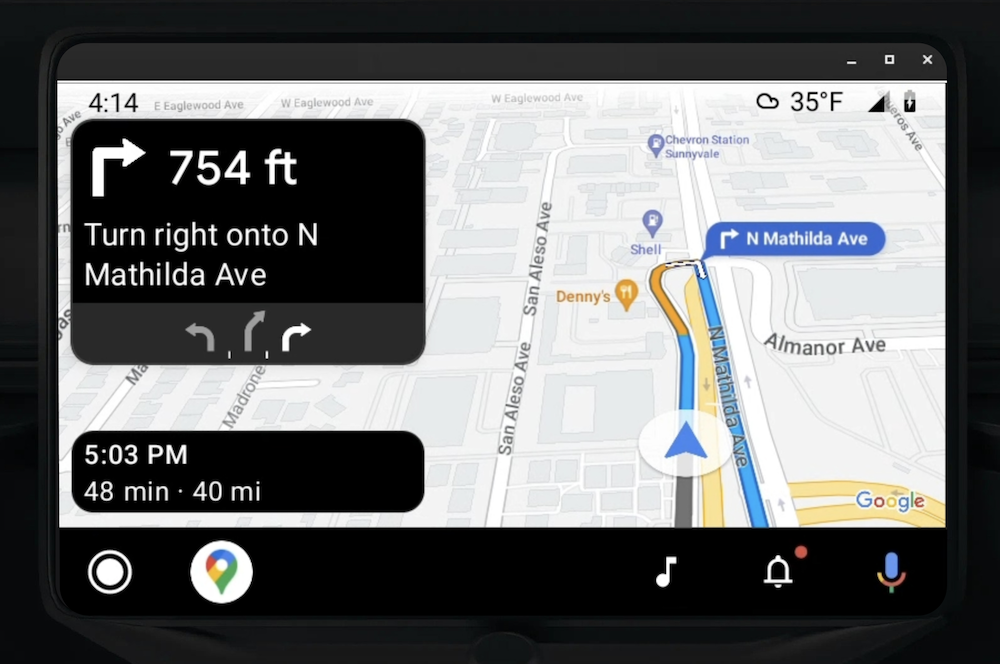
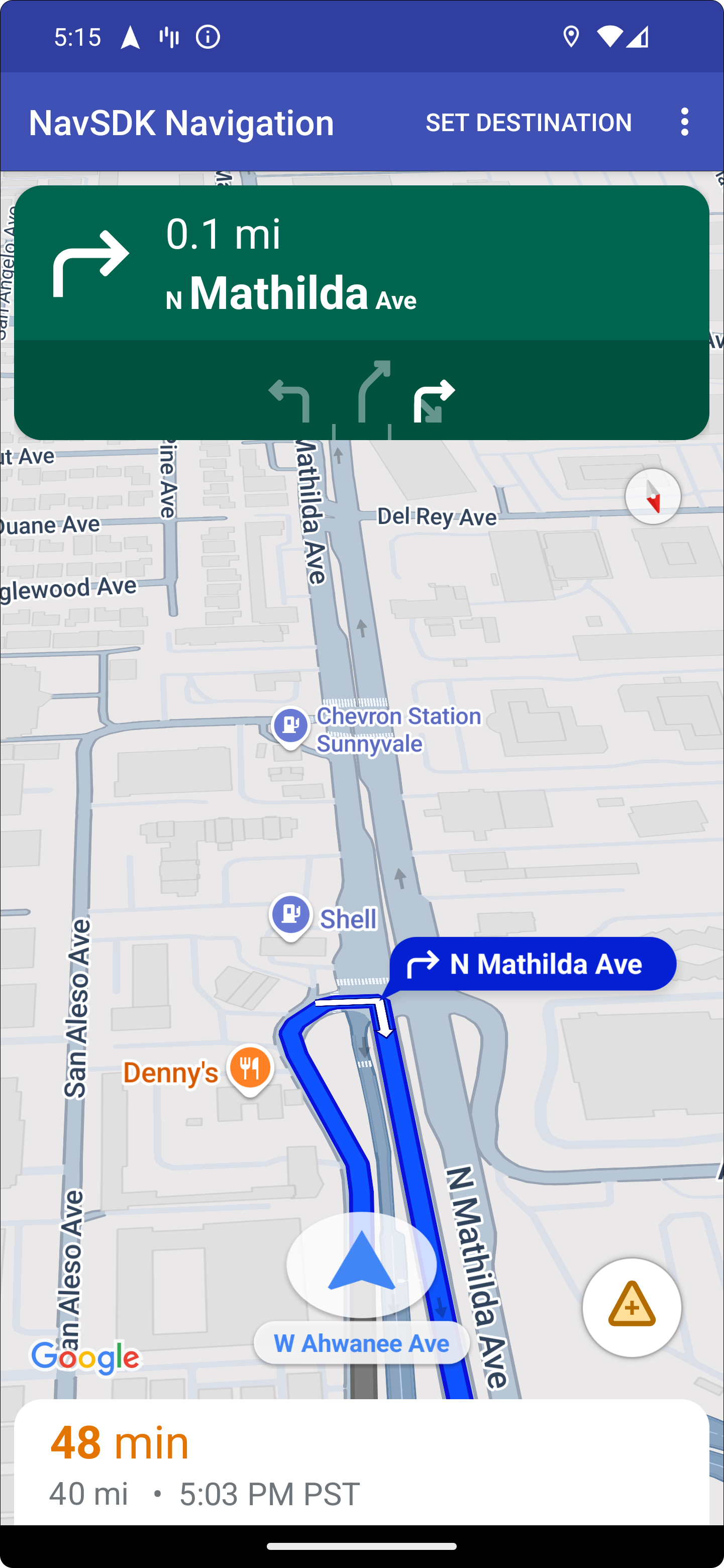
โทรศัพท์ที่เชื่อมต่อจะยังคงแสดงประสบการณ์การใช้งาน Navigation SDK มาตรฐานหรือมุมมองหรือเวิร์กโฟลว์อื่นๆ ในแอปพลิเคชันของคุณได้ ฟีเจอร์นี้ช่วยให้คุณยังคงให้บริการฟังก์ชันการทำงานที่กำหนดเองซึ่งอาจทำงานได้ไม่ดีบนหน้าจอรถยนต์
ตั้งค่า
ส่วนแรกของการทำให้แอปทำงานร่วมกับ Android Auto ได้เกี่ยวข้องกับการตั้งค่าบริการรถยนต์ด้วย Android Auto จากนั้นเปิดใช้ไลบรารี TurnByTurn ในแอป Navigation SDK
เริ่มต้นใช้งาน Android Auto
ก่อนเริ่มทำงานกับฟีเจอร์ Navigation SDK ที่ออกแบบมาเพื่อทำงานร่วมกับ Android Auto คุณต้องตั้งค่าบริการรถยนต์สำหรับแอปเพื่อให้ Android Auto ค้นพบแอปได้
ทำตามขั้นตอนต่อไปนี้ ซึ่งทั้งหมดจะอยู่ในเอกสารประกอบสำหรับนักพัฒนาซอฟต์แวร์ Android สำหรับรถยนต์
- ทำความคุ้นเคยกับฟีเจอร์พื้นฐานของ Android Auto
- ติดตั้งไลบรารีแอป Android สำหรับรถยนต์
- กำหนดค่าไฟล์ Manifest ของแอปให้รวม Android Auto
- ประกาศระดับแอปสำหรับรถยนต์ขั้นต่ำเป็น 1 ในไฟล์ Manifest
- สร้าง
CarAppServiceและเซสชันของคุณ
ตั้งค่า Navigation SDK
เมื่อสร้างบริการแอปสำหรับรถยนต์แล้ว คุณก็พร้อมที่จะทำงานกับ Navigation SDK
- ตั้งค่าโปรเจ็กต์ หากคุณยังไม่ได้ผสานรวม Navigation SDK เข้ากับแอป
- เปิดใช้ฟีดคำแนะนำแบบเลี้ยวต่อเลี้ยวสำหรับแอป
- ไม่บังคับ ใช้ไอคอนที่สร้างขึ้นจาก Navigation SDK
- วาดแผนที่โดยใช้คลาส
NavigationViewForAutoบน Android Auto Surface ที่ระบุไว้ในคลาสScreen - ป้อนข้อมูลในเทมเพลตการนำทางของ Android Auto ด้วยข้อมูลจากไลบรารี TurnbyTurn
เมื่อคุณมีบริการที่ลงทะเบียนไว้สำหรับการให้ข้อมูลการนำทางแก่แอปและแอปสามารถเชื่อมต่อกับ Android Auto ได้แล้ว คุณก็พร้อมที่จะสร้างองค์ประกอบการนำทางที่เหลือซึ่งจำเป็นต่อการทำงานของแอปอย่างถูกต้องกับ Android Auto ดังนี้
- วาดแผนที่และ UI การนำทาง
- เปิดใช้การโต้ตอบกับแผนที่
- แสดงเส้นทางการนำทาง
- ตรวจสอบว่าประเภทการบังคับทิศทางถูกต้อง
วาด UI ของแผนที่และการนำทาง
คลาส NavigationViewForAuto จะแสดงผลแผนที่และ UI การนำทางบนหน้าจอ Android Auto ซึ่งมีฟังก์ชันการทำงานเหมือนกับ NavigationView สำหรับโทรศัพท์เป็นส่วนใหญ่ แต่มีการโต้ตอบที่จำกัด ใช้ NavigationViewForAuto เพื่อวาดบน Surface ที่ Android Auto มีให้
private boolean isSurfaceReady(SurfaceContainer surfaceContainer) {
  return surfaceContainer.getSurface() != null
        && surfaceContainer.getDpi() != 0
        && surfaceContainer.getHeight() != 0
        && surfaceContainer.getWidth() != 0;
}

@Override
public void onSurfaceAvailable(@NonNull SurfaceContainer surfaceContainer) {
  if (!isSurfaceReady(surfaceContainer)) {
    return;
   }
  virtualDisplay =
      getCarContext()
          .getSystemService(DisplayManager.class)
          .createVirtualDisplay(
            VIRTUAL_DISPLAY_NAME,
            surfaceContainer.getWidth(),
            surfaceContainer.getHeight(),
            surfaceContainer.getDpi(),
            surfaceContainer.getSurface(),
            DisplayManager.VIRTUAL_DISPLAY_FLAG_OWN_CONTENT_ONLY);
    presentation = new Presentation(getCarContext(), virtualDisplay.getDisplay());

    navigationView = new NavigationViewForAuto(getCarContext());
    navigationView.onCreate(null);
    navigationView.onStart();
    navigationView.onResume();

    presentation.setContentView(navigationView);
    presentation.show();

    navigationView.getMapAsync(googleMap -> this.googleMap = googleMap);
  }

@Override
public void onSurfaceDestroyed(@NonNull SurfaceContainer surfaceContainer) {
  navigationView.onPause();
  navigationView.onStop();
  navigationView.onDestroy();

  presentation.dismiss();
  virtualDisplay.release();
}
เปิดใช้การโต้ตอบกับแผนที่
เพื่อความปลอดภัยของผู้ขับขี่ Android Auto จะจำกัดการโต้ตอบกับพื้นผิวหน้าจอไว้ที่ชุดเมธอด SurfaceCallback ใช้ Callback เหล่านี้เพื่อรองรับการโต้ตอบของผู้ขับขี่กับแผนที่บนหน้าจอในแผงหน้าปัดแบบจำกัด ตัวอย่างเช่น onClick และ onScale สอดคล้องกับท่าทางสัมผัสแตะและบีบจากผู้ใช้ Callback การโต้ตอบต้องใช้แถบการทำงานของแผนที่ดังนี้
หากต้องการรับ Callback การโต้ตอบกับแผนที่ แอปของคุณต้องใช้ปุ่ม Action.PAN
หากต้องการรองรับการดำเนินการเพิ่มเติมของผู้ใช้ ให้เพิ่มปุ่มลงในแถบการดำเนินการของแผนที่
เปิดใช้ Callback ของแพลตฟอร์ม
@NonNull
@Override
public Template onGetTemplate() {
  return new NavigationTemplate.Builder()
    .setActionStrip(new ActionStrip.Builder().build())
    .setMapActionStrip(new ActionStrip.Builder().addAction(Action.PAN).build())
    .build();
}
ซูมด้วยการบีบและกางนิ้ว
@Override
public void onScale(float focusX, float focusY, float scaleFactor) {
  CameraUpdate update =
      CameraUpdateFactory.zoomBy((scaleFactor - 1),
                                  new Point((int) focusX, (int) focusY));
  googleMap.animateCamera(update); // map is set in onSurfaceAvailable.
}
การแพนกล้อง
@Override
public void onScroll(float distanceX, float distanceY) {
  googleMap.moveCamera(CameraUpdateFactory.scrollBy(distanceX, distanceY));
}
แสดงเส้นทางในการนำทาง
ส่วนนี้จะอธิบายวิธีตั้งค่าผู้สังเกตการณ์สำหรับโพสต์การนำทางและป้อนข้อมูลเส้นทางการนำทางในเทมเพลตการ์ดเลี้ยว
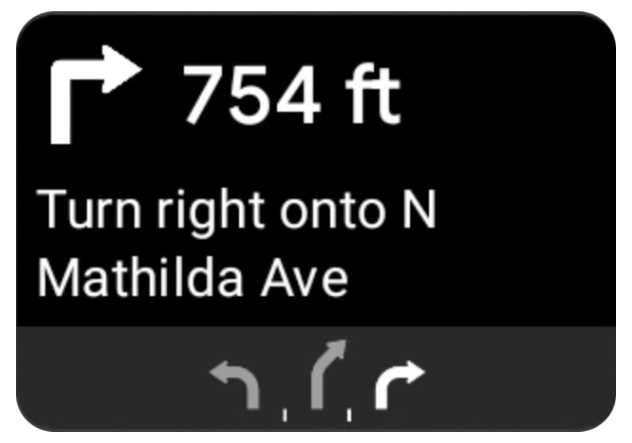
เทมเพลตการนำทางของ Android Auto มีการ์ดเลี้ยวที่แสดงข้อมูลการนำทางที่เกี่ยวข้องกับการเดินทางปัจจุบัน ไลบรารี TurnByTurn ใน Navigation SDK จะให้ข้อมูลการนำทางนี้ ซึ่งโค้ดของคุณจะใช้เพื่อสร้างเทมเพลตการนำทางของ Android Auto
ตั้งค่าผู้สังเกตการณ์
ในตัวอย่างต่อไปนี้ SampleApplication เป็นคลาสแอปพลิเคชันที่กำหนดเองซึ่งเก็บออบเจ็กต์ MutableLiveData<NavInfo> ไว้ เมื่อผู้สังเกตการณ์ได้รับการอัปเดตจากออบเจ็กต์ Navigator ผู้สังเกตการณ์จะโพสต์ออบเจ็กต์ NavInfo นี้ไปยัง NavInfoMutableLiveData ที่ดูแลโดยคลาส SampleApplication
ตัวอย่างต่อไปนี้จะลงทะเบียนผู้สังเกตการณ์สำหรับออบเจ็กต์นี้ในการติดตั้งใช้งาน Screen ของ Android Auto
public SampleAndroidAutoNavigationScreen(@NonNull CarContext carContext,
                                     SampleApplication application) {
  super(carContext);
  getCarContext().getCarService(AppManager.class).setSurfaceCallback(this);
  application.getNavInfoMutableLiveData().observe(this, this::processNextStep);
}
ป้อนข้อมูลการนำทาง
ข้อมูลโค้ดต่อไปนี้แสดงวิธีป้อนข้อมูลเทมเพลต Android Auto ด้วยข้อมูลการกำหนดเส้นทางปัจจุบัน ซึ่งรวมถึงขั้นตอน ระยะทาง และไอคอน อ่านข้อมูลเพิ่มเติมเกี่ยวกับองค์ประกอบการแสดงผลเหล่านี้ได้ในสร้างการแสดงผลฟีด
ขยายเพื่อดูตัวอย่างโค้ด
private RoutingInfo currentRoutingInfo;

@NonNull
@Override
public Template onGetTemplate() {
NavigationTemplate.Builder navigationTemplateBuilder =
  new NavigationTemplate.Builder()
    .setActionStrip(...)
    .setMapActionStrip(...)
  if (currentRoutingInfo != null) {
    navigationTemplateBuilder.setNavigationInfo(currentRoutingInfo);
  }
  return navigationTemplateBuilder.build();
}

private void processNextStep(NavInfo navInfo) {
  if (navInfo == null || navinfo.getCurrentStep() == null) {
    return;
  }

/**
*   Converts data received from the Navigation data feed
*   into Android-Auto compatible data structures. For more information
*   see the "Ensure correct maneuver types" below.
*/
  Step currentStep = buildStepFromStepInfo(navInfo.getCurrentStep());
  Distance distanceToStep =
              buildDistanceFromMeters(navInfo.getDistanceToCurrentStepMeters());

  currentRoutingInfo =
     new RoutingInfo.Builder().setCurrentStep(currentStep, distanceToStep).build();

  // Invalidate the current template which leads to another onGetTemplate call.
  invalidate();
}

private Step buildStepFromStepInfo(StepInfo stepInfo) {
  IconCompat maneuverIcon =
               IconCompat.createWithBitmap(stepInfo.getManeuverBitmap());
  Maneuver.Builder
            maneuverBuilder = newManeuver.Builder(
                  ManeuverConverter
                          .getAndroidAutoManeuverType(stepInfo.getManeuver()));
  CarIcon maneuverCarIcon = new CarIcon.Builder(maneuverIcon).build();
  maneuverBuilder.setIcon(maneuverCarIcon);
  Step.Builder stepBuilder =
    new Step.Builder()
       .setRoad(stepInfo.getFullRoadName())
       .setCue(stepInfo.getFullInstructionText())
       .setManeuver(maneuverBuilder.build());

  if (stepInfo.getLanes() != null
           && stepInfo.getLanesBitmap() != null) {
    for (Lane lane : buildAndroidAutoLanesFromStep(stepInfo)) {
      stepBuilder.addLane(lane);
    }
    IconCompat lanesIcon =
               IconCompat.createWithBitmap(stepInfo.getLanesBitmap());
    CarIcon lanesImage = new CarIcon.Builder(lanesIcon).build();
    stepBuilder.setLanesImage(lanesImage);
  }
    return stepBuilder.build();
}

/*
*   Constructs a {@code Distance} object in imperial measurement units.
*   In a real world scenario, units would be based on locale.
*/
private Distance buildDistanceFromMeters(int distanceMeters) {

// Distance can be negative so set the min distance to 0.
  int remainingFeet = (int) max(0, distanceMeters * DistanceConstants.FEET_PER_METER);
  double remainingMiles = ((double) remainingFeet) / DistanceConstants.FEET_PER_MILE;

// Only use the tenths place digit if distance is less than 10 miles and show
// feet if distance is less than 0.25 miles.

  if (remainingMiles >= DistanceConstants.MIN_MILES_TO_SHOW_INTEGER) {
    return Distance.create((int) round(remainingMiles), Distance.UNIT_MILES);
  } else if (remainingMiles >= 0.25) {
    return Distance.create((int) remainingMiles, Distance.UNIT_MILES);
  } else {
    return Distance.create(remainingFeet, Distance.UNIT_FEET);
  }
}
ยืนยันประเภทการบังคับทิศทางที่ถูกต้อง
ประเภทการบังคับทิศทางที่ใช้ในไลบรารี Android Auto Car จะสอดคล้องแบบหนึ่งต่อหนึ่งกับการบังคับทิศทางที่ไลบรารี TurnByTurn มีให้ อย่างไรก็ตาม คุณต้องแปลงการบังคับทิศทางของ Navigation SDK เป็นการประกาศที่ถูกต้องในไลบรารี Android Auto Car ตารางต่อไปนี้แสดงความสอดคล้องกันของช่องจำนวนหนึ่ง ตามด้วยยูทิลิตีตัวแปลงตัวอย่างเพื่อความสะดวกของคุณ
| การบังคับทิศทางในไลบรารีแบบเลี้ยวต่อเลี้ยว | Android Auto Maneuver |
|---|---|
DEPART |
TYPE_DEPART |
DESTINATION |
TYPE_DESTINATION |
DESTINATION_LEFT |
TYPE_DESTINATION_LEFT |
DESTINATION_RIGHT |
TYPE_DESTINATION_RIGHT |
TURN_U_TURN_CLOCKWISE |
TYPE_U_TURN_RIGHT |
ON_RAMP_LEFT |
TYPE_ON_RAMP_NORMAL_LEFT |
ON_RAMP_RIGHT |
TYPE_ON_RAMP_NORMAL_RIGHT |
ON_RAMP_SLIGHT_LEFT |
TYPE_ON_RAMP_SLIGHT_LEFT |
FORK_RIGHT |
TYPE_FORK_RIGHT |
ขยายเพื่อดูตัวอย่างโค้ด
import com.google.android.libraries.mapsplatform.turnbyturn.model.Maneuver;
import com.google.common.collect.ImmutableMap;
import javax.annotation.Nullable;

/** Converter that converts between turn-by-turn and Android Auto Maneuvers. */
public final class ManeuverConverter {
  private ManeuverConverter() {}

  // Map from turn-by-turn Maneuver to Android Auto Maneuver.Type.
  private static final ImmutableMap<Integer, Integer> MANEUVER_TO_ANDROID_AUTO_MANEUVER_TYPE =
      ImmutableMap.<Integer, Integer>builder()
          .put(Maneuver.DEPART, androidx.car.app.navigation.model.Maneuver.TYPE_DEPART)
          .put(Maneuver.DESTINATION, androidx.car.app.navigation.model.Maneuver.TYPE_DESTINATION)
          .put(
              Maneuver.DESTINATION_LEFT,
              androidx.car.app.navigation.model.Maneuver.TYPE_DESTINATION_LEFT)
          .put(
              Maneuver.DESTINATION_RIGHT,
              androidx.car.app.navigation.model.Maneuver.TYPE_DESTINATION_RIGHT)
          .put(Maneuver.STRAIGHT, androidx.car.app.navigation.model.Maneuver.TYPE_STRAIGHT)
          .put(Maneuver.TURN_LEFT, androidx.car.app.navigation.model.Maneuver.TYPE_TURN_NORMAL_LEFT)
          .put(
              Maneuver.TURN_RIGHT,
              androidx.car.app.navigation.model.Maneuver.TYPE_TURN_NORMAL_RIGHT)
          .put(Maneuver.TURN_KEEP_LEFT, androidx.car.app.navigation.model.Maneuver.TYPE_KEEP_LEFT)
          .put(Maneuver.TURN_KEEP_RIGHT, androidx.car.app.navigation.model.Maneuver.TYPE_KEEP_RIGHT)
          .put(
              Maneuver.TURN_SLIGHT_LEFT,
              androidx.car.app.navigation.model.Maneuver.TYPE_TURN_SLIGHT_LEFT)
          .put(
              Maneuver.TURN_SLIGHT_RIGHT,
              androidx.car.app.navigation.model.Maneuver.TYPE_TURN_SLIGHT_RIGHT)
          .put(
              Maneuver.TURN_SHARP_LEFT,
              androidx.car.app.navigation.model.Maneuver.TYPE_TURN_SHARP_LEFT)
          .put(
              Maneuver.TURN_SHARP_RIGHT,
              androidx.car.app.navigation.model.Maneuver.TYPE_ON_RAMP_SHARP_RIGHT)
          .put(
              Maneuver.TURN_U_TURN_CLOCKWISE,
              androidx.car.app.navigation.model.Maneuver.TYPE_U_TURN_RIGHT)
          .put(
              Maneuver.TURN_U_TURN_COUNTERCLOCKWISE,
              androidx.car.app.navigation.model.Maneuver.TYPE_U_TURN_LEFT)
          .put(
              Maneuver.MERGE_UNSPECIFIED,
              androidx.car.app.navigation.model.Maneuver.TYPE_MERGE_SIDE_UNSPECIFIED)
          .put(Maneuver.MERGE_LEFT, androidx.car.app.navigation.model.Maneuver.TYPE_MERGE_LEFT)
          .put(Maneuver.MERGE_RIGHT, androidx.car.app.navigation.model.Maneuver.TYPE_MERGE_RIGHT)
          .put(Maneuver.FORK_LEFT, androidx.car.app.navigation.model.Maneuver.TYPE_FORK_LEFT)
          .put(Maneuver.FORK_RIGHT, androidx.car.app.navigation.model.Maneuver.TYPE_FORK_RIGHT)
          .put(
              Maneuver.ON_RAMP_UNSPECIFIED,
              androidx.car.app.navigation.model.Maneuver.TYPE_ON_RAMP_NORMAL_RIGHT)
          .put(
              Maneuver.ON_RAMP_LEFT,
              androidx.car.app.navigation.model.Maneuver.TYPE_ON_RAMP_NORMAL_LEFT)
          .put(
              Maneuver.ON_RAMP_RIGHT,
              androidx.car.app.navigation.model.Maneuver.TYPE_ON_RAMP_NORMAL_RIGHT)
          .put(
              Maneuver.ON_RAMP_KEEP_LEFT,
              androidx.car.app.navigation.model.Maneuver.TYPE_ON_RAMP_NORMAL_LEFT)
          .put(
              Maneuver.ON_RAMP_KEEP_RIGHT,
              androidx.car.app.navigation.model.Maneuver.TYPE_ON_RAMP_NORMAL_RIGHT)
          .put(
              Maneuver.ON_RAMP_SLIGHT_LEFT,
              androidx.car.app.navigation.model.Maneuver.TYPE_ON_RAMP_SLIGHT_LEFT)
          .put(
              Maneuver.ON_RAMP_SLIGHT_RIGHT,
              androidx.car.app.navigation.model.Maneuver.TYPE_ON_RAMP_SLIGHT_RIGHT)
          .put(
              Maneuver.ON_RAMP_SHARP_LEFT,
              androidx.car.app.navigation.model.Maneuver.TYPE_ON_RAMP_SHARP_LEFT)
          .put(
              Maneuver.ON_RAMP_SHARP_RIGHT,
              androidx.car.app.navigation.model.Maneuver.TYPE_ON_RAMP_SHARP_RIGHT)
          .put(
              Maneuver.ON_RAMP_U_TURN_CLOCKWISE,
              androidx.car.app.navigation.model.Maneuver.TYPE_ON_RAMP_U_TURN_RIGHT)
          .put(
              Maneuver.ON_RAMP_U_TURN_COUNTERCLOCKWISE,
              androidx.car.app.navigation.model.Maneuver.TYPE_ON_RAMP_U_TURN_LEFT)
          .put(
              Maneuver.OFF_RAMP_LEFT,
              androidx.car.app.navigation.model.Maneuver.TYPE_OFF_RAMP_NORMAL_LEFT)
          .put(
              Maneuver.OFF_RAMP_RIGHT,
              androidx.car.app.navigation.model.Maneuver.TYPE_OFF_RAMP_NORMAL_RIGHT)
          .put(
              Maneuver.OFF_RAMP_KEEP_LEFT,
              androidx.car.app.navigation.model.Maneuver.TYPE_OFF_RAMP_SLIGHT_LEFT)
          .put(
              Maneuver.OFF_RAMP_KEEP_RIGHT,
              androidx.car.app.navigation.model.Maneuver.TYPE_OFF_RAMP_SLIGHT_RIGHT)
          .put(
              Maneuver.OFF_RAMP_SLIGHT_LEFT,
              androidx.car.app.navigation.model.Maneuver.TYPE_OFF_RAMP_SLIGHT_LEFT)
          .put(
              Maneuver.OFF_RAMP_SLIGHT_RIGHT,
              androidx.car.app.navigation.model.Maneuver.TYPE_OFF_RAMP_SLIGHT_RIGHT)
          .put(
              Maneuver.OFF_RAMP_SHARP_LEFT,
              androidx.car.app.navigation.model.Maneuver.TYPE_OFF_RAMP_NORMAL_LEFT)
          .put(
              Maneuver.OFF_RAMP_SHARP_RIGHT,
              androidx.car.app.navigation.model.Maneuver.TYPE_OFF_RAMP_NORMAL_RIGHT)
          .put(
              Maneuver.ROUNDABOUT_CLOCKWISE,
              androidx.car.app.navigation.model.Maneuver.TYPE_ROUNDABOUT_ENTER_AND_EXIT_CW)
          .put(
              Maneuver.ROUNDABOUT_COUNTERCLOCKWISE,
              androidx.car.app.navigation.model.Maneuver.TYPE_ROUNDABOUT_ENTER_AND_EXIT_CCW)
          .put(
              Maneuver.ROUNDABOUT_STRAIGHT_CLOCKWISE,
              androidx.car.app.navigation.model.Maneuver.TYPE_ROUNDABOUT_ENTER_CW)
          .put(
              Maneuver.ROUNDABOUT_STRAIGHT_COUNTERCLOCKWISE,
              androidx.car.app.navigation.model.Maneuver.TYPE_ROUNDABOUT_ENTER_CCW)
          .put(
              Maneuver.ROUNDABOUT_LEFT_CLOCKWISE,
              androidx.car.app.navigation.model.Maneuver
                  .TYPE_ROUNDABOUT_ENTER_AND_EXIT_CW_WITH_ANGLE)
          .put(
              Maneuver.ROUNDABOUT_LEFT_COUNTERCLOCKWISE,
              androidx.car.app.navigation.model.Maneuver
                  .TYPE_ROUNDABOUT_ENTER_AND_EXIT_CCW_WITH_ANGLE)
          .put(
              Maneuver.ROUNDABOUT_RIGHT_CLOCKWISE,
              androidx.car.app.navigation.model.Maneuver
                  .TYPE_ROUNDABOUT_ENTER_AND_EXIT_CW_WITH_ANGLE)
          .put(
              Maneuver.ROUNDABOUT_RIGHT_COUNTERCLOCKWISE,
              androidx.car.app.navigation.model.Maneuver
                  .TYPE_ROUNDABOUT_ENTER_AND_EXIT_CCW_WITH_ANGLE)
          .put(
              Maneuver.ROUNDABOUT_SLIGHT_LEFT_CLOCKWISE,
              androidx.car.app.navigation.model.Maneuver
                  .TYPE_ROUNDABOUT_ENTER_AND_EXIT_CW_WITH_ANGLE)
          .put(
              Maneuver.ROUNDABOUT_SLIGHT_LEFT_COUNTERCLOCKWISE,
              androidx.car.app.navigation.model.Maneuver
                  .TYPE_ROUNDABOUT_ENTER_AND_EXIT_CCW_WITH_ANGLE)
          .put(
              Maneuver.ROUNDABOUT_SLIGHT_RIGHT_CLOCKWISE,
              androidx.car.app.navigation.model.Maneuver
                  .TYPE_ROUNDABOUT_ENTER_AND_EXIT_CW_WITH_ANGLE)
          .put(
              Maneuver.ROUNDABOUT_SLIGHT_RIGHT_COUNTERCLOCKWISE,
              androidx.car.app.navigation.model.Maneuver
                  .TYPE_ROUNDABOUT_ENTER_AND_EXIT_CCW_WITH_ANGLE)
          .put(
              Maneuver.ROUNDABOUT_SHARP_LEFT_CLOCKWISE,
              androidx.car.app.navigation.model.Maneuver
                  .TYPE_ROUNDABOUT_ENTER_AND_EXIT_CW_WITH_ANGLE)
          .put(
              Maneuver.ROUNDABOUT_SHARP_LEFT_COUNTERCLOCKWISE,
              androidx.car.app.navigation.model.Maneuver
                  .TYPE_ROUNDABOUT_ENTER_AND_EXIT_CCW_WITH_ANGLE)
          .put(
              Maneuver.ROUNDABOUT_SHARP_RIGHT_CLOCKWISE,
              androidx.car.app.navigation.model.Maneuver
                  .TYPE_ROUNDABOUT_ENTER_AND_EXIT_CW_WITH_ANGLE)
          .put(
              Maneuver.ROUNDABOUT_SHARP_RIGHT_COUNTERCLOCKWISE,
              androidx.car.app.navigation.model.Maneuver
                  .TYPE_ROUNDABOUT_ENTER_AND_EXIT_CCW_WITH_ANGLE)
          .put(
              Maneuver.ROUNDABOUT_U_TURN_CLOCKWISE,
              androidx.car.app.navigation.model.Maneuver
                  .TYPE_ROUNDABOUT_ENTER_AND_EXIT_CW_WITH_ANGLE)
          .put(
              Maneuver.ROUNDABOUT_U_TURN_COUNTERCLOCKWISE,
              androidx.car.app.navigation.model.Maneuver
                  .TYPE_ROUNDABOUT_ENTER_AND_EXIT_CCW_WITH_ANGLE)
          .put(
              Maneuver.ROUNDABOUT_EXIT_CLOCKWISE,
              androidx.car.app.navigation.model.Maneuver.TYPE_ROUNDABOUT_EXIT_CW)
          .put(
              Maneuver.ROUNDABOUT_EXIT_COUNTERCLOCKWISE,
              androidx.car.app.navigation.model.Maneuver.TYPE_ROUNDABOUT_EXIT_CCW)
          .put(Maneuver.FERRY_BOAT, androidx.car.app.navigation.model.Maneuver.TYPE_FERRY_BOAT)
          .put(Maneuver.FERRY_TRAIN, androidx.car.app.navigation.model.Maneuver.TYPE_FERRY_TRAIN)
          .put(Maneuver.NAME_CHANGE, androidx.car.app.navigation.model.Maneuver.TYPE_NAME_CHANGE)
          .buildOrThrow();

  /** Represents the roundabout turn angle for a slight turn in either right or left directions. */
  private static final int ROUNDABOUT_ANGLE_SLIGHT = 10;

  /** Represents the roundabout turn angle for a normal turn in either right or left directions. */
  private static final int ROUNDABOUT_ANGLE_NORMAL = 45;

  /** Represents the roundabout turn angle for a sharp turn in either right or left directions. */
  private static final int ROUNDABOUT_ANGLE_SHARP = 135;

  /** Represents the roundabout turn angle for a u-turn in either right or left directions. */
  private static final int ROUNDABOUT_ANGLE_U_TURN = 180;

  /**
   * Returns the corresponding {@link androidx.car.app.navigation.model.Maneuver.Type} for the given
   * direction {@link Maneuver}
   *
   * @throws {@link IllegalArgumentException} if the given maneuver does not have a corresponding
   *     Android Auto Maneuver type.
   */
  public static int getAndroidAutoManeuverType(@Maneuver int maneuver) {
    if (MANEUVER_TO_ANDROID_AUTO_MANEUVER_TYPE.containsKey(maneuver)) {
      return MANEUVER_TO_ANDROID_AUTO_MANEUVER_TYPE.get(maneuver);
    }
    throw new IllegalArgumentException(
        String.format(
            "Given turn-by-turn Maneuver %d cannot be converted to an Android Auto equivalent.",
            maneuver));
  }

  /**
   * Returns the corresponding Android Auto roundabout angle for the given turn {@link Maneuver}.
   * Returns {@code null} if given maneuver does not involve a roundabout with a turn.
   */
  @Nullable
  public static Integer getAndroidAutoRoundaboutAngle(@Maneuver int maneuver) {
    if (maneuver == Maneuver.ROUNDABOUT_LEFT_CLOCKWISE
        || maneuver == Maneuver.ROUNDABOUT_RIGHT_CLOCKWISE
        || maneuver == Maneuver.ROUNDABOUT_LEFT_COUNTERCLOCKWISE
        || maneuver == Maneuver.ROUNDABOUT_RIGHT_COUNTERCLOCKWISE) {
      return ROUNDABOUT_ANGLE_NORMAL;
    }
    if (maneuver == Maneuver.ROUNDABOUT_SHARP_LEFT_CLOCKWISE
        || maneuver == Maneuver.ROUNDABOUT_SHARP_RIGHT_CLOCKWISE
        || maneuver == Maneuver.ROUNDABOUT_SHARP_LEFT_COUNTERCLOCKWISE
        || maneuver == Maneuver.ROUNDABOUT_SHARP_RIGHT_COUNTERCLOCKWISE) {
      return ROUNDABOUT_ANGLE_SHARP;
    }
    if (maneuver == Maneuver.ROUNDABOUT_SLIGHT_LEFT_CLOCKWISE
        || maneuver == Maneuver.ROUNDABOUT_SLIGHT_RIGHT_CLOCKWISE
        || maneuver == Maneuver.ROUNDABOUT_SLIGHT_LEFT_COUNTERCLOCKWISE
        || maneuver == Maneuver.ROUNDABOUT_SLIGHT_RIGHT_COUNTERCLOCKWISE) {
      return ROUNDABOUT_ANGLE_SLIGHT;
    }
    if (maneuver == Maneuver.ROUNDABOUT_U_TURN_CLOCKWISE
        || maneuver == Maneuver.ROUNDABOUT_U_TURN_COUNTERCLOCKWISE) {
      return ROUNDABOUT_ANGLE_U_TURN;
    }
    return null;
  }
}
เอกสารประกอบที่เกี่ยวข้อง
- เปิดใช้ฟีดคำแนะนำแบบเลี้ยวต่อเลี้ยว: ผสานรวมฟังก์ชันการทำงานแบบเลี้ยวต่อเลี้ยวก่อนเพื่อให้แอปใช้ได้กับ Android Auto
- แสดงข้อมูลในฟีด: เข้าถึงฟิลด์ข้อมูลเพื่อดูข้อมูลคำแนะนำและใช้ไอคอน