
This page provides attribution requirements and guidelines for displaying Grounding Lite content in your applications.
Inform the user about the use of Google Maps sources
With each Maps Grounding Lite result, you will receive an Attribution message that supports the response. The following metadata is returned:
- title: The specific title to display for the source.
- url: The URL used to redirect users to Google Maps or Google Search to see the source material.
When presenting results from Maps Grounding Lite, you must specify the associated Google Maps sources and inform your users of the following:
- The Google Maps sources must immediately follow the generated content that the sources support. This generated content is also referred to as the Maps Grounding Lite result.
- The Google Maps sources must be viewable within one user interaction.
For voice-first interfaces
Sourcing: Google Maps sources must be displayed in a companion UI that shows a verbatim historical record of any AI voice conversation. This record must adhere to the sourcing requirements and is subject to the applicable data caching and storage limits.
Active disclosure of sources: End users must be made reasonably aware of the role Google Maps plays in their experience and how to find detailed sourcing at the time of interaction.
The active disclosure of sources must convey the following points:
- AI generated content may include information from Google Maps.
- Detailed sources are available in the companion UI.
You must convey the active disclosure of sources using at least one of the following methods.
- Visual display: For voice interactions that occur on a device with a screen, display the active disclosure on the screen whenever Grounding with Google Maps is used.
- Voice announcement: Read the active disclosure to the user. This must occur during the first interaction supported by Grounding with Google Maps and recur at least every 6 months.
Example disclosure: "AI generated content may include information from Google Maps. You can find detailed sources in the companion app."
Persistent disclosure: An explanation that Google Maps content may be used in AI generated content must be persistently accessible to the end user (e.g., in a voice settings menu or a voice interaction disclosure).
User inquiries: Your voice assistant must accurately answer end user inquiries regarding the source of the content, including when AI generated content includes information from Google Maps. If Google Maps is the source, direct end users to the companion UI for access to specific source information.
Display Google Maps sources with Google Maps links
For each source provided in the Attribution message, a link preview must be generated following these requirements:
1. General Requirements
- Attribute each source to Google Maps following the Google Maps text attribution guidelines.
- Display the source title exactly as provided in the response.
Link to the source using the url provided in the response.
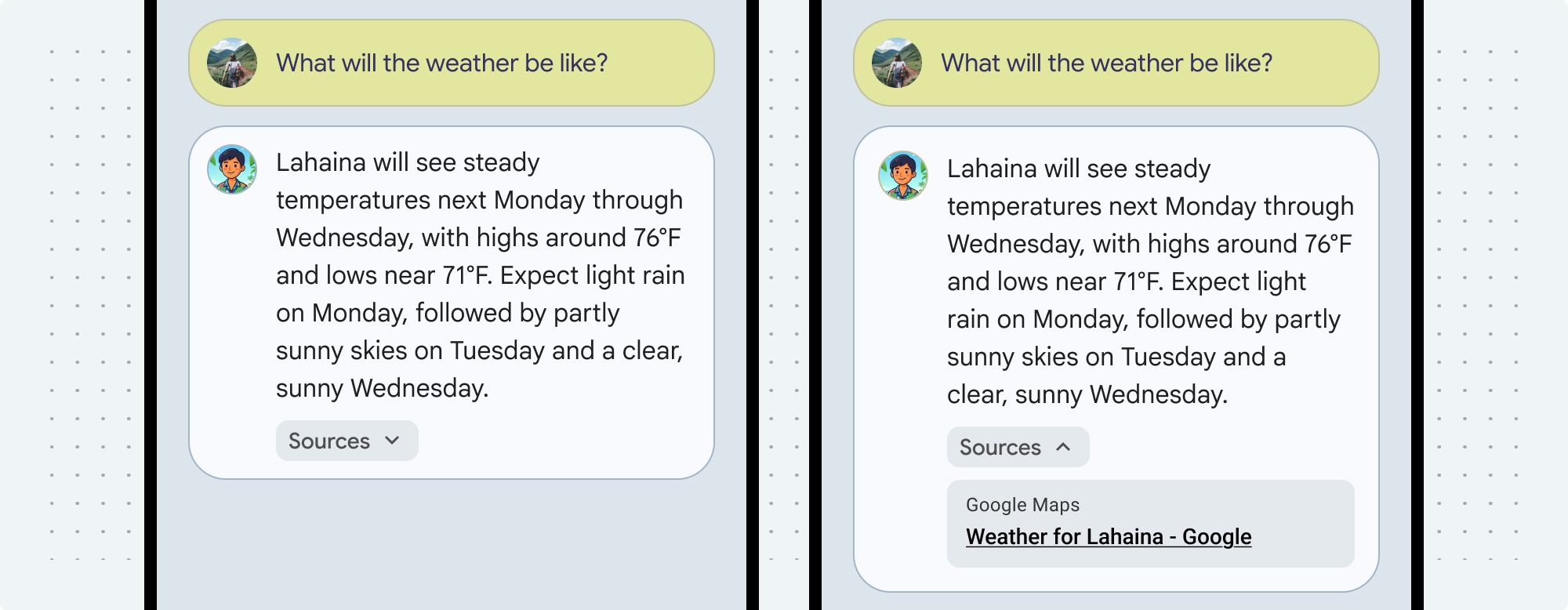
2. Visual Enhancement (Optional)
- A Google Maps favicon may be inserted before the Google Maps text attribution.
- A photo from the source URL (og:image) may be included.
Google Maps text attribution guidelines
When you attribute sources to Google Maps or Google in text, follow these guidelines:
- Don't modify the text Google Maps or Google in any way: Don't change the capitalization.
- Don't wrap Google Maps onto multiple lines.
- Don't localize Google Maps or Google into another language.
- Prevent browsers from translating Google Maps by using the HTML attribute translate="no".
Style Google Maps text as described in the following table:
| Property | Style |
|---|---|
| Font family | Roboto. Loading the font is optional. |
| Fallback font family | Any sans serif body font already used in your product or "Sans-Serif". |
| Font weight | 400 |
| Font color | White, black (#1F1F1F), or gray (#5E5E5E). Maintain 4.5:1 contrast. |
| Font size | Minimum font size: 12sp Maximum font size: 16sp To learn about sp, see Font size units on the Material Design website. |
Example CSS
The following CSS renders Google Maps with the appropriate typographic style and color on a white or light background.
@import url('https://fonts.googleapis.com/css2?family=Roboto&display=swap');

.GMP-attribution {
font-family: Roboto, Sans-Serif;
font-style: normal;
font-weight: 400;
font-size: 1rem;
letter-spacing: normal;
white-space: nowrap;
color: #5e5e5e;
}